


 Video Converter Ultimate
 บันทึกหน้าจอ
 ซ่อมวิดีโอ
 ดาวน์โหลดอย่างปลอดภัย
2 วิธีที่มีประสิทธิภาพในการผสานไฟล์ WebM โดยไม่สูญเสียคุณภาพ
จะรวมไฟล์ WebM ได้อย่างไร เมื่อคุณดาวน์โหลดชุดวิดีโอที่อัปโหลดจากผู้อื่นทางออนไลน์ และต้องการเล่นซ้ำอย่างต่อเนื่องเพื่อประสบการณ์การรับชมที่ดียิ่งขึ้น คุณอาจพิจารณารวมวิดีโอ WebM เหล่านี้เป็นวิดีโอเดียว อย่างไรก็ตาม เนื่องจากมีคุณภาพสูงและมีขนาดเล็ก คุณจึงควรรวมไฟล์ WebM กับ MKV เพื่อรักษาคุณภาพสูงไว้ในขนาดที่ค่อนข้างเล็ก ดังนั้น มีสองวิธีที่มีประสิทธิภาพในการช่วยคุณรวม WebM เป็นไฟล์ MKV

ส่วนที่ 1: วิธีผสานไฟล์ WebM ออนไลน์ฟรีโดยไม่สูญเสียข้อมูล
ตัวผสานวิดีโอออนไลน์ฟรี FVC เป็นตัวรวมไฟล์อเนกประสงค์ที่ช่วยผสานไฟล์ได้ทุกฟอร์แมต รวมถึงการผสานไฟล์ WebM ออนไลน์ได้ฟรี คุณไม่จำเป็นต้องดาวน์โหลดซอฟต์แวร์ เพียงอัปโหลดไฟล์ WebM ของคุณผ่านเบราว์เซอร์แล้วผสานเข้าด้วยกันได้ในไม่กี่คลิก.
- 1. คลิกง่ายๆ เพื่อรวมไฟล์วิดีโอ WebM จำนวนเท่าใดก็ได้เข้าเป็นไฟล์เดียวทางออนไลน์ฟรี
- 2. รองรับการส่งออกรูปแบบวิดีโอยอดนิยมส่วนใหญ่รวมถึงรูปแบบ MKV ที่มีคุณภาพสูง
- 3. ไม่มีลายน้ำเพื่ออัปโหลดวิดีโอโดยตรงบน YouTube, Facebook หรือแพลตฟอร์มอื่นๆ
- 4. ลบไฟล์ที่อัพโหลดอย่างถาวรใน 24 ชั่วโมงเพื่อปกป้องความเป็นส่วนตัวของคุณ
ขั้นตอนที่ 1: ไปที่ตัวรวมวิดีโอออนไลน์ฟรี FVC และทำตามคำแนะนำเพื่อติดตั้งปลั๊กอินให้เสร็จในไม่กี่วินาที จากนั้นคลิกปุ่ม อัปโหลดวิดีโอเพื่อผสาน เพื่อเลือกหนึ่งในไฟล์วิดีโอ WebM ที่ต้องการ.

ขั้นตอนที่ 2: คลิกไอคอน เครื่องหมายบวก เพื่อเพิ่มไฟล์วิดีโอ WebM อื่น ๆ ที่คุณต้องการผสาน และคุณควรเพิ่มวิดีโอเหล่านี้ตามลำดับที่ต้องการ จากนั้นเลือก ฟอร์แมต MKV และ ความละเอียด 1920*1080 เพื่อคงคุณภาพความคมชัดของวิดีโอ.

ขั้นตอนที่ 3: คลิกปุ่ม ผสานตอนนี้ แล้วหลังจากเลือกโฟลเดอร์ปลายทางในเครื่อง โปรแกรมจะเริ่มผสานไฟล์วิดีโอ WebM ให้อัตโนมัติ.
ส่วนที่ 2: วิธีที่เป็นมืออาชีพที่สุดในการเข้าร่วมไฟล์ WebM เพื่อสร้างไฟล์ใหม่
ตัวรวมไฟล์ออนไลน์ฟรีนี้ช่วยให้คุณผสานวิดีโอ WebM ได้อย่างง่ายดาย แต่หากคุณต้องการผสานเฉพาะบางส่วนของไฟล์ WebM เข้าด้วยกันเพื่อสร้างวิดีโอใหม่ คุณควรใช้เครื่องมือมืออาชีพอย่าง Video Converter Ultimate ซึ่งไม่เพียงแค่ผสานไฟล์ WebM ได้เท่านั้น แต่ยังแก้ไขวิดีโอก่อนไปขั้นตอนการผสานได้ด้วย.
- 1. รวมไฟล์วิดีโอ WebM เป็นไฟล์เดียวด้วยรูปแบบต่างๆ รวมถึง MKV
- 2. สามารถรักษาคุณภาพดั้งเดิมของวิดีโอ WebM รวมถึง 1080p HD และ 4K
- 3. เครื่องมือแก้ไขที่ใช้งานง่ายเพื่อตัดวิดีโอ เพิ่มตัวกรอง ปรับเอฟเฟกต์วิดีโอ และแยกวิดีโอ
- 4. การควบรวมกิจการที่รวดเร็วเพื่อรวมไฟล์วิดีโอ WebM หลายไฟล์ในเวลาไม่กี่นาที
ดาวน์โหลดฟรีสำหรับ Windows 7 หรือใหม่กว่าดาวน์โหลดอย่างปลอดภัย
ดาวน์โหลดฟรีสำหรับ MacOS 10.7 หรือใหม่กว่าดาวน์โหลดอย่างปลอดภัย
ขั้นตอนที่ 1: ดาวน์โหลด Video Converter Ultimate และเปิดใช้งาน คลิกปุ่ม เพิ่มไฟล์ ที่มุมซ้ายบนเพื่อเลือกไฟล์ WebM ทั้งหมดที่คุณต้องการผสาน.

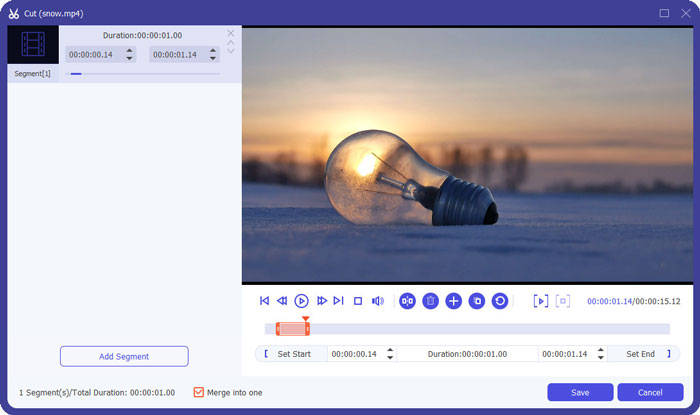
ขั้นตอนที่ 2: คลิกปุ่ม ตัด เพื่อคลิปวิดีโอแต่ละไฟล์ทีละไฟล์ ลากไทม์ไลน์หรือใส่เวลาอย่างแม่นยำเพื่อเลือกส่วนที่ต้องการ จากนั้นคลิกปุ่ม บันทึก เพื่อคงการตั้งค่าไว้.
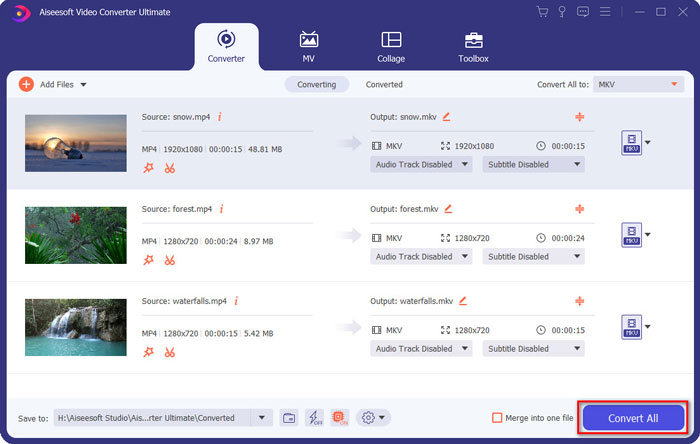
ขั้นตอนที่ 3: คลิกปุ่ม แปลงทั้งหมดเป็น > วิดีโอ > MKV แล้วเลือกปุ่ม เหมือนต้นฉบับ แม้ว่าขนาดไฟล์ WebM จะใหญ่ขึ้นเล็กน้อย แต่คุณภาพจะยังคงเหมือนกับวิดีโอต้นฉบับ.

ขั้นตอนที่ 4: หลังจากเลือกเส้นทางจัดเก็บแล้ว ให้ติ๊กที่ ผสานเป็นไฟล์เดียว และคลิกปุ่ม แปลงทั้งหมด เพื่อบันทึก.
คุณอาจอยากรู้เพิ่มเติม: วิธีผสานวิดีโอบน iPhone.
ส่วนที่ 3: คำถามที่พบบ่อยเกี่ยวกับการเข้าร่วมไฟล์ WebM
1.WebM คืออะไร?
WebM คือรูปแบบวิดีโอที่ Google เสนอ และวิดีโอ WebM มักใช้บนเว็บไซต์เสมอ เพราะสามารถเล่นได้อย่างคล่องแคล่วบนเบราว์เซอร์เกือบทั้งหมด รวมถึง Google Chrome, Firefox และอื่นๆ ด้วยคุณภาพสูงและมีขนาดเล็ก
2. การรวมไฟล์ WebM จะลดคุณภาพวิดีโอหรือไม่
ได้ โดยเฉพาะอย่างยิ่งเมื่อคุณรวมไฟล์ WebM หลายไฟล์เป็นไฟล์ WebM ไฟล์เดียว วิธีที่ดีที่สุดในการรักษาคุณภาพต้นฉบับคือการรวมไฟล์วิดีโอ WebM เข้าด้วยกันเป็นไฟล์ MKV
3. ฉันสามารถเก็บรูปแบบ WebM หลังจากรวมไฟล์วิดีโอ WebM ได้หรือไม่
ได้ คุณสามารถทำได้ แต่ควรแปลงฟอร์แมตเป็น MKV ซึ่งเป็นต้นแบบของ WebM เหตุผลก็เพราะว่า แม้ WebM จะรักษาคุณภาพสูงไว้ได้ในขนาดไฟล์ที่เล็ก แต่ฟอร์แมต MKV ถูกใช้งานบ่อยกว่า WebM มาก อย่างไรก็ตาม หากคุณต้องการ คุณยังสามารถแปลง WebM เป็น MP4 ได้เช่นกัน.
สรุป
เมื่อคุณต้องการรวมไฟล์วิดีโอ WebM ที่ดาวน์โหลดบนเว็บไซต์เพื่อให้ได้รับประสบการณ์การรับชมที่คล่องแคล่วมากขึ้น วิธีที่ง่ายที่สุดคือการใช้โปรแกรมเชื่อมวิดีโอออนไลน์ฟรีเพื่อช่วยคุณ อย่างไรก็ตาม หากคุณต้องการสร้างวิดีโอใหม่โดยการรวมไฟล์วิดีโอ WebM คุณต้องตัดส่วนที่จำเป็นก่อนเข้าร่วม ในกรณีนี้ ให้ดาวน์โหลดโปรแกรมแปลงวิดีโอระดับมืออาชีพ - Video Converter Ultimate เพื่อตัดและรวมไฟล์ WebM พร้อมกัน
-
 5 อันดับแรก WebM Player ที่ดีที่สุดสำหรับ Android/iPhone/Windows/Mac
 หากคุณต้องการเล่น WebM บนอุปกรณ์ของคุณให้ประสบความสำเร็จคุณควรเรียนรู้เพิ่มเติมเกี่ยวกับเครื่องเล่น WebM ที่ดีที่สุด 5 อันดับแรกสำหรับ Android, iPhone, Windows, Mac จากบทความนี้
-
 บีบอัด WebM - วิธีบีบอัดไฟล์ WebM ออนไลน์
 จะบีบอัดไฟล์ WebM ออนไลน์ได้อย่างไร? วิธีที่เร็วที่สุดในการบีบอัดไฟล์ขนาดใหญ่คืออะไร? โพสต์นี้บอกวิธีบีบอัด WebM ฟรี 2 วิธี
-
 MP4 เป็น WebM Converter - 4 วิธีที่ดีที่สุดในการแปลง MP4 เป็น WebM
 เมื่อคุณต้องการแปลง MP4 เป็น WebM ฟรีคุณสามารถเรียนรู้เพิ่มเติมเกี่ยวกับ 4 วิธีที่ใช้บ่อยที่สุดเพื่อรับวิดีโอที่ต้องการได้ฟรีจากบทความ
