


 Video Converter Ultimate
 บันทึกหน้าจอ
 ซ่อมวิดีโอ
วิธีวนซ้ำวิดีโอ MP4 โดยใช้เครื่องมือออนไลน์เพื่อการเล่นต่อเนื่อง
คุณรู้หรือไม่ว่า วิดีโอสั้น ๆ ที่มีช่วงเวลาน่าสนใจหรือตลก ๆ เล่นซ้ำไปซ้ำมา สามารถเป็นสูตรสำเร็จของความปังบนโซเชียลมีเดียได้? เราเรียกวิดีโอแบบนี้ว่า “วิดีโอวนลูป” วิดีโอวนลูปเหล่านี้ช่วยให้ผู้ชมดูวิดีโอได้นานขึ้น ซึ่งส่งผลให้ได้กดถูกใจ แชร์ และการมีส่วนร่วมโดยรวมมากขึ้น โดยทั่วไปแล้วมีหลายวิธีในการสร้างวิดีโอวนลูป และข่าวดีก็คือคุณทำได้กับวิดีโอส่วนใหญ่ โดยเฉพาะอย่างยิ่งกับฟอร์แมตยอดนิยมอย่าง MP4 ที่ใช้ได้กับแทบทุกอุปกรณ์ ดังนั้น หากคุณเคยสงสัยว่าคุณจะใส่เอฟเฟกต์วนลูปให้กับวิดีโอของคุณได้ไหม หรือคุณจะวนลูป MP4 ได้หรือเปล่า บอกเลยว่าทำได้แน่นอน!
โชคดีที่มีเว็บไซต์ออนไลน์ที่ใช้งานง่ายมากมายที่พร้อมช่วยคุณสร้างวิดีโอแบบวนซ้ำได้ในเวลาอันรวดเร็ว พบกับพวกเขาเมื่อคุณเจาะลึกเข้าไปในโพสต์นี้

ส่วนที่ 1 Aiseesoft วิดีโอ Looper ฟรีออนไลน์
เนื่องจากคุณกำลังมองหาเครื่องมือออนไลน์ที่ยอดเยี่ยมในการเล่นคลิปวิดีโอซ้ำ Aiseesoft Video Looper จึงเป็นเครื่องมือที่มีประโยชน์ ช่วยให้คุณสามารถวนซ้ำวิดีโอ MP4 ทั้งหมดหรือเพียงส่วนสั้น ๆ ได้ นอกจากนี้ มันยังให้คุณเลือกได้อย่างชัดเจนว่าคุณต้องการให้ทำซ้ำกี่ครั้ง โดยเลือกระยะเวลาที่วิดีโอสุดท้ายจะยาวก่อนที่คุณจะสร้างมันขึ้นมา นอกจากนี้ยังมีฟังก์ชันดูตัวอย่างในตัวเพื่อให้คุณสามารถตรวจสอบว่ามันถูกต้องหรือไม่ นอกจากนี้ยังมีการตั้งค่าพิเศษในการวนซ้ำ MP4 ออนไลน์ โดยเฉพาะสำหรับแพลตฟอร์มโซเชียลมีเดียยอดนิยม ทำให้ง่ายต่อการแชร์คลิปตลกของคุณ ยิ่งไปกว่านั้น คุณยังสามารถปรับแต่งคุณภาพวิดีโอและการตั้งค่าเสียงเพื่อให้ได้ผลลัพธ์ตามที่คุณต้องการ มีอะไรอีก? มีแม้กระทั่งโหมดแสดงตัวอย่างแบบเต็มหน้าจอ ดังนั้นคุณจึงมั่นใจได้ว่าทุกอย่างลงตัวก่อนที่จะบันทึกวิดีโอแบบวนซ้ำ!
ข้อดี
- มันวนวิดีโออย่างรวดเร็ว
- วิดีโอแบบวนซ้ำที่ส่งออกไม่มีลายน้ำ
- มันวนซ้ำวิดีโอ MP4 ทั้งหมดหรือคลิปเฉพาะหรือกำหนดจำนวนการซ้ำแบบกำหนดเอง
- ช่วยให้สามารถปรับการตั้งค่าวิดีโอและเสียง เช่น รูปแบบ คุณภาพ และบิตเรตได้
- การแสดงตัวอย่างในตัวช่วยให้คุณตรวจสอบวิดีโอที่วนซ้ำก่อนที่จะบันทึก
จุดด้อย
- ขาดคุณสมบัติเช่นการตัดแต่ง การตัด หรือการเพิ่มเอฟเฟกต์
- ต้องใช้เน็ตที่เสถียรจึงจะทำงานได้
วิธีวนลูปไฟล์ MP4 ด้วย Aiseesoft
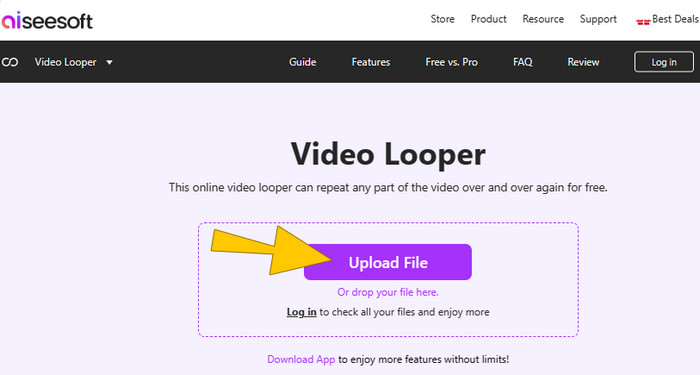
ขั้นตอนที่ 1 บนเว็บไซต์ ให้คลิกปุ่ม Upload File เพื่ออัปโหลดไฟล์ MP4 ที่คุณต้องการวนลูปโดยตรง.
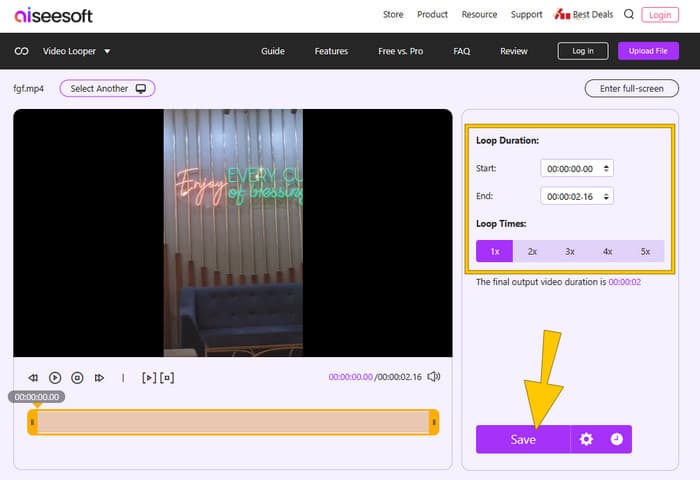
ขั้นตอนที่ 2 เมื่อวิดีโอถูกนำเข้าแล้ว ให้ปรับตั้งค่าตามต้องการ เช่น จำนวนรอบการวนลูป ระยะเวลา และตัดส่วนวิดีโอหากต้องการ จากนั้นกดปุ่ม Save เพื่อใช้การเปลี่ยนแปลง.
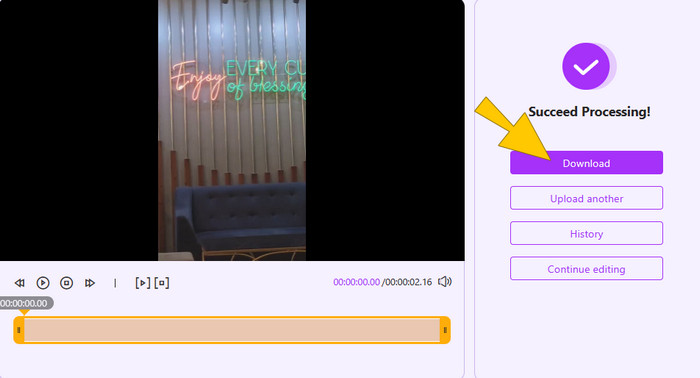
ขั้นตอนที่ 3 หลังจากตั้งค่าให้วิดีโอวนลูปแล้ว คุณสามารถเริ่มบันทึกออกได้โดยคลิกปุ่ม Download.
ตอนที่ 2. คลิดิโอ
ต่อไปคือ Clideo แพลตฟอร์มออนไลน์ที่มาพร้อมเครื่องมือตัดต่อวิดีโอหลากหลาย รวมถึงตัวทำวิดีโอวนลูปที่ช่วยให้คุณเล่นคลิปซ้ำได้ง่าย ๆ ฟรี ๆ เครื่องมือนี้เหมาะมากหากคุณต้องการให้วิดีโอตลก ๆ เล่นซ้ำไปมา หรือสร้างแอนิเมชันสั้น ๆ แบบวนลูป นอกจากนี้ Clideo ยังใช้งานได้กับทุกอุปกรณ์ที่มีเว็บเบราว์เซอร์ จึงไม่จำเป็นต้องดาวน์โหลดซอฟต์แวร์เพิ่มเติม รองรับไฟล์วิดีโอหลายรูปแบบ และยังให้คุณเปลี่ยนฟอร์แมตของวิดีโอที่วนลูปแล้วก่อนบันทึกอีกด้วย เพื่อให้คล้ายกับเครื่องมือก่อนหน้า ใน Clideo คุณสามารถเลือกวนลูปทั้งวิดีโอหรือเฉพาะส่วนที่ต้องการ และตั้งให้เล่นซ้ำแบบไม่จำกัดครั้งได้ เหมือนกับเวลาที่คุณแปลงMP4 เป็น GIF แต่คราวนี้ยังมีเสียงด้วย.
ข้อดี
- มันวนซ้ำวิดีโออย่างรวดเร็วและทำงานบนอุปกรณ์ทุกชนิดที่มีเว็บเบราว์เซอร์
- ใช้งานง่ายโดยไม่ต้องดาวน์โหลดหรือเสียค่าธรรมเนียม
- รองรับรูปแบบวิดีโอต่างๆ
จุดด้อย
- ต้องใช้เน็ตที่เสถียรจึงจะใช้งานได้
- มีฟังก์ชันการวนซ้ำขั้นพื้นฐาน
- มันสร้างเอาต์พุตที่มีลายน้ำฟรี
วิธีวนลูป MP4 ออนไลน์ด้วย Clideo
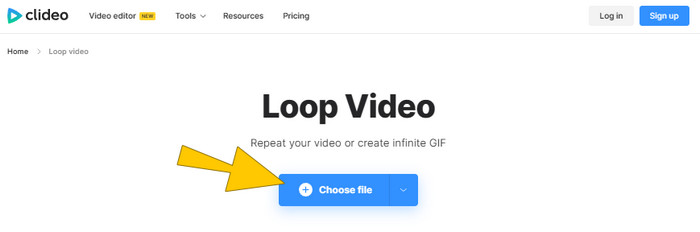
ขั้นตอนที่ 1 อัปโหลดวิดีโอ MP4 โดยคลิกปุ่ม Choose file.
ขั้นตอนที่ 2 หลังจากอัปโหลดแล้ว ให้ตั้งค่าจำนวนรอบการวนลูปในพื้นที่ทำงาน จากนั้นคลิกปุ่ม Export.
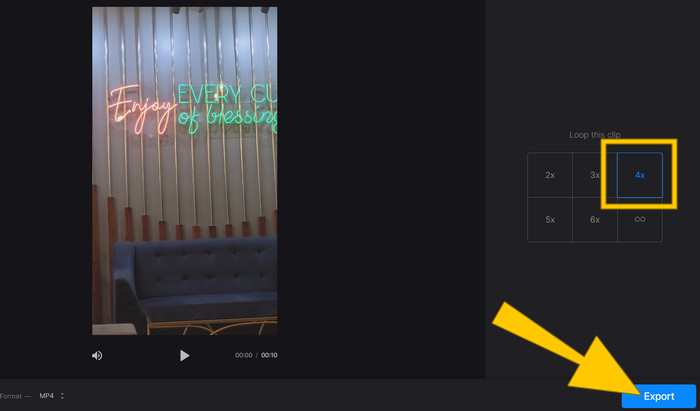
ขั้นตอนที่ 3 หลังจากนั้น ให้ดาวน์โหลดวิดีโอเพื่อบันทึกลงคอมพิวเตอร์ของคุณ.
ส่วนที่ 3 เครื่องตัดวิดีโอออนไลน์-Video Looper
ต่อมาคือ Online Video Cutter - Video Looper เครื่องมือออนไลน์ที่ช่วยให้คุณวนลูปวิดีโอได้ภายในไม่กี่วินาทีผ่านเว็บเบราว์เซอร์ ทำงานร่วมกับไฟล์วิดีโอแทบทุกรูปแบบที่คุณคาดหวังได้ เช่น MP4 และ AVI นอกจากนี้ ด้วยเครื่องมือวนลูปนี้ คุณยังสามารถตัดต่อ ครอป และปรับความเร็ววิดีโอได้จากทั้งโทรศัพท์และคอมพิวเตอร์ โดยไม่จำเป็นต้องใช้ชุดตัดต่อระดับมืออาชีพอีกต่อไป!
ข้อดี
- ให้ความยืดหยุ่นในการดาวน์โหลดวิดีโอแบบวนซ้ำในรูปแบบต่างๆ
- คุณสามารถใช้บนสมาร์ทโฟนเพื่อการตัดต่อวิดีโอได้ทุกที่
- มันมีการวนซ้ำวิดีโออย่างรวดเร็วในไม่กี่วินาที
จุดด้อย
- ขึ้นอยู่กับพลังการประมวลผลของบริการออนไลน์
- บริการออนไลน์มีคุณสมบัติการแก้ไขที่จำกัด
วิธีวนซ้ำ MP4 โดยใช้เครื่องตัดวิดีโอออนไลน์
ขั้นตอนที่ 1 คลิกปุ่ม Open file เพื่ออิมพอร์ตวิดีโอ MP4 ที่ต้องการวนลูป.

ขั้นตอนที่ 2 เลือกจำนวนรอบการวนลูปที่คุณต้องการใช้ จากนั้นคลิกปุ่ม Save.
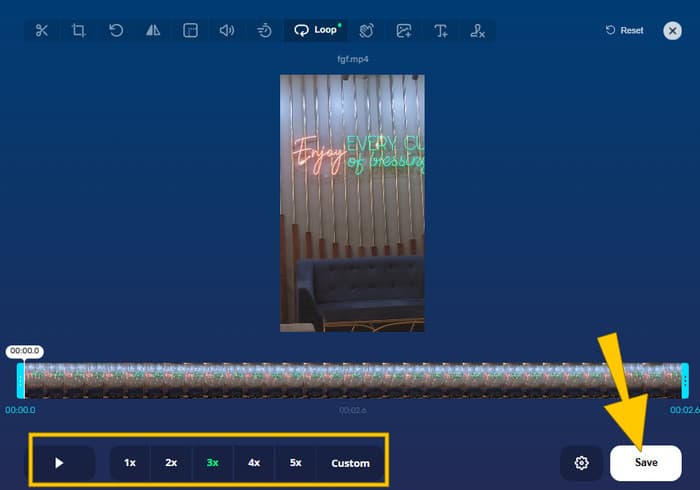
ขั้นตอนที่ 3 เพื่อดาวน์โหลดวิดีโอที่วนลูปแล้ว ให้คลิกปุ่ม Save ในหน้าต่างถัดไป.
ส่วนที่ 4 Flixier MP4 Looper
สุดท้าย จุดหยุดในรายการของเราในการวนวิดีโอสำหรับโปรเจ็กต์หรือดูคลิปตลกซ้ำๆ คือ MP4 Looper ของ Flixier เป็นตัวเลือกที่ยอดเยี่ยมที่ทำให้การวนซ้ำวิดีโอ MP4 เป็นเรื่องง่าย ในทำนองเดียวกัน ไทม์ไลน์ของ Flixier ช่วยให้คุณวนซ้ำ ตัดแต่ง และแก้ไขวิดีโอได้อย่างง่ายดาย คุณสามารถลากขอบของวิดีโอเพื่อย่อหรือลบส่วนที่ไม่ต้องการออกทั้งหมดได้ ข่าวดีก็คือแม้แต่ Flixier เวอร์ชันฟรีก็มีเครื่องมือมากมายที่จะช่วยคุณสร้างลูป อย่างไรก็ตาม คุณเพียงแค่ต้องแน่ใจว่าวิดีโอสุดท้ายของคุณมีความยาวไม่เกิน 10 นาที
ข้อดี
- มันทำงานได้โดยตรงบนเว็บเบราว์เซอร์ของคุณ
- มีเครื่องมือไทม์ไลน์ในตัวที่ให้คุณตัดส่วนที่ไม่ต้องการออกจากวิดีโอของคุณได้
- มีอินเทอร์เฟซที่ใช้งานง่ายซึ่งช่วยให้สามารถวนซ้ำวิดีโอได้ง่าย
จุดด้อย
- เวอร์ชันฟรีมีเวลาจำกัด 10 นาทีสำหรับวิดีโอที่ส่งออก
- คุณต้องสร้างบัญชี Flixier เพื่อเข้าถึงคุณสมบัติทั้งหมด
- จำเป็นต้องมีการเชื่อมต่ออินเทอร์เน็ตที่เสถียร
วิธีใช้เครื่องมือวนลูป MP4 ของ Flixier
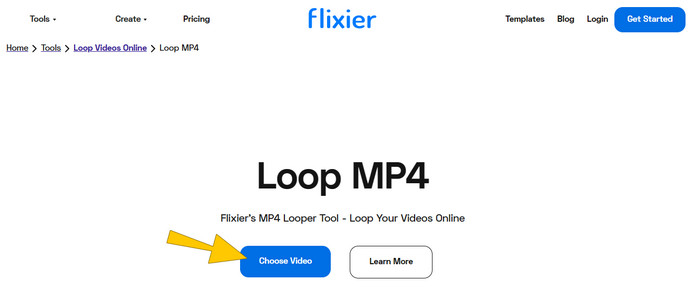
ขั้นตอนที่ 1 คลิกปุ่ม Choose Video เลือกวิดีโอ MP4 ที่คุณต้องการวนลูป จากนั้นคลิกปุ่ม Import All.
ขั้นตอนที่ 2 เมื่ออัปโหลดแล้ว ให้ลากวิดีโอไปยังไทม์ไลน์ จากนั้นไปที่ส่วน Loop Video เพื่อเลือกจำนวนรอบการวนลูปที่คุณต้องการ.
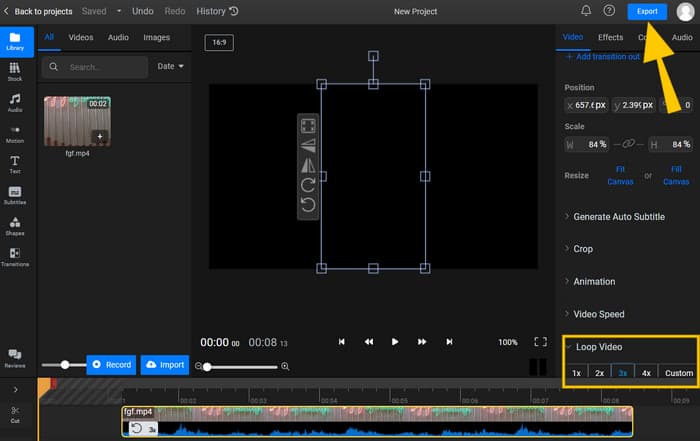
ขั้นตอนที่ 3 จากนั้นคลิกปุ่ม Export และดาวน์โหลดวิดีโอที่วนลูปแล้วเพื่อบันทึกลงในอุปกรณ์ของคุณ.
ส่วนที่ 5. คำถามที่พบบ่อยเกี่ยวกับ MP4 Video Loop
เหตุใดจึงต้องวนซ้ำวิดีโอ MP4
มีสาเหตุหลายประการที่คุณต้องวนวิดีโอ อย่างไรก็ตาม สาเหตุทั่วไปคือการเรียนรู้ที่จะมีสมาธิและเล่นวิดีโอตลกซ้ำ
ข้อเสียของการวนซ้ำวิดีโอคืออะไร?
ข้อเสียอย่างหนึ่งของการวนซ้ำวิดีโอคือการทำให้วิดีโอมีขนาดใหญ่ขึ้น
การวนซ้ำวิดีโอเป็นเรื่องยากหรือไม่?
การวนซ้ำขึ้นอยู่กับโปรแกรมตัดต่อวิดีโอที่คุณใช้ โดยทั่วไป การใช้ looper ออนไลน์จะทำให้กระบวนการวนซ้ำเป็นเรื่องง่าย
สรุป
เรียบร้อยแล้ว! นี่คือเครื่องมือออนไลน์ง่าย ๆ สำหรับการวนลูป MP4 เพื่อให้เล่นซ้ำได้ต่อเนื่อง วิธีการเหล่านี้ช่วยประหยัดเวลาคุณได้มาก เพราะส่วนใหญ่ทำได้แค่ 3 ขั้นตอนง่าย ๆ เท่านั้น มาทำให้ไฟล์ MP4 ของคุณเล่นซ้ำได้ตลอด ทุกที่ ทุกเวลา!
-
 วิธีที่ง่ายกว่าในการเพิ่มความเร็ววิดีโอรูปแบบ MP4 [ออฟไลน์ & ออนไลน์]
 คุณต้องการเพิ่มความเร็ววิดีโอของคุณในรูปแบบ MP4 หรือไม่? บทความนี้อาจช่วยให้คุณทราบถึงความแตกต่างในการเพิ่มความเร็วของวิดีโอไม่ว่าจะทางออนไลน์หรือออฟไลน์
-
 คำแนะนำทีละขั้นตอนเกี่ยวกับการแปลง MP4 เป็น GIF บนเดสก์ท็อปหรือออนไลน์
 กำลังมองหาวิธีที่ดีที่สุดในการแปลง MP4 เป็น GIF อยู่ใช่ไหม? นี่คือคำแนะนำโดยละเอียดที่ควรปฏิบัติตามใน Photoshop, Windows Movie Maker, โปรแกรมแปลงวิดีโอออนไลน์ และอื่นๆ อีกมากมาย
-
 วนลูป GIF กับ Animated GIF Looper ที่ดีที่สุดบน Windows & Mac
 ต้องการทราบความลับของ GIF วนซ้ำที่ดีที่สุดและสร้างขึ้นมาหรือไม่ ถ้าเป็นเช่นนั้น คุณมาถูกที่แล้ว เรียนรู้วิธีสร้างลูปด้วย Looper ที่ดีที่สุด
