


 Video Converter Ultimate
 บันทึกหน้าจอ
 ซ่อมวิดีโอ
M4V Tag Editor บน Mac และ Windows เพื่อแก้ไขข้อมูลเมตา M4V [ปราศจากปัญหา]
ไฟล์ M4V ได้รับการปกป้องด้วยระบบ Apple FairPlay DRM เพื่อป้องกันไม่ให้ผู้ใช้แจกจ่ายไฟล์อย่างผิดกฎหมายบนอินเทอร์เน็ต ดังนั้น ถ้าไฟล์ .m4v ของคุณถูกป้องกันไว้แล้วควรทำอย่างไรต่อไป? คุณยังสามารถแก้ไขแท็กของไฟล์ M4V ที่ถูกป้องกันได้หรือไม่? โชคดีที่คำตอบคือทำได้ ต้องการรู้ไหมว่าต้องใช้เครื่องมือใดบ้าง? ในบทความนี้ คุณจะได้รู้จัก โปรแกรมแก้ไขแท็ก M4V บน Mac และ Windows หลายตัวที่ช่วยให้คุณเปลี่ยนข้อมูลเมตาของไฟล์ M4V ได้อย่างง่ายดาย.

ส่วนที่ 1 ตัวแก้ไขแท็ก M4V 2 อันดับแรกสำหรับ Mac OS
ขณะที่เรากำลังเรียกดูเว็บ เราพบเครื่องมือที่เป็นไปได้ที่คุณสามารถใช้เพื่อเปลี่ยนแท็กของ M4V ที่มีอยู่ในระบบ Mac ของคุณ หากคุณต้องการทราบสองเครื่องมือที่ดีที่สุดที่คุณสามารถใช้ได้ โปรดอ่านรายละเอียดต่อไปนี้ด้านล่างหากคุณเป็นผู้ใช้ Mac
iFlicks
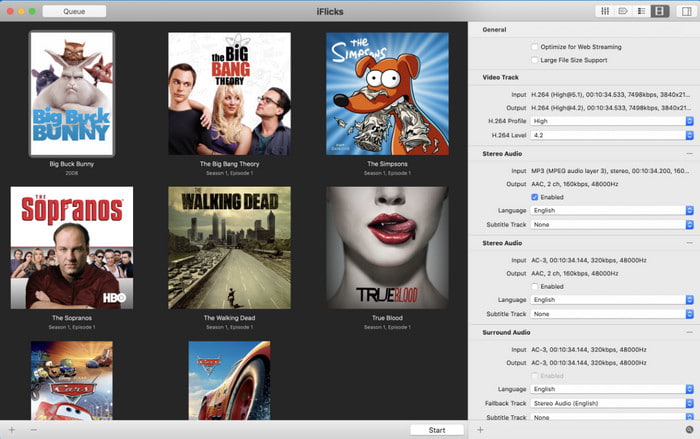
ระบบปฏิบัติการที่รองรับ: macOS 10.13.2 หรือใหม่กว่า
ราคา: $9.49–$18.49 ต่อปี
iFlicks เป็นทั้งตัวแปลงไฟล์และโปรแกรมแก้ไขแท็ก M4V บน Mac แบบครบวงจร เครื่องมือนี้ช่วยให้ผู้ใช้ iTunes จัดระเบียบรายการทีวีและภาพยนตร์ให้ดูดีขึ้นตามข้อมูลเมตาที่คุณตั้งค่า นอกจากนี้ยังสามารถดึงแท็กของไฟล์ M4V ที่มีอยู่บน iTunes มาให้โดยอัตโนมัติ คุณจึงไม่จำเป็นต้องใส่ข้อมูลเองทีละรายการ แต่ก็ยังสามารถเขียนทับข้อมูลได้ตามต้องการ แม้ว่าเครื่องมือนี้จะสะดวกใช้งาน แต่บางครั้งก็อาจใช้เวลาปรับตัว เพราะอาจซับซ้อนเล็กน้อย การแก้ไขหรือค้นหาแท็กที่ถูกต้องอาจทำได้ยาก เนื่องจากหน้าต่างค้นหามีขนาดเล็ก อีกทั้งคุณยังจำเป็นต้องสมัครสมาชิกซอฟต์แวร์หลังหมดช่วงทดลองใช้งาน.
ซับเลอร์
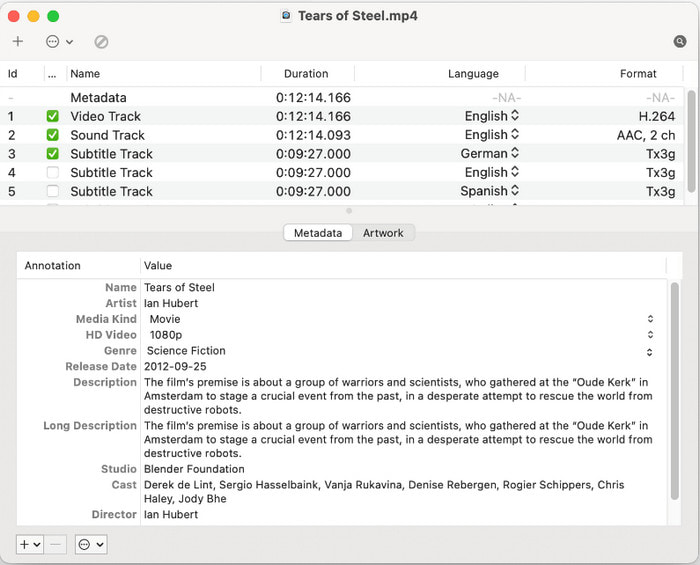
ระบบปฏิบัติการที่รองรับ: macOS 10.11 หรือใหม่กว่า
ราคา: ฟรี
Subler เป็นอีกหนึ่งโปรแกรมแก้ไขแท็ก m4v บน Mac ที่ใช้ลบหรือแก้ไขข้อมูลเมตาของไฟล์ M4V จากนั้นบันทึกกลับไปใหม่ เครื่องมือนี้เป็นทั้งตัวแยกสตรีม (demuxer) และตัวแปลงถอดรหัส (transcoder) ซึ่งช่วยจัดการกับไฟล์ฟอร์แมตที่เกี่ยวกับ Apple ได้อย่างรวดเร็ว ขึ้นอยู่กับลักษณะการใช้งาน เดิมทีเครื่องมือนี้ถูกพัฒนามาเพื่อเพิ่มคำบรรยาย (subtitle) แต่ผู้พัฒนาตัดสินใจเพิ่มฟีเจอร์ใหม่ ๆ เข้ามา เพื่อตอบสนองต่อความต้องการในการแก้ปัญหาทั่วไปที่เพิ่มสูงขึ้น แม้จะมีการเพิ่มฟังก์ชันใหม่แล้ว แต่ประสบการณ์ใช้งานด้าน GUI ก็ยังไม่ได้รับการปรับปรุงมากนัก หน้าตายังคงปรับแต่งไม่ได้ ทว่าการใช้งานก็ยังคงตรงไปตรงมา.
ส่วนที่ 2 ตัวแก้ไขแท็ก M4V ยอดนิยม 3 อันดับแรกสำหรับ Windows OS
หากคุณเป็นผู้ใช้ Windows งานนี้ยังคงทำได้สำหรับตัวแก้ไขข้อมูลเมตาบางตัวใน Windows แต่เครื่องมือที่รองรับรูปแบบ M4V คืออะไร? อ่านรายการด้านล่างต่อไปเพื่อทำความเข้าใจรายละเอียดทั้งหมดที่เรารวบรวมไว้ขณะที่เราค้นหา เลือกอย่างระมัดระวัง และตรวจสอบแต่ละรายการ
FVC Video Converter Ultimate
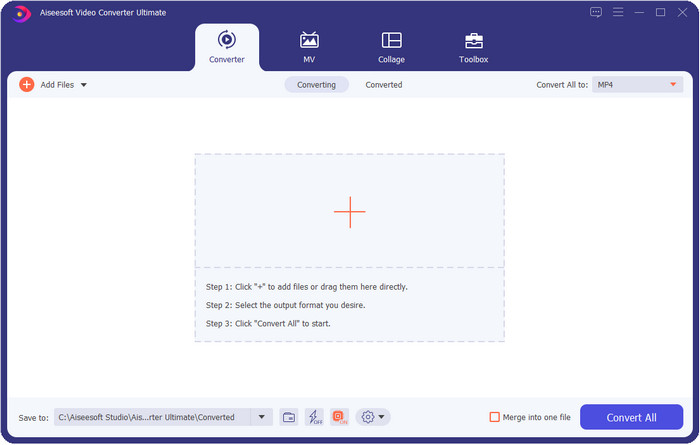
ระบบปฏิบัติการที่รองรับ: Windows Vista/7/8/8.5/10/11 ขึ้นไป; macOS 10.7 จนถึงเวอร์ชันล่าสุด
ราคา: $ 25.00 ต่อปี; $ 55.00 แบบใช้ถาวร
FVC Video Converter Ultimate เป็นโปรแกรมแก้ไขข้อมูลเมตา M4V บน Windows และ Mac ที่ได้รับรางวัล ซึ่งช่วยให้คุณจัดการข้อมูลเมตาได้อย่างง่ายดาย แม้ว่าเครื่องมือนี้จะมีราคาสูงกว่าโปรแกรมอื่นเล็กน้อย แต่มันก็เป็นเครื่องมือทรงพลังที่คุณต้องมี เพราะมาพร้อมกล่องเครื่องมือครบชุดและใช้งานได้หลายวัตถุประสงค์ นอกจากนี้ยังรองรับฟอร์แมตได้อย่างกว้างขวางมาก จึงไม่ต้องกังวลว่าไฟล์ของคุณจะไม่รองรับ ไม่ว่าจะเป็นวิดีโอหรือเสียงก็ใช้ได้ทั้งหมด ไม่จำเป็นต้องดาวน์โหลดโปรแกรมหลายตัวเพื่อแก้ไขข้อมูลเมตา แปลงไฟล์ หรือแก้ไขวิดีโออย่างอื่น เพราะปัญหาที่เกี่ยวกับวิดีโอทุกอย่างมีคำตอบเดียวคือเครื่องมืออัลทิเมตตัวนี้.

คุณสมบัติ FVC Video Converter Ultimate:
5,689,200+ ดาวน์โหลด- กรอกหรือลบแท็กอย่างรวดเร็วในรูปแบบ M4V, MOV, MKV, AVI, MP4 และ 1,000+
- รองรับกล่องเครื่องมือที่เชื่อถือได้เพื่อช่วยคุณตัดแต่ง ตัด ปรับปรุง สร้าง GIF ฯลฯ
- มี GUI ที่ดีที่สุดและปรับแต่งได้มากที่สุดเพื่อช่วยประสบการณ์ของผู้ใช้
- รองรับระบบปฏิบัติการทั้งหมดเช่น Windows และ Mac
ดาวน์โหลดฟรีสำหรับ Windows 7 หรือใหม่กว่าดาวน์โหลดอย่างปลอดภัย
ดาวน์โหลดฟรีสำหรับ MacOS 10.7 หรือใหม่กว่าดาวน์โหลดอย่างปลอดภัย
เครื่องสแกนแท็ก
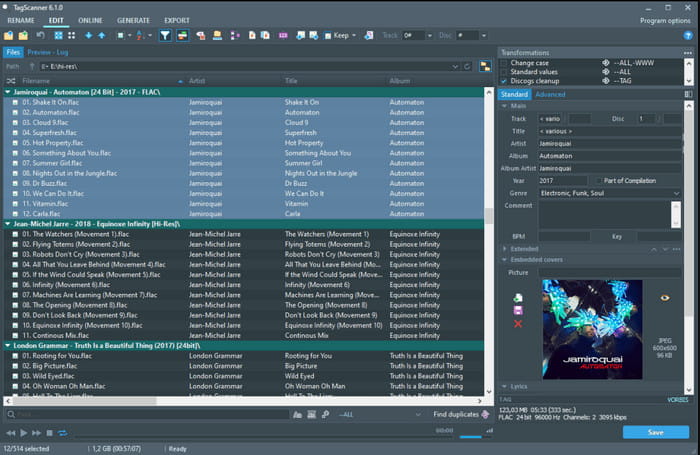
ระบบปฏิบัติการที่รองรับ: Windows Vista ขึ้นไป
ราคา: ฟรี
Tag Scanner เป็นโปรแกรมแก้ไขข้อมูลเมตา m4v ยอดนิยมอีกตัวหนึ่งบน Windows ที่คุณสามารถดาวน์โหลดและใช้ได้ฟรี เครื่องมือนี้ช่วยให้คุณแก้ไขแท็กของไฟล์ทีละไฟล์หรือแบบชุดได้อย่างง่ายดาย ถือเป็นแอปที่เหมาะสำหรับควบคุมข้อมูลเมตา เช่น ชื่อ อัลบั้ม แนวเพลง ระยะเวลา วันที่ และอื่น ๆ ของไฟล์มีเดียที่รองรับ อย่างไรก็ตาม ก่อนที่คุณจะคุ้นชินกับการทำงานของเครื่องมือหรือวิธีใช้งาน คุณอาจต้องใช้เวลาเรียนรู้พอสมควร เพราะมีฟังก์ชันที่ค่อนข้างระดับสูง.
Avidemux
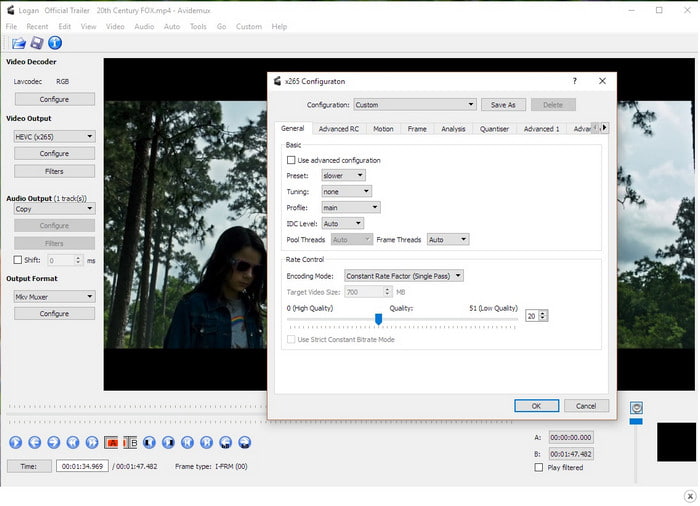
ระบบปฏิบัติการที่รองรับ: Windows XP/7/8/8.5/10, macOS, Linux
ราคา: ฟรี
Avidemux เป็นหนึ่งในโปรแกรมแก้ไขแท็ก M4V ที่รู้จักกันดีสำหรับการแก้ไขข้อมูลเมตา m4v และมีให้ใช้งานบนหลายแพลตฟอร์ม เป็นซอฟต์แวร์โอเพ่นซอร์สที่พัฒนาโดย SourceForge เพื่อช่วยผู้ใช้ประจำในการทำงานด้านการแก้ไขต่าง ๆ ในชีวิตประจำวัน เช่น การจัดการเมทาดาทา แม้ว่าจะมีฟังก์ชันและคุณสมบัติอย่างครบถ้วน แต่ก็ยังรองรับการแก้ไขพื้นฐานที่จำเป็นต่อไฟล์มีเดียของคุณ ฟอร์แมตที่รองรับยังมีจำนวนจำกัด และฟอร์แมตใหม่ ๆ บางส่วนก็ยังไม่รองรับ อย่างไรก็ตาม ซอฟต์แวร์ยังอยู่ในขั้นตอนพัฒนาอย่างต่อเนื่อง ซึ่งหมายความว่าเครื่องมือนี้จะดีขึ้นเรื่อย ๆ ในระยะยาว.
เมื่อคุณเข้าถึงเครื่องมือบนเว็บไซต์หลักแล้ว โปรดจำไว้ว่าการเชื่อมต่อของคุณไม่ปลอดภัย ดังนั้นบุคคลของคุณจึงสามารถเข้าถึงข้อมูลส่วนบุคคลที่คุณแทรกบนเว็บไซต์ได้
ส่วนที่ 3 คำถามที่พบบ่อยเกี่ยวกับโปรแกรมแก้ไขแท็ก M4V
ข้อมูลใดบ้างที่ฉันเห็นในข้อมูลเมตา
เมทาดาทาคือข้อมูลที่คุณจะพบได้บนตัวไฟล์ เช่น ชื่อผู้สร้าง ชื่อเรื่อง สถานที่ เวลา วันที่ ประเภท (genre) บท (chapter) และอื่น ๆ อีกมากมาย หากคุณต้องการรู้เพิ่มเติมเกี่ยวกับเมทาดาทา คุณสามารถคลิกลิงก์นี้เพื่อเรียนรู้เพิ่มเติมเกี่ยวกับ เมทาดาทาคืออะไร.
ฉันสามารถดูข้อมูลเมตาได้หรือไม่
ได้ คุณสามารถดูได้ ไม่ว่าคุณจะใช้ตัวดูข้อมูลเมตาที่มีมาให้ในตัวบน Windows หรือ Mac หรือจะใช้เครื่องมือเฉพาะทางก็ได้ หากคุณยังไม่รู้ว่าจะใช้อะไรในการดูข้อมูลเมตาของไฟล์มีเดีย ลองอ่านบทความเกี่ยวกับ ตัวดูเมทาดาทา 4 อันดับแรกที่ใช้งานได้ทั้งออนไลน์และออฟไลน์.
ข้อมูลเมตาสามารถช่วยฉันจัดระเบียบไฟล์ได้หรือไม่
ได้ คุณสามารถจัดเรียงไฟล์สื่อตามข้อมูลเมตาได้ ดังนั้น หากคุณต้องการไฟล์ที่มีการจัดระเบียบมากขึ้นในไลบรารีหรือโฟลเดอร์ของคุณ เราขอแนะนำให้คุณเปลี่ยนหรือเพิ่มข้อมูลเมตาเพื่อหลีกเลี่ยงไฟล์ที่ยุ่งเหยิงในโฟลเดอร์หรือไลบรารีของคุณและความสับสน
สรุป
ชวนทึ่งไม่น้อยที่ตอนนี้มีโปรแกรมแก้ไขข้อมูลเมตา M4V หลากหลายตัวในท้องตลาด คุณสามารถดาวน์โหลดเครื่องมือเหล่านี้ทั้งหมดได้หากต้องการ และปรับเปลี่ยนข้อมูลเมตาของไฟล์ M4V ได้ตามใจ แต่ตัวไหนดีที่สุด? โดยไม่ต้องลังเล FVC Video Converter Ultimate คือโปรแกรมแก้ไขที่ดีที่สุดและทรงพลังที่สุดที่คุณต้องใช้สำหรับงานนี้ ถ้าคุณยังไม่มั่นใจกับข้อมูลที่เราให้ไว้ในบทความนี้ งั้นคุณควรลองดาวน์โหลดโปรแกรมแล้วใช้งานด้วยตัวเอง.
-
 6 ตัวเลือกที่ชื่นชอบ Snapchat ตัวกรอง Snapchat แบบเคลื่อนไหวบน Snapchat
 ต้องการทราบวิธีที่ดีที่สุดในการเพิ่มตัวกรองในวิดีโอ Snapchat หรือไม่? คุณสามารถคลิกที่นี่และเรียนรู้ตัวกรองต่างๆ ที่คุณสามารถใช้เพื่อนำไปใช้กับวิดีโอ Snapchat
-
 4 ตัวแปลงความละเอียดวิดีโอชั้นนำเป็นความละเอียดวิดีโอที่ต่ำกว่า
 จะลดความละเอียดของวิดีโอได้อย่างไร? ตัวแปลงความละเอียดวิดีโอบางตัวไม่ได้ดีที่สุดในงานของพวกเขา ดังนั้นวันนี้ เราจึงเลือกตัวแปลงความละเอียดที่ดีที่สุด 4 ตัวที่คุณสามารถใช้ได้
-
 ความละเอียดของวิดีโอคืออะไร: ข้อมูลเชิงลึกของความละเอียดและอื่นๆ อย่างเจาะลึก
 ความละเอียดของวิดีโอคืออะไร? สิ่งนี้สำคัญในทุกวิดีโอหรือไม่ มันเป็นสิ่งสำคัญ หากคุณต้องการทราบแนวคิดเพิ่มเติมเกี่ยวกับความละเอียดของวิดีโอ ให้คลิกได้ทันที
