


 Video Converter Ultimate
 บันทึกหน้าจอ
 ซ่อมวิดีโอ
 ดาวน์โหลดอย่างปลอดภัย
วิธีผสานวิดีโอ 3GP จากโทรศัพท์มือถือเป็นไฟล์เดียว
เมื่อคุณถ่ายวิดีโอหลายรายการระหว่างการเดินทางด้วยสมาร์ทโฟนของคุณ คุณอาจต้องการรวมไฟล์ 3GP เป็นวิดีโอเดียว วิธีที่ดีที่สุดในการรวมคลิปวิดีโอคืออะไร? ไม่ว่าคุณจะเข้าร่วมวิดีโอ 3GP หรือสร้างภาพยนตร์ด้วยไฟล์สมาร์ทโฟน คุณสามารถเรียนรู้เพิ่มเติมเกี่ยวกับ 2 วิธีที่ใช้บ่อยที่สุดได้จากบทความ

ส่วนที่ 1: วิธีผสาน 3GP ออนไลน์ฟรี
หากต้องการรวมไฟล์ 3GP ของคุณโดยไม่ต้องตัดต่อ คุณเพียงแค่ต้องใช้เครื่องมือที่สะดวกในการรวมวิดีโอ 3GP ออนไลน์ได้ฟรี FVC Free Online Video Merger เป็นหนึ่งในตัวรวมวิดีโอ 3GP ที่ดีที่สุดด้วยอินเทอร์เฟซที่เรียบง่าย ช่วยให้คุณรวมไฟล์ 3GP ได้โดยไม่จำกัดจำนวนหรือขนาด นอกจากนี้ยังสามารถปรับความละเอียดและรูปแบบวิดีโอได้ด้วย.
ขั้นตอนที่ 1: ไปที่ Free Online Video Merger ด้วยเว็บเบราว์เซอร์ใดก็ได้ คุณสามารถคลิกปุ่ม Upload Videos to Merge เพื่อโหลดไฟล์ 3GP หนึ่งไฟล์เข้าสู่ตัวรวมวิดีโอออนไลน์ ซึ่งจะพาคุณไปยังอินเทอร์เฟซตัวเชื่อมวิดีโอออนไลน์.
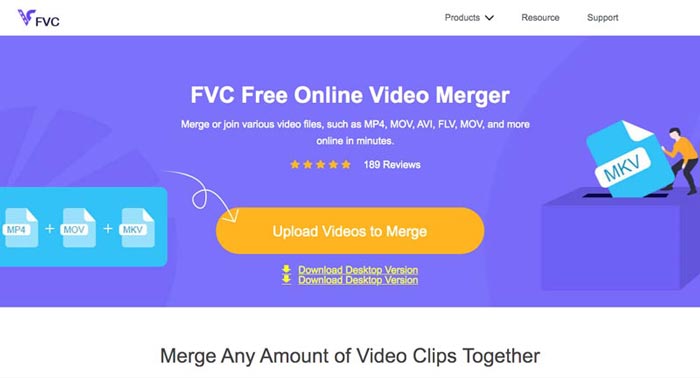
ขั้นตอนที่ 2: เพียงอัปโหลดไฟล์ 3GP เพิ่มเติมที่คุณต้องการรวม จากนั้นคุณสามารถเปลี่ยนความละเอียดและรูปแบบของวิดีโอได้โดยคลิกที่ช่อง Resolution และ Format คุณสามารถรวมไฟล์ 3GP ของคุณให้เป็นไฟล์วิดัียอยอดนิยมอย่าง MP4 หรือ MKV ได้.
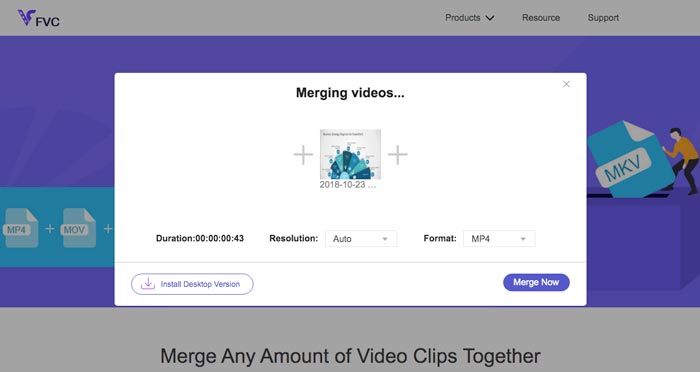
ขั้นตอนที่ 3: เมื่อคุณพอใจกับวิดีโอผลลัพธ์แล้ว คุณสามารถคลิกปุ่ม Merge Now เพื่อเริ่มกระบวนการรวมไฟล์ เมื่อการรวมเสร็จสิ้น วิดีโอที่เชื่อมแล้วจะถูกบันทึกลงในฮาร์ดไดรฟ์ของคุณ.
เป็นวิธีที่ง่ายในการเข้าร่วมไฟล์ 3GP ออนไลน์ได้ฟรี แต่ถ้าคุณต้องการแก้ไขเพิ่มเติมสำหรับไฟล์วิดีโอของคุณ คุณต้องมีเครื่องมือระดับมืออาชีพมากกว่านี้
ส่วนที่ 2 วิธีการรวมวิดีโอ 3GP ลงในภาพยนตร์
ไม่ว่าคุณจะต้องการรวมวิดีโอ 3GP ให้เป็นภาพยนตร์พร้อมฟิลเตอร์สวยงาม หรือแค่เชื่อมไฟล์ 3GP หลายไฟล์ให้เป็นไฟล์เดียว Video Converter Ultimate ก็เป็นตัวแปลงวิดีโออเนกประสงค์ที่คุณควรพิจารณา ใช้แยกและรวมคลิปวิดีโอ เลือกธีมวิดีโอ ใส่ลายน้ำในวิดีโอ และยังสามารถแปลงวิดีโอ 3GP ไปเป็นรูปแบบวิดีโออื่นเพื่อโพสต์บนโซเชียลมีเดียได้โดยตรง.
- 1. ช่วยให้คุณสามารถตัดส่วนที่ต้องการออกหรือรวม 3GP หลาย ๆ อันเป็นชิ้นเดียว
- 2. จัดเตรียมคุณสมบัติการตัดต่อวิดีโอพื้นฐาน เช่น ตัดแต่ง แยก ครอบตัด และหมุน
- 3. เข้าร่วมคลิปวิดีโอ 3GP ในภาพยนตร์ที่มีตัวกรอง ธีม ไฟล์เพลง ฯลฯ
- 4. เพิ่มคำบรรยาย, แทร็กเสียง, เอฟเฟกต์ 3D, ลายน้ำ, บีบอัดวิดีโอ, และอื่น ๆ.
ดาวน์โหลดฟรีสำหรับ Windows 7 หรือใหม่กว่าดาวน์โหลดอย่างปลอดภัย
ดาวน์โหลดฟรีสำหรับ MacOS 10.7 หรือใหม่กว่าดาวน์โหลดอย่างปลอดภัย
วิธีที่ 1: วิธีรวมวิดีโอ 3GP หลายรายการโดยตรง
ขั้นตอนที่ 1: ดาวน์โหลดและเปิดใช้งาน Video Converter Ultimate จากเว็บไซต์ทางการ เลือกอินเทอร์เฟซ Converter แล้วคลิกปุ่ม Add Files เพื่อเพิ่มไฟล์ 3GP ที่คุณต้องการรวม นอกจากนี้คุณยังสามารถลากวิดีโอ 3GP เข้าในโปรแกรมได้โดยตรง.

ขั้นตอนที่ 2: เมื่อนำเข้าไฟล์ 3GP แล้ว คุณควรเลือกฟอร์แมตของไฟล์ผลลัพธ์ คลิกไอคอนรูปกรรไกรเพื่อตัดส่วนที่คุณต้องการ นอกจากนี้คุณยังสามารถหมุน/ครอบตัดวิดีโอ ใส่เอฟเฟ็กต์ฟิลเตอร์ เพิ่มลายน้ำ หรือปรับแต่งแทร็กเสียงสำหรับวิดีโอผลลัพธ์ได้.

ขั้นตอนที่ 3: ไปที่ด้านล่างของอินเทอร์เฟซผู้ใช้เพื่อเลือกโฟลเดอร์ปลายทางสำหรับไฟล์ 3GP ที่รวมแล้ว หลังจากนั้นให้คลิกที่ช่อง Merge into One File และคลิก Convert All เพื่อเริ่มรวมไฟล์ 3GP.

วิธีที่ 2: วิธีรวมไฟล์ 3GP ลงในภาพยนตร์
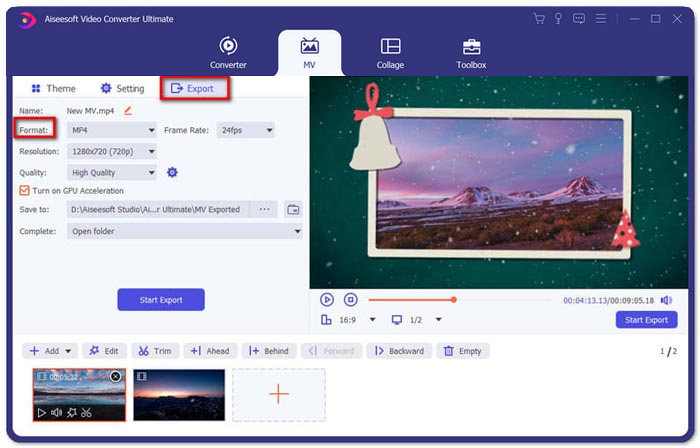
ขั้นตอนที่ 1: เมื่อต้องการเชื่อมไฟล์ 3GP ให้เป็นภาพยนตร์ คุณสามารถเลือกเมนู MV จากนั้นคุณจะเข้าสู่หน้าอินเทอร์เฟซสร้าง MV คลิกปุ่ม Add ที่มุมซ้ายล่างของหน้าต่างเพื่อนำเข้าวิดีโอ 3GP และรูปภาพของคุณ.
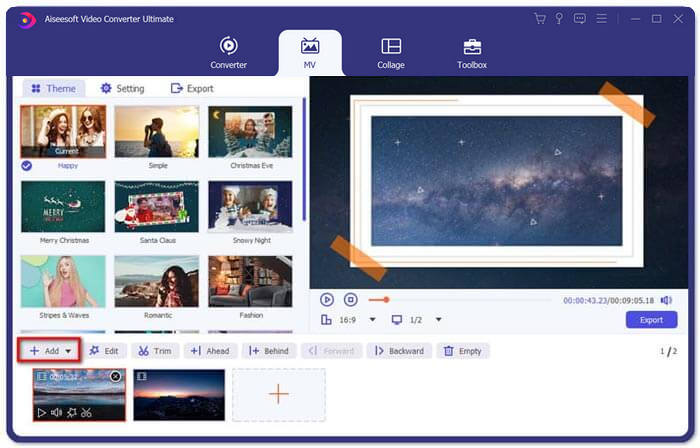
ขั้นตอนที่ 2: หลังจากนั้นคุณสามารถคลิกปุ่ม Edit เพื่อปรับเอฟเฟ็กต์วิดีโอ นอกจากนี้คุณยังสามารถเลือกธีมสำหรับภาพยนตร์ MV ของคุณได้ ที่แถบด้านซ้ายให้คลิกแท็บ Theme แล้วเลือกธีมที่คุณต้องการสำหรับ MV ของคุณ.
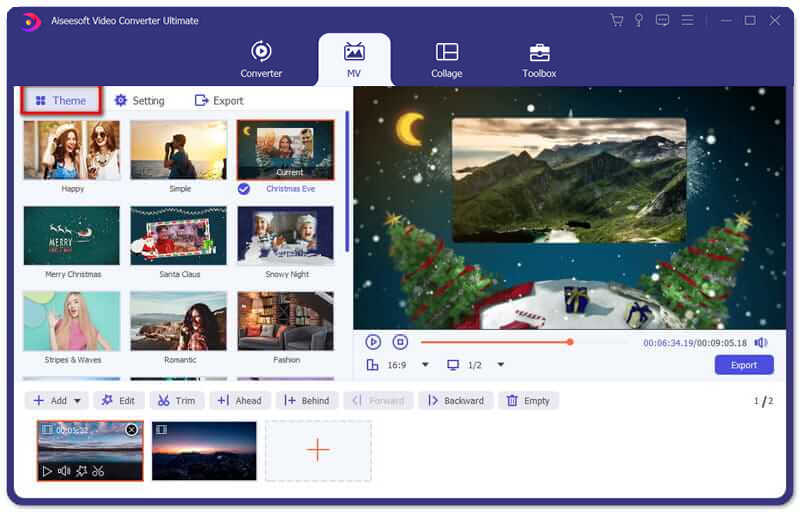
ขั้นตอนที่ 3: หากคุณพอใจกับไฟล์ 3GP ที่รวมแล้ว คุณสามารถคลิกปุ่ม Export เพื่อบันทึกไฟล์วิดีโอ ตามค่าเริ่มต้น รูปแบบไฟล์ผลลัพธ์จะเป็น MP4 แน่นอนว่าคุณสามารถเลือกฟอร์แมตวิดีโออื่นตามความต้องการของคุณได้เช่นกัน.
ส่วนที่ 3 คำถามที่พบบ่อยเกี่ยวกับวิธีการผสาน 3GP
1. รูปแบบ 3GP คืออะไร?
3GP เป็นรูปแบบไฟล์มัลติมีเดียที่ออกแบบมาเพื่อบันทึกการจัดเก็บข้อมูล มีการใช้กันอย่างแพร่หลายบนอุปกรณ์พกพา เมื่อคุณถ่ายภาพหรือถ่ายวิดีโอด้วยโทรศัพท์มือถือของคุณ โดยปกติไฟล์จะถูกบันทึกในรูปแบบ 3GP โดยปกติ 3GP จะใช้บนโทรศัพท์มือถือ 3G และสามารถเล่นได้บนโทรศัพท์ 2G และ 4G บางรุ่น
2. จะรวมไฟล์ 3GP บนสมาร์ทโฟนได้อย่างไร?
เมื่อคุณต้องการรวมไฟล์ 3GP บน iPhone หรือโทรศัพท์ Android คุณสามารถใช้ Video Merger สำหรับโทรศัพท์ Android, VivaVideo สำหรับ iPhone หรือดาวน์โหลดแอปพลิเคชันอื่นเพื่อรวมวิดีโอ แต่เมื่อคุณต้องการเข้าร่วมไฟล์ 3GP เป็นภาพยนตร์ คุณยังคงต้องใช้การรวมวิดีโอระดับมืออาชีพ
3. ฉันสามารถรวมวิดีโอ 3GP กับไฟล์เสียงได้หรือไม่?
ใช่. แต่คุณไม่สามารถใช้ไฟล์เสียงเป็นพื้นหลังสำหรับวิดีโอ 3GP ไม่ว่าคุณจะต้องการรวมสองไฟล์ หรือใช้เสียงเป็นพื้นหลังของวิดีโอ 3GP โปรแกรมผสมผสาน 3GP ระดับมืออาชีพควรเป็นตัวเลือกของคุณ
สรุป
เมื่อคุณต้องการรวมไฟล์วิดีโอ 3GP บนอุปกรณ์พกพาให้เป็นไฟล์วิดีโอเดียว คุณสามารถเรียนรู้ 2 วิธีที่มีประสิทธิภาพจากบทความนี้ คุณสามารถรวมไฟล์ 3GP ออนไลน์ได้ฟรีด้วย Free Online Video Joiner หากคุณต้องการตัดต่อและใส่เอฟเฟ็กต์พิเศษลงในวิดีโอของคุณ Video Converter Ultimate ถือเป็นเครื่องมือที่เหมาะสมสำหรับคุณ หากมีคำถามใด ๆ เกี่ยวกับการรวมไฟล์ 3GP คุณสามารถติดต่อเราได้ตลอดเวลา.
-
 วิธีฟรี 3 อันดับแรกในการแปลง FLV เป็น 3GP บน Windows / Mac
 ไม่สามารถเปิดไฟล์ FLV บนสมาร์ทโฟนหรือแท็บเล็ตได้? ไม่ต้องกังวล! ที่นี่เราแบ่งปันสามวิธีในการแปลง FLV เป็น 3GP โดยไม่สูญเสียคุณภาพสำหรับการเล่นบนมือถือ
-
 3 วิธีในการแปลง MP4 เป็น 3GP ไม่ยุ่งยาก
 ต้องการแปลง MP4 เป็น 3GP ด้วยวิธีที่ง่ายและรวดเร็วหรือไม่? ที่นี่เราจะแบ่งปัน 3 ตัวแปลง MP4 เป็น 3GP เพื่อเปลี่ยน MP4 เป็น 3GP สำหรับการเล่นบนโทรศัพท์มือถือต่างๆ
-
 3 เครื่องเล่น 3GP ฟรีที่ดีที่สุดสำหรับคอมพิวเตอร์และมือถือที่คุณควรรู้
 เมื่อคุณต้องการเล่นภาพยนตร์ 3GP ของคุณได้อย่างง่ายดายโดยไม่ต้องติดตั้งหรือแปลงตัวแปลงสัญญาณวิดีโอคุณสามารถเรียนรู้เพิ่มเติมเกี่ยวกับเครื่องเล่น 3GP ที่ดีที่สุด 3 ตัวบน Windows, Mac, Android และ iPhone ได้ในบทความนี้
