


 Video Converter Ultimate
 บันทึกหน้าจอ
 ซ่อมวิดีโอ
[รีวิวฉบับสมบูรณ์] 5 เครื่องตัด MP3 ล่าสุดที่มีใน Windows/Mac/Online
เรามักอยากตัดเสียงที่กำลังฟังอยู่แล้วนำไปตั้งเป็นเสียงเรียกเข้า เพื่อเน้นเฉพาะส่วนสำคัญหรือเพื่อตัดรายละเอียดที่ไม่จำเป็นทิ้ง ถึงแม้ในทุกแพลตฟอร์มจะมีเครื่องมือตัดเสียงให้ใช้หลากหลายตัว แต่ก็ยังมีบางตัวที่ไม่น่าไว้วางใจ ดังนั้นวันนี้เราจึงจะมาแนะนำเครื่องมือตัดเสียงที่เราคัดมาจากท้องตลาด ซึ่งคุณสามารถเชื่อถือได้ เพราะเราได้ทดลองใช้ทุกเครื่องมือด้วยตัวเองเพื่อให้แน่ใจว่าไม่มีมัลแวร์และมีความน่าเชื่อถือ ก่อนคัดเลือก เราใช้มาตรฐานที่เข้มงวดมากสำหรับผู้ใช้ที่ต้องการเครื่องมือตัดเสียงที่ไว้ใจได้ เพื่อให้คุณท่องเว็บได้อย่างเต็มประสิทธิภาพ เราจึงขอแนะนำเครื่องมือตัดเสียง MP3 จำนวน 5 ตัวด้านล่างนี้ ที่พร้อมสำหรับการตัดเสียงในทุกฟอร์แมตให้คุณใช้งานได้ทันที.

ส่วนที่ 1 2 โปรแกรมตัดไฟล์ MP3 ออฟไลน์ Windows & Mac
1. Video Converter Ultimate – เครื่องตัด MP3 ที่ดีที่สุด [แนะนำเป็นอย่างยิ่ง]
เครื่องมือตัดเสียง MP3 ที่ดีที่สุดในลิสต์นี้คือ Video Converter Ultimate ซึ่งช่วยให้ผู้ใช้ตัดเสียงได้อย่างง่ายดาย ด้วยความช่วยเหลือจากเครื่องมือระดับสุดยอดนี้ คุณสามารถตัดเสียงเพื่อลบส่วนที่ไม่ต้องการ รวมไฟล์เสียงที่ตัดหลาย ๆ ไฟล์ให้เป็นไฟล์เดียว และเพิ่มความดังของเสียงได้หากรู้สึกว่าเสียงเบาเกินไป นอกจากนี้ซอฟต์แวร์นี้ยังประมวลผลได้อย่างรวดเร็วมาก พร้อมทั้งรักษาคุณภาพเสียงต้นฉบับเอาไว้อย่างดี.
เครื่องมือนี้ไม่เหมือนกับเครื่องตัดใดๆ เครื่องมือนี้รองรับรูปแบบที่หลากหลาย ไม่เพียงแต่ MP3 แต่ยังรวมถึง FLAC, M4R, M4A, OGG, MKA, WAV, WMA และอื่นๆ และแน่นอนว่าไฟล์เสียงของคุณได้รับการสนับสนุนที่นี่เพื่อตัด บางทีคุณอาจไม่รู้วิธีตัดไฟล์เสียงและใช้งานตามความต้องการของคุณในตอนนี้ วันนี้เป็นวันโชคดีของคุณเพราะเราจะสอนวิธีใช้เครื่องตัด MP3 และริงโทนฟรีโดยทำตามบทช่วยสอนด้านล่าง
ขั้นตอนที่ 1. ดาวน์โหลดโปรแกรมตัดเสียงลงในคอมพิวเตอร์ของคุณโดยคลิกปุ่มดาวน์โหลดด้านล่าง เลือกให้ตรงกับระบบที่ใช้ไม่ว่าจะเป็น Windows หรือ Mac จากนั้นติดตั้งโปรแกรมให้เรียบร้อยแล้วเปิดใช้งาน อย่าลืมทำความคุ้นเคยกับหน้าตาโปรแกรมก่อน เพื่อให้การทำตามขั้นตอนต่อไปเป็นเรื่องง่าย.
ดาวน์โหลดฟรีสำหรับ Windows 7 หรือใหม่กว่าดาวน์โหลดอย่างปลอดภัย
ดาวน์โหลดฟรีสำหรับ MacOS 10.7 หรือใหม่กว่าดาวน์โหลดอย่างปลอดภัย
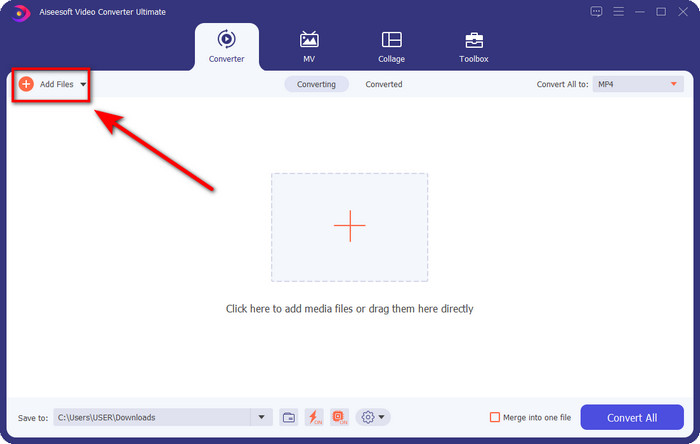
ขั้นตอนที่ 2. ลากไฟล์เสียงที่คุณต้องการตัดมาวางบนหน้าต่างโปรแกรม หรือตรวจหาไฟล์เสียงผ่านปุ่ม Add Files แล้วเลือกไฟล์จากโฟลเดอร์ในคอมพิวเตอร์ จากนั้นคลิก Open เพื่อไปยังขั้นตอนถัดไป.
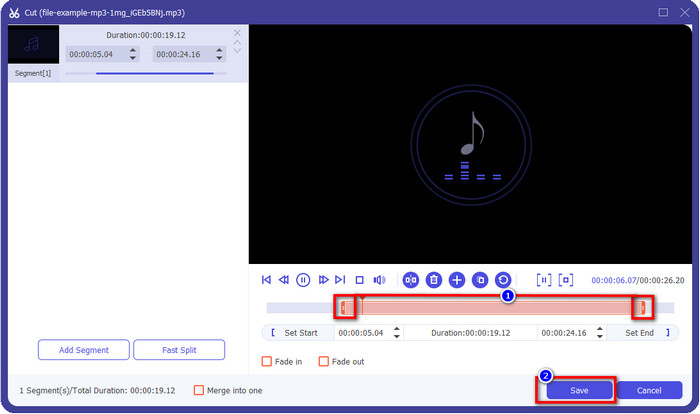
ขั้นตอนที่ 3. เมื่อนำไฟล์เสียงเข้าโปรแกรมแล้ว ให้คลิกปุ่มรูปกรรไกร จากนั้นลากแถบ play in และ play out ให้ครอบคลุมช่วงเสียงที่คุณต้องการเก็บไว้ จำไว้ว่าส่วนเสียงที่ถูกไฮไลต์อยู่ระหว่าง play in และ play out เท่านั้นที่จะถูกเก็บไว้ จากนั้นกด Save เพื่อตัดเสียง.
ตัวเลือกเสริม. ต้องการเพิ่มความดังของเสียงหรือไม่? ถ้าใช่ ให้คลิกปุ่มรูปไม้กายสิทธิ์ แล้วปรับแถบเลื่อนระดับเสียง (volume slider) โดยลากขึ้น จากนั้นกด OK เพื่อบันทึก.
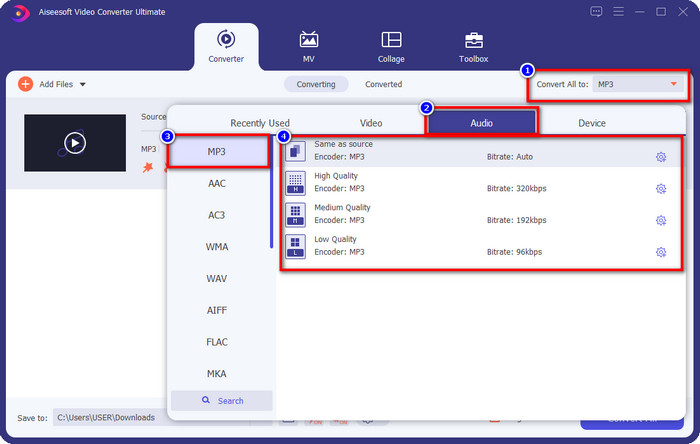
ขั้นตอนที่ 4. ไปที่ Convert All to, Audio แล้วตั้งค่าฟอร์แมตเป็น MP3 แม้คุณจะไม่ได้แปลงไฟล์ก็ตาม ให้ตรวจดูให้แน่ใจว่าชื่อฟอร์แมตใต้ Convert All to เป็น MP3 ไม่ใช่ฟอร์แมตอื่น เพื่อหลีกเลี่ยงการแปลงไปเป็นชนิดไฟล์อื่นโดยไม่ได้ตั้งใจ.
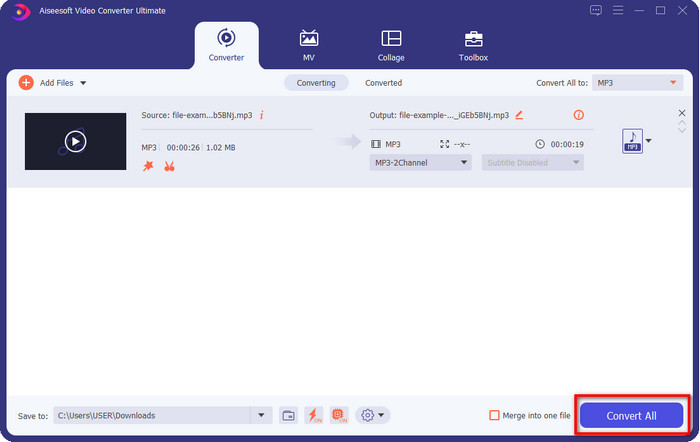
ขั้นตอนที่ 5. คลิก Convert All เพื่อเริ่มบันทึกไฟล์เสียงที่ตัดไว้ เท่านี้คุณก็ได้ไฟล์เสียงที่ตัดเรียบร้อยแล้วด้วยโปรแกรมตัด MP3 ฟรีที่ใช้งานง่ายที่สุดตัวหนึ่ง.
ข้อดี
- มันสามารถตัดเสียงของคุณอย่างรวดเร็วที่สุดและประมวลผลภายในไม่กี่วินาที
- มีคุณสมบัติขั้นสูงเพื่อเพิ่มพลังเสียง
- รองรับระบบปฏิบัติการทั้งหมดเช่น Windows หรือ Mac
- สามารถรวมไฟล์เสียงหลายไฟล์ได้ด้วยการรวมเสียงของเครื่องมือนี้
จุดด้อย
- จำเป็นต้องซื้อเครื่องมือ
2. ความกล้า
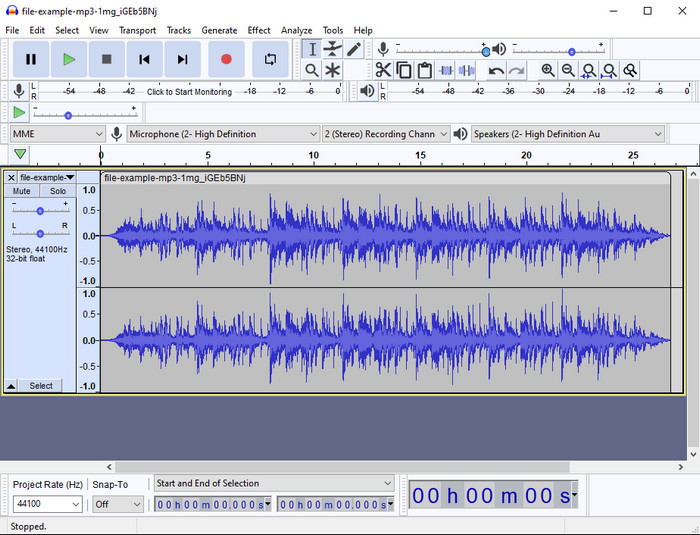
ตลอดหลายปีที่ผ่านมา Audacity มอบฟีเจอร์การตัดต่อเสียงระดับมืออาชีพให้ผู้ใช้ โปรแกรมนี้ดาวน์โหลดได้ฟรี และยังให้ผู้ใช้สามารถมิกซ์หลายแทร็กพร้อมกันได้อีกด้วย เป็นเครื่องมือที่รู้จักกันดีในหมู่ผู้ทำพอดแคสต์ ใช้ตัดต่อและบันทึกพอดแคสต์ได้อย่างสะดวก อย่างไรก็ตาม ฟีเจอร์บางอย่างค่อนข้างเข้าใจยาก โดยเฉพาะหากคุณไม่คุ้นเคยกับการใช้ซอฟต์แวร์เฉพาะทางประเภทนี้.
แม้ว่าคุณจะยังสามารถเรียนรู้วิธีใช้งานมันได้ แต่ต้องใช้เวลาในการใช้ศักยภาพของเครื่องตัดเสียง MP3 นี้อย่างเต็มที่ และสำหรับการตัดเสียง พูดได้เลยว่ามันตัดได้ทันทีและง่ายดายหากคุณต้องการ
ข้อดี
- ดาวน์โหลดฟรีในทุกโปรแกรมเช่น Windows และ Mac
- โปรแกรมแก้ไขเสียงขั้นสูงและเป็นมืออาชีพพร้อมให้เสียงของคุณยอดเยี่ยม
- เหมาะที่สุดสำหรับการบันทึกพอดแคสต์และอื่นๆ
จุดด้อย
- คู่แข่งหลายรายมี UI ที่ใช้งานง่าย
- ไม่ใช่ตัวเลือกที่ดีที่สุดสำหรับผู้เริ่มต้นเพื่อผลลัพธ์ในการตัดและการแก้ไขอื่นๆ ในทันที
- รายงานบางฉบับระบุว่าข้อมูลของคุณจะถูกเก็บรวบรวมหากคุณใช้เครื่องมือนี้ แต่ยังไม่มีหลักฐานที่แน่ชัด
ส่วนที่ 2 3 เครื่องตัด MP3 ออนไลน์ที่เข้าถึงได้บนเว็บ
1. mp3cut.net
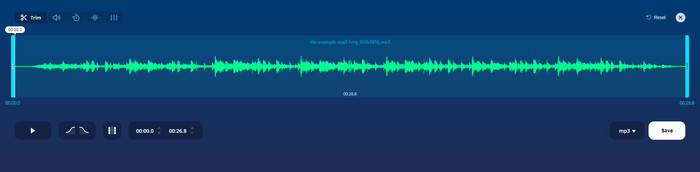
คุณอาจใช้ mp3cut.net หากคุณต้องการเครื่องตัด MP3 ออนไลน์สำหรับงาน หลังจากอัปโหลดไฟล์ในเครื่องตัดออนไลน์นี้แล้ว ตอนนี้คุณสามารถลบเสียงที่คุณต้องการวาดบนไฟล์เสียงของคุณได้ นอกจากนี้ เครื่องมือนี้ยังมีคุณสมบัติการแก้ไขเล็กน้อยเพื่อเปลี่ยนความเร็วและระดับเสียงของเสียง หากคุณต้องการ
แม้ว่าจะมีความสามารถประเภทนี้ แต่เครื่องมือนี้ขัดข้องเกือบตลอดเวลาและไม่สามารถเล่นเสียงเพื่อฟังได้หากคุณตัดเสียงอย่างถูกต้อง ดังนั้น หากต้องการใช้งานอีกครั้ง คุณจะต้องรีเฟรชเบราว์เซอร์และทำซ้ำการปรับที่คุณทำทั้งหมดอีกครั้ง
ข้อดี
- ใช้งานง่ายและเข้าถึงได้ผ่านอินเทอร์เน็ต
- ตรงประเด็น คุณสมบัติที่จะช่วยคุณตัดเสียง
- มีคุณลักษณะการแก้ไขพื้นฐาน
จุดด้อย
- มีโฆษณาบนเว็บอินเตอร์เฟส
- บางครั้งเกิดปัญหาและต้องโหลดใหม่อีกครั้งเพื่อใช้งาน
2. audiotrimmer.com
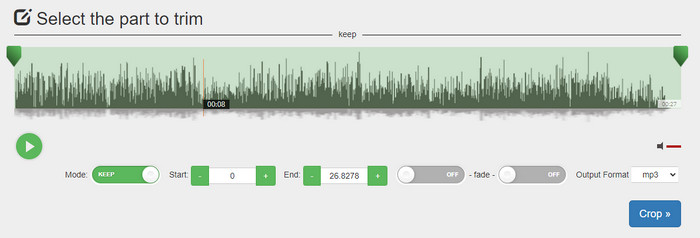
อีกหนึ่งเว็บตัด MP3 ฟรีออนไลน์ก็คือ audiotrimmer.com. เครื่องมือนี้มีฟีเจอร์ตัดเสียงที่เข้าใจง่ายและตรงไปตรงมา ทุกฟังก์ชันใช้งานได้ชัดเจน คุณสามารถเลือกได้ว่าจะเก็บช่วงเสียงนั้นไว้หรือจะตัดออก นอกจากนี้ยังมีเอฟเฟกต์เฟดเข้าและเฟดออกเช่นเดียวกับตัวตัดเสียงอื่น ๆ ที่กล่าวถึง อย่างไรก็ตาม ตอนที่เราลองใช้ฟังก์ชันเฟดเข้าและเฟดออก กลับไม่มีเอฟเฟกต์ถูกเพิ่มลงในไฟล์เสียงของเราเลย แต่ถ้าคุณต้องการแค่ตัดเสียงแบบง่าย ๆ เว็บนี้ก็เป็นตัวเลือกที่ควรลองใช้อย่างยิ่ง.
ข้อดี
- ฟรีและเข้าถึงได้ในทุกเบราว์เซอร์
- ง่ายต่อการใช้ตัดแต่งเสียง
- มีเอฟเฟคเฟดอินและเอาท์
จุดด้อย
- Fade-in และ Out ทำงานได้ไม่ดี
- มีโฆษณาที่น่ารำคาญมากมายหากคุณเข้าถึง ดังนั้นโปรดระวังอย่าคลิกมัน
3. คลิดิโอ

หนึ่งในตัวตัดและต่อไฟล์ MP3 ออนไลน์ที่ดีที่สุดที่คุณสามารถใช้ได้คือ Clideo ผู้ใช้ส่วนใหญ่ชื่นชอบและนิยมใช้เครื่องมือนี้เพราะความสามารถด้านการตัดต่อเสียงที่ดี นอกจากนี้คุณยังสามารถเพิ่มเอฟเฟกต์เฟดเข้าและเฟดออกให้ไฟล์เสียงได้หากต้องการ แต่หลังจากส่งออกไฟล์และลองฟังดูแล้ว กลับไม่พบว่ามีเอฟเฟกต์เฟดเข้าและเฟดออกถูกเพิ่มลงในไฟล์เสียงของเรา เราพบปัญหาเล็กน้อยเกี่ยวกับการอัปโหลดและดาวน์โหลดไฟล์ด้วย ต่างจากเครื่องมือแรกที่กล่าวถึง การอัปโหลดไฟล์เสียงเพื่อใช้เครื่องมือตัดของ Clideo ใช้เวลานาน และบางครั้งเราก็อัปโหลดไฟล์เสียงไม่สำเร็จด้วยเหตุผลที่ไม่ทราบแน่ชัด.
แม้ว่าเราจะประสบปัญหาบางอย่าง แต่ก็ยังเป็นเครื่องตัดออนไลน์ที่ดีที่สุด และปลอดภัยในการใช้งาน
ข้อดี
- เครื่องตัดออนไลน์ที่ดีที่สุด
- ส่วนต่อประสานผู้ใช้ระดับมืออาชีพ
- ง่ายต่อการใช้.
จุดด้อย
- กระบวนการอัปโหลดและดาวน์โหลดจะใช้เวลามากเกินไป
- เฟดเข้าแล้วออกแต่ไม่ค่อยดี
ส่วนที่ 3 คำถามที่พบบ่อยเกี่ยวกับเครื่องตัด MP3
ทริมเมอร์ MP3 ที่ดีที่สุดบน Mac คืออะไร
FVC Video Converter Ultimate มีให้ใช้งานบน Mac เช่นกัน ดังนั้นหากคุณต้องการตัดเสียงบน Mac ก็ควรดาวน์โหลดเครื่องมือระดับสุดยอดนี้มาใช้จัดการไฟล์เสียงของคุณ เครื่องมือนี้ไม่ได้เด่นแค่เรื่องการตัดเสียงเท่านั้น แต่ยังช่วยเพิ่มคุณภาพเสียงได้ด้วยการบูสต์เสียง อีกทั้งหากคุณต้องการแปลงไฟล์ รวมไฟล์ ซิงก์เสียง ฯลฯ เครื่องมือนี้ก็พร้อมช่วยเหลือ หากต้องการรู้รายละเอียดเกี่ยวกับเครื่องมือนี้มากกว่านี้ คุณควรย้อนกลับไปอ่านข้อมูลที่นำเสนอไว้ด้านบน.
การตัดแต่งเสียงทำให้ขนาดลดลงหรือไม่?
ขนาดไฟล์ของเสียงจะลดลงหลังจากที่คุณตัดต่อ ขณะที่เราเปรียบเทียบไฟล์เสียงต้นฉบับกับไฟล์ที่ตัด เราพบว่าระดับความสูงมีการเปลี่ยนแปลง ซึ่งหมายความว่ายิ่งไฟล์เสียงสั้นเท่าไหร่ ขนาดของไฟล์ก็จะยิ่งเล็กลง แต่ถ้าไฟล์เสียงของคุณยาวมาก ให้คาดหวังว่าขนาดไฟล์นั้นก็จะมีนัยสำคัญเช่นกัน
ฉันสามารถใช้ Audacity เพื่อรวมไฟล์เสียงหลายไฟล์เข้าด้วยกันได้หรือไม่
ได้ คุณสามารถทำได้ Audacity รองรับการรวมหลายแทร็กเสียงให้เป็นไฟล์เดียว อย่างไรก็ตาม การใช้งานค่อนข้างยาก โดยเฉพาะหากคุณไม่มีคู่มือหรือบทเรียนให้ทำตาม ดังนั้นหากคุณต้องการรวมเสียงด้วย Audacity คุณสามารถคลิกลิงก์นี้ link แล้วทำตามคำแนะนำได้.
สรุป
เครื่องมือตัด MP3 ที่นำเสนอที่นี่ทุกตัวผ่านมาตรฐานที่เราได้ตั้งไว้ เพื่อให้คุณได้รับเฉพาะตัวตัดเสียงที่ดีที่สุด บทความนี้แสดงให้เห็นว่า การเลือกเครื่องมือตัดเสียงที่ถูกต้องและเหมาะกับความต้องการของคุณนั้นสำคัญเพียงใด แม้ตัวตัดเสียงเหล่านี้จะมีหน้าที่คล้ายกัน แต่ FVC Video Converter Ultimate ก็ให้ประสิทธิภาพในการตัดเสียงที่ดีกว่ามาก จากการวิจัยของเรา เครื่องมือนี้ผ่านเกณฑ์มาตรฐานทุกข้อที่เรากำหนด ดังนั้นหากคุณต้องการมีเครื่องมือตัดเสียงชั้นยอดไว้ใช้งาน นี่คือทางเลือกที่ดีที่สุดในบรรดาตัวเลือกมากมายบนท้องตลาด ดีเกินกว่าจะเชื่อหรือไม่? ถ้าอย่างนั้นคุณควรดาวน์โหลดไปลองใช้งานด้วยตัวเองจะดีกว่า.
-
 วิธีตัดและรวมเพลงออนไลน์ – 4 วิธีที่ดีที่สุดที่คุณควรรู้
 เมื่อคุณต้องการตัดและรวมเพลงออนไลน์เพื่อสร้างผลงานเพลง คุณสามารถเรียนรู้เพิ่มเติมเกี่ยวกับเครื่องมือออนไลน์ที่ดีที่สุด 4 อย่างในการตัดเพลงและรวมไฟล์จากบทความ
-
 ค้นพบเครื่องตัด MP4 ที่ดีที่สุดพร้อมขั้นตอนและข้อมูล
 คุณต้องการเรียนรู้วิธีตัดวิดีโอเช่น vloggers ที่คุณดูหรือไม่? จากนั้นอ่านโพสต์นี้ต่อไปเพื่อดูว่าคุณใช้เครื่องตัดหญ้า MP4 แบบใดได้บ้าง
-
 ดาวน์โหลดเครื่องเล่น MP3 – 10 เครื่องเล่นเพลง MP3 ฟรีที่ดีที่สุดในปี 2025
 เครื่องเล่นเพลง MP3 ที่ดีที่สุดคืออะไร? ฉันจะใส่เพลงลงในเครื่องเล่น MP3 ได้อย่างไร? จะดาวน์โหลดเครื่องเล่นเพลง MP3 ได้อย่างไร? โพสต์นี้ให้รายละเอียดเกี่ยวกับเครื่องเล่น MP3 ฟรีที่ดีที่สุด 10 รายการสำหรับ Windows PC และ Mac
