


 Video Converter Ultimate
 บันทึกหน้าจอ
 ซ่อมวิดีโอ
วิธีแก้ไขแท็ก MP3 ด้วยโปรแกรมแก้ไขแท็ก MP3 ที่ดีที่สุด [ง่าย & มีประสิทธิภาพ]
เมื่อต้องเผชิญกับงานอย่างการแก้ไขแท็ก MP3 คุณอาจจะแก้ไขข้อมูลเพลงได้ง่าย ๆ ด้วยโปรแกรมแก้ไขแท็กเพลงที่มาพร้อมกับเครื่อง แต่ก็ยังมีข้อจำกัดในสิ่งที่ทำได้เช่นกัน เช่นเดียวกับเวลาที่ต้องจัดการไฟล์ MP3 หรือไฟล์เสียงหลายไฟล์ การเลือกใช้เครื่องมือที่ติดมากับระบบอาจไม่ใช่ตัวเลือกที่ดีที่สุด ในกรณีแบบนี้ เราจำเป็นต้องใช้โปรแกรมแก้ไขแท็กเสียงโดยเฉพาะที่คุณสามารถดาวน์โหลดหรือใช้ผ่านเว็บเพื่อแก้ปัญหานี้ เพื่อประหยัดเวลาการค้นหาบนอินเทอร์เน็ตและทำให้วันของคุณมีประสิทธิภาพมากขึ้น ด้านล่างคือเครื่องมือเด่นที่คุณไว้ใจได้ ซึ่งเป็นตัวเลือก โปรแกรมแก้ไขแท็ก MP3 ที่มีอยู่ในท้องตลาดตอนนี้.

ส่วนที่ 1 ตัวแก้ไขแท็ก MP3 ที่ดีที่สุดในการแก้ไขแท็ก MP3 ง่ายและไม่ยุ่งยาก [แนะนำเป็นอย่างยิ่ง]
Video Converter Ultimate เป็นโปรแกรมแก้ไขข้อมูลเมตาของ MP3 แบบอเนกประสงค์ที่คุณสามารถดาวน์โหลดได้บน Windows หรือ Mac เครื่องมือนี้สามารถจัดการปัญหานี้ได้โดยที่ผู้ใช้ไม่ต้องออกแรงมากนัก มีประสิทธิภาพใช่ไหมล่ะ นั่นคือสิ่งที่คุณจะได้รับหากคุณใช้โปรแกรมแก้ไขแท็กที่ดีที่สุดในตลาด ด้วยเครื่องมือนี้ คุณสามารถอัปโหลดไฟล์เสียงและวิดีโอหลายรูปแบบ แล้วเปลี่ยนข้อมูลเมตาของไฟล์ตามที่คุณต้องการได้.
เครื่องมือนี้แตกต่างจากเครื่องมือแก้ไขแท็กอื่นๆ ที่คุณสามารถดาวน์โหลดหรือใช้บนเว็บ เครื่องมือนี้สามารถจัดการกับปัญหาต่างๆ กับวิดีโอและเสียงของคุณได้ คุณมีปัญหาเพราะเสียงเบาไปหน่อย ซิงค์กับวิดีโอ เสียงและวิดีโอคุณภาพต่ำ หรือรูปแบบที่ไม่สามารถเล่นได้ น่าประหลาดใจที่ปัญหาทั้งหมดได้รับการแก้ไขด้วยความช่วยเหลือจากเครื่องมือแบบครบวงจรนี้ คุณต้องการทราบวิธีใช้ตัวแก้ไขแท็ก MP3 ที่ดีที่สุดหรือไม่? หากเป็นเช่นนั้น ให้ทำตามขั้นตอนด้านล่างเพื่อให้ประสบความสำเร็จภายในเวลาไม่กี่นาที
- 1. เป็นเครื่องมือแก้ไขข้อมูลเมตาที่น่าเชื่อถือที่สุดที่คุณสามารถใช้ได้ ซึ่งพิสูจน์แล้วว่าคุ้มค่ากับผู้ใช้นับล้าน + ทั่วโลก
- 2. มีคุณลักษณะขั้นสูงหลายอย่างที่คุณสามารถพบได้บน Toolbox เช่น การเร่งความเร็วของวิดีโอ การย้อนกลับ การปรับปรุง การแก้ไขสี และอื่นๆ อีกมากมาย
- 3. เป็นตัวเลือกที่สมบูรณ์แบบสำหรับผู้เริ่มต้นและผู้เชี่ยวชาญเกี่ยวกับงานดังกล่าว
- 4. ทำงานได้ทั้งบนระบบปฏิบัติการ Windows และ Mac โดยมีฟังก์ชันและคุณสมบัติขั้นสูงเหมือนกัน
ขั้นตอนที่ 1. คุณสามารถดาวน์โหลดซอฟต์แวร์ได้โดยคลิกปุ่มดาวน์โหลด แล้วกดปุ่มที่ตรงกับระบบของคุณ ทำตามขั้นตอนการติดตั้ง และคลิก Start Now เพื่อเริ่มแก้ไขแท็ก MP3.
ดาวน์โหลดฟรีสำหรับ Windows 7 หรือใหม่กว่าดาวน์โหลดอย่างปลอดภัย
ดาวน์โหลดฟรีสำหรับ MacOS 10.7 หรือใหม่กว่าดาวน์โหลดอย่างปลอดภัย
ขั้นตอนที่ 2. เปิด Toolbox แล้วหา Media Metadata Editor จากรายการฟังก์ชันแก้ไขที่มีอยู่ ไม่ต้องกังวลเพราะฟังก์ชันนี้ติดตั้งมาในโปรแกรมเรียบร้อยแล้ว จึงไม่จำเป็นต้องใช้ทรัพยากรเพิ่มเติม.
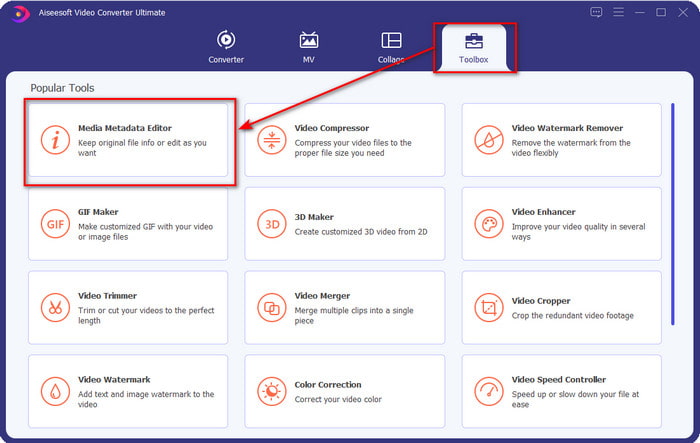
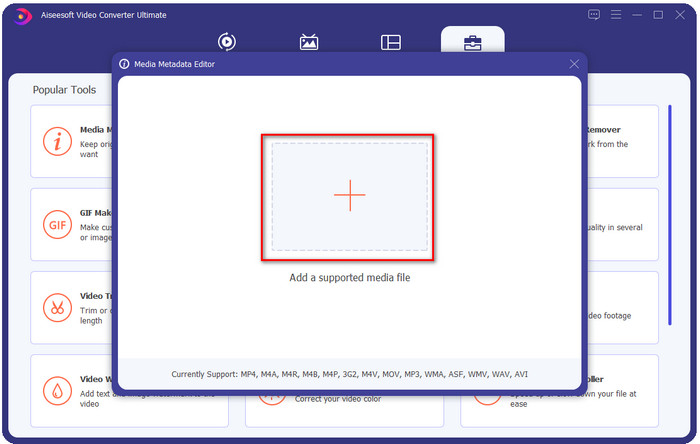
ขั้นตอนที่ 3. คลิก + แล้วหาไฟล์เสียง MP3 ในโฟลเดอร์ที่แสดงบนหน้าจอ เลือกไฟล์แล้วคลิก Open เพื่อดำเนินการต่อ.
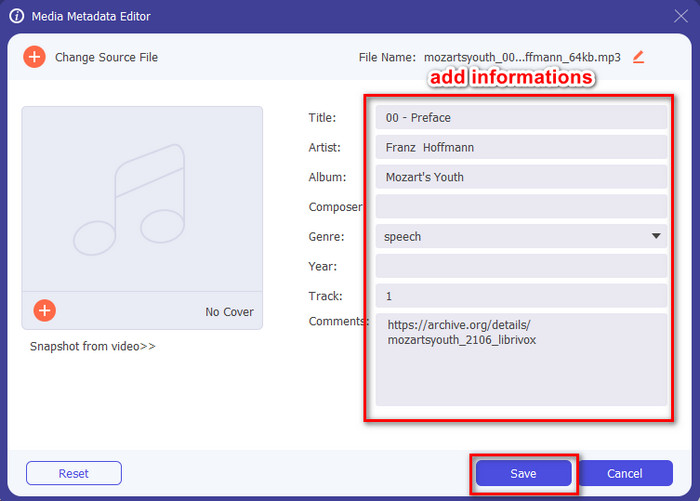
ขั้นตอนที่ 4. จากนั้นเปลี่ยนหรือเอาแท็กไฟล์ออกในส่วนกล่องข้อความ หากคุณพอใจกับแท็กแล้ว ให้คลิก Save ขั้นตอนสุดท้าย โปรแกรมนี้จะไม่สร้างไฟล์ MP3 ซ้ำอีกไฟล์พร้อมข้อมูลเมตา แต่จะใช้ข้อมูลเมตากับไฟล์ต้นฉบับโดยตรง.
ที่เกี่ยวข้อง:
ส่วนที่ 2 ตัวแก้ไขแท็ก MP3 เสริม 4 ตัวที่คุณควรทราบว่ามีให้ใช้งานบน Windows, Mac และ Online
แท็กMP3

TagMP3 เป็นโปรแกรมแก้ไขแท็ก MP3 ออนไลน์ที่เป็นที่รู้จักซึ่งคุณสามารถเข้าใช้ได้ฟรีผ่านเว็บทุกเมื่อ ด้วยเครื่องมือออนไลน์นี้ คุณไม่จำเป็นต้องดาวน์โหลดทรัพยากรเพิ่มเติมเพื่อใช้งานเพราะมันทำงานบนเว็บ นอกจากนี้ยังสามารถตรวจจับ id3v1 และ id3v2 ของไฟล์ MP3 ของคุณ และอัปเดตเป็น id3v2 ได้ในภายหลัง แม้ว่า id3v1 จะล้าสมัยอยู่ แม้ว่าจะมีฟังก์ชันที่ยอดเยี่ยม แต่ผู้ใช้บางรายมองว่าไม่น่าเชื่อถือเพราะมีข่าวลือว่าบางครั้งใส่ข้อมูลที่ไม่เกี่ยวข้องกับไฟล์เสียงเข้าไป อย่างไรก็ตาม ผู้ใช้ส่วนใหญ่ก็พอใจกับความสามารถของเครื่องมือนี้ และถือว่าปลอดภัยและใช้งานง่าย.
ขั้นตอนที่ 1. ค้นหา TagMP3 บนเบราว์เซอร์ของคุณแล้วเปิดเว็บไซต์.
ขั้นตอนที่ 2. อัปโหลดไฟล์ MP# โดยคลิก Choose Now!
ขั้นตอนที่ 3. เพิ่มข้อมูลที่จำเป็น แล้วคลิก Done! Generate New Files.
MetaBliss
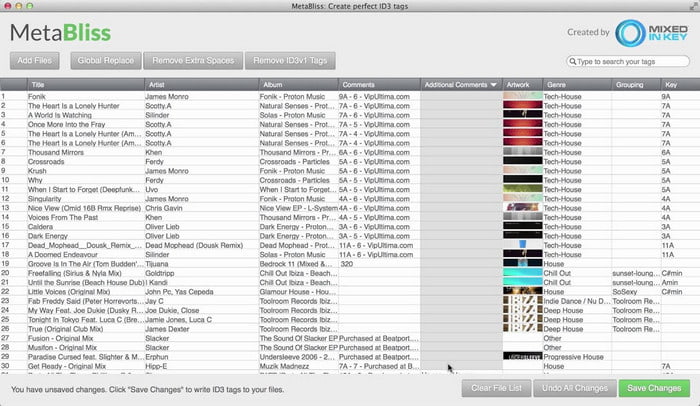
MetaBliss เป็นโปรแกรมแก้ไขแท็ก MP3 แบบตารางสเปรดชีตที่มีให้ใช้บน Mac เครื่องมือนี้สามารถทำงานได้ตลอดไม่ว่าในวันไหน ต่อให้คุณใส่ไฟล์ไว้มากแค่ไหนก็จัดการได้สบาย ๆ ด้วยเครื่องมือนี้ คุณสามารถลบหรือแก้ไขแท็กในไฟล์ MP3 ได้ด้วยการเลือกหลายไฟล์พร้อมกันเพื่อประหยัดเวลา แม้ว่าโปรแกรมจะรองรับการแก้ไขแบบกลุ่ม แต่หน้าตาโปรแกรมค่อนข้างเก่า ซึ่งหมายความว่าอินเทอร์เฟซกราฟิกไม่สวยงามอย่างที่คุณอาจคาดหวัง อย่างไรก็ตาม หากไม่ติดเรื่องหน้าตาคล้ายสเปรดชีต ก็ยังถือว่าใช้งานได้ดี.
ขั้นตอนที่ 1. ดาวน์โหลดโปรแกรมแก้ไขแท็กบน Mac แล้วเปิดโปรแกรม.
ขั้นตอนที่ 2. คลิก Add Files แล้วมองหาไฟล์ MP3.
ขั้นตอนที่ 3. แทนที่ข้อมูลในแต่ละคอลัมน์ แล้วคลิก Save Changes เพื่อบันทึกแท็ก.
MetaTOGGer
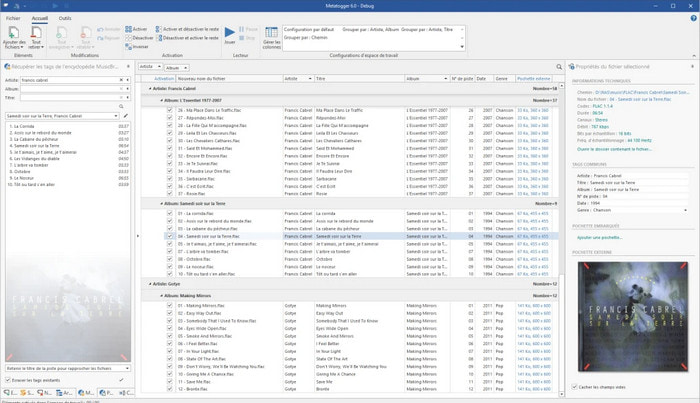
MetaTOGGer เป็นโปรแกรมแก้ไขแท็กไฟล์ Speex, OGG, FLAC และ MP3 บน Windows 10 ด้วยความช่วยเหลือของเครื่องมือนี้ คุณสามารถเพิ่มข้อมูลเมตาโดยอัตโนมัติตามฐานข้อมูลออนไลน์ที่มีอยู่ หรือจะเพิ่มเองด้วยมือก็ได้ หากคุณจะใช้โปรแกรมนี้ ให้คาดหวังอินเทอร์เฟซที่ให้ความรู้สึกคล้ายกับ Microsoft Office ถึงแม้อินเทอร์เฟซจะคุ้นตา แต่การเรียนรู้วิธีใช้ก็ยังต้องใช้เวลา และคุณจำเป็นต้องดาวน์โหลดทรัพยากรเพิ่มเติม นั่นคือ Microsoft .Net 3.5 framework.
ขั้นตอนที่ 1. หลังจากติดตั้งเฟรมเวิร์กแล้ว ขั้นตอนต่อไปคือดาวน์โหลดโปรแกรม.
ขั้นตอนที่ 2. ลากและวางไฟล์ลงในโปรแกรม จากนั้นแก้ไขแท็กที่มีให้ในรายการ.
ขั้นตอนที่ 3. ไปที่เมนู File แล้วคลิก Save.
Kid3
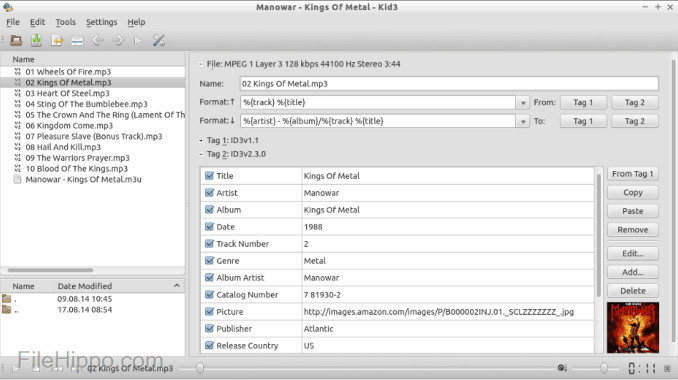
โปรแกรมตัวสุดท้ายในรายชื่อที่จะช่วยคุณแก้ไขข้อมูลเมตา MP3 บน Linux และอุปกรณ์อื่น ๆ คือ Kid3 ด้วยเครื่องมือนี้ คุณสามารถจัดการแท็กของไฟล์มีเดียต่าง ๆ ได้อย่างง่ายดาย เช่นเดียวกับ Metabliss โปรแกรมนี้รองรับการแท็กแบบกลุ่ม หมายความว่าคุณสามารถเพิ่มไฟล์หลายไฟล์พร้อมกันแล้วแก้ไขได้ แม้โปรแกรมนี้จะทำงานด้านนี้ได้ดี แต่ก็ยังมีประสิทธิภาพดีที่สุดบน Linux เมื่อเทียบกับอุปกรณ์อื่นที่รองรับ นอกจากนี้คุณยังต้องผ่านหลายฟังก์ชันก่อนจะแก้ไขหรือจัดการข้อมูลเมตาของไฟล์ได้.
ขั้นตอนที่ 1. ดาวน์โหลดซอฟต์แวร์ลงบนเดสก์ท็อปของคุณ แล้วคลิก Add Files.
ขั้นตอนที่ 2. คลิกไฟล์ MP3 ที่คุณเพิ่มเข้าไป แล้วคลิก Edit เพื่อเปลี่ยนข้อมูลเมตาของไฟล์เสียง.
ขั้นตอนที่ 3. กด Save เพื่อดาวน์โหลดไฟล์ที่มีข้อมูลเมตาเรียบร้อยแล้ว.
ส่วนที่ 3 คำถามที่พบบ่อยเกี่ยวกับ MP3 Metadata Editors
ดาวน์โหลดโปรแกรมแก้ไขข้อมูลเมตา MP3 ปลอดภัยหรือไม่
ตรวจสอบให้แน่ใจว่าเว็บไซต์ที่มาของซอฟต์แวร์นั้นปลอดภัยในการเข้าถึง คุณสามารถตรวจสอบข้อมูลเกี่ยวกับเว็บไซต์นั้นได้โดยคลิกที่ไอคอนแม่กุญแจบนเว็บเบราว์เซอร์ ด้วยวิธีนี้ คุณสามารถตรวจสอบว่าเครือข่ายของคุณปลอดภัยหรือไม่ และข้อมูลอยู่ไกลจากแฮกเกอร์หรือไม่ หากคุณไม่แน่ใจเกี่ยวกับซอฟต์แวร์ คุณต้องออกทันทีและหลีกเลี่ยงการคลิกสิ่งใด ๆ บนเว็บไซต์นั้นเพื่อหลีกเลี่ยงความเสียหายที่ไม่คาดคิดกับอุปกรณ์ของคุณ
จุดประสงค์ของการแก้ไขแท็กใน MP3 คืออะไร?
พูดแบบนี้; หากคุณมีแท็กที่ถูกต้อง คุณไม่จำเป็นต้องกังวลเกี่ยวกับการจัดเรียงไฟล์ในไลบรารีตามแท็กที่ผูกไว้กับไฟล์ MP3 ของคุณ การมีห้องสมุดที่เป็นระเบียบเป็นเหตุผลหนึ่งที่คุณต้องแก้ไขแท็ก อีกประการหนึ่งอาจเป็นข้อมูลเสียงที่ได้รับการอัปเดต ดังนั้นคุณจะต้องอัปเดตและอื่น ๆ อีกมากมาย
เหตุใด MP3 ของฉันจึงไม่มีแท็ก
มีหลายสาเหตุที่ไฟล์เสียงของคุณไม่มีแท็ก หากดาวน์โหลดบนเว็บ คาดว่าผู้เขียนจะลบออกด้วยเหตุผลด้านความเป็นส่วนตัว ด้วยข้อมูลเมตา คุณสามารถใช้ประโยชน์จากข้อมูลเกี่ยวกับตัวคุณเองได้หากคุณเป็นผู้เขียน ดังนั้นการลบออกจึงเป็นตัวเลือกที่ดี แม้ว่าจะยังมีสาเหตุหลายประการ แต่เราจำเป็นต้องมีแท็กเพื่อทำให้ไฟล์ MP3 ของเราเป็นระเบียบ
สรุป
ด้วยตัวแก้ไขแท็ก MP3 ที่ดีที่สุดเหล่านี้ คุณสามารถปรับแท็กในไฟล์ MP3 ของคุณได้อย่างง่ายดายและมีประสิทธิภาพซึ่งตัวแก้ไขอื่นๆ ในตลาดไม่มีให้ นอกจากนี้ ขั้นตอนสำหรับแต่ละเครื่องมือสามารถรับประกันความสำเร็จในการปฏิบัติงานโดยเร็วที่สุด อย่างไรก็ตาม หากเราเปรียบเทียบแต่ละรายการ เราจะเห็นว่าเครื่องมือขั้นสูงสุดมีความน่าเชื่อถือและดีกว่าเครื่องมือในรายการมาก ไม่แนะนำอย่างไม่มีเหตุผล ดังนั้น หากคุณต้องการใช้เครื่องมือ คุณต้องทำตามขั้นตอนตามลำดับ อ่านด้วยความระมัดระวัง และทำงานให้เสร็จภายในพริบตา
-
 ตัวแยกข้อมูลเมตา 5 อันดับแรกที่มีจำหน่ายออนไลน์และออฟไลน์ [2022]
 คุณสามารถหาตัวแยกข้อมูลเมตาได้หลายตัวในตลาด แต่วันนี้ เราเลือกตัวแยกแท็กที่เลือกมากที่สุดเพียงห้าตัวตามผู้ชม
-
 ผู้แก้ไขข้อมูลเมตาวิดีโอ 5 อันดับแรกสำหรับปี 2022 [รีวิวที่เป็นกลาง]
 คุณต้องการดูข้อมูลเมตาของวิดีโอของคุณหรือไม่? หากเป็นเช่นนั้น โปรดอ่านรายละเอียดด้านล่างเพื่อทำความเข้าใจหัวข้อนี้อย่างเต็มที่และทราบว่าเครื่องมือใดเหมาะกับคุณที่สุด
-
 7 เครื่องมือแก้ไขแท็กเพลงยอดนิยมบน Windows, Mac และอุปกรณ์พกพา
 แท็กเพลงเป็นที่นิยมใช้สำหรับการจัดเรียงเพลงในห้องสมุดของคุณตามข้อมูลภายใน จะทำอย่างไรถ้าคุณต้องการเปลี่ยน อ่านรายละเอียดด้านล่างเพื่อทราบข้อมูลเพิ่มเติม
