


 Video Converter Ultimate
 บันทึกหน้าจอ
 ซ่อมวิดีโอ
 ดาวน์โหลดอย่างปลอดภัย
วิธี 4 อันดับแรกในการลบ Emojis ออกจากวิดีโอ
การใช้อีโมจิเป็นเรื่องเพลิดเพลินเวลาแชตคุยกับคนอื่น แต่พอถึงเวลาที่เราจะดูหนังหรือวิดีโอเรื่องโปรด หลายคนอาจรู้สึกว่าการมีอีโมจิทับอยู่บนภาพนั้นชวนหงุดหงิดมาก ดังนั้นเราจะมาแนะนำหนึ่งในวิธีที่มีประสิทธิภาพที่สุดในการกำจัดอีโมจิน่ารำคาญเหล่านี้ออกจากวิดีโอของคุณ แล้วจะรออะไรอยู่ มาลองอ่านบทความนี้ไปพร้อมกันและเรียนรู้วิธีลบอีโมจิออกจากวิดีโอด้วยวิธีที่ง่ายและรวดเร็วที่สุดกันเลย.

ตอนที่ 1: วิธีลบ Emojis ออกจากวิดีโอโดยใช้เครื่องมือที่ดีที่สุด
วิธีที่ดีที่สุดในการลบอีโมจิออกจากวิดีโอคือการใช้ Video Converter Ultimate ซอฟต์แวร์ตัวนี้สามารถลบองค์ประกอบส่วนเกินในวิดีโอของคุณได้ เช่น อีโมจิหรืออีโมติคอน ข้อความ ลายน้ำ โลโก้ และอื่น ๆ อีกทั้งยังมีหน้าตาโปรแกรมที่เข้าใจง่ายและขั้นตอนที่ไม่ซับซ้อน ทำให้สะดวกต่อการใช้งานสำหรับทุกคน เครื่องมือนี้มี 2 วิธีในการลบอีโมจิออกจากวิดีโอของคุณ คือ Video Watermark Remover และ Video Cropper Tool นอกจากนี้ยังรองรับรูปแบบไฟล์วิดีโอต่าง ๆ เช่น MP4, M4V, MOV, SWF, FLV, 3GP, MTS และอื่น ๆ หากคุณใช้ Windows หรือ Mac ก็สามารถใช้เครื่องมือนี้ได้ เพราะ Video Converter Ultimate รองรับทั้งบน Windows และ Mac.
นอกจากนี้ คุณสามารถสร้าง GIF จากรูปภาพและวิดีโอของคุณโดยใช้เครื่องมือนี้ เนื่องจากมีคุณสมบัติ GIF Maker นอกจากนี้ หากคุณต้องการซิงค์เสียงจากวิดีโอของคุณ ก็สามารถทำได้ด้วยเครื่องมือนี้ มีคุณสมบัติการซิงค์เสียงที่ให้คุณปรับและซิงค์เสียงกับวิดีโอ
มาแสดงวิธีที่ดีที่สุดในการลบอิโมจิที่น่ารำคาญออกจากวิดีโอของคุณโดยใช้เครื่องมือลบลายน้ำวิดีโอ
ขั้นตอนที่ 1: ดาวน์โหลด Video Converter Ultimate บน Windows หรือ Mac ของคุณ สามารถคลิกปุ่ม Download ด้านล่าง จากนั้นเปิดโปรแกรมหลังติดตั้งเสร็จ.
ดาวน์โหลดฟรีสำหรับ Windows 7 หรือใหม่กว่าดาวน์โหลดอย่างปลอดภัย
ดาวน์โหลดฟรีสำหรับ MacOS 10.7 หรือใหม่กว่าดาวน์โหลดอย่างปลอดภัย
ขั้นตอนที่ 2: เมื่อหน้าโปรแกรมปรากฏขึ้น คุณจะเห็นตัวเลือก 4 แบบที่ด้านบน ให้เลือกแท็บ Toolbox แล้วคลิก Video Watermark Remover.
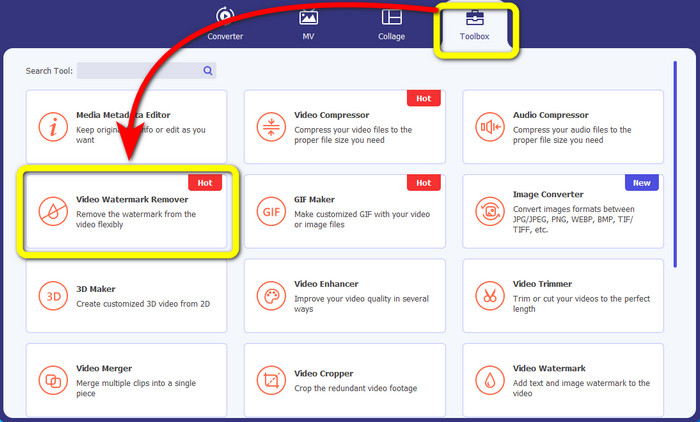
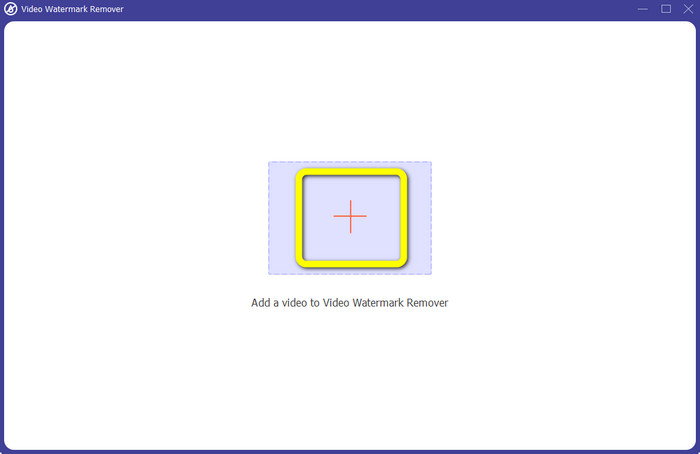
ขั้นตอนที่ 3: จากนั้นคลิกไอคอนเครื่องหมาย + เพื่อเพิ่มวิดีโอที่มีอีโมจิซึ่งคุณต้องการลบ.
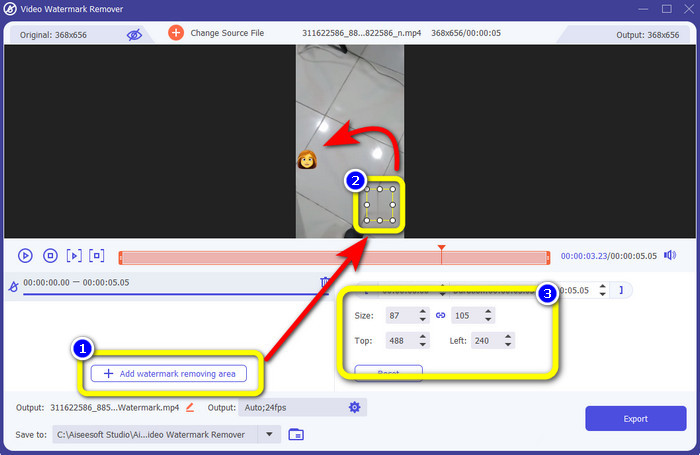
ขั้นตอนที่ 4: หลังจากเพิ่มวิดีโอแล้ว ให้คลิกปุ่ม Add Watermark Removing Area จะมีกล่องเล็ก ๆ ปรากฏบนวิดีโอของคุณ ให้ใช้กล่องนี้วางทับบนอีโมจิ ในช่องที่สาม คุณสามารถใช้ตัวเลือก Size, Top และ Left เพื่อปรับตำแหน่งกล่องบนหน้าจอได้.
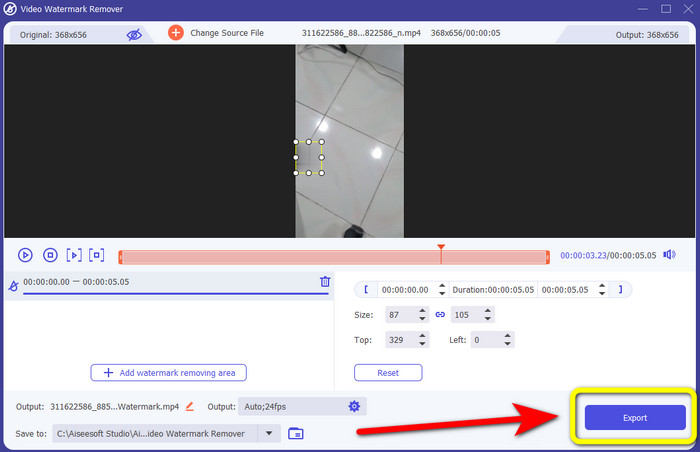
ขั้นตอนที่ 5: เมื่อวางกล่องทับอีโมจิเรียบร้อยแล้ว ให้กดปุ่ม Export รอให้ระบบประมวลผลลบอีโมจิ แล้วบันทึกไฟล์ที่เสร็จสมบูรณ์.
ตอนที่ 2: วิธีออนไลน์ในการลบอิโมจิออกจากวิดีโอ
ใช้ Media.io
หากคุณสนใจตัวลบอีโมจิแบบออนไลน์ คุณสามารถลองใช้ Media.io เครื่องมือออนไลน์ตัวนี้สามารถลบองค์ประกอบที่รบกวนสายตาออกจากวิดีโอได้ เช่น อีโมจิ ลายน้ำ โลโก้ และอื่น ๆ ไม่จำเป็นต้องมีประสบการณ์มาก่อน เพราะมีเพียงไม่กี่ขั้นตอนในการลบอีโมจิออกจากวิดีโอ นอกจากนี้ แอปพลิเคชันนี้ยังเป็นเครื่องมือแบบข้ามแพลตฟอร์ม คุณจึงใช้งานได้ทั้งบน iPhone, Android, iPad, Windows และ Mac และยังรองรับไฟล์วิดีโอยอดนิยมอย่าง WMV, MOV, MP4, FLV, 3GP, AVI และอื่น ๆ อีกทั้งยังรับประกันความเป็นส่วนตัว เพราะมีเพียงคุณเท่านั้นที่เข้าถึงวิดีโอที่อัปโหลดได้.
อย่างไรก็ตาม Media.io สามารถเสนอคุณสมบัติที่จำกัดเมื่อใช้เวอร์ชันฟรีเท่านั้น คุณสามารถอัปโหลดไฟล์ที่มีขนาดสูงสุด 100Mb เท่านั้น และกระบวนการลบเป็นเรื่องปกติ คุณต้องซื้อรุ่นพื้นฐานหรือรุ่นโปรเพื่อรับประสบการณ์คุณสมบัติเพิ่มเติมจากแอปพลิเคชันออนไลน์นี้ ทำตามขั้นตอนด้านล่างเพื่อลบอีโมจิออกจากวิดีโอของคุณ
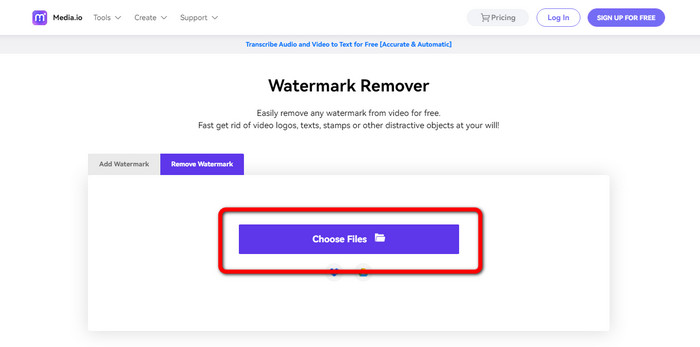
ขั้นตอนที่ 1: เข้าไปที่เว็บไซต์ Media.io คลิกปุ่ม Choose Files แล้วเพิ่มวิดีโอที่มีอีโมจิของคุณ.
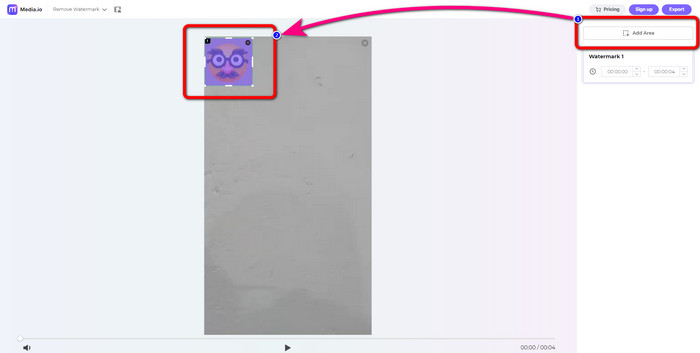
ขั้นตอนที่ 2: หลังจากอัปโหลดวิดีโอแล้ว คลิกปุ่ม Add Area จะมีกล่องสีน้ำเงินปรากฏขึ้น ลากกล่องนั้นไปวางทับบนอีโมจิ.
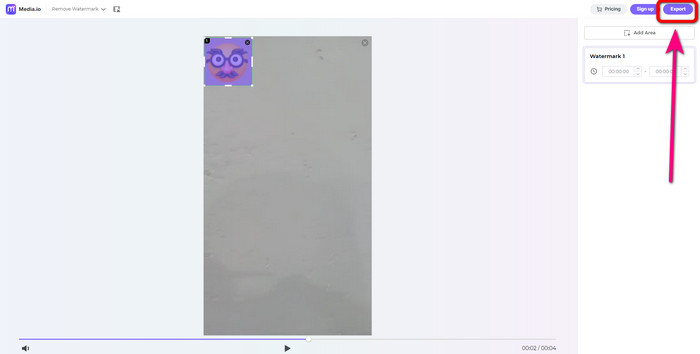
ขั้นตอนที่ 3: ขั้นตอนสุดท้าย ให้คลิกปุ่ม Export แล้วบันทึกวิดีโอของคุณในแบบที่ไม่มีอีโมจิ.
ใช้ 123Apps
เครื่องมือลบอีโมจิออนไลน์อีกตัวที่คุณสามารถใช้ได้คือ 123Apps ด้วยคำแนะนำของเครื่องมือนี้ คุณสามารถลบองค์ประกอบรบกวนใดๆ ออกจากวิดีโอของคุณได้อย่างง่ายดาย เช่น อีโมจิ สติ๊กเกอร์ โลโก้ ลายน้ำ ตราประทับวันที่ และอื่นๆ นอกจากนี้ คุณสามารถใช้มันได้อย่างง่ายดายเพราะมีอินเทอร์เฟซที่ใช้งานง่ายซึ่งเหมาะสำหรับผู้เริ่มต้น นอกจากนั้น ยังรองรับไฟล์วิดีโอหลายรูปแบบ เช่น MOV, AVI, MP4, WMV เป็นต้น นอกจากการลบอิโมจิและวัตถุออกจากวิดีโอแล้ว คุณยังสามารถใช้ 123Apps สำหรับการตัดต่อวิดีโอได้อีกด้วย มันมีเครื่องมือต่าง ๆ ที่คุณสามารถใช้ได้ เช่น ตัวตัดวิดีโอ ตัวหมุน ตัวทริมเมอร์ ตัววนลูป ตัวผสานและอื่น ๆ
แต่ก็มีข้อจำกัด คุณสามารถอัปโหลดด้วยขนาดไฟล์สูงสุด 500Mb เท่านั้น หากต้องการทำงานกับไฟล์ขนาดใหญ่ขึ้น คุณต้องซื้อการสมัครสมาชิก สุดท้าย มีบางครั้งที่เครื่องมือนี้ทำงานได้ไม่ดีเนื่องจากการเชื่อมต่ออินเทอร์เน็ต หากคุณต้องการลบอีโมจิออกจากวิดีโอของคุณ ให้ลองทำตามขั้นตอนง่ายๆ ด้านล่างนี้
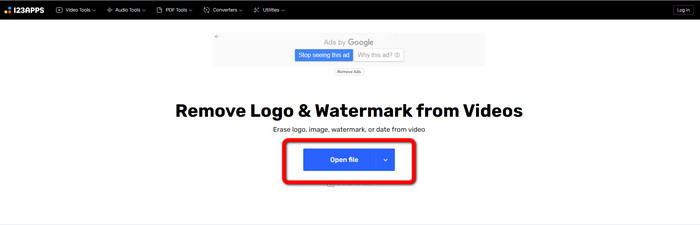
ขั้นตอนที่ 1: ไปที่เว็บไซต์ 123APPS แล้วคลิกปุ่ม Open File เพื่ออัปโหลดวิดีโอที่มีอีโมจิ.
ขั้นตอนที่ 2: ใช้เมาส์เลือกพื้นที่ที่คุณต้องการลบออก.
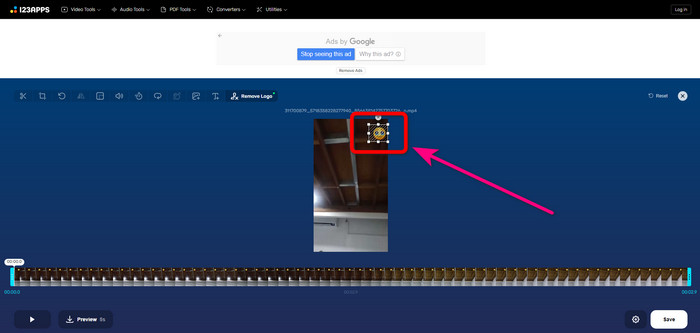
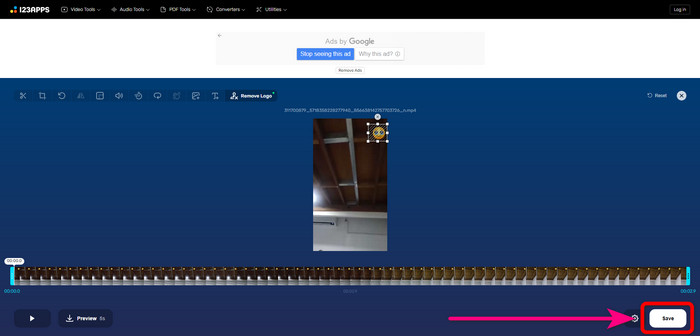
ขั้นตอนที่ 3: สุดท้ายให้กดปุ่ม Save รอให้ประมวลผลการลบ แล้วบันทึกวิดีโอลงในอุปกรณ์ของคุณ.
HitPaw Watermark Remover ออนไลน์
อีกหนึ่งเครื่องมือที่มีประโยชน์ในการลบอีโมจิออกจากวิดีโอคือ HitPaw Watermark Remover Online เครื่องมือนี้มีทั้งแบบดาวน์โหลดและแบบออนไลน์ คุณจึงเลือกได้ว่าจะใช้ผ่านเว็บหรือบนเดสก์ท็อป มันช่วยให้คุณลบสิ่งต่าง ๆ เช่น ลายน้ำบนวิดีโอ ได้ภายในไม่กี่วินาที และยังใช้งานได้ไม่จำกัดครั้ง อีกทั้งไม่ต้องมีความรู้ด้านเทคนิคระดับมืออาชีพ เพราะมีเพียง 3 ขั้นตอนพื้นฐานในการลบวัตถุที่น่ารำคาญออกจากวิดีโอของคุณ.
นอกจากนี้ยังมีความปลอดภัยระดับสูง ซึ่งหมายความว่าไฟล์ของคุณปลอดภัย และมีเพียงคุณเท่านั้นที่สามารถแก้ไขวิดีโอของคุณได้ อย่างไรก็ตาม เมื่อใช้เครื่องมือออนไลน์นี้ คุณต้องคำนึงถึงการเชื่อมต่ออินเทอร์เน็ต มันจะทำงานได้ไม่ดีถ้าคุณมีอินเทอร์เน็ตที่ช้า นอกจากนี้ บางครั้งก็เข้ากันไม่ได้กับอุปกรณ์อื่นๆ เช่น Android ทำตามขั้นตอนด้านล่างเพื่อลบอีโมจิออกจากวิดีโอ
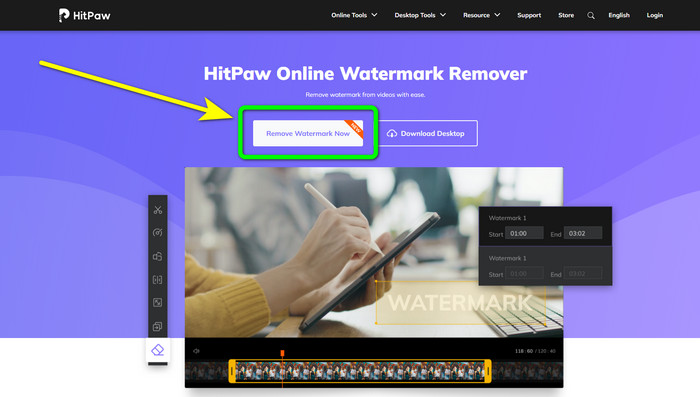
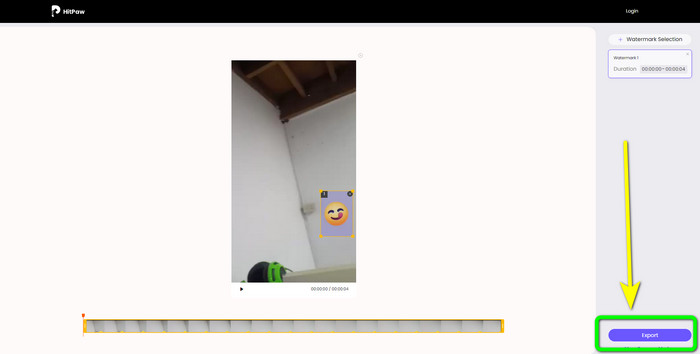
ขั้นตอนที่ 1: ไปที่เว็บไซต์ HitPaw Online Watermark Remover คลิกปุ่ม Remove Watermark Now > Choose File เพื่อใส่วิดีโอของคุณ.
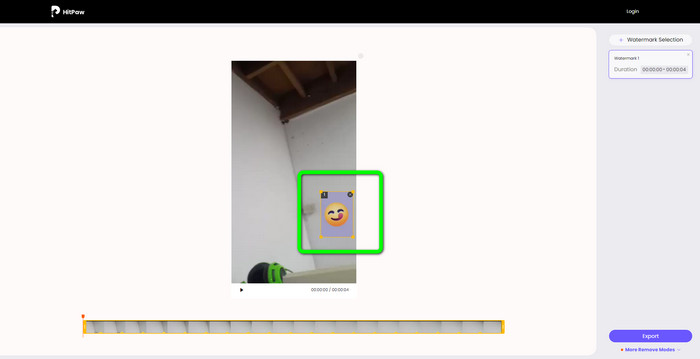
ขั้นตอนที่ 2: หลังจากใส่วิดีโอแล้ว คุณจะสามารถใช้กล่องสีน้ำเงินบนวิดีโอได้ทันที ให้ลากกล่องนี้ไปวางทับบนอีโมจิ.
ขั้นตอนที่ 3: สุดท้ายคลิกปุ่ม Export แล้วบันทึกวิดีโอของคุณ.
ส่วนที่ 3: คำถามที่พบบ่อยเกี่ยวกับการลบอิโมจิออกจากวิดีโอ
1. ฉันสามารถลบอิโมจิออกจากวิดีโอโดยใช้ Android และ iPhone ได้หรือไม่
ใช่คุณสามารถ. คุณสามารถใช้ Watermark Remover, Logo Eraser, PicLab, Photo Eraser และอื่นๆ นี่เป็นแอปพลิเคชั่นที่ดีที่คุณสามารถใช้เพื่อลบองค์ประกอบที่ไม่จำเป็นออกจากวิดีโอของคุณ
2. ฉันจะลบวัตถุออกจากวิดีโอได้อย่างไร
คุณสามารถใช้ Video Converter Ultimate นี่เป็นเครื่องมือที่เป็นประโยชน์ในการลบวัตถุออกจากวิดีโอของคุณ
3. ทำไมฉันจึงควรลบอีโมจิออกจากวิดีโอของฉัน
เหตุผลง่ายๆ คือ เพื่อให้คุณเพลิดเพลินกับการชมภาพยนตร์หรือวิดีโอที่คุณชื่นชอบ การเห็นองค์ประกอบที่ไม่จำเป็นเหล่านี้เช่นอิโมจิไม่ใช่เรื่องน่ายินดีนัก ดังนั้นจึงเป็นการดีกว่าที่จะลบออกจากวิดีโอของคุณ
สรุป
นี่คือ 4 วิธีเด่น ๆ ในการลบอีโมจิออกจากวิดีโอ และหากคุณต้องการวิธีที่ใช้งานง่ายไม่ยุ่งยาก แนะนำให้ลองใช้ Video Converter Ultimate แอปพลิเคชันนี้จะช่วยคุณลบวัตถุน่ารำคาญออกจากวิดีโอได้อย่างง่ายดาย.
-
 วิธีที่เร็วที่สุดในการลบโลโก้ออกจากวิดีโอใน Adobe Premiere Pro
 ลองวิธีที่ง่ายและรวดเร็วที่สุดในการลบโลโก้ออกจากวิดีโอใน Adobe Premiere Pro บทความนี้จะนำเสนอวิธีที่ดีที่สุดในการลองใช้อุปกรณ์ของคุณ
-
 วิธีลบโลโก้ออกจากวิดีโอโดยใช้ Windows Movie Maker
 หากคุณต้องการเรียนรู้เกี่ยวกับการลบโลโก้ออกจากวิดีโอโดยใช้ Windows Movie Maker และวิธีอื่นๆ โปรดอ่านบทความนี้ เรามีวิธีง่ายๆ ให้คุณ
-
 วิธีที่ยอดเยี่ยมในการลบสติกเกอร์ออกจากรูปภาพและวิดีโอ
 คุณต้องการเอาสติกเกอร์ออกจากวิดีโอและรูปภาพอย่างง่ายดายหรือไม่? ต่อไปนี้คือวิธีที่มีประสิทธิภาพ รวมถึงวิธีที่ง่ายที่สุดและน่าเชื่อถือที่สุดที่คุณสามารถลองได้
