


 Video Converter Ultimate
 บันทึกหน้าจอ
 ซ่อมวิดีโอ
 ดาวน์โหลดอย่างปลอดภัย
วิธีกำจัดลายน้ำ Power Director ฟรี [100% Working]
For choosing a full-featured video editor and maker, you can’t go wrong with choosing the Power Director on your device. Expect that you will get a fantastic result once you use it for editing your video for presentations, vlogs, tutorials, demos, and more. Also, you should know that it adds a watermark on the edited videos if you are currently using the free version. Some users became frustrated with the watermark being applied to the video they worked hard. Instead of being frustrated, why don’t you try reading this article? Let’s learn how to get rid of the Power Director watermark for free to solve the problem once and for all.

ส่วนที่ 1 วิธีกำจัดลายน้ำของ Power Director ฟรีด้วยโซลูชั่นยอดนิยมในตลาด
FVC Video Converter Ultimate
FVC Video Converter Ultimate เวอร์ชันอัปเดตมีโปรแกรมลบลายน้ำวิดีโอ ซึ่งคุณสามารถใช้เพื่อให้มีวิดีโอบน PowerDirector สำหรับพีซีโดยไม่มีลายน้ำ เครื่องมือนี้กลายเป็นเครื่องมือที่สมบูรณ์ที่สามารถทำงานได้อเนกประสงค์พร้อมๆ กัน และทำอย่างมืออาชีพด้วยการประมวลผลที่รวดเร็ว สิ่งที่ทำให้เราประหลาดใจกับเครื่องมือนี้คือความง่ายในการใช้งาน หากคุณใช้สิ่งนี้ คุณไม่จำเป็นต้องเป็นมืออาชีพในการลบลายน้ำบนวิดีโอของคุณ สำหรับผู้ใช้ที่กำลังมองหาโปรแกรมลบลายน้ำที่ดีที่สุด คุณจะไม่ผิดหวังกับการดาวน์โหลดซอฟต์แวร์นี้บนเดสก์ท็อปของคุณฟรี ยังไม่มั่นใจ? วิธีเดียวที่จะโน้มน้าวคุณว่ามันมีประสิทธิภาพสูงสุดคือการคัดลอกบทช่วยสอนที่เราเพิ่มให้คุณติดตาม
Step 1. You can download this software on your Windows or macOS free by clicking the download button below. After choosing the version, you want to download, install the software immediately, then open it.
ดาวน์โหลดฟรีสำหรับ Windows 7 หรือใหม่กว่าดาวน์โหลดอย่างปลอดภัย
ดาวน์โหลดฟรีสำหรับ MacOS 10.7 หรือใหม่กว่าดาวน์โหลดอย่างปลอดภัย
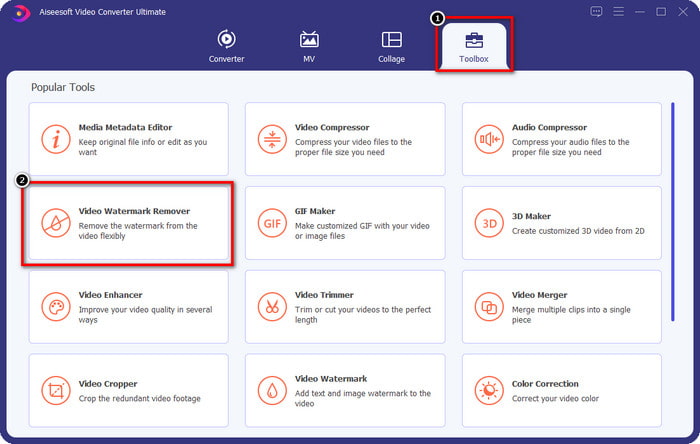
Step 2. Now that it is running into the system go to Toolbox, and look for Video Watermark Remover on the set of features.
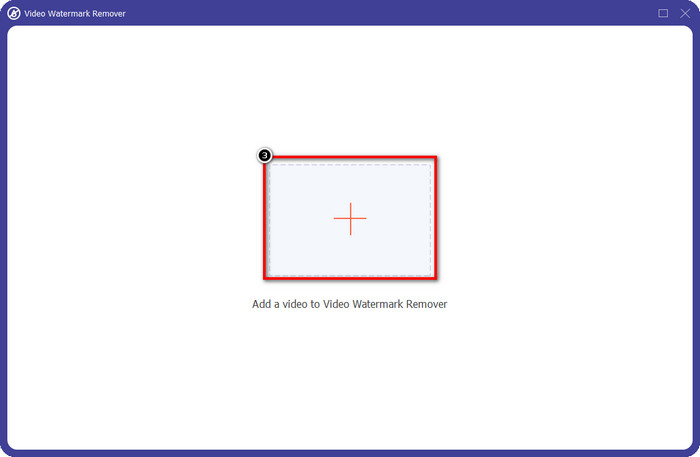
Step 3. After that, click the + icon to upload the video file you have a problem with.
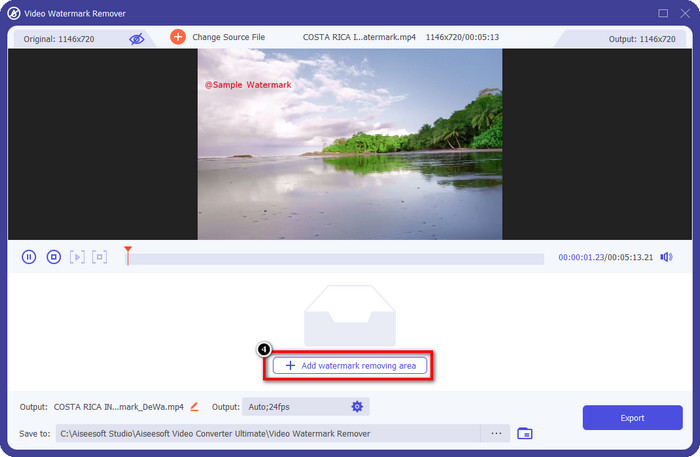
Step 4. Press Add Watermark Removing Area to start using the tool of this software.
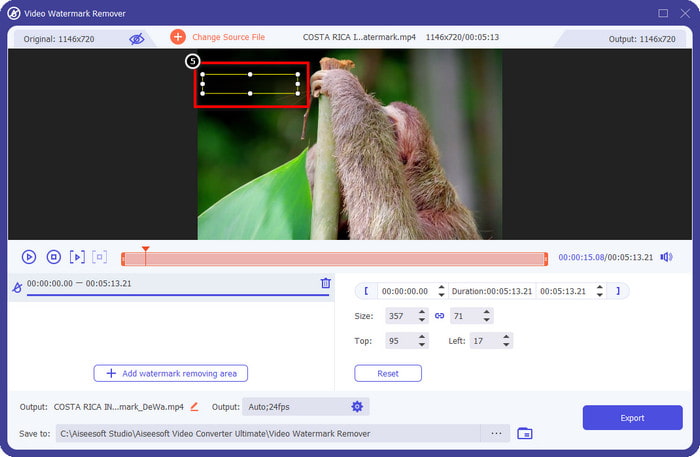
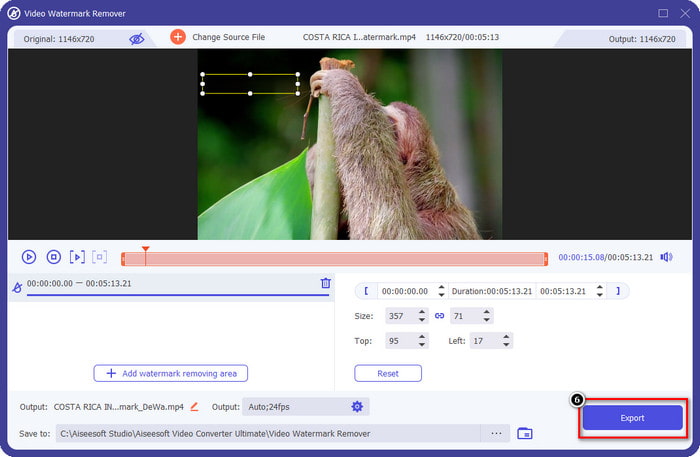
Step 5. With your mouse, drag the rectangular shape to the watermark area, then release it. You are allowed to adjust the rectangular-shaped to highlight the watermark.
Step 6. Hit the Export button to start the watermark removal process. When done, a pop-up folder will show on your screen; click the file to watch the video with no watermark on it.
VLC Media Player
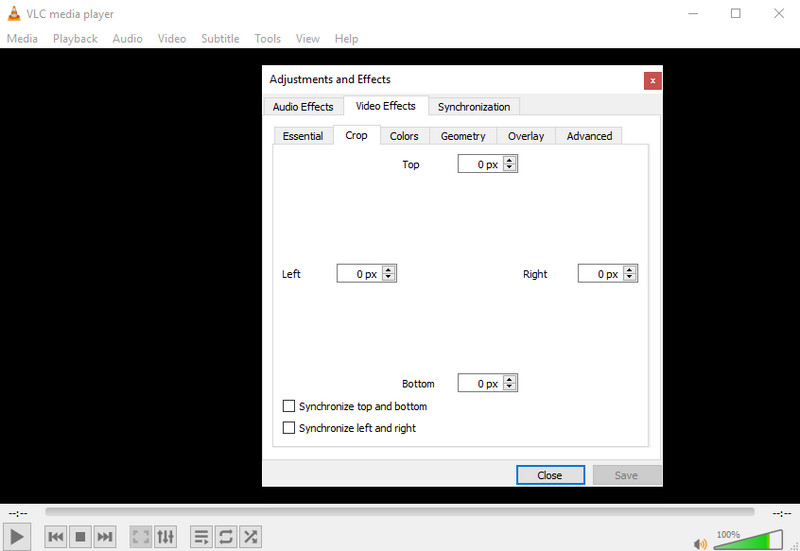
VLC Media Player is not a dedicated watermark remover. Still, it can do the job by cropping out the watermark on the video you have. This tool is not only a video player and cropper; there are other things this popular media player can offer you. But never expect this tool to be capable of doing professional editing and easy to use because it is not. On cropping the video, you will need to add the exact measurement to crop out the watermark on the video. So, suppose you did know the exact x and y of the video. In that case, you can follow how to remove the edited by PowerDirector watermark with this media player.
Step 1. After downloading the software on VideoLAN.org, open the software. Click Media, then Open File, and search the video file you are editing on Power Director on the local drive that will show on your screen.
Step 2. The video will start to play, click Tools, then Effects and Filter. You can use your keyboard by hitting the Control + E for Windows and Command + E for Mac.
Step 3. Go to Video Effects, Crop, and add the measurement to the video to crop out the watermark.
Step 4. To apply the adjustment you did, click Save.
Kapwing
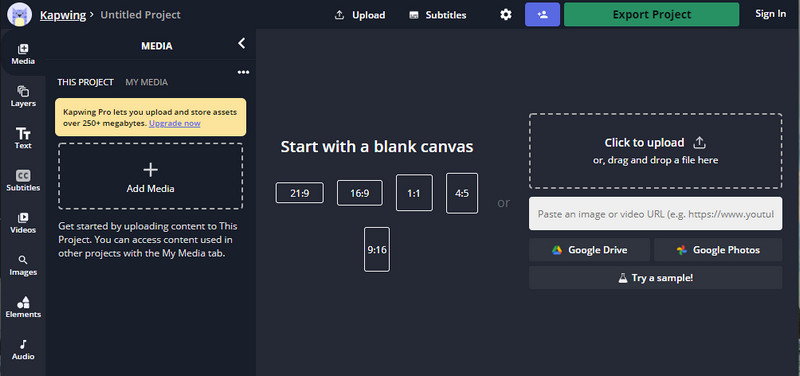
ต้องการโปรแกรมตัดต่อวิดีโอออนไลน์หรือไม่ ลองใช้ Kapwing เป็นเครื่องมือทางเว็บที่ใช้งานง่ายซึ่งคุณสามารถใช้แก้ไขวิดีโอได้เหมือนกับที่คุณสามารถทำได้ใน Power Director ถึงกระนั้นก็ยังไม่อยู่ในระดับที่ตราไว้ของ Power Director การตัดต่อวิดีโอส่วนใหญ่ที่คุณอาจต้องการอยู่ที่นี่แล้ว เช่น การครอบตัดลายน้ำ แม้ว่าเครื่องมือจะทำงานเหมือนกับ VLC ในการลบลายน้ำ แต่เครื่องมือนี้มีบานหน้าต่างแสดงตัวอย่างซึ่งคุณสามารถดูวิดีโอที่ครอบตัดก่อนส่งออกได้ ดังนั้น ถ้าคุณต้องการบันทึกวิดีโอ คุณแก้ไขบน Powerdirector โดยไม่มีลายน้ำสำหรับพีซี คุณต้องครอบตัดมันก่อนที่นี่
Step 1. Open the web tool by searching it on your browser, then click Add Media to upload the video file here. There will be an uploading process, so you will need to wait before you can use the video you upload.
Step 2. Click Crop on the left side of the interface to open its cropping features.
Step 3. Adjust the frame and ensure that the watermark of the video isn’t included on the frame.
Optional: If you don’t want to change the dimension of the video manually, there are available options below that you can freely use.
ram และตรวจสอบให้แน่ใจว่าลายน้ำของวิดีโอไม่รวมอยู่ในเฟรม” /]Step 4. When done, click Done Cropping to save the video you cropped with the Kapwing.
ที่เกี่ยวข้อง:
วิธีลบลายน้ำออกจากวิดีโอที่ส่งออกจาก Renderforest
วิธีลบลายน้ำ Viva Video ออกจากวิดีโอ
ส่วนที่ 2 คำถามที่พบบ่อยเกี่ยวกับการถอดลายน้ำผู้อำนวยการพลังงาน
ดาวน์โหลด Powerdirector ไม่มีลายน้ำ apk ฟรีสำหรับ Android ได้หรือไม่
ได้ คุณสามารถไปที่ Play Store และค้นหาชื่อเพื่อดาวน์โหลดแอป Power Director อย่างไรก็ตาม เครื่องมือรุ่นทดลองใช้ฟรีจะเพิ่มลายน้ำ สมมติว่าคุณลองดาวน์โหลดแอปบนเว็บไซต์บุคคลที่สามเพื่อให้มีเวอร์ชันเต็ม ในกรณีนั้น คุณต้องไม่ทำเพราะอาจมีไวรัสที่เป็นอันตรายในไฟล์เมื่อดาวน์โหลดบน Android ของคุณ หากต้องการลบลายน้ำบน Powerdirector คุณต้องซื้อคีย์ใบอนุญาต
แอพ Power Director บนพีซีราคาเท่าไหร่?
คุณสามารถมี Power Director 365 สำหรับ $ 4.08 ราคาเริ่มต้นทุกเดือน คุณสามารถไปที่แผนและสมัครสมาชิกบนเว็บไซต์ทางการ คุณยังสามารถดูคุณสมบัติที่รวมไว้ซึ่งคุณจะได้รับเมื่อคุณใช้แผนที่คุณเลือกได้
Cyberlink PowerDirector มีลายน้ำหรือไม่?
ใช่ จะเพิ่มลายน้ำเมื่อคุณส่งออกวิดีโอในแอปเวอร์ชันฟรี แต่ก็สามารถหลีกเลี่ยงได้ หากคุณซื้อซอฟต์แวร์ของแผนหรือการสมัครใช้งานใดๆ คุณไม่จำเป็นต้องกังวลเกี่ยวกับลายน้ำ เนื่องจากจะไม่มีลายน้ำของผลิตภัณฑ์เพิ่มเมื่อส่งออก
สรุป
หากคุณต้องการส่งออกวิดีโอ คุณต้องสร้างวิดีโอบน PowerDirector สำหรับพีซีโดยไม่มีลายน้ำ คุณต้องซื้อคีย์ใบอนุญาตสำหรับโปรแกรมนี้ แต่ถ้าคุณไม่ต้องการใช้เงินอย่างน้อยสักเพนนี ให้เลือกเครื่องมือที่เราเพิ่มในบทความนี้เพราะเครื่องมือเหล่านี้สามารถลบลายน้ำบนวิดีโอที่คุณแก้ไขได้อย่างมีประสิทธิภาพ ยังไม่มั่นใจกับเครื่องมือที่เราเพิ่มในบทความนี้? ถ้าอย่างนั้นมันจะช่วยได้ถ้าคุณลองมันก่อน โดยเริ่มจากเครื่องมือขั้นสูงสุดเพื่อลบลายน้ำของ Power Director
-
 ลบลายน้ำ Animoto บนวิดีโออย่างง่ายดายและมีประสิทธิภาพ
 จะลบลายน้ำ Animoto ในวิดีโอได้อย่างไร? อ่านบทความนี้ต่อไปในขณะที่เรามีบทแนะนำที่สมบูรณ์เกี่ยวกับวิธีการทำ
-
 วิธีลบลายน้ำออกจากวิดีโอโดยใช้ Final Cut Pro [คู่มือฉบับสมบูรณ์]
 มีปัญหากับลายน้ำบนวิดีโอ? ไม่ต้องพูดอีกต่อไป เพราะเราได้จัดเตรียมบทแนะนำเกี่ยวกับวิธีลบลายน้ำออกจากวิดีโอโดยใช้ Final Cut Pro
-
 3 วิธีในการลบ WeVideo Watermark ด้วยเอฟเฟกต์ทันที
 คุณมีปัญหาในการแก้ปัญหาลายน้ำที่ WeVideo ออกหรือไม่? ไม่ต้องกังวลอีกต่อไป เพราะเราเพิ่มข้อมูลที่คุณต้องรู้
