


 Video Converter Ultimate
 บันทึกหน้าจอ
 ซ่อมวิดีโอ
 ดาวน์โหลดอย่างปลอดภัย
แนวทางในการลบ VSDC Watermark บนวิดีโออย่างง่ายดาย & มีประสิทธิภาพ
คุณจะไม่มีทางผิดหวังหากเลือกใช้ VSDC Video Editor สำหรับการตัดต่อวิดีโอพื้นฐานบน Windows โปรแกรมตัดต่อแบบไม่เป็นเชิงเส้นตัวนี้สามารถตอบโจทย์ความต้องการด้านการตัดต่อวิดีโอของคุณได้ เพราะมาพร้อมชุดฟีเจอร์การตัดต่อที่คุณสามารถใช้สร้างผลงานวิดีโอคุณภาพเยี่ยมได้ในตอนจบ ด้วยความนิยมที่เพิ่มขึ้นของเครื่องมือนี้ ทำให้ผู้ใช้หลายคนมีคำถามเกี่ยวกับโปรแกรมนี้ และหนึ่งในคำถามยอดฮิตในตอนนี้ก็คือ VSDC เวอร์ชันฟรีมีลายน้ำหรือไม่? คุณเองมีข้อสงสัยแบบเดียวกับผู้ใช้คนอื่นบนเว็บหรือเปล่า? เพื่อเป็นคำตอบให้กับคำถามที่หลายคนอยากรู้ เราจะให้คำตอบที่คุณต้องการ อ่านต่อเพื่อทำความเข้าใจให้ชัดเจนยิ่งขึ้น.

ส่วนที่ 1 โปรแกรมตัดต่อวิดีโอ VSDC ฟรีมีลายน้ำหรือไม่
แม้ว่าคุณจะใช้ VSDC เวอร์ชันฟรีในการแก้ไขวิดีโอหรือภาพยนตร์ที่คุณมี แต่ไม่มีลายน้ำ VSDC เมื่อคุณส่งออก เพื่อให้คุณสามารถเพลิดเพลินกับวิดีโอที่คุณแก้ไขที่นี่โดยไม่มีลายน้ำได้ฟรี หากต้องการใช้คุณลักษณะการตัดต่อวิดีโออื่นๆ ที่มีอยู่ คุณควรซื้อเครื่องมือเพื่อปลดล็อก แม้ว่าจะเป็นโปรแกรมแก้ไขฟรี แต่เครื่องมือนี้ไม่สามารถลบลายน้ำที่คุณเพิ่มลงในวิดีโอได้ เป็นปัญหาสำหรับบางคน และบางคนใช้คุณสมบัติการแยกและตัดเพื่อลบลายน้ำ แม้ว่าจะเป็นการดีหากอยู่ด้านข้าง แต่ถ้าลายน้ำอยู่ตรงกลาง คุณจะใช้เครื่องตัดวิดีโอไหม แน่นอน ไม่! เครื่องมือด้านล่างนี้สามารถช่วยคุณในการลบลายน้ำ VSDC ที่อยู่ในวิดีโอของคุณได้อย่างง่ายดาย
ส่วนที่ 2 วิธีการลบลายน้ำจากวิดีโอบน VSDC ด้วย 2 วิธีที่มีอยู่
FVC Video Converter Ultimate – สุดยอดตัวลบลายน้ำบน Windows & Mac
FVC Video Converter Ultimate เป็นซอฟต์แวร์ขั้นสูงที่ขับเคลื่อนด้วย AI ที่ดีที่สุดตัวหนึ่งที่คุณสามารถใช้ในการลบลายน้ำของ VSDC เครื่องมือนี้เปิดโอกาสให้คุณปรับแต่งการทำงานของฟีเจอร์ลบลายน้ำได้เอง ซึ่งโปรแกรมอื่น ๆ ส่วนมากไม่อนุญาตให้ทำได้ มันสามารถลบลายน้ำออกจากวิดีโอได้อย่างแม่นยำโดยไม่ทิ้งร่องรอยบริเวณที่เคยมีลายน้ำมาก่อน.
นอกจากนี้ เครื่องมือนี้ยังมีคุณลักษณะและฟังก์ชันที่มีประสิทธิภาพซึ่งคุณไม่สามารถหาได้ในซอฟต์แวร์อื่น แม้ว่าเครื่องมือนี้จะสนับสนุนเทคโนโลยี AI คุณไม่จำเป็นต้องกังวลเกี่ยวกับสเปคคอมพิวเตอร์ของคุณ เนื่องจากเครื่องมือนี้ทำงานบน Windows และ macOS ระดับล่าง ประสิทธิภาพเหนือกว่า ใช้สเปคต่ำในคอมพิวเตอร์ ทำงานได้ทั้งบน Windows และ Mac และเพิ่มประสิทธิภาพในการนำเข้าและส่งออก ไม่มีอะไรเหลือให้ค้นหานอกจากการสอนทีละขั้นตอนเกี่ยวกับวิธีการลบลายน้ำออกจากวิดีโอใน VSDC ด้วยความช่วยเหลือด้านล่าง
ขั้นตอนที่ 1. ดาวน์โหลดซอฟต์แวร์ลงบนเดสก์ท็อปของคุณตอนนี้โดยคลิกปุ่มดาวน์โหลดด้านล่าง จากนั้นทำตามขั้นตอนการติดตั้งและตั้งค่าที่โปรแกรมกำหนด แล้วคลิก Start Now เพื่อเปิดเครื่องมือบนเดสก์ท็อปของคุณ.
ดาวน์โหลดฟรีสำหรับ Windows 7 หรือใหม่กว่าดาวน์โหลดอย่างปลอดภัย
ดาวน์โหลดฟรีสำหรับ MacOS 10.7 หรือใหม่กว่าดาวน์โหลดอย่างปลอดภัย
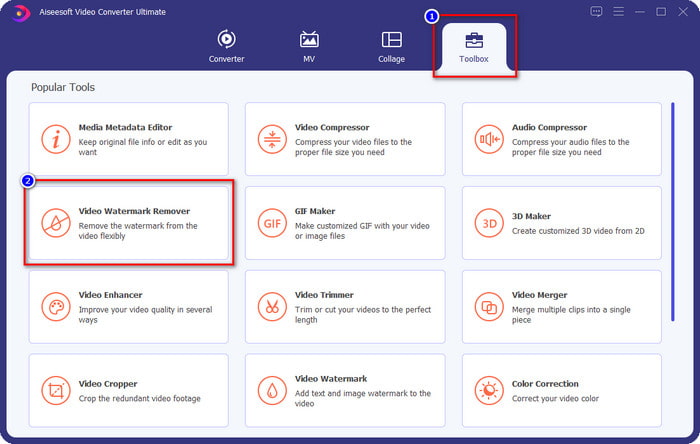
ขั้นตอนที่ 2. หลังจากเปิดซอฟต์แวร์แล้ว ให้ไปที่ส่วน Toolbox และเลือก Video Watermark Remover เพื่อใช้เครื่องมือลบลายน้ำขั้นสุดของโปรแกรมนี้.
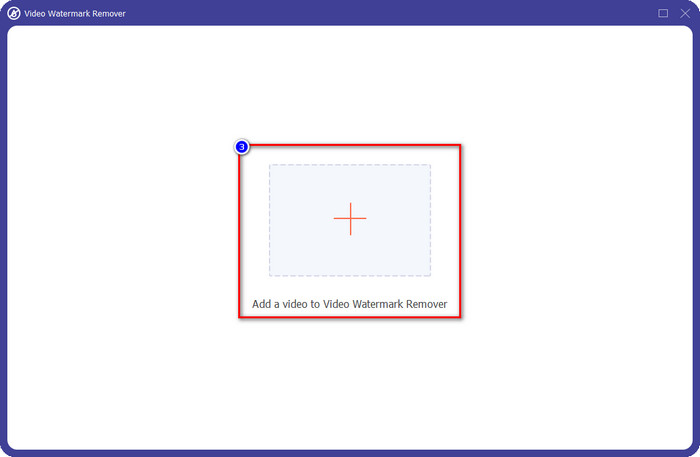
ขั้นตอนที่ 3. บนหน้าต่างที่จะแสดงบนหน้าจอ ให้คลิกไอคอนเครื่องหมาย + เพื่ออัปโหลดวิดีโอที่มีลายน้ำ.
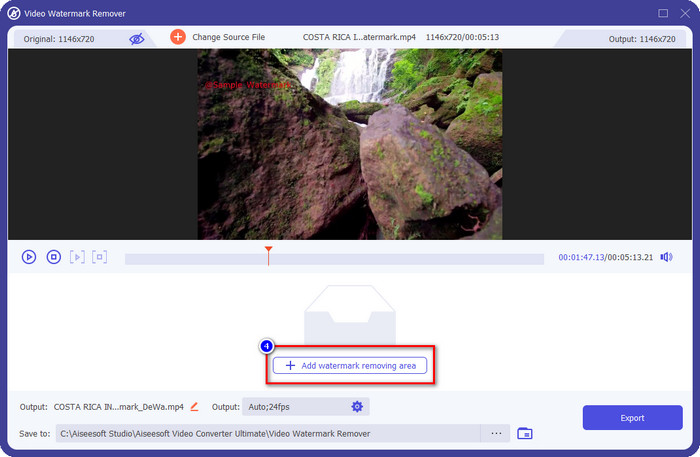
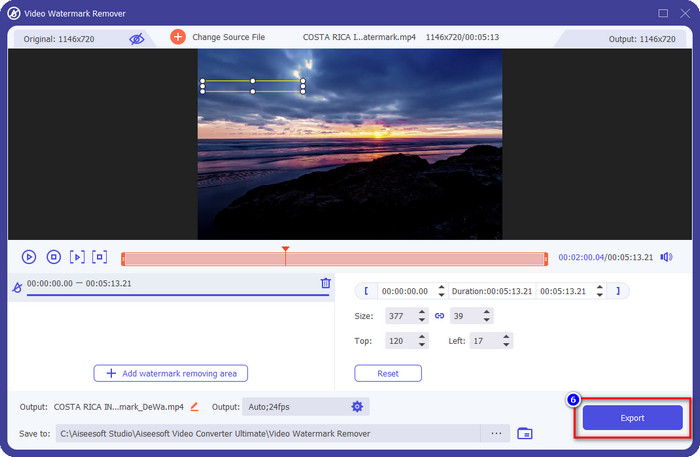
ขั้นตอนที่ 4. หากต้องการใช้เครื่องมือลบลายน้ำ ให้คลิก Add Watermark Removing Area.
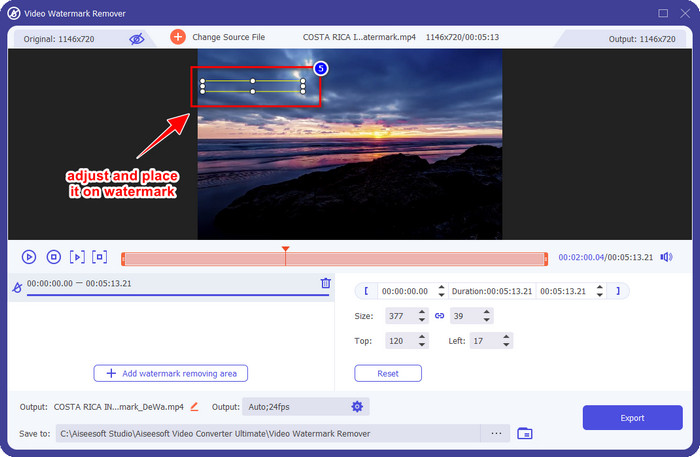
ขั้นตอนที่ 5. วาง กล่องเลือกไปยังบริเวณที่มีลายน้ำ และตรวจสอบให้แน่ใจว่าครอบคลุมทั้งหมด เพื่อที่เมื่อตอนส่งออกวิดีโอ คุณจะไม่เห็นลายน้ำในวิดีโอและสามารถรับชมได้อย่างเพลิดเพลิน.
ขั้นตอนที่ 6. เมื่อครอบคลุมลายน้ำเรียบร้อยแล้ว ให้คลิกปุ่ม Export เพื่อบันทึกวิดีโอโดยไม่มีลายน้ำ.
Kapwing
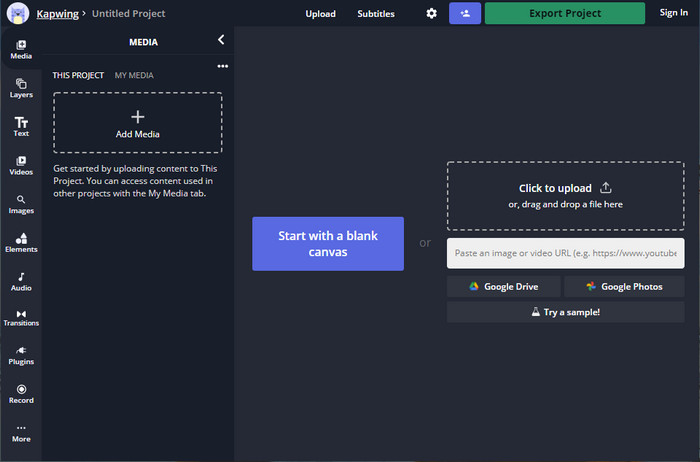
หนึ่งในวิธีที่ดีที่สุดในการลบลายน้ำของ VSDC เวอร์ชันฟรีก็คือการใช้ Kapwing.com เครื่องมือลบลายน้ำตัวนี้ช่วยให้คุณกำจัดลายน้ำที่มีอยู่เดิมบนวิดีโอได้อย่างรวดเร็วเพื่อให้วิดีโอดูสวยงาม แม้ว่าคุณจะไม่ใช่มืออาชีพในการทำงานลักษณะนี้ ก็ไม่ต้องกังวลหากเลือกใช้เครื่องมือนี้ เพราะมีอินเทอร์เฟซที่ใช้งานง่ายและครบถ้วน ทำให้การเรียนรู้การใช้งานเป็นไปได้อย่างรวดเร็ว เครื่องมือนี้ถือเป็นตัวเลือกที่ดีมาก แต่ก็มีข้อเสีย เช่น เวอร์ชันฟรีไม่สามารถส่งออกวิดีโอที่ยาวเกิน 60 นาที มีข้อจำกัดหลายอย่าง และต้องลงชื่อเข้าใช้เพื่อจะลบลายน้ำของ Kapwing เมื่อต้องการส่งออกวิดีโอ.
ขั้นตอนที่ 1. เปิดเว็บเครื่องมือ แล้วอัปโหลดไฟล์โดยลากและวางมาที่นี่.
ขั้นตอนที่ 2. หลังจากอัปโหลดไฟล์แล้ว ให้ไปที่ส่วน elements และคลิกรูปทรงที่คุณต้องการซึ่งมีให้เลือกที่นี่.
ขั้นตอนที่ 3. กดค้างและวาง รูปทรงไปยังตำแหน่งลายน้ำ โปรดจำไว้ว่า วิธีนี้จะได้ผลไม่ดีนักหากในวิดีโอนั้นมีหลายสี และจะใช้ได้ผลก็ต่อเมื่อบริเวณนั้นของวิดีโอใช้โทนสีเดียว.
ขั้นตอนที่ 4. คลิก Export Video จากนั้นคลิก Export MP4 เพื่อบันทึกวิดีโอฉบับสุดท้าย.
ที่เกี่ยวข้อง:
ส่วนที่ 3 คำถามที่พบบ่อยเกี่ยวกับ VSDC Free Video Editor มีลายน้ำหรือไม่
ฉันสามารถส่งออกวิดีโอ 4K บน VSDC ได้ไหม?
ใช่ เครื่องมือนี้สามารถส่งออกวิดีโอในความละเอียด 4k หากคุณต้องการ อย่างไรก็ตาม กระบวนการนี้ใช้เวลามากกว่าความละเอียดวิดีโออื่นๆ เช่น 1080 และ 720 แม้ว่าการเรนเดอร์จะใช้เวลามาก แต่เครื่องมือนี้ก็ยังสามารถสร้างคุณภาพวิดีโอที่มีความคมชัดสูงเป็นพิเศษได้ เช่น 4k หากจำเป็น
จะลบลายน้ำใน VSDC ได้อย่างไร?
ดาวน์โหลดเครื่องมือ จากนั้นเปิดใช้งานเพื่อดำเนินการต่อ คลิก Add Object และคลิกวิดีโอใต้เครื่องมือ เปิดตัวกรองวิดีโอ จากนั้นตัวเลือกจะปรากฏขึ้น คลิกตัวกรอง; คลิก ดีโลโก้ ด้วย DeLogo คุณสามารถปกปิดลายน้ำของวิดีโอบน VSDC ได้แล้ว ใช้งานได้กับเครื่องมือเวอร์ชันปรับปรุงใหม่เท่านั้น หากหาไม่พบ คุณต้องอัปเดตสิ่งที่คุณใช้โดยดาวน์โหลดเวอร์ชันที่ใหม่กว่า
VSDC เป็นโปรแกรมตัดต่อวิดีโอที่ดีที่สุดในการใช้งานหรือไม่?
ไม่ใช่สิ่งที่ดีที่สุด แต่เราถือได้ว่าเป็นเครื่องมือที่ต้องลองเพราะมีคุณสมบัติการแก้ไขพื้นฐานที่คุณอาจต้องใช้เพื่อสร้างวิดีโอที่น่าประทับใจ แม้ว่าการเรียนรู้วิธีการใช้งานจะค่อนข้างสูง แต่ผู้ใช้รายอื่นมักจะใช้เวลาเรียนรู้ซอฟต์แวร์นี้มากกว่าที่จะทำการแก้ไข แม้ว่าจะไม่ใช่โปรแกรมตัดต่อวิดีโอที่ดีที่สุด 10 อันดับแรก แต่ก็ยังถือว่าเป็นเครื่องมือที่ยอดเยี่ยมสำหรับจุดประสงค์ในการแก้ไข
สรุป
หากต้องการลบลายน้ำของ VSDC คุณจะต้องมีโปรแกรมลบลายน้ำที่ไว้ใจได้ เช่นซอฟต์แวร์ทั้งสองที่กล่าวถึงในบทความนี้ ด้วยขั้นตอนที่ให้ไว้ของแต่ละตัว คุณสามารถเลือกได้เองว่าตัวไหนเหมาะกับความต้องการและมีประโยชน์มากที่สุดในการลบลายน้ำออกจากวิดีโอของคุณ แต่ถ้าคุณต้องการซอฟต์แวร์อเนกประสงค์ที่ใช้ได้ทั้งลบและเพิ่มลายน้ำ ตัดต่อวิดีโอ แปลงไฟล์ และทำอย่างอื่นได้อีกมากมาย คุณควรเลือกใช้ FVC Video Converter Ultimate ทำไมจึงควรเลือก? ก็เพราะมันเป็นซอฟต์แวร์รอบด้านที่ดีที่สุดที่คุณควรมีติดเดสก์ท็อปไว้นั่นเอง การอ่านบทความนี้ช่วยคุณได้มากขึ้นหรือไม่? หากใช่ คุณสามารถให้ห้าดาวด้านล่างได้หากพอใจกับบทความนี้.
-
 คำแนะนำเกี่ยวกับลายน้ำบนภาพถ่ายคืออะไร [อัปเดต 2022]
 ลายน้ำบนภาพถ่ายคืออะไร? เราจำเป็นต้องเพิ่มหรือไม่ เราจะกำจัดมันได้อย่างไร? ทุกสิ่งที่คุณต้องการอยู่ที่นี่ ดังนั้นโปรดอ่านบล็อกนี้ต่อไป
-
 วิธีการลบลายน้ำจาก Wondershare DVD Creator อย่างง่ายดาย
 บทความนี้ครอบคลุมข้อมูลเกี่ยวกับวิธีการเอาลายน้ำออกจาก Wondershare DVD Creator ในการรับข้อมูลทั้งหมดที่คุณต้องการ คุณจะต้องอ่านสิ่งนี้
-
 ลบลายน้ำออกจาก PDF อย่างง่ายดายด้วยขั้นตอนง่าย ๆ
 ลบลายน้ำออกจาก PDF โดยทำตามขั้นตอนง่าย ๆ เหล่านี้ เรียนรู้วิธีลบลายน้ำออกจากไฟล์ PDF ของคุณอย่างง่ายดายโดยใช้เครื่องมือที่น่าทึ่งเหล่านี้
