


 Video Converter Ultimate
 บันทึกหน้าจอ
 ซ่อมวิดีโอ
 ดาวน์โหลดอย่างปลอดภัย
บทแนะนำที่สมบูรณ์เกี่ยวกับวิธีการลบลายน้ำ Weibo ที่คุณต้องรู้
Weibo เป็นแพลตฟอร์มโซเชียลมีเดียที่เป็นที่รู้จักซึ่งใช้ในการแชร์ เผยแพร่ และรับข้อมูลอย่างเช่น Twitter ที่คุณมักใช้ในประเทศจีน คุณยังสามารถโพสต์และดาวน์โหลดภาพขนาดย่อ รูปภาพ และวิดีโอได้ที่นี่ อย่างไรก็ตาม จะมีลายน้ำเมื่อคุณส่งออก ผู้ใช้หลายคนต้องการลบออกเนื่องจากรบกวนการมองเห็นของเนื้อหา
แม้ว่าจะมีโปรแกรมลบลายน้ำให้เลือกใช้นับพันตัว แต่มีเพียงไม่กี่เครื่องมือเท่านั้นที่สามารถลบลายน้ำได้อย่างมีประสิทธิภาพ ดังนั้น หากคุณไม่ชอบลายน้ำบนสื่อภาพที่คุณดาวน์โหลด บทความนี้ได้รวบรวมเครื่องมือที่ดีที่สุดมาให้คุณ เราได้ทดสอบมาแล้วเพื่อยืนยันว่าเครื่องมือเหล่านี้ใช้งานได้จริงและมีประสิทธิภาพในการลบลายน้ำ เพื่อสอนคุณวิธีลบลายน้ำ Weibo คุณจำเป็นต้องอ่านบทความนี้ให้ต่อเนื่องจนจบ.

ส่วนที่ 1 วิธีลบลายน้ำจากวิดีโอ Weibo โดยใช้ Ultimate Watermark Remover
ลายน้ำ Weibo อาจกลายเป็นปัญหาบนเครื่องมืออื่น ๆ เพราะส่วนใหญ่จะทิ้งรอยเปื้อนของลายน้ำเอาไว้ แต่ถ้าคุณใช้ FVC Video Converter Ultimate จะไม่เหลือรอยเปื้อนลายน้ำใด ๆ เลย ไม่ว่าลายน้ำจะมีขนาดใหญ่หรือเล็กเพียงใด เครื่องมือนี้ก็ลบออกได้อย่างมีประสิทธิภาพโดยไม่ทิ้งร่องรอยลายน้ำไว้ คุณจึงเพลิดเพลินกับการดูวิดีโอที่ส่งออกไปยัง Weibo ได้อย่างเต็มที่ กล่าวอีกนัยหนึ่ง การลบลายน้ำด้วยความช่วยเหลือของโปรแกรมนี้เป็นเรื่องง่ายมาก.
นอกจากนี้ คุณยังสามารถใช้เครื่องมือนี้สำหรับสิ่งอื่น เช่น การตัด การรวม บีบอัด ตัดแต่ง สร้าง GIF และอื่นๆ และถ้าคุณต้องการเพิ่มลายน้ำบนวิดีโอของคุณเพื่อไม่ให้ใครขโมยมันจากคุณได้ คุณสามารถใช้ซอฟต์แวร์นี้เพื่อทำสิ่งนี้ได้ เป็นซอฟต์แวร์แบบ all-in-one ที่จำเป็นสำหรับเดสก์ท็อปของคุณ คุณต้องการทราบวิธีการลบลายน้ำออกจากวิดีโอ Weibo หรือไม่? คุณสามารถทำตามขั้นตอนที่ประสบความสำเร็จในขณะที่เราอธิบายวิธีการทำทีละขั้นตอน
ดาวน์โหลดฟรีสำหรับ Windows 7 หรือใหม่กว่าดาวน์โหลดอย่างปลอดภัย
ดาวน์โหลดฟรีสำหรับ MacOS 10.7 หรือใหม่กว่าดาวน์โหลดอย่างปลอดภัย
': ก่อนที่คุณจะทำตามขั้นตอนที่สำเร็จ ตรวจสอบให้แน่ใจว่าคุณได้ส่งออกวิดีโอ Weibo ที่คุณต้องการลบลายน้ำ เพื่อให้คุณสามารถค้นหาวิดีโอนั้นในโฟลเดอร์ได้อย่างง่ายดาย
ขั้นตอนที่ 1. ก่อนอื่น ให้ดาวน์โหลดซอฟต์แวร์ลงบนเดสก์ท็อปของคุณแล้วเลือกเวอร์ชันให้ตรงกับระบบปฏิบัติการ หลังจากติดตั้งซอฟต์แวร์แล้ว ให้ทำตามขั้นตอนการติดตั้ง WinRAR ที่จะแสดงบนหน้าจอของคุณ จากนั้นคลิก Start Now เพื่อเปิดโปรแกรมและดำเนินการต่อ.
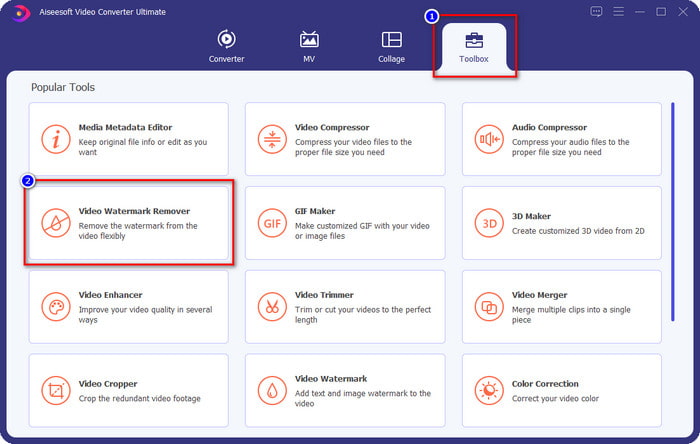
ขั้นตอนที่ 2. ไปที่เมนู Toolbox แล้วมองหา Video Watermark Remover จากนั้นคลิก.
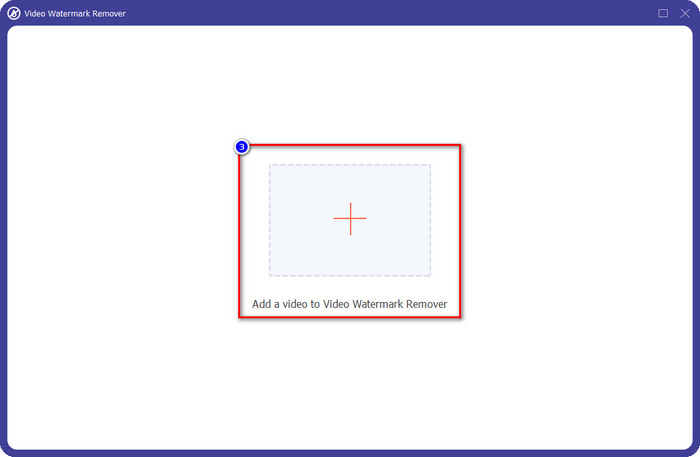
ขั้นตอนที่ 3. คลิกปุ่ม + แล้วค้นหาวิดีโอ Weibo ที่มีลายน้ำที่คุณดาวน์โหลดไว้ในโฟลเดอร์ จากนั้นคลิกไฟล์และกด Open เพื่ออัปโหลด.
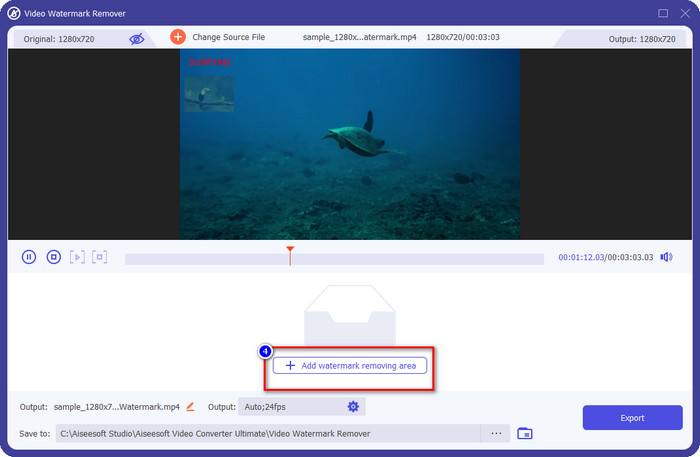
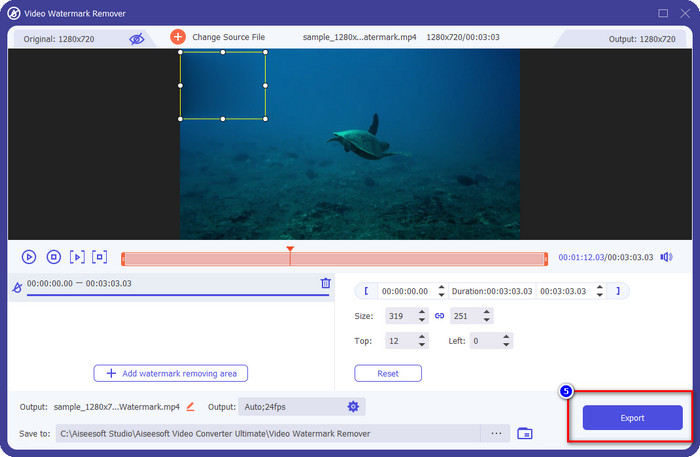
ขั้นตอนที่ 4. บนหน้าต่างใหม่ที่ปรากฏขึ้น ให้คลิก Add Watermark Removing Area เพื่อเข้าสู่ขั้นตอนการลบลายน้ำ.
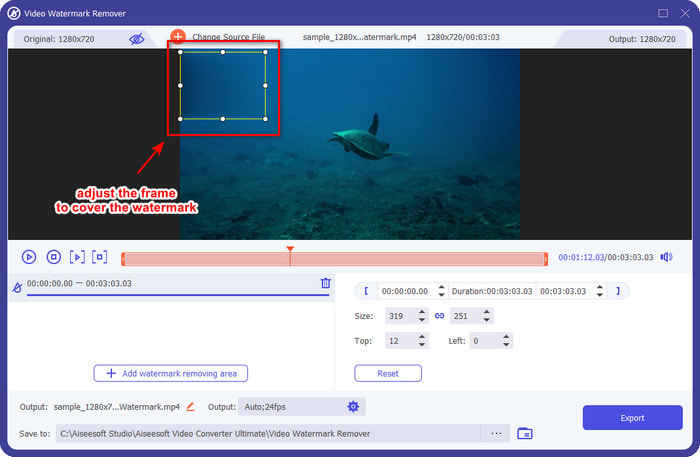
ขั้นตอนที่ 5. ลากและกดค้าง ที่กรอบเลือกเพื่อครอบบริเวณลายน้ำ คุณสามารถขยายหรือย่อขนาดกรอบได้ตามต้องการ และให้ครอบคลุมลายน้ำก่อนที่คุณจะส่งออก.
ขั้นตอนที่ 6. หลังจากวางกรอบเลือกทับลายน้ำแล้ว ให้คลิก Export เพื่อลบลายน้ำบนวิดีโอที่คุณอัปโหลด ไม่จำเป็นต้องรอนาน เพราะโปรแกรมรองรับการประมวลผลความเร็วสูงเป็นพิเศษ คุณจะได้วิดีโอ Weibo ที่ไม่มีลายน้ำภายในไม่กี่วินาที.
ส่วนที่ 2 วิธีลบลายน้ำออกจากภาพถ่าย Weibo โดยใช้เวอร์ชันฟรีบนเว็บ
จะบันทึกรูปภาพ Weibo โดยไม่ติดลายน้ำได้อย่างไร? คุณไม่สามารถบันทึกรูปภาพโดยไม่มีลายน้ำถ้าบันทึกจาก Weibo โดยตรง แต่คุณสามารถใช้ FVC Free Watermark Remover เพื่อลบลายน้ำบนรูปภาพได้ มันเป็นเครื่องมือลบลายน้ำรูปภาพที่ครบครัน ด้านฟังก์ชันการใช้งาน เราสามารถบอกได้ว่าเครื่องมือนี้ดีกว่าโปรแกรมลบลายน้ำอื่น ๆ บนเว็บอย่างมาก ดังนั้น ถ้าคุณต้องการลบลายน้ำบนรูปภาพ นี่คือเครื่องมืออันดับแรกที่คุณควรลอง แม้ว่ามันจะลบลายน้ำบนภาพนิ่งได้ แต่ก็ไม่สามารถลบลายน้ำบนวิดีโอได้เหมือนที่เวอร์ชัน Ultimate ทำให้คุณ.
อย่างไรก็ตาม มันใช้งานได้ฟรี และอินเทอร์เฟซของเว็บก็สะอาด ดังนั้นคุณจะไม่เห็นโฆษณาใดๆ ที่อาจรบกวนคุณด้วยซ้ำ ต้องการทราบวิธีการใช้เครื่องมือเว็บนี้หรือไม่? จากนั้นทำตามขั้นตอนที่ระบุด้านล่างเพื่อลองด้วยตัวเอง
หมายเหตุ: เช่นเดียวกับวิดีโอ อย่าลืมดาวน์โหลดภาพ Weibo ที่คุณต้องการ และตรวจดูให้แน่ใจว่าคุณได้วางมันลงบนโฟลเดอร์ที่มองเห็นได้และเข้าถึงได้ง่าย
ขั้นตอนที่ 1. หากต้องการใช้งานตัวลบลายน้ำบนเว็บ ให้คลิกลิงก์นี้เพื่อเปิดหน้าเว็บ.
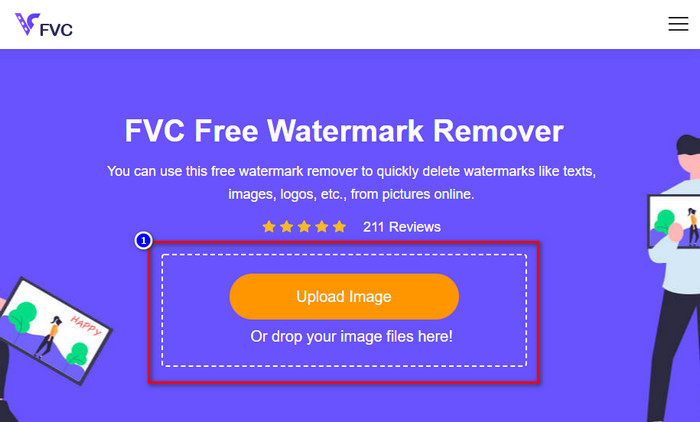
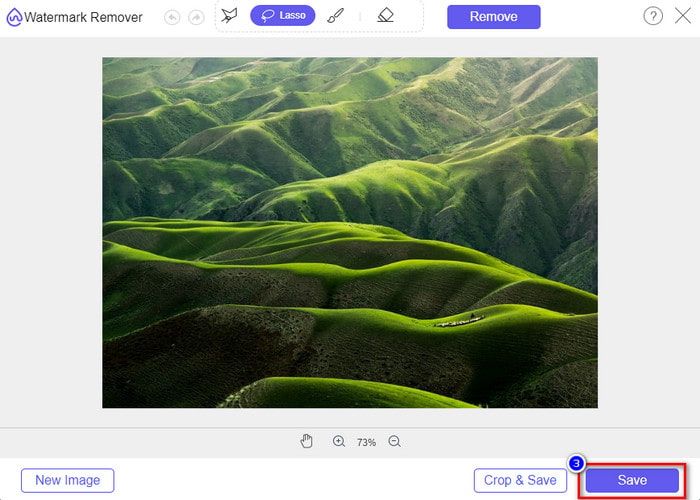
ขั้นตอนที่ 2. บนหน้าเว็บ ให้คลิก Upload Image จากนั้นจะมีหน้าต่างโฟลเดอร์ปรากฏขึ้นบนหน้าจอ ค้นหารูปภาพแล้วกด Open เพื่ออัปโหลด.
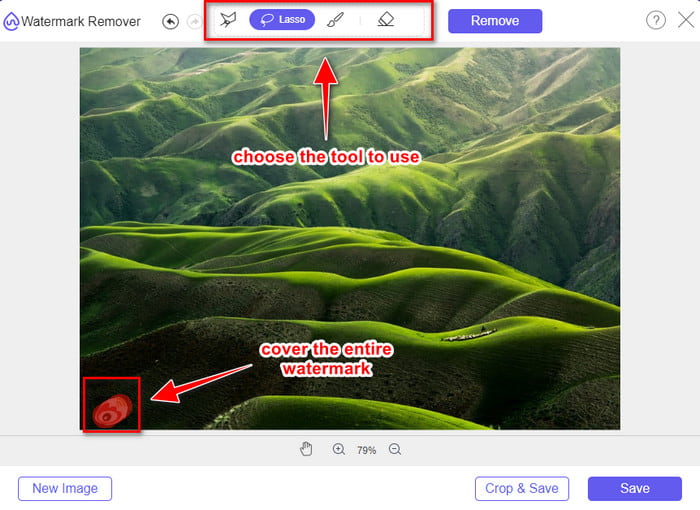
ขั้นตอนที่ 3. คุณสามารถลากวาดตามลายน้ำบนภาพเพื่อที่จะลบมันออก และตรวจสอบให้แน่ใจว่าลายน้ำทุกส่วนอยู่ในพื้นที่ที่คุณลากครอบไว้.
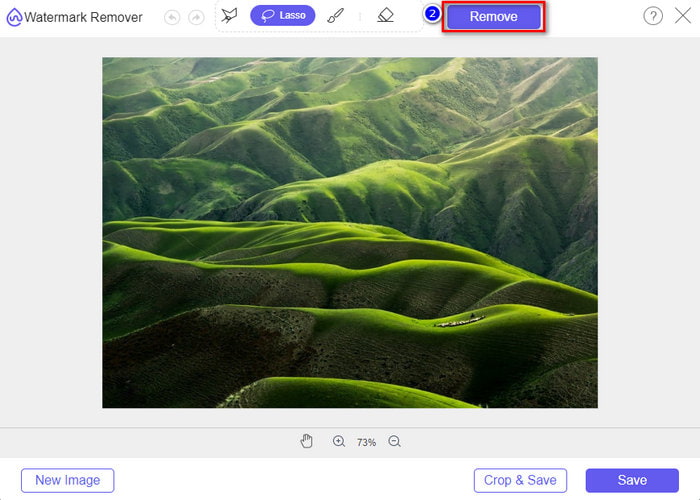
ขั้นตอนที่ 4. กด Remove เพื่อลบลายน้ำที่อยู่บนรูปภาพของคุณ.
ขั้นตอนที่ 5. หลังจากลบลายน้ำออกจากรูปภาพ Weibo แล้ว ให้คลิก Save เพื่อดาวน์โหลดรูปภาพ Weibo ที่ไม่มีลายน้ำ.
ที่เกี่ยวข้อง:
ส่วนที่ 3 คำถามที่พบบ่อยเกี่ยวกับวิธีการลบ Weibo Watermark
เหตุใดลายน้ำ Weibo จึงพร่ามัวหลังจากส่งออก
เครื่องมือบางอย่างเบลอลายน้ำเพื่อไม่ให้เห็นบนสื่อภาพที่พวกเขาส่งออกบน Weibo แต่ไม่ใช่เครื่องมือทั้งหมดที่จะเบลอลายน้ำ บางคนลบลายน้ำบนสื่อภาพโดยไม่มีร่องรอยใด ๆ ดังนั้น หากคุณต้องการลบลายน้ำบน Weibo โดยไม่ทำให้ภาพเบลอ คุณต้องรู้จักเครื่องมือที่เรากล่าวถึงข้างต้นเพื่อช่วยคุณในการลบ
ฉันสามารถปกปิดโลโก้ Weibo ในไฟล์ที่ส่งออกได้หรือไม่
ใช่คุณสามารถ. ด้วยวิธีนี้ คุณจะไม่เห็นลายน้ำของ Weibo ในไฟล์ อย่างไรก็ตาม การดัดแปลงแก้ไขจะครอบคลุมบางส่วนของไฟล์ ดังนั้น แทนที่จะช่วยคุณ มันอาจทำให้ไฟล์แย่ลง ดังนั้น จึงจำเป็นต้องลบลายน้ำเพื่อลบลายน้ำของไฟล์
ไฟล์ที่ส่งออกทั้งหมดบน Weibo มีลายน้ำหรือไม่
การส่งออกไฟล์ประเภทใดก็ได้บนแพลตฟอร์มไมโครบล็อกนี้จะทิ้งเครื่องหมายไว้ ไม่ว่ามันคืออะไร ลายน้ำจะถูกเพิ่มเข้าไปในไฟล์ อย่างไรก็ตาม คุณสามารถลบออกได้ด้วยเครื่องมือที่เรากล่าวถึงก่อนหน้านี้ในบทความนี้
สรุป
น่าทึ่งใช่ไหม? FVC มีเครื่องมือที่คุณต้องใช้ในการลบลายน้ำ Weibo ทั้งบนวิดีโอและรูปภาพได้อย่างรวดเร็ว แม้ว่าคุณจะไม่มีประสบการณ์หรือไม่ใช่มืออาชีพด้านการตัดต่อก็ตาม ก็ยังสามารถตัดต่อได้ด้วยเครื่องมือที่กล่าวมาข้างต้น ดังนั้น หากคุณต้องการลบลายน้ำบนรูปภาพ ไม่ว่าจะมาจาก Weibo หรือไม่ก็ตาม FVC Free Watermark Remover คือเครื่องมือเดียวที่คุณต้องมี แต่ถ้าเป็นวิดีโอและ GIF คุณควรใช้ซอฟต์แวร์ระดับมืออาชีพที่ใช้งานง่ายและราคาไม่แพง อย่างเช่น FVC Video Converter Ultimate แล้วจะรออะไรอยู่? ลบลายน้ำบนสื่อภาพของคุณ เพื่อเพลิดเพลินกับการรับชมโดยไม่เห็นร่องรอยของลายน้ำอีกต่อไป.
-
 วิธีที่ดีที่สุดในการเพิ่มลายน้ำให้กับวิดีโอใน Photoshop บน Windows & Mac
 ต้องการทราบวิธีการเพิ่มลายน้ำให้กับวิดีโอใน Photoshop? ในกรณีนั้น บทความนี้จะให้ข้อมูลบางอย่างที่คุณจำเป็นต้องรู้
-
 3 วิธีแก้ปัญหาที่ดีที่สุดเกี่ยวกับวิธีลบลายน้ำออกจากวิดีโออย่างง่ายดาย
 ต้องการลบลายน้ำที่น่ารำคาญในวิดีโอหรือไม่? ด้วยบล็อกนี้ คุณสามารถเรียนรู้แนวคิดต่างๆ ในการลบลายน้ำบนวิดีโอ
-
 4 วิธีที่ดีที่สุดในการลบลายน้ำออกจาก GIF [ออนไลน์และออฟไลน์]
 ต้องการลบลายน้ำออกจาก GIF หรือไม่ ด้วยเครื่องมือในบทความนี้ คุณจะได้เรียนรู้รูปแบบต่างๆ ด้วยน้ำยาล้างลายน้ำต่างๆ ที่มีอยู่ในแพลตฟอร์มของคุณ
