


 Video Converter Ultimate
 บันทึกหน้าจอ
 ซ่อมวิดีโอ
 ดาวน์โหลดอย่างปลอดภัย
วิธีลบลายน้ำ WeVideo บนวิดีโอที่แก้ไขอย่างมืออาชีพ
ไม่ต้องการดาวน์โหลดหรือใช้โปรแกรมตัดต่อวิดีโอรายเดือนบนเดสก์ท็อปเพราะคุณมีงบประมาณไม่เพียงพอใช่ไหม WeVideo เป็นเครื่องมือที่ต้องลองหากคุณต้องการโปรแกรมตัดต่อวิดีโอฟรีที่ไม่เสียเงิน เครื่องมือเว็บนี้ช่วยให้คุณสร้างเอาต์พุตวิดีโอที่น่าทึ่งในการเข้าถึงและในลักษณะที่สวยงามยิ่งขึ้นโดยทำตามขั้นตอนง่ายๆ ไม่กี่ขั้นตอน ด้วยความนิยม เครื่องมือนี้จึงกลายเป็นหนึ่งในโปรแกรมตัดต่อวิดีโอที่มีผู้เข้าชมมากที่สุดที่คุณสามารถเข้าถึงได้บนเว็บ
นับจากวันนี้เป็นต้นไป โอกาสที่ผู้ใช้จะเข้าเยี่ยมชมเว็บไซต์เพื่อใช้โปรแกรมตัดต่อวิดีโอจะมีมากขึ้น แต่ผู้ใช้ก็มีคำถามบางอย่างเกี่ยวกับโปรแกรมตัดต่อวิดีโอนี้ออนไลน์ และมักจะถามคำถามว่า WeVideo มีลายน้ำหรือไม่ ที่ถูกใส่ลงบนวิดีโอที่ตัดต่อหรือเปล่า เพื่อจะตอบคำถามนี้ คุณจำเป็นต้องอ่านบทความนี้ให้จบเพื่อหาคำตอบว่ามันมีการใส่ลายน้ำลงบนวิดีโอที่คุณตัดต่อที่นี่หรือไม่.

ส่วนที่ 1. WeVideo มีลายน้ำหรือไม่?
ใช่ มันเพิ่มลายน้ำ WeVideo เมื่อคุณส่งออกวิดีโอที่คุณแก้ไขที่นี่ มีหลายวิธีในการลบลายน้ำ WeVideo แต่ไม่ใช่ตัวลบลายน้ำทั้งหมดที่คุณเห็นในตลาดจะมีประสิทธิภาพเท่ากับตัวลบลายน้ำอื่นๆ แทนที่จะลองใช้เครื่องมือทั้งหมดเพื่อดูว่าเครื่องมือใดเหมาะกับคุณ สิ่งที่ดีที่สุดจะได้รับการพิจารณาที่นี่ เนื่องจากเราให้เครื่องมือลบลายน้ำที่เราเลือกเองซึ่งให้ผลลัพธ์ที่ดีที่สุดในการลบลายน้ำ แม้ว่าคุณจะเป็นมืออาชีพหรือไม่ก็ตาม คุณสามารถใช้ตัวลบลายน้ำนี้เพื่อกำจัดลายน้ำในวิดีโอของคุณได้อย่างง่ายดาย
ส่วนที่ 2 วิธีกำจัด WeVideo Watermark
FVC Video Converter Ultimate
FVC Video Converter Ultimate มอบคุณภาพวิดีโอที่ดีที่สุดทั้งสำหรับผู้เริ่มต้นและมืออาชีพ ด้วยความสามารถในการลบลายน้ำบนวิดีโอ ทำให้โปรแกรมนี้เป็นที่นิยมของผู้ใช้จำนวนมาก และกลายเป็นตัวเลือกอันดับแรกเมื่อพวกเขาต้องการลบลายน้ำออกจากวิดีโอของตน โปรแกรมนี้ใช้ได้ทั้งบน Windows และ macOS จึงรองรับแพลตฟอร์มหลากหลายตั้งแต่เวอร์ชันเก่าจนถึงล่าสุด แม้ว่าเครื่องมือนี้จะไม่ใช่ซอฟต์แวร์ฟรี แต่เมื่อคุณใช้งานแล้ว คุณจะได้ผลลัพธ์ที่ดีที่สุดอย่างแน่นอน สำหรับผู้ใช้ที่อยากใช้โปรแกรมนี้ รวมถึงผู้ที่เคยลองใช้แล้วแต่ยังอยากรู้ว่าจะลบลายน้ำของ WeVideo ได้อย่างไร ขั้นตอนแบบทีละขั้นด้านล่างจะพาคุณไปสู่แนวทางในการลบลายน้ำบนวิดีโอของคุณได้อย่างมีประสิทธิภาพ.
ขั้นตอนที่ 1. คุณสามารถดาวน์โหลดซอฟต์แวร์นี้ได้ด้วยการคลิกปุ่มดาวน์โหลดด้านล่าง เลือกระบบปฏิบัติการที่คุณใช้งานอยู่ในปัจจุบัน และตรวจสอบให้แน่ใจว่าคลิกปุ่มที่ถูกต้อง หลังจากนั้นให้ติดตั้งซอฟต์แวร์ตามขั้นตอนที่แนะนำในการตั้งค่า แล้วจึงเปิดโปรแกรม.
ดาวน์โหลดฟรีสำหรับ Windows 7 หรือใหม่กว่าดาวน์โหลดอย่างปลอดภัย
ดาวน์โหลดฟรีสำหรับ MacOS 10.7 หรือใหม่กว่าดาวน์โหลดอย่างปลอดภัย
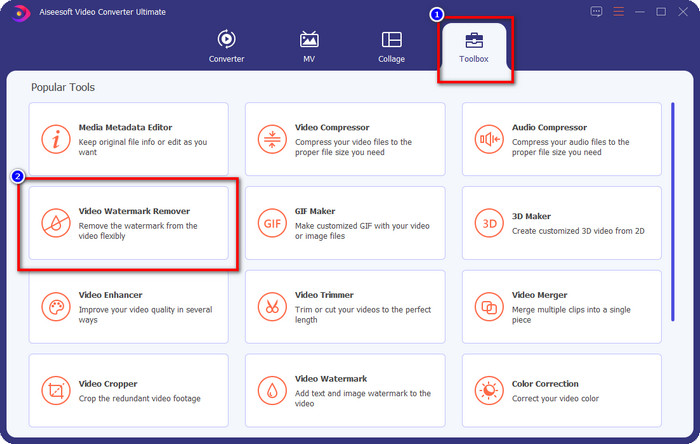
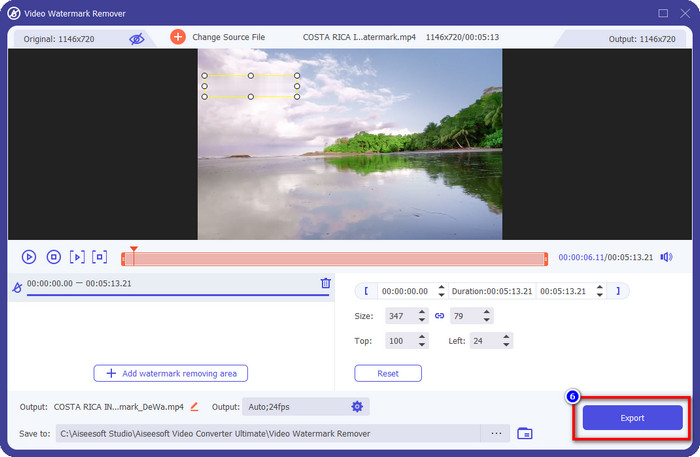
ขั้นตอนที่ 2. ในเมนู Toolbox ให้ค้นหา Video Watermark Remover ที่มีอยู่ในโปรแกรมนี้ แล้วคลิกเพื่อดำเนินการต่อ.
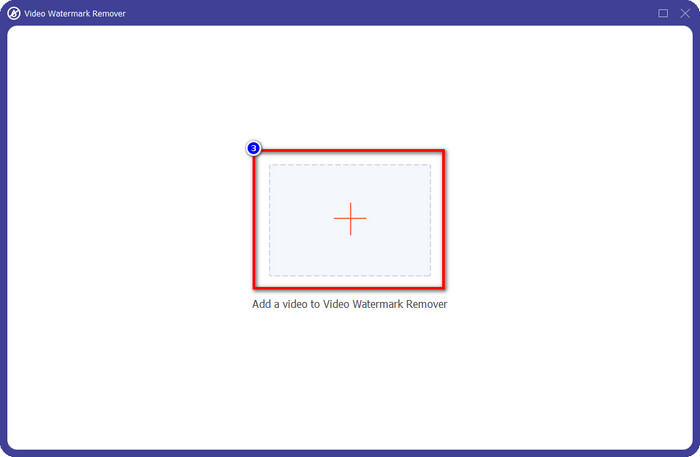
ขั้นตอนที่ 3. โดยการคลิกไอคอน + คุณสามารถอัปโหลดวิดีโอที่มีลายน้ำได้ ค้นหาไฟล์ในโฟลเดอร์ที่แสดงบนหน้าจอของคุณ คลิกเลือกไฟล์หนึ่งครั้ง จากนั้นกด Open เพื่ออัปโหลด.
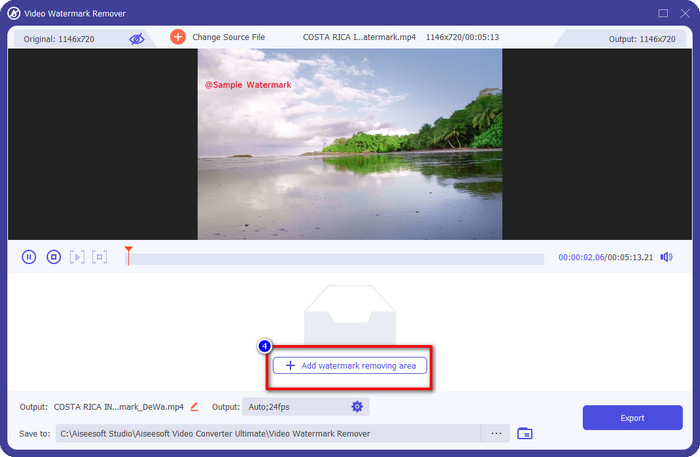
ขั้นตอนที่ 4. หลังจากอัปโหลดวิดีโอที่มีลายน้ำแล้ว ให้กด Add Watermark Removing Area และรอให้กระบวนการโหลดสั้น ๆ เสร็จสิ้น.
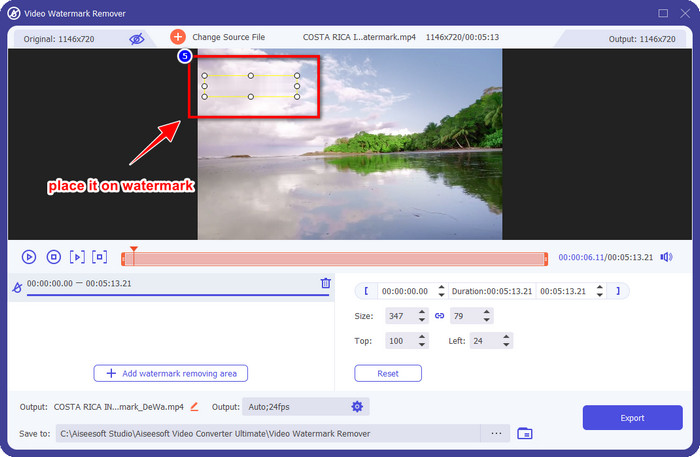
ขั้นตอนที่ 5. วางกรอบเลือกลงบนลายน้ำของ WeVideo และครอบให้ครบทั้งหมด เพื่อที่เมื่อคุณส่งออกวิดีโอแล้ว คุณจะไม่เห็นร่องรอยของลายน้ำหลงเหลืออยู่ตอนท้ายของวิดีโอ.
ขั้นตอนที่ 6. ตอนนี้คุณสามารถบันทึกวิดีโอที่ลบลายน้ำออกแล้วได้โดยการคลิกปุ่ม Export กระบวนการบันทึกจะไม่ใช้เวลานาน เพราะโปรแกรมรองรับการประมวลผลความเร็วสูงและการเร่งด้วยฮาร์ดแวร์.
iMyFone Mark Go
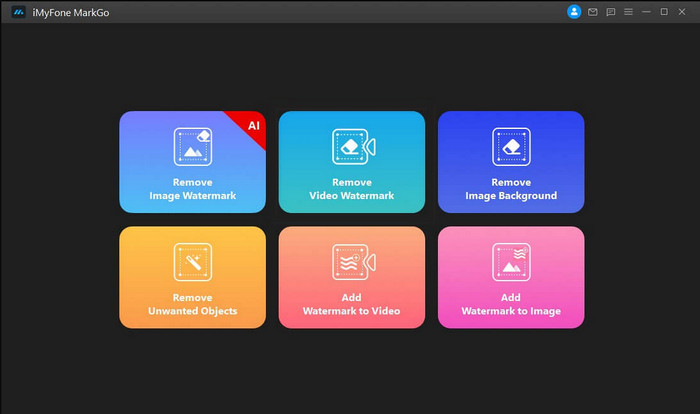
iMyFone Mark Go เป็นอีกหนึ่งโปรแกรมลบลายน้ำที่คุณสามารถดาวน์โหลดได้บน Windows และ Mac เพื่อช่วยคุณลบลายน้ำของ WeVideo โปรแกรมนี้สามารถลบลายน้ำในวิดีโอได้อย่างมีประสิทธิภาพเช่นเดียวกับเครื่องมือระดับสูงตัวอื่น ๆ เช่นเดียวกับซอฟต์แวร์ออฟไลน์ทั่วไปที่คุณสามารถดาวน์โหลดลงเดสก์ท็อปได้ คุณจำเป็นต้องซื้อเวอร์ชันเต็มของโปรแกรมเพื่อใช้ฟังก์ชันลบลายน้ำและใช้งานฟีเจอร์ระดับพรีเมียมสำหรับลบลายน้ำบนวิดีโอของคุณ แม้ว่าจะมีค่าใช้จ่าย แต่ก็ไม่ได้แพงเท่ากับโปรแกรมลบลายน้ำตัวอื่น ๆ ที่มีให้ดาวน์โหลด ดังนั้น หากคุณต้องการลบลายน้ำบนวิดีโอของคุณอย่างง่ายดายและมีประสิทธิภาพ คุณสามารถทำตามขั้นตอนด้านล่างขณะที่เราแนะนำคุณแบบทีละขั้นตอน.
ขั้นตอนที่ 1. ดาวน์โหลดซอฟต์แวร์ลงเดสก์ท็อปของคุณโดยเข้าไปที่เว็บไซต์ทางการ.
ขั้นตอนที่ 2. หลังจากเปิดโปรแกรมแล้ว ให้คลิกที่ Remove Video Watermark.
ขั้นตอนที่ 3. เพิ่มไฟล์วิดีโอโดยคลิก Add the Video จากนั้นเลือกไฟล์วิดีโอที่มีลายน้ำ.
ขั้นตอนที่ 4. เลื่อนกรอบสี่เหลี่ยมที่ปรากฏขึ้นแล้ววางทับบนตำแหน่งของลายน้ำเพื่อครอบให้หมด แม้ว่าจะมีตัวเลือกอื่นอีกสามแบบสำหรับการลบลายน้ำ แต่คุณจะไม่สามารถใช้งานได้ เพราะตัวเลือกเหล่านั้นสงวนไว้สำหรับผู้ใช้แบบพรีเมียม.
ขั้นตอนที่ 5. คลิกปุ่ม Export เพื่อบันทึกวิดีโอที่คุณลบลายน้ำออกแล้ว.
เครื่องตัดวิดีโอออนไลน์ – ลบโลโก้ออกจากวิดีโอ
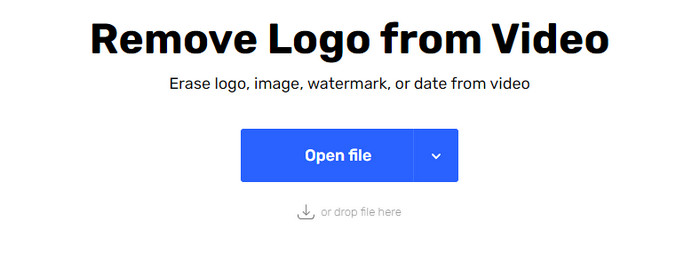
จะลบลายน้ำของ WeVideo ฟรีได้อย่างไร? ให้ใช้ Online Video Cutter – Remove Logo From Video ซอฟต์แวร์นี้เป็นเครื่องมือเว็บฟรีที่คุณสามารถใช้ลบลายน้ำบนวิดีโอของคุณได้โดยตรงบนเว็บ โดยไม่ต้องดาวน์โหลดอะไรหรือต้องจ่ายเงิน เครื่องมือนี้มีประสิทธิภาพเทียบเท่ากับโปรแกรมลบลายน้ำตัวอื่น ๆ ในตลาดหากนำมาเปรียบเทียบกัน แต่ก็ยังไม่ดีเท่าโปรแกรมระดับสูงสุด มันสามารถครอบลายน้ำในวิดีโอของคุณเพื่อให้ภาพวิดีโอดูดีขึ้น อย่างไรก็ตาม ถ้าคุณไม่มีการเชื่อมต่ออินเทอร์เน็ต เครื่องมือนี้จะไม่ใช่ตัวเลือกที่ดีที่สุดสำหรับการลบลายน้ำในวิดีโอของคุณ แต่ถ้าคุณมีอินเทอร์เน็ต ก็สามารถทำตามขั้นตอนด้านล่างเพื่อเริ่มใช้เครื่องมือนี้ลบลายน้ำบนวิดีโอของคุณได้.
ขั้นตอนที่ 1. เปิดแท็บใหม่และค้นหาชื่อเครื่องมือนี้เพื่อเริ่มลบลายน้ำออกจากวิดีโอ.
ขั้นตอนที่ 2. คลิก Open File เพื่ออัปโหลดวิดีโอจาก WeVideo มาที่นี่ และให้เครื่องมือประมวลผลเพื่อแสดงตัวอย่างวิดีโอที่คุณอัปโหลด.
ขั้นตอนที่ 3. คลิกที่ตำแหน่งลายน้ำเพื่อใช้พื้นที่ลบลายน้ำที่เครื่องมือนี้มี เมื่อคุณคลิกที่ส่วนใดส่วนหนึ่งของวิดีโอ จะมีกรอบเลือกปรากฏขึ้น.
ขั้นตอนที่ 4. กด Save เพื่อบันทึกวิดีโอที่ไม่มีลายน้ำแล้ว.
ที่เกี่ยวข้อง:
ส่วนที่ 3 คำถามที่พบบ่อยเกี่ยวกับการลบ WeVideo Watermark
เครื่องมือใดดีที่สุดในการลบ WeVideo Watermark
ไม่ต้องสงสัยเลยว่ามันคือ FVC Video Converter Ultimate; เครื่องมือนี้ให้ผลลัพธ์ที่ดีที่สุดในการลบลายน้ำในวิดีโอของคุณ ในบรรดาเครื่องมือลบลายน้ำที่เลือก เราไม่สามารถปฏิเสธได้ว่าเครื่องมือที่ดีที่สุดนั้นเหนือกว่าเครื่องมือลบลายน้ำอื่นๆ
ฉันสามารถครอบตัดลายน้ำ WeVideo ได้หรือไม่
ได้ คุณสามารถครอบตัดลายน้ำที่ WeVideo ทิ้งไว้ในวิดีโอของคุณได้ แต่ขนาดของวิดีโอจะลดลง และมีโอกาสที่คุณภาพของวิดีโอจะลดลงเนื่องจากคุณตัดอัตราส่วนภาพออก
อะไรทำให้ WeVideo เป็นโปรแกรมตัดต่อวิดีโอที่ดีที่สุดบนเว็บ
ด้วยคุณสมบัติการตัดต่อวิดีโอพื้นฐานที่สมบูรณ์ที่คุณคุ้นเคย และความง่ายในการใช้เครื่องมือนี้ นี่คือความรู้ทั่วไปเกี่ยวกับสิ่งที่ทำให้ WeVideo เป็นหนึ่งในโปรแกรมตัดต่อวิดีโอที่ดีที่สุดที่คุณสามารถใช้ได้บนเว็บ แต่มันไม่ดีเท่ากับโปรแกรมตัดต่อวิดีโออื่น ๆ Adobe Premiere Pro, Final Cut Pro เป็นต้น
สรุป
ในที่สุด ด้วยวิธีการที่เราให้ไว้ข้างต้น คุณก็ทราบวิธีกำจัดลายน้ำ WeVideo แล้ว แต่คุณคิดอย่างไรเกี่ยวกับเครื่องมือที่เราสมัครเข้าร่วม หากคุณยังไม่รู้ว่าควรใช้อะไร คุณต้องทดสอบ FVC Video Converter Ultimate ในความเห็นของเรา ให้สิ่งที่ดีที่สุดในการลบลายน้ำและยังใช้งานง่ายอีกด้วย ดังนั้นสิ่งที่คุณรอ? คลิกปุ่มดาวน์โหลดเพื่อลบลายน้ำและใช้งานทันที
-
 น้ำยาล้างลายน้ำ 123rf – การตรวจสอบอย่างละเอียดของเครื่องมือขั้นสูงสุด
 หากคุณต้องการทราบว่าตัวลบลายน้ำ 123rf ที่โดดเด่นที่สุดคืออะไร โปรดอ่านบทความนี้อย่างละเอียด บทความนี้ให้การทบทวนเชิงลึกเกี่ยวกับเครื่องมือต่างๆ
-
 วิธีลบลายน้ำ DeviantArt บน Windows และ Mac
 ต้องการเรียนรู้วิธีลบลายน้ำ DeviantArt บนรูปภาพของคุณหรือไม่? ด้วยการใช้ตัวลบลายน้ำ DeviantArt ที่โดดเด่นที่สุด คุณสามารถลบลายน้ำที่น่ารำคาญเหล่านั้นออกได้อย่างง่ายดาย
-
 สุดยอดซอฟต์แวร์เพื่อลบลายน้ำ Video Helper บนวิดีโอที่ส่งออก [2022]
 คุณต้องการทราบวิธีการลบลายน้ำบนวิดีโอที่คุณดาวน์โหลดบน Video Helper หรือไม่? ถ้าเป็นเช่นนั้นอ่านบทความนี้เพื่อทราบ
