


 Video Converter Ultimate
 บันทึกหน้าจอ
 ซ่อมวิดีโอ
การวิเคราะห์โดยสังเขปเกี่ยวกับข้อความที่มีอยู่ในแอพวิดีโอ Windows/Mac/Android/iOS
การปกป้องโปรเจกต์ของคุณเป็นเรื่องสำคัญมาก โดยเฉพาะอย่างยิ่งหากคุณโพสต์งานออนไลน์เพื่อหลีกเลี่ยงการถูกขโมยผลงาน อย่างไรก็ตาม ไม่ใช่ทุกเว็บไซต์ที่จะสามารถรักษาผลงานของคุณให้ปลอดภัยจากการถูกขโมยโดยผู้อื่นได้ ดังนั้นก่อนที่คุณจะโพสต์โปรเจกต์ลงบนเว็บ การใส่วอเตอร์มาร์กจึงถือเป็นตัวเลือกที่เหมาะสม แม้ว่าวอเตอร์มาร์กจะไม่สามารถปกป้องงานของคุณได้ 100% แต่ก็ถือเป็นอีกหนึ่งวิธีในการรักษาความปลอดภัยผลงานจากการถูกลอกเลียน จากโพสต์นี้ เราจะนำเสนอเครื่องมือต่าง ๆ ที่คุณสามารถใช้ได้ ส่วนใหญ่ใช้งานได้ฟรี แต่อีกบางส่วนต้องชำระเงินเพื่อปลดล็อกศักยภาพการใช้งานทั้งหมดของเครื่องมือ ณ นาทีนี้ มาเปิดมุมมองโดยรวมเกี่ยวกับแอปใส่ข้อความบนวิดีโอ ประจำปี 2022 กันเลย.

ส่วนที่ 1 ข้อความที่ดีที่สุด 3 อย่างในแอปพลิเคชันวิดีโอที่คุณสามารถดาวน์โหลดได้บน Windows & Mac
FVC Video Converter Ultimate
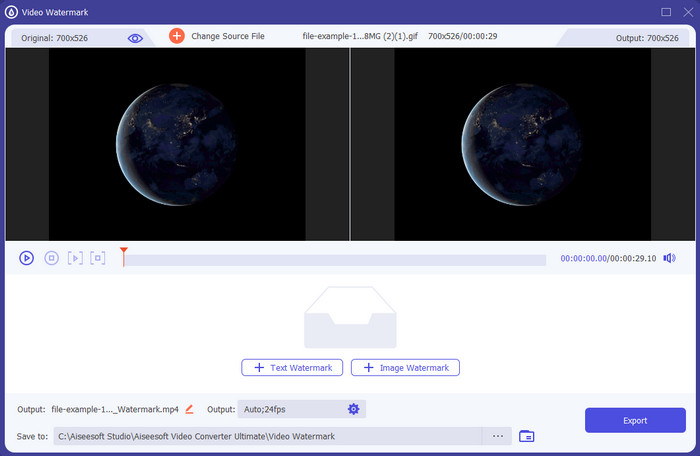
ค่าใช้จ่าย: มีให้ลองใช้ฟรี ราคาเริ่มต้นที่ $39.50 ต่อหนึ่งปี, $55.20 สำหรับการใช้งานตลอดชีพ และสำหรับ 2-5 เครื่อง แบบ Lifetime ราคา $119.00.
แพลตฟอร์มที่รองรับ: Windows และ Mac.
หากคุณต้องการแอปสำหรับใส่ข้อความลงในวิดีโอ คุณควรเลือกใช้เครื่องมือที่มีคนเลือกมากที่สุดในปี 2022 อย่าง FVC Video Converter Ultimate เครื่องมือนี้รองรับไฟล์ได้หลายรูปแบบให้คุณอัปโหลดเข้าไปได้อย่างหลากหลาย ดังนั้นการเพิ่มไฟล์วิดีโอลงมาจึงไม่ใช่ปัญหา อีกทั้งคุณยังสามารถเปลี่ยนรูปแบบไฟล์ได้หากจำเป็น เมื่อมองแวบแรกที่หน้าตาโปรแกรม (GUI) จะเห็นว่าเครื่องมือนี้ดูเรียบร้อยและเป็นมืออาชีพไปพร้อมกัน แม้จะเป็นเครื่องมือระดับมืออาชีพ แต่ผู้ใช้ที่มีประสบการณ์น้อยหรือแทบไม่มีเลยก็สามารถเรียนรู้วิธีใช้งานได้อย่างรวดเร็ว เส้นโค้งการเรียนรู้ไม่ชันเท่ากับ Adobe Photoshop.
ยิ่งกว่านั้น เครื่องมือนี้นำมาซึ่งความภาคภูมิใจในชื่อของมันในฐานะเครื่องมือขั้นสูงสุด เพราะมีกระบวนการอัพโหลดและดาวน์โหลดที่รวดเร็วที่สุด ไม่ว่าจะเป็นไฟล์หนึ่ง สอง หรือหลายไฟล์ การเข้ารหัสรูปแบบไฟล์ lossy หรือ lossless ทำได้ง่ายและรวดเร็วหากคุณใช้เครื่องมือนี้ แม้ว่าเครื่องมือนี้จะมีราคาแพงเล็กน้อยจากรายการโปรแกรมแก้ไขข้อความวิดีโอ แต่เรายังคงพบว่าเครื่องมือนี้เป็นเครื่องมือที่ง่ายที่สุดในการใช้งานแต่มีประสิทธิภาพมากที่สุด
ดาวน์โหลดฟรีสำหรับ Windows 7 หรือใหม่กว่าดาวน์โหลดอย่างปลอดภัย
ดาวน์โหลดฟรีสำหรับ MacOS 10.7 หรือใหม่กว่าดาวน์โหลดอย่างปลอดภัย
Adobe Photoshop
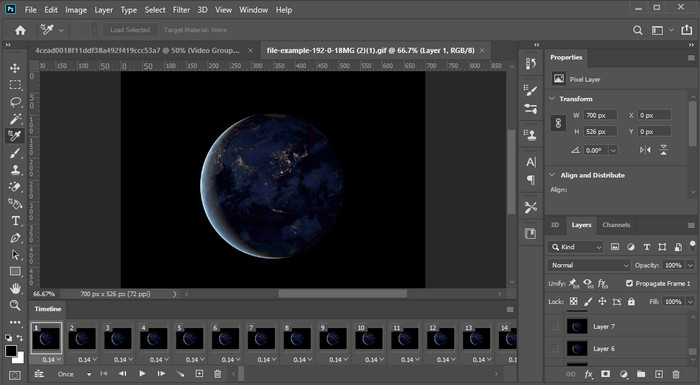
ค่าใช้จ่าย: ทดลองใช้งานฟรี 7 วัน และ $20.99 ต่อเดือน.
แพลตฟอร์มที่รองรับ: Windows, Mac และ iPad.
ต้องการเครื่องมือระดับมืออาชีพมารับงานนี้ใช่ไหม? งั้น Adobe Photoshop ก็คือเครื่องมือระดับโปรในที่นี้ ด้วยหน้าตาโปรแกรมและฟีเจอร์ที่จัดเต็ม ทำให้กลายเป็นตัวเลือกแรกของมืออาชีพในการดาวน์โหลดมาใช้บนแพลตฟอร์มของตน นอกจากนี้ เครื่องมือนี้ยังมีฟีเจอร์การตัดต่อขั้นสูงที่คุณสามารถใช้เพื่อทำให้ข้อความบนวิดีโอดูสวยงามและโดดเด่นกว่าที่เคย.
อย่างไรก็ตาม เครื่องมือนี้ไม่ใช่ตัวเลือกที่ดีที่สุดหากคุณเป็นมือใหม่ในการแก้ไข เพราะมันเป็นเครื่องมือทางเทคนิคที่แม้แต่มืออาชีพบางคนยังต้องอ่านบทช่วยสอนเกี่ยวกับวิธีการทำงานเฉพาะ แต่ถ้าคุณต้องการใช้สิ่งนี้ ให้เพิ่มข้อความลงในแอปวิดีโอ คุณสามารถดาวน์โหลดได้จากเว็บไซต์ทางการของ Adobe
iMovie
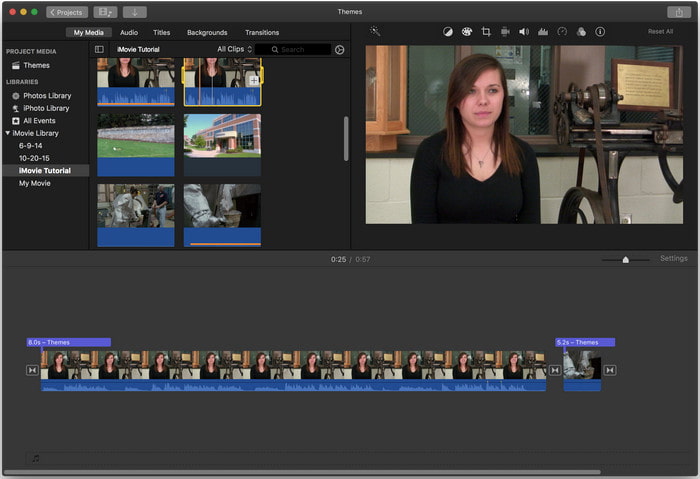
ค่าใช้จ่าย: ติดตั้งมาฟรีอยู่แล้ว.
แพลตฟอร์มที่รองรับ: Mac และ iOS.
หากคุณต้องการเครื่องมือฟรีบน Mac หรืออุปกรณ์ iOS เพื่อใส่วอเตอร์มาร์กบนวิดีโอ คุณสามารถใช้ iMovie เพื่อทำงานนี้ได้ แอปนี้ไม่สามารถดาวน์โหลดบนอุปกรณ์ Windows หรือ Android ได้ เพราะออกแบบมาสำหรับอุปกรณ์ของ Apple เท่านั้น แม้แพลตฟอร์มที่รองรับจะมีจำกัด แต่ก็ยังถือเป็นหนึ่งในเครื่องมือใส่วอเตอร์มาร์กที่ดีที่สุดที่คุณสามารถใช้บน Mac และ iOS ผู้เริ่มต้นส่วนใหญ่จะชื่นชอบเพราะมีฟีเจอร์ตัดต่อที่จัดเต็มให้ใช้ฟรี ดังนั้นหากคุณใช้ Mac หรือ iOS ควรลองแอปใส่ข้อความบนวิดีโอนี้ดูก่อน แล้วดูว่าสามารถตอบโจทย์ความต้องการของคุณได้หรือไม่.
ส่วนที่ 2 3 แอปพลิเคชั่นข้อความวิดีโอที่ดีที่สุดมีให้ใน Android และ iOS ทั้งหมด
เครื่องมือทั้งหมดที่กล่าวถึงข้างต้นมีให้ใช้งานบน Windows และ Mac ในขณะที่บางเครื่องมือรองรับอุปกรณ์พกพาที่จำกัด จะทำอย่างไรถ้าคุณมีอุปกรณ์เคลื่อนที่และต้องการเพิ่มข้อความเป็นลายน้ำในวิดีโอ คุณยังทำได้ไหม คุณสามารถใช้เครื่องมือที่เรานำเสนอด้านล่าง อ่านด้วยความระมัดระวังเพื่อดูว่าเครื่องมือนี้จะเพียงพอกับความต้องการของคุณหรือไม่
โปรแกรมตัดต่อวิดีโอ: ข้อความในวิดีโอ
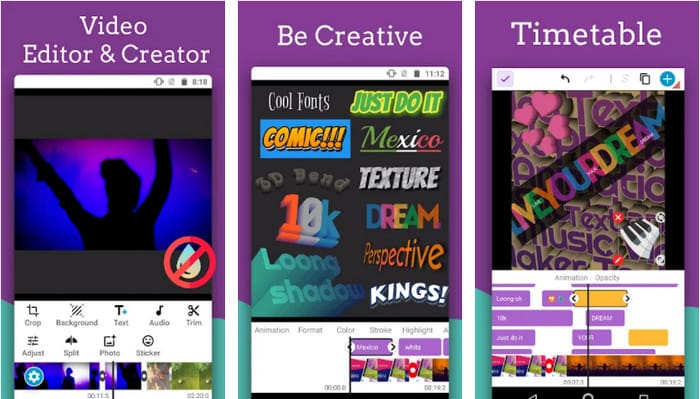
ค่าใช้จ่าย: ดาวน์โหลดฟรี.
แพลตฟอร์มที่รองรับ: Android.
แม้ว่าจะมีแอปใส่ข้อความลงวิดีโอให้ดาวน์โหลดฟรีบน Android อยู่มากมาย แต่เรายังคงมองว่า Video Editor: Text on Video โดดเด่นในหลาย ๆ ด้าน แอป Android ตัวนี้มีฟีเจอร์การตัดต่อขั้นสูงให้ผู้ใช้สามารถทำให้วิดีโอดูโดดเด่นยิ่งขึ้น หากคุณต้องการใช้แอปนี้และใส่วอเตอร์มาร์กลงในวิดีโอ ก็ยังมีเอฟเฟกต์ตัวอักษรเคลื่อนไหวให้คุณใส่ข้อความแบบแอนิเมชันบนวิดีโอได้ด้วย.
แม้ว่าเครื่องมือจะดาวน์โหลดได้ฟรี แต่ก็ยังต้องมีการปรับปรุงอีกมาก และจำเป็นต้องแก้ไขในเครื่องมือนี้ เช่น ข้อบกพร่องและข้อบกพร่องที่ผู้ใช้บางคนพบ นอกจากนี้ โฆษณาบางรายการจะปรากฏขึ้นเมื่อคุณเปิดแอปในโทรศัพท์และใช้งาน อย่างไรก็ตาม นักพัฒนาซอฟต์แวร์ยังคงอัปเดตเครื่องมืออยู่เสมอเพื่อเป็นโปรแกรมตัดต่อวิดีโอที่ดีที่สุดบน Android เพื่อให้ได้เต็มศักยภาพ
Vont - ข้อความในวิดีโอ 4+
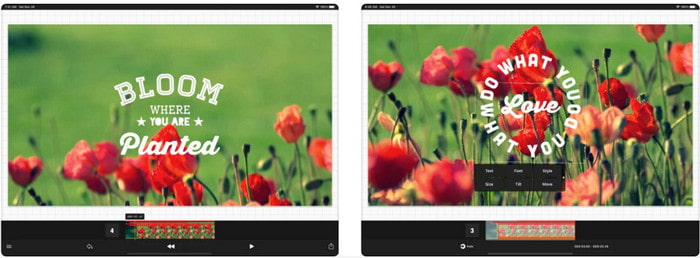
ค่าใช้จ่าย: ดาวน์โหลดฟรี การซื้อภายในแอปตั้งแต่ $2.99 ถึง $9.49.
แพลตฟอร์มที่รองรับ: iPhone, iPad และ Android.
Vont - Text on Videos 4+ เป็นหนึ่งในแอปที่ดีที่สุดสำหรับการใส่ข้อความลงบนวิดีโอในทุกอุปกรณ์พกพา แอปรองรับทั้งอุปกรณ์ Android และ iOS จึงไม่แปลกที่เครื่องมือนี้จะได้รับชื่อเสียงและความนิยมจากทั้งสองฝั่ง แต่ถ้าจะเปรียบเทียบว่าแอปทำงานได้ดีกว่าบนแพลตฟอร์มใด เราสามารถบอกได้ว่ามีความเหมาะสมกับอุปกรณ์ iOS มากกว่า เพราะรองรับฟอร์แมตได้มากกว่า และมีฟีเจอร์การตัดต่อที่ละเอียดกว่าให้ใช้งาน.
แม้ว่าเครื่องมือนี้จะทำงานได้ดีกว่าบน iOS แต่เรายังคงเห็นพ้องต้องกันว่าเครื่องมือนี้ใช้งานได้ดีเยี่ยมแม้ในอุปกรณ์ Android เพื่อเพิ่มลายน้ำอย่างรวดเร็วในวิดีโอบางรายการ
ข้อความในวิดีโอ: Easy Vid Editor 4+
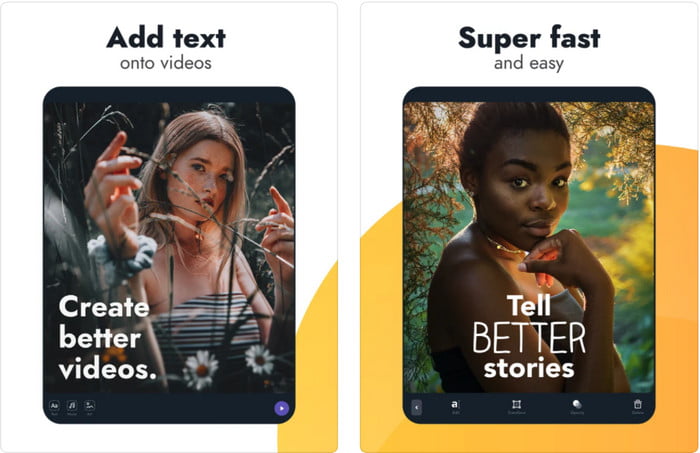
ค่าใช้จ่าย: ดาวน์โหลดฟรี การซื้อภายในแอปตั้งแต่ $1.99 ถึง $49.99
แพลตฟอร์มที่รองรับ: iPhone และ iPad.
หากคุณอยากรู้ว่าแอปใส่ข้อความบนวิดีโอตัวไหนดีที่สุดบน iOS แน่นอนว่า Text On Video: Easy Vid Editor 4+ คือคำตอบ แอปนี้รองรับฟีเจอร์การตัดต่อหลายอย่างที่คุณสามารถใช้เพื่อใส่วอเตอร์มาร์กข้อความลงในวิดีโอได้อย่างง่ายดาย พร้อมปรับเปลี่ยนสไตล์ฟอนต์ได้หลากหลาย.
เช่นเดียวกับ Photoshop เครื่องมือนี้ส่งเสริมลายน้ำข้อความ 3 มิติเพื่อช่วยให้คุณจัดการข้อความและวางไว้ที่ใดก็ได้ราวกับว่าอยู่ในขณะถ่ายวิดีโอหรือภาพถ่าย แม้ว่าเราจะพิจารณาแล้วว่าดีที่สุด แต่เราก็ยังคิดว่ามันไม่ใช่เครื่องมือระดับมือโปรที่คุณต้องการ หากคุณเป็นผู้เชี่ยวชาญในการตัดต่อที่มีรายละเอียดมาก
ที่เกี่ยวข้อง:
ส่วนที่ 3 คำถามที่พบบ่อยเกี่ยวกับ Add Text Watermark Apps
การดาวน์โหลดแอปลายน้ำข้อความปลอดภัยหรือไม่
จะปลอดภัยหากคุณดาวน์โหลดเครื่องมือนี้จากเว็บไซต์ทางการหรือตัวดาวน์โหลด มันจะไม่ทำให้เกิดปัญหาใด ๆ หากคุณดาวน์โหลดบนเว็บไซต์ทางการ อย่างไรก็ตาม ไม่ใช่ทุกเว็บไซต์ที่ได้รับการป้องกัน ดังนั้นคุณจึงต้องระมัดระวังการดาวน์โหลดที่ปลอดภัยที่สุดเพื่อใช้เครื่องมือบนระบบปฏิบัติการของคุณ เพื่อหลีกเลี่ยงปัญหาใดๆ
แอพลายน้ำข้อความใดทำงานได้ดีกว่าบนเดสก์ท็อปหรือโทรศัพท์
ไม่ต้องสงสัยเลยว่าแอพลายน้ำข้อความบนเดสก์ท็อปทำงานได้ดีกว่าสำหรับงานหนักเพราะเดสก์ท็อปมี CPU ที่สูงกว่าโทรศัพท์ แต่ถ้าคุณต้องการการแก้ไขแบบกึ่งถ่วงน้ำหนัก ลายน้ำข้อความในโทรศัพท์เป็นตัวเลือกของคุณ เพราะคุณสามารถนำไปได้ทุกที่และใช้งานได้ทุกเมื่อโดยไม่ต้องตั้งค่าเดสก์ท็อป
เหมาะที่จะซื้อแอพลายน้ำข้อความหรือไม่?
หากคุณมีงบประมาณจำกัด เราขอแนะนำให้ใช้เครื่องมือฟรี แต่มีข้อจำกัดบางประการ และคาดว่าจะเป็นเช่นนั้นเพราะเป็นเครื่องมือฟรี แต่ถ้าคุณต้องการคุณลักษณะที่ดีที่สุดในเวอร์ชันพรีเมียม เราขอแนะนำให้คุณซื้อหรือสมัครรับข้อมูลเนื่องจากคุณไม่สามารถรับคุณลักษณะเหล่านี้ในเวอร์ชันฟรีได้
สรุป
ตอนนี้เราได้วิเคราะห์เครื่องมือทั้งหมดเสร็จแล้ว ก็ถึงเวลาที่คุณจะต้องดาวน์โหลดตัวที่เหมาะสมสำหรับตัวเอง เราหวังว่าโพสต์นี้จะช่วยให้คุณตัดสินใจได้ว่าจะใช้ตัวไหนดี แต่ถ้าคุณยังตัดสินใจไม่ได้ เราขอแนะนำให้เลือก FVC Video Converter Ultimate เพราะมันเป็นเครื่องมือแบบครบวงจรที่คุณสามารถดาวน์โหลดได้ทั้งบน Windows และ Mac และทุกฟีเจอร์ได้รับการออกแบบมาอย่างดีเพื่อตอบโจทย์งานแต่ละประเภท ดังนั้นจึงไม่ต้องสงสัยเลยว่ามันคือแอปใส่วอเตอร์มาร์กข้อความที่ดีที่สุดในบรรดาตัวเลือกทั้งหมดข้างต้น.
-
 วิธีเพิ่มเสียงและเพลงลงในวิดีโอฟรีบนคอมพิวเตอร์ / โทรศัพท์ของคุณ
 บทความนี้แสดง 4 วิธีง่ายๆในการเพิ่มเสียงลงในวิดีโอฟรี ไม่ว่าคุณต้องการเพิ่มแทร็กเสียงใดลงในวิดีโอของคุณคุณสามารถรับผลลัพธ์ที่น่าพึงพอใจได้ที่นี่
-
 เปลี่ยน GIF เป็นรูปแบบวิดีโอ: แปลง GIF Memes เป็นวิดีโอ [2025]
 กำหนดวิธีการแปลง GIF เป็นรูปแบบวิดีโอด้วยความช่วยเหลือของเครื่องมือที่แสดงด้านล่าง เลือกข้อใดและเรียนรู้วิธีดำเนินการ เนื่องจากเรารวบรวมหลักฐานเพียงพอ
-
 แอพ GIF ที่ยอดเยี่ยมสำหรับวิดีโอสำหรับอุปกรณ์ Android และ iOS
 คุณรู้หรือไม่ว่าคุณสามารถแปลง GIF เป็นรูปแบบวิดีโอใดก็ได้ที่คุณต้องการโดยใช้โทรศัพท์ของคุณ เลือกแอพที่ดีที่สุดบน Android หรือ iOS ของคุณ
