


 Video Converter Ultimate
 บันทึกหน้าจอ
 ซ่อมวิดีโอ
 ดาวน์โหลดอย่างปลอดภัย
รีวิวคอมเพรสเซอร์ Veed.io: เครื่องมือนี้ทำงานอย่างไร
ในศตวรรษที่ 21 ผู้คนหลงใหลในสื่อดิจิทัลเป็นอย่างมาก บริการสตรีมมิงส่วนใหญ่ในปัจจุบันเปิดให้คุณรับชมและสตรีมวิดีโอได้อย่างไม่จำกัด บนคอมพิวเตอร์และสมาร์ทโฟนของเรา การชมวิดีโอก็ได้กลายเป็นส่วนสำคัญในชีวิตประจำวันของเราเช่นกัน เมื่อจะซื้ออุปกรณ์สักชิ้น เรามักให้ความสำคัญกับหน้าจอแสดงผลและความสามารถของอุปกรณ์ในการเล่นวิดีโอ เมื่อเทคโนโลยีการสร้างวิดีโอพัฒนาขึ้น ทำให้ได้คุณภาพที่ดีขึ้น ไฟล์วิดีโอก็มีขนาดใหญ่ขึ้นตามไปด้วย ดังนั้นจึงได้มีการพัฒนาเทคโนโลยีบีบอัดวิดีโอรูปแบบต่าง ๆ ขึ้นมา หนึ่งในโปรแกรมบีบอัดวิดีโอออนไลน์ที่ได้รับความนิยมในปัจจุบันคือ Veed.io compressor บทความนี้จะรีวิวข้อดี ข้อเสีย และวิธีใช้งานแอปออนไลน์ตัวนี้อย่างละเอียด.

ส่วนที่ 1. Veed Video Compressor คืออะไร
Veed.io เป็นเครื่องมือบีบอัดวิดีโอที่ช่วยให้ผู้ใช้สามารถบีบอัดไฟล์วิดีโอขนาดใหญ่ได้โดยไม่กระทบต่อคุณภาพ เครื่องมือบนเว็บนี้ใช้งานง่ายและมีอินเทอร์เฟซแบบลากและวางที่เรียบง่าย นอกจากนี้ยังไม่มีโฆษณาเพื่อให้ผู้ใช้สามารถบีบอัดวิดีโอต่าง ๆ ได้อย่างรวดเร็วและปลอดภัย หนึ่งในคุณสมบัติที่สำคัญของ Veed.io คือความสามารถในการบีบอัดวิดีโอโดยไม่กระทบต่อคุณภาพ สามารถรักษาความละเอียดของไฟล์วิดีโอในขณะที่บีบอัดด้วยอัลกอริธึมขั้นสูง นอกจากนี้ เครื่องมือออนไลน์นี้ยังเข้ากันได้และรองรับคอนเทนเนอร์วิดีโอต่าง ๆ รวมถึง MP4, AVI, MOV, MKV, WMV และอื่น ๆ Veed.io บีบอัดวิดีโอและเสนอคุณสมบัติการแก้ไข เช่น การตัด การครอบตัด การเพิ่มข้อความ และอื่นๆ มีแผงแก้ไขไทม์ไลน์ที่ผู้ใช้สามารถแก้ไขและปรับปรุงวิดีโอเอาท์พุตของตนได้ ไม่เพียงแต่คุณสามารถลดขนาดไฟล์ของวิดีโอได้ แต่คุณยังสามารถตกแต่งและแก้ไขลักษณะที่ปรากฏของวิดีโอได้อีกด้วย
ส่วนที่ 2 ข้อดีข้อเสียของ Veed Video Compressor
Veed.io เป็นเครื่องมือที่ยอดเยี่ยมที่มาพร้อมกับฟีเจอร์มากมาย อย่างไรก็ตาม ไม่มีอะไรสมบูรณ์แบบในแง่ของการใช้งานดิจิทัล เรายังมีพื้นที่สำหรับการปรับปรุงกระบวนการอยู่เสมอ นั่นคือเหตุผลที่เราได้ทำการตรวจสอบข้อดีและข้อเสียหลายประการอย่างละเอียดถี่ถ้วน
ข้อดี
- สามารถให้คุณสมบัติการแก้ไขมากมายแก่ผู้ใช้เพื่อปรับปรุงเอาต์พุตวิดีโอ
- นอกจากนี้ยังสามารถปรับขนาดอัตราส่วนภาพวิดีโอให้เหมาะสมกับแพลตฟอร์มโซเชียลมีเดียได้อีกด้วย
- คุณสามารถเปลี่ยนสีพื้นหลังของไฟล์วิดีโอที่คุณพยายามบีบอัดได้
- มีเครื่องกำจัดเสียงรบกวนจากพื้นหลัง
- เครื่องมือออนไลน์นี้มาพร้อมกับตัวเลือกในการปรับปรุง FPS
- มันมาพร้อมกับตัวเลือกการส่งออกที่เร็วขึ้น
จุดด้อย
- แม้ว่าแอปนี้จะเป็นบริการฟรีเมียม แต่ฟีเจอร์บางอย่างอาจไม่เปิดให้ทดลองใช้ฟรี
- สำหรับการใช้งานฟรี จะมีลายน้ำเมื่อส่งออกวิดีโอ
- เครื่องมือจะย่อและบีบอัดไฟล์โดยอัตโนมัติ นี่อาจเป็นข้อเสียเปรียบสำหรับผู้ใช้ที่ต้องการมีตัวเลือกหรือการเลือกเพื่อลดขนาดไฟล์ด้วยตนเอง
- ขึ้นอยู่กับความเร็วอินเทอร์เน็ตเป็นหลัก ดังนั้นระยะเวลาในการบีบอัดด้วยเครื่องมือนี้อาจแตกต่างกันไป
ส่วนที่ 3 คำแนะนำของ Veed Video Compressor
Veed.io สามารถเข้าถึงได้จากอุปกรณ์ใดๆ ที่มีการเชื่อมต่ออินเทอร์เน็ต และเข้ากันได้กับเบราว์เซอร์หลักๆ ทั้งหมด เป็นเครื่องมือที่ใช้งานง่ายในการแก้ไขคลิปขนาดเล็กและบีบอัดให้เป็นไฟล์วิดีโอที่มีขนาดเล็กลง คุณสามารถตรวจสอบวิธีแก้ปัญหาด้านล่างได้หากต้องการเรียนรู้เกี่ยวกับกระบวนการโดยละเอียดของเครื่องมือ
ขั้นตอนที่ 1: เข้าใช้งาน Veed.io ออนไลน์
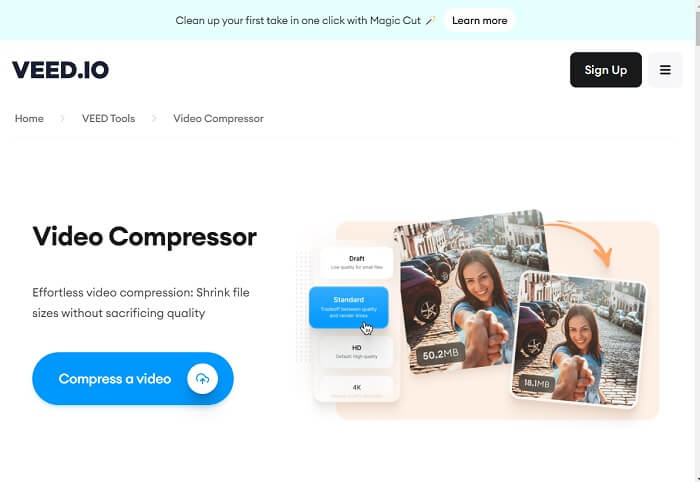
เปิดโปรแกรมบีบอัดวิดีโอ Veed บนเว็บเบราว์เซอร์ของคุณไปยังหน้าโปรดักต์หลัก คุณยังสามารถกดลิงก์ที่ใส่ไว้ในบทความแนะนำนี้เพื่อเข้าสู่หน้าเว็บได้อย่างรวดเร็ว จากนั้นคุณสามารถสมัครบัญชีผู้ใช้ หรือกดตัวเลือก Compress a Video เพื่อเข้าสู่ฟีเจอร์แก้ไขได้โดยตรง.
ขั้นตอนที่ 2: นำเข้าวิดีโอและแก้ไข
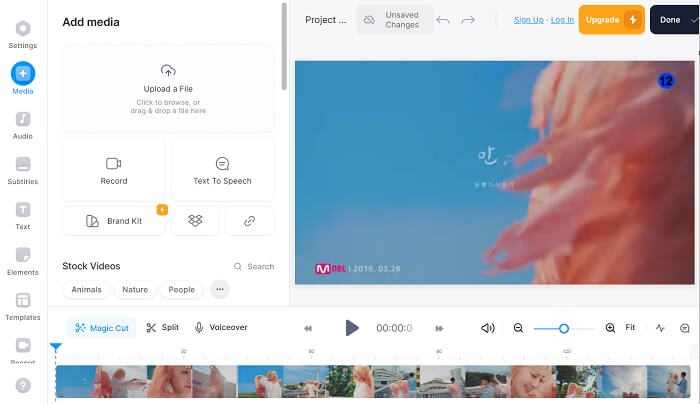
หลังจากนั้น ให้ไปที่แท็บ Media โดยคลิกที่ตัวเลือกบริเวณด้านซ้ายของเครื่องมือออนไลน์ คุณจะเห็นตัวเลือกสำหรับการนำเข้าวิดีโอ คุณสามารถลากและปล่อยไฟล์วิดีโอ หรือกด Upload a File เพื่อเพิ่มวิดีโอลงในอินเทอร์เฟซของเครื่องมือ จากนั้นลากวิดีโอลงบนไทม์ไลน์สำหรับตัดต่อและปรับแต่งวิดีโอด้วยฟีเจอร์แก้ไขต่าง ๆ.
ขั้นตอนที่ 3: ส่งออกและลดขนาดไฟล์วิดีโอ
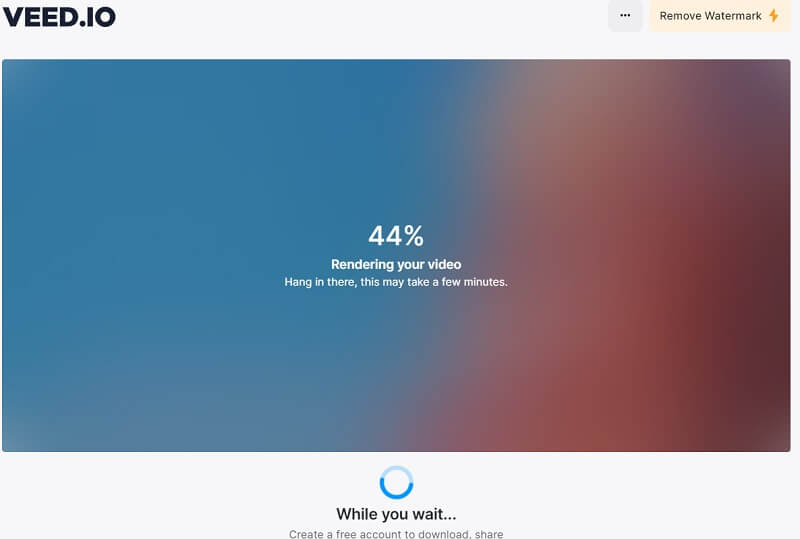
เมื่อแก้ไขวิดีโอเสร็จเรียบร้อยตามผลลัพธ์ที่คุณต้องการแล้ว ให้เตรียมไฟล์เพื่อส่งออก คลิกตัวเลือก Done ที่มุมขวาบนของเครื่องมือออนไลน์ จากนั้นเลือก Export Video เพื่อบีบอัดไฟล์ด้วยอัลกอริทึมของเครื่องมือโดยอัตโนมัติ รอให้กระบวนการเสร็จสิ้น แล้วคุณจะสามารถบันทึกวิดีโอลงในโฟลเดอร์บนคอมพิวเตอร์ได้โดยตรง หรือส่งออกไปยังแพลตฟอร์มโซเชียลมีเดียได้.
ส่วนที่ 4 ทางเลือกสำหรับ Veed Video Compressor
สมมติว่าคุณรู้สึกว่า Veed.io แตกต่างจากความรู้สึกของคุณและต้องใช้วิธีอื่นในการบีบอัดวิดีโอของคุณ ส่วนนี้จะวิเคราะห์โซลูชันต่างๆ เพื่อบีบอัดไฟล์วิดีโอโดยไม่ต้องใช้โปรแกรมบีบอัดวิดีโอ Veed.io
1. Video Converter Ultimate
Video Converter Ultimate คือแอปแปลงวิดีโอรุ่นใหม่บนคอมพิวเตอร์ที่สามารถลดและปรับขนาดไฟล์วิดีโอของคุณได้โดยไม่ทำให้คุณภาพลดลง จุดเด่นที่ทำให้เครื่องมือนี้เป็นตัวเลือกที่ดีกว่า Veed.io คือความสามารถในการบีบอัดไฟล์วิดีโอคุณภาพสูง ผู้ใช้สามารถลดขนาดไฟล์ของวิดีโอที่มีความละเอียด 8K, 4K, 2K, 1080p และอื่น ๆ ได้ เราต่างก็ทราบกันดีว่าวิดีโอความละเอียดระดับนี้จะใช้ขนาดไฟล์จำนวนมาก ด้วยแอปนี้ อุปกรณ์ของคุณจะ "หายใจได้คล่องขึ้น" เพราะสามารถเก็บวิดีโอความละเอียดสูงเหล่านี้ได้มากขึ้นในพื้นที่จัดเก็บที่น้อยลง นอกจากนี้ แอปยังรองรับมากกว่า 1000 รูปแบบไฟล์สำหรับการตัดต่อ ปรับปรุง และบีบอัด ไม่ว่าจะเป็น MP4, AVI, WMV, MKV, MOV, รูปแบบที่ VLC รองรับ และอื่น ๆ คุณสามารถดูคู่มือรายละเอียดด้านล่างเกี่ยวกับวิธีบีบอัดวิดีโอด้วย Video Converter Ultimate.
ขั้นตอนที่ 1: ดาวน์โหลด Free Converter Ultimate บนคอมพิวเตอร์ของคุณ
หากต้องการบีบอัดไฟล์วิดีโอด้วย Free Converter Ultimate คุณต้องดาวน์โหลดไฟล์ติดตั้งและบันทึกลงบนคอมพิวเตอร์ของคุณ หากคุณต้องการเครื่องมืออย่างเร่งด่วน เราก็มีวิธีที่สะดวกกว่านี้ เพียงกดไอคอน Free Download ด้านล่างเพื่อดาวน์โหลดไฟล์ติดตั้งของเครื่องมือ.
ดาวน์โหลดฟรีสำหรับ Windows 7 ขึ้นไปดาวน์โหลดอย่างปลอดภัย
ดาวน์โหลดฟรีสำหรับ MacOS 10.7 หรือใหม่กว่าดาวน์โหลดอย่างปลอดภัย
ขั้นตอนที่ 2: นำเข้าและลดขนาดไฟล์วิดีโอ
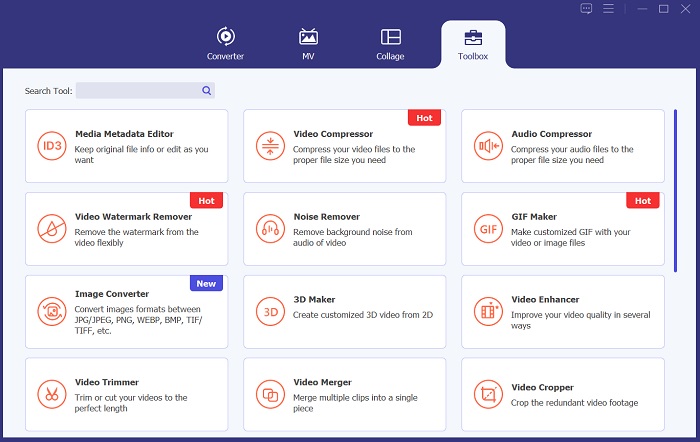
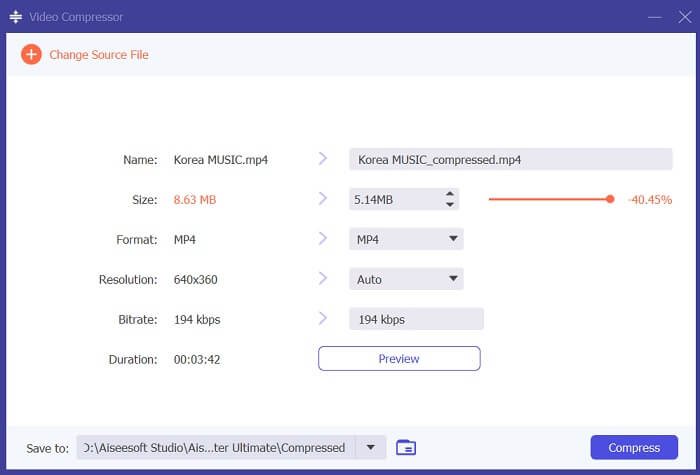
ต่อมาเพื่อบีบอัดวิดีโอ ให้ไปที่ตัวเลือก Toolbox และค้นหา Video Compressor คลิกไอคอน + บนอินเทอร์เฟซของแอป แล้วค้นหาวิดีโอที่คุณต้องการลดขนาดไฟล์ จากนั้นกดปุ่ม OK เพื่อเพิ่มวิดีโอลงในระบบของเครื่องมือ.
ขั้นตอนที่ 3: ส่งออกวิดีโอ
สุดท้าย เมื่อคุณได้ปรับขนาดไฟล์วิดีโอตามที่ต้องการแล้ว ให้กดตัวเลือก Compress เพื่อวิเคราะห์วิดีโอและเริ่มกระบวนการบีบอัด ไฟล์ผลลัพธ์จะถูกบันทึกโดยอัตโนมัติลงในโฟลเดอร์บนคอมพิวเตอร์ของคุณ ภายใต้โฟลเดอร์ผลลัพธ์ของ Video Converter Ultimate.
2. โปรแกรมบีบอัดวิดีโอ FVC ออนไลน์
อีกหนึ่งตัวเลือกที่ผู้ใช้สามารถใช้บีบอัดวิดีโอได้คือ FVC Video Compressor Online เครื่องมือบนเว็บตัวนี้เป็นแพลตฟอร์มเฉพาะทางสำหรับลดขนาดไฟล์ของวิดีโอ รองรับไฟล์วิดีโอและรูปแบบต่าง ๆ มากมาย เช่น MP4, MOV, AVI, FLV, TS, WebM, M4V และอื่น ๆ อีกทั้งยังรองรับคุณภาพวิดีโอหลายระดับ ผู้ใช้สามารถบีบอัดวิดีโอที่มีความละเอียด 4K, HD, SD, 3D และอื่น ๆ ได้ ด้วยอัลกอริทึมของเครื่องมือ ทำให้มั่นใจได้ว่ากระบวนการบีบอัดจะเร็วกว่าโปรแกรมบีบอัดวิดีโอออนไลน์ทั่วไปถึง 30 เท่า คุณสมบัตินี้ทำให้เครื่องมือนี้เป็นทางเลือกที่ดีกว่า Veed.io นอกจากนี้ FVC Video Compressor Online ยังมีฟีเจอร์บีบอัดแบบเป็นชุดที่สามารถลดขนาดไฟล์ได้ครั้งละจำนวนมาก ซึ่งเป็นสิ่งที่ Veed.io ยังไม่มี หากต้องการเรียนรู้วิธีลดขนาดไฟล์วิดีโอด้วยแพลตฟอร์มนี้ โปรดทำตามขั้นตอนโดยละเอียดด้านล่าง.
ขั้นตอนที่ 1: เข้าใช้งาน FVC Video Compressor Online
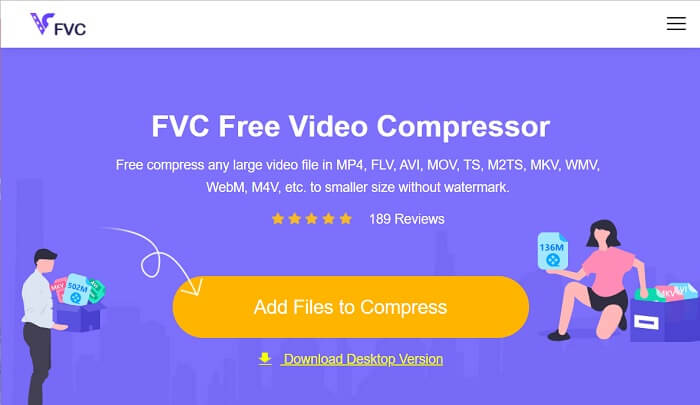
เริ่มต้นการประมวลผลไฟล์วิดีโอของคุณโดยการเข้าถึง FVC Video Compressor Online บนเว็บเบราว์เซอร์ของคุณ เครื่องมือนี้เข้ากันได้กับ Chrome, Firefox, Safari, Microsoft Edge และอีกมากมาย ไปที่หน้าผลิตภัณฑ์หลักและค้นหาอินเทอร์เฟซ
ขั้นตอนที่ 2: บีบอัดไฟล์วิดีโอ
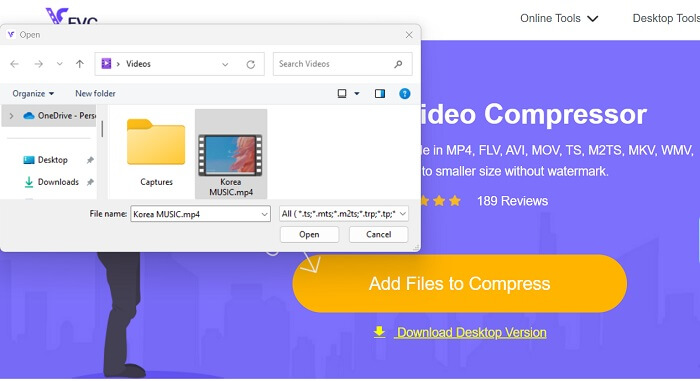
คลิกไอคอน Add Files to Compress เพื่อเปิดโฟลเดอร์บนคอมพิวเตอร์หรืออุปกรณ์ของคุณ ค้นหาและเลือกวิดีโอที่คุณต้องการบีบอัด จากนั้นคลิก Open เพื่อนำเข้าไฟล์ สำหรับผู้ใช้ใหม่ คุณอาจต้องดาวน์โหลดตัวติดตั้งหรือตัวเรียกใช้งานบนเว็บเบราว์เซอร์ก่อนจึงจะสามารถใช้งานแพลตฟอร์มนี้ได้.
ขั้นตอนที่ 3: ส่งออกวิดีโอ
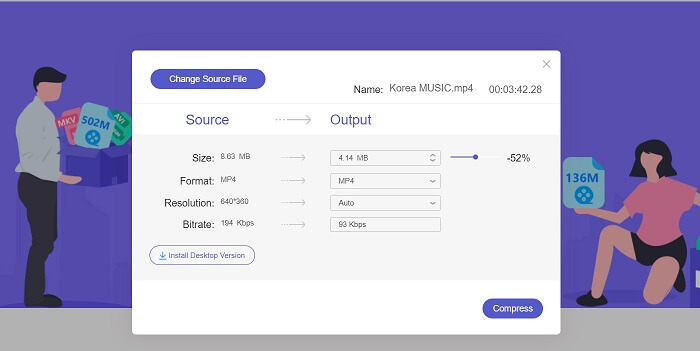
สุดท้าย ให้บีบอัดไฟล์วิดีโอโดยการปรับค่าพารามิเตอร์วิดีโอต่าง ๆ ใช้ตัวเลื่อนเพื่อเลือกเปอร์เซ็นต์ของขนาดไฟล์ที่จะลดจากวิดีโอต้นฉบับ จากนั้นคุณสามารถกดตัวเลือก Compress เพื่อเริ่มกระบวนการและส่งออกวิดีโอที่ถูกลดขนาดแล้ว.
อ่านเพิ่มเติม:
10 เครื่องมือบีบอัด GIF ที่ดีที่สุดสำหรับผู้ใช้เดสก์ท็อปและออนไลน์
วิธีบีบอัดวิดีโอสำหรับ Vimeo ก่อนอัปโหลด (ฟรี & ออนไลน์)
ส่วนที่ 5. คำถามที่พบบ่อยเกี่ยวกับ Veed Video Compressor
โปรแกรมอัดวิดีโอ Veed ฟรีหรือเปล่า?
Veed Video Compressor เป็นเครื่องมือซอฟต์แวร์ที่ช่วยให้ผู้ใช้สามารถลดขนาดไฟล์วิดีโอได้โดยไม่สูญเสียคุณภาพ ใช้อัลกอริธึมการบีบอัดขั้นสูงเพื่อบีบอัดวิดีโอโดยยังคงความละเอียดและอัตราเฟรมดั้งเดิมไว้ สามารถใช้ได้กับทุกเว็บเบราว์เซอร์ รวมถึง Chrome, Safari และ Firefox ใช้งานได้ฟรีสำหรับผู้ใช้ที่ต้องการลดขนาดไฟล์วิดีโอ
การใช้ Veed io ปลอดภัยหรือไม่
ใช่ Veed Video Compressor ปลอดภัยในการใช้งาน ใช้การเข้ารหัส SSL เช่น HTTP เพื่อให้มั่นใจในความปลอดภัย การป้องกัน และความเป็นส่วนตัวของข้อมูลลูกค้า นอกจากนี้ ผู้ใช้ไม่จำเป็นต้องดาวน์โหลดหรือรับซอฟต์แวร์ไฟล์ใดๆ บนอุปกรณ์ของตน ทำให้เป็นตัวเลือกที่ปลอดภัยและสะดวกสำหรับการบีบอัดไฟล์วิดีโอ
VEED ฟรีมีลายน้ำหรือไม่?
ใช่ มันมีลายน้ำเมื่อส่งออกไฟล์วิดีโอ Veed Video Compressor ช่วยให้ผู้ใช้ปรับแต่งการตั้งค่าการบีบอัดได้ตามความต้องการ ผู้ใช้สามารถปรับพารามิเตอร์ เช่น บิตเรต ความละเอียด และอัตราเฟรม เพื่อให้ได้ระดับการบีบอัดที่ต้องการ คุณสมบัติขั้นสูงเหล่านี้พร้อมใช้งาน อย่างไรก็ตาม วิดีโอที่ส่งออกจะมีลายน้ำอยู่
สรุป
Veed Video Compressor เป็นเครื่องมือที่เหมาะสำหรับครีเอเตอร์คอนเทนต์ที่ต้องการอัปโหลดวิดีโอคุณภาพสูงโดยไม่ต้องรอเวลาอัปโหลดนาน ๆ แพลตฟอร์มนี้ยอดเยี่ยมสำหรับผู้ที่ต้องการบีบอัดไฟล์วิดีโอขนาดใหญ่ให้เล็กลงได้อย่างรวดเร็วและมีประสิทธิภาพ อินเทอร์เฟซที่ใช้งานง่ายและอัลกอริทึมการบีบอัดขั้นสูงทำให้เครื่องมือนี้โดดเด่นในตลาดโปรแกรมบีบอัดวิดีโอที่มีตัวเลือกอยู่มากมาย อย่างไรก็ตาม เครื่องมือนี้ยังต้องได้รับการปรับปรุงต่อไป ดังที่เราได้กล่าวถึงข้อเสียไว้ข้างต้น เมื่อ Veed compress ไม่ตอบโจทย์คุณ คุณสามารถพึ่งพาตัวเลือกอื่นและโปรแกรมทางเลือกที่แนะนำไว้ในบทความนี้ได้ ถึงกระนั้น Veed.io ก็ยังเป็นแพลตฟอร์มที่ดี ใช้งานง่าย และมีประสิทธิภาพในการลดขนาดไฟล์วิดีโอ.
-
 วิธีบีบอัดวิดีโอ GoPro จาก 4K เป็น 1080p (ฟรีและออนไลน์)
 เมื่อคุณใช้กล้อง GoPro ในการถ่ายวิดีโอโดยปกติขนาดไฟล์ของวิดีโอที่ถ่ายจะมีขนาดใหญ่มากซึ่งจะแชร์กับผู้อื่นได้ยาก ดังนั้นโพสต์นี้จะแสดงวิธีการบีบอัดวิดีโอ GoPro
-
 วิธีการบีบอัดวิดีโอฟรีสำหรับ Facebook จาก GBs เป็น MBs
 หากคุณถูกห้ามไม่ให้อัปโหลดวิดีโอขนาดใหญ่บน Facebook ไม่ต้องกังวล เพียงบีบอัดวิดีโอขนาดใหญ่จาก GBs เป็น MBs ด้วยโปรแกรมอัดวิดีโอฟรี
-
 วิธีบีบอัดวิดีโอสำหรับเว็บอย่างมีประสิทธิภาพโดยไม่สูญเสียคุณภาพ
 เมื่อวิดีโอบนเว็บไซต์ของคุณได้รับการร้องเรียนจำนวนมากจากลูกค้าว่ามีการบัฟเฟอร์อยู่เสมอคุณสามารถลองบีบอัดวิดีโอสำหรับเว็บได้ 2 วิธีที่มีประสิทธิภาพซึ่งจะช่วยลดเวลาในการบัฟเฟอร์ของเว็บไซต์เพื่อรักษาลูกค้าไว้
