


 Video Converter Ultimate
 บันทึกหน้าจอ
 ซ่อมวิดีโอ
[แก้ไขแล้ว] วิธีใช้ตัวกรองวิดีโอเพื่อปรับปรุงวิดีโอของคุณอย่างสมบูรณ์แบบ
ทำให้สื่อภาพของคุณโดดเด่นกว่าคนอื่นด้วยการใช้ฟิลเตอร์วิดีโอ ฟิลเตอร์เหล่านี้สามารถขับเน้นโทนภาพ สร้างความสม่ำเสมอ เพิ่มบรรยากาศ และทำอะไรได้มากกว่านั้น แม้จะมีแอปฟิลเตอร์มากมายในท้องตลาด เราก็มักหวังว่าจะสามารถตัดต่อวิดีโอใน Video Converter Ultimate ได้โดยตรง เช่น การเพิ่มฟิลเตอร์ เป็นต้น แต่ก่อนที่เราจะไปดูวิธีใช้เครื่องมือสุดยอดนี้ ลองมาทำความรู้จักกันก่อนว่า “ฟิลเตอร์วิดีโอ” คืออะไร และมีประเภทใดบ้างที่ช่วยให้คุณสร้างวิดีโอที่สมบูรณ์แบบได้ ลองอ่านให้จบเพื่อให้พอเห็นภาพรวมก่อน.

ส่วนที่ 1 ตัวกรองวิดีโอคืออะไร
ฟิลเตอร์วิดีโอ เป็นฟีเจอร์ที่ได้รับความนิยมทั่วทั้งเว็บ ซึ่งช่วยให้ผู้ใช้สร้างสื่อภาพที่มีรายละเอียดมากขึ้นได้ โดยไม่จำเป็นต้องใส่เอฟเฟ็กต์พิเศษ ฟิลเตอร์เหล่านี้เป็นฟิลเตอร์สำเร็จรูป ที่ออกแบบมาแตกต่างกันเพื่อปรับปรุงภาพให้ดีขึ้นทั้งในด้านโทนภาพ ความสว่าง ความลึก อุณหภูมิสี ฯลฯ แม้ฟิลเตอร์จะช่วยให้คุณปรับแต่งวิดีโอได้ แต่จุดประสงค์ของแต่ละฟิลเตอร์ก็ไม่เหมือนกัน เช่น หากคุณต้องการถ่ายวิดีโอแนวพอร์ตเทรต คุณก็ต้องใช้ฟิลเตอร์ที่เหมาะสม รายละเอียดต่อไปนี้จะบอกมาตรฐานที่คุณควรพิจารณา เพื่อเลือกแอปฟิลเตอร์วิดีโอที่ดีที่สุดสำหรับการดาวน์โหลดหรือใช้งาน.
รายการนี้ไม่ใช่ตัวกรองต่างๆ แต่จะพูดถึงกระบวนการ ประโยชน์ และมาตรฐานของตัวกรอง
1. ปรับแก้สีได้
การแก้ไขสีเป็นกระบวนการควบคุมปริมาณแสงที่จะตกกระทบบนฟิล์ม ในฐานะช่างภาพ เป้าหมายของคุณคือการมีภาพที่สมบูรณ์แบบโดยจัดวางทุกอย่างให้สมดุล อย่างไรก็ตาม ไม่ใช่ตลอดเวลาที่คุณจะผสมผสานทุกสิ่งทุกอย่างที่สามารถทำให้การถ่ายภาพของคุณดีขึ้นได้ แต่ด้วยฟิลเตอร์แก้ไขสีเพื่อให้การถ่ายวิดีโอของคุณมีความสมดุลโดยการกรองฉากที่มีแสงสีดำ ความสว่าง และคอนทราสต์
2. ตัวกรองสำหรับงานที่สมบูรณ์แบบ
มีตัวกรองใบหน้าวิดีโอมากมายในตลาด แต่บางตัวกรองก็ไม่ดีเท่าตัวอื่นๆ แม้ว่าโปรแกรมตัดต่อวิดีโอจะมีชุดฟิลเตอร์อยู่ แต่การมองหาฟิลเตอร์ที่สมบูรณ์แบบอาจเข้าใจยาก โดยเฉพาะอย่างยิ่งหากคุณไม่มีแนวคิดมากมายเกี่ยวกับฟิลเตอร์เหล่านี้ แม้ว่าคุณจะสามารถลองใช้มันทั้งหมดได้ แต่จะใช้เวลานานเล็กน้อยหากคุณทำอย่างนั้น ดังนั้น หากคุณต้องการทราบข้อมูลเพิ่มเติมเกี่ยวกับตัวกรองที่เลือกมากที่สุดในโปรแกรมตัดต่อวิดีโอ คุณสามารถไปที่ส่วนที่สองได้
3. โปรแกรมตัดต่อวิดีโอที่ดีที่สุดบน Go
เครื่องมือที่คุณต้องเลือกควรมีคุณลักษณะการตัดต่อวิดีโอเพื่อช่วยคุณในการตัด ผสาน ครอบตัด และทำสิ่งต่างๆ ได้มากขึ้น อย่างไรก็ตาม หากคุณเลือกเครื่องมือที่จะแก้ไข คุณต้องพิจารณาสิ่งต่อไปนี้ หากคุณเป็นมือโปรหรือมือใหม่ คุณต้องพิจารณามาตรฐานของคุณเพื่อให้มีโปรแกรมตัดต่อวิดีโอที่ดีที่สุด
สำหรับมืออาชีพ:
◆ โปรแกรมตัดต่อวิดีโอทำการตัดต่อวิดีโอขั้นสูงเพื่อช่วยให้คุณทำงานที่ซับซ้อนได้ในครั้งเดียว
◆ รองรับไฟล์ประเภทต่างๆ เพื่อนำเข้าและส่งออก
◆ รองรับการนำเข้าไฟล์วิดีโอดิบจากกล้อง โทรศัพท์มือถือ หรือ DSLR
สำหรับผู้เริ่มต้น:
◆ ต้องใช้งานง่ายเพื่อทำการตัดต่อวิดีโออย่างมีประสิทธิภาพ
◆ แม้ว่าจะไม่ใช่เครื่องมือระดับมืออาชีพ แต่ก็ควรมีเครื่องมือแก้ไขที่ดีที่สุดที่ผู้เริ่มต้นต้องการ
◆ GUI ต้องหนักน้อยกว่าเพื่อหลีกเลี่ยงความสับสนในคุณสมบัติของเครื่องมือ
ส่วนที่ 2 อะไรคือตัวกรองวิดีโอที่ดีที่สุดที่คุณสามารถใช้ได้
รายละเอียดที่แสดงในที่นี้คือตัวกรองที่คุณใช้เพื่อช่วยอัปเกรดวิดีโอได้ โปรดทราบว่าตัวกรองไม่สามารถเปลี่ยนคุณภาพวิดีโอได้ แต่สามารถช่วยให้วิดีโอของคุณดูยอดเยี่ยมได้
1. ตัวกรองใบหน้าสัตว์
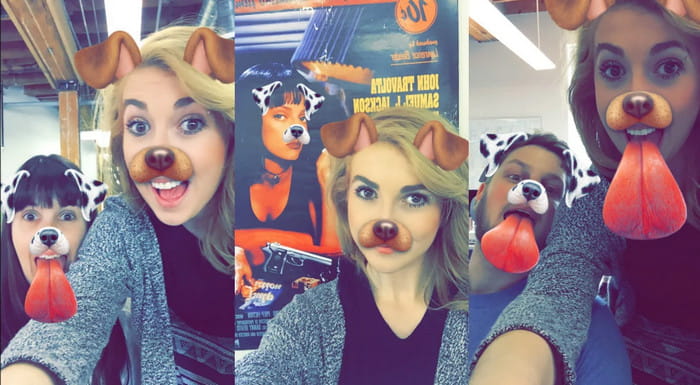
ผู้ใช้ส่วนใหญ่ชอบที่จะใช้ฟิลเตอร์สำหรับสุนัขหรือแมวในวิดีโอเพราะว่ามันมีเอกลักษณ์และทำให้เราหัวเราะได้ ตัวกรองนี้ทำให้สัตว์ต่าง ๆ เคลื่อนไหวและสิ่งอื่น ๆ ที่ตลกขบขัน ไม่เหมือนกับตัวกรองอื่น ๆ แม้ว่าจะไม่ช่วยปรับปรุงการถ่ายภาพของคุณ แต่คุณยังสามารถใช้ตัวเลือกนี้ได้หากต้องการมีฟิลเตอร์ภาพเคลื่อนไหวเพื่อวัตถุประสงค์อื่น นอกจากนี้ แอปการกรองอันดับต้น ๆ ที่คุณสามารถดาวน์โหลดได้เพิ่มตัวกรองภาพเคลื่อนไหวสำหรับผู้ใช้แล้ว
2. ตัวกรองสีเทา
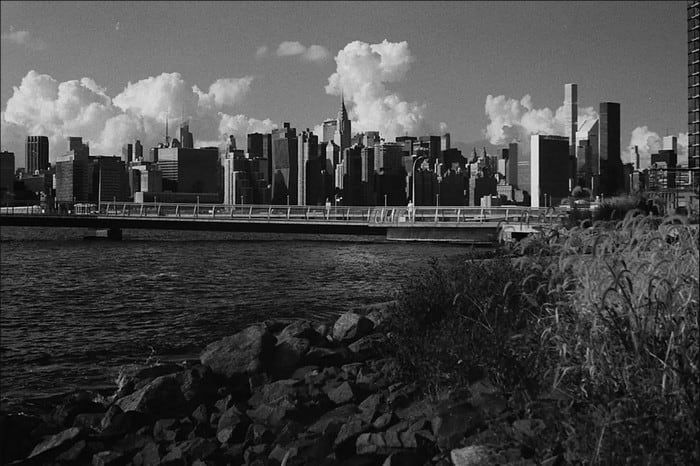
คิดถึงบรรยากาศยุค 90 แล้วอยากถ่ายวิดีโอขาวดำใช่ไหม? ฟิลเตอร์สีเทา (Gray Filter) จะช่วยให้คุณได้วิดีโอสไตล์ยุค 90 ฟิลเตอร์นี้ไม่เหมือนฟิลเตอร์อื่นที่ใช้คอนทราสต์สูงและสีจัดจ้าน เพราะจะใช้โทนสีขาวดำผสมกันเพื่อสร้างบรรยากาศย้อนยุคแบบยุค 90.
3. ฟิลเตอร์ความงาม
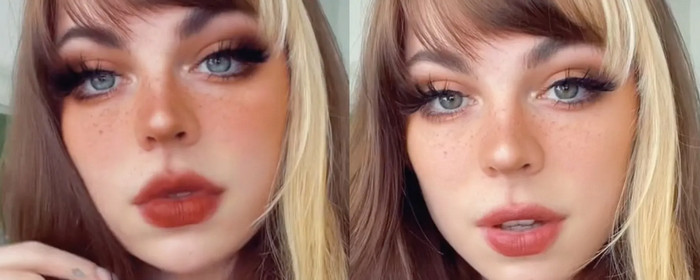
ต้องการถ่ายวิดีโอและมีตัวกรองวิดีโอที่ปรับให้เรียบหรือไม่? ฟิลเตอร์ความงามสามารถช่วยคุณปรับปรุงภาพถ่ายของคุณเองได้ ด้วยฟิลเตอร์นี้ คุณจะเห็นความแตกต่างมากมายระหว่างภาพถ่ายต้นฉบับและภาพถ่ายที่ได้รับการปรับปรุง ผู้มีอิทธิพลและศิลปินบางคนเลือกตัวกรองนี้เพื่อปรับปรุงภาพยนตร์และภาพของพวกเขา
4. ฟิลเตอร์อุ่น
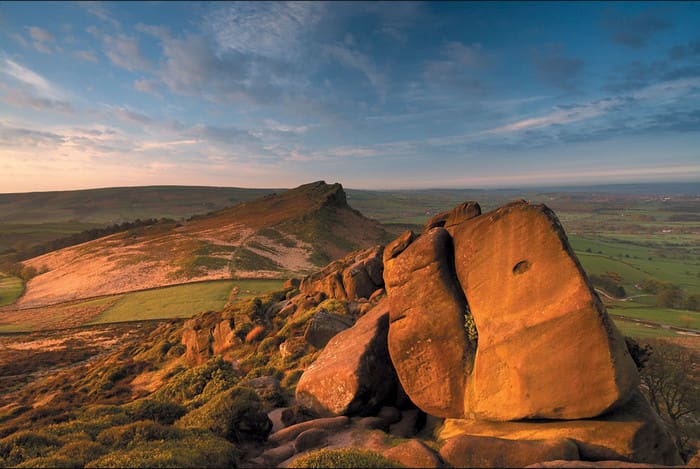
อีกฟิลเตอร์หนึ่งที่ช่วยเพิ่มความอบอุ่นให้กับภาพที่หม่นซีดและลดโทนสีน้ำเงินก็คือ ฟิลเตอร์โทนอุ่น (Warm Filter) ฟิลเตอร์นี้จะยกระดับวิดีโอของคุณให้โทนสีผิวดูดีขึ้น ไม่ว่าจะถ่ายในที่ร่มหรือแสงไฟอิเล็กทรอนิกส์ แม้ว่าจะช่วยลดโทนสีน้ำเงินได้ แต่หากเป็นสีน้ำเงินที่จัดมาก ๆ บางครั้งก็อาจลดได้ไม่หมด อย่างไรก็ตาม ฟิลเตอร์นี้เหมาะมากหากคุณต้องการถ่ายวิดีโอท้องฟ้า.
5. ตัวกรองธรรมดา

ฟิลเตอร์แบบเรียบ (Plain Filter) จะให้เอฟเฟ็กต์นุ่มนวลกับวิดีโอที่คุณถ่าย ฟิลเตอร์นี้จะทำให้ขอบภาพดูนุ่มขึ้นและเพิ่มความสว่างให้สีภาพมากกว่าวิดีโอต้นฉบับ แม้จะเป็นฟิลเตอร์ แต่ก็ไม่ได้เปลี่ยนภาพมากนัก เพราะยังคงลักษณะดั้งเดิมไว้ เพียงปรับให้ดีขึ้นเล็กน้อย เหมาะอย่างยิ่งหากคุณไม่ต้องการใส่ฟิลเตอร์หนัก ๆ และอยากคงความเป็นวิดีโอต้นฉบับเอาไว้.
แม้ว่าเราจะไม่ได้กล่าวถึงตัวกรองทั้งหมด แต่ตัวกรองเหล่านี้เป็นตัวกรองที่ใช้บ่อยที่สุดในแอปกรองวิดีโอ อย่างไรก็ตาม ชื่อของพวกเขาอาจแตกต่างกันไปตามเครื่องมือต่างๆ แต่รูปลักษณ์ของตัวกรองจะเหมือนกัน
ส่วนที่ 3 สุดยอดโปรแกรมดาวน์โหลดเพื่อเพิ่มตัวกรองวิดีโอในวิดีโอหรือคลิปใด ๆ บน Windows & Mac
คุณสามารถใช้งานฟิลเตอร์ทั้งสี่แบบและอื่น ๆ ที่กล่าวมาข้างต้นได้ทั้งหมด เพียงดาวน์โหลด Video Converter Ultimate ซอฟต์แวร์นี้ช่วยให้คุณใส่ฟิลเตอร์ลงในวิดีโอใดก็ได้อย่างมีประสิทธิภาพ ไม่ว่าคุณจะถ่ายจากกล้องหรือมือถือ แม้แต่กล้อง DSLR ก็สามารถนำคลิปเข้าโปรแกรมแล้วใส่ฟิลเตอร์ได้เช่นกัน ต่างจากแอปฟิลเตอร์อื่น ๆ ตรงที่แอปนี้ไม่ได้เหมาะเฉพาะผู้เริ่มต้นเท่านั้น ผู้เชี่ยวชาญก็สามารถใช้งานและพึ่งพาเครื่องมือนี้ได้.
ยิ่งไปกว่านั้น ถ้าคุณต้องการมีโปรแกรมตัดต่อวิดีโอที่ดีที่สุดบน Windows และ Mac โชคดีที่คุณสามารถใช้สิ่งนี้ได้ ดังนั้นตอนนี้ หากคุณกำลังจะเพิ่มตัวกรองวิดีโอ ให้ทำตามบทช่วยสอนที่ง่ายต่อการปฏิบัติด้านล่างเพื่อเพิ่มตัวกรองในวิดีโอใดๆ ให้สำเร็จ
ขั้นตอนที่ 1 ดาวน์โหลดโปรแกรมตัดต่อวิดีโอลงคอมพิวเตอร์ของคุณโดยคลิกปุ่มดาวน์โหลดด้านล่าง หลังจากดาวน์โหลดเสร็จ ให้ติดตั้งโปรแกรมตามขั้นตอนที่แสดง แล้วเปิดใช้งาน.
ดาวน์โหลดฟรีสำหรับ Windows 7 หรือใหม่กว่าดาวน์โหลดอย่างปลอดภัย
ดาวน์โหลดฟรีสำหรับ MacOS 10.7 หรือใหม่กว่าดาวน์โหลดอย่างปลอดภัย
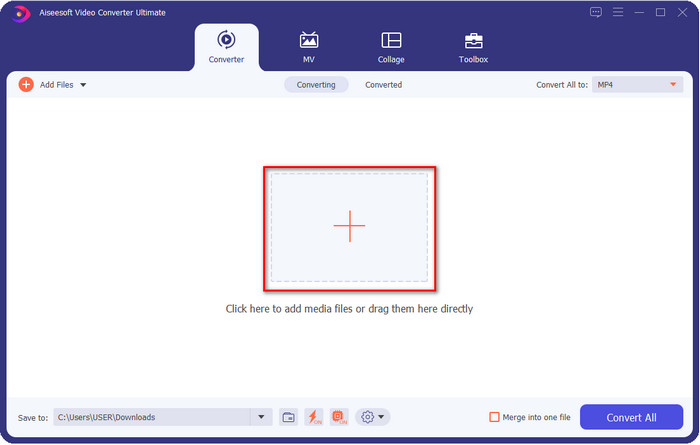
ขั้นตอนที่ 2 ในการเพิ่มไฟล์เข้าโปรแกรมตัดต่อวิดีโอ ให้คลิกปุ่ม + จากนั้นเลือกไฟล์วิดีโอจากโฟลเดอร์ที่ปรากฏบนหน้าจอ แล้วกด Open เพื่อเพิ่มไฟล์เข้าสู่คิวสำหรับใส่ฟิลเตอร์.
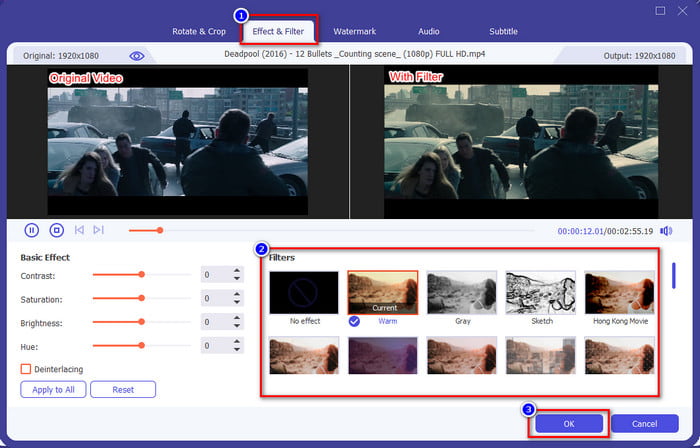
ขั้นตอนที่ 3 เมื่อคุณคลิกปุ่มรูปไม้กายสิทธิ์ จะมีหน้าต่างใหม่สำหรับตัดต่อแสดงขึ้นบนหน้าจอ ให้คลิก Effects & Filters ที่ส่วนบน เลือกฟิลเตอร์ที่ต้องการใช้งาน ลองทุกแบบได้ตามต้องการ แล้วคลิก OK หากคุณพอใจกับฟิลเตอร์ที่เลือก.
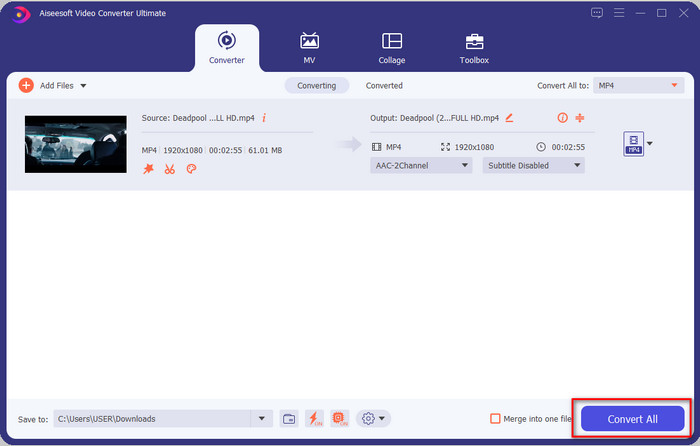
ขั้นตอนที่ 4 ส่งออกวิดีโอจากโปรแกรมตัดต่อโดยคลิก Convert All รอสักครู่เพื่อให้ดาวน์โหลดไฟล์วิดีโอลงคอมพิวเตอร์ของคุณ เพียงเท่านี้คุณก็จะได้วิดีโอที่ผ่านการใส่ฟิลเตอร์อย่างสวยงามด้วยโปรแกรมตัดต่อวิดีโอยอดเยี่ยมบน Windows และ Mac แล้ว.
ที่เกี่ยวข้อง:
ส่วนที่ 4 คำถามที่พบบ่อยเกี่ยวกับตัวกรองวิดีโอ
การดาวน์โหลดแอปตัวกรองวิดีโอปลอดภัยหรือไม่
ขึ้นอยู่กับเว็บไซต์ที่คุณดาวน์โหลด แม้ว่าการดาวน์โหลดโปรแกรมตัดต่อวิดีโอบนเว็บจะปลอดภัย แต่คุณต้องแน่ใจว่าเว็บไซต์ที่คุณกำลังเข้าชมนั้นปลอดภัย มิฉะนั้นบางคนอาจได้รับข้อมูลและข้อมูลส่วนตัวของคุณ
ตัวกรองทำให้คุณภาพวิดีโอลดลงหรือไม่
คุณภาพของวิดีโออาจเปลี่ยนแปลงเนื่องจากเอฟเฟกต์ของฟิลเตอร์ที่คุณเพิ่ม ดังนั้น หากคุณต้องการรักษาความละเอียดคุณภาพสูงไว้ คุณต้องนึกถึงตัวกรองที่คุณใช้ เพราะตัวกรองนั้นจะเปลี่ยนคุณภาพของวิดีโอ แต่ถ้าคุณใช้ฟิลเตอร์แบบพิกเซล จะส่งผลต่อคุณภาพของวิดีโอ
เหตุใดรูปแบบจึงเปลี่ยนไปหลังจากเพิ่มตัวกรอง
รูปแบบไฟล์ที่ตั้งค่าในโปรแกรมโดยเริ่มต้นมักจะเป็นฟอร์แมตมาตรฐาน เพื่อหลีกเลี่ยงปัญหานี้ คุณสามารถใช้ Video Converter Ultimate แล้วทำตามขั้นตอนเหล่านี้ หลังจากใส่ฟิลเตอร์เสร็จ ให้ไปที่ Convert All to จากนั้นค้นหารูปแบบไฟล์ดั้งเดิมแล้วคลิกเลือก ทำตามขั้นตอนสุดท้ายให้ครบ ตอนนี้ไฟล์วิดีโอของคุณก็จะยังคงรูปแบบเดิมไว้ พร้อมกับฟิลเตอร์ที่คุณเพิ่มเข้าไปแล้ว.
สรุป
ตอนนี้เราได้ทำความเข้าใจเกี่ยวกับฟิลเตอร์วิดีโอและฟิลเตอร์ยอดนิยมต่าง ๆ แล้ว เมื่อได้อธิบายไปแล้วว่าฟิลเตอร์คืออะไรและมีแบบใดให้เลือกใช้ ก็ถึงเวลาที่จะดาวน์โหลด Video Converter Ultimate เพื่อใส่ฟิลเตอร์ให้วิดีโอของคุณและทำให้ดูโดดเด่น เครื่องมือนี้ไม่เพียงช่วยให้คุณใส่ฟิลเตอร์ลงในวิดีโอเท่านั้น แต่ยังช่วยให้ตัดต่อวิดีโอได้อย่างไม่ซับซ้อน คุณสามารถเป็นเจ้าของเครื่องมือสุดเจ๋งนี้ได้ด้วยการคลิกปุ่มดาวน์โหลดและซื้อเวอร์ชันเต็ม เพื่อเพลิดเพลินกับฟีเจอร์ทั้งหมดที่โปรแกรมมอบให้.
-
 วิธีเพิ่มเสียงและเพลงลงในวิดีโอฟรีบนคอมพิวเตอร์ / โทรศัพท์ของคุณ
 บทความนี้แสดง 4 วิธีง่ายๆในการเพิ่มเสียงลงในวิดีโอฟรี ไม่ว่าคุณต้องการเพิ่มแทร็กเสียงใดลงในวิดีโอของคุณคุณสามารถรับผลลัพธ์ที่น่าพึงพอใจได้ที่นี่
-
 เปลี่ยน GIF เป็นรูปแบบวิดีโอ: แปลง GIF Memes เป็นวิดีโอ [2021]
 กำหนดวิธีการแปลง GIF เป็นรูปแบบวิดีโอด้วยความช่วยเหลือของเครื่องมือที่แสดงด้านล่าง เลือกข้อใดและเรียนรู้วิธีดำเนินการ เนื่องจากเรารวบรวมหลักฐานเพียงพอ
-
 แอพ GIF ที่ยอดเยี่ยมสำหรับวิดีโอสำหรับอุปกรณ์ Android และ iOS
 คุณรู้หรือไม่ว่าคุณสามารถแปลง GIF เป็นรูปแบบวิดีโอใดก็ได้ที่คุณต้องการโดยใช้โทรศัพท์ของคุณ เลือกแอพที่ดีที่สุดบน Android หรือ iOS ของคุณ
