


 Video Converter Ultimate
 บันทึกหน้าจอ
 ซ่อมวิดีโอ
ตัวแก้ไขแท็ก WMV ที่ดีที่สุดในการแก้ไขข้อมูลเมตาของ WMV คืออะไร [Foolproof]
WMV เป็นรูปแบบไฟล์ดั้งเดิมที่คุณจะพบเจอหากคุณเป็นผู้ใช้ Windows ด้วยไฟล์ชนิดนี้ คุณสามารถเก็บแอนิเมชัน คลิปวิดีโอ และตอนของรายการทีวีแบบความคมชัดสูง โดยใช้การบีบอัดวิดีโอของ Microsoft แบบหนึ่งหรือหลายแบบ แม้ว่าไฟล์นี้จะเก็บข้อมูลทั้งหมดเหล่านี้ได้ แต่บางแท็กใน WMV ก็ต้องได้รับการแก้ไข ถึงแม้คุณจะสามารถดูข้อมูลเมทาดาทาของไฟล์ WMV บน Windows Media Player ได้ แต่คุณไม่สามารถปรับแก้ให้ถูกต้องได้ แล้วบน Windows ควรใช้เครื่องมือไหน? ในกรณีนี้ เราจะนำเสนอรีวิวแบบเป็นกลางของ โปรแกรมแก้ไขแท็ก WMV ทั้งสี่ตัวที่คุณสามารถใช้งานได้.

ส่วนที่ 1 ตัวแก้ไขแท็ก WMV มหัศจรรย์สำหรับ Windows & Mac [แนะนำ]
FVC Video Converter Ultimate เป็นซอฟต์แวร์ที่เชื่อถือได้ ซึ่งมอบฟีเจอร์ระดับท็อปที่คุณต้องการในการแก้ไขเมทาดาทา WMV ได้อย่างง่ายดาย โปรแกรมนี้ใช้งานได้ทั้งบนระบบปฏิบัติการ Windows และ Mac เมื่อใช้เครื่องมือนี้ คุณจะได้สัมผัสประสบการณ์ใหม่ในการลบ แก้ไข และอัปเดตแท็กได้อย่างลื่นไหลในไฟล์กว่า 1000+ รูปแบบที่ซอฟต์แวร์นี้รองรับ สำหรับผู้เริ่มต้น เครื่องมือนี้มีอินเทอร์เฟซที่เข้าใจง่าย ทำให้เรียนรู้ฟังก์ชันทั้งหมดได้ไม่ยาก แต่ก็เหมาะอย่างยิ่งสำหรับมืออาชีพที่ต้องการแก้ไขวิดีโอขั้นสูงเช่นกัน น่าทึ่งใช่ไหม? ไม่ว่าคุณจะไม่มีประสบการณ์แก้ไขแท็กมาก่อน หรือมีอยู่แล้ว คุณก็สามารถพึ่งพาเครื่องมือนี้ได้ หากต้องการแก้ไขเมทาดาทาระดับยอดเยี่ยมด้วยซอฟต์แวร์ตัวนี้ รายละเอียดต่อไปนี้จะเน้นการใช้งานโปรแกรมแก้ไขแท็ก WMV อันยอดเยี่ยมนี้ แต่ก่อนอื่นให้ดาวน์โหลดลงบน Windows หรือ Mac แล้วติดตั้งให้เรียบร้อย.
ข้อดีของการใช้ Ultimate WMV Tag Editor
- 1. สามารถแก้ไขแท็กสำหรับ WMV, AVI, MP4, MKV, MOV และรูปแบบอื่นๆ กว่า 1,000 รูปแบบได้อย่างรวดเร็ว
- 2. รองรับกล่องเครื่องมือแบบ all-in-one ซึ่งคุณสามารถตัดแต่ง ตัด ผสาน ตัด ย้อนกลับวิดีโอ และอื่นๆ
- 3. เป็นตัวเลือกที่ดีที่สุดสำหรับผู้เริ่มต้นและมืออาชีพที่ต้องการเครื่องมืออเนกประสงค์
- 4. ดาวน์โหลดเครื่องมือขั้นสูงสุดบน Windows และ Mac ของคุณในขณะที่มีฟังก์ชันขั้นสูงเหมือนกัน
ดาวน์โหลดฟรีสำหรับ Windows 7 หรือใหม่กว่าดาวน์โหลดอย่างปลอดภัย
ดาวน์โหลดฟรีสำหรับ MacOS 10.7 หรือใหม่กว่าดาวน์โหลดอย่างปลอดภัย
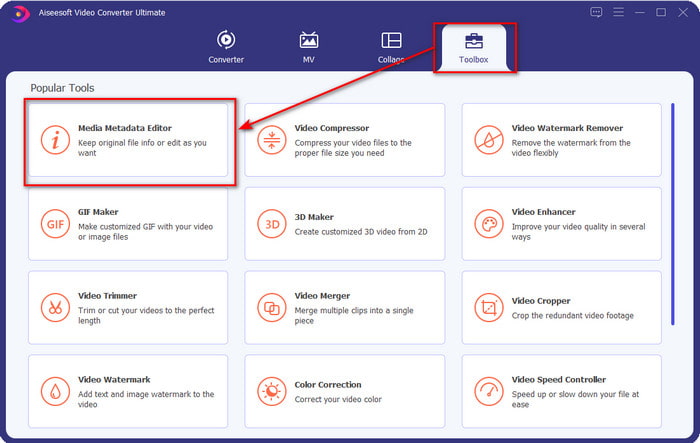
ขั้นตอนที่ 1. หลังจากติดตั้งเครื่องมือสำเร็จแล้ว ให้เปิดโปรแกรมขึ้นมาทันที บนอินเทอร์เฟซของเครื่องมือ ให้ไปที่ส่วน Toolbox แล้วค้นหา Media Metadata Editor จากนั้นคลิกเพื่อเปิด.
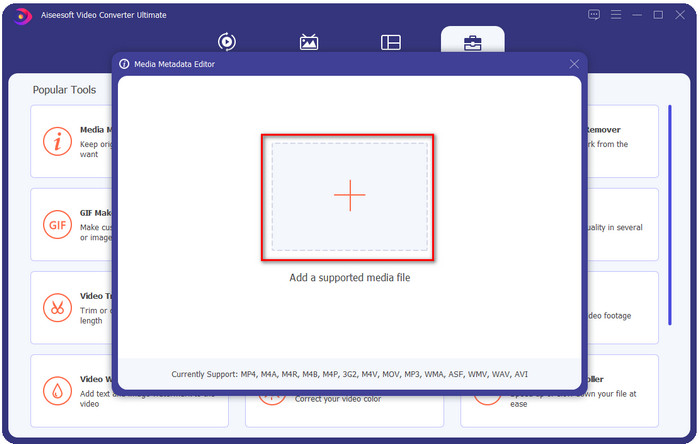
ขั้นตอนที่ 2. กดไอคอน + หลังจากที่คุณคลิกเข้าโปรแกรมแก้ไขแล้ว เลือกไฟล์ WMV จากโฟลเดอร์ที่จะแสดงบนหน้าจอของคุณ กด Open เมื่อคุณตัดสินใจเลือกไฟล์เรียบร้อยแล้ว.
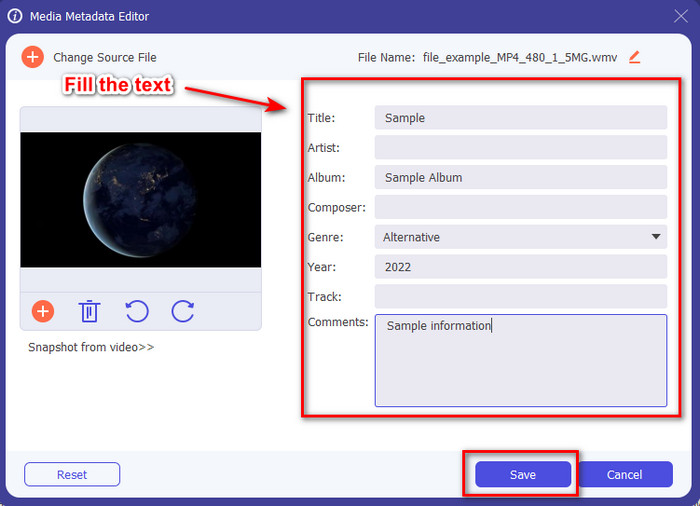
ขั้นตอนที่ 3. กรอกข้อมูลใน กล่องข้อความ ตามที่คุณต้องการ จากนั้นคลิก Save เพื่อบันทึกแท็กที่คุณเพิ่มลงในไฟล์.
ที่เกี่ยวข้อง:
ส่วนที่ 2 อีก 3 ตัวแก้ไขแท็กที่ดีที่สุดบน Windows
โปรแกรมตัดต่อวิดีโอ Machete
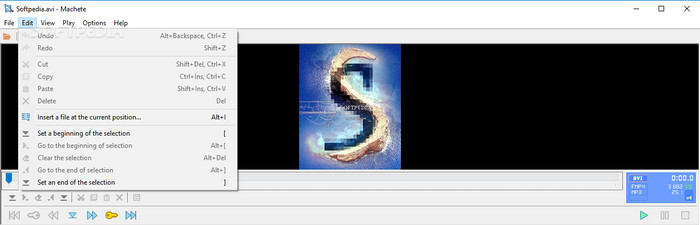
Machete Video Editor Lite เป็นโปรแกรมแก้ไขเมทาดาทา WMV บน Windows ที่คุณสามารถดาวน์โหลดลงในพีซีของคุณได้ ด้วยเครื่องมือนี้ คุณสามารถแก้ไขแท็กได้เฉพาะไฟล์ AVI และ MKV เท่านั้น นอกเหนือจากสองรูปแบบนี้จะไม่รองรับ มันเป็นโปรแกรมแก้ไขเมทาดาทาที่ออกแบบมาสำหรับ Windows โดยเฉพาะ ดังนั้นไม่จำเป็นต้องกังวลเมื่อลองใช้เครื่องมือนี้ เพราะมันจะช่วยคุณทำงานดังกล่าวได้ แม้ว่าจะเป็นโปรแกรมแก้ไขเมทาดาทาที่ดี แต่ส่วนติดต่อผู้ใช้ (GUI) ล้าสมัยและจำเป็นต้องปรับโฉมใหม่เพื่อแข่งขันกับโปรแกรมแก้ไขเมทาดาทาที่มี GUI ทันสมัยกว่าบนท้องตลาด นอกจากนี้ เครื่องมือนี้รองรับเพียงสองรูปแบบคือ AVI และ MKV ซึ่งอาจเป็นข้อเสียที่ใหญ่ที่สุด เพราะโปรแกรมแก้ไขแท็กตัวอื่นรองรับไฟล์ได้หลากหลายรูปแบบ ทำให้อัปโหลดไฟล์ได้สะดวกกว่า.
TigoTago
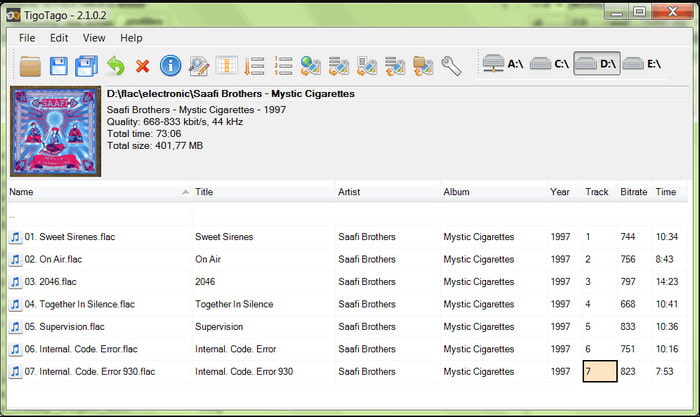
อีกหนึ่งโปรแกรมแก้ไขแท็ก WMV โดยเฉพาะที่ใช้งานได้บน Windows คือ TigoTago ต่างจาก Machete Video Editor Lite เครื่องมือนี้รองรับวิดีโอสามรูปแบบ ได้แก่ MP4, WMV และ AVI หากคุณต้องการแก้ไขแท็กเสียง ก็สามารถอัปโหลดไฟล์ MP3, WMA, WAV และอื่น ๆ ได้มากมาย อินเทอร์เฟซของเครื่องมือมีลักษณะคล้ายสเปรดชีต ซึ่งคุณจะเห็นคอลัมน์ต่าง ๆ สำหรับแท็กแต่ละประเภทของไฟล์คุณ แม้จะมี GUI แบบสเปรดชีต แต่ก็ยังต้องได้รับการอัปเดต เพราะดูเหมือนว่าเครื่องมือนี้จะไม่ได้รับการอัปเดตมาเป็นเวลานาน ขณะใช้งาน เราพบฟังก์ชันบางอย่างที่สร้างความสับสนและทำให้เสียเวลาในการแก้ไขแท็ก ซึ่งค่อนข้างยุ่งยาก แม้จะมีปัญหาเหล่านี้เกิดขึ้นได้ แต่คุณก็ยังสามารถดาวน์โหลดมาใช้ได้ฟรีบน Windows.
คุณสมบัติบน Windows
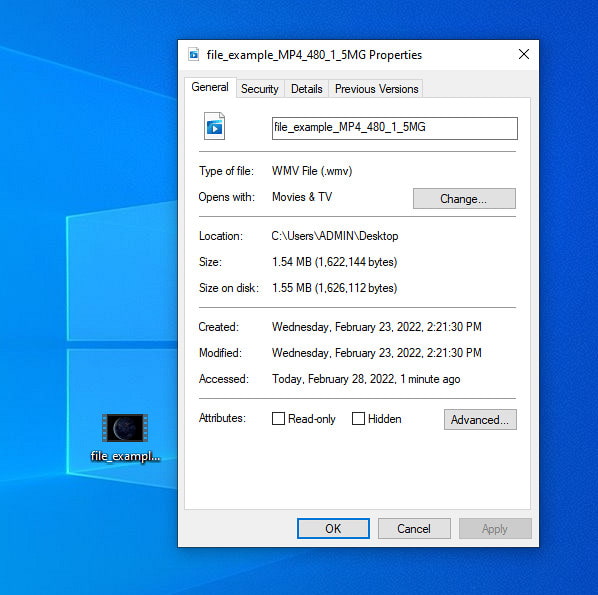
Properties บน Windows เป็นฟีเจอร์เฉพาะที่คุณสามารถใช้งานได้ฟรีบนระบบปฏิบัติการ Windows ทุกเครื่อง ฟีเจอร์นี้ไม่ต้องดาวน์โหลดหรือเข้าถึงผ่านเว็บ ซึ่งถือเป็นข้อได้เปรียบอย่างมาก ด้วยฟังก์ชันนี้ คุณสามารถอัปเดตแท็กของไฟล์มีเดียใด ๆ เช่น WMV ได้อย่างง่ายดายภายในไม่กี่คลิก เมื่อไม่นานมานี้ ผู้ใช้บางคน รวมถึงตัวเราเอง พบว่าการใช้ฟังก์ชันนี้ไม่ค่อยสะดวกนัก เพราะเมื่อเราพยายามอัปเดตเมทาดาทาของไฟล์ต้นฉบับ ปรากฏว่าแท็กไม่ถูกบันทึก ก็ถือว่าเป็นเรื่องที่ต้องคาดไว้ได้ เพราะมันไม่ใช่โปรแกรมแก้ไขเมทาดาทาระดับมืออาชีพ อย่างไรก็ตาม หากคุณต้องการอัปเดตเมทาดาทา WMV คุณก็ยังสามารถแก้ไขได้ไม่ยาก.
ส่วนที่ 3 คำถามที่พบบ่อยเกี่ยวกับ WMV Tag Editor
ฉันสามารถแก้ไขข้อมูลเมตา WMV บน Mac ได้หรือไม่
ใช่คุณสามารถ ด้วยความช่วยเหลือของเครื่องมือขั้นสูงสุดที่เรานำเสนอข้างต้น งานนี้จึงเป็นเรื่องง่าย ดังนั้น หากคุณเป็นผู้ใช้ Mac ให้ดาวน์โหลดเครื่องมือบนอุปกรณ์ของคุณโดยคลิกปุ่มดาวน์โหลดสำหรับ Mac แล้วทำตามขั้นตอนเดียวกัน อย่างไรก็ตาม รูปภาพอาจแตกต่างกันเล็กน้อยในฟังก์ชันบน Mac แต่แท็กที่คุณเพิ่มจะถูกบันทึกได้สำเร็จโดยไม่ทำให้เสียเหงื่อ
ข้อมูลเมตา WMV จะแสดงเมื่อรับชมบน Windows Media Player หรือไม่
ขณะเล่นบน Windows Media Player ซึ่งเป็นโปรแกรมเล่นสื่อดั้งเดิมบน Windows แท็กจะไม่แสดงบนหน้าจอ แต่คุณสามารถเข้าถึงได้โดยกดคลิกขวาของเมาส์ไปที่ไฟล์ คลิก Properties และหน้าต่างขนาดเล็กจะแสดงตำแหน่งที่คุณสามารถดูแท็กในไฟล์ WMV ของคุณได้ จำไว้ว่าคุณสามารถดูได้ แต่ไม่สามารถแก้ไขได้ตามความต้องการของคุณ
การถ่ายโอน WMV บนเว็บสูญเสียข้อมูลเมตาหรือไม่
ปัญหานี้เป็นเรื่องปกติที่เกิดขึ้นกับไฟล์สื่อส่วนใหญ่ ข้อมูลเมตาจะหายไประหว่างทางเนื่องจากประเภทของแอปที่คุณใช้จำเป็นต้องลบข้อมูลเมตาเพื่อลดขนาดไฟล์เพื่อการถ่ายโอนที่ราบรื่น ดังนั้นจึงเป็นการดีกว่าที่จะคัดลอกข้อมูลเมตาแล้วส่งแยกกันเพื่อหลีกเลี่ยงปัญหานี้
สรุป
ท้ายที่สุดแล้ว เครื่องมือทั้งหมดที่เราเลือกมานั้นคือโปรแกรมแก้ไขเมทาดาทา WMV ที่มีประสิทธิภาพที่สุด ที่คุณสามารถดาวน์โหลดหรือเข้าถึงได้ฟรีบนระบบ Windows ทุกเวอร์ชันที่รองรับการอัปโหลดไฟล์ WMV ได้อย่างรวดเร็ว แม้ว่าเครื่องมือเหล่านี้จะช่วยคุณได้ แต่บางตัวก็อาจสร้างปัญหาให้คุณได้เช่นกัน ดังนั้นการเลือกโปรแกรมแก้ไขแท็กที่เหมาะสมจึงเป็นสิ่งสำคัญ เพื่อหลีกเลี่ยงปัญหาหรือความเสียหายเพิ่มเติม หากคุณยังสงสัยอยู่ว่าเครื่องมือใดที่มีโปรแกรมแก้ไขแท็กที่ดีเยี่ยม มี Toolbox อเนกประสงค์ และใช้งานง่าย เราขอประกาศอย่างภาคภูมิว่าความต้องการทั้งหมดเหล่านี้มีอยู่ใน FVC Video Converter Ultimate แตกต่างจากคู่แข่งในตลาด เครื่องมือนี้ถูกออกแบบมาเพื่อช่วยเหลือผู้ใช้ในปัญหาวิดีโอในแต่ละวัน เช่น การแปลงไฟล์ การแก้ไขแท็ก การตัดต่อวิดีโอ เป็นต้น เหลือเชื่อใช่ไหม? แต่นั่นคือสิ่งที่เครื่องมือระดับ ultimate ตัวนี้มอบให้คุณได้.
-
 ข้อมูลเมตาคืออะไร: เรียนรู้ข้อมูลพื้นฐานเกี่ยวกับข้อมูลเมตา
 เมตาดาต้าคืออะไร? สิ่งนี้สำคัญหรือไม่? ข้อมูลเมตามีส่วนใดบ้าง คุณมีคำถามเดียวกันหรือไม่? ในบทความนี้ คุณจะได้เรียนรู้ข้อมูลพื้นฐานเกี่ยวกับข้อมูลเมตา
-
 4 อันดับเครื่องมือดูข้อมูลเมตาที่ดีที่สุดทั้งแบบออนไลน์และออฟไลน์ [อัปเดต 2025]
 ฉันสามารถตรวจสอบข้อมูลเมตาของไฟล์ของฉันได้หรือไม่ ได้ ด้วยความช่วยเหลือของโพสต์นี้ เราจะแนะนำให้คุณรู้จักกับผู้ดูข้อมูลเมตาต่างๆ ที่คุณสามารถใช้ได้
-
 เคล็ดลับที่ง่ายและรวดเร็วในการแปลง WMV เป็น MOV [พิสูจน์แล้ว]
 คุณต้องการทราบว่าตัวแปลงใดดีที่สุดและใช้งานง่ายที่แปลง WMV เป็น MOV? อ่านบทความนี้ต่อเนื่องจากจะกล่าวถึงตัวเลือกที่เป็นไปได้ทั้งหมดที่คุณต้องพิจารณาใช้
