


 Video Dönüştürücü Ultimate
 Ekran kaydedicisi
 Video Onarımı
 Güvenli İndirme
WTV'den MP4'e Dönüştürücü: WTV'yi MP4'e Dönüştürme
DVR-MS formatının halefi olan WTV, Microsoft tarafından Windows Media Center tarafından kaydedilen TV içeriğini depolamak için geliştirilmiştir. MPEG-2 ve MPEG-4 standardı ve MPEG-1 Layer II veya Dolby Digital AC-3 ile kodlanan WTV, FFMPEG, Windows Media Center, CyberLink PowerDVD 12, Nero 12, HandBrake, CCextractor vb. Gibi birkaç yazılım tarafından desteklenir.

WTV dosyalarını rahatça izlemek veya paylaşmak istiyorsanız, en iyisi WTV’yi hemen her cihazla uyumlu en popüler format olan MP4’e dönüştürmektir.
İnternette WTV’den MP4’e dönüştürücü aradık ve WTV’yi MP4’e çevirmek için en iyi 2 ücretsiz WTV’den MP4’e dönüştürücüyü bulduk.
Bölüm 1. Ücretsiz Video Dönüştürücü - WTV'yi MP4 Online'a Dönüştürün
WTV’yi MP4'e dönüştürmek aslında çok kolaydır. WTV’yi MP4'e çevirmenin en kolay yolu, bunu çevrimiçi tamamlamaktır. Free Online Video Converter, WTV’yi MP4’e ve diğer yaygın video ve ses formatlarına dönüştürmek için kullanılan ücretsiz bir yazılımdır. Bu ücretsiz çevrimiçi araç Windows 10/8/7 ve Mac OS X 10.7 veya üzeriyle uyumludur ve birkaç adımda WTV’yi MP4’e kolayca dönüştürebilirsiniz.
Süreci kolaylaştırmak için kılavuzu takip edebilirsiniz:
1. Bilgisayardan WTV dosyalarını yüklemek için Add Files to Convert (Dönüştürülecek Dosyaları Ekle) düğmesine tıklayın.
2. Onay kutusundan MP4 formatını seçin.
3. Convert (Dönüştür) düğmesine tıklayarak WTV dosyalarını otomatik olarak dönüştürün ve indirin.
Şimdi, WTV'yi MP4'e nasıl dönüştürebileceğinizi ayrıntılarıyla anlatmak için buradayız.
Adım 1. WTV dosyalarını ekleyin
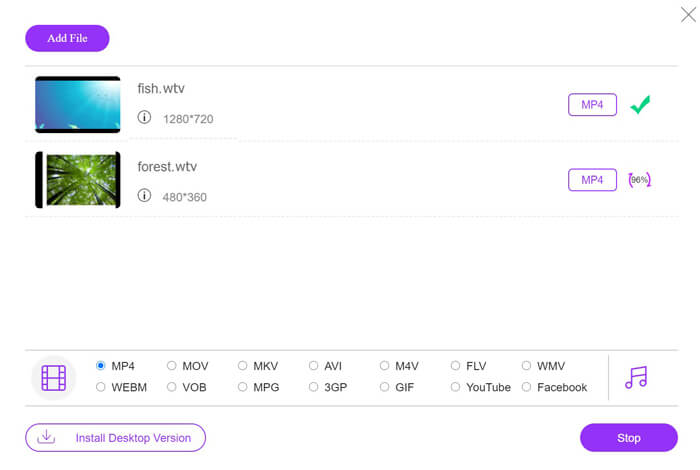
Tarayıcınız üzerinden bu ücretsiz çevrimiçi WTV’den MP4'e dönüştürücüyü açın. Add Files to Convert düğmesine tıklayın; ardından başlatıcıyı indirip kurmanız gerektiğini bildiren bir açılır pencere görünecektir. Başlatıcıyı indirip kurduktan sonra, açık kaynak penceresi belirecek ve bilgisayarınızdaki WTV kayıtlarını yüklemek için seçebileceksiniz. Bu ücretsiz yazılım toplu dönüştürmeyi destekler ve çevrimiçi olarak birden fazla WTV dosyası ekleyebilirsiniz.

Adım 2. MP4’ü seçin
Alt kısımda bulunan MP4 onay kutusunu işaretleyin; burada MKV, AVI, M4V, FLV, VOB, GIF, YouTube, Facebook, MP3, AAC, WMA, WAV, FLAC vb. gibi çeşitli çıktı seçeneklerini bulabilirsiniz.
Ayrıca, çıktı MP4 bölümünün yanındaki Settings (Ayarlar) simgesine tıklayarak kodlayıcıyı (encoder), kare hızını (frame rate), çözünürlüğü, bit hızını (bitrate) ve diğer parametreleri ayarlayabilirsiniz.

Adım 3. WTV’yi MP4’e dönüştürün
Her şey hazır olduğunda Convert düğmesine tıklayın; dönüştürülen MP4 dosyalarını kaydetmek için hedef klasörü seçmenizi isteyen bir pencere açılacaktır. Hedefi seçin ve bu ücretsiz çevrimiçi dönüştürücüye geri dönerek, MP4 dosyalarını dönüştürme ve indirme işlemini otomatik olarak başlatmak için tekrar Convert düğmesine tıklayın. Dönüştürme ilerleme yüzdesini doğrudan görebilirsiniz.
Bölüm 2. HandBrake - WTV'yi PC / Mac'te MP4'e dönüştürün
WTV'yi MP4'e dönüştürmenin bir başka ücretsiz yolu da HandBrake kullanmaktır. HandBrake, WTV dosyalarını okuyabilen birkaç yazılımdır. Ayrıca, Windows ve Mac bilgisayarınızda WTV'yi MP4 / MKV'ye dönüştürebilir.
HandBrake açık kaynaklı bir masaüstü yazılımıdır, bu nedenle bu ücretsiz dönüştürücüyü önce bilgisayarınıza indirmelisiniz.
Yine, HandBrake'de WTV'yi MP4'e dönüştürmenin basit adımları aşağıdaki gibidir:
1. WTF dosyalarını veya tüm klasörü HandBrake'e ekleyin.
2. HandBrake'de özel MP4 profili.
2. WTV'yi önizleyin ve MP4'e dönüştürün.
HandBrake'de WTV'yi MP4 olarak değiştirmenin kapsamlı kılavuzu.
Adım 1. WTV dosyalarını HandBrake’e ekleyin
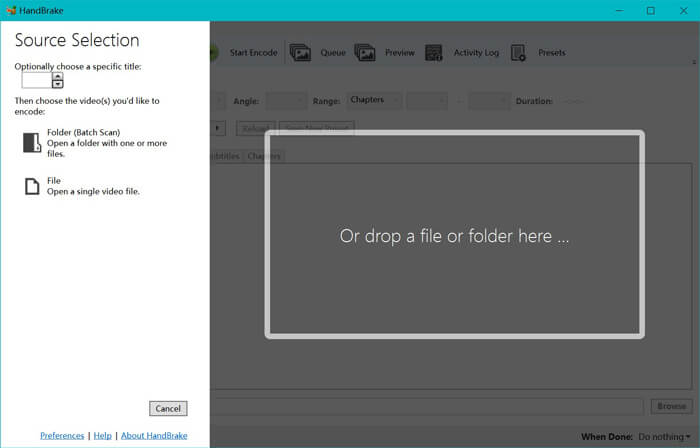
HandBrake’i bilgisayarınıza kurduktan sonra, program varsayılan olarak açık kaynak (open source) penceresini gösterecektir. Burada ana pencereye WTV dosyalarını veya klasörünü eklemek için Folder (Klasör) veya File (Dosya) seçeneklerine tıklayabilirsiniz. Alternatif olarak, WTV dosyalarını bu yazılıma sürükleyip bırakmanız da mümkündür.
Adım 2. MP4 formatını seçin
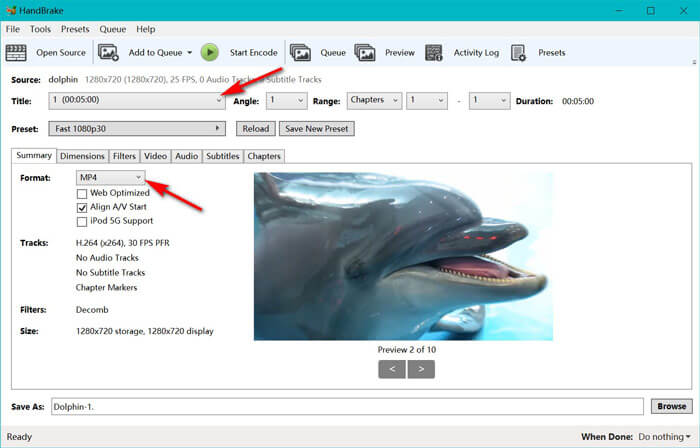
WTV dosyalarını yükledikten sonra, Title açılır menüsünden tam olarak istediğiniz WTV dosyasını seçebilirsiniz. Ardından Summary sekmesinde çıktı formatı olarak MP4'ü seçin. Ayrıca HandBrake, boyutları (dimensions), filtreleri, video codec/kalitesini, ses parçasını vb. ayarlamanıza da izin verir. Sadece MP4 değil, AVI, MOV, M2TS vb. gibi diğer formatları da MKV’ye dönüştürebilir.
Adım 3. WTV’yi MP4’e önizleyin ve dönüştürün
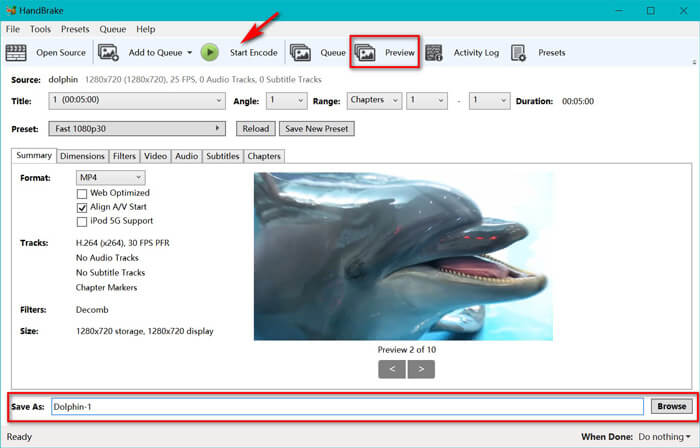
HandBrake’in araç çubuğundaki Preview (Önizleme) özelliği, kodlama işleminden önce yeni MP4 videonuzun nasıl görüneceğini görmenizi sağlar. Tüm ayarlar tam istediğiniz gibi olduğunda, dönüştürülen MP4 dosyalarına bir ad verin ve alt kısımdaki Browse (Gözat) düğmesine tıklayarak yeni videolarınızın kaydedileceği konumu seçin. Son olarak, WTV’yi MP4’e dönüştürmek için araç çubuğundaki Start Encode (Kodlamayı Başlat) düğmesine tıklayın.
Bölüm 3. WTV'den MP4'e SSS
HandBrake neden MP4'ü M4V olarak kaydediyor?
MP4 dosyaları için HandBrake, AC3 ses ve SRT altyazılarını seçtiğinizde veya MP4 dosyasını özelleştirmek için bölüm işaretçilerine sahip olduğunuzda MP4 dosyalarını otomatik olarak M4V uzantısını kullanarak oluşturur. Ancak .m4v uzantısını doğrudan .mp4 olarak değiştirebilirsiniz.
VLC oynatıcı WTV dosyalarını oynatabilir mi?
VLC, WTV dosyalarını doğrudan oynatamaz. WTV kod paketini kurmak için K-Lite Kod Paketini kurmalı ve ardından WTV dosyalarını VLC'de oynatmalısınız.
Korumalı WTV dosyalarını dönüştürebilir miyim?
Evet yapabilirsin. Ancak, yalnızca MCEBuddy, korumalı ticari WTF dosyalarının düzenlenmesini ve dönüştürülmesini destekler. Korumalı WTV dosyalarını kopyalamak ve dönüştürmek için bu yazılımı kullanmanız gerekir.
Sonuç
Window Media Center'da kaydedilmiş WTV dosyalarını rahatça kullanmak için, öncelikle WTV'yi MP4'e dönüştürmelisiniz. Bu gönderi, WTV'yi Ücretsiz Çevrimiçi Video Dönüştürücü ve El Freni aracılığıyla çevrimiçi olarak MP4'e dönüştürmenin 2 ücretsiz yolunu paylaşıyor. Free Online Video Converter, WTV'yi MP4 ve diğer popüler formatlara dönüştürmenize izin verirken, HandBrake size sınırlı çıktı formatı seçenekleriyle daha fazla düzenleme kontrolü sağlar.
Tercih ettiğiniz yol hangisi?
Veya belki daha iyi bir WTV - MP4 dönüştürücünüz var mı?
Her iki durumda da sizden haber almak isterim. Öyleyse devam edin ve aşağıya bir yorum bırakın.
-
 MXF'yi Ücretsiz Dönüştürücü ile MP4'e Dönüştürme
 Bu gönderi, bilgisayarda MXF'yi MP4'e dönüştürmek için ayrıntılı bir kılavuzdur. Basit adımlarla video kamera MXF'yi MP4'e dönüştürmek için 4 ücretsiz MXF - MP4 dönüştürücü alabilirsiniz.
-
 MP4'ü MOV'a Ücretsiz Dönüştürmenin En İyi 3 Yolu
 MP4, Mac'te MOV'a nasıl dönüştürülür? MP4'ü MOV'a kalite kaybı olmadan dönüştürmenin ücretsiz bir yolu var mı? Bu gönderi, videoyu MP4'ten MOV'a Mac, Windows PC ve çevrimiçi olarak dönüştürmenize yardımcı olacak 3 basit yolu paylaşıyor.
-
 Windows / Mac / Online'da M2TS'yi WMV'ye Dönüştürme (Tamamen Ücretsiz Kullanım)
 M2TS'yi WMV videolarına dönüştürmenin 3 kolay yolu. Windows, Mac ve çevrimiçi olarak video formatını M2TS'den WMV'ye ücretsiz olarak değiştirebilirsiniz. Toplu dönüştürme desteklenmektedir.
