


 Video Dönüştürücü Ultimate
 Ekran kaydedicisi
 Video Onarımı
En İyi 5 Erişilebilir Ses Yükseltici Uygulaması Hakkında Ayrıntılı İncelemelerde
Pop, metal, rock, caz ve benzeri türler olsun, tüm evrendeki herkes müziği sever. Ancak her hoparlör, tüylerimizi diken diken edecek kadar iyi bir ses çıkışı sunmaz. Ayrıca, amplifikatör satın almak yüzlerce dolara, hatta daha da kötüsü, bin dolardan fazlasına mal olabilir. Pahalı değil mi? Fakat, tüm platformlarda kullanıma sunulan bu en iyi amplifikatörleri kullanmayı denersek, çok para harcamaktan kaçınabiliriz. Şimdi, bir ses yükseltici uygulama kullanmak istiyorsanız, yukarıda belirtilen miktardan çok daha ucuza mal olacak ve yine de harika bir yükseltme sağlayacak aşağıdaki listeyi okumayı deneyin.

Bölüm 1. PC ve Mac'te Bulunan Olağanüstü Ses Yükseltici
Çok para harcamadan 8D veya 16D bir ses deneyimi elde etmek istiyorsanız, o zaman Video Converter Ultimate kullanmayı deneyin. Bu aracı, diğer amplifikatör ekipmanlarından farklı kılan şey, çok daha az para harcayacak olmanız ve kurulum yapmaya ya da nasıl kullanılacağını öğrenmek için kalın bir kılavuz okumanıza gerek olmamasıdır. Ayrıca bu masaüstü yazılımı, videolarınızı, ses dosyalarınızı, GIF’lerinizi ve daha fazlasını iyileştirmede son derece iyidir. Ücretli bir araç olsa da, videonuz ve sesiniz üzerinde kolayca uygulayabileceğiniz gelişmiş özellikler sunmasına rağmen kullanımı son derece sorunsuzdur. Şimdi, yazılımı nasıl kullanacağınızı öğrenmek istiyorsanız, aşağıda verilen adımları mutlaka takip etmelisiniz.
Video Converter Ultimate’ın Ses Yükselticisini Kullanma Adımları:
Adım 1. Her şeyden önce, yazılımı PC ya da Mac sürücünüze indirin. Ardından bilgisayarınıza kurun ve kolay kurulum adımlarını manuel olarak tamamlayın.
Ücretsiz İndirWindows 7 veya üstü içinGüvenli İndirme
Ücretsiz İndirMacOS 10.7 veya üstü içinGüvenli İndirme
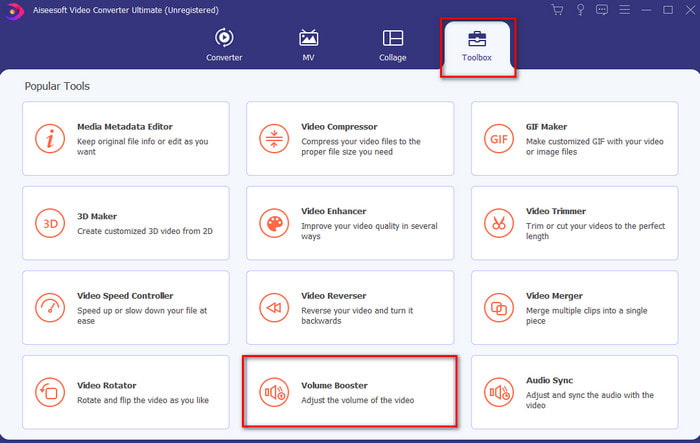
Adım 2. Toolbox (Araç Kutusu) bölümünün altında Volume Booster (Ses Yükseltici) seçeneğine tıklayın.
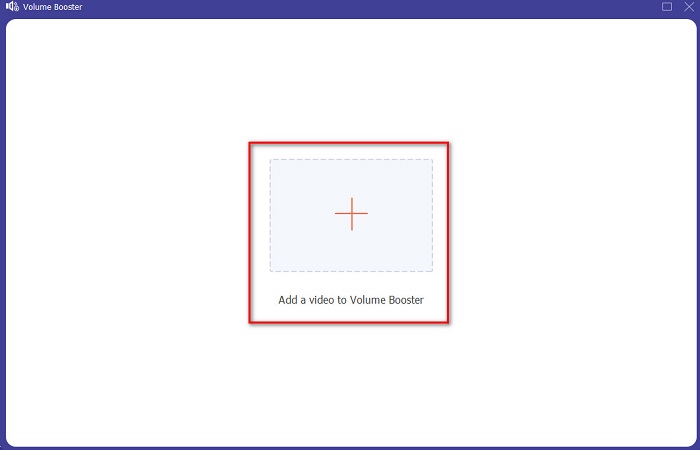
Adım 3. Sesi yükseltmek istediğiniz dosyayı seçmek için + düğmesine tıklayın. Ardından devam etmek için Open (Aç) butonuna basın.
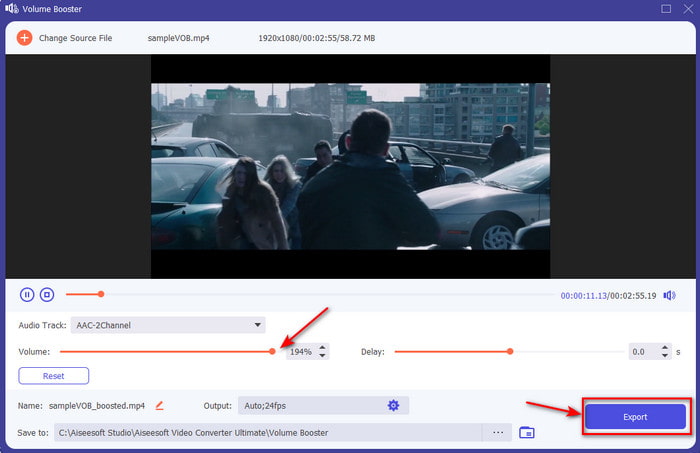
Adım 4. Arayüzde, sesi daha yüksek ve net yapmak için artık ses kaydırıcısını sürükleyebilirsiniz. Ses ayarını bitirdiğinizde Export (Dışa Aktar) düğmesine tıklayın.
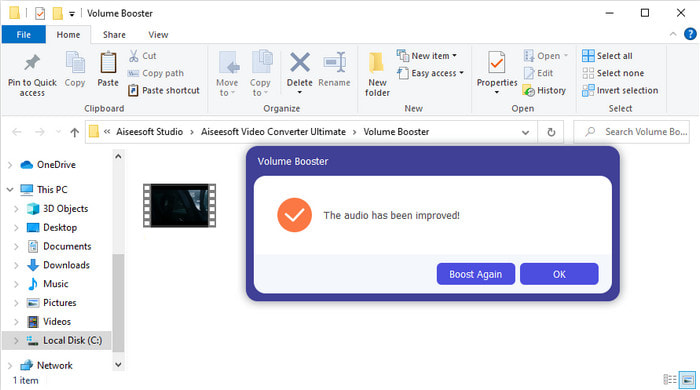
Adım 5. İşlemin tamamlanması için birkaç saniye bekleyin ve bittiğinde, yükselttiğiniz dosyayla birlikte bir dosya yöneticisi ekranınızda açılacaktır; dosyaya tıklayarak dinleyin.
Artıları
- Bu yazılımın kullanımı kolaydır ve sesinizin olağanüstü olmasını sağlayabilir.
- Yazılımın performansı müşterileri tarafından büyük beğeni topluyor.
- PC ve Mac'te mevcuttur ve kolayca indirilebilir.
Eksileri
- Bu yazılım mobil cihazları desteklemez.
- Bu araç ücretlidir ancak diğer masaüstü araçlarına kıyasla o kadar pahalı değildir.
İlgili:
MP4 Video Ses Seviyesi Nasıl Artırılır
VLC Ses Gecikmesi Nasıl Düzeltilir
Bölüm 2. iOS ve Android Cep Telefonlarında Bulunan En İyi Ses Yükseltici Uygulamasının 4. Bölümü
1. Ses Yükseltme – Ses Yükseltici 4+ (iOS)
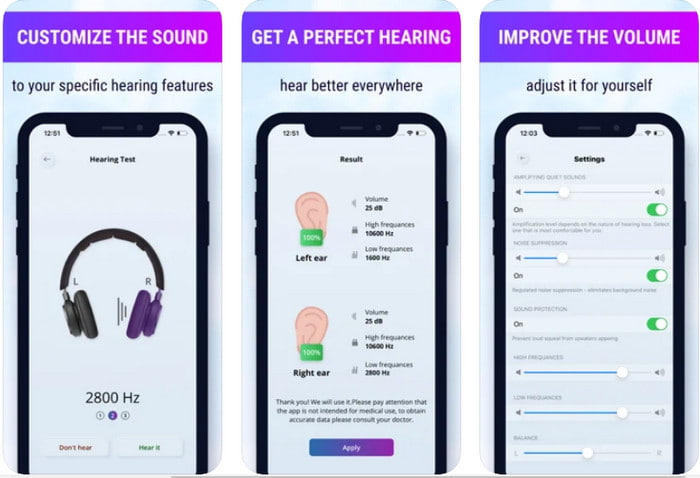
iOS kullanıcıları Volume Boost- Sound Amplifier 4+ uygulamasını kolayca ve ücretsiz olarak indirebilir. Bu uygulama, otomatik ses ayarlaması sayesinde sesi zahmetsizce yükseltebilir, ancak dilerseniz manuel olarak da müdahale edebilirsiniz. Ayrıca, bu uygulama bir amplifikatör olarak kullanmak için gayet uygundur, ancak Bluetooth hoparlörlerde ve kulaklıklarda ya da AirPods’larda çalışmaz. Uygulamayı açtığınızda sık sık çökme sorunları ve kaçınılmaz reklamlarla da karşılaşabilirsiniz. Uygulama ücretsiz indirilebilse de, reklamlardan kurtulmak ve diğer işlevleri kullanmak için uygulama içi satın alma gerektirir.
Artıları
- Herhangi bir iOS cihazına indirmek ücretsizdir.
- Hoparlörünüzün sesini 30db'ye kadar kolayca yükseltin.
- Sezgisel arayüz ve kurulum.
Eksileri
- Bu uygulamada hala birçok çökme, donma ve hata deneyimi yaşayın.
- Reklamlardan kaçınılması gereken çok şey var.
2. Ekstra Ses Yükseltici - yüksek sesli hoparlör (Android)
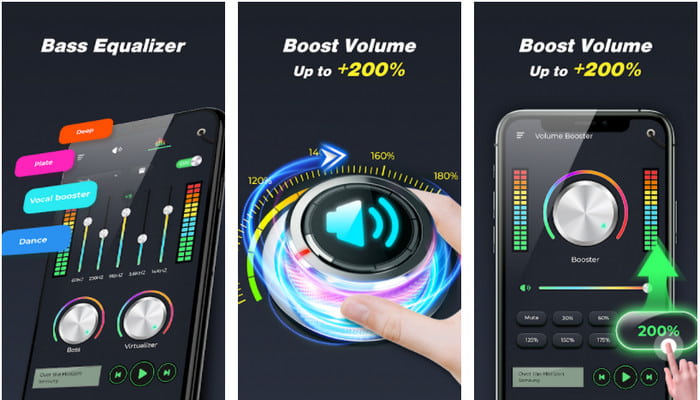
iOS kullanıcılarının telefonlarında bir ses yükseltici uygulaması varsa, Android kullanıcılarının da Extra Volume Booster gibi bir seçeneği olmalıdır. Üstelik, bu uygulamanın performansından memnun kalan birçok kullanıcı, ses yükseltme ve güçlendirme konusunda oldukça başarılı olduğunu belirtmektedir. Ancak, bu uygulamayı açtığınızda telefondan çıkan tüm sesler—arama zil sesi, alarmlar, bildirimler ve daha fazlası—birlikte yükseltilir. Yani bu özellikler için ayrı ayar seçenekleri yoktur. Araç ücretsiz olsa da, Android’de hatta iOS’ta yer alan bazı ücretli uygulamalara kıyasla yine de oldukça iyi sayılır. Fakat sesi 200% seviyesine kadar açarsanız, bu düzeydeki ses çıktısını kaldıramayan dahili veya Bluetooth hoparlörlerinizde bozulmalar olmasını bekleyin.
Artıları
- Android cihazlarda indirebileceğiniz amplifikatörün basitleştirilmiş versiyonu.
- Uygulama arayüzü çok olmasa da harika.
- Bu uygulamada farklı güçlendirme ve güçlendirme mevcuttur.
Eksileri
- Uygulamayı kullanırken sayısız reklamla karşılaşmayı bekleyin.
- Aracı kullanırken CPU veya telefonun ısınma olasılığı vardır.
3. Hoparlör Güçlendirme: Ses Yükseltici ve Ses Yükseltici 3D (Android)
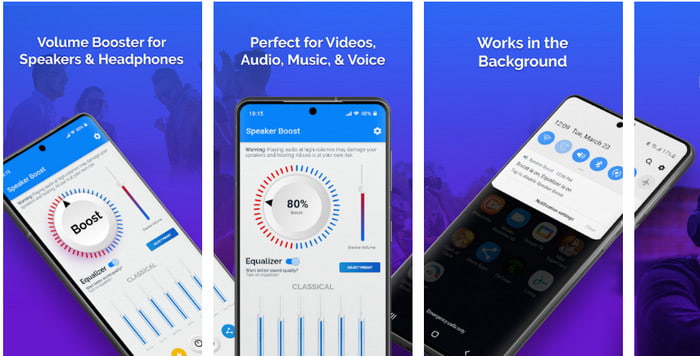
Android’de kullanabileceğiniz ve harika bir çevresel ses yükseltici sunan bir diğer uygulama da Speaker Boosttur. Extra Volume Booster gibi bu uygulama da son derece net hedefli ve deneyiminiz olmasa bile kullanımı çok daha kolaydır. Ayrıca bu aracı ücretsiz olarak indirebilirsiniz, ancak isteyebileceğiniz bazı uygulama içi satın alma seçenekleri vardır; örneğin rahatsız edici reklamları kaldırmak gibi. Araç kullanmak için makul görünse de, uygulama içi satın alma fiyatları bu listedeki diğer yazılımlarla kıyaslandığında oldukça yüksektir. Kullanıcıları rahatsız eden bir diğer sorun ise, uygulamanın reklam engelleyicilerin arkasında da çalışması ve bu yüzden casus yazılım olma ihtimaline dair endişeler uyandırmasıdır.
Artıları
- Sesi kolayca artırmak için yerinde ve yine de kullanımı güçlü.
- Sesleri yükseltmekle uğraşmadan aracı ücretsiz olarak indirin.
- Ekolayzırda manuel geçersiz kılma işlemini yapın.
Eksileri
- Bu araç eksik, yani temelde deneysel durumda.
- Sesi artırdığınızda duyacağınız bazı bozulmalar var.
4. Boom: Bas Güçlendirici ve Ekolayzer 4+ (iOS)
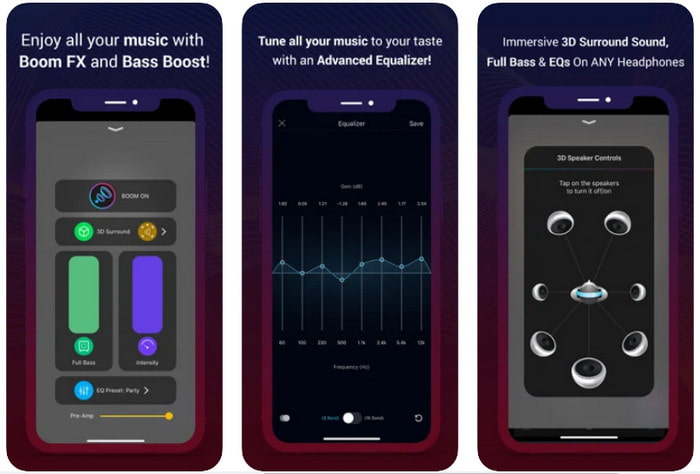
Gelişmiş bir ses yükseltici uygulama arıyorsanız, Boom: Bass Booster harika bir seçimdir. Ancak bu uygulama yalnızca iOS cihazlarda mevcuttur; Android cihazlarınızda bulamazsınız. Şimdiye kadar bu araç, kullanıcılarından epey övgü aldı, fakat bazı formatlar için yükseltme desteği sunmuyor. Ayrıca uygulamayı kullanırken zaman zaman hatalar ve çökmelerle karşılaşmanız olasıdır. Bunun yanı sıra, yeni kullanıcılar için biraz yanıltıcı olabilir. Uygulamanın performansı genel olarak fena görünmese de, daha iyi hale gelmesi için hâlâ geliştirmeye ihtiyaç duyuyor.
Artıları
- Gelişmiş özelliklerden bazıları burada mevcuttur.
- Kolaylıkla kullanabileceğiniz portatif amplifikatörler.
- Uygulamaya 5 yıldız üzerinden 4,1 yıldız verilir.
Eksileri
- Kafa karıştırıcı arayüz yapısı nedeniyle yeni başlayanlar için en iyi seçim değil.
- Çoğu ses formatının bu uygulama ile güçlendirilmesi desteklenmez.
- Uygulamada hata ve gecikme sorunları devam ediyor.
Bölüm 3. Ses Yükselticiler hakkında SSS
db nedir?
Db, desibel anlamına gelir ve bu, ses dalgasının yüksekliğini veya gücünü ifade eden ölçü birimidir. Ayrıca, desibel yardımıyla, uzun bir süre içinde hangi sesi duymamızın güvenli olduğunu kolayca belirleyebiliriz. Ve aşağıdaki 85 desibelin tümünü duymak çok güvenlidir.
Yüksek sesin zararları nelerdir?
Yüksek seslere maruz kaldığımızda işitme duyumuzun zarar görmesi bizim için çok yaygın. Ancak bunun mide bulantısı, baş ağrısı, stres, yorgunluk ve daha fazlasına neden olabileceğini biliyor muydunuz? Bu nedenle, bir amplifikatör kullanmak üzereyseniz, onu doğru şekilde kullanın ve kaçınılmaz zararlı etkilerden kaçınmak için aşırı kullanmayın.
Hoparlörlerimde neden bazı çatlaklar duyuyorum?
Bu sorun, çok sınırlı bir hertz'in üstesinden gelebileceği hoparlörler için çok olağandır. Bu nedenle, sesi artırırsanız, hoparlörün kaldırabileceğinden emin olun. Ve eğer biraz çatlama duyarsanız, sesi hemen azaltmalısınız. Ancak, sesi kıssanız bile bazı çatlaklar duyarsanız, o zaman çok geçtir.
Sonuç
Burada sunulan tüm uygulamalar ve yazılımlar, birer amplifikatör olarak kullanmak için oldukça uygundur. Yukarıda bahsedilen programların bazı farklılıkları olsa da, işlevleri benzerdir. Ancak, PC ve Mac için en iyi ses yükselticiyi arıyorsanız, Video Converter Ultimate bu ihtiyaç için en iyi aday olmalıdır. Çünkü kolayca kullanabileceğiniz olağanüstü gelişmiş özellikler sunar. Bu seçeneğin gerçekten en iyisi olup olmadığını merak ediyorsanız, önce bilgisayarınıza indirin ve yukarıda belirtilen adımları takip edin.
Ücretsiz İndirWindows 7 veya üstü içinGüvenli İndirme
Ücretsiz İndirMacOS 10.7 veya üstü içinGüvenli İndirme
-
 [Kolay] Senkronize Olmayan Ses ve Video Nasıl Onarılır
 Akışınızı yarın için planlayacağınızı, ancak kurulumunuzu kontrol ettiğinizde ses ve videonun senkronize olmadığını varsayalım. Bu endişe hakkında daha fazla bilgi edinmek için bu makaleyi okuyun.
-
 OBS Ses Gecikmesi Sorunlarının Nasıl Düzeltileceğine İlişkin 7 Kolay Adım [Çözüldü]
 OBS Studio'yu kullanırken ses gecikmesi nedeniyle kayıttan sonra video klibinizi izlemekte zorlanıyor musunuz? Senkronize olmayan sesi etkili bir şekilde nasıl düzelteceğinizi öğrenmek için aşağıdaki makaleyi okuyun.
-
 Bilgisayarınızda / Telefonunuzda Ücretsiz Olarak Videoya Ses ve Müzik Ekleme
 Bu makale, videoya ücretsiz olarak ses eklemenin 4 kolay yolunu gösterir. Videonuza eklemek istediğiniz ses parçası ne olursa olsun, burada tatmin edici sonuçlar elde edebilirsiniz.
