


 Video Dönüştürücü Ultimate
 Ekran kaydedicisi
 Video Onarımı
 Güvenli İndirme
MP4 Çevrimiçi ve Çevrimdışı 3GP'ye Nasıl Dönüştürülür
MP4, MP4 oynatıcılarda, cep telefonlarında ve tabletlerde oynatılabilen popüler bir video formatıdır. Web sitesinden indirdiğimiz filmler genellikle MP4 formatında kalır. Ancak bazı cep telefonları yalnızca 3GP videolarının oynatılmasını destekler. Bu makale size 3 ücretsiz MP4 - 3GP dönüştürücülerini gösterecek ve MP4'ü 3GP'ye sorunsuz bir şekilde dönüştürebilirsiniz.

Bölüm 1. Windows ve Mac'te MP4'ü 3GP'ye Dönüştürme
MP4'ü çevrimdışı olarak 3GP’ye dönüştürmek istiyorsanız, bir masaüstü MP4'ten 3GP’ye dönüştürücü kullanabilirsiniz. FVC Free FLV to 3GP Converter, Windows ve Mac için ücretsiz ve kullanımı kolay bir video dönüştürme yazılımıdır. FLV, MP4, MOV, MKV, MTS, M2TS vb. gibi çeşitli videoları zahmetsizce 3GP’ye dönüştürebilir. Ayrıca, başlangıç/bitiş kısmına tema ekleme, yazar, zaman, sağlayıcı bilgilerini ayarlama gibi düzenleme özellikleri de sunar.

- MP4, MKV, AVI, MOV, MP3, AAC, AIFF vb. Videoları 3GP'ye dönüştürün.
- 3GP videolarını ve kayıpsız ses dosyasını MP4 dosyasından 1 tıklamayla dışa aktarın.
- Kullanıcıların sağlayıcı, başlık, yazar, zamanı düzenlemesine ve tema eklemesine izin verin.
- Bazı cep telefonlarında oynatmak için MP4'ü 3GP'ye dönüştürün.
Ücretsiz İndirWindows 7 veya sonrası içinGüvenli İndirme
Ücretsiz İndirMacOS 10.7 veya sonrası içinGüvenli İndirme
Adım 1. FVC Free FLV to 3GP Converter’ı Windows veya Mac’inize ücretsiz indirin, kurun ve başlatın. Bilgisayarınızdan MP4 dosyalarını yüklemek için Dosya Ekle düğmesine tıklayın. Aynı anda birden fazla MP4 dosyasını dönüştürebilirsiniz.
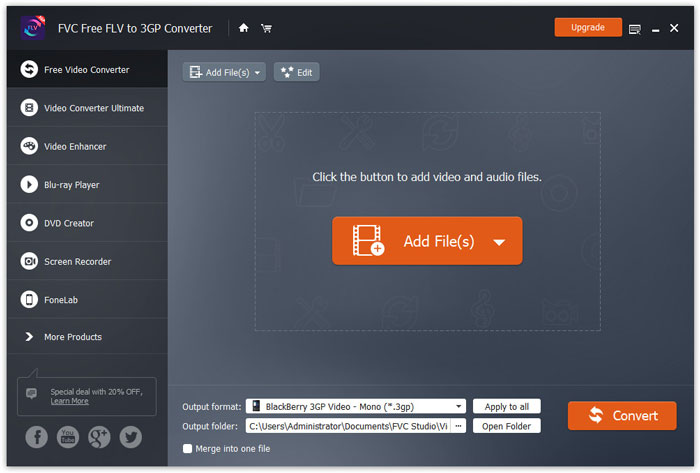
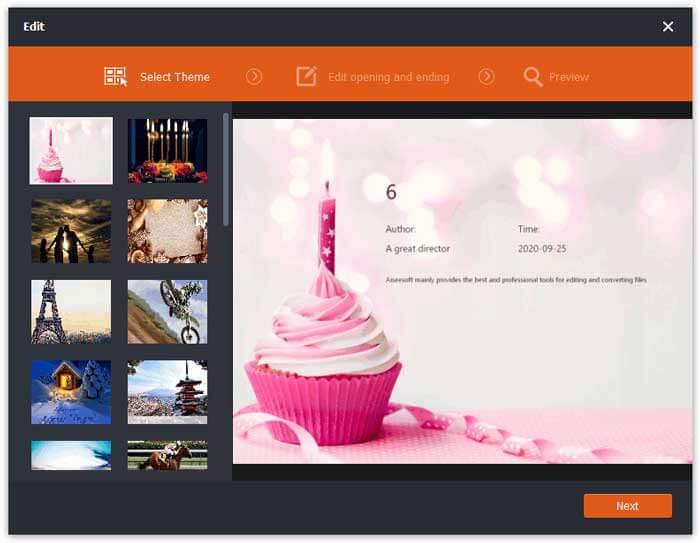
2. Adım. MP4 dosyanıza tıklayın ve Düzenle düğmesine basın. MP4 dosyanıza bir tema ekleyebilir ve açılış ile bitiş içeriğini düzenleyebilirsiniz. Ardından değişiklikleri ön izlemek ve kaydetmek için İleri düğmesine tıklayın.
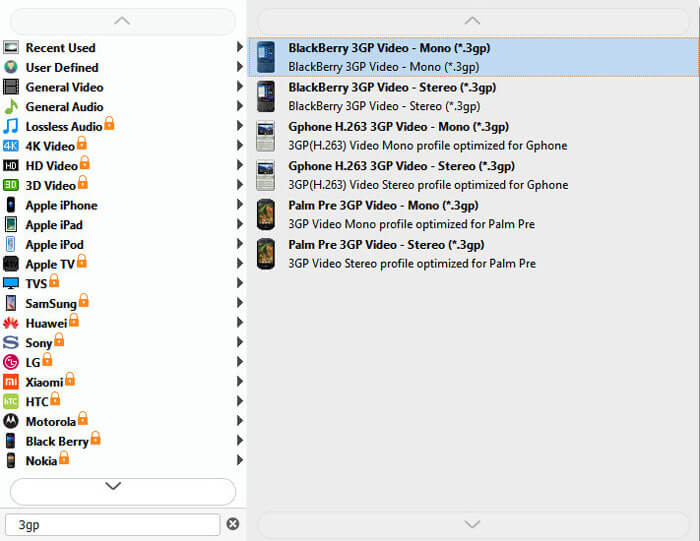
Adım 3. Alttaki Çıktı formatı açılır listesinden 3GP’yi seçin. BlackBerry 3GP Video - Mono (*.3gp) veya istediğiniz başka bir seçeneği belirleyebilirsiniz.
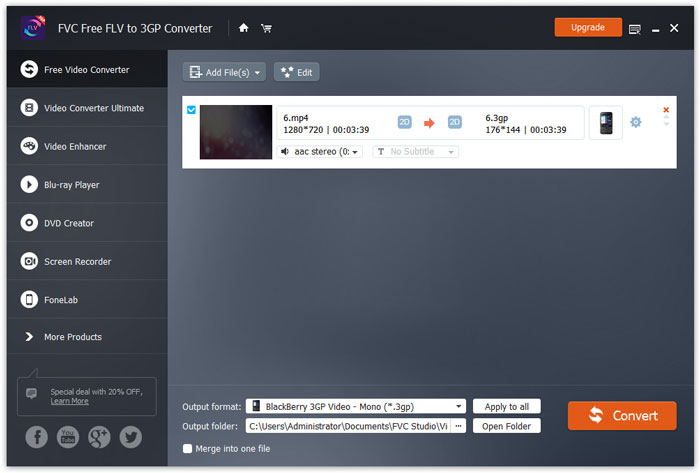
Adım 4. Son olarak, bilgisayarınızda çıktı klasörünü seçin ve MP4’ü 3GP’ye dönüştürmeyi başlatmak için Dönüştür düğmesine tıklayın.
Bölüm 2. 3GP'yi MP4'ten 2 Çevrimiçi 3GP Dönüştürücü ile dışa aktarın
Masaüstü 3GP dönüştürücü kurmaya kıyasla, web tabanlı bir dönüştürücü kullanmak, MP4'ü 3GP'ye dönüştürmek için çok daha basit ve daha kolaydır. Bu bölümde, MP4'ü 3GP'ye zorlanmadan dönüştürmenize yardımcı olacak 2 çevrimiçi 3GP dönüştürücüyü paylaşacağız.
1. FVC Ücretsiz Çevrimiçi Video Dönüştürücü
FVC Free Online Video Converter, popüler video ve ses biçimlerini 3GP, MKV, MOV, WMV, AVI, MP3 ve daha fazlasına dönüştürebileceğiniz, iyi bilinen bir video dönüştürücü platformudur.
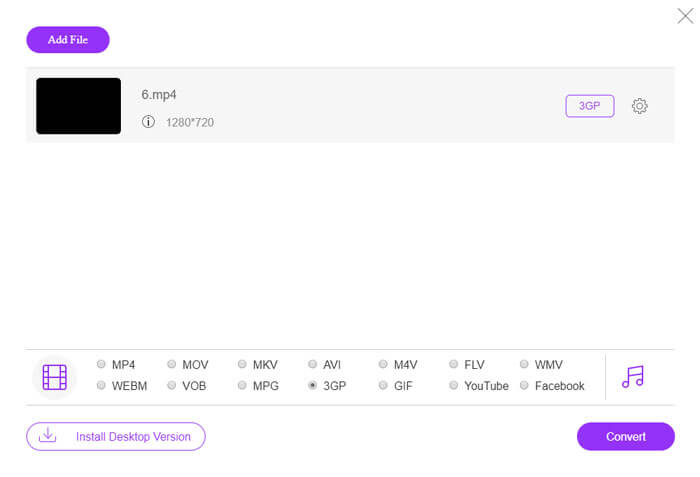
Adım 1. FVC Free Video Converter’ın resmi web sitesine gidin. Başlatıcıyı indirip kurmak için Dönüştürülecek Dosyaları Ekle düğmesine tıklayın.
Dosyaları toplu dönüştürmek için Masaüstü Sürümü indirin.

Adım 2. Yerel bilgisayarınızdan MP4 dosyalarını seçin. Dişli simgesine tıklayarak video bit hızını, örnekleme hızını, kare hızını, çözünürlüğü ve ses seviyesini ayarlayabilirsiniz.

Adım 3. Altta çıktı formatını 3GP olarak ayarlayın. Ardından MP4'ü 3GP’ye dönüştürmeyi başlatmak için Dönüştür düğmesine tıklayın. Aynı anda birden fazla MP4 dosyasını toplu şekilde 3GP’ye dönüştürebilirsiniz.
2. Zemzar
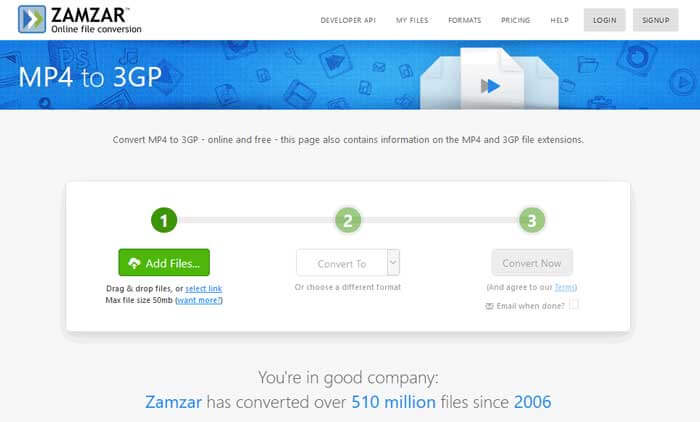
Zamzar bir çevrimiçi video dönüştürücü, ses dönüştürücü, görüntü dönüştürücü ve e-kitap dönüştürücüsüdür. MP4'ü Zamzar kullanarak diğer çeşitli biçimlere dönüştürmek uygundur. Aşağıdakiler, MP4'ü 3GP'ye dönüştürmek için basit adımlardır.
Adım 1. zamzar.com/convert/mp4-to-3gp/ adresine gidin ve MP4 dosyalarınızı yüklemek için Dosya Ekle düğmesine tıklayın.
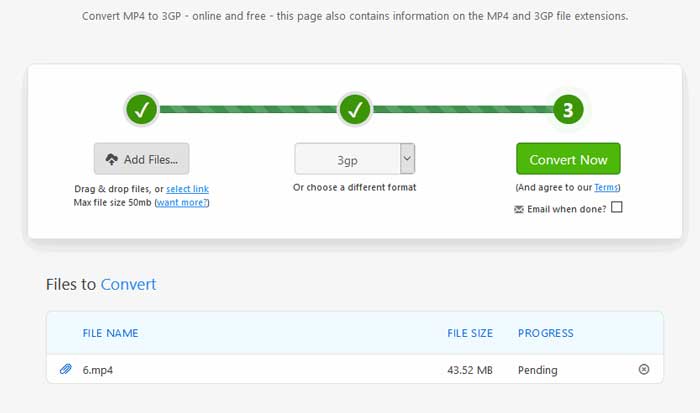
Adım 2. Farklı bir çıktı formatı seçebilirsiniz. Genellikle 3gp varsayılan olarak çıktı formatı olarak ayarlanır. MP4'ü 3GP’ye dönüştürmeyi başlatmak için Şimdi Dönüştür düğmesine tıklayın.
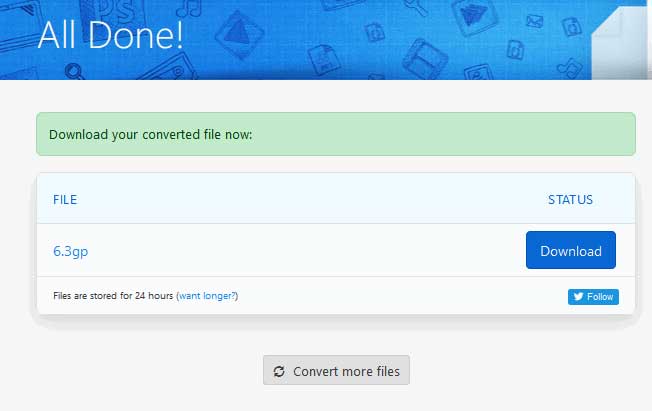
Adım 3. Ardından başka bir sayfaya yönlendirileceksiniz. Dönüştürülen 3GP dosyasını bilgisayarınıza kaydetmek için İndir düğmesine tıklayabilirsiniz.
Peki MP4 dosyanızın boyutu büyükse ne olur? Buradan MP4 dosyalarını nasıl sıkıştıracağınızı görün.
MP4 ve 3GP karşılaştırması
2001 yılında Moving Picture Experts Group (MPEG) tarafından piyasaya sürülen MP4 formatı, video, ses, altyazı ve görüntü verilerini ayrı parçalarda kaydetmenize yardımcı olabilir. MPEG-4 Part 14'ün kısaltmasıdır. Ayrıca, video akışı ve paylaşımı için kullanılan en popüler formatlardan biridir.
3. Nesil Ortaklık Projesi (3GPP), bir multimedya kapsayıcı formatı olarak 3GP/3GPP formatını üretti. Aslında ISO medya dosyası formatına dayanmaktadır. Bunu genellikle 3G cep telefonları arasında ve çevrimiçi olarak iletilen video/ses akışlarını kaydetmek için kullanırız.
Bölüm 3. MP4'ü 3GP'ye Dönüştürme Hakkında SSS
1. 3GP, MP4'ten daha mı iyidir?
3GP, 3G ağlı cep telefonları için tasarlanmıştır. 3GP dosyalarını QuickTime, VLC ve RealPlayer gibi oynatıcılarda oynatabilirsiniz. MP4, 3GP’ye kıyasla çok daha uyumludur. Birçok taşınabilir medya oynatıcı ve akıllı telefon tarafından evrensel olarak desteklenir.
2. 3GP nedir?
3GP, 3. Nesil tarafından tanımlanan bir multimedya kapsayıcı formatıdır. 3G cep telefonlarında oynatılan videoları ve ses akışlarını depolayabilir, ancak bazı 2G veya 4G telefonlarda da oynatılabilir.
3. MP4'ü FLV'ye nasıl dönüştürebilirim?
FVC Free Online Video Converter’ın yardımıyla, çevrimiçi olarak kolayca MP4’ü FLV’ye dönüştürebilirsiniz. Bu çevrimiçi siteye gidin ve başlatıcıyı kurmak için Dosya Ekle ve Dönüştür düğmesine tıklayın. Ardından bilgisayardan MP4 dosyalarını seçin ve çıktı formatı olarak FLV’yi işaretleyin. MP4’ü FLV’ye dönüştürmek için Dönüştür düğmesine tıklayın.
Sonuç
MP4'ü Windows ve Mac'te 3GP'ye dönüştürmek için esas olarak 3 yöntemden bahsettik. Çevrimiçi bir çözümü tercih ederseniz, FVC Free Online Video Converter veya Zamzar'ı çevrimiçi deneyebilirsiniz. MP4 dosyanızı daha fazla mükemmellik için düzenlemek istiyorsanız, bunun yerine Free FLV to 3GP Converter'ı kullanabilirsiniz. Daha iyi bir çözümünüz varsa, lütfen yorum yapmaktan çekinmeyin.
-
 MP4'ü VOB'a Hızla Dönüştürmenin En İyi 3 Ücretsiz Yolu
 MP4, Windows PC ve Mac'te VOB'a nasıl dönüştürülür? Bu sorunu çözmek için, bu gönderi MP4'ü ücretsiz olarak VOB'a dönüştürmenize yardımcı olacak en iyi 3 yolu paylaşacaktır.
-
 Bedava | 3 Kaliteyi Kaybetmeden MP4'ü WMV'ye Dönüştürmenin En İyi Yöntemleri
 Bu gönderi, MP4 videosunun Mac veya Windows'ta WMV formatına nasıl dönüştürüleceğini paylaşıyor. Ayrıca size hem masaüstü yazılımı hem de web tabanlı çevrimiçi dönüştürücüler dahil olmak üzere çeşitli seçenekler sunacağız. En iyi MP4'ten WMV'ye dönüştürme araçlarını öğrenmeye hazır mısınız?
-
 3 MP3'ü Resimle MP4'e Dönüştürme Yöntemleri
 MP3'ü MP4'e yüksek kalitede dönüştürmek nasıl? Bu gönderi, Windows ve Mac'te resimlerle MP3'ü MP4'e değiştirmek için 3 etkili ve ücretsiz yöntem gösterir.

