


 Video Dönüştürücü Ultimate
 Ekran kaydedicisi
 Video Onarımı
 Güvenli İndirme
After Effects'te Videoyu Kolayca Hızlandırma
Videonuzu hızlandırmak istiyorsanız mutlaka bir hızlandırma aracı kullanmanız gerekir. Ancak tüm araçlar aynı özellikleri sunmaz. Muhtemelen internette bulabileceğiniz ve videonuzun hızını değiştirebileceğiniz en iyi araç Adobe After Effects’tir. Pek çok profesyonel, hızlandırma aracı kullanırken ilk tercih olarak bunu seçmektedir. Bu makalede en iyi hızlandırma araçlarını kavrayacak ve After Effects’te video nasıl hızlandırılır öğreneceksiniz.

Bölüm 1. After Effects'te Videonuzu Hızlandırma veya Yavaşlatma
Adobe After Effects muhtemelen piyasada bulabileceğiniz en çok kullanılan hızlandırma araçlarından biridir. Pek çok profesyonel bu aracı; efekt ekleme, kendi şablonunuzu oluşturma, metin animasyonu yapma vb. gelişmiş özellikleri nedeniyle kullanır. Bu aracın etkileyici yanı, harika hareketli grafikler ve görsel efektler oluşturabilmesidir. Eğer profesyonel bir film yapımcısıysanız, muhtemelen sunduğu özellikler ve araçlar nedeniyle siz de bunu kullanmak isteyeceksiniz. Ayrıca hem Windows hem de Mac için kullanılabilir.
Profesyonel bir çıktı oluşturabilmesine rağmen, kullanıcı arayüzünü anlamak zordur. Arayüzünde ustalaşması için bir rehbere ihtiyacınız var. Bununla birlikte, birçok film yapımcısı ve profesyonel editör bu aracı kullanır ve onu en iyi video hızlandırma aracı olarak bulur. After Effects hızlandırma video aracını kullanmakla ilgileniyorsanız, aşağıdaki adımları izleyin.
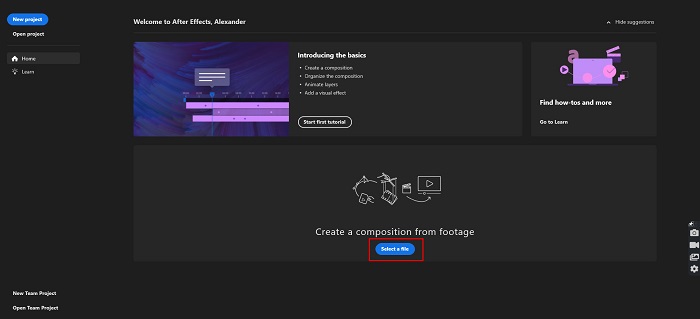
Adım 1. Öncelikle bilgisayarınıza Adobe After Effects’i indirin. Ardından uygulamayı açın. Yazılımın ana arayüzünde, hızlandırmak istediğiniz videoyu yüklemek için Select a File düğmesine tıklayın. Sonrasında bilgisayarınızdaki dosyalar açılacak ve videonuzu buradan yükleyeceksiniz.
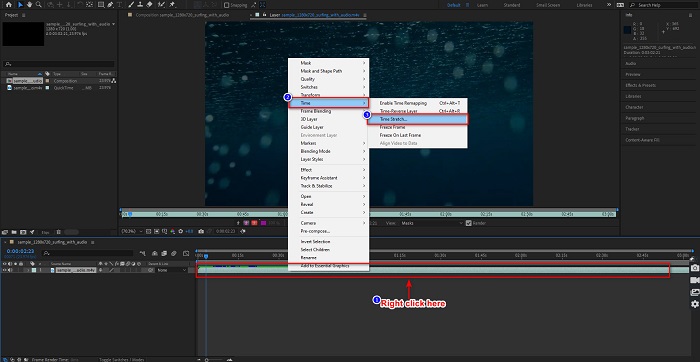
Adım 2. Ardından videonuzun zaman çizelgesine sağ tıklayın. Açılan menüde Time > Time Stretch seçeneğine tıklayın.
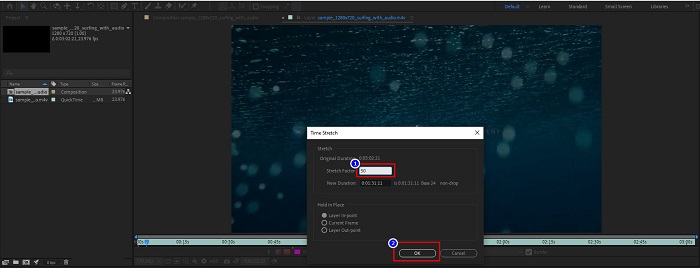
Adım 3. Daha sonra istediğiniz uzatma faktörü yüzdesini yazın ve OK düğmesine tıklayın. Ardından video hızınızdaki değişikliği göreceksiniz.
Artıları
- Bu araç, film yapım endüstrisinde ve film yapım kariyerlerinde kullanılıyor
- 3D oluşturma, sanal gerçeklik, efekt ekleme ve daha fazlası gibi birçok gelişmiş özelliğe sahiptir.
- Windows ve Mac dahil hemen hemen tüm medya platformlarında mevcuttur.
Eksileri
- Aracı uzun süre kullanmak için bir abonelik ücreti ödemeniz gerekiyor.
- Kullanımı zor bir yazılım arayüzüne sahiptir.
Bölüm 2. Videonuzu Hızlandırmanın Daha Kolay Yolları
Ancak daha kolay bir yazılım arayüzüne sahip bir araç arıyorsanız, bu araç tam size göre. FVC Video Converter Ultimate da videonuzu hızlandırmak veya yavaşlatmak için popüler bir araçtır. Basit bir kullanıcı arayüzüne sahiptir ve birçok kişi videolarını hızlandırmak için bu aracı kullanmaktadır. Ayrıca video hızını 0.125x, 0.25x, 0.5x, 0.75x, 1.25x, 1.5x, 2x, 4x ve 8x olarak ayarlayabilirsiniz.
Ayrıca bu araç, video düzenleyici, GIF oluşturucu, 3B oluşturucu ve daha fazlası gibi kullanabileceğiniz daha fazla özellik sunar. Bu araçta daha etkileyici olan şey, videonuzun çözünürlüğünü ve kare hızını değiştirebilmenizdir. Bu araç hakkında daha fazla bilgi edinmek için aşağıdaki açıklamayı okuyun.

FVC Video Dönüştürücü Ultimate
5.689.200+ İndirme- Windows ve Mac'te bir videoyu hızlandırın.
- Video ters çevirici, video filigranı, ses yükseltici vb. gibi gelişmiş özelliklere sahiptir.
- MP4, WMV, AVI, M4V, FLV ve daha fazlası dahil olmak üzere çok sayıda dosya formatını destekler.
- Videonuzun bit hızını ve çözünürlüğünü ayarlamanıza olanak tanır.
Ücretsiz İndirWindows 7 veya üstü içinGüvenli İndirme
Ücretsiz İndirMacOS 10.7 veya üstü içinGüvenli İndirme
İşte videonuzu hızlandırmak için FVC Video Converter Ultimate kullanma yolları
Adım 1. Windows veya Mac için Download düğmesine tıklayarak FVC Video Converter Ultimate’ı indirin. Kurulum adımlarını takip edin ve uygulamayı çalıştırın.
Ücretsiz İndirWindows 7 veya üstü içinGüvenli İndirme
Ücretsiz İndirMacOS 10.7 veya üstü içinGüvenli İndirme
Adım 2. Ana yazılım arayüzünün üst kısmındaki panelden Toolbox seçeneğine tıklayın. Ardından Video Speed Controller seçeneğine tıklayın.
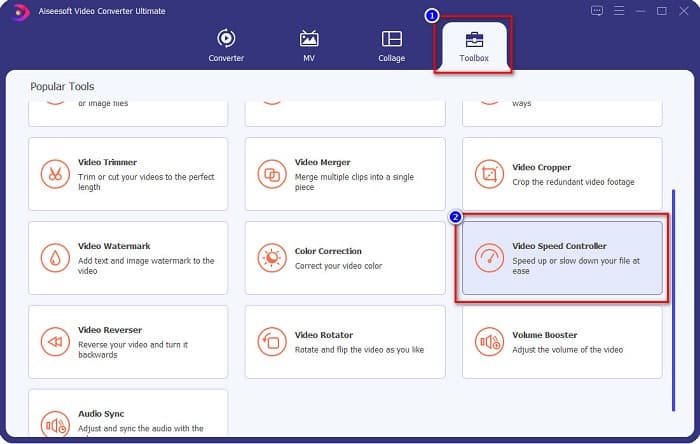
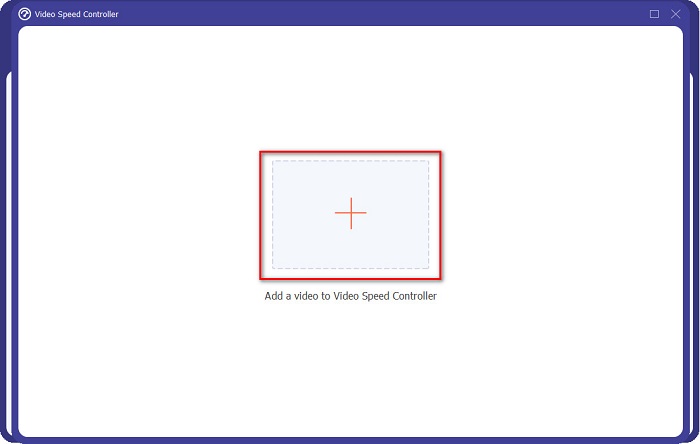
Adım 3. Video Speed Controller’a tıkladıktan sonra başka bir arayüze yönlendirileceksiniz. Videonuzu yüklemek için + simgesine tıklayın veya videonuzu bu + işaretinin üzerine sürükleyip bırakın.
Adım 4. Sonra, videonuzun önizlemesinin altındaki seçeneklerden istediğiniz video hızını seçin ve ardından Export düğmesine tıklayın.
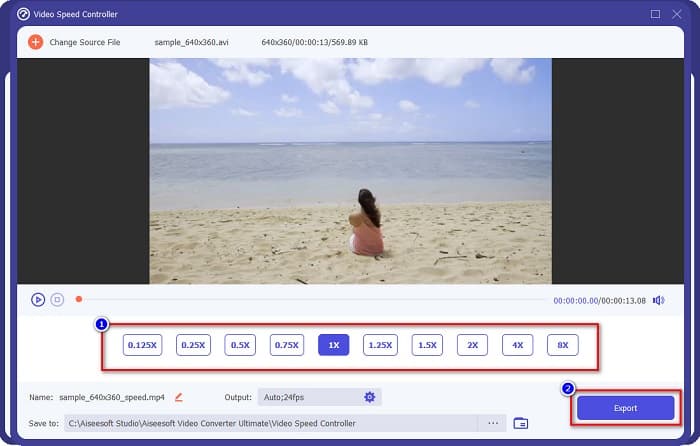
Tamamlandığında masaüstü dosyalarınıza otomatik olarak kaydedilecektir.
Bölüm 3. Adobe After Effects ve FVC Video Converter Ultimate
Kullanılacak en iyi hızlandırma video aracını seçmekte zorlanıyor musunuz? O zaman endişelenmeyin çünkü size yukarıda bahsedilen araçlarla ilgili daha ayrıntılı ve daha net bir fikir vereceğiz. Buna rağmen, bu iki araç harika kullanıcı derecelendirmelerine sahiptir ve videonuzu hızlandırabilir veya yavaşlatabilir.
| vs. | Adobe After Effects | FVC Video Dönüştürücü Ultimate |
| uyumluluk | Windows ve Mac | Windows ve Mac dahil neredeyse tüm medya platformları |
| Kullanımı kolay |  |  |
| Kullanılacak başka özelliklere sahip | | |
| Fiyat | Fiyat $20.99/ay'dan başlar | 1 aylık sürüm fiyatı $23.30 |
| En iyi kullanılan | Film çekmek | Videoları dönüştürme ve düzenleme |
Artık ayrımları ve benzerlikleri bildiğinize göre, kullanacağınız hızlandırma video aracı sizin elinizde.
Bölüm 4. After Effects'te Videoyu Hızlandırma Hakkında SSS
Bir video hızlandırma çevrimiçi aracı kullanmak daha mı iyi?
Evet. İnternette bulabileceğiniz birçok çevrimiçi hızlandırma video aracı vardır. Ancak, hızlandırma çevrimiçi araçları internete bağlıdır, yani internet bağlantısı yavaş olduğunda yükleme işlemi yavaş olabilir.
After Effects kullanarak bir GIF oluşturabilir misiniz?
Hayır. Adobe After Effects'te GIF oluşturucu yoktur. Ancak animasyonlu GIF oluşturabilen bir araç istiyorsanız, FVC Video Converter Ultimate'ı kullanın. Kullanımı kolay yerleşik bir GIF oluşturucuya sahiptir.
Adobe After Effects tüm dosya biçimlerini destekler mi?
Adobe After Effects, MPEG, WAV, WMV, SWF, FLV, MP4, M4V ve çok daha fazlası dahil olmak üzere çok sayıda video/görüntü dosyası formatını destekler.
Sonuç
Tüm bunlarla birlikte, bu makale Adobe After Effects’in video hızlandırma konusunda gerçekten benzersiz ve kullanılması en iyi araçlardan biri olduğunu kanıtlamaktadır. Sahip olduğu özellikler ve ürettiği profesyonel çıktı son derece etkileyicidir. Artık pek çok profesyonel film yapımcısı ve video editörünün bu aracı neden birçok amaç için kullandığını net bir şekilde görebilirsiniz. Ancak yeni başlayan biriyseniz ve daha basit bir kullanıcı arayüzüne sahip bir video hızlandırma aracı arıyorsanız, o zaman FVC Video Converter Ultimate sizin için en iyi video hız denetleyicisidir. Öyleyse ne bekliyorsunuz? Hemen indirin ve sunduğu harika özellikleri deneyin.
-
 Premiere Pro ve Alternatifleriyle Videoyu Hızlandırma
 Bir videoyu hızlandırmak için premiere pro'yu nasıl kullanacağınızı bilmek ister misiniz? O zaman adımlar ve diğer uygun fiyatlı alternatifler sağladığımız için doğru makaledesiniz.
-
 TikTok'ta Video Hızlandırmanın 2 Zahmetsiz Yolu
 TikTok'ta videoyu nasıl hızlandıracağınızın sırrını bilmek ister misiniz? Ardından, nasıl yapılacağı hakkında fikir sahibi olmak ve size yardımcı olacak diğer 2 aracın neler olduğunu öğrenmek için bu makaleyi okuyun.
-
 2021 İçin Mükemmel İpuçları: iMovie'de Video Nasıl Hızlandırılır
 Arkadaşınız, iOS işletim sistemini kullanarak bir videoyu nasıl hızlandıracağınızla ilgili sorununuzda size yardımcı olması için iMovie'yi öneriyor, ancak ne yapacağınızı bilmiyor musunuz? Bu makaleyi daha fazla okurken bununla ilgili daha fazla bilgi edinin.
