


 Video Dönüştürücü Ultimate
 Ekran kaydedicisi
 Video Onarımı
 Güvenli İndirme
MP4'i OGG'ye Ücretsiz ve Çevrimiçi Dönüştürme
MP4, video, ses ve altyazıları depolayan dijital bir multimedya kabıdır. OGG, verimli akış ve dosya sıkıştırma için ücretsiz ve açık bir kapsayıcı formatıdır. Bazen bazı ses oynatıcılarda oynatmak için MP4'ü OGG formatına dönüştürmeniz gerekir. Bu gönderi, MP4'ü OGG'ye sorunsuz bir şekilde dönüştürmek için 3 ücretsiz MP4'ü OGG dönüştürücülere paylaşacak.

Bölüm 1. MP4'ü Ücretsiz OGG'ye Dönüştürmenin Profesyonel Yolu
En iyi MP4'ten OGG’ye dönüştürücüyü bulmak istiyorsanız, FVC Free FLV to MP4 Converter programını deneyebilirsiniz. Bu, Windows ve Mac için ücretsiz ve kullanımı kolay bir video dönüştürme yazılımıdır. MP4, FLV, MOV, MKV, MTS, M2TS vb. gibi çeşitli videoları zahmetsizce OGG’ye dönüştürebilirsiniz. Ayrıca, başlangıç/bitiş kısmına tema ekleme, yazar, zaman, sağlayıcı bilgilerini ayarlama gibi düzenleme özellikleri de sunar.

- MP4, MKV, AVI, MOV, MP3, AAC, AIFF vb. Videoları OGG'ye dönüştürün.
- OGG videolarını ve kayıpsız ses dosyasını MP4 dosyasından 1 tıklamayla dışa aktarın.
- Kullanıcıların sağlayıcı, başlık, yazar, zamanı düzenlemesine ve tema eklemesine izin verin.
- Bazı taşınabilir müzik çalarlarda oynatmak için MP4'ü OGG'ye toplu dönüştürün.
Ücretsiz İndirWindows 7 veya sonrası içinGüvenli İndirme
Ücretsiz İndirMacOS 10.7 veya sonrası içinGüvenli İndirme
1. Adım. İndirdikten sonra FVC Free FLV to MP4 Converter yazılımını Windows veya Mac bilgisayarınıza kurun ve başlatın. Bilgisayarınızdan MP4 dosyalarını yüklemek için Dosya Ekle düğmesine tıklayın. Aynı anda birkaç MP4 dosyasını dönüştürmek istiyorsanız, hepsini birden yükleyebilirsiniz.
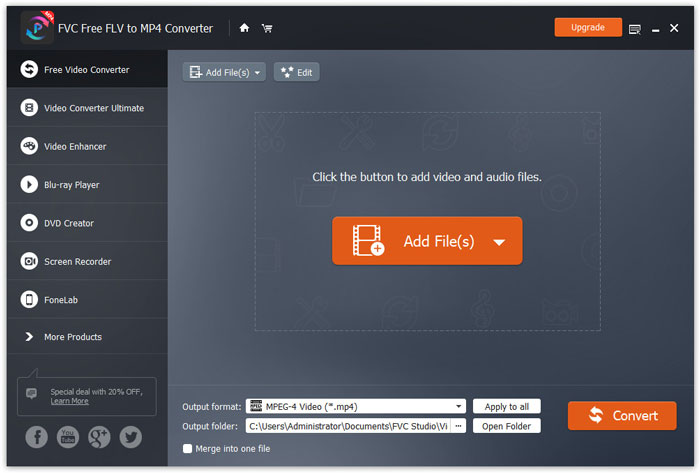
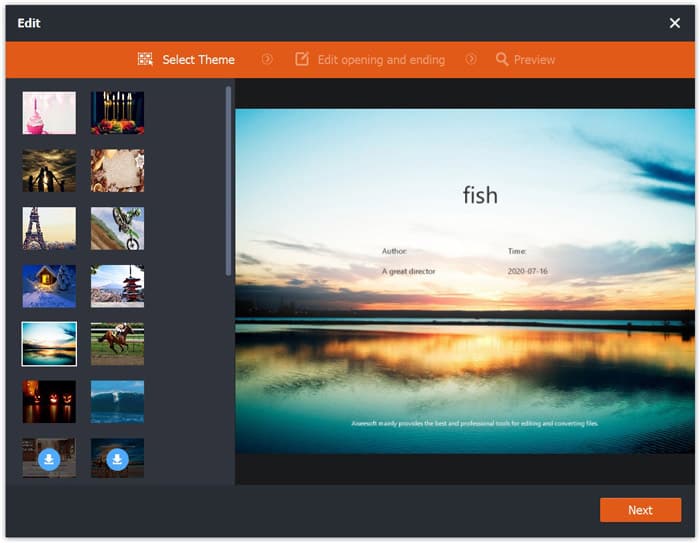
2. Adım. MP4 dosyanıza tıklayın ve Düzenle düğmesine basın. MP4 dosyanıza bir tema ekleyebilir ve açılış ile bitiş içeriğini düzenleyebilirsiniz. Ardından değişiklikleri ön izlemek ve kaydetmek için İleri düğmesine tıklayın.
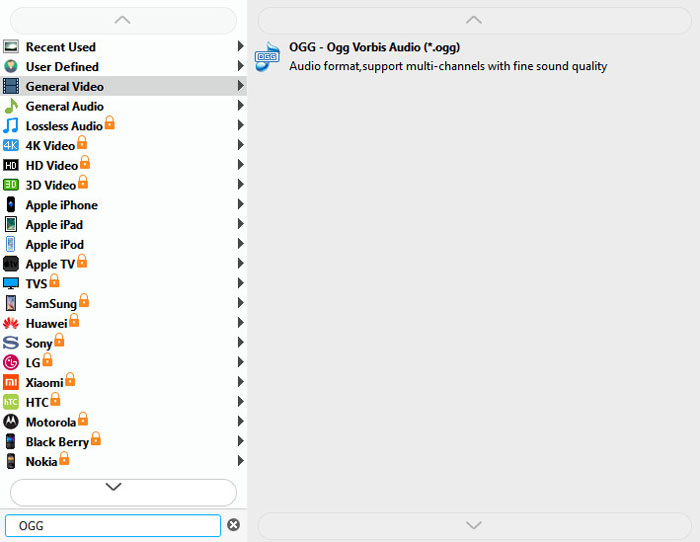
3. Adım. Alttaki açılır menüden Çıkış formatı düğmesine tıklayın ve listeden OGG formatını arayın. Çıkış formatı olarak OGG - Ogg Vorbis Audio (*.ogg) seçebilirsiniz.
4. Adım. Bilgisayarınızda çıktı klasörünü belirleyin ve MP4'ü OGG’ye dönüştürmeye başlamak için Dönüştür düğmesine tıklayın.
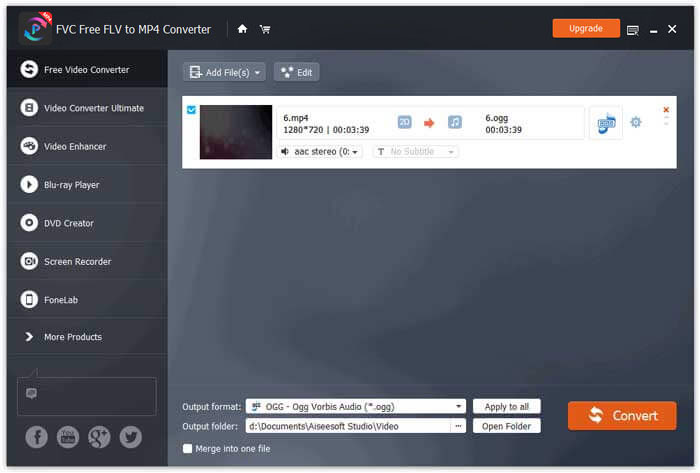
FVC Free FLV to MP4 Converter ile ayrıca birkaç MP4 dosyasını tek bir dosyada birleştirebilirsiniz.
Bölüm 2. MP4'ü OGG Çevrimiçi Olarak Değiştirme
Bir masaüstü dönüştürücü ile karşılaştırıldığında, çevrimiçi dönüştürücü kullanmak, MP4'ü OGG'ye dönüştürmek için zaman kazandıran bir yöntemdir. Seçebileceğiniz birçok çevrimiçi MP4'ten OGG'ye dönüştürücüler vardır. Bu bölümde, MP4 dosyalarınızı çevrimiçi ücretsiz OGG'ye dönüştürmek için 2 MP4'ü OGG dönüştürücülere paylaşacağız.
1. Zemzar
Zamzar, video dönüştürücü, ses dönüştürücü, görüntü dönüştürücü ve e-kitap dönüştürücü için çok işlevli bir çevrimiçi platformdur. Zamzar ile MP4'ü OGG gibi çeşitli diğer biçimlere kolayca dönüştürebilirsiniz. MP4'ü çevrimiçi Zamzar ile OGG'ye dönüştürmek için basit adımlar.
1. Adım. www.zamzar.com/convert/mp4-to-ogg/ adresine gidin ve MP4 dosyalarınızı yüklemek için Add Files düğmesine tıklayın.
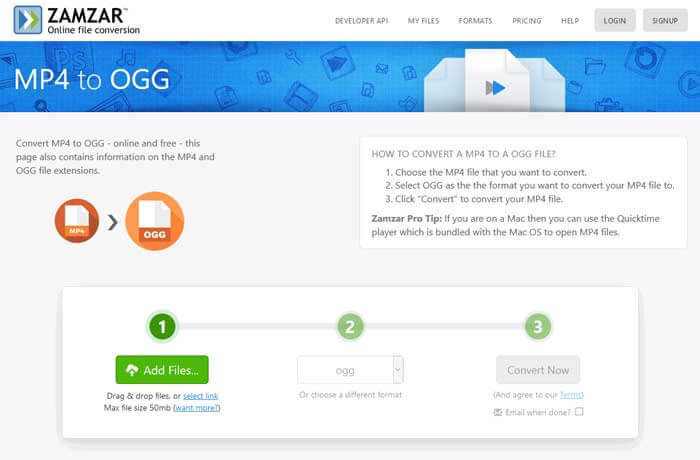
2. Adım. Varsayılan çıkış formatı zaten ogg olarak ayarlanmıştır. MP4'ü OGG’ye dönüştürmeye başlamak için Convert Now düğmesine tıklayın.
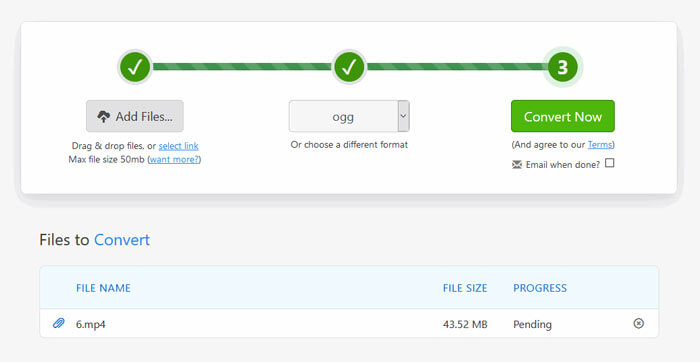
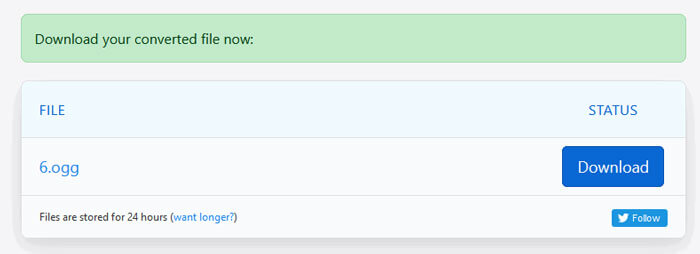
3. Adım. Ardından başka bir sayfaya yönlendirileceksiniz. Dönüştürülen OGG dosyasını bilgisayarınıza kaydetmek için Download düğmesine tıklayabilirsiniz.
Büyük boyutlu bir MP4 dosyasını dönüştürürken, Zamzar kullanırken dönüştürme işlemi takılabilir. Sayfayı yenileyip yeniden dönüştürmeniz gerekir. Daha sorunsuz bir dönüştürme istiyorsanız, FVC Free FLV to MP4 Converter size çok yardımcı olabilir. (Daha fazla MP4 oynatıcıyı burada görebilirsiniz)
2. Dönüşüm
Convertio, belge, resim, elektronik tablo, e-kitap, ses ve video dosyalarını dönüştürmek için kolay bir araçtır. Convertio kullanılarak, MP4 dosyaları mükemmel bir doğrulukla MP3'e dönüştürülebilir. OGG'yi MP4'ten Convertio ile dışa aktarmak için aşağıdaki adımları izleyin.
1. Adım. Convertio MP4 to OGG Converter (convertio.co/mp4-ogg/) sitesine gidin. MP4 dosyalarınızı yüklemek için Choose Files düğmesine tıklayın. Ayrıca Dropbox, Google Drive’dan MP4 dosyaları ekleyebilir veya URL’yi kopyalayabilirsiniz.
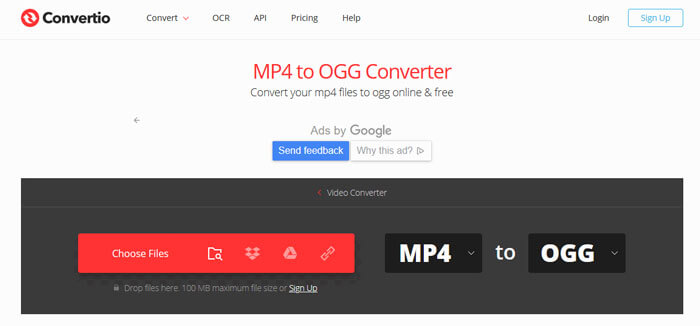
2. Adım. Açılır menüden OGG seçin ve ardından kodek, kalite, ses kanalları, frekans, ses düzeyi gibi ayarları yapmak için dişli simgesine tıklayın. MP4 dosyasını istediğiniz bölüme kadar kesebilirsiniz.
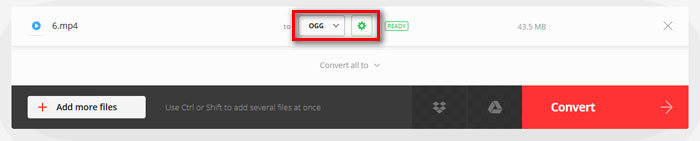
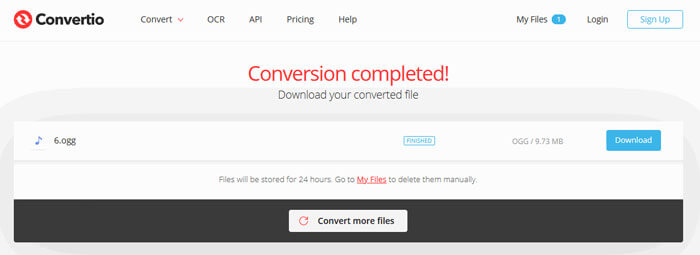
3. Adım. Tüm ayarları yaptıktan sonra MP4'ü OGG’ye dönüştürmek için Convert düğmesine tıklayın. Dönüştürme bittiğinde, dönüştürülen OGG dosyasını bilgisayarınıza kaydetmek için Download düğmesine tıklayın.
Bölüm 3. MP4'ü OGG'ye Dönüştürme Hakkında SSS
1. OGG video formatı nedir?
OGG, müzik, video, altyazı gibi metinler ve meta veriler içerebilen ücretsiz ve açık bir kapsayıcı formatıdır.
2. OGG dosyasını hangi oynatıcı oynatabilir?
VLC, Windows Media Player, Adobe Audition, Audials, MPlayer ve daha fazlası gibi OGG dosyasını çalabilen birçok taşınabilir oynatıcı vardır.
3. MP4'ü MP3'e nasıl dönüştürebilirim?
FVC Free Online Video Converter yardımıyla, çevrimiçi olarak kolayca MP4’ü MP3’e dönüştürebilirsiniz. Bu çevrimiçi siteye gidin ve başlatıcıyı kurmak için Dosyaları Dönüştürmek İçin Ekle düğmesine tıklayın. Ardından bilgisayardan MP4 dosyalarını seçin ve çıkış formatı olarak MP3’ü işaretleyin. MP4’ü MP3’e dönüştürmek için Dönüştür düğmesine tıklayın.
Sonuç
MP4'ü çevrimiçi ve çevrimdışı OGG dosyalarına dönüştürmek için esas olarak 3 MP4'ü OGG'ye dönüştürdük. Masaüstü FVC Free FLV to MP4 Converter ile, açık kaynaklı OGG dosyasını MP4'ten kolayca dışa aktarabilirsiniz. Daha iyi çözümleriniz varsa, lütfen yorum yapmaktan çekinmeyin.
-
 WebM'den MP4'e | WebM'yi MP4'e Ücretsiz Dönüştürme
 WebM dosyaları web tarayıcısı olmadan nasıl izlenir? WebM'yi MP4'e dönüştürmeniz gerekir. İşte WebM'yi çevrimiçi ve Mac ve Windows bilgisayarda MP4'e dönüştürmek için en iyi 10 ücretsiz WebM'den MP4'e dönüştürücü.
-
 MP4'ten FLV'ye | En İyi 3 Ücretsiz Dönüştürücü
 Bu gönderi, MP4'ten FLV'ye dönüştürme için ayrıntılı bir kılavuzdur. MP4'ü çevrimiçi olarak, Windows veya Mac bilgisayarda FLV'ye dönüştürmek için en iyi 3 ücretsiz dönüştürücüyü alabilirsiniz.
-
 Windows / Mac / Online'da MP4 Dosyalarını Birleştirmenin En İyi 6 Yolu
 Projeniz için ham MP4 dosyalarınızı birleştirmek mi istiyorsunuz? Bu gönderi, MP4 videolarını Windows, Mac ve çevrimiçi olarak kolaylıkla birleştirmenize yardımcı olacak en iyi 6 yolu bir araya getiriyor.
