


 Video Dönüştürücü Ultimate
 Ekran kaydedicisi
 Video Onarımı
 Güvenli İndirme
Apowersoft Ücretsiz HEIC Dönüştürücü ve Kullanılacak Alternatif HEIC Dönüştürücüler Nedir?
Apple, yeni ve gelişmiş HEIC görüntü formatını tanıttığından beri, birçoğumuz bu formatı sevdik; çünkü daha küçük dosya boyutuyla yüksek çözünürlüklü bir görüntü barındırabiliyor. Dosya boyutunu sıkıştırma yeteneği etkileyici olsa da, bu görüntü formatının yeni olduğunu ve Apple dışındaki tüm platformların bunu desteklemediğini göz ardı etmemeliyiz. Yani, HEIC dosyasını alıcı için uygun hâle getirmek istiyorsanız, özellikle alıcı bir iOS veya Mac kullanıcısı değilse, formatı JPEG’e dönüştürmeniz gerekir. Apowersoft Free HEIC Converter yardımıyla bu görevi hızla halledebilirsiniz; ancak indirmeden önce, daha hızlı karar verebilmeniz için mutlaka okumanız gereken dönüştürücü incelemesini burada bulabilirsiniz.

Bölüm 1. Apowersoft Ücretsiz HEIC Dönüştürücü İncelemesini Tamamlayın
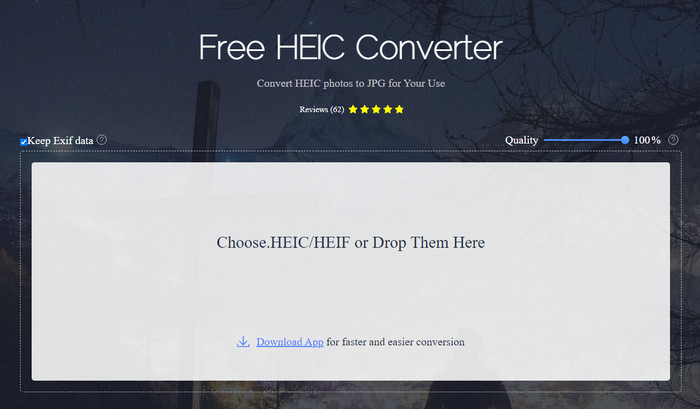
İsminden de anlaşılacağı üzere, Apowersoft HEIC Converter HEIC dosyanızı uyumlu bir JPEG formata ücretsiz dönüştürme imkânı sunar. Masaüstünüze güvenilmez bir dönüştürücü indirmek yerine, ek bir şey indirip kurmadan bu aracı hemen kullanabilirsiniz. Resmî sitesindeyken bağlantınız korunduğundan, web aracına erişim de güvenlidir. HEIC dosyasını buraya sürükleyip bırakarak kolayca yükleyebilirsiniz. Peki, çevrimiçi dönüştürücüyü, web’de veya masaüstünde kullanabileceğiniz diğer dönüştürücülerden benzersiz kılan nedir? İşte kullanmaya karar verirseniz elde edebileceğiniz temel özellikler.
Apowersoft Free HEIC Converter’ın Temel Özellikleri:
◆ Yazılıma web üzerinden erişebildiğiniz için dönüştürücünün indirilmesi gerekli değildir.
◆ HEIC dosyalarını toplu olarak veya tek tek JPEG formatına dönüştürmeyi destekler.
◆ Dönüştürme yapılmadan önce görüntünün kalitesini değiştirin.
◆ Dönüştürdükten sonra aynı EXIF dosyasını JPEG dosyasına kaydedebilirsiniz.
◆ HEIC dosyasını ekstra adımlar atmadan otomatik olarak dönüştürün.
Artıları
- Web aracı arayüzü oldukça iyi ve genel bir görünüm.
- Dosyayı JPEG'e dönüştürdükten sonra yüksek kaliteli bir görüntü kalır.
- Dosyayı aynı anda dönüştürmeyi desteklediğinden toplu iş dosyalarını dönüştürmek kolaydır.
Eksileri
- Meta verileri tuttuğunu söylese de, bazen biçimi dönüştürdükten sonra meta veriler kaybolur.
- Çıktı formatı bir ile sınırlıdır ve bu JPEG'dir.
- Fonksiyonlar sınırlıdır.
Bölüm 2. Çevrimiçi ve Çevrimdışı En İyi Apowersoft Ücretsiz HEIC Dönüştürücü Alternatiflerinin 3'ü
FVC Ücretsiz HEIC to JPG Dönüştürücü
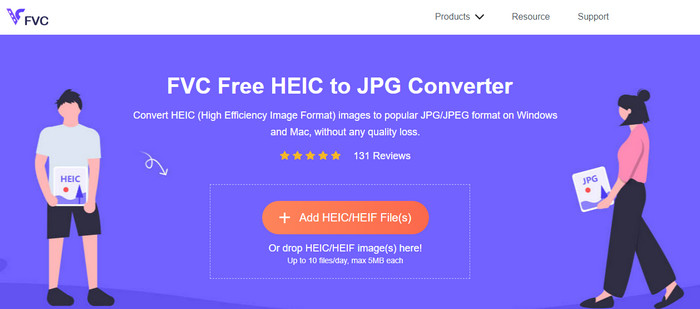
FVC Free HEIC to JPG Converter, sezgisel arayüzü sayesinde görevi saniyeler içinde tamamlamanıza yardımcı olduğundan, Apowersoft ücretsiz HEIC’ten JPG’ye dönüştürücüsüne en iyi alternatiftir. Bu tür bir web dönüştürücüyle, aracı kullanmak için asıl programı indirmenize gerek kalmaz, ancak başlatıcısını indirmeniz gerekir. Başlatıcının indirilmesi şart olsa da, dönüştürme hızında hâlâ üstünlüğe sahiptir. HEIC’i JPG’ye dönüştürme konusunda deneyiminiz olmasa bile, bu araçla herhangi bir eğiticiye ihtiyaç duymadan işi kolayca ve etkili biçimde yapabilirsiniz.
Şimdiye kadar, web aracı görevi başka hiçbir çevrimiçi dönüştürücünün yapamadığı şekilde gerçekleştirdi. Ancak bu web aracının, her dosyanın dosya boyutu ve günlük olarak yükleyebileceğiniz izin verilen dosyalar gibi sınırlamaları olduğu gerçeğini göz ardı edemeyiz. Ancak bu sınırlamalara sahip olmak istemiyorsanız, masaüstü sürümünü indirmenizi öneririz – Aiseesoft HEIC Converter. Bu yazılım, Windows ve Mac gibi her iki işletim sistemi için de mevcuttur.
HEICtoJPEG.com
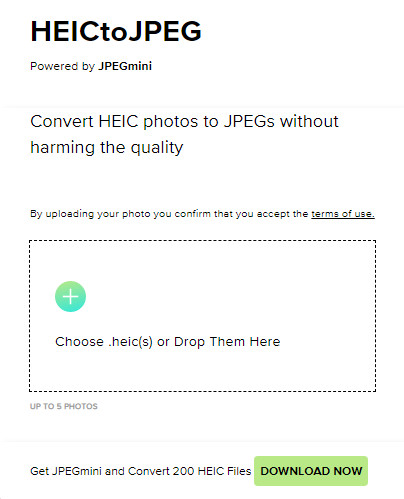
HEICtoJPEG.com, web üzerinden ücretsiz ve güvenli biçimde erişebileceğiniz bir başka Apowersoft HEIC Converter alternatifidir. İncelediğimiz araçta olduğu gibi, burada da HEIC dosyalarınızı yalnızca JPEG’e dönüştürebilirsiniz. Dolayısıyla, kalitede ayarlama yapmadan HEIC formatını doğrudan JPEG’e dönüştürmek istiyorsanız bunu kullanmalısınız. Web aracını açtıktan sonra dosyayı buraya sürükleyip bırakabilirsiniz ve dönüştürme işlemi otomatik olarak başlar. Ayrıca bu web aracıyla toplu HEIC dönüştürme de yapabilirsiniz ve günlük kullanım açısından herhangi bir sınırlaması yoktur.
Genel olarak, web aracı harika çünkü hızlı bir işlem için toplu dönüştürmeyi destekliyor. Ancak, formatı JPEG'e dönüştürmeden önce diğer çevrimiçi araçların yaptığı gibi gelişmiş ayarı manuel olarak değiştiremezsiniz. Web aracı profesyonel bir seçim olmasa da, bizim gibi HEIC'imizde basit bir dönüşüm yapmak isteyen yeni başlayanlar için en iyisidir.
Pixillion Görüntü Dönüştürücü
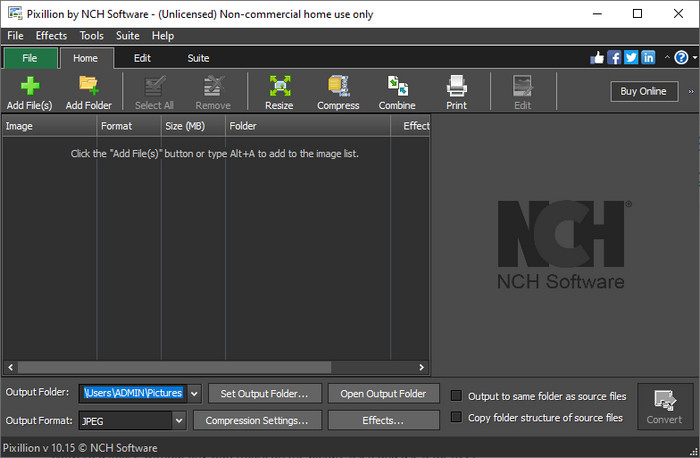
Diyelim ki internet bağlantınız stabil değil, bu yüzden web tabanlı bir araç olan Apowersoft Free HEIC Converter’ı kullanamıyorsunuz. Dönüştürme yapmak yine de mümkün mü? Evet, Pixillion Image Converter ile mümkün. Bu çevrimdışı yazılım, görüntünüzü JPG, BMP, PNG vb. gibi çok sayıda çıktı formatına dönüştürmenizi sağlar. Bu tür bir araçla, HEIC görüntünüzü dışa aktarmadan önce ayarlayabilirsiniz; boyutlandırma, sıkıştırma, düzenleme gibi pek çok işlemi, sunduğumuz web aracından daha fazlasını yapabilirsiniz.
Yüklediğiniz görüntü dosyası ne olursa olsun, formatı istediğiniz çıktıya kolayca dönüştürebilir ve mevcut cihazınızla uyumlu hale getirebilirsiniz. Harika, değil mi? Evet öyle. Ancak kullanmadan önce, yazılımı indirmeniz ve yüklemeniz gerekecek, bu biraz zahmetli çünkü bu başka bir adım, özellikle tek bir HEIC dosyasını JPG veya başka bir formata dönüştürmek istiyorsanız. Bununla birlikte, araç harika ve Windows işletim sisteminize indirmek ücretsizdir.
İlgili:
Bölüm 3. Apowersoft HEIC Dönüştürücü İncelemesi hakkında SSS
Dönüştürülen HEIC dosyasını Apowersoft Ücretsiz HEIC Dönüştürücüde dışa aktarırken filigran var mı?
Neyse ki buraya dönüştürdüğünüz dosya resminizde filigran bırakmayacak. Böylece, dönüştürülen görüntünün keyfini, resmin kendisinde herhangi bir filigran olmadan çıkarabilir ve ücretsiz olarak kullanabilirsiniz.
Apowersoft HEIC Dönüştürücüyü kullanmak için oturum açmam gerekir mi?
Hesabınızı kontrol etmek için oturum açabilirsiniz, ancak çevrimiçi dönüştürücüyü kullanmak istiyorsanız oturum açmanız gerekmez. Böylece, aracın resmi web sitesinde sürükleyip bırakarak ve otomatik olarak dönüştürerek hemen kullanabilirsiniz.
Sonuç
Apowersoft HEIC Dönüştürücü incelemesinden sonra, biçimi JPG'ye dönüştürerek HEIC sorunumuzu çözmek için kullanmamız gereken en iyi dönüştürücü olup olmadığını artık biliyoruz. Web aracının kullanımı ücretsiz ve web'de erişilebilir olmasına rağmen, bu makalede yine de bazı dezavantajlara yer verdik. Bu nedenle, bunun sizin için bir araç olmadığını düşünüyorsanız, dönüştürücünüzde ihtiyaç duyacağınız boşluğu üç alternatif doldurabilir, ancak incelediğimiz dönüştürücü size veremez. Ancak bunların hepsi yeterli değilse, HEIC dosyanızı JPEG veya PNG'ye dönüştürebilecek en iyi aracı indirmenizi öneririz. Bunun ne olduğunu bilmek ister misin? Ardından, Windows veya Mac kullanıyor olsanız da, elinizin altında olması için yukarıda eklediğimiz indirme düğmesine tıklamanız gerekir.
-
 MKV Meta Verilerini Bir Profesyonel Gibi Düzenlemenin En İyi Yolları [Kolay]
 MKV meta verilerinin nasıl düzenleneceğine dair bir fikriniz yok mu? Bazı kullanıcılar MKV'deki etiketleri düzenlemeyi zor buluyor, eğer onlardan biriyseniz bu makaleyi okuyun.
-
 Mac ve Windows'ta En İyi 3 FLAC Meta Veri Düzenleyici [Güncellenmiş 2023]
 FLAC meta verilerini değiştirmek istiyor musunuz? Bu durumda, kullanabileceğiniz en son FLAC meta veri düzenleyicisi hakkında yeterli bilgiyi sağladığımız için bu makaleyi okumalısınız.
-
 WebM Meta Verilerini Hızlı Bir Şekilde Düzenleme Konusunda En İyi Teknik
 WebM meta verilerinin nasıl düzenleneceğine dair bir eğitim eklerken aşağıda verdiğimiz tüm ayrıntıları okuyun. Bu konuda daha fazla bilgi için bu bağlantıya tıklayın.
