


 Video Dönüştürücü Ultimate
 Ekran kaydedicisi
 Video Onarımı
 Güvenli İndirme
4 En İyi MP4 - SWF Dönüştürücüler, MP4'ü Yüksek Kalitede SWF'ye Dönüştürür
Bazı MP4 videolarını web sitenizde veya sosyal medya sitelerinizde paylaştığınızda, çekici bir anlık görüntünüz olması gerekir. Elbette, MP4'ü otomatik olarak oynatılabilen SWF dosyalarına da dönüştürebilirsiniz. 4 ücretsiz MP4'ten SWF'ye dönüştürücüler hakkında daha fazla ayrıntı öğrenin ve ihtiyacınıza göre istediğinizi seçin.

Bölüm 1: 4 MP4'ü SWF'ye Dönüştürmenin En İyi Yöntemleri
En İyi 1: MP4'ü FVC Ücretsiz Çevrimiçi Video Dönüştürücü ile SWF'ye dönüştürün
FVC Free Online Video Converter, herhangi bir popüler video/ses formatını kolayca SWF’ye dönüştürebilen çok yönlü bir MP4’ten SWF’ye dönüştürücüdür. Ayrıca, ihtiyacınıza göre video bit hızı, örnekleme, kare hızı ve çözünürlüğü düzenlemenizi de sağlar.
- 1. MP4 dosyalarını birkaç tıklamayla çevrimiçi olarak SWF'ye dönüştürmek için basit kullanıcı arayüzü.
- 2. Video bit hızını, örnek hızını, kare hızını, çözünürlüğü, hacmi ve daha fazlasını ayarlayın.
- 3. Ana akım videoların çoğunu orijinal kalitede dönüştürmeyi destekleyin.
- 4. Boyut sınırlaması, filigran veya kayıt olmadan MP4'ü SWF'ye dönüştürün.
Adım 1. Çevrimiçi MP4'ten SWF’ye dönüştürücü sayfasına gidin, Dönüştürülecek Dosyaları Ekle düğmesine tıklayabilirsiniz. MP4 dosyalarını ilk kez dönüştürüyorsanız, önceden video indirici başlatıcıyı indirmeniz gerekir.

Adım 2. Ardından, bilgisayarınızdan dönüştürmek istediğiniz MP4 videoyu seçebilirsiniz. Ayrıca, toplu dönüştürme için daha fazla MP4 dosyası yüklemek üzere Dosya Ekle düğmesine de tıklayabilirsiniz.
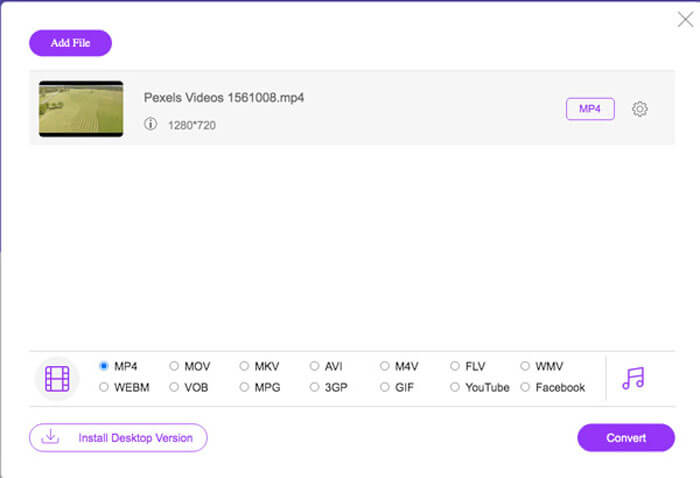
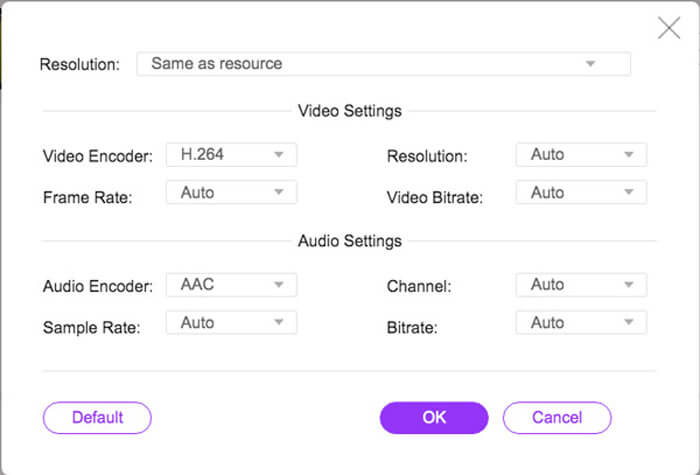
Adım 3. Altta yer alan bölümden çıktı formatı olarak SWF veya FLV’yi seçin. Ayrıca, video kodlayıcı, kare hızı, video bit hızı, örnekleme hızı ve diğer ayarları yapmak için Dişli simgesine tıklayabilirsiniz.
Adım 4. Bundan sonra, bilgisayarınızda MP4'ü SWF’ye dönüştürmek için Dönüştür düğmesine tıklayabilirsiniz. Bir toplu işlem içinde birden çok MP4 dosyasını istediğiniz video formatına dönüştürmenize olanak tanır. (Bkz. SWF’yi MP4’e dönüştürme)
En İyi 2: MP4'ü Convertio ile SWF'ye Dönüştürme
Convertio, 45'ten fazla dosya formatını destekleyen başka bir çevrimiçi MP4'ten SWF'ye dönüştürücüdür. MP4 dosyalarını sabit sürücü, Dropbox, Google Drive ve diğerleri gibi farklı kaynaklardan yüklemenizi sağlar. Ayrıca çıktı videoları için ayarları da değiştirebilirsiniz.
1. MP4 dosyalarını eklemek için sabit sürücü, bulut vb. Gibi çeşitli yöntemler sağlayın.
2. MP4, SWF, ses ve daha fazlası dahil olmak üzere 200'den fazla formatı destekleyin.
3. MP4'ten SWF'ye dönüştürme tamamlandığında sizi bilgilendirmek için e-postalar gönderin.
4. Video kalitesini, kare hızını, CBR'yi, ses kodekini ve daha fazlasını ayarlayın.
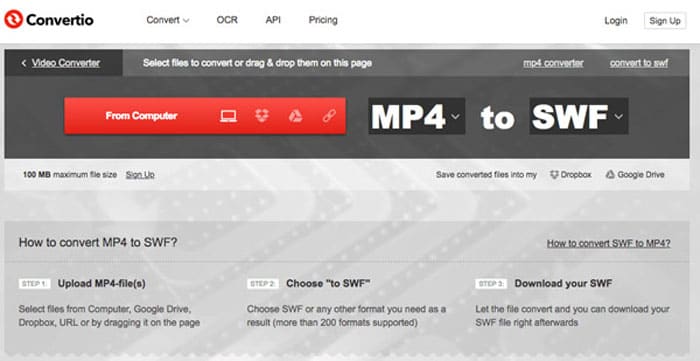
Adım 1. Herhangi bir tarayıcıda Convertio sitesine gidin, girdi formatı olarak MP4’ü ve çıktı formatı olarak SWF’yi seçebilirsiniz. Ardından MP4 videolarını bilgisayar sabit diskinizden, Google Drive’dan ve Dropbox’tan seçebilirsiniz.
Adım 2. Video ayarlarını düzenlemeniz gerekiyorsa, kare hızı, CBR, VBR, ses kodeği, ses seviyesi ve diğer ayarları dilediğiniz gibi yapmak için Gelişmiş seçeneğine tıklayabilirsiniz.
Adım 3. Ardından, yüklenen videoyu SWF formatına dönüştürmek için Dönüştür düğmesine tıklayabilirsiniz. Dönüştürme işlemi belli bir süre alır. SWF dosyasını kaydetmek için İndir düğmesine tıklayabilirsiniz.
İlk 3: MP4'ü CloudConvert aracılığıyla SWF'ye geçirin
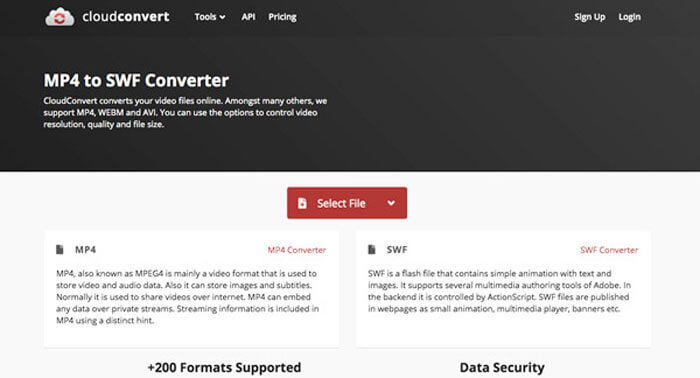
CloudConvert, MP4, SWF, WebM, AVI ve diğerleri gibi dosya formatlarının çoğunu dönüştürmenize olanak tanır. Ayrıca, video çözünürlüğünü, video kalitesini ve dosya boyutunu kolaylıkla kontrol etmek için MP4'ten SWF'ye dönüştürücü seçeneklerini de kullanabilirsiniz.
1. Ses, video, belge vb. 200'den fazla dosya formatını destekleyin.
2. Dosyaları dönüştürürken veri güvenliği konusunda endişelenmenize gerek yoktur.
3. İhtiyaçlarınıza göre ayarlanmış ayar, video kalitesi ve diğer birçok seçenek.
4. Uygulamanızla özel entegrasyonlara izin veren gelişmiş API'ler sağlayın.
Adım 1. CloudConvert’e gidin ve girdi formatı olarak MP4’ü, çıktı formatı olarak SWF’yi seçin. Elbette, tarayıcınıza şu bağlantıyı da girebilirsiniz: https://cloudconvert.com/mp4-to-swf.
Adım 2. Dosya Seç düğmesine tıklayın, bilgisayarınızdan, URL’den, Google Drive’dan, Dropbox’tan ve hatta OneDrive’dan MP4 dosyası seçebilirsiniz. Videoları yüklemek için Daha Fazla Dosya Ekle düğmesine tıklayabilirsiniz.
Adım 3. Ayrıca video ve ses ayarlarını da düzenleyebilirsiniz. Ardından, MP4 dosyalarını gereksiniminize göre SWF videoya dönüştürmek için yalnızca Dönüştür düğmesine tıklamanız yeterlidir.
En İyi 4: MP4'ü XMedia Recode ile SWF'ye çevirin
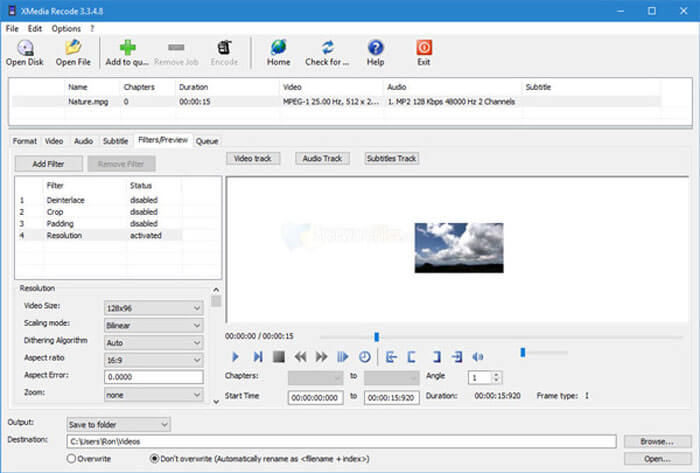
XMedia Recode, birden fazla MP4 videosunu toplu işlemle SWF formatına dönüştürmek için ücretsiz bir Windows MP4'ten SWF'ye dönüştürücüsüdür. Ayrıca, Kutu Bulanıklaştırma, Renk Eğrileri, Gürültü Azaltma ve daha fazlası gibi birden çok gelişmiş özellikle videoları düzenlemenize olanak tanır.
1. Dönüştürme için çok daha fazla giriş ve çıkış video formatını destekleyin.
2. Çıktı SWF dosyalarını özelleştirmek için bir Bit Hızı Hesaplayıcı aracı sağlayın.
3. Gürültü giderme, çevirme, renk düzeltme vb. İçin gelişmiş video düzenleme özellikleri.
4. Kare hızını, renk modunu, bit hızını, GOP uzunluğunu ve diğer ayarları değiştirin.
Adım 1. Programı başlattıktan sonra, SWF’ye dönüştürmek istediğiniz tüm MP4 videolarını eklemek için Dosya Aç düğmesine tıklayabilirsiniz. Ardından Biçim sekmesinden çıktı formatını SWF olarak ayarlayın.
Adım 2. Videoları düzenlemek istediğinizde, Filtreler bölümüne gidebilir ve mevcut çeşitli düzenleme seçeneklerini kullanabilirsiniz. Çıktı SWF dosyalarını özelleştirmek için, Video ve Ses sekmesine gidip ilgili yapılandırmaları ayarlayabilirsiniz.
Adım 3. Ardından, MP4'ten SWF’ye dönüştürme işlemini başlatmak için Kodla düğmesine tıklayabilirsiniz. MP4’ü istediğiniz video formatına kodlamak yalnızca kısa bir süre alır.
Bölüm 2: MP4'ü SWF'ye Dönüştürme hakkında SSS
1. SWF Dosya Formatı nedir?
SWF dosyası, Macromedia ve Adobe sistemleri tarafından geliştirilen bir Adobe Flash dosya formatıdır. Aynı zamanda ShockWave Flash olarak da bilinir, ancak daha sonra Küçük Web Formatı olarak değiştirilmiştir. MP4'ü doğrudan SWF'ye dönüştürdüğünüzde, etkileşim ve işlev animasyonlarını veya uygulamalarını içermeyebilir.
2. SWF VS MP4, Farklar Nelerdir?
Hem SWF hem de MP4, çevrimiçi akış siteleri için popüler video formatlarıdır. Ancak iPhone ve iPad gibi mobil cihazlar SWF dosyalarını desteklemez. MP4'ü SWF'ye dönüştürmenin tek avantajı, video formatının izleyicilerinizle daha iyi etkileşim kurabilmesidir.
3. MP4'ü VLC Media Player ile SWF'ye Dönüştürmek Mümkün mü?
Hayır. VLC Media Player, SWF'yi MP4'e dönüştürmenizi sağlayan çok yönlü bir video dönüştürücüdür, ancak çıktı biçimi olarak SWF'yi desteklemez. Elbette, MP4'ü kolaylıkla SWF'ye dönüştürmek için bazı eklentileri kullanabilir veya bunun yerine çevrimiçi alternatifi seçebilirsiniz.
Sonuç
MP4'ü SWF'ye dönüştürmek istediğinizde, makaleden en iyi 5 ücretsiz MP4'ten SWF'ye dönüştürücüler hakkında daha fazla bilgi edinebilirsiniz. Birden fazla MP4 dosyasını sınırlama olmaksızın çevrimiçi olarak dönüştürmeniz gerekiyorsa, dikkate almanız gereken ilk seçenek FVC Free Online Video Converter olmalıdır.
-
 FLV Video Dosyalarınızı Bir Kuruş Ödemeden MP4'e Dönüştürme
 Bu kılavuz, FLV video dosyalarınızı Windows 10/8/7 / XP ve Mac OS X'te MP4 formatına dönüştürmek için dört ücretsiz yöntemi paylaşır, böylece herhangi bir cihazda videoların keyfini çıkarabilirsiniz.
- 50MB - 5MB - MP4 Dosyasını Saniyeler İçinde Sıkıştırma
Herhangi bir ücretsiz video dönüştürücü yazılımını FVC stüdyosundan bulabilirsiniz. MP4, MOV, TS, AVI, WMV, FLAC, MP3 vb. Dahil olmak üzere herhangi bir video / ses formatı desteklenir.
-
 MP4'ü WAV Online'a Ücretsiz Olarak Nasıl Dönüştürebilirim
 MP4'ü WAV'a dönüştürmek için çok mu uğraşıyorsunuz? Hangi dönüştürücünün bir kuruş ödemeden size mükemmel bir şekilde yardımcı olabileceğini bilmiyor musunuz? Bu yazıyı okuyun ve tüm sorularınız cevaplanacaktır.
