


 Video Dönüştürücü Ultimate
 Ekran kaydedicisi
 Video Onarımı
 Güvenli İndirme
İşte MP4'e MPG Dönüştürücü Hakkında Bilmeniz Gerekenler
Videolarınız için en iyi biçimi seçmek çok önemlidir. Yanlış biçim, özellikle de yerleşik oynatıcınız onu tanımıyorsa, izleme temponuzu bozabilir veya iş akışınızı durdurabilir. MP4 ve MPG oldukça benzer biçimler olsa da, birini diğerine tercih etmeniz gereken belirli durumlar vardır. MPG dosyaları genellikle DVD veya CD’ye video yazdırırken dikkate alınır, ancak daha az modern sıkıştırma teknolojisi kullanır. Buna karşılık, uyumluluk sorunlarını aşmak ve daha iyi kalite elde etmek istiyorsanız, MP4 en iyi çözümdür. Bu yazı, masaüstü, çevrimiçi ve mobil uygulamalarla kullanabileceğiniz en iyi MPG'den MP4'e dönüştürücü programları adım adım tanıtacaktır.

İncelemeniz için, bu gönderideki programları karşılaştıran aşağıdaki tabloya bakabilirsiniz.
| Kurulum Boyutu | En İyi Kullanıcılar | Fiyat | |
| Video Dönüştürücü Ultimate | 23.8MB | Profesyoneller için Ortalama | $55.20 / ömür boyu |
| Herhangi bir video dönüştürücü | 55.7MB | Ortalamaya Yeni Başlayanlar | $49,95 / ömür boyu |
| Çevrimiçi Ücretsiz Video Dönüştürücü | Yok | yeni başlayanlar | Bedava |
| BulutDönüştürme | Yok | Ortalama | Bedava |
| Video Format Fabrikası | 15MB | Yeni Başlayanlar İçin Ortalama | Uygulama İçi Satın Alma |
| Video dönüştürücü | 28.43MB | Ortalama | Uygulama İçi Satın Alma |
Bölüm 2. Windows ve Mac için MPG'den MP4'e Dönüştürücü
1. Video Dönüştürücü Ultimate
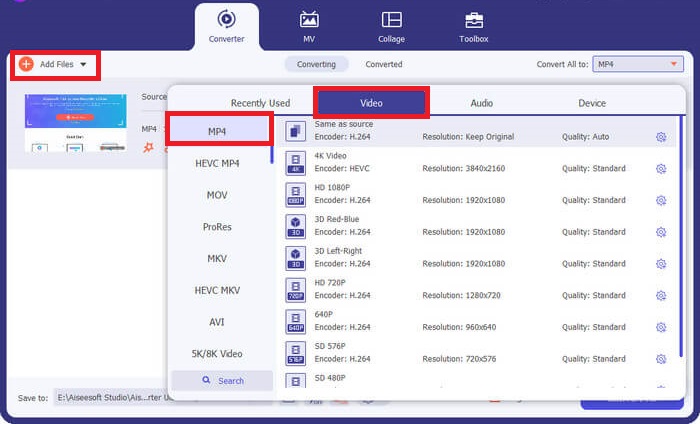
Dönüştürme ihtiyaçlarınızı en üst düzeye çıkarmak istiyorsanız, Video Converter Ultimate sizin için uygun olabilir. Bu program, GPU donanım hızlandırma özelliğinden yararlanarak dönüştürmeyi 50 kata kadar daha hızlı gerçekleştirir. Ayrıca, kullanıcıların çıktı kalitesi parametrelerini düzenleyerek istedikleri video kalitesine uyarlamalarına olanak tanır. Bunlara ek olarak, Video Converter Ultimate; FLV, MOV’un yanı sıra MPG ve MP4 gibi geniş bir çıktı biçimi yelpazesi sunar. Sizin için avantaj olması adına, bu MPG'den MP4'e dönüştürücünün nasıl kullanılacağına dair hızlı bir özet aşağıdadır.
Adım 1. Aşağıdaki uygun İndir düğmesine tıklayarak başlayın. Mac cihaz kullanıyorsanız sağdaki düğmeye, Windows için soldaki düğmeye tıklayın. Ardından yazılımı çalıştırın ve cihazınızda başlatmak için kurulum adımlarını izleyin.
Ücretsiz İndirWindows 7 veya üzeri içinGüvenli İndirme
Ücretsiz İndirMacOS 10.7 veya üstü içinGüvenli İndirme
Adım 2. MP4 dosyasını içe aktarmak için ortadaki Artı işaretine tıklayın. MP4 dosyasını veya bir klasörü seçin ve yükleme işleminin tamamlanması için küçük resmin ekranda görünmesini bekleyin.
Adım 3. Sonraki adımda, çıktı biçimleri listesini açmak için Profil menüsünü aşağı doğru genişletin. Buradan video paneline gidip MP4 seçeneğini belirleyin. Gerekirse Ayarlar bölümünden kaliteyi de ayarlayabilirsiniz.
Adım 4. Çıktı gereksinimleriniz ayarlandıktan sonra dönüştürme işlemine geçebilirsiniz. Süreci başlatmak için Tümünü Dönüştür düğmesine tıklayın.
Ana Özellikler
◆ Bu en iyi MPG'den MP4'e dönüştürücü, kullanıcıların toplu dönüştürme özelliğinin keyfini çıkarmasını sağlar.
◆ 1000'den fazla önceden seçilmiş ses ve video çıkış formatı sunar.
◆ Video Converter Ultimate, Video Enhancer, Compressor, GIF oluşturucular ve daha fazlası gibi dijital dosya düzenleme için bir araç kutusu sunar.
◆ Program, 14 günlük deneme sürümü ile ücretsiz bir MPG'den MP4'e dönüştürücü Windows 10'a sahiptir.
Artıları
- Program yeni başlayanlar, ortalama ve profesyonel kullanıcılar için en iyisidir.
- Arayüz, gezinmek için estetik olarak hoş.
Eksileri
- Aracın video düzenleme özelliği yalnızca temel işlevleri sunar.
- URL üzerinden video dönüştürme kullanılamıyor.
2. Herhangi Bir Video Dönüştürücü
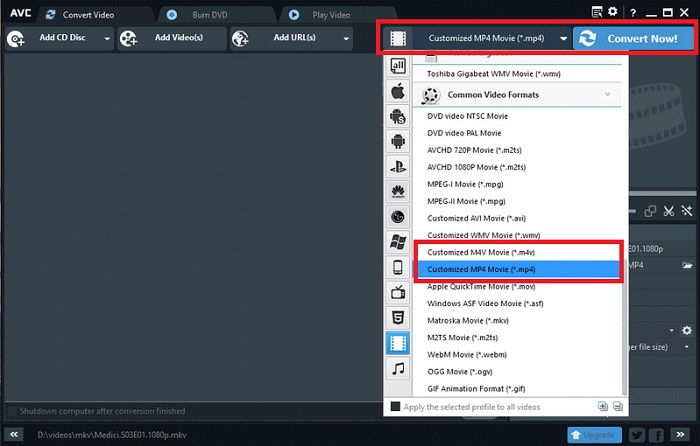
Tanınmaya değer başka bir araç da Any Video Converter'dır. Bu program, sevdiğiniz herhangi bir videoyu dönüştürmek söz konusu olduğunda harikalar yaratıyor. Ancak, pro sürümüne yükselten kullanıcılar, dosyaları dönüştürmenin yanı sıra sınırsız ekran kaydedici özelliğine ve Webcam kaydediciye erişebilirler. Programı kullanarak MPG'nin MP4'e nasıl dönüştürüleceğinin bir dökümü.
Adım 1. MPG dosyalarını MP4 biçimine dönüştürmek için önce Video Dönüştür paneline gidin. Ardından Video Ekle düğmesine tıklayın ve hedef dosyanızı seçin.
Adım 2. Dosyayı içe aktardıktan sonra, Çıktı Profili menüsünü açın ve MP4 seçeneğini belirleyin.
Adım 3. Sonraki adımda, çıktınızı kaydedeceğiniz klasörü seçin. Son olarak, dönüştürme işlemini başlatmak için Şimdi Dönüştür düğmesine tıklayın.
Ana Özellikler
◆ Programın ücretsiz sürümü istenmeyen ve sinir bozucu reklamlar içermez.
◆ Any Video Converter, dönüştürülen çıktınızda hiçbir marka filigranı izi bırakmamaya kararlıdır.
Artıları
- Bu program, MPG dosyalarınız için video düzenleme araçları sunar.
Eksileri
- Herhangi bir Video Dönüştürücü, yeni başlayanlar için gezinmek zor olabilir.
Bölüm 3. MPG'den MP4'e Çevrimiçi Dönüştürücü
1. Ücretsiz Çevrimiçi Video Dönüştürücü
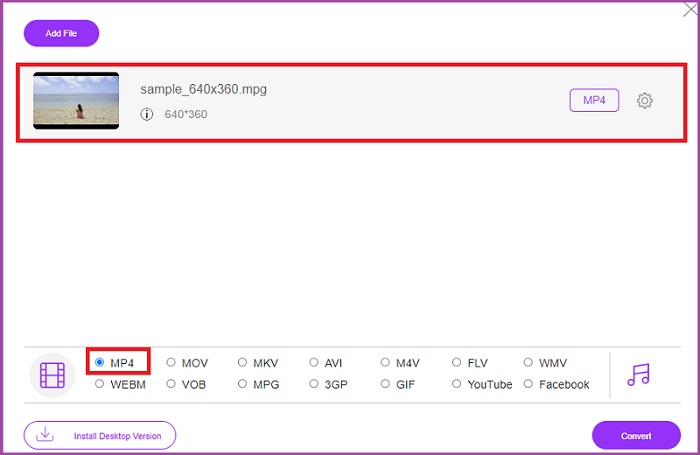
Yazılım kurulumuna ayıracak sınırlı depolama alanınız varsa, bazı çevrimiçi araçlar da size yardımcı olabilir. Şimdiye kadar, Free Video Converter Online, MPG’den MP4’e video dönüştürme ihtiyaçlarınızı karşılayabilecek, oldukça kapsamlı bir programdır. Bu program, çoğumuzun aşina olduğu 50’den fazla popüler biçim sunar. Ayrıca kullanıcıların parametreleri ayarlayarak çıktı kalitesi gereksinimlerini kontrol etmelerine de olanak tanır. Bu en iyi ücretsiz MPG’den MP4’e dönüştürücüyü kullanmak isterseniz, aşağıda yer alan basit adımları takip edin.
Adım 1. Çevrimiçi programı arama motorunuzda açın. Ekrana geldiğinde, Dosyaları Dönüştürmek İçin Ekle düğmesine tıklayın ve programı başlatın.
Adım 2. Ardından, ham videonuzu programa eklemek için aynı düğmeye tekrar basın. Dosyanız yüklendiğinde, çıktı biçimleri arasından MP4 seçeneğini işaretleyin.
Adım 3. Son olarak, Dönüştür düğmesine tıklayın ve çıktının indirilmesini bekleyin.
Artıları
- Bu çevrimiçi MPG'den MP4'e dönüştürücü, toplu dönüştürme özelliklerine izin verir.
- 300 MB'a kadar büyük dosya boyutlarına hitap edebilir.
Eksileri
- Free Online Video Converter, video düzenleme araçları sunmaz.
2. CloudConvert
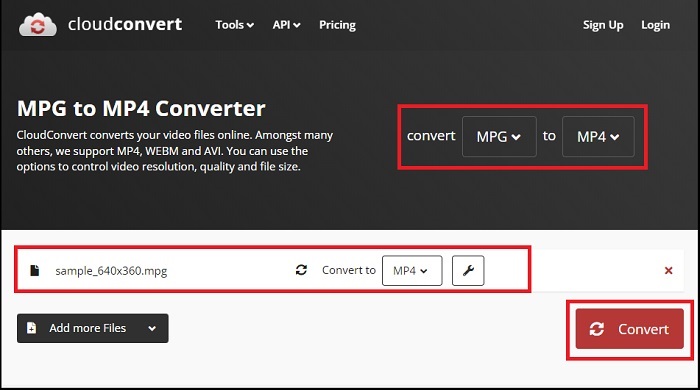
200'den fazla desteklenen çıktı biçimiyle CloudConvert, çok yönlü olduğunu düşündüğümüz bir şeydir. Bu araç yalnızca videoları dönüştürmenize yardımcı olmakla kalmaz, aynı zamanda e-kitapları, arşivleri, görüntüleri ve ses dosyalarını başka bir dosya uzantısına dönüştürebilir. Ayrıca bu program, en iyi sonuçları en üst düzeye çıkarmak için kalite değişikliğine de izin verir. Aşağıdaki en iyi MPG'den MP3'e dönüştürücü indirmelerinden biriyle video formatlarını dönüştürmek için aşağıda oluşturduğumuz kılavuza bakın.
Adım 1. Arama motorunuzu kullanarak Convert Files sitesine gidin. Ortadaki Gözat düğmesine tıklayarak yerel klasörünüze erişin.
Adım 2. Yükleme işleminden sonra, Çıktı Biçimi kutusunu genişletin ve listeden MP4 seçeneğini seçin.
Adım 3. Son adım olarak Dönüştür düğmesine basın ve dosyanızın indirilmesini bekleyin.
Artıları
- Kullanıcı bilgilerini korumak için veri güvenliği koruması sunar.
- Bu program 1000'den fazla medya çıktı formatı sunar.
Eksileri
- İnternet bağlantısı kesildiğinde dönüşüm kesintiye uğrar.
Bölüm 4. Android ve iOS için MPG'den MP4'e Dönüştürücü Uygulaması
1. Ses Video Fabrikası
Teknolojideki yenilikler, taşınabilir mobil cihazlarda MPG'yi MP4'e dönüştürmeyi uygulanabilir hale getirdi. Audio Video Factory ile ses ve video formatlarını tek bir uygulamada dönüştürebilirsiniz. Ayrıca, dosyalarınızı dönüştürmeden önce codec ve bit hızı gibi video parametrelerini düzenlemenize olanak tanır.
Adım 1. Uygulama ekranında, Artı düğmesine tıklayın ve dosya klasörünüze erişmek için Videoyu seçin.
Adım 2. MPG dosyanızı seçtikten sonra, Dönüştür düğmesine dokunun ve biçim listesini görmek için Çıktı sekmesini açın.
Adım 3. Listeden MP4'ü seçtikten sonra, dosyanızdaki diğer bilgileri de düzenleyebilirsiniz. Ardından, dönüştürme işlemini başlatmak için Dönüştür düğmesine basın.
Artıları
- Kullanıcıların şarkı adı, albüm kapağı ve sanatçı gibi meta veri bilgilerini düzenlemesine olanak tanıyan çok yönlü bir Android ve iOS uygulaması.
- Dönüştürülen dosyalarınızı doğrudan oynatmak için yerel bir medya oynatıcıya sahiptir.
Eksileri
- Tasarım söz konusu olduğunda arayüzün yükseltilmesi gerekiyor.
2. Technorazer'den Video Dönüştürücü
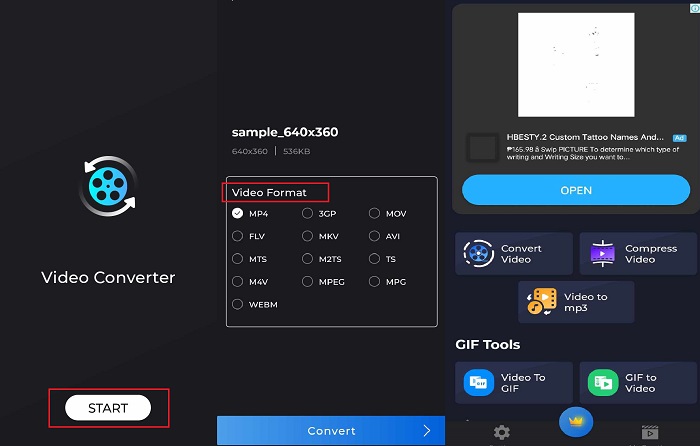
Bir videoyu dönüştürün, sıkıştırın ve sese dönüştürün - bunlar Video Converter'ın sağladığı güçlü özelliklerdir. Technorazer firması tarafından üretilen bir uygulama, Playstore'da 4.8/5 üzerinde incelemeye sahip. Bu uygulama, 70x hıza kadar hızlı bir dönüştürme hızını artırır. Ayrıca, kullanıcıların kaliteden ödün vermeden MPG'yi VOB, MPP4, 3GP, FLV ve daha fazlası gibi herhangi bir formata dönüştürmesine olanak tanır. Bunun da ötesinde, Video Converter by Tehcnorazer, yerleşik düzelticiyi kullanarak GIF dosyalarını çıkarabilir ve sesinizden zil sesleri oluşturabilir.
Adım 1. İlgili işlemi etkinleştirmek için Video Dönüştür düğmesine dokunun. Sonrasında, Video Seç düğmesine dokunup MPG dosyanızı içe aktarın.
Adım 2. Dosya ekranda yüklendiğinde, çıktı biçimleri otomatik olarak görünecek; buradan MP4 seçeneğini seçin.
Adım 3. Son olarak Dönüştür düğmesine dokunun. İşlem tamamlandığında dosyanıza yeni bir ad verebilir ve cihazınızda yerel bir klasöre kaydedebilirsiniz.
Artıları
- Siyah dış görünüm arayüzü, programa şık bir görünüm katar.
- Sınırsız video dosyası boyutu karşılanır.
- Ücretli sürüm, ters video özelliği içerir.
Eksileri
- Ücretsiz sürüm çok fazla reklam içeriyor.
Daha Fazla Okuma:
Ses Kalitesini Korumak için Zahmetsiz MPG'den MP3'e Dönüştürme
MKV’yi Dakikalar İçinde Zahmetsizce MP4’e Dönüştürmek için En İyi Yazılım
Bölüm 5. MPG'den MP4'e dönüştürücü hakkında SSS
MPG'yi ücretsiz olarak MP4'e dönüştürebilir miyim?
Kesinlikle evet! Video dosyalarınızı başka bir biçime dönüştürmek isterseniz, Free Video Converter Online gibi birçok çevrimiçi platform yardımcı olabilir.
MPG, MP4'ten daha mı iyi?
Kalite açısından MP4, aynı bit hızına sahip olmasına rağmen MPG'den üstündür. Ancak, dosyalarınızı internet üzerinden dağıtmak için daha verimli bir format hedefliyorsanız, MP4'ün avantajı vardır.
MP4'ün avantajları nelerdir?
Kayıt için, MP4 standart formatımızdır. Biçim, dosyanızın boyutunu küçültmeyi amaçlayan bir tür kayıplı sıkıştırmadır. Kalite ile ilgili olarak, MP4 ortalama olarak kabul edilir ve herhangi bir platformla son derece uyumludur.
MPG'yi MP4'ye dönüştürmek güvenli mi?
Kesinlikle evet! Çevrimiçi veya çevrimdışı yazılım olan çoğu platform, kullanımdan önce kullanıcıların kişisel bilgilerini gerektirmez. Öte yandan, MPG'nin MP4'e dönüştürülmesi, medya oynatıcılarla uyumsuzluk sorunlarına yol açmayacaktır.
MPG dosyalarını neden oynatamıyorum?
MPG dosyaları çoğu zaman herhangi bir video oynatıcıda uyumludur. Herhangi bir sorunla karşılaşırsanız, medya yürütücünüzün MPG dosyalarını destekleyip desteklemediğini veya dosyalarınızın bozuk olup olmadığını kontrol edebilirsiniz.
Sonuç
Belirli durumlarda hem MPG hem de MP4 ihtiyaçlarınızı karşılayabilir. Yukarıda belirtilen araçlar arasında, çevrimdışı programlar video biçimi dönüştürmenin yanı sıra düzenleme ve sıkıştırma da yapabilir. Ücretsiz MPG'den MP4'e dönüştürücü çevrimiçi programlar ise toplu dönüştürme ve ses parametrelerini değiştirme imkânı sunar. Mobil uygulama söz konusu olduğunda ise, büyük boyutlu tek bir dosyayı dönüştürürken avantaj sağlar ve dosyayı ayrıca düzenlemenize gerek kalmaz.
-
 Windows/Mac/Android/iPhone için En İyi 4 MPG/MPEG Oynatıcısı [2025]
 En sevdiğiniz MPG veya MPEG dosyasını sorunsuz bir şekilde oynatmak istiyorsanız, bu makaleden bilgisayarlar ve cep telefonları için en iyi 4 MPG / MPEG oynatıcı hakkında daha fazla bilgi edinebilirsiniz.
-
 Çevrimiçi/Çevrimdışı Dönüştürücüleri Kullanarak MPG'yi MKV'ye Dönüştürmenin 4 Yolu
 MPG dosyalarını MKV'ye dönüştürebilen, kullanımı kolay bir dönüştürücü mü arıyorsunuz? Bu makale, MPG'yi MKV dosyalarına hızlı bir şekilde dönüştürmenin en iyi ve en kolay yollarını listeler.
-
 Gerçekten: MP4 Videoyu Yavaşlatmak İçin En İyi Uygulama
 Yavaşlatmak, videonuzun hızını artırmanın yanı sıra, videonuzdan en iyi çıktıyı elde etmek için gereken birçok uygulamadan biridir. Makalenin geri kalanını okuyarak mümkün olan en iyi editör olmayı hedefleyin.
