


 Video Dönüştürücü Ultimate
 Ekran kaydedicisi
 Video Onarımı
 Güvenli İndirme
FLV'yi WAV'a Dönüştürmenin 3 Ücretsiz Yolu
İndirdiğiniz videolardan ses çıkarmak istiyorsunuz ama nasıl yapacağınızı bilmiyor musunuz? FLV’yi WAV’a veya MP3’e dönüştürmenin kolay bir yolunu mu arıyorsunuz?
Bazı durumlarda, yalnızca bir videonun ses parçasına veya arka plan müziğine ihtiyacınız vardır. Yani videoyu sese dönüştürmeniz gerekiyor. Bu gönderi temel olarak FLV'nin WAV'a nasıl dönüştürüleceği hakkında konuşacak.

FLV dosyalarınızı dönüştürmeniz için burada 3 harika FLV’den WAV’a dönüştürücü öneriliyor. FLV’yi WAV sesine dönüştürmek için tercih ettiğiniz yöntemi seçebilirsiniz.
Bölüm 1. FLV'yi WAV'a Çevrimiçi Dönüştür
İnternette FLV’yi WAV’a dönüştürme yöntemi aradığınızda, birçok sonucun ücretsiz çevrimiçi dönüştürücü olduğunu görürsünüz. Hangisini kullanmanız gerektiğini bilmiyorsanız, burada size popüler Ücretsiz Çevrimiçi Video Dönüştürücüyü içtenlikle tanıtıyoruz. Bu araç, FLV’yi MP4, MOV, AVI, MP3, AAC, M4A ve WAV gibi sık kullanılan tüm video ve ses formatlarına dönüştürmek için özel olarak tasarlanmıştır.
Diğer çevrimiçi FLV'den WAV'a dönüştürücülerle karşılaştırıldığında, daha fazla giriş ve çıkış biçimini destekler ve daha hızlı dönüştürme hızı sunar. Ayrıca, herhangi bir hesap kaydı veya oturum açma gerektirmez. Herhangi bir FLV dosyasını dosya boyutu sınırı olmadan dönüştürmenize olanak tanır.
Adım 1: Tarayıcınızda bu ücretsiz çevrimiçi FLV’den WAV’a dönüştürücü siteye gidin. Safari, IE, Chrome, Firefox ve Yahoo dahil çoğu web tarayıcısıyla uyumludur.
Adım 2: FLV dönüştürme için bir başlatıcı kurmak üzere Dönüştürülecek Dosyaları Ekle ve ardından İndir düğmesine tıklayın. Kurulumdan sonra FLV dosyanızı yüklemeniz için bir açılır pencere görüntülenecektir.

Adım 3: Ana dönüştürücü penceresine geldiğinizde, MP4, MOV, AVI, FLV, MKV, VOB, MPG, WMV ve daha fazlası gibi bazı popüler video formatlarının listelendiğini göreceksiniz. Bu adımda, ses formatlarını açmak için Ses simgesine tıklamanız gerekir. Çıktı formatı olarak WAV’ı seçin.
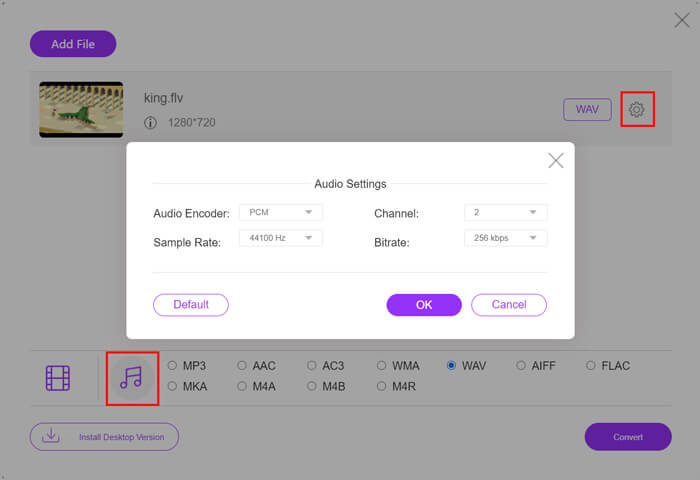
Adım 4: FLV’den WAV’a dönüştürme işleminden önce, daha fazla ses ayarı özelleştirmek için çıktı formatının yanındaki Ayarlar simgesine tıklayabilirsiniz. Burada ses kodlayıcıyı, kanalı, örnekleme hızını ve bit hızını ayarlamanıza izin verilir. Ardından FLV dosyanızı WAV sesine dönüştürmek için Dönüştür düğmesine tıklayabilirsiniz.
Eğer FLV’yi MP3, WMA, WAV vb. gibi ses formatlarına dönüştürmek istiyorsanız, ses sekmesine tıklayıp onu işaretlemeniz gerekir.
Bölüm 2. FLV'yi WAV'a Ücretsiz Dönüştür
Çevrimiçi FLV dönüştürücülerin yanı sıra, FLV’yi kolayca WAV’a dönüştürmenize yardımcı olabilecek bazı ücretsiz video dönüştürücüler de vardır. Bunu yapmak için Free FLV Converter’a güvenebilirsiniz.

Ücretsiz FLV'den WAV'ye Dönüştürücü
155321+ İndirmeler- FLV'yi WAV, AAC, MP3, M4A, MP4, MOV, AVI ve daha fazlasına dönüştürün.
- Sık kullanılan tüm video ve ses formatlarını destekleyin.
- En yeni çok çekirdekli CPU'ları ve GPU hızlandırmalarını destekleyin.
- Bir veya daha fazla FLV dosyasını kalite kaybı olmadan dönüştürün.
Ücretsiz İndirWindows 7 veya sonrası içinGüvenli İndirme
Ücretsiz İndirMacOS 10.7 veya sonrası içinGüvenli İndirme
İhtiyacınız olan tüm dönüştürme özelliklerini taşır. Takip kılavuzu, FLV'yi onunla nasıl WAV'a dönüştüreceğinizi gösterecektir.
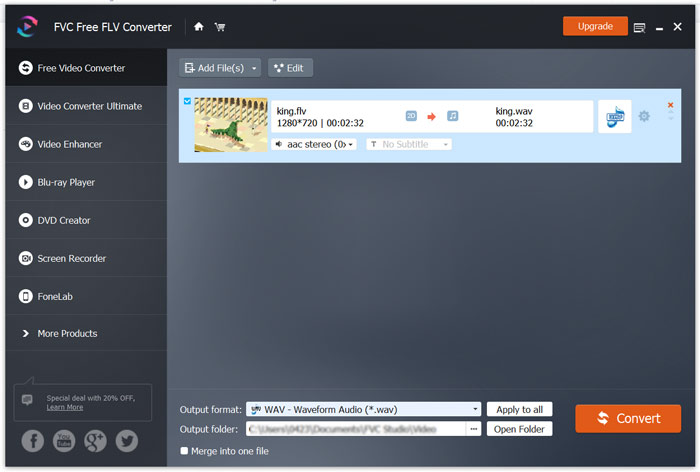
Adım 1: Bu ücretsiz FLV’den WAV’a dönüştürücüyü bilgisayarınıza ücretsiz indirip kurun ve çalıştırın. FLV dosya(ları)nızı içe aktarmak için Dosya Ekleye tıklayın.

Adım 2: Çıkış formatına tıklayın ve hedef format olarak WAV’ı seçin. Ardından uygun bir hedef klasör seçin.
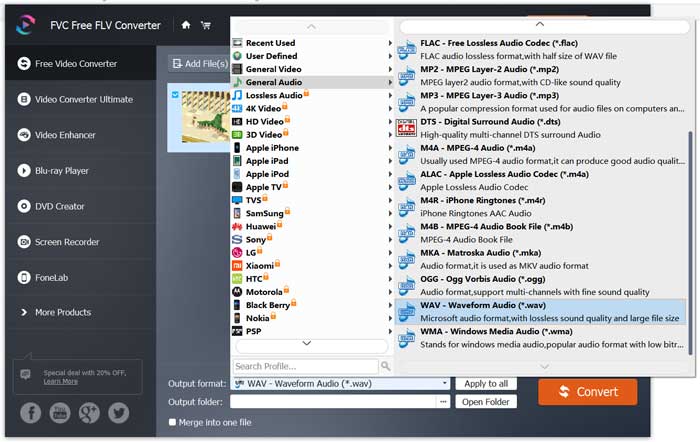
Adım 3: FLV’den WAV’a dönüştürme işlemine başlamak için Dönüştür düğmesine tıklayın.
Bölüm 3. VLC ile FLV'yi WAV'a Dönüştürün
Bilgisayarınızda VLC Media Player kuruluysa, FLV’yi WAV’a dönüştürmek için VLC’ye de güvenebilirsiniz. VLC’nin, temel dönüştürme ve düzenleme özellikleri de taşıyan popüler bir medya oynatıcı olduğunu bilmelisiniz.
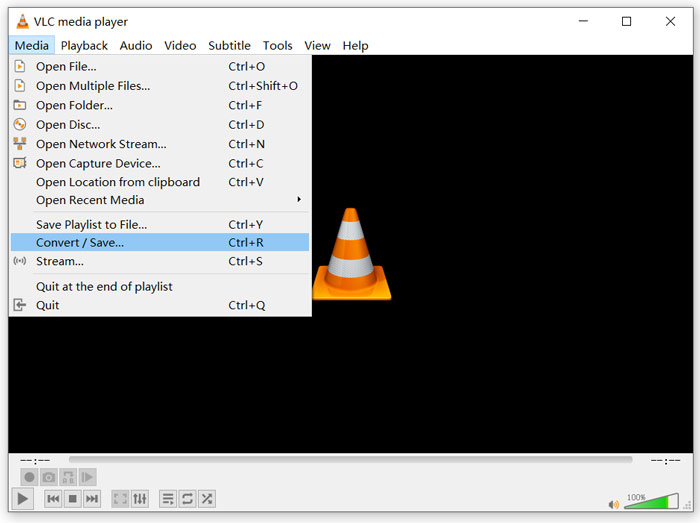
Adım 1: Bilgisayarınızda VLC Media Player’ı açın. VideoLAN sitesinden ücretsiz olarak kurabilirsiniz. Medya’ya tıklayın ve açılır menüden Dönüştür/Kaydet seçeneğini seçin.
Adım 2: Şimdi Ortam Aç penceresine yönlendirileceksiniz. Dönüştürmek istediğiniz FLV dosyasını eklemek için Ekle düğmesine tıklayın. Ardından Dönüştür penceresini açmak için Dönüştür/Kaydet düğmesine tıklayın.
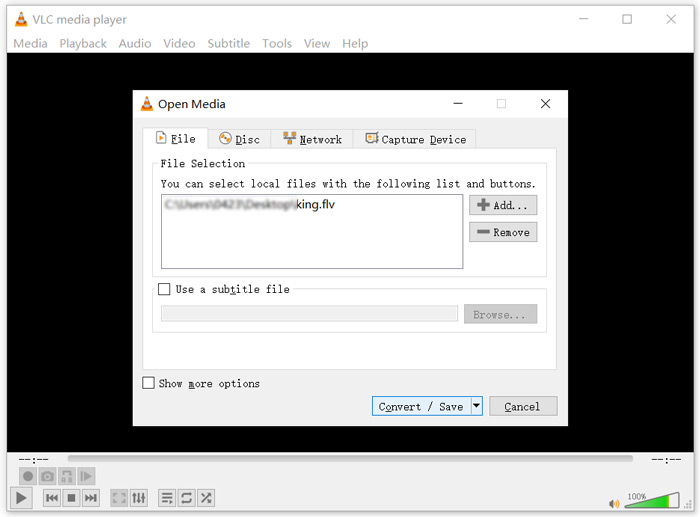
Adım 3: Dönüştür sekmesi altında Çıktıyı göster seçeneğini işaretleyin. Ardından Profil açılır listesinden uygun bir çıktı formatı seçin. Uygun bir hedef klasör seçmek için Gözat düğmesine tıklayın. Bu adımda çıktı dosyasını yeniden adlandırabilirsiniz.
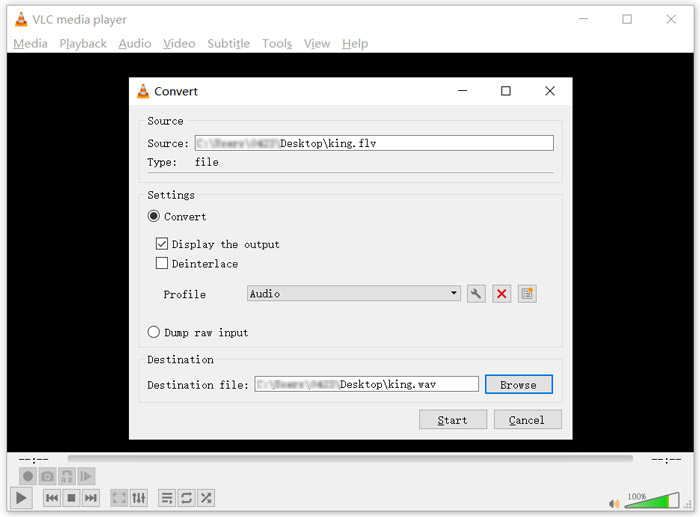
Adım 4: FLV’nizi WAV’a dönüştürmeye başlamak için Başlat düğmesine tıklayın. Bundan sonra VLC, dönüştürülen WAV dosyasını otomatik olarak oynatacaktır. Dönüştürme sırasında Dosya dönüştürülüyor uyarısını görebilirsiniz. Dönüştürme tamamlanana kadar VLC Media Player’ı tamamen kapatmayın.
Bölüm 4. FLV'yi WAV'a Dönüştürmeyle İlgili SSS
FLV vs WAV, FLV ve WAV arasındaki fark nedir?
FLV, Flash Video File, Adobe Systems tarafından geliştirilmiş, flaş uyumlu bir video dosyasıdır. Kısa bir başlık, iç içe geçmiş video, ses ve meta veri paketleri içerir. FLV, başlangıçta Adobe uygulamalarına video akışlarını gömmek için tasarlanmıştır. Bir FLV dosyası 640x360 video akışı ve 44,1 KHz, 2 kanallı, AAC ses akışı taşır.
WAV dosya uzantısına sahip bir dosya, Waveform Audio File Format’tır ve verileri segmentler halinde depolayan bir kapsayıcıdır. Aslen Microsoft ve IBM tarafından geliştirilmiştir ve sıkıştırılmamış, kayıpsız ses depolar; bu da çok büyük dosya boyutlarıyla sonuçlanır. Biçim, ses verilerini, parça numaralarını, örnekleme hızını ve bit hızını depolamak için kapsayıcılar kullanır.
FLV'yi WAV yazılımına nasıl dönüştürebilirim?
Herhangi bir dönüştürücü yazılımı olmadan FLV'yi WAV'a dönüştürmek istiyorsanız, dosya uzantısını .flv'den .wav'a değiştirmeyi seçebilirsiniz.
Bir FLV'u WAV'e nasıl indirebilirim?
Piyasada sunulan ve videoyu yerel bilgisayarınızda ses dosyası olarak kaydetmenize yardımcı olabilecek çok sayıda ekran kaydedici bulunmaktadır.
Sonuç
Bu yazıyı okuduktan sonra, FLV dosyalarından WAV sesini çıkarmanın 3 ücretsiz yolunu öğrenebilirsiniz. FLV’yi WAV’a dönüştürmeniz gerektiğinde, bunu yapmak için tercih ettiğiniz FLV dönüştürücüyü seçebilirsiniz.
-
 Android, iOS ve Bilgisayar için En İyi 5 WAV Oynatıcı
 Android telefonda WAV dosyaları nasıl oynanır? WAV'ı hangi oyuncu oynayabilir? Bu gönderi Android, iPhone, Mac ve PC için en iyi 5 ücretsiz WAV oynatıcıyı paylaşıyor.
-
 Windows 10/8/7, Mac, iOS ve Android için Denemeniz Gereken En İyi 10 FLV Video Oynatıcı
 FLV oynatıcı, Windows, Mac, Android, iOS cihazınızdaki FLV dosyalarınıza kolayca erişmenize yardımcı olur. Şu anda indirebileceğiniz en iyi FLV dosya oynatıcılarına göz atın.
-
 En İyi 5 Ücretsiz Dönüştürücü ile WAV'ı MP3'e Dönüştürme
 Bu sayfa, bilgisayardaki WAV'ı MP3'e değiştirmek için ücretsiz WAV - MP3 dönüştürücüsünün (iTunes, Audacity, VLC, Windows Media Player ve Free Audio Converter) uzun bir listesidir.
