


 Video Dönüştürücü Ultimate
 Ekran kaydedicisi
 Video Onarımı
En İyi GIF Kırpıcıların Yardımıyla Bir GIF Nasıl Kırpılır
Mesajınıza uygun GIF’leri seçmek, iletmek istediğiniz tona tam olarak uyması için şarttır. Ancak bazı GIF’lerin, asıl niyetinizi gösterebilmesi için kırpılması gerekir. GIF’lerinizi kırpmaya çalıştığınızda, GIF kalitesinin bozulmaması ve aynı fps değerini koruması önemlidir. Bazen GIF’inizi kırpmak için doğru kırpma aracını seçmek biraz zor olabilir; çünkü her araç kırpma imkânı sunmaz. Ayrıca kırpma özelliği olan bazı araçlar GIF’in kalitesini ve fps’ini düşürür. Bu yazıda, size en uygun GIF kırpma aracını seçebilirsiniz; listelenen tüm araçlar, size doğru kanıtları sunmak için tarafımızdan test edilmiştir. Ayrıca, tüm platformlarda kullanılabilen en iyi GIF kırpma aracını ve nasıl kullanılacağını da anlatıyoruz. Konu hakkında daha fazlasını öğrenmek için okumaya devam edin.

Bölüm 1. Windows ve Mac İşletim Sistemlerini Destekleyen En İyi GIF Kırpıcı
1. GIF Maker'a FVC Bedava Video
Bu araç Windows ve Mac gibi tüm platformlarda kullanılabilir. FVC tarafından geliştirilen en iyi animasyonlu GIF kırpma aracıdır; bu da FVC Free Video to GIF Maker’dır. Bu yazılım, kullanıcılarının mevcut GIF’lerini keşfetmesine ve iyileştirmesine, ayrıca isterlerse yeni GIF’ler oluşturmasına imkân tanır. GIF’inizi kırpmak istiyorsanız, bu araç bunu internet bağlantısı olmadan bile yapmanıza yardımcı olur. Böylece GIF’inizi daha ayırt edilebilir hâle, kolay ve etkili bir şekilde getirebilirsiniz. GIF’inizi nasıl kırpacağınızı öğrenmek için aşağıdaki adımları izleyin.
Adım 1. Aracı sürücünüze yükleyin ve tercihleri ihtiyaçlarınıza göre ayarlayın.
Ücretsiz İndirWindows 7 veya sonrası içinGüvenli İndirme
Ücretsiz İndirMacOS 10.7 veya sonrası içinGüvenli İndirme
Adım 2. Aracı başlattıktan sonra ekranınızda buna benzer küçük bir arayüz görünecektir.
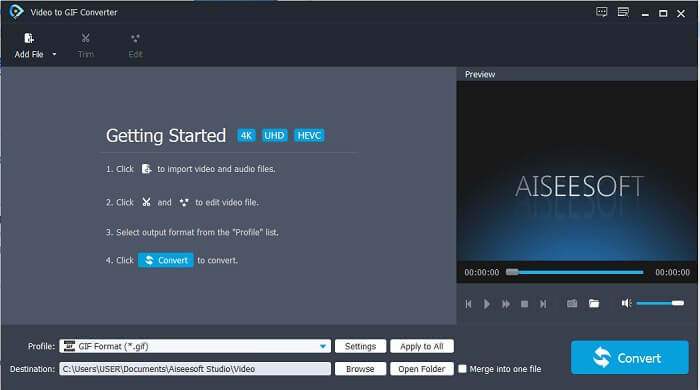
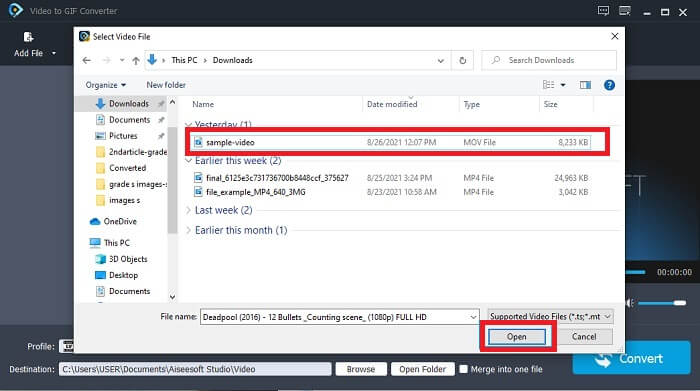
Adım 3. Dosya Ekle’ye tıklayın veya video dosyasını aracın arayüzüne sürükleyip bırakın.
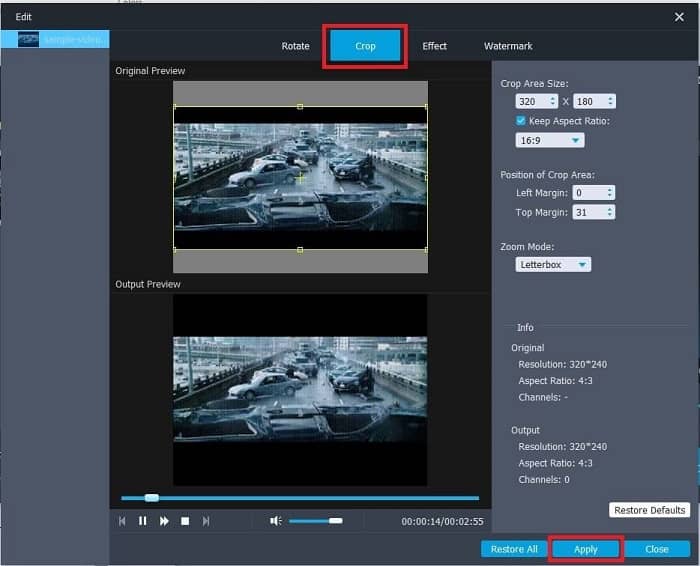
Adım 4. GIF’inizi geliştirmek için Düzenle’ye tıklayın. Kırp bölümüne gidip GIF’inizin boyutunu ayarlayın. Ayrıca En Boy Oranını ve Yakınlaştırma Modunu da değiştirebilirsiniz. Yaptığınız ayarları kaydetmek için Uygula’ya tıklayın.
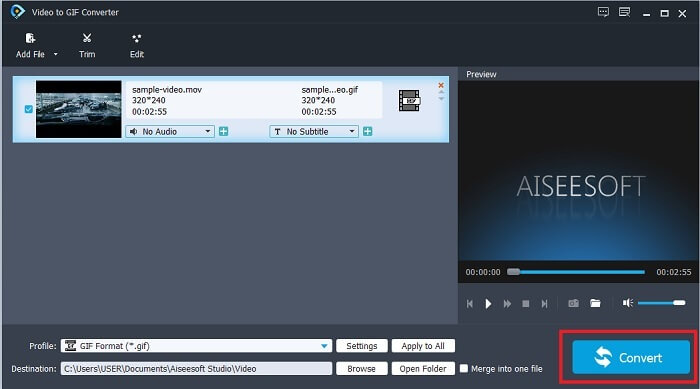
Adım 5. Videonuzu GIF’e dönüştürmeyi başlatmak için Dönüştüre tıklayın. Dönüştürme tamamlandığında, dosyanın adını yazarak son çıktıyı dosya gezgininde kontrol edebilirsiniz.
Artıları
- Tüm küçük özellikler burada mevcuttur.
- Çevrimiçi araçtan ve bazı indirilebilir araçlardan çok daha iyidir.
- Bu araçla GIF'inizi kolaylıkla oluşturun.
Eksileri
- Ultimate sürümünün sağladığı ana özellikleri kullanamazsınız.
- Premium sürümden ziyade daha az formatlı videoyu destekler.
2. Video Dönüştürücü Ultimate
Bu aracın ücretsiz sürümü basit işi yapabilir, ancak premium sürümü en iyi GIF kırpıcıdır. Video Converter Ultimate yalnızca adı değil, aynı zamanda bu aracın herhangi bir videoyu bir GIF dosyasına dönüştürmede son nokta olduğudur. Ücretsiz sürümünün ve aşağıdaki aracın aksine, bu araç basit GIF'inizi daha muhteşem hale getirebilir. Yalnızca bu aracın sağlayabileceği efektler ekleyerek GIF'inizi olağanüstü bir hale getirin. Ayrıca bir videonun MP4'ten GIF'e dönüştürülmesi, videoları tek bir videoda birleştirme, 3D oluşturucu ve daha pek çok şey gibi GIF'e dönüştürülmesini sağlar. Bu nedenle, bu aracı kişisel kırpıcınız olarak kullanın ve sizi asla yarı yolda bırakmaz. Ayrıca, alıcınıza daha özel bir mesaj iletmek için GIF'inizi nasıl kırpacağınızı öğrenmek için aşağıdaki adımları okumaya devam edin.
Adım 1. Bu aracı kullanmadan önce indirmeniz gerekir. Aracı sürücünüze yükleyin, tercihleri ihtiyaçlarınıza göre değiştirin ve aracın ekranınızda çalışmasını başlatmak için Bitir’e tıklayın.
Ücretsiz İndirWindows 7 veya üstü içinGüvenli İndirme
Ücretsiz İndirMacOS 10.7 veya üstü içinGüvenli İndirme
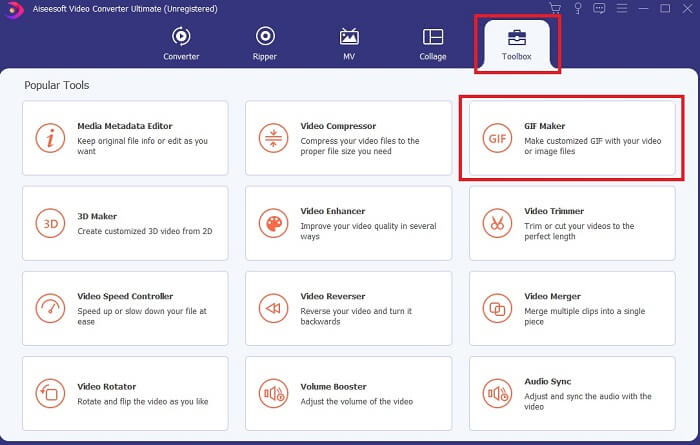
Adım 2. Araç tamamen sürücünüze indirildiğinde, böyle yönetilebilir bir arayüz ekranınızda görünecektir. Araç çubuğuna tıklayın ve araç çubuğunda GIF Maker’a tıklayın.
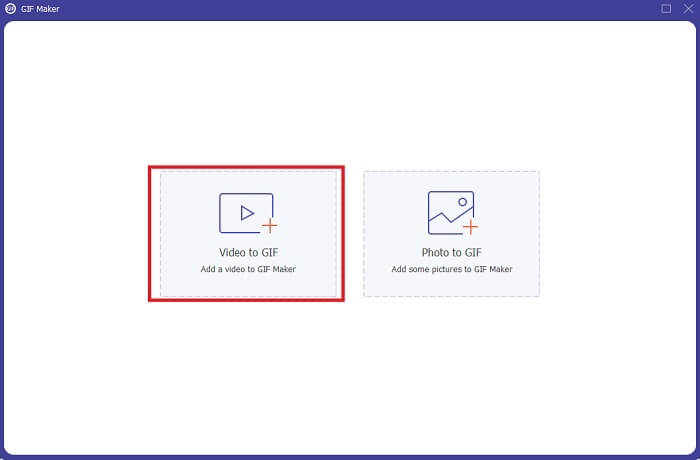
Adım 3. Video eklemek için Video to GIFe tıklayın ve kırpmak veya düzenlemek istediğiniz GIF’i bulun. Videoyu seçtikten sonra GIF Maker’ı başlatmak için Aç’a tıklayın.
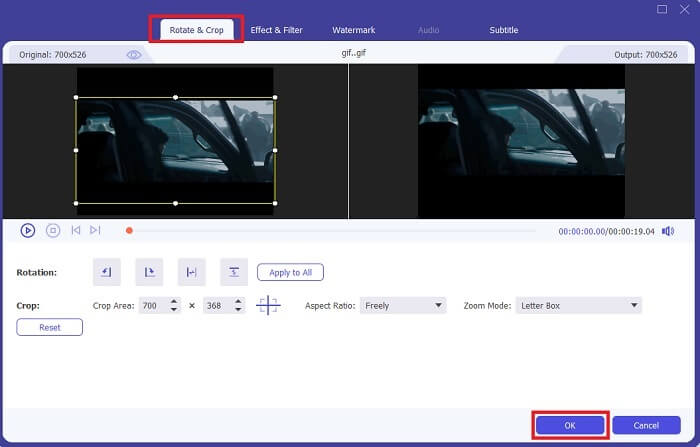
Adım 4. Düzenlemeye başlamak için üzerinde yıldız simgesi bulunan düğmeye tıklayın. GIF’i kırpmaya başlamak için Döndür & Kırp’a tıklayın. Ayrıca efektler ve filtreler, filigran ve altyazı da ekleyebilirsiniz. Tüm ayarlamalar bittiğinde, değişiklikleri kaydetmek için Tamam’a tıklayın.
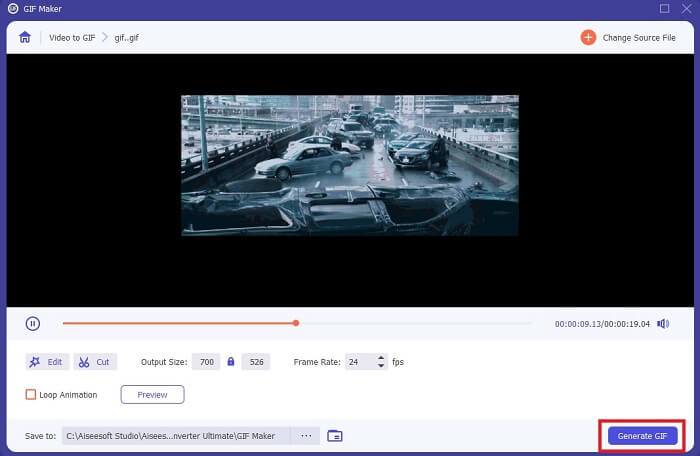
Adım 5. Son çıktıyı daha kolay bulmak için kaydetmek istediğiniz konumu değiştirin. Dönüştürmeyi başlatmak için GIF Oluştur’a tıklayın. Dönüştürme 0% tamamlandığında, son çıktıyı kaydetmek istediğiniz konumda veya dosya yöneticisinde bulun.
Artıları
- GIF'inizi çok daha etkileşimli bir hale getirmek istiyorsanız, kullanacağınız araç. GIF'lerinize renk katmak için hayal gücünüzü kullanın.
- Diğer premium sürümün sağlayamadığı ana özellikleri kullanarak GIF'inizi etkileyici bir çıktıya dönüştürebilir.
- Bir milyondan fazla kullanıcı bu aracı ilk tercihi premium sürüm aracı olarak seçiyor.
Eksileri
- Aracı kullanmak için önce ödemeyi sağlamalısınız ama o kadar da pahalı olmadığı kesin. Dolayısıyla, bu aracı satın aldıysanız daha azını beklememelisiniz.
- Başlatmadan önce aracı indirin. İnternetiniz olmasa bile, internete bağlı olmadığı için bu aracı yine de kullanabilirsiniz.
Bölüm 2. İnternet Üzerinden Erişebileceğiniz En İyi 5 En İyi GIF Kırpıcı
1. iLoveIMG
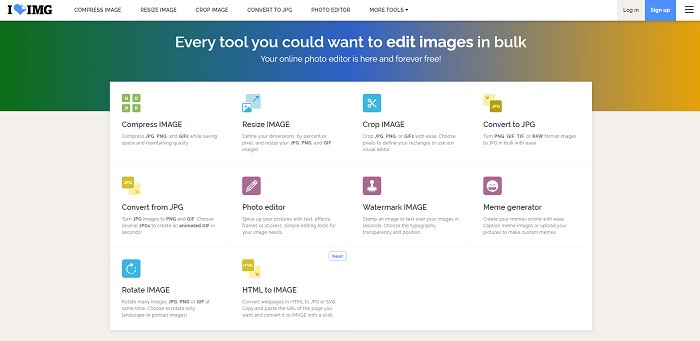
GIF’inizi bu çevrimiçi GIF kırpma aracı yardımıyla kırpın. iLoveIMG, en iyi çevrimiçi GIF, JPG ve PNG kırpma aracı olarak bilinir. Her ne kadar bu araç videoları GIF formatına dönüştüremese de (sadece GIF, JPG ve PNG dosyalarınızı iyileştirmeye odaklanır), web sitesinin arayüzü beklentilerin üzerindedir; yalnızca basit değil, aynı zamanda oldukça etkileşimlidir. Bu nedenle siteyi kullanırken sıkılmayacağınızı düşünebilirsiniz. Puanlamak gerekirse 10 üzerinden 7 alır; bu da çevrimiçi, web tabanlı bir uygulama için gayet iyidir.
Artıları
- GIF, JPG ve PNG'nizi geliştirmek için en iyisi.
- Web sitesinin arayüzü inanılmaz güzel.
- İndirmeye gerek yok.
Eksileri
- Bağlantı kesilirse veri kaybı olasılığı vardır.
- Video biçimini bir GIF biçimine dönüştüremezsiniz.
2. Kırmızı Ketçap
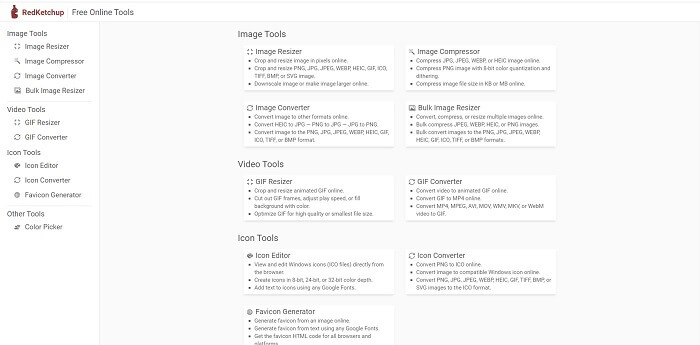
iLoveIMG size göre değilse, bu çevrimiçi GIF kırpma aracını denemelisiniz. RedKetchup, sunduğu her düzenleme aracı hakkında verdiği açıklamalar sayesinde oldukça bilgilendiricidir. Böylece, herhangi bir özelliğin ne işe yaradığını bilmiyorsanız bile, onu anlamanız daha kolay olur. Ayrıca görüntülerinizi GIF, PNG, JPG, WEBP ve daha fazlasına dönüştürebilirsiniz. iLoveIMG’den daha fazla formatı destekler; ancak bu aracın dezavantajı, web sayfası arayüzünün oldukça sıkıcı olmasıdır. Sitenin tüm arka planı yalnızca beyaz renktedir ve renkli olan tek şey RedKetchup adı ve simgesidir.
Artıları
- iLoveIMG'den daha fazla görüntü formatını destekler.
- Kullanıcının işlevlerini anlayabilmesi için her araç özelliğinin kısa bir açıklaması vardır.
- Ücretsiz bir çevrimiçi araçtır.
Eksileri
- Bu aracın web sayfası, monoton rengi nedeniyle bakmak çok sıkıcı.
- İnternetiniz kararsızsa dosyanın düzgün kaydedilmeme ihtimali vardır.
3. Kapwing
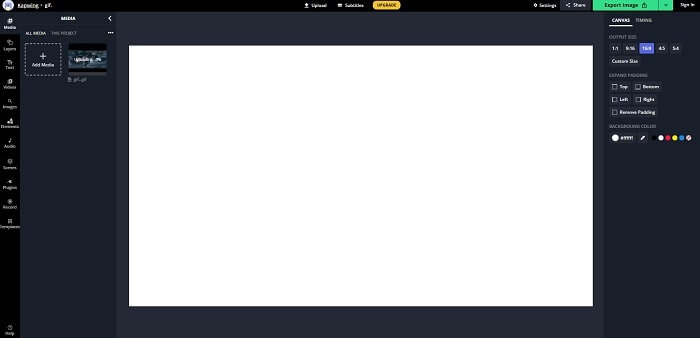
Bu aracın, çevrimiçi olmasına rağmen neredeyse Photoshop ile aynı özelliklere sahip olduğu söylenebilir. Çevrimiçi ortamda en iyi GIF kare kırpma aracıdır. Kapwing, arkadaşlarınızla paylaşmak istediğiniz en iyi GIF’leri oluşturmasıyla bilinir. Yukarıdaki ilk iki araçtan farklı olarak, bu araç bazı video formatlarını destekleyerek bunları GIF formatına dönüştürebilir. Her ne kadar bu aracı kullanmayı öğrenmek biraz zamanınızı alsa da buna değecektir. Ancak basit bir GIF oluşturmak istiyorsanız, bu araç bu işi en iyi şekilde yapar. Bu aracın, çevrimiçi olmasına rağmen neredeyse Photoshop ile aynı özelliklere sahip olduğu söylenebilir. Çevrimiçi ortamda en iyi GIF kare kırpma aracıdır. Kapwing, arkadaşlarınızla paylaşmak istediğiniz en iyi GIF’leri oluşturmasıyla bilinir. Yukarıdaki ilk iki araçtan farklı olarak, bu araç bazı video formatlarını destekleyerek bunları GIF formatına dönüştürebilir. Her ne kadar bu aracı kullanmayı öğrenmek biraz zamanınızı alsa da buna değecektir. Ancak basit bir GIF oluşturmak istiyorsanız, bu araç bu işi en iyi şekilde yapar.
Artıları
- Araç web sitesinin arayüzü size Photoshop ile neredeyse aynı havayı verecektir.
- Videonuzu GIF formatına dönüştürün.
- Temel düzenleme özellikleri sağlanır.
Eksileri
- Videonun nihai çıktısının işlenmesi her zaman internetinizin ne kadar hızlı olduğuna bağlı olacaktır. Bu nedenle, nihai çıktıyı üretmek için çok sabırlı olmak gerekir.
- Çıktınızdan filigranı kaldırmak için kaydolmanız gerekir. Bu nedenle, her güncellemede ve bazı can sıkıcı duyurularda bir posta bekleyin. Çünkü hesabınıza erişmelerine izin veriyorsunuz.
4. GIFGIF'ler
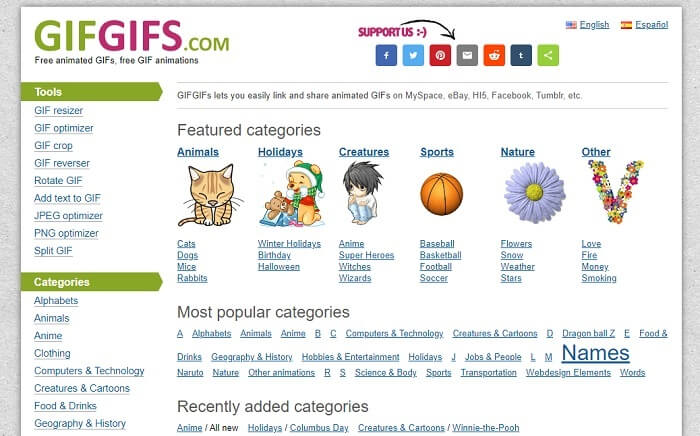
GIF’lerinizi bu kalite kaybı olmadan GIF kırpma aracı ile kırpabilirsiniz. GIFGIFs, size çevrimiçi ortamda en iyi, hazır GIF’leri sunar. Alfabe, spor, anime, giyim vb. gibi sunduğu kategoriler arasından seçim yapabilirsiniz. Ayrıca bu araç yalnızca GIF’lerinizi iyileştirmek için en iyi özellikleri sunmakla kalmaz, JPG ve PNG dosyalarınızı da optimize edebilirsiniz.
Artıları
- GIF'inizi daha iyi hale getirmek için iyi bir seçimdir.
- JPEG, PNG ve GIF'i optimize etmeyi destekler.
- Kategori bölümlerinde önceden yapılmış GIF'leri seçin.
Eksileri
- Bir arama çubuğu sağlamaz, bu nedenle kullanmak istediğiniz mükemmel GIF'i bulmak zordur.
- Arayüz tamam. Özel bir şey değil ya da iyi değil ama kötü değil mi demeliyiz.
5. VEED.IO
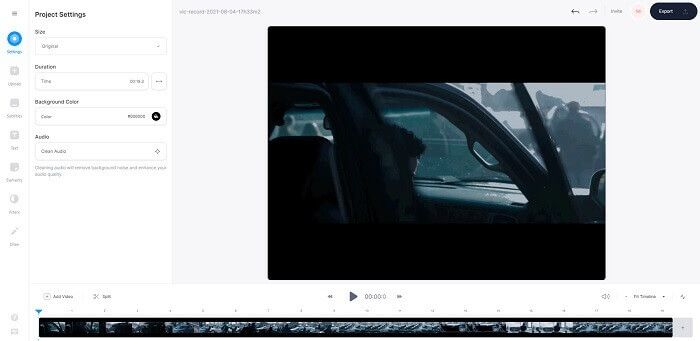
Bunu çevrimiçi olarak ilk tercihiniz ücretsiz GIF kırpıcınız olarak seçin, ancak isterseniz premium sürüme de yükseltilebilir. VEED.IO, GIF'lerinizi daha iyi hale getirmek için en iyi çevrimiçi araçlardan biridir. Ancak aracın ücretsiz sürümü yalnızca 50mb GIF dosya boyutunu destekler ve daha fazla dosya boyutu eklemek için aracın premium sürümünü satın almanız gerekir.
Artıları
- GIF'inizi daha iyi hale getirmek için harika bir düzenleme özelliği sunar.
- Basit kullanıcı arayüzü.
- Dilerseniz alt yazı da ekleyebilirsiniz.
Eksileri
- 2B görüntülerinizi geliştirmek için bir 3B oluşturucu sağlamaz.
- Bazı durumlarda, zaman çizelgesini yakınlaştırmaya çalıştığınızda yazılım çöküyor.
Bölüm 3. GIF Kırpıcı Hakkında SSS
GIF formatından daha iyi bir format var mı?
GIF'in web'deki en iyi hareketli görüntü formatı olduğu çok iyi bilinmesine rağmen. Peki GIF yerine daha iyi bir format olduğunu biliyor muydunuz? Bu APNG'dir. Bu biçim, GIF'ten daha fazla renk paleti sağlar ve sıkıştırmada da daha iyidir. Ancak WEBP, MNG, FLIF ve AVIF'i de kullanabilirsiniz.
GIF'lerin yaratılmasının nedeni nedir?
1987'nin sonlarında, Steve Wilhite adında biri, bilgisayar ekranında gösterilebilecek, dosya boyutu küçük bir görüntü formatı oluşturmanın mümkün olup olmadığını kendine sordu ve o dönemde GIF doğmuş oldu. GIF’ler hakkında daha fazla bilgi edinmek için buraya tıklayabilirsiniz.
Hangisi daha iyi? JPG veya GIF?
JPG formatı, geniş bir renk yelpazesini desteklediği için size daha ayrıntılı bir görüntü sağlar, bu nedenle fotoğraf çekmede en iyisidir. GIF, az miktarda renk paleti sağlar, ancak statik bir görüntü oluşturmada iyidir.
Sonuç
Sonuç olarak, size ihtiyaç duyduğunuz kırpma imkânını sunacak en iyi GIF kırpma aracını seçmelisiniz. GIF’i kırpsanız bile, GIF’in kalitesini etkilemeden bunu yapabilmelisiniz. Ancak açıkça görülüyor ki FVC tarafından geliştirilen nihai aracı seçmeniz gerekir. Çünkü GIF’inizi diğer GIF’lere göre çok daha çarpıcı gösterecek, eklemek istediğiniz en iyi GIF özelliklerini size sunar. Bu nedenle, Video Converter Ultimateı kullanırsanız GIF’inizi kırpmak hiç olmadığı kadar kolay hâle gelir.
-
 GIF'i Sıkıştırma ve Dosya Boyutunu Yüksek Kaliteyle Küçültme Eğitimi
 İşte bilgisayarınızda veya cep telefonunuzda GIF sıkıştırmanın 2 kolay yolu. FVC Free Online Video Compressor kullanabilirsiniz ve Photoshop, GIF dosya boyutunu farklı yönlerden küçültür.
-
 GIF Oynatıcı - Windows PC, Mac, Android ve iPhone için En İyi 5 GIF Oynatıcı
 GIF dosyalarını hangi program açar? GIF'leri Android'de nasıl görüntülerim? İPhone'da GIF'leri açmak için bir GIF oynatıcı var mı? Bu gönderi sizin için en iyi 5 GIF oyuncusunu paylaşıyor.
-
 AVI Videolarını Windows/Mac'te Animasyonlu GIF Dosyalarına Dönüştürme
 GIF memleri oluşturmak için ilginç AVI bölümlerini seçmek ister misiniz? Bu makale, AVI videolarını kırpmak ve AVI'yi ücretsiz olarak animasyonlu GIF dosyalarına dönüştürmek için en iyi 2 yöntemi anlatacaktır.
