


 Video Dönüştürücü Ultimate
 Ekran kaydedicisi
 Video Onarımı
 Güvenli İndirme
Kaliteyi Düşürmeden M2TS'yi MP4'e Dönüştürme
“Sony kameramdan videoları bilgisayara koyduğumda, bunlar M2TS dosyaları oluyor ve bunlar Facebook veya YouTube'da paylaşılamıyor. Dosyaları MP4'e dönüştürmek ve bilgisayarımda izlemek için bir video dönüştürücü nerede bulabilirim? "
Bazen M2TS dosyalarını bazı taşınabilir cihazlarda oynatmak veya YouTube ya da Facebook’a yüklemek isteyebilirsiniz. Bunları MP4 gibi yaygın bir video formatına dönüştürmek akıllıca olacaktır. Bu yazıda, Windows ve Mac’te M2TS’yi MP4’e dönüştürmenin 5 ücretsiz yolunu paylaşacağız.

Bölüm 1. M2TS'yi MP4'e Ücretsiz Dönüştürmenin En İyi Yolu
Tüm medya oynatıcıları M2TS dosyalarını desteklemez. HD kameralarla çekilen M2TS videoların keyfini daha iyi çıkarabilmek için, oynatmak üzere M2TS’yi yaygın olarak kullanılan MP4 formatına dönüştürmeniz daha iyi olur. FVC Free M2TS Converter, hepsi bir arada bir M2TS dönüştürücü ve düzenleyicidir. Yalnızca M2TS dosyalarını MP4, MKV, AVI, MOV vb. formatlara dönüştürmekle kalmaz, aynı zamanda sıkıştırma, birleştirme, tema ekleme ve daha fazlası gibi düzenleme işlemleri de yapabilirsiniz.
Ücretsiz İndirWindows 7 veya üstü içinGüvenli İndirme
Ücretsiz İndirMacOS 10.7 veya üstü içinGüvenli İndirme
Adım 1.Ücretsiz İndir düğmesine tıklayarak Free M2TS Converter’ı hızlıca indirebilirsiniz. Ardından Windows bilgisayarınıza kurup çalıştırın. M2TS dosyasını programa aktarmak için Dosya(lar) Ekle düğmesine tıklayın.
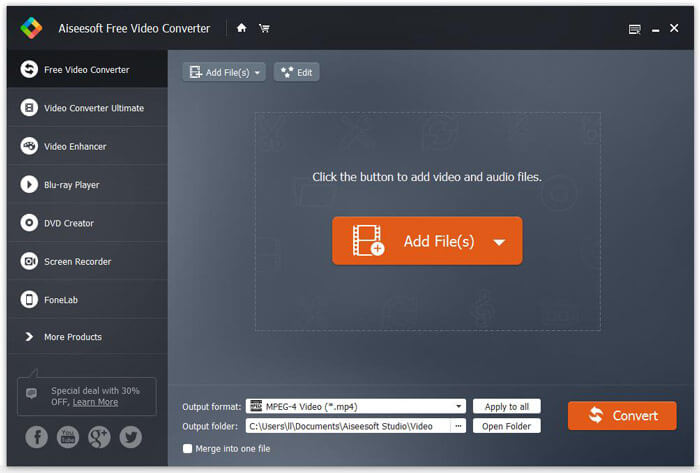
Adım 2.Çıktı formatı açılır düğmesine tıklayın ve çıktı formatı olarak MPEG-4 Video (*.mp4) seçeneğini belirleyin. Dönüştürülen dosyanın kaydedileceği çıkış klasörünü de ayarlayabilirsiniz.

Adım 3.Videoya belirli bir tema eklemek istiyorsanız, üst menüdeki Düzenle düğmesine tıklayarak uygun bir tema seçebilirsiniz. Tüm ayarlar yapıldıktan sonra, M2TS dosyasını MP4'e dönüştürmeye başlamak için Dönüştür düğmesine tıklayın.

Bölüm 2. M2TS'yi MP4 Online Olarak Değiştirme
M2TS’yi çevrim içi ve ücretsiz olarak MP4'e dönüştürmek istiyorsanız, FVC Free Online Video Converter harika bir seçenek olacaktır. Ücretsiz bir çevrim içi multimedya dönüştürücüsü olarak neredeyse tüm yaygın video ve ses dosyalarını MP4, FLV, MKV, MOV, M4V, MTS, TS, M2TS, WMV, ASF, VOB, MP3, AAC vb. formatlara dönüştürmeyi destekler. Ayrıca kullanımı da oldukça kolaydır.
Adım 1. FVC Free Online Video Converter sitesine gidin. Üst kısımdan Dönüştürülecek Dosyaları Ekle seçeneğine tıklayın. Ardından FVC başlatıcısını indirip kurun.

Adım 2. Dönüştürmek istediğiniz videoyu seçin. MP4 bir video istiyorsanız, yalnızca MP4 seçeneğine tıklayın. Sonra Dönüştür.

Adım 3. MP4 videoyu doğrudan masaüstüne kaydedebilirsiniz. Bundan sonra dönüştürme işlemi otomatik olarak başlayacaktır.
Bölüm 3. ConvertFiles ile M2TS'yi MP4'e Dönüştürme
ConvertFiles, 200'den fazla video, ses, resim, belge, sunum ve arşiv formatını destekleyen web tabanlı M2TS'den MP4'e dönüştürücüdür. M2TS dosyasını çevrimiçi olarak MP4'e dönüştürmeye başlamak için aşağıdaki basit adımları izleyin.
Adım 1.ConvertFiles’ın resmi sayfasına gidin. Yerel M2TS dosyanızı yüklemek için Gözat düğmesine tıklayın.
Adım 2.Girdi formatı kutusuna tıklayıp HDV Video Dosyası (.m2ts) seçeneğini işaretleyin ve Çıktı formatı kutusuna tıklayıp çıktı formatı olarak MPEG-4 Video Dosyası (.mp4) seçeneğini seçin.
Adım 3.M2TS’yi ücretsiz olarak MP4'e dönüştürmeye başlamak için Dönüştür düğmesine tıklayın. Dönüştürme işlemi birkaç dakika sürebilir. Sonrasında dönüştürülen MP4 dosyasını indirmek için indirme bağlantısına tıklayabilirsiniz.
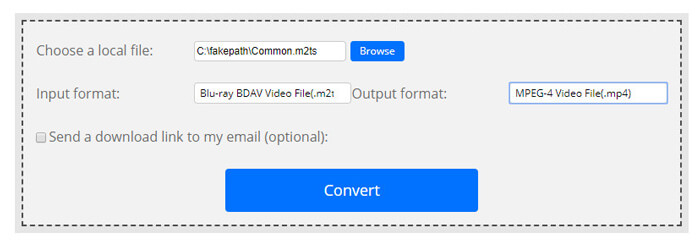
Bazen, geçersiz giriş biçimi nedeniyle dönüştürme başarısız olabilir. Yüksek bir başarı oranı elde etmek için, bunun yerine Free M2TS Converter'ı deneyebilirsiniz.
Bölüm 4. M2TS'yi VLC ile MP4'e Dönüştürme
VLC Media Player, Windows, Mac, Linux, iOS ve Android için açık kaynaklı bir multimedya oynatıcıdır. Ayrıca, M2TS dosyalarını MP4, MOV, AVI ve daha fazlasına dönüştürmek için harika bir M2TS'den MP4'e dönüştürücü olarak çalışır. Dahası, M2TS dosyalarını kırpma, kesme, döndürme, görüntü efektleri ekleme ve daha fazlasını düzenleyebilirsiniz.
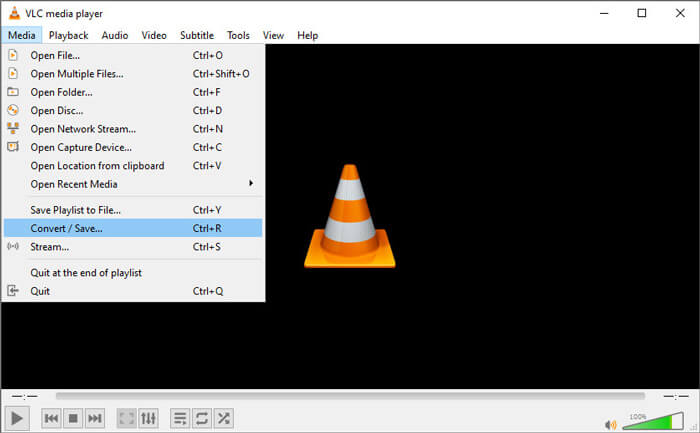
Adım 1.VLC Media Player’ı bilgisayarınıza indirip çalıştırın. Devam etmek için Ortam > Dönüştür / Kaydet... seçeneğine tıklayın. Ardından M2TS dosyanızı eklemek için Ekle... düğmesine tıklayın.
Adım 2.Dönüştür penceresine geçmek için Dönüştür / Kaydet düğmesine tıklayın. Çıktı formatı olarak Video - H.264 + MP3 (MP4) seçeneğini belirlemek için Profil açılır düğmesine tıklayın.
Adım 3.Hedef klasörü seçmek için Gözat düğmesine tıklayın. Ardından M2TS’yi MP4'e dönüştürmeye başlamak için Başlat düğmesine tıklayın.
Bölüm 5. MP4'i M2TS'den El Freni ile Dışa Aktarma
HandBrake, videoyu neredeyse her formattan dönüştürebilen başka bir ücretsiz ve açık kaynaklı video kod dönüştürücüdür. Aşağıdaki adımlarla M2TS dosyasını MP4'e dönüştürmek için El Freni'ni deneyebilirsiniz.
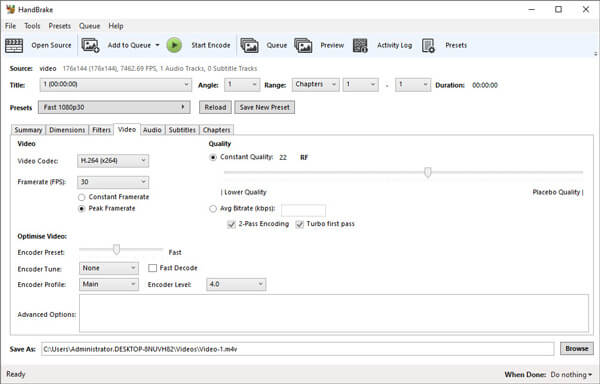
Adım 1.HandBrake’i Windows/Mac bilgisayarınıza ücretsiz olarak indirip kurun ve başlatın. Yerel klasörünüzden M2TS dosyasını içe aktarmak için sol üst köşedeki Open Source (Kaynak Aç) seçeneğine tıklayın.
Adım 2.M2TS dosyası için ayarları özelleştirebilirsiniz. Özet sekmesindeki Format açılır düğmesinden MP4 seçeneğini seçin. Video sekmesinde video codec’ini, video kalitesini, kare hızını ayarlayabilir ve videoyu optimize edebilirsiniz.
Adım 3.Hedef klasörü ayarlamak için Gözat düğmesine tıklayın. Ardından M2TS’yi ücretsiz olarak MP4'e dönüştürmeye başlamak için Start Encode (Kodlamayı Başlat) düğmesine tıklayın.
Bölüm 6. M2TS'yi MP4'e Dönüştürme Hakkında SSS
M2TS ile MP4 arasındaki fark nedir?
M2TS, MPEG-2 Taşıma Sisteminin kısaltmasıdır. Blu-ray Disc Audio Video kapsayıcı dosya formatıdır ve video, ses ve diğer akışları çoklamak için kullanılır. Genellikle M2TS dosyaları aynı kalitede MP4 dosyalarından daha büyüktür. MP4 dosyaları neredeyse tüm medya oynatıcılarda desteklenir, ancak M2TS dosyaları yalnızca birkaç oynatıcıda oynatılabilir.
M2TS dosyalarını PC’de nasıl oynatırım?
M2TS dosyalarını Windows Media Player, VLC Media Player, 5K Player, SMPlayer, Splash gibi bazı popüler medya oynatıcı uygulamalarında doğrudan açabilirsiniz. M2TS dosyalarını Sony Picture Motion Browser Yazılımıyla da oynatabilirsiniz.
VLC, M2TS dosyalarını oynatabilir mi?
Evet. M2TS dosyalarını Windows ve Mac'te VLC Media Player ile oynatabilirsiniz. M2TS dosyasını VLC'de oynatmak için VLC media player'ı çalıştırın ve Media to Open File'ı tıklayın. Bu codec sorunu için işe yaramazsa, önce M2TS'yi VLC destekli video formatına dönüştürmelisiniz.
Sonuç
Yukarıdaki 5 ücretsiz yöntemle M2TS dosyalarını MP4'e kolaylıkla dönüştürebilirsiniz. Karşılaştırmadan sonra, FVC Free M2TS Converter, en iyi M2TS - MP4 dönüştürücü olmalıdır. Donanım hızlandırma teknolojisi ile MP4 dosyalarını dakikalar içerisinde yüksek kalitede dışa aktarır. Bu ücretsiz dönüştürücüyü hemen deneyebilirsiniz.
-
 TS'yi MP4'e Dönüştürme Hakkında Kapsamlı Kılavuz
 TS dosyaları nedir ve TS'yi MP4'e dönüştürmek ister misiniz? Bu yazıda, TS'yi MP4'e dönüştürmek için ücretsiz ve çevrimiçi yöntemler paylaşacağız.
-
 MTS Dosyalarını MP4'e Dönüştürme
 MTS dosyasını MP4'e nasıl dönüştüreceğinizi bilmiyor musunuz? Bu kılavuzda, kalite kaybı olmadan Windows veya Mac'te MTS formatını MP4 olarak değiştirmenin 6 ücretsiz ve kolay yolunu bulacaksınız.
-
 2 MTS'yi MP3'e Ücretsiz Dönüştürmenin Basit Yolları
 MP3 sesini MTS dosyasından çıkarmanız gerekiyor, ancak nasıl yapılacağını bilmiyor musunuz? Bu gönderi, MTS / M2TS'yi yüksek ses kalitesiyle MP3'e dönüştürmenize yardımcı olacak 2 kolay yolu paylaşıyor.
