


 Video Dönüştürücü Ultimate
 Ekran kaydedicisi
 Video Onarımı
 Güvenli İndirme
HEIC'i Saniyeler İçinde Hızlıca PNG'ye Dönüştürmenin 7 Kolay Yolu
HEIC dosyanızı diğer cihazlarla geniş ölçüde uyumlu hale getirmek mi istiyorsunuz? Aradığınızı buldunuz! Bu makale, HEIC dosyanızı hiç zorlanmadan PNG’ye dönüştürmenin en iyi yollarını gösteriyor. Öyleyse arkanıza yaslanın ve HEIC’i PNG’ye zahmetsizce dönüştürmenin en iyi yöntemlerini birlikte keşfedelim.

Bölüm 1. Neden HEIC'i PNG Formatına Dönüştürün
HEIC dosya formatı, Apple tarafından oluşturulan bir görüntü formatıdır. Apple cihazlarının yaygın olarak kullandığı bir görüntü formatıdır. Yüksek kaliteli bir çözünürlüğe sahip olmasına rağmen cihazınızda çok fazla yer kaplamaz. Ancak HEIC dosyaları, Apple dışındaki cihazlarla uyumlu değildir. Buna karşılık, Taşınabilir Grafik Biçimi anlamına gelen PNG, GIF biçimlerinin yerini almak üzere oluşturulmuş bir görüntü dosyası biçimidir.
Sıkıştırılmamış en çok kullanılan resim formatıdır, yani çok büyük bir dosya boyutuna sahiptir. Bununla birlikte, hemen hemen tüm cihazlar bu görüntü dosyası biçimini destekler. Bu nedenle, HEIC görüntünüzü Apple dışındaki diğer cihazlarda açmak istiyorsanız, onu bir PNG dosya biçimine dönüştürmeniz daha iyi olur.
Bölüm 2. HEIC Dosyanızı Çevrimiçi Olarak PNG Dosyasına Dönüştürmenin 5 Kolay Yolu
HEIC'i PNG'ye dönüştürmenin en iyi yollarını aramak oldukça zordur. Ancak HEIC'i PNG dosya formatına dönüştürmeniz için en iyi ve en basit yöntemleri araştırdık.
FVC Ücretsiz HEIC'den PNG'ye Dönüştürücü Kullanın
HEIC’i PNG’ye dönüştürmenin en iyi yolu bir dönüştürücü araç kullanmaktır. İnternette bulduğumuz en iyi araç ise FVC Free HEIC to PNG Converter. Bu dönüştürücü, HEIC dosyanızı kolayca PNG dosya formatına çeviren çevrimiçi bir araçtır. Ayrıca HEIC dosyalarınızı toplu olarak PNG’ye dönüştürmek isterseniz, bu araçta bunun için de bir özellik vardır.
Ayrıca, neredeyse tüm yaygın tarayıcılarda erişilebilir olması, onu tarayıcı sınırlaması olmayan bir araç haline getirir. Ayrıca, basit bir yazılım arayüzüne sahiptir ve dosya boyutu sınırı yoktur, böylece HEIC dosyalarını dosya boyutunu düşünmeden dönüştürebilirsiniz. Bu nedenle, bu çevrimiçi HEIC'den PNG'ye dönüştürücü kullanmakla ilgileniyorsanız, aşağıdaki basit kılavuzu izleyin.
1. Adım. Tarayıcınızda FVC Free HEIC to PNG Converter aramasını yapın. Ayrıca doğrudan web sayfalarına gitmek için bu bağlantıya tıklayabilirsiniz. İlk arayüz şu şekilde görünür:

2. Adım. Ardından Add HEIC/HEIF File(s) düğmesine tıklayın. Bilgisayar klasörleriniz açılacak ve burada HEIC dosyanızı seçeceksiniz.
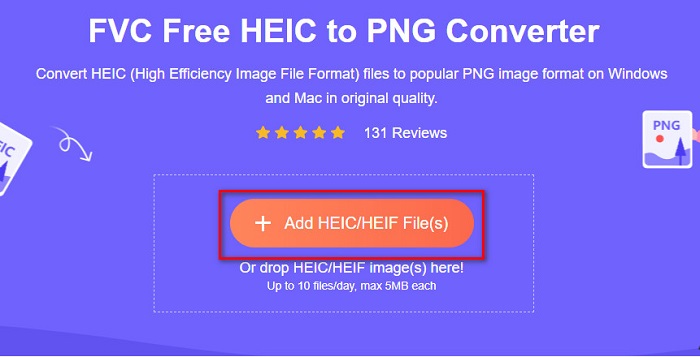
3. Adım. Daha sonra bilgisayar klasörleriniz açılacak ve HEIC dosyanızı seçeceksiniz. Open (Aç) düğmesine basın. Böylece HEIC’ten PNG’ye dönüştürme işlemi başlayacaktır.

4. Adım. Son olarak, yazılımın arayüzünde Download (İndir) düğmesine tıklayarak PNG dosyanızı indirin.

Basit, değil mi? Bu kolay adımları izleyerek HEIC dosyanızı bir PNG dosyasına dönüştürebilirsiniz.
Xconvert.com'u kullanın
Xconvert, HEIC dosyalarını kolayca PNG dosyalarına dönüştüren, ücretsiz bir çevrimiçi HEIC’ten PNG’ye dönüştürücüdür. Bu çevrimiçi dönüştürücünün yeni başlayan kullanıcılar için uygun, kullanımı kolay bir arayüzü vardır. Ayrıca bu aracı kullanırken görüntünüzün çözünürlüğünü de değiştirebilirsiniz. Ancak internet bağlantısına bağımlı bir araç olduğu için, internet yavaş olduğunda dönüştürme işlemi de yavaşlayabilir. Bunun yanında, rahatsız edici olabilecek reklamlar da içermektedir.
1. Adım. Tarayıcınızda Xconvert.com araması yapın. Web sitelerinde Add Files (Dosya Ekle) düğmesine tıklayın; ardından bilgisayar dosyalarınız açılacak ve HEIC dosyanızı seçeceksiniz.

2. Adım. Görüntünüz yazılımın arayüzüne yüklenecektir. Yükleme tamamlandıktan sonra, arayüzün sağ alt köşesinde bulunan Convert (Dönüştür) düğmesine tıklayın. Dosyanızın indirilmeye hazır olmasını bekleyin ve ardından bir sonraki adıma geçin.
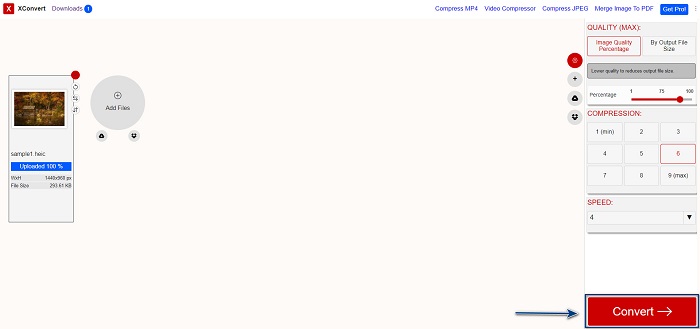
3. Adım. Dosyanız hazır olduğunda, PNG dosyanızı indirmek için Download (İndir) düğmesine tıklayın; indirme düğmesinin üst kısmında çıktı boyutunu ve dönüştürmenin ne kadar sürdüğünü de göreceksiniz.

Zamzar'ı kullan
HEIC’i çevrimiçi olarak PNG’ye dönüştürmenin bir başka yolu da Zamzar çevrimiçi dönüştürücüyü kullanmaktır. Muhtemelen HEIC’ten PNG’ye dönüştürücü ararken bu araca rastlamışsınızdır. Bu dönüştürücü, kullanılabilir hemen hemen tüm tarayıcılarda erişilebilirdir. Ayrıca basit bir kullanıcı arayüzüne sahip olduğu için son derece kullanıcı dostudur. Ancak dönüştürme işlemi sırasında internet bağlantınız kesilirse dosyanız bozulabilir. Yine de pek çok kullanıcı HEIC’i PNG dosyasına dönüştürmek için bu aracı kullanmaktadır.
1. Adım. Kullandığınız tarayıcıda Zamzar araması yapın. Web sitelerinde Add Files (Dosya Ekle) düğmesine tıklayın. Bilgisayar dosyalarınız açılacak, ardından HEIC görüntünüzü yükleyin.

2. Adım. HEIC dosyanızı yükledikten sonra, açılır menü (drop-down) düğmesine tıklayın ve çıktı dosya formatı olarak PNG’yi seçin.

3. Adım. Son olarak, HEIC dosyanızı PNG formatına dönüştürmek için Convert Now (Şimdi Dönüştür) düğmesine tıklayın. Ardından PNG dosyanızı indirin. Sadece birkaç saniye bekleyin, hepsi bu!

Dönüşüm Tools.io'yu kullanın
Conversion Tool, basit bir kullanıcı arayüzüne sahip çevrimiçi bir HEIC’ten PNG’ye dönüştürücüdür. HEIC dosyanızı yüksek hızda PNG’ye dönüştürebilir. Ayrıca, diğer çevrimiçi dönüştürücülere kıyasla çok fazla reklam içermez. Ancak dezavantajı, günde yalnızca on dosya dönüştürebilmeniz ve bir dosya boyutu sınırı bulunmasıdır. Fakat küçük dosyalar dönüştürüyorsanız, bu araç sizin için uygun olabilir.
1. Adım. Tarayıcınızda Conversion Tools.io araması yapın. Ardından yazılımın ana arayüzünde Browse (Gözat) düğmesine tıklayın ya da HEIC dosyanızı Browse düğmesinin üzerine sürükleyip bırakın.

2. Adım. Sonrasında HEIC dosyanızı PNG dosyasına dönüştürmeye başlamak için Run Conversion (Dönüştürmeyi Çalıştır) düğmesine tıklayın. Görüntü dosyanızın yüklenmesini bekleyin ve ardından bir sonraki adıma geçin.

3. Adım. Son olarak PNG dosyanızı indirmek için Download (İndir) düğmesine tıklayın.

CDKM'yi kullan
Size sunacağımız son araç CDKM. Bu araç, yalnızca birkaç tıklamayla HEIC dosyalarını PNG’ye dönüştürmenize olanak tanır. Ancak bu çevrimiçi dönüştürücüyü kullanırken, internet hızınıza bağlı olarak dönüştürme işlemi birkaç saniye sürebilir. Ayrıca rahatsız edici olabilecek reklamlar da içerir. Yine de herhangi bir dosya boyutu sınırı olmadığı için denemeye değerdir.
1. Adım. Tarayıcınızda CDKM online converter araması yapın. Yazılımın ana arayüzünde Choose Files (Dosya Seç) düğmesine tıklayın. Bilgisayar klasörleriniz açılacak, ardından yüklemek için HEIC dosyanızı seçin.

2. Adım. Ardından dönüştürme işlemini başlatmak için Start Conversion (Dönüştürmeyi Başlat) düğmesine tıklayın.

3. Adım. Son olarak biraz aşağı kaydırdığınızda Download (İndir) düğmesini göreceksiniz. PNG dosyanızı indirmek için Download düğmesine tıklayın.

Bölüm 3. Mac'te HEIC'i PNG'ye dönüştürün
Apple cihazları HEIC dosya biçimlerini destekler ve Mac kullanarak bir HEIC dosyasını yerel olarak açabilirsiniz. Ancak HEIC dosyanızı PNG'ye dönüştürmek istiyorsanız, Mac'teki Fotoğraf Uygulamasını kullanarak değiştirebilirsiniz. Buna göre, eğer bir Mac kullanıcısıysanız bu kısmı okumanızda fayda var.
1. Adım. Öncelikle HEIC dosyanızı Fotoğraflar Uygulamasına sürükleyip bırakın. Ardından HEIC fotoğrafınızı önizleyin ve Dosya > Dışa Aktar > 1 Fotoğrafı Dışa Aktar seçeneğine tıklayın.

2. Adım. Daha sonra, Fotoğraf Türü (Photo Kind) bölümünde istediğiniz çıktı formatına tıklayın. PNG dosya formatını seçin.

3. Adım. Ardından Export (Dışa Aktar) düğmesine tıklayın ve çıktı dosyanız için hedef klasörü seçin. HEIC dosyanızın PNG dosya formatına dönüştüğünü göreceksiniz.

Bölüm 4. iPhone'da HEIC Dosyasını PNG'ye Dönüştürün
iPhone kullanıyorsanız, cihazınızda bir HEIC dosyası açabilirsiniz. Ancak bir iPhone cihazı kullanarak HEIC dosyanızı PNG'ye dönüştürmek istiyorsanız, sizin için bir yolumuz var. Aşağıdaki basit ve kolay adımları izleyerek HEIC'i PNG'ye zahmetsizce dönüştürebilirsiniz.
1. Adım. iPhone’unuzdaki Fotoğraflar Uygulamasında, ekranınızın üst kısmında bulunan Seç düğmesine dokunun. Ardından HEIC dosyanızı seçin ve Paylaş simgesine dokunun.
2. Adım. Ekranı yukarı kaydırın; Copy Photo (Fotoğrafı Kopyala) seçeneğini göreceksiniz, buna dokunun.
3. Adım. Son olarak Dosyalar uygulamasına gidin, Gözat düğmesine dokunun ve istediğiniz çıktı konumunu seçin (iCloud Drive veya iPhone’umda’ya dokunun). Ardından HEIC dosyanızı oraya yapıştırın.

Dosyanızı yapıştırdıktan sonra dosyanızın otomatik olarak PNG dosyasına dönüştürüleceğini göreceksiniz.
Bölüm 5. HEIC Dosyası ve PNG Dosyası Hakkında Genişletilmiş Bilgi
HEIC dosyanızı PNG'ye dönüştürmek isteyip istemediğiniz konusunda hala şüpheniz varsa, bu iki dosya arasındaki farkları ayırt etmenize yardımcı olacak bir karşılaştırma tablosu sunuyoruz. Ayrıca, size HEIC ve PNG özelliklerine net bir genel bakış sunar. HEIC dosyaları ile PNG dosyaları arasındaki farkı öğrenmek için dikkatlice okuyun.
| HEIC | PNG | |
| uyumluluk | Bu dosya biçimini yalnızca Apple cihazı destekler. | Apple cihazları da dahil olmak üzere hemen hemen tüm cihazlar bu dosyayı destekler. |
| Dosya boyutu | Küçük dosya boyutu. | Büyük dosya boyutuna ulaşabilir. |
| Görüntü kalitesi | Yüksek görüntü kalitesi. | Kaliteli ama HEIC dosyasından daha iyi değil. |
| Sıkıştırılmış/Sıkıştırılmamış | Sıkıştırılmış | sıkıştırılmamış |
| Düzenleme | Düzenleme sırasında görüntü kalitesini korur. | Düzenleme sırasında kalite düşebilir. |
Bölüm 6. HEIC'i PNG'ye Dönüştürme Hakkında SSS
HEIC'i PNG'ye dönüştürmek dosya boyutunu etkiler mi?
Evet. HEIC'i PNG'ye dönüştürdüğünüzde, yüksek olmasa da dosya boyutunu artıracaktır.
PNG dosyalarını Adobe Photoshop'ta açabilir misiniz?
Kesinlikle. Adobe Photoshop, PNG dosya biçimini desteklediğinden PNG dosyalarını Adobe Photoshop'ta açabilirsiniz.
PNG dosya biçimini Apple cihazlarında yerel olarak açabilir misiniz?
Evet. iPhone'unuzdan ekran görüntüleri aldığınızda, bunlar otomatik olarak Film Rulonuza bir PNG dosyası olarak kaydedilir.
Sonuç
Sonunda! Maceramızın sonuna geldik. Bu makale, HEIC dosyanızı PNG dosya formatına dönüştürmek için en iyi çözümleri sunuyor. Yukarıda gösterilen tüm çevrimiçi HEIC’ten PNG’ye dönüştürücüler, dosyanızı zahmetsizce ve etkili bir şekilde dönüştürebilir. Ayrıca Mac veya iPhone kullanıcısıysanız yararlanabileceğiniz başka seçenekler de mevcuttur. Ancak olağanüstü özelliklere sahip en iyi HEIC’ten PNG’ye dönüştürücüyü arıyorsanız, FVC Free HEIC to PNG dönüştürücü sizin için en iyi tercihtir.
-
 HEIC Dosyası Windows, Mac ve Online'da Nasıl Açılır
 HEIC dosyalarını nasıl açacağınızı mı arıyorsunuz? Bu makale size HEIC dosyalarını Windows, Mac ve Online'da açmak için en iyi çözümleri sunar.
-
 JPG VS GIF: JPG'yi GIF'e Dönüştürmenin 3 Zahmetsiz Yolu
 JPG ve GIF arasındaki farkı bilmek ister misiniz? Yoksa JPG'yi GIF animasyon formatına mı geçirmek istiyorsunuz? O zaman bir fikir edinmek için bu makaleyi okuyun.
-
 Görüntüyü Animasyonlu GIF'e Değiştirmenin En İyi 5 Yolu [Güncelleme 2022]
 GIF'e dönüştürücü bir resme mi ihtiyacınız var? Bu makale, piyasada bulabileceğimiz en iyi beş dönüştürücüyü sağlayacaktır. Öyleyse, bu makaleyi okuyarak bu araçları öğrenelim.
