


 Video Dönüştürücü Ultimate
 Ekran kaydedicisi
 Video Onarımı
 Güvenli İndirme
Filigranları Kaldırmak İçin Pixlr Kullanarak En Kolay Prosedürler
Eğer buraya fotoğraflarınızdan filigranı kaldırmak için Pixlr kullanmayı öğrenmek amacıyla geldiyseniz, doğru yazıdasınız. Şahsen, üzerinde filigran bulunan bir fotoğraf görmek can sıkıcı olduğu için, bunları kaldırmak daha iyidir. Bu yazının başından sonuna kadar, yalnızca Pixlr uygulamasını kullanmayı değil, aynı zamanda fotoğraflarınızdaki filigranları yok etmek için mükemmel alternatifleri kullanmayı da öğreneceksiniz. Eğer buraya sorununuzu çözmek için geldiyseniz, bu makaleyi okumaya devam edebilir ve görüntülerinizden rahatsız edici filigranları kaldırmaya yönelik bazı eğitimleri öğrenebilirsiniz.

Bölüm 1: Pixlr Kullanarak Fotoğraflardan Filigranları Kaldırma
Pixlr, fotoğraflarınızı geliştirmek için kullanabileceğiniz bir düzenleme aracıdır. Ayrıca, fotoğrafınızı güzel ve benzersiz kılmak için çeşitli şablonlar sunar. Bu işlevlerin yanı sıra, Pixlr’ın görüntülerinizden filigranları kaldırabildiğini biliyor muydunuz? Evet! Doğru duydunuz! Pixlr, fotoğrafınızdan istemediğiniz tüm rahatsız edici nesneleri, filigranlar, çıkartmalar, emojiler, metinler ve daha fazlası dâhil olmak üzere, anında ortadan kaldırabilir. Ayrıca, bu çevrim içi yazılım ücretsizdir; bu nedenle herhangi bir ödeme veya abone olma konusunu düşünmeniz gerekmez. Ancak, Pixlr’ı kullanmak o kadar da kolay değildir. Karşılaşabileceğiniz birçok seçeneği ve karmaşık işlem adımları vardır; bu da onu profesyonel olmayan kullanıcılar için uygun olmaktan çıkarır. Bu uygulamayı kullanmak için eğitim videoları izlemeniz veya ileri düzey kullanıcılardan rehberlik almanız gerekir. Ayrıca, web tabanlı bir yazılım olduğu için hızlı bir internet bağlantısına sahip olmanız zorunludur; aksi hâlde iyi performans göstermez. Filigranları Pixlr kullanarak kaldırmak için aşağıdaki basit eğitimi izleyin.
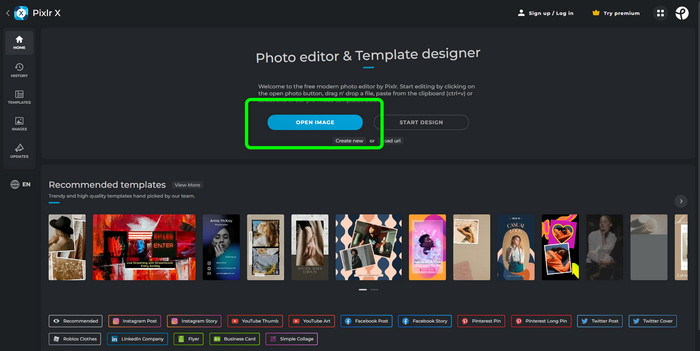
Adım 1: Pixlr’ı kullanmak için önce Pixlr’ın web sitesini ziyaret etmelisiniz. Ardından, kaldırmak istediğiniz filigranlı fotoğrafı yüklemek için Open Image düğmesine tıklayın. Görseli URL üzerinden de ekleyebilirsiniz.
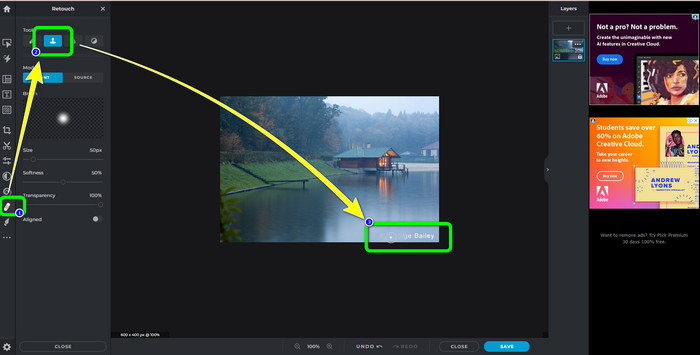
Adım 2: İstediğiniz görseli yükledikten sonra, arayüzün sol tarafındaki Retouch düğmesini seçin. Sonra araçlar görünecektir. Clone Stamp tool (Damga Klonlama aracı) seçeneğini seçin. Seçimi yaptıktan sonra, filigranı silmek için farenizle filigranlı alana tıklamaya başlayabilirsiniz.
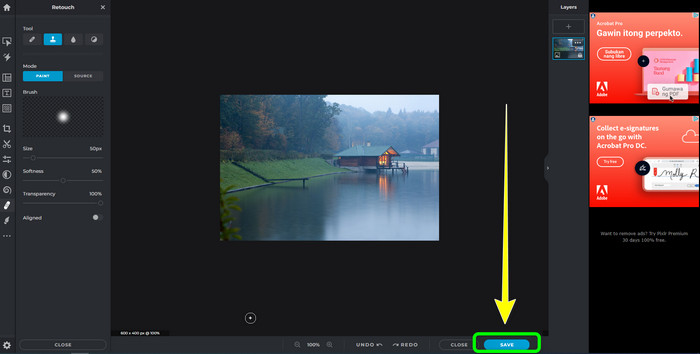
Adım 3: Kaldırmak istediğiniz tüm filigranları zaten temizlediyseniz, Kaydet düğmesine tıklayın. Ardından, dosyayı istediğiniz konuma kaydedin.
Bölüm 2: Fotoğraflardan Filigranları Silmek İçin Mükemmel Pixlr Alternatifleri
FVC Ücretsiz Filigran Sökücü
Gördüğünüz gibi, özellikle yeni başlayanlar için Pixlr’ı kullanmak zordur. Daha basit bir filigran kaldırıcı istiyorsanız, size sunabileceğimiz en iyi alternatif FVC Free Watermark Remover’dır. Bu çevrim içi yazılım, yeni başlayanlar için mükemmel olan basit bir arayüze ve yöntemlere sahiptir. Bu uygulama, filigran, logo, tarih damgası vb. gibi tüm istenmeyen nesneleri fotoğraflarınızdan kolayca silebilir. Ayrıca tamamen ücretsizdir ve fotoğraflarınızdan birden fazla filigranı kaldırabilirsiniz.
Ama bekleyin, dahası var. FVC Free Watermark Remover, filigranları kaldırmak için size iki yol sunar. İlk yol, Filigran Kaldırma Araçlarını kullanmaktır. Bu araçlar Brush, Lasso ve Polygonal'dır. Fotoğrafınızdaki filigranları vurgulamak ve kaldırmak için bu araçları kullanabilirsiniz. İkinci yol, Kırpma Aracını kullanmaktır. Filigran alanı fotoğrafınızın kenarındaysa, bunları yalnızca fareyi kullanarak kırpmanız gerekir. Bu iki yöntemi kullanarak filigran kaldırma örneği istiyorsanız, aşağıdaki adımları izleyin.
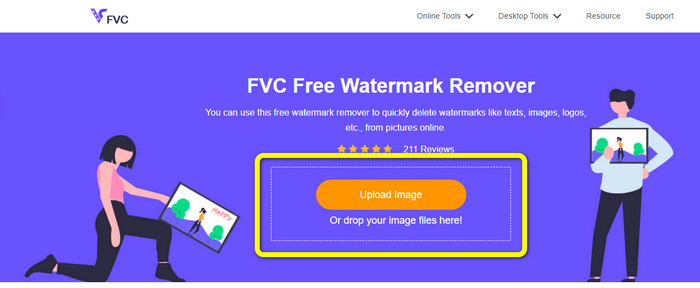
Adım 1: Tarayıcınızı açın ve FVC Free Watermark Remover web sitesini ziyaret edin. Ardından, Upload Image düğmesini seçin ve filigranlı istediğiniz fotoğrafı yükleyin.
Adım 2: Bundan sonra, Polygonal, Lasso ve Brush gibi filigran kaldırma araçlarını kullanabilirsiniz. Ayrıca fazla vurgulamaları silmek için Eraser aracını kullanabilirsiniz. Küçük filigranları görebilmek için fotoğrafınızın altındaki büyüteç aracını kullanarak yakınlaştırma ve uzaklaştırma yapabilirsiniz.
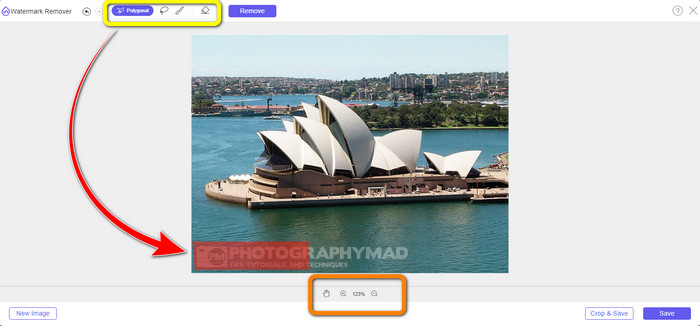
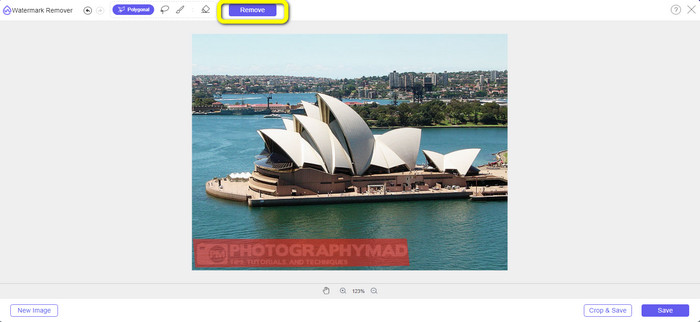
Adım 3: Bu bölümde, fotoğrafınızdaki tüm filigranları vurgulamayı bitirdiğinizde, Remove düğmesine tıklayarak bunları kaldırabilirsiniz. Ardından, kaldırma işlemini bekleyin.
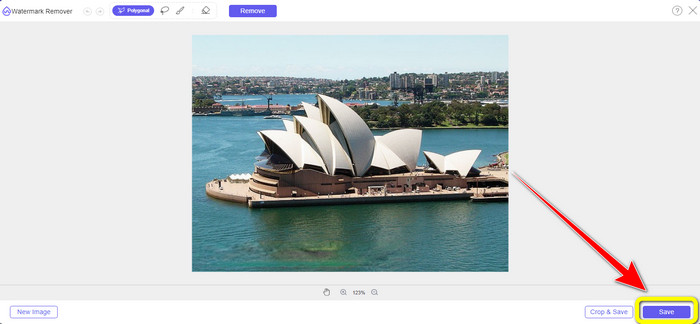
Adım 4: Artık son adıma geçebiliriz. Fotoğrafınızdaki tüm filigranları sildikten sonra, son çıktınızı indirmek için Save düğmesine tıklayın.
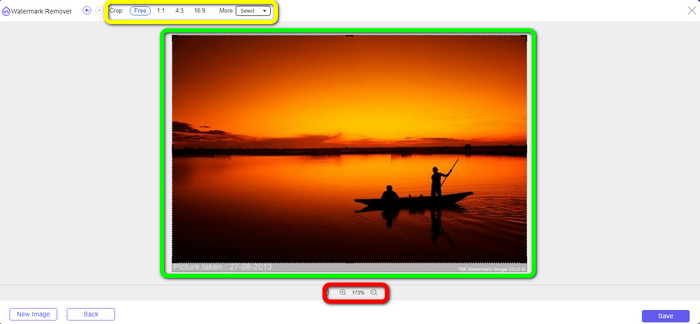
Adım 5: Filigranı kaldırmanın bir başka yolu da kırpma aracını kullanmaktır. Görsel dosyayı ekledikten sonra Crop & Save düğmesini seçin.
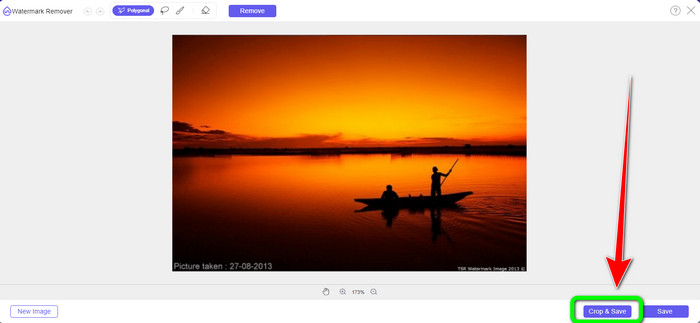
Adım 6: Bu adımda, fotoğrafın kenarlarını farenizle tıklayıp sürükleyerek fotoğrafınızı kırpabilir ve filigranları ortadan kaldırabilirsiniz. Sarı kutuda, fotoğrafınızı nasıl kırpmak istediğinize dair birçok seçeneği görebilirsiniz. Kırmızı kutuda ise fotoğrafı büyütüp küçültebilirsiniz.
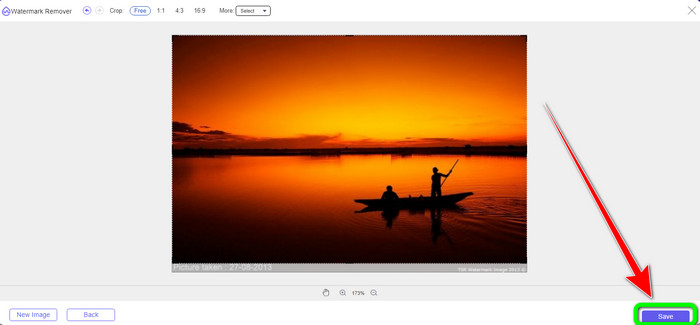
Adım 7: Son adımda, fotoğrafınızı kırpmayı bitirdiğinizde dosyayı kaydetmek için Save düğmesine tıklayın. Ardından, filigransız hâlini görmek için açabilirsiniz.
Filigran Kaldırıcı.io
Bir fotoğraftan filigran kaldırmanın bir başka, daha kolay yolu da Watermark Remover.io kullanmaktır. Bu çevrim içi uygulama, Pixlr’dan çok daha basittir. Oldukça sade bir arayüze ve temel adımlara sahiptir; yeni bir kullanıcı bile bunu kolayca kullanabilir. Ayrıca aynı anda birden fazla filigranı kaldırabilir. En iyi yanı ise çok renkli filigranları desteklemesidir; yani filigranların rengi farklı olsa bile, bunları anında kaldırabilir.
Ancak ne yazık ki, Watermark Remover.io sınırlı özelliklere sahiptir. Bir ayda yükleyebileceğiniz maksimum resim yalnızca 50 resimdir. Ayrıca sadece 25 GB depolama sunabiliyor ki bu da yeterli değil. Ayrıca, bu uygulamanın iyi performans göstermesini istiyorsanız, hızlı bir internet bağlantınızın olması gerekir.
Filigranları fotoğrafınızdan silmek için aşağıdaki adımları izleyin.
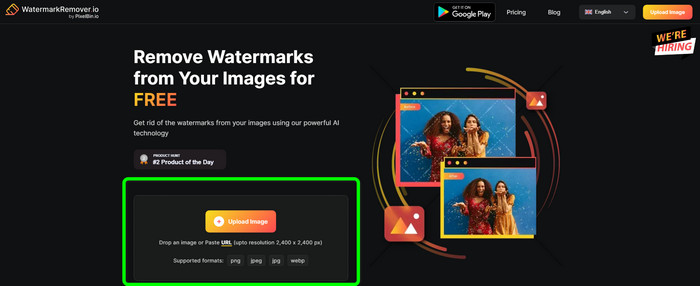
Adım 1: Tarayıcınızı kullanarak Watermark Remover.io web sitesini ziyaret edin. Ardından, Upload Image düğmesine tıklayın. Filigranları fotoğrafınızdan otomatik olarak kaldıracaktır; bu yüzden işlemin tamamlanmasını bekleyin.
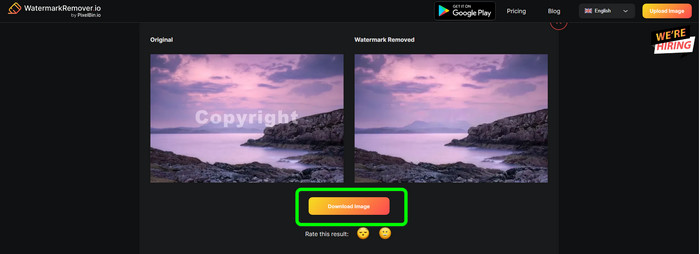
Adım 2: Fotoğrafınızdaki filigranlar tamamen kaybolduğunda, bilgisayarınıza kaydetmek için Download Image düğmesine tıklayın. Bu aracı, fotoğraflardan Alamy filigranlarını kaldırmak için de kullanabilirsiniz.
3. Bölüm: Pixlr Kullanarak Filigranları Kaldırma Hakkında SSS
1. En iyi ücretsiz filigran sökücü hangisidir?
Kullanabileceğiniz en iyi ücretsiz filigran kaldırıcı, FVC Free Watermark Remover’dır. Bu uygulama, fotoğrafınızdan tek kuruş ödemeden tüm rahatsız edici nesneleri ortadan kaldırabilir.
2. Pixlr'da nasıl filigran eklerim?
Pixlr hesabınıza giriş yapmalısınız. Ardından “Pixlr Editor”a gidin ve başlatın. Bundan sonra, "Yeni Resim Oluştur" u tıklayın. O zaman zaten fotoğrafınızda bir filigran oluşturabilir ve fotoğrafınızın yüksekliğini ve genişliğini ayarlayabilirsiniz.
3. Pixlr yasal bir araç mı?
Kesinlikle evet! Pixlr meşru bir uygulamadır. Tüm özelliklerinin kullanılmasına izin verilir ve yetkilendirilir. Böylece bu çevrimiçi uygulamayı endişelenmeden çalıştırabilirsiniz.
Sonuç
Filigransız bir fotoğraf görmek gerçekten tatmin edici, değil mi? Bu, bu makalenin size Pixlr kullanarak filigran kaldırmayı göstermesinin en önemli sebebidir. Ayrıca, daha kolay yöntemlere sahip diğer çevrim içi araçları da tanıttık. Ancak kullanışlı ve pratik bir yazılım isterseniz, FVC Free Watermark Remover kullanabilirsiniz.
-
 PNG Görüntülerinden Filigranları Kaldırmanın En İyi 3 Yolu
 Filigranları PNG'den çevrimiçi olarak kaldırmak için bu en iyi üç yöntemi keşfedin. Bu gönderiyi okuyun ve görüntülerinizi düzgün ve izleyicilerinizin gözünde daha hoş hale getirin.
-
 JPG Online'dan Filigranı Kaldırmanın Basit Yolları
 Etkili uygulamaları kullanarak çevrimiçi olarak JPG'den filigranların nasıl kaldırılacağına ilişkin en iyi taktikleri keşfedelim. Prosedürleri öğrenmek için bu makaleyi takip edin.
-
 iFunny Filigranlarını Kolayca Kaldırmak için Eksiksiz Kılavuzlar
 Sizin için en olağanüstü iFunny filigran sökücüyü keşfedin. Ayrıca, fotoğraflarınızdan iFunny filigranlarını kaldırmak için bu basit yöntemleri öğrenin.
