


 Video Dönüştürücü Ultimate
 Ekran kaydedicisi
 Video Onarımı
 Güvenli İndirme
Fotoğraftaki Filigranları Kaldırmanın Olağanüstü Yolları
Fotoğraflardan filigranları nasıl kaldıracağınızı öğrenmek mi istiyorsunuz? Ancak bazen kaydetmek istediğiniz resimlerde, göze rahatsızlık veren ve görüntülerin tüm güzelliğini görmenizi engelleyen filigranlar bulunur. Neyse ki, bilgisayarınızda, iPhone’unuzda ve Android cihazınızda bu gereksiz filigranları kaldırmak için yazılım uygulamaları kullanabilirsiniz. Bu şekilde, filigran temizleme özelliğine sahip bu uygulamaları kullanarak istediğiniz fotoğrafları kaydedebilirsiniz. Filigranları kaldırmanın kolay yöntemleri hakkında daha fazla bilgi edinmek için bu makaleyi okumak en iyi seçimdir.

Bölüm 1. Bilgisayarınızdaki Fotoğraftan Filigran Nasıl Kaldırılır
1. FVC Ücretsiz Filigran Sökücü
Bir fotoğraftan filigranı çevrimiçi ve ücretsiz olarak kaldırmak istiyorsanız, FVC Free Watermark Remover uygulamasını kullanabilirsiniz. Bu uygulama, logolar, metinler, görseller ve daha fazlası gibi fotoğraflarınızdaki her türlü filigranı kaldırmanıza yardımcı olabilir. Ayrıca JPG, PNG, JPEG, BMP ve daha birçok farklı görüntü formatını destekler. Dahası, sade arayüzü, ayrıntılı rehberi ve basit düğmeleri sayesinde kullanımı ve anlaşılması kolaydır. Filigranları fiilen kaldırma açısından FVC Free Watermark Remover, fare ile bir çokgen çizgisi veya kement çizerek kaldırmak istediğiniz filigranı seçmenize olanak tanır. Fırça aracı da fotoğraflarınızdan filigranları yok etmek için başka bir seçenektir. Fotoğraftan filigranı ücretsiz kaldırmak istiyorsanız, aşağıdaki basit adımları izleyin.
Adım 1: FVC Free Watermark Remover web sitesine gidin ve Upload Image düğmesine tıklayın. Ardından, filigranını kaldırmak istediğiniz görüntüyü ekleyin.

Adım 2: Filigranlı görüntünüzü açtıktan sonra, filigranları kaldırmak için Polygonal tool, Lasso ve Brush aracı gibi filigran kaldırma seçeneklerini kullanabilirsiniz.
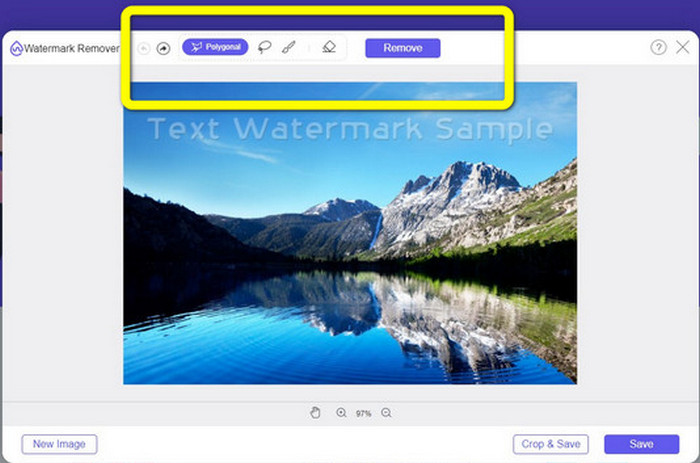
Adım 3: Brush, Lasso veya Brush aracını kullanarak fotoğrafınızdaki filigranları işaretleyin.
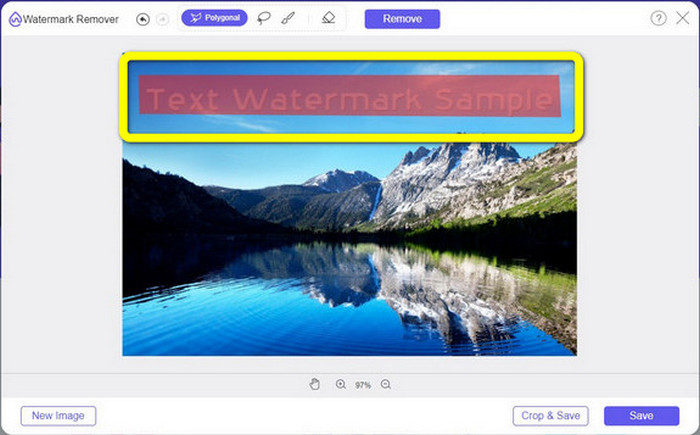
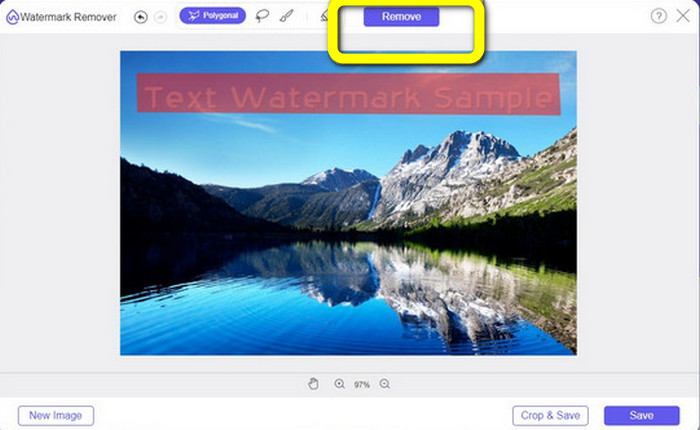
Adım 4: Fotoğrafınızdaki filigranları işaretlemeyi bitirdiğinizde Remove düğmesine tıklayın.
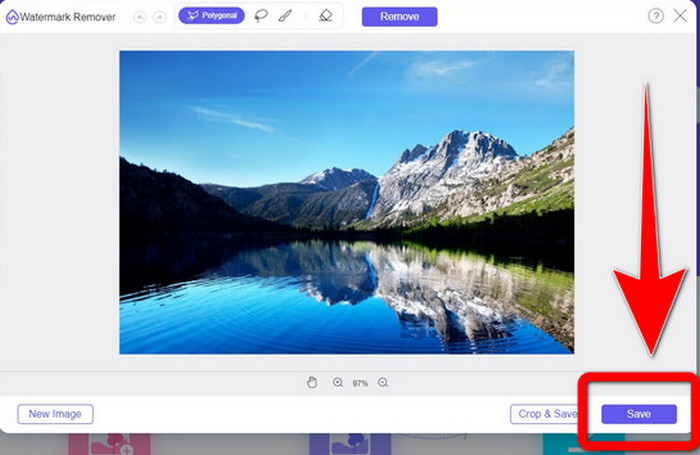
Adım 5: Fotoğrafınızdaki filigran kaldırıldıktan sonra görüntünüzü indirmek için Save düğmesine tıklayın ve artık fotoğraflarınıza filigranlardan rahatsız olmadan keyifle bakabilirsiniz.
2. Photoshop
Bilgisayarınıza indirmek için mükemmel ve güvenilir bir uygulama da arıyorsanız, Adobe Photoshop kullanabileceğiniz en güvenilir uygulamalardan biridir. Bu bölümde, Photoshop’un fotoğraflardan filigranları nasıl kaldırdığını göreceksiniz. Bu uygulama fotoğrafçılar, web tasarımcıları, grafik tasarımcıları, mizah içerik üreticileri vb. için uygundur. Ancak Adobe Photoshop’u satın almanız gerekir, çünkü yalnızca 7 günlük ücretsiz deneme sunar. Ayrıca, Photoshop çoklu fotoğraf işlemleri için uygun değildir ve karmaşık bir öğrenme sürecine sahiptir. Görsellerinizdeki filigranları en basit şekilde kaldırmak istiyorsanız, aşağıdaki adımları izleyin.
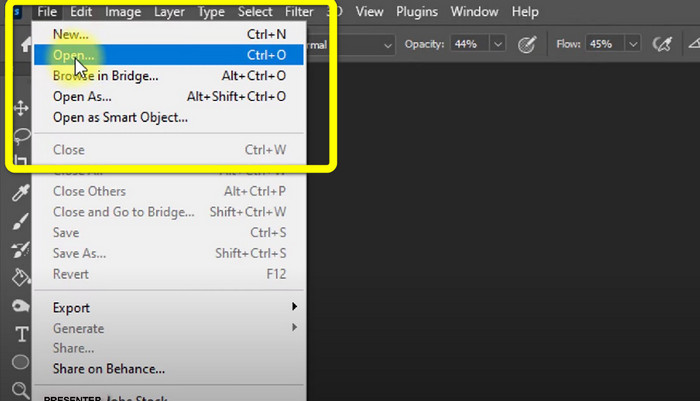
Adım 1: Adobe Photoshop uygulamanızı açın. File > Open seçeneğini belirleyin ve filigranlı fotoğrafınızı ekleyin.
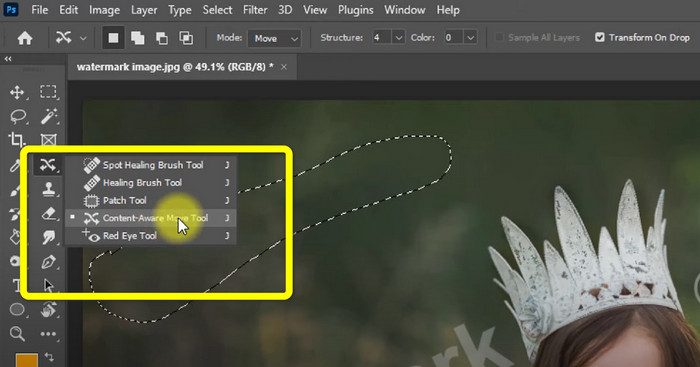
Adım 2: Düzenleme araçlarından Content-Aware Move Tool aracına tıklayın.
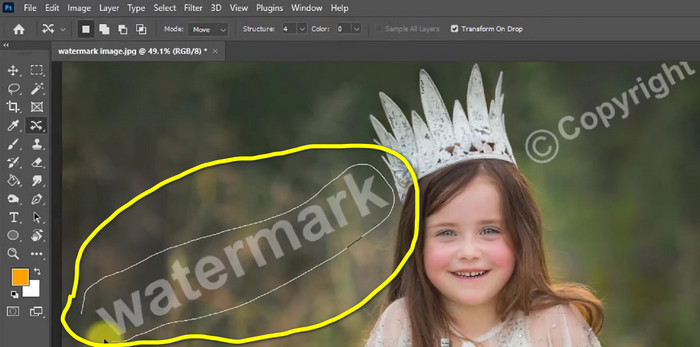
Adım 3: Content-Aware Move Tool aracına tıkladıktan sonra, fotoğrafınızdaki filigran alanını seçin ve klavyenizden Delete tuşuna basın.
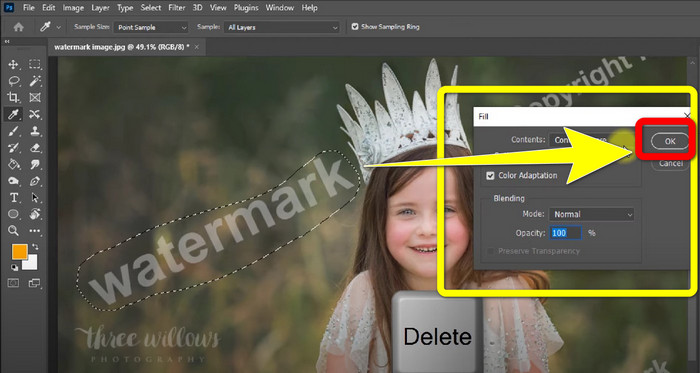
Adım 4: Delete tuşuna bastıktan sonra küçük bir arayüz daha açılacaktır, burada OK düğmesine tıklayın.
3. GIMP
Fotoğraflarınızdaki filigranları kaldırmak için kullanabileceğiniz bir diğer uygun uygulama GIMP’tir. Görüntüleri düzenlemek ve değiştirmek için kullanılan, açık kaynaklı bir raster grafik düzenleyicisidir ve bu da onu görüntü düzenleme için kullanışlı bir araç yapar. Ayrıca JPG, PNG, TIFF, GIF ve daha fazlası gibi birçok dosya formatını destekler. Ancak, bazen aniden çökebilir ve katmanları düzenlemek de zordur. GIMP kullanarak fotoğraflarınızdaki filigranları nasıl kaldıracağınızı öğrenmek istiyorsanız, aşağıdaki adımları izleyin.
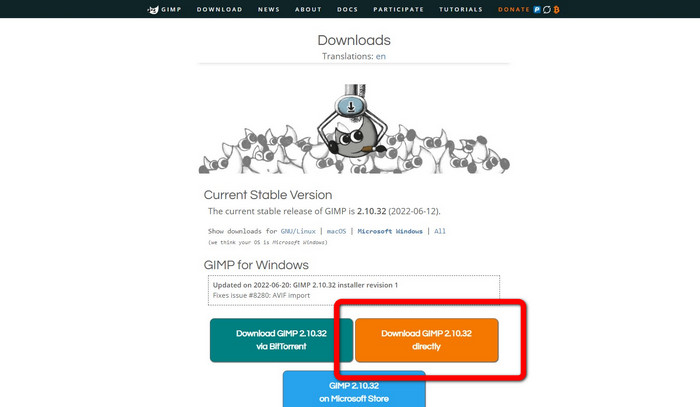
Adım 1: GIMP web sitesindeyseniz, uygulamayı indirmek için Download Directly seçeneğine tıklayın ve kurulum sürecini takip edin.
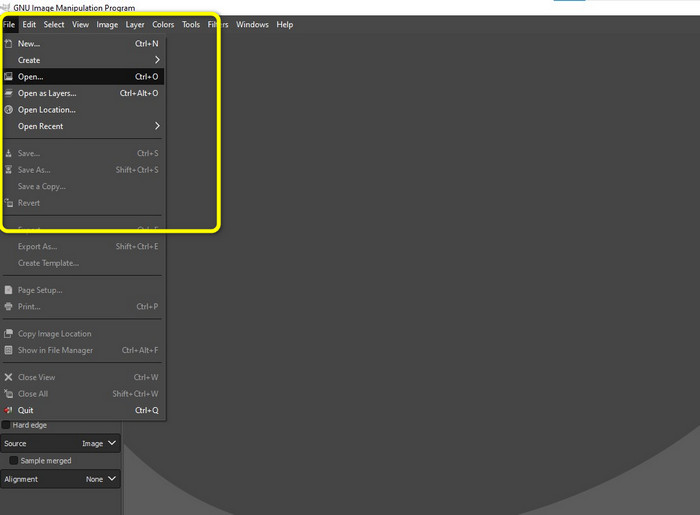
Adım 2: Uygulamayı açın ve filigranlı fotoğrafınızı eklemek için File > Open seçeneğine tıklayın.
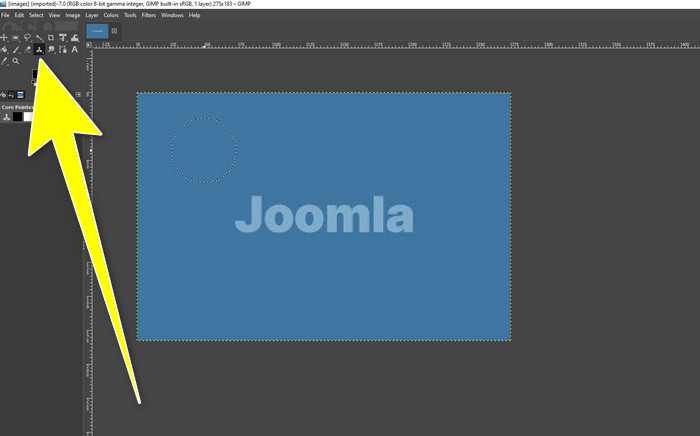
Adım 3: Clone tool aracına tıklayın ve imleci boş bir alana getirin. Ctrl tuşuna basın ve boş alana tıklayın.
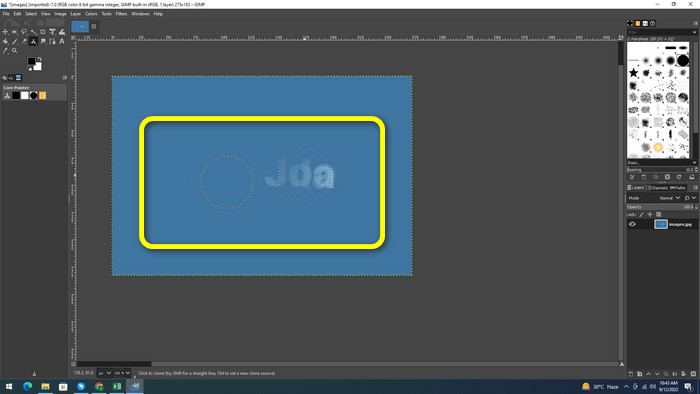
Adım 4: İmlecinizi filigranların üzerinden Drag yaparak sürükleyin, böylece filigranları kaldırın. Filigranınız artık yok. Artık fotoğrafınızı kaydedebilirsiniz.
4. Aiseesoft Ücretsiz Çevrimiçi Filigran Sökücü
En iyi çevrimiçi fotoğraf filigran kaldırıcıyı istiyorsanız, Aiseesoft Free Watermark Remover Online tam size göre. Bu uygulama, fotoğraflarınızdaki birden çok filigranı, metni, tarih damgalarını, logoları ve daha fazlasını kaldırmanıza yardımcı olabilir. Ayrıca kullanımı kolaydır ve bu da onu yeni başlayanlar için mükemmel kılar. PNG, JPEG, BMP, JPG ve daha fazlası gibi çeşitli görüntü formatlarını destekler. Ancak bu uygulama tamamen ücretsiz değildir; gelişmiş özelliklerden yararlanmak için lisans satın almanız gerekir. Görsellerinizdeki filigranları kaldırmak istiyorsanız, şu adımları izleyin.
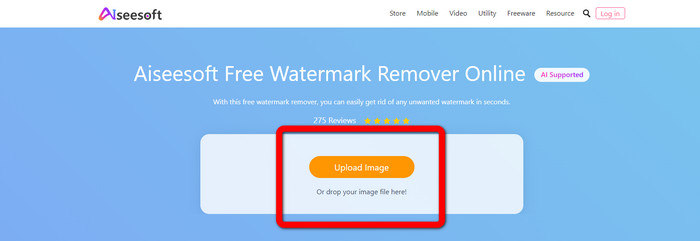
Adım 1: Aiseesoft Free Watermark Remover Online web sitesine gidin. Ardından filigranlı fotoğrafınızı eklemek için Upload Image düğmesine tıklayın.
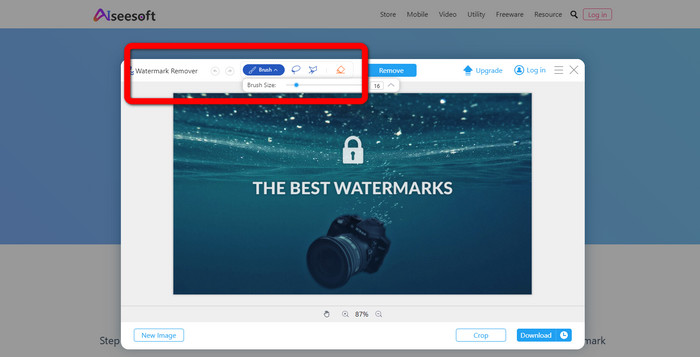
Adım 2: Fotoğrafınızı zaten eklediyseniz, watermark remover tool bölümüne geçin. Ardından Brush, Polygonal ve Lasso gibi kaldırma araçlarını görebilirsiniz.
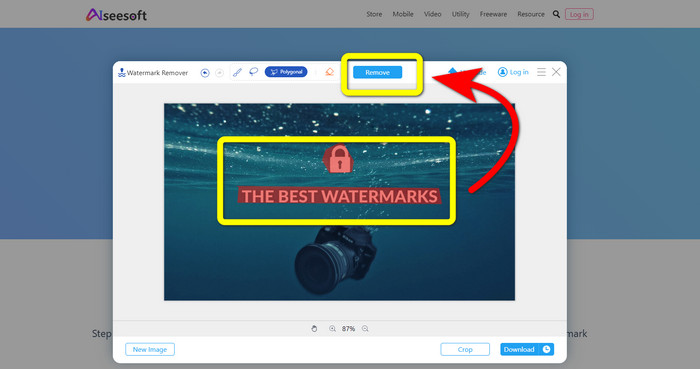
Adım 3: Bu araçları kullanarak fotoğrafınızdaki filigranları highlight edin ve Remove düğmesine tıklayın.
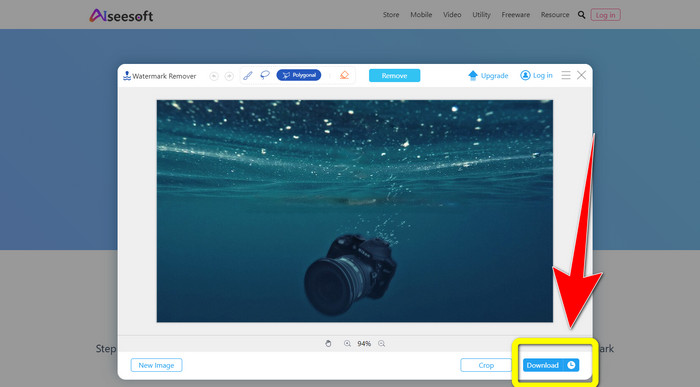
Adım 4: Sonuçtan memnunsanız, fotoğrafınızı kaydetmek için Download düğmesine tıklayın.
5. Piksel
Pixlr, fotoğraflarınızdaki filigranları kaldırmak için kullanabileceğiniz bir başka çevrimiçi araçtır. Kullanımı kolaydır ve yeni başlayanlar için uygundur. PSD, PNG, JPEG, WEBP ve PXZ gibi farklı görüntü formatlarını destekler. Ayrıca bu uygulamayı iPhone, Android, Masaüstü ve Dizüstü gibi cihazlarınızda kullanabilirsiniz. Ancak, diğer uygulamalar kadar çok seçeneği yoktur ve efektleri sınırlıdır. Bir resimdeki filigranı nasıl sileceğinizi öğrenmek istiyorsanız, aşağıdaki adımları izleyin.
Adım 1: Pixlr web sitesine gidin. Filigranlı resmi eklemek için Open Image düğmesine tıklayın.

Adım 2: Fotoğrafınızı ekledikten sonra, retouch > heal aracına gidin.
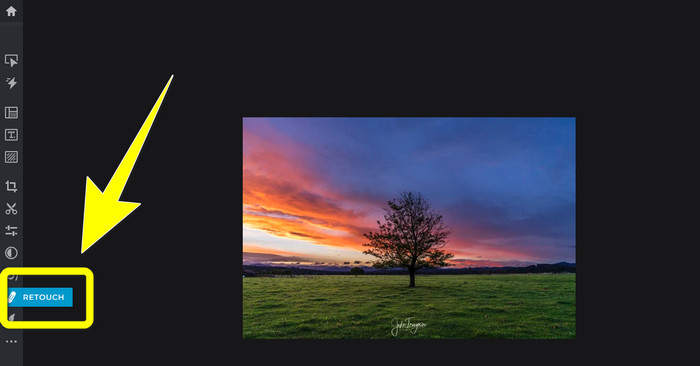
Adım 3: retouch > heal aracına tıkladıktan sonra, görüntünüzdeki filigrana tıklayın.
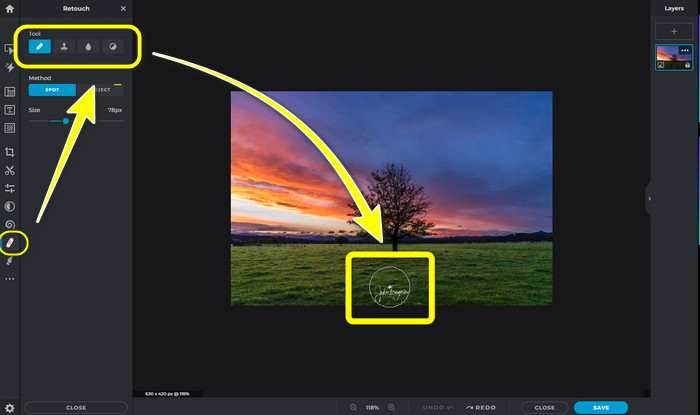
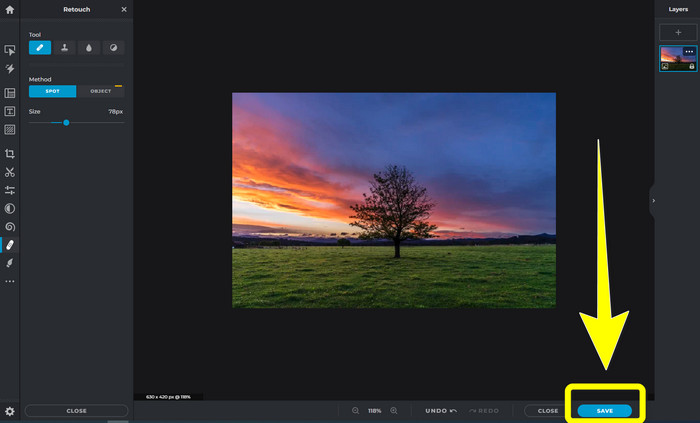
Adım 4: Filigran kaybolduysa, Save düğmesine tıklayın.
6. Boyalı
Inpaint, görsellerinizdeki filigranları kaldırmak istediğinizde kullanabileceğiniz bir diğer çevrimiçi uygulamadır. Yalnızca filigranları değil, logoları ve metinleri de kaldırabilir. JPG, PNG ve WEBP gibi görüntü formatlarını da destekler. Ancak yüksek kaliteli görüntüler elde etmek istiyorsanız uygulamayı satın almanız gerekir. Fotoğraflarınızdaki filigranları kaldırmak istiyorsanız, aşağıdaki basit adımları izleyin.
Adım 1: Inpaint web sitesine gidin. Upload Image düğmesine ve filigranlı görüntünüze tıklayın.
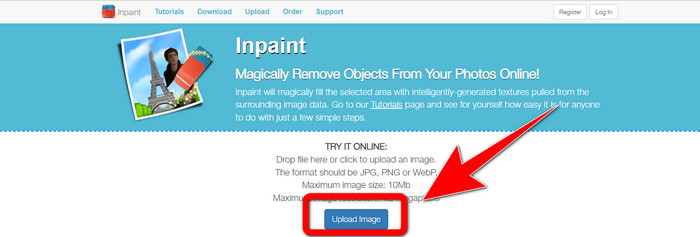
Adım 2: Görüntünüzü yüklediğinizde, Marker, Polygonal, Lasso ve Eraser tool gibi watermark remover tools seçeneklerini belirleyin ve fotoğrafınızdaki filigranları işaretleyin.
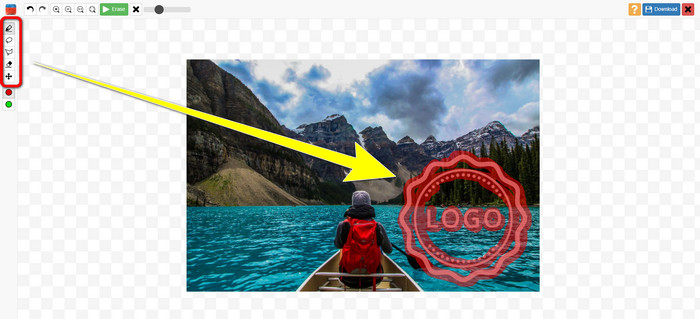
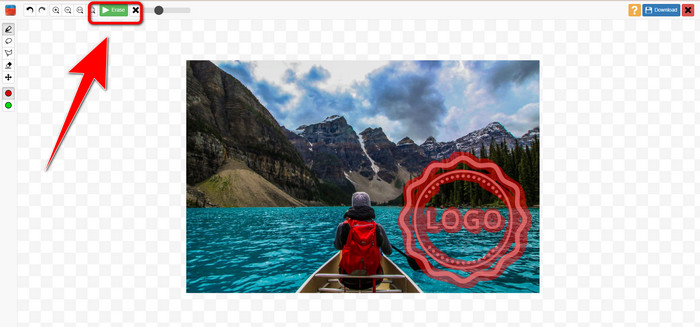
Adım 3: Filigranları işaretlemeyi bitirdiğinizde Erase düğmesine tıklayın.
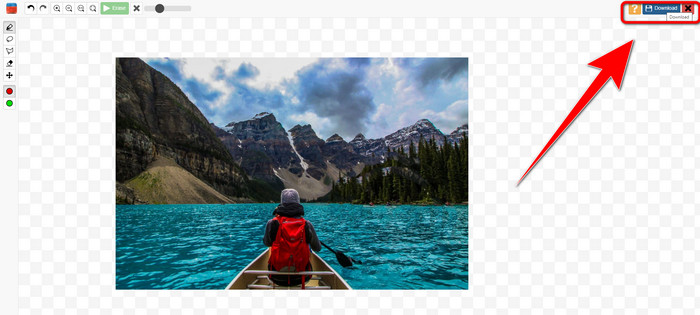
Adım 4: Filigran kaybolduysa, görüntünüzü kaydetmek için Download düğmesine tıklayın.
7. Fotoğraf Damgası Sökücü
Photo Stamp Remover, bilgisayarınızla birlikte kullanabileceğiniz bir uygulamadır. Ücretsiz olarak indirebilirsiniz. Bu uygulama, resimlerinizdeki logolar, metinler, filigranlar ve tarihler gibi gereksiz nesneleri hızla kaldırabilir. Ancak, karmaşık arka plana sahip resimlerde iyi performans göstermez. Ayrıca, bu yazılım orijinal fotoğrafın renklerini ve dokusunu filigranları kaplayacak şekilde geri yükleyerek orijinal görünmesini sağlayabilir. Resimlerinizdeki filigranları kaldırmak için bu adımları izleyin.
Adım 1: Windows bilgisayarınıza Photo Stamp Remover indirmek için Download düğmesine tıklayın ve kurulum sürecini takip edin.
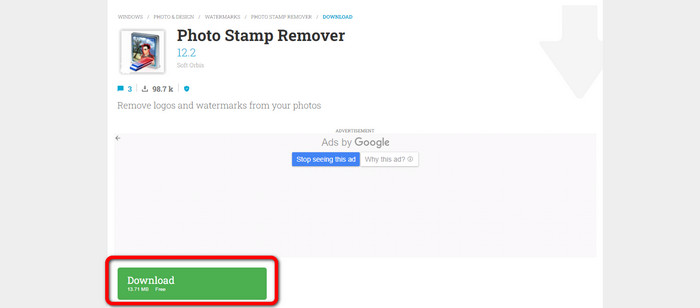
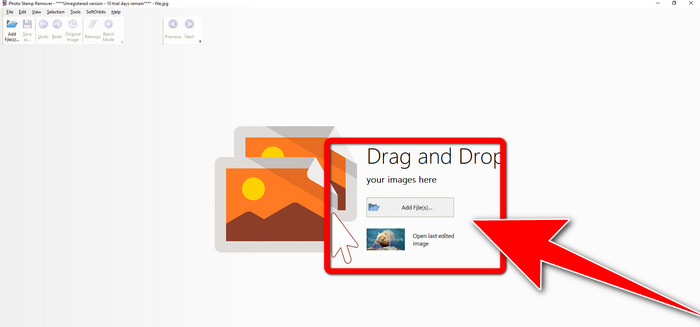
Adım 2: Uygulamayı başlatın ve filigranlı fotoğrafınızı eklemek için Add File düğmesine tıklayın.
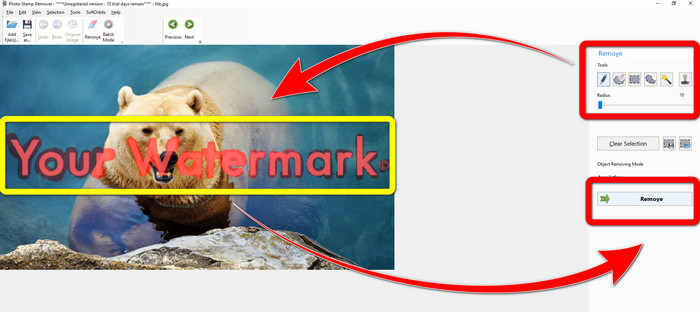
Adım 3: Remover tools bölümüne gidin ve Selection Marker aracına tıklayın. Filigranları işaretleyin ve Remove düğmesine tıklayın.
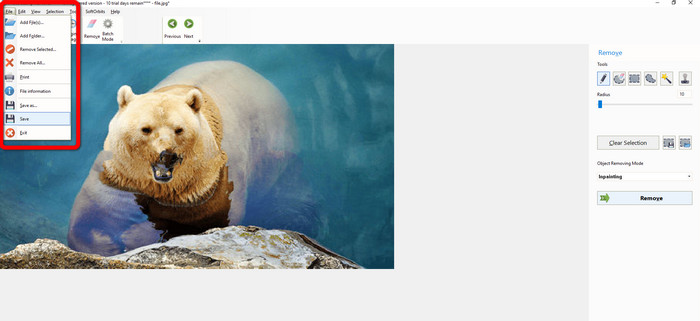
Adım 4: Görüntünüzdeki filigranları kaldırdıysanız, File > Save seçeneğine tıklayın. Böylece görüntünüzdeki filigranları kaldırma işlemini tamamlamış olursunuz.
Bölüm 2. iPhone ve Android'de Fotoğraftan Filigran Nasıl Kaldırılır
1. Video Silgisi
Android kullanarak bir fotoğraftan filigranları nasıl kaldıracağınızı öğrenmenize yardımcı olacak bir uygulama arıyorsanız, Video Eraser tam size göre. Bu uygulama, fotoğraflarınızdaki metin, filigran vb. gereksiz nesneleri kaldırabilir. Ayrıca bu uygulama ile videolarınızdaki filigranları da silebilirsiniz. Ancak, filigranın silindiği bölgede resim lekeli görünebilir. Video Eraser’ı nasıl kullanacağınızı öğrenmek istiyorsanız, aşağıdaki adımları izleyin.
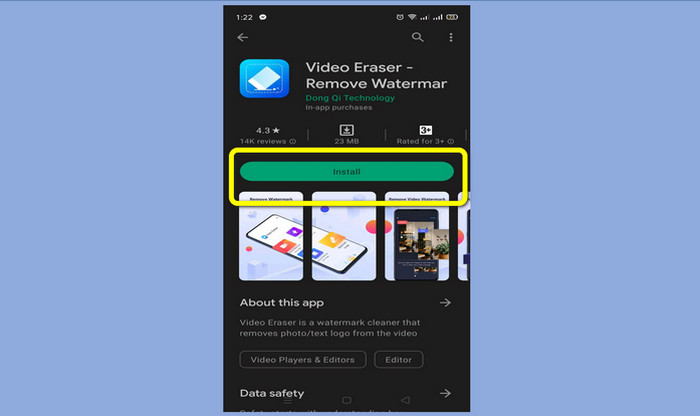
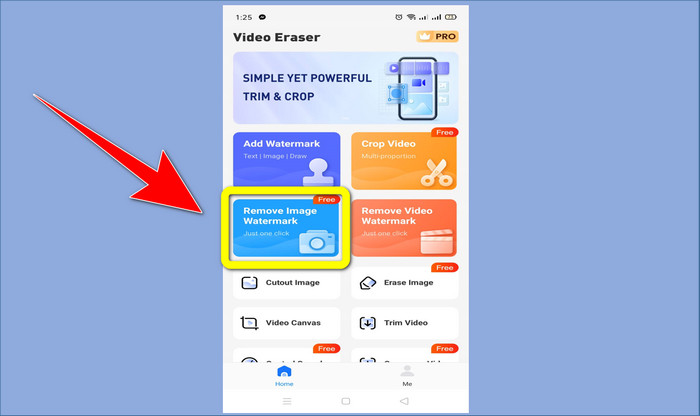
Adım 1: Android cihazınıza Video Eraser uygulamasını yükleyin. Kurulum tamamlandığında uygulamayı açın.
Adım 2: Filigranlı fotoğrafınızı eklemek için Remove Image Watermark seçeneğine tıklayın.
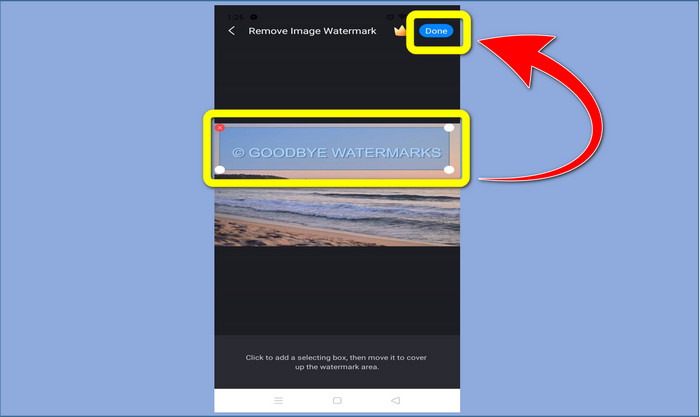
Adım 3: Fotoğrafınızdaki filigranı işaretleyin ve Done düğmesine tıklayın.
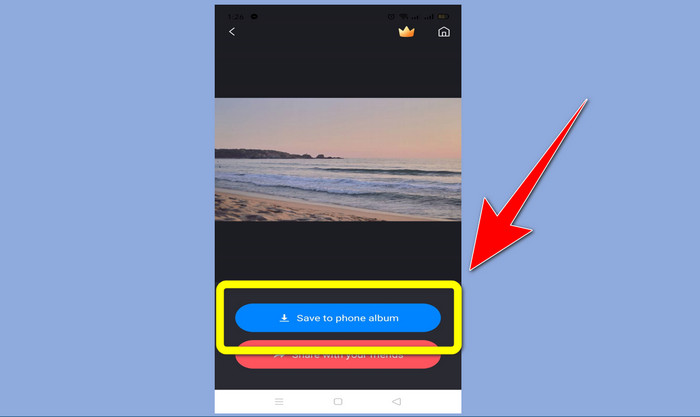
Adım 4: Done düğmesine tıkladıktan sonra filigran kaybolacaktır. Fotoğrafınızı kaydetmek için Save to Photo Album seçeneğine tıklayın.
2. Snapseed
Snapseed, özellikle iPhone’da bir fotoğraftan filigranı nasıl kaldıracağınızı öğrenmek istediğinizde kullanabileceğiniz mükemmel bir düzenleyicidir. Bu uygulama, görsellerinizdeki filigranları kaldırmak istiyorsanız çok işinize yarar. Ayrıca kırpma, döndürme ve daha fazlası gibi kullanabileceğiniz çeşitli düzenleme araçlarına sahiptir. Yine de, özellikle ileri düzey düzenleme açısından yeni başlayanlar için çok uygun değildir ve kullanıcı dostu olmasına rağmen hafif bir öğrenme süreci gerektirir. Bu uygulamayı kullanarak fotoğrafınızdaki filigranları kaldırmak için aşağıdaki adımları izleyin.
Adım 1: iPhone’unuza Snapseed uygulamasını yükleyin. Kurulum tamamlandığında yazılımı açın.
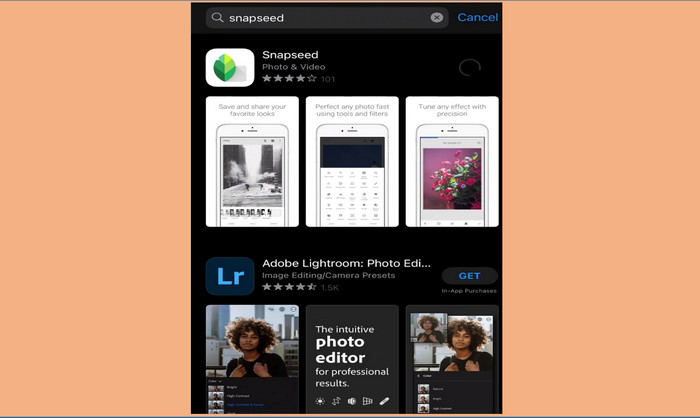
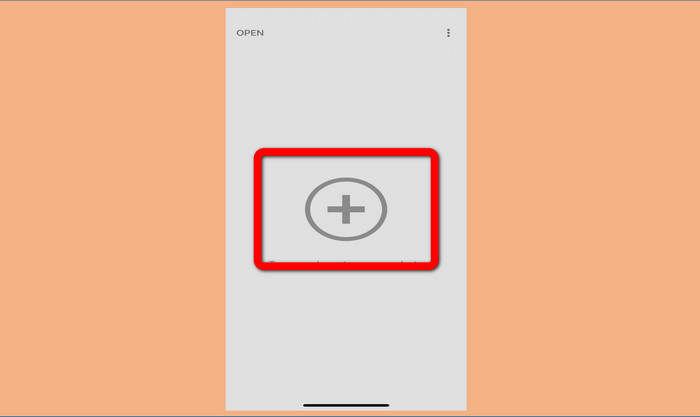
Adım 2: Filigranlı fotoğrafınızı eklemek için Plus sign düğmesine tıklayın.
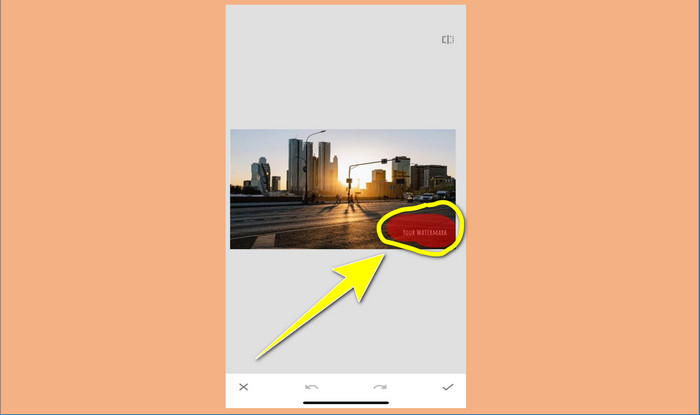
Adım 3: Fotoğrafı ekledikten sonra Tools > Healing seçeneğini belirleyin ve görüntünüzdeki filigranları işaretleyin. Filigranları işaretledikten sonra otomatik olarak kaybolacaktır.
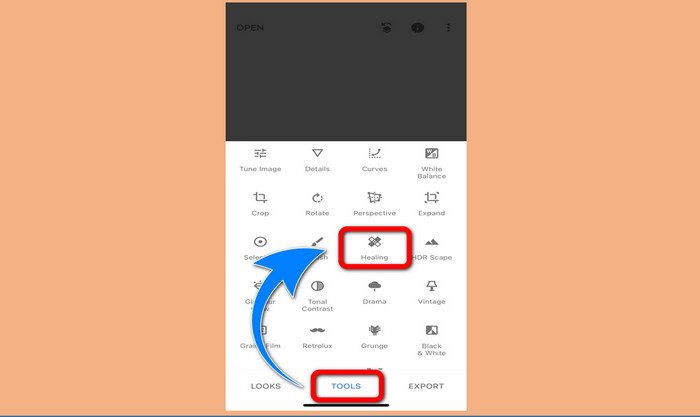
Adım 4: Filigranları işaretledikten sonra otomatik olarak kaybolacaklardır.
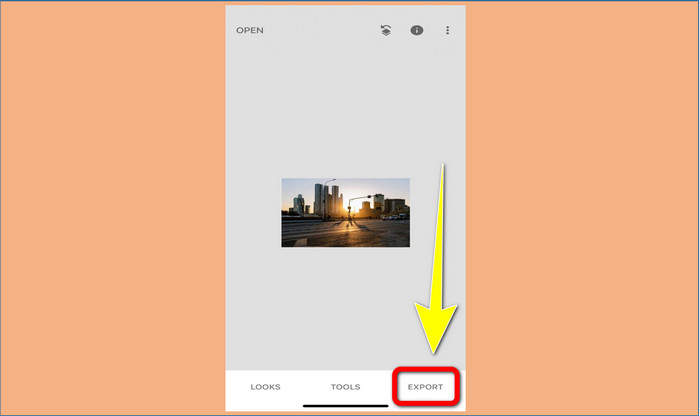
Adım 5: Fotoğrafınızdaki filigranları kaldırmayı bitirdiğinizde, resminizi iPhone’unuza kaydetmek için Check işaretine ve ardından Export seçeneğine tıklayın.
İlgili:
Videodan Adobe Stock Filigranını Kaldırmanın En Hızlı Yöntemi [ Eğitim ]
Bir Videodan Filigranı Profesyonelce Kaldırmanın 5 Yolu
Bölüm 3. Fotoğraflardan Filigranları Kaldırma Hakkında SSS
Özellikle Mac için ücretsiz olarak kullanabileceğim bir filigran sökücü var mı?
Evet, var! Mac’inizde FVC Free Watermark Remover gibi birçok filigran kaldırıcı kullanabilirsiniz. Bu, Mac’inizdeki filigranları kaldırmak için kullanılan çevrimiçi bir uygulamadır.
Bir videodan filigranları kaldırmanın bir yolu var mı?
Kesinlikle! Yapması kolay bir şey. Artık kullanabileceğiniz bazı filigran temizleme uygulamaları, fotoğraf ve videolardaki filigranları kaldırabilir. Tek yapmanız gereken arama kutusunda filigran kaldırıcıyı aramak ve sonuç sayfasını görmek.
Filigranları kaldırmak kolay mı?
Evet elbette! Kullanacağınız uygulamaya zaten sahipseniz, fırça, işaretleyici, kement ve çokgen araçlar gibi temizleme araçlarını aramanız gerekir. Ardından filigranları vurgulayın ve tamamlayın.
Sonuç
Yukarıda gösterildiği gibi, bu makale fotoğraflardan filigranları kaldırmanın dikkate değer yollarını sunmaktadır. Ancak, filigranları kaldırmak için kullanabileceğiniz mükemmel bir araç istiyorsanız, FVC Free Watermark Remover sizin için en iyi seçenektir.
-
 Power Director Filigranından Ücretsiz Olarak Nasıl Kurtulursunuz [Tamamlandı]
 Power Director filigranından ücretsiz olarak nasıl kurtulurum? Filigranı ortadan kaldırmak için en iyi araçlar burada, bu yüzden bunları okuyarak öğrenin.
-
 Canvasjs Deneme Sürümü Filigranını Kaldırmak İçin Bilmeniz Gereken En İyi Teknikler
 Canvasjs filigranını kaldırmanın en iyi yolu bir araç kullanmanız gerekecek. Bir araç seçmediyseniz, bu makalede seçebilirsiniz.
-
 Animaker Filigranı Maliyetsiz Nasıl Kaldırılır [ Kanıtlanmış Yollar ]
 Animaker filigranı nasıl kaldırılır? Bu blogda listelediğimiz en iyi araçlarla filigrandan kurtulmak için bunları kullanabilirsiniz.
