


 Video Dönüştürücü Ultimate
 Ekran kaydedicisi
 Video Onarımı
Apple Cihazları için MP3'ü M4R'ye Dönüştürmenin En Uygun Yolları
iPhone'unuzda en sevdiğiniz müziği zil sesine dönüştürmeyi hiç düşündünüz mü? Böyle bir şey mümkün mü? Elbette mümkün. Bunun için tek yapmanız gereken dosyayı dönüştürmek. Peki neden önce dönüştürmemiz gerekiyor? Çünkü onu zil sesi olarak ayarlayabilelim mi? Asıl sebep, belirli bir dosyayı şarkı zil sesi olarak ayarlamak için dosyanın M4R formatında olması gerektiğidir. Öyleyse size uygun en iyi MP3’ten M4R’a iTunes dönüştürücüsünü bulmanız gerekiyor. Bu makale, MP3 dosyanızı nasıl dönüştürebileceğinize dair farklı yöntemler sunuyor; ayrıca aşağıdaki içeriği okuyarak toplu halde MP3’ü M4R’a dönüştürme işlemini nasıl yapacağınızı da öğrenebilirsiniz.

Bölüm 1. MP3'ü M4R'ye Dönüştürmenin En Uygun Yolu
Video Converter Ultimate, MP3'ü M4R'ye dönüştürmek için kullanabileceğiniz açık ara en inandırıcı araçtır. Sadece tek bir dosya değil, MP3'ten MP4'e toplu dönüştürme de yapabilir HD videolar ve kayıpsız ses üretebilen bir dönüştürücüdür. Aslında, dosyayı orijinal kalitesini kaybetmeden dönüştürmek için idealdir ve önerilir. Hız, oradaki normal dönüştürücüden 30 kat daha hızlıdır. Ayrıca, telefonunuza kaydetmek için bir çalma listesini dönüştürüyorsanız, kesinlikle bu araç işi sizin için yapabilir. Zahmetsiz ve ter yok. Bu arada, sesi dönüştürmenin yanı sıra keyfini çıkarabileceğiniz diğer özelliklerden bazıları burada. Ayrıca, kullanmaya karar verirseniz referans olması için aşağıda adım adım bir kılavuz yazılmıştır.
◆ Meta verileri düzenleyin.
◆ Yüksek Hızlı GPU hızlandırma.
◆ Gerçek zamanlı teknik destek.
◆ Video sıkıştırma desteklenir.
Adım 1. Kullanmak için aşağıdaki indirme düğmesine tıklayarak uygulamayı edinin. Uygulamayı Windows veya Mac’inize indirdikten sonra başlatın.
Ücretsiz İndirWindows 7 veya üstü içinGüvenli İndirme
Ücretsiz İndirMacOS 10.7 veya üstü içinGüvenli İndirme
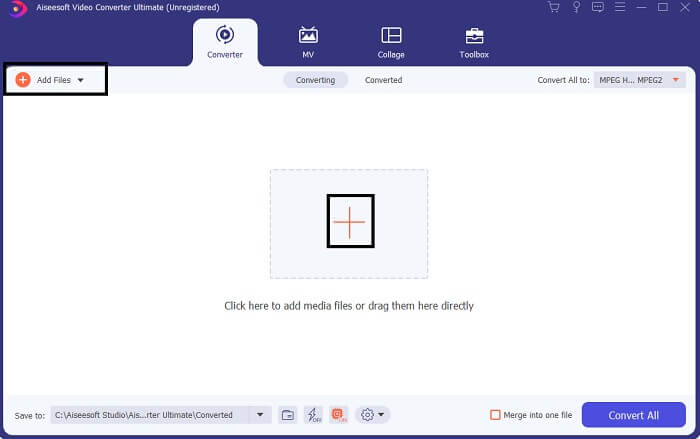
Adım 2. Aracın ana arayüzünde dosya yüklemek için iki seçenek göreceksiniz. Ortadaki Artı İşareti simgesine tıklayabilir veya sol üst kısımdaki Dosya Ekle düğmesine basabilirsiniz. Hedef dosyayı seçin ve yükleyin.
Adım 3. İstediğiniz çıktıyı almak için, arayüzün sağ üst tarafında bulunan açılır menüye tıklayarak formatı değiştirin.
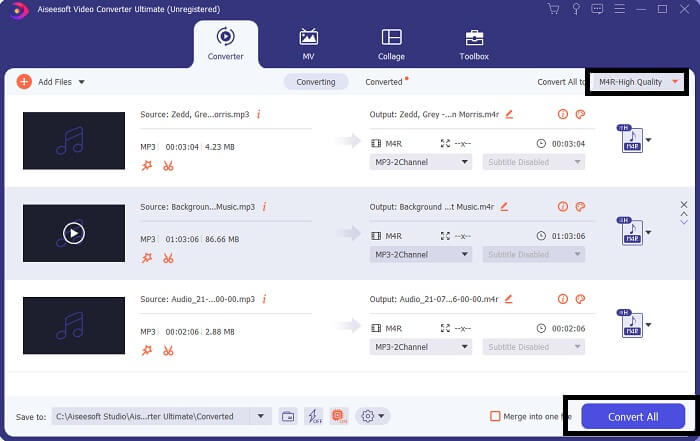
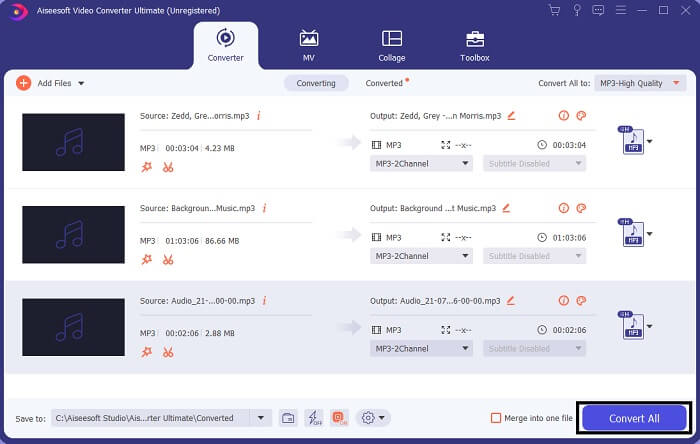
Adım 4. Son olarak, ana arayüzün sağ alt kısmındaki Tümünü Dönüştür düğmesine tıklayın. Ardından dosyanın dönüştürülmesini bekleyin.
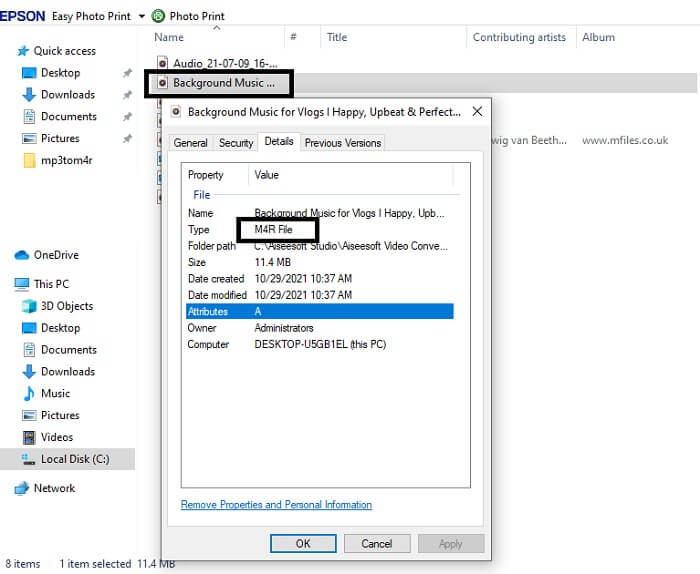
Adım 5. Son olarak, ses çıktısının kaydedildiği klasörü açın ve dosyayı iPhone’unuza aktarın. Bunu yapmak için bir aktarım aracı veya uygulaması kullanabilirsiniz. İnternette bu konuda öneriler bulabilirsiniz. Sadece aramanız yeterli; ardından iPhone’unuzda zil sesi olarak ayarlama sürecini uygulayabilirsiniz.
Bölüm 2. MP3'ü Çevrimiçi Olarak M4R'ye Dönüştürmek İçin En İyi Araçlardan Bazıları
FVC Ücretsiz Çevrimiçi Ses Dönüştürücü
Ücretli bir dönüştürme aracı iyi olabilir ama pratik bir araç gibisi yoktur. İhtiyaçlarınızı göz önünde bulundurarak FVC, aracın ücretsiz bir sürümünü oluşturdu. FVC Free Audio Converter, her zaman ve her yerden ücretsiz erişebileceğiniz bir araçtır. Tek ihtiyacınız olan çalışan bir internet bağlantısı ve desteklenen bir tarayıcıdır. Bu MP3’ten M4R’a iPhone zil sesi dönüştürücü, yüksek kaliteli, kayıpsız ses üretebilir. Çıktı tatmin edicidir ve bunun için para harcamanız gerekmez. Dahası da var; bunun toplu dönüştürme yapabildiğini biliyor muydunuz? Evet, yapabilirsiniz! Ayrıca kullanırsanız elde edeceğiniz bazı dikkat çekici özellikler de var. Öte yandan, işinizi kolaylaştırmak için bir de kullanım kılavuzu yazıldı.
◆ Dönüştürülen dosya, orijinaline benzer bir kaliteye sahiptir.
◆ 100% ücretsiz ve kullanımı güvenlidir.
◆ Dönüştürme sırasında boyut sınırı yoktur.
◆ Toplu dönüştürme desteklenir.
Adım 1. Araca erişmek için FVC Free Audio Converter’ın resmi web sitesini ziyaret edin.
Adım 2. Buradan, Dönüştürülecek Dosyalar Ekle seçeneğine tıklayın. İlk kez kullanıyorsanız, FVC Launcher’ı Aç seçeneğine tıklayarak erişim izni vermeniz gerekir. Ardından, dönüştürmek istediğiniz dosyayı bulmanızı sağlayan bir pencere ekranınızda belirecektir.
Dosyaları toplu dönüştürmek için Masaüstü Sürümü indirin.
Adım 3. Dosyayı yükledikten sonra başka bir pencere açıldığını göreceksiniz. Alt kısımda, çıktı dosyasının formatını M4R kutucuğunu işaretleyerek değiştirin.
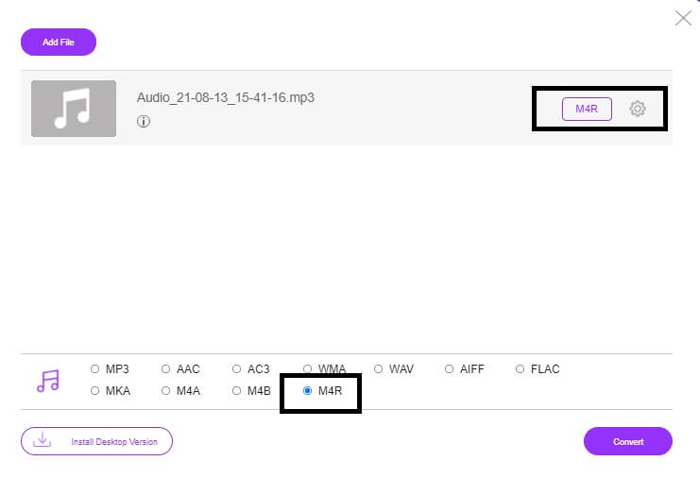
Adım 4. Ardından dönüştürme işlemini başlatmak için Dönüştür düğmesine tıklayın.
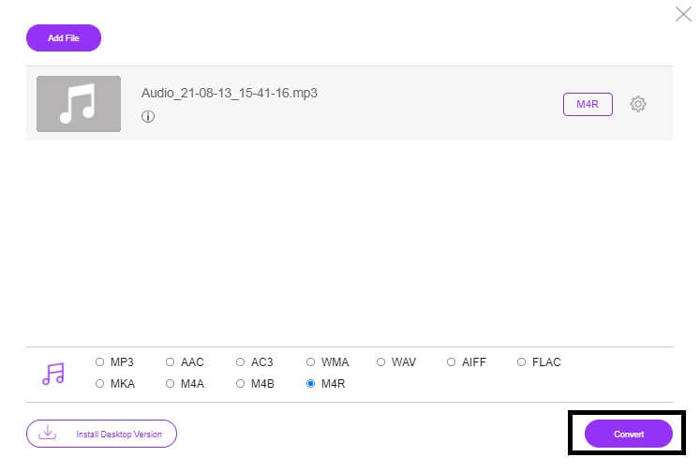
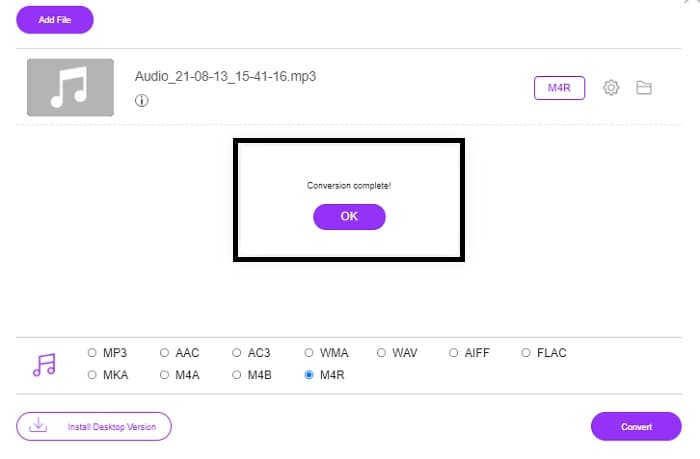
Adım 5. Son olarak, dosyayı kaydedebileceğiniz bir klasör seçin ve dosya otomatik olarak kaydedilecektir. Ardından dosyayı iPhone’unuza aktarın. Toplu dönüştürme yapabileceğinizi unutmayın; kendinizi sınırlamayın.
İlgili:
Dosya Dönüştürücü ile M4ROnline
Kullanıcılarının da anlattığı gibi, bu çevrimiçi araç basit ama güvenilirdir. Varsayılan olarak, özellikle MP3’ü M4R’a dönüştürmek için geliştirilmiştir. Adından da anlaşılacağı gibi bu araç bunun için tasarlanmıştır. Farklı web tarayıcılarında çalışır; bu yüzden indirmenize veya satın almanıza gerek yoktur. Siteyi ziyaret ettiğinizde aracın arayüzünün sadeliğini fark edeceksiniz. Oldukça anlaşılırdır; yükleme ve dönüştürme sürecine başlamak için tek yapmanız gereken Gözat düğmesine tıklamaktır. Denemek isterseniz, resmi web sitesini ziyaret etmeniz ve bizzat deneyimlemeniz önerilir. Dolayısıyla bu araç iyi bir alternatiftir. Aracı kullanma sürecini öğrenmek için aşağıdaki adımlara da göz atabilirsiniz.
Adım 1. Öncelikle yapmanız gereken, M4R Online’ın resmi sayfasına gitmek ve ardından Gözat seçeneğine tıklamaktır.
Adım 2. Dosyayı klasörünüzden seçin ve Dosya Yükle düğmesine tıklayın.
Adım 3. Tamamlandı mesajını gördüğünüzde, dosyayı indirmek için dosyanın üzerine tıklayın.
Online-convert.com
Bu araç oldukça uzun süredir hizmet vermektedir. Dönüştürme ihtiyaçları için birçok kişinin bu çevrimiçi aracı oldukça faydalı bulduğunu söyleyebiliriz. Aksi takdirde, işe yaramasaydı şu ana kadar varlığını sürdürmezdi. Sitenin ana sayfasını ziyaret ettiğinizde kullanılabilir tüm araçları göreceksiniz. Ana sayfada ses dönüştürücü, video dönüştürücü, resim dönüştürücü, belge dönüştürücü ve e-kitap dönüştürücü bir arada bulunuyor. Bunların bir araya getirilmesi, kullanıcının ihtiyaç duyduğu aracı daha kolay bulmasını sağlıyor. Bu yüzden, bu listeye MP3’ten M4R’a iTunes dönüştürücüleri arasında dahil edilmeyi hak ediyor. Öte yandan, referans olması için aracı nasıl kullanacağınız aşağıda açıklanıyor.
Adım 1. Aracın resmi sitesini ziyaret edin ve Ses Dönüştürücü seçeneğini seçin.
Adım 2. Açılır Liste düğmesine tıklayın, çıktı formatını seçin ve ardından GİT’e tıklayın.
Adım 3. Ardından yeni bir pencere açılacaktır. Buradan Dosya Seç düğmesine tıklayın ve dosyayı yükleyin. Dönüştürme işlemini başlatmak için Dönüştürmeyi Başlat düğmesine tıklayın. Dosya hazır olduğunda, dosya bilgisayarınıza otomatik olarak indirilir.
MP3 ve M4R
MP3 formatı 1993 yılında Moving Picture Experts Group (MPEG) tarafından piyasaya sürüldü. Sesi diğer sıkıştırılmamış formatlardan çok daha küçük bir boyuta sıkıştırabildiğinden, müziği depolamak için standarttı. Günümüzde, özellikle çevrimiçi ses dağıtımı için hala yaygın olarak kullanılmaktadır.
Apple iTunes ile oluşturulan özel bir iPhone zil sesini kaydetmek için bir M4R dosyası kullanılır. Normalde, bir parça zil sesini bilgisayardan bir iOS cihazına aktarırken bu formatı görebilirsiniz. iTunes ile oluşturulan M4R dosyaları genellikle telif hakkı koruması içerir.
Bölüm 3. MP3'ü M4R'ye Dönüştürme Hakkında SSS
M4R nedir?
Özellikle Apple tarafından oluşturulan ve kesinlikle iPhone ve diğer Apple cihazları için zil sesi olarak kullanılan bir dosya uzantısıdır. Konu kalite olduğunda M4A ve MP4 kadar iyidir.
İTunes dışında bir MP3'ten M4R'ye dönüştürücü var mı?
Kesinlikle, var. Yukarıdaki araçlardan birini seçebilir veya Windows Media Player'ı kopyalayarak kullanmayı düşünebilirsiniz. Tüm işlemlerden geçmek istemiyorsanız, çevrimiçi olarak sunulan ücretsiz araçları kullanabilirsiniz. Uzun kopyalama sürecinden geçmek yerine sesi doğrudan istediğiniz formata dönüştürürler.
Dosyamı zil sesi olarak kullanmak için neden MP3'ten M4R'ye dönüştürmem gerekiyor?
Bu bir zorunluluktur. Bir dosyanın zil sesi olarak kabul edilmesi için, dosyanın zil sesiniz olarak çalınabilmesi için varsayılan olarak M4R formatında olması gerekir.
Sonuç
Tüm bunlarla birlikte, kesinlikle yukarıda listelenen araçlara güvenebilirsiniz. İhtiyaçlarınıza bağlı olarak hangi aracın size yardımcı olabileceğine erişmeniz yeterlidir. Mac'te ücretsiz olarak MP3'ü M4R'ye dönüştürmek isteyen veya hangi cihazı kullanıyor olursanız olun, dönüştürmek isteyen bir öğrenci ve normal vatandaşsanız, ücretsiz araçlara başvurabilirsiniz. Profesyonel kullanım için Video Converter Ultimate kullanılması önerilir. Dönüştürmek için daha fazla araç hakkında daha fazla bilgi edinmek istiyorsanız, her zaman bu sayfaya geri dönebilirsiniz.
-
 [Ücretsiz ve Çevrimiçi] Görüntülü MP3'ü MP4'e Dönüştürmenin 3 Yöntemi
 MP3'ü MP4'e yüksek kalitede dönüştürmek nasıl? Bu gönderi, Windows ve Mac'te resimlerle MP3'ü MP4'e değiştirmek için 3 etkili ve ücretsiz yöntem gösterir.
-
 MP3'ün WAV Formatına Nasıl Dönüştürüleceğini Öğrenin
 MP3'ü WAV'a nasıl dönüştüreceğinizi bilmek ister misiniz? Hangi araçların alabileceğiniz en kaliteli dönüşümü ürettiğini belirleyin.
-
 M4A'yı WAV'a Dönüştürme Yönergeleri [PC ve Mac]
 Ayrıntılı adımlarla ve aralarından seçim yapabileceğiniz farklı araçlarla M4A'yı WAV'a nasıl dönüştüreceğiniz hakkında daha fazla bilgi edinin.

