


 Video Dönüştürücü Ultimate
 Ekran kaydedicisi
 Video Onarımı
 Güvenli İndirme
MP3, Windows 10 ve Mac'te Görüntü ile MP4'e Nasıl Dönüştürülür
MP3, Moving Picture Experts Group tarafından geliştirilmiş standart bir ses formatıdır. MPEG-1 ve MPEG-2 standardizasyonlarını kullanır. MP3, web sitelerinde ve multimedya oynatıcılarda en yaygın ses formatı olarak kabul edilir. MP4, her yaştan kullanıcı arasında en popüler video formatıdır.
Çoğu zaman, MP3 dosyasına arka plan olarak uyumlu bir resim eklemek istersiniz. Aşağıda, Windows ve Mac’te MP3’ü MP4’e dönüştürmek için 3 ücretsiz ve hızlı çözüm bulabilirsiniz. Dönüştürdükten sonra videoyu YouTube veya Facebook’a yükleyip paylaşabilirsiniz.
Bölüm 1. MP3'ü MP4 Online'a Ücretsiz Olarak Dönüştürme
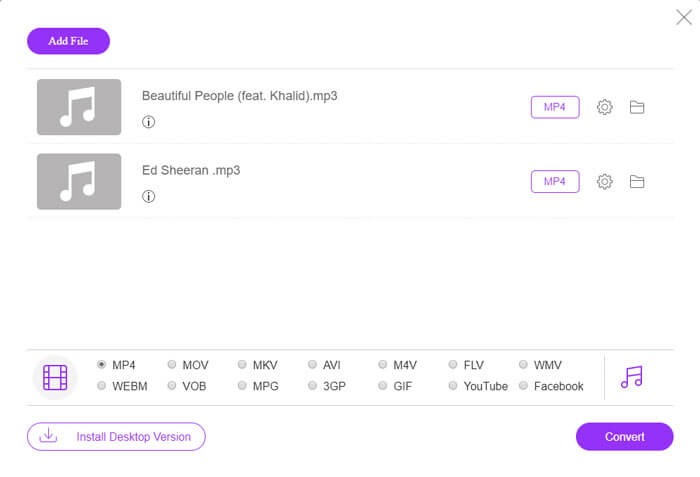
FVC Free Online Video Converter, Windows ve Mac’te herhangi bir ses veya video dosyasını kolayca MP4, MOV, MKV, AVI, M4V, FLV, WMV, WEBM, VOB vb. formatlara ücretsiz dönüştürebilir. Ayrıca birden fazla MP3 dosyası yükleyerek MP3’ü MP4’e toplu olarak dönüştürmenize de olanak tanır. Bu ücretsiz çevrimiçi araç, video kodlayıcı, kare hızı, çözünürlük, bit hızı, ses kodlayıcı ve kanalı ayarlamayı da destekler. Üçüncü taraf yazılım kurmak istemiyorsanız en iyi seçeneğiniz olacaktır.
Adım 1. Başlatıcıyı indirmek için Add Files to Convert düğmesine tıklayın. Açılan pencerede MP3 dosyalarınızı seçip yükleyin. Birden fazla MP3 dosyası yükleyebilirsiniz.
Adım 2. Bu çevrimiçi MP3 dönüştürücünün alt kısmında MP4’ü seçin. Video ve ses ayarlarını yapmak için dişli simgesine tıklayabilirsiniz.
Adım 3. Tüm tercihleri ayarladıktan sonra Convert düğmesine tıklayın ve çıkış klasörünü seçin. Ardından MP3’ten MP4’e dönüştürme otomatik olarak başlayacaktır.
Başarılı dönüştürmeden sonra, dönüştürülen dosyayı istediğiniz gibi görüntüleyebilmeniz veya paylaşabilmeniz için çıktı klasörü bir kerede açılır. Bu ücretsiz yazılım MP4 dosyasını siyah arkaplanla yapar.
Bölüm 2. MP3'ü VLC ile MP4'e Dönüştürme
VLC Media Player, DVD, VCD, çeşitli video ve ses dosyaları gibi tüm multimedya dosyalarını oynatan ücretsiz ve açık kaynaklı bir multimedya oynatıcıdır. Aynı zamanda Windows, Mac, Linux, Android ve iOS kullanıcıları için ücretsiz bir MP3'ten MP4'e dönüştürücüdür. Burada, VLC Media Player kullanarak MP3'ü MP4'e nasıl dönüştürebileceğinizi göstereceğiz.
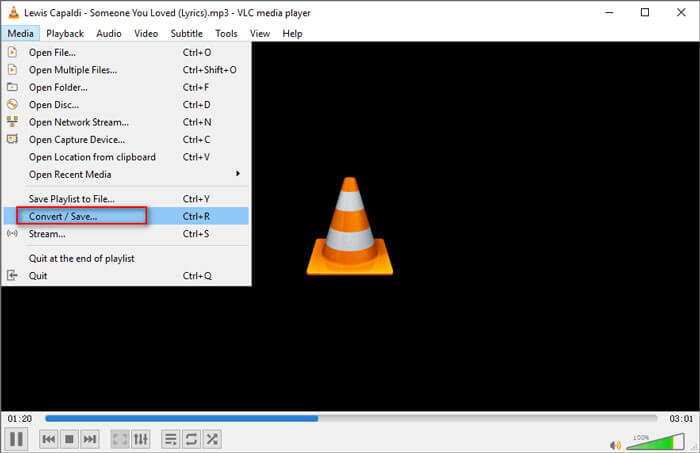
Adım 1. Bilgisayarınızda VLC’yi açın. Media'ya, ardından Open File’a tıklayın ve MP3 dosyanızı içe aktarın.
Adım 2. Media'ya, sonra Convert/Save'e tıklayın. Açılan pencerede, Convert/Save açılır düğmesinin altından Convert’i seçin.
Adım 3. Profil’in yanındaki açılır düğmeye tıklayın ve çıkış formatı olarak Video - H.264 + MP3 (MP4)’ü seçin.
Adım 4. Çıkış klasörünü seçmek için Browse düğmesine tıklayın. Ardından MP3'ü siyah arka planla ücretsiz olarak MP4'e dönüştürmeye başlamak için Start düğmesine tıklayın. (MP4’ü MP3’e nasıl dönüştürürsünüz?)
Bölüm 3. MP3'ü Resimle MP4'e Dönüştürmenin Profesyonel Yolu
Yukarıdaki yöntemler, dönüştürmeden sonra MP3 dosyanıza siyah bir arka plan ekler. Dönüştürülmüş MP4 dosyasına bir kapak eklemek istiyorsanız, profesyonel bir MP3'ten MP4'e dönüştürücü kullanabilirsiniz. FVC Free MP3 to MP4 Converter, MP3 müziğinizi renkli bir resimle MP4’e dönüştürmenin daha profesyonel bir yolunu sunar.

Ücretsiz MP3 - MP4 Dönüştürücü
113.435+ İndirme- MP3 müzik dosyasını MP4, AVI, MOV, MKV, WMV ve daha fazlasına dönüştürün.
- MP3 dosyanız için renkli temalar sağlayın, açılış ve bitişi ayarlayın.
- Yerleşik oynatıcıyla dönüştürmeden önce dönüştürülen MP4 dosyalarını önizleyin.
- MP3'ü MP4 dosyalarına yüksek video kalitesiyle toplu dönüştürme desteği.
Ücretsiz İndirWindows 7 veya sonrası içinGüvenli İndirme
Ücretsiz İndirMacOS 10.7 veya sonrası içinGüvenli İndirme
Adım 1. MP3 dosyası ekleyin
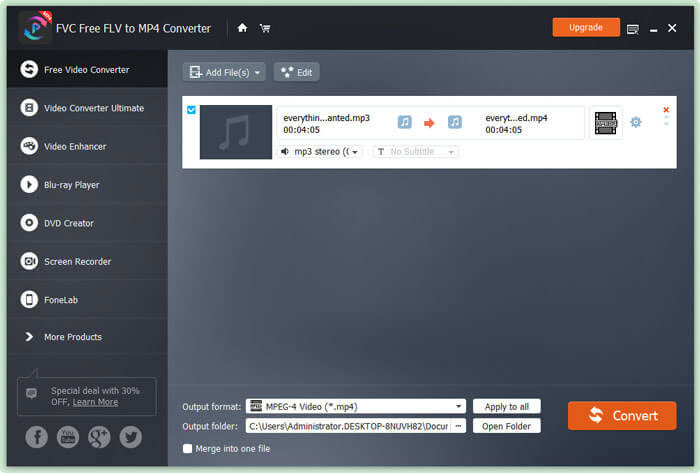
Bu MP3'ten MP4'e dönüştürücüyü Windows bilgisayarınıza ücretsiz indirin, kurun ve başlatın. MP3 dosyasını bu dönüştürücüye aktarmak için Add File(s) düğmesine tıklayın. Bu ücretsiz MP3’ten MP4’e dönüştürücü, aynı anda bir veya daha fazla MP3 dosyasını dönüştürmenizi sağlayan bir toplu dönüştürme özelliğiyle donatılmıştır.
Adım 2. Tema seçin
MP3 dosyanızı seçin ve tema eklemek için Edit düğmesine tıklayın. Seçebileceğiniz birkaç farklı türde tema vardır. Ardından videonun açılış ve bitişini düzenlemek için Next düğmesine tıklayın.

3. Adıma MP3'ü MP4'e dönüştürün
Hedef formatınız olarak, Output format açılır listesinden MP4'ü seçin. Daha sonra MP3'ü resimli olarak ücretsiz bir şekilde MP4’e dönüştürmeye başlamak için Convert düğmesine tıklayın.

En yeni hızlandırma teknolojisinin kullanılması sayesinde, MP3'ü MP4'e son derece hızlı bir dönüştürme hızıyla dönüştürmenizi sağlar. Dahası, ses dönüştürme sırasında hiçbir kalite kaybı olmayacağını garanti eder. (Daha fazla MP4 oynatıcı bulun)
Bölüm 4. MP3'ü MP4'e Dönüştürme Hakkında SSS
İTunes'dan MP3'e aktarabilir miyim?
Evet. İTunes'u açın ve Düzenle ›Tercihler'e gidin. Genel sekmesinde, İçe Aktarma Ayarları'nı bulun ve tıklayın. Ardından Şunu Kullanarak İçe Aktar'ın yanındaki açılır düğmeden MP3 Kodlayıcı'yı seçin ve değişiklikleri kaydetmek için Tamam'ı tıklayın. Dönüştürmek istediğiniz müziği vurgulayın ve Dosya ›Dönüştür› MP3 Sürümü Oluştur seçeneğine gidin. Ardından iTunes müziği MP3'e dönüştürülecektir.
İTunes şarkıları MP3 veya MP4 mi?
Hiçbiri. İTunes'dan satın aldığınız müzik AAC (m4a) biçimindedir. Diğer cihazlarda oynatmak için AAC formatını MP3'e dönüştürebilirsiniz.
Audacity ile MP3'ü MP4'e dönüştürebilir miyim?
Evet. Audacity, MP4'ün MP3'ten dışa aktarılmasını desteklemez. Ancak, AC3, MP4, M4A, WMA, AMR gibi daha fazla ses formatını dışa aktarmak için isteğe bağlı FFmpeg kitaplığını yükleyebilirsiniz.
HandBrake MP4'ü MP3'ten dışa aktarabilir mi?
Hayır. HandBrake, birçok ses ve video formatına ve bu formatlardan dönüşüm sağlayan açık kaynaklı bir video kod dönüştürücüsüdür. Maalesef MP3'ten MP4'e dönüştürme gibi yalnızca ses dönüştürmeyi desteklemez.
Sonuç
Bu yazıda, Windows ve Mac’te görselle birlikte MP3’ü MP4’e dönüştürmek için 3 ücretsiz yöntem tanıttık. FVC Free Online Video Converter, MP3 müzik dosyasını MP4’e dönüştürmenin en pratik yoludur. Daha iyi önerileriniz varsa, lütfen bize yorum bırakmaktan çekinmeyin.
-
 MOV VS MP4 - Hangisi Daha İyi
 MOV VS MP4, hangisi daha iyi? Bu gönderi MP4 ve MOV arasındaki farkı anlatıyor, böylece video dosyalarınız için daha iyi bir seçim yapabilirsiniz.
-
 Kaliteyi Kaybetmeden MOV'u MP4'e Dönüştürme
 MOV (Apple QuickTime Movie) dosyalarını MP4'e dönüştürmek ister misiniz? Bu gönderi, MOV video dosyalarınızı Windows 10/8/7 / XP ve Mac OS X'te MP4 formatına dönüştürmek için 4 ücretsiz yöntem paylaşıyor.
-
 WMA'yı MP3'e Dönüştürmenin En İyi 4 Yolu
 Windows Media Player ile WMA'yı MP3'e dönüştürmek mümkün müdür? WMA'yı MP3'e ücretsiz dönüştürmek nasıl? Bu gönderi, Mac, Windows PC ve çevrimiçi olarak WMA'dan MP3'e ses dönüştürme yapmanıza yardımcı olacak 4 basit yöntemi paylaşıyor.
