


 Video Dönüştürücü Ultimate
 Ekran kaydedicisi
 Video Onarımı
 Güvenli İndirme
AMV'yi MP4'e Dönüştürmenin Eşsiz ve Mükemmel Yolları
AMV videonuzu tüm programlarda keyifle izlemek mi istiyorsunuz? O hâlde AMV dosyanızı MP4 biçimine dönüştürmeniz gerekir. Ama endişelenmeyin! Video dosyalarınızı dönüştürmek için size en iyi çözümü sunacağız. Bu makalede tanıtılan dönüştürücüler önceden test edilmiştir. Böylece uygulamaların güvenli olup olmadığı konusunda kaygılanmanıza gerek kalmaz. Ayrıca, yazılımı kullanırken faydalanabileceğiniz özelliklerle de sizi tanıştıracağız. İlginizi çektiysek ve siz de AMV’yi MP4’e dönüştürmek isteyen kullanıcılar arasındaysanız, bu makaleyi okuyun ve video dönüştürme hakkında bilgi edinin.

Bölüm 1: AMV ve MP4'e Giriş
AMV
Dosya Uzantısı: .amv
Geliştiren: MTV
Dosya Kategorisi: Video Dosya Biçimi
Açıklama: Actions Media Video dosya biçiminde kaydedilen ve bazı Çin yapımı taşınabilir medya oynatıcılar tarafından desteklenen videolar AMV dosyaları olarak bilinir. Düşük çözünürlüklü (96x96 ila 320x240 piksel) sıkıştırılmış bir film içerir. AMV medya oynatıcılarla birlikte gelen masaüstü PC yazılımları ve VideoLAN VLC medya oynatıcı da AMV dosyalarını oynatabilir.
İlgili Programlar: K-Lite Codec Pack, Video LAN ve VLC Media Player
AMV
Dosya Uzantısı: .mp4
Geliştiren: Moving Picture Experts Group (MPEG)
Dosya Kategorisi: Video Dosya Biçimi
Açıklama: AAC ve MPEG-4 video standartları, MP4 uzantısını birlikte tanımlar. Ses, video, altyazılar ve 2D ve 3D grafikler dahil olmak üzere herhangi bir ortam türü kapsayıcı içinde yer alabilir. Windows'ta hemen hemen her oynatıcı MP4 dosyalarını çalabilir, ancak Mac'te bir eklenti yüklemeniz veya MP4 dosyasını başka bir biçime dönüştürmeniz gerekir. Hareketli Görüntü Uzmanları adlı bir grup.
İlgili Programlar: Apple, QuickTime Player, VLC Media Player, Microsoft, Windows Media Player ve Video LAN.
Bölüm 2: AMV'yi Çevrimdışı MP4'e Dönüştürmek İçin Mükemmel Prosedürler
İndirilebilir bir araç kullanarak AMV’yi MP4’e dönüştürmek istiyorsanız, sizin için en iyi çözüme sahibiz. Video Converter Ultimate’ı kullanabilirsiniz. AVI, MKV, WMV, MOV, FLV, M4V, SWF, MTS, M2TS ve daha fazlası dahil olmak üzere 100+ video biçimini destekler. Bu araç, tüm kullanıcılar için uygun, basit yöntemlere sahip sezgisel bir arayüze sahiptir. Bu araçla aynı anda birden fazla dosyayı dönüştürebilirsiniz, çünkü toplu dönüştürme işlemi yapmanıza olanak tanır. Dahası, sunduğu en dikkat çekici özelliklerden biri, diğer dönüştürücülerden 30 kat daha hızlı olan ultra hızlı dönüştürme işlemidir. Ayrıca, bu araçla AMV videolarınızı düzenleyebilirsiniz. Uygulamanın daha fazla özelliğini keşfetmek için aşağıdaki ek bilgileri okuyun.
Özellikleri
◆ MP4, AMV, WMV, AVI, MKV, FLV, SWF, MOV ve 100'den fazla video formatını dönüştürün.
◆ Aynı anda birden çok dosyayı dönüştürmek için bir toplu dönüştürme işlemi sunar.
◆ Video geliştirici, düzeltici, kırpıcı, döndürücü, renk düzeltme ve daha fazlası gibi video düzenleme araçları sağlar.
FVC Video Converter Ultimate kullanarak AMV'yi MP4'e dönüştürmek için aşağıdaki basit talimatları izleyin.
Adım 1: Öncelikle Windows veya Mac’inize Video Converter Ultimate’ı indirmeniz gerekir. Aşağıdaki İndir düğmesine tıklayın. Ardından, yazılımı kurup açın.
Ücretsiz İndirWindows 7 veya üstü içinGüvenli İndirme
Ücretsiz İndirMacOS 10.7 veya üstü içinGüvenli İndirme
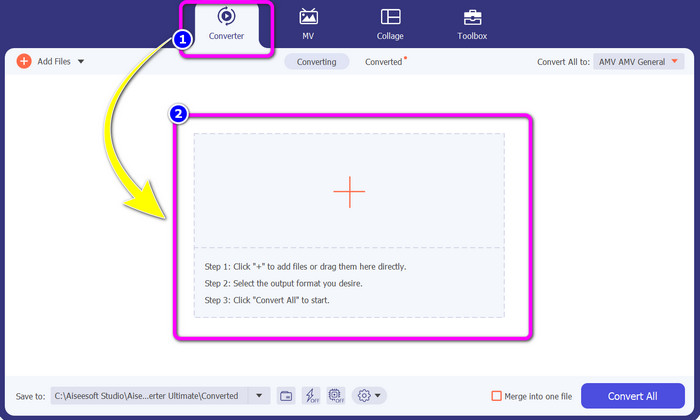
Adım 2: Converter panelini seçin ve Artı işareti düğmesine tıklayın. Klasörünüz ekranda görünecek ve dönüştürmek istediğiniz AMV videosunu seçebileceksiniz.
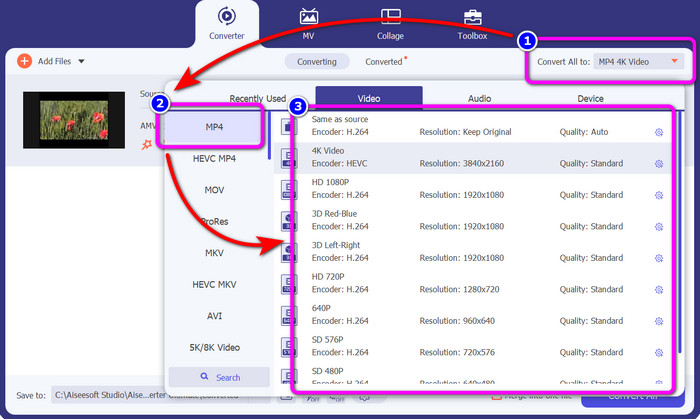
Adım 3: Convert All düğmesine basın. Biçim seçenekleri göründüğünde, istediğiniz çıktı biçimi olan MP4 dosyasını seçin. Ardından videonuz için 4K Video çözünürlüğe kadar çözünürlük seçebilirsiniz. Tercih ettiğiniz çözünürlüğü seçin veya orijinal videonuzla aynı çözünürlüğü seçebilirsiniz.
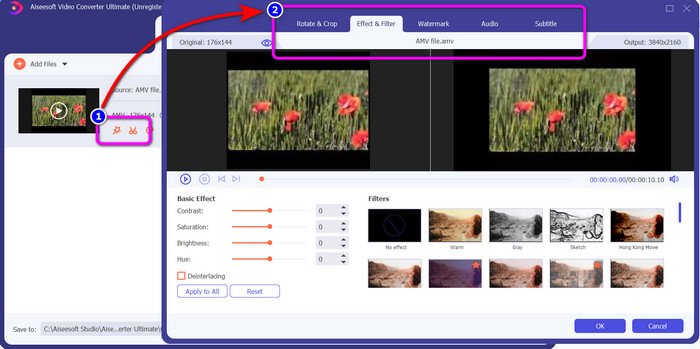
Adım 4: Videonuzu düzenlemek istiyorsanız, Edit simgesine tıklayın. Ardından, filigranları değiştirerek, ekleyerek veya kaldırarak, efektler ya da filtreler uygulayarak, videolarınızı döndürüp kırparak videonuzu düzenleyebilirsiniz. Sonra OK’e tıklayın. Bu şekilde videonuzu iyileştirebilirsiniz.
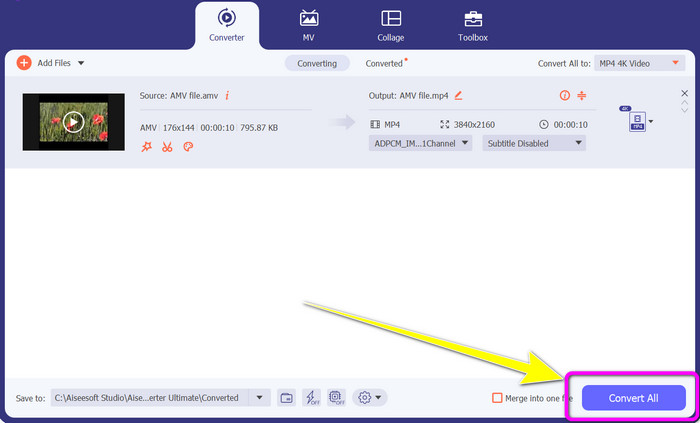
Adım 5: Videonuzu düzenledikten sonra dönüştürme işlemini başlatmak için Convert All düğmesine tıklayın. Ardından, son çıktınızı bilgisayarınıza kaydedin. Son sonucu görmek için dönüştürülmüş videonuzu bilgisayarınızda açın. DV’yi MP4’e nasıl dönüştüreceğinizi öğrenmek için buraya tıklayın.
Bölüm 3: AMV'yi Çevrimiçi MP4'e Ücretsiz Olarak Dönüştürmenin En Kolay Yolu
AMV’yi MP4'e çevrimiçi dönüştürmenin bir başka yolu da FVC Free Video Converter Online kullanmaktır. Bu araç, basit adımları ve sade arayüzü ile hem profesyonel hem de deneyimsiz tüm kullanıcılar için uygundur. Videoları sadece birkaç tıklamayla dönüştürebilirsiniz. Ayrıca bu dönüştürücü; AVI, MP4, M4V, FLV, MOV, WMV, MKV ve daha fazlası gibi birçok video biçimini destekler. Aynı anda birden fazla dosyayı dönüştürmek için toplu dönüştürme işlemi de yapabilirsiniz. Buna ek olarak, dosyalarınızı dönüştürürken videonuzun çözünürlüğünü de değiştirebilirsiniz. Videonuzun bit hızını ve kare hızını ayarlamayı planlıyorsanız bu da mümkündür. Bu çevrimiçi uygulamayı ücretsiz olarak kullanabilir ve videolarınızı filigran, logo, çıkartma, metin ve benzeri istenmeyen ögeler olmadan indirebilirsiniz. Ayrıca Google Chrome, Safari, Internet Explorer, Microsoft Edge vb. tüm tarayıcılardan erişilebilir.
Özellikler
◆ MP4, AMV, FLV, AVI, MOV, VOB, MKV ve daha fazlası dahil olmak üzere çeşitli video formatlarını dönüştürün.
◆ Daha hızlı prosedür için toplu dönüştürme işlemi sunar.
◆ Videonun bit hızını, kare hızını ve çözünürlüğünü düzenleyin.
◆ MP3, FLAC, WAV, AAC, AC3 vb. ses formatlarını dönüştürün.
◆ Sesin bit hızını ve örnekleme hızını ayarlayın.
FVC Free Video Converter Ultimate kullanarak AMV'yi MP4'e dönüştürmek için aşağıdaki basit prosedürleri kullanın.
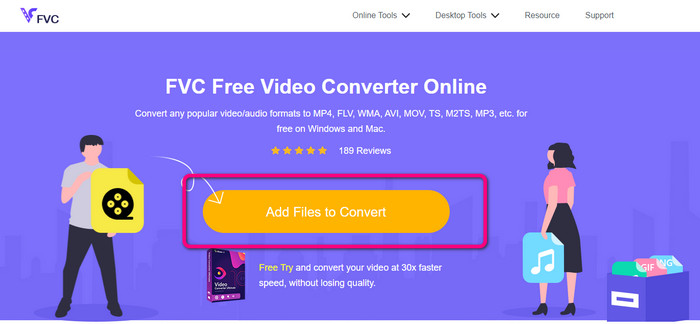
Adım 1: Tarayıcınızı açın ve FVC Free Video Converter Online sitesine gidin. Dönüştürmek istediğiniz AMV videosunu yüklemek için Add Files to Convert düğmesine basın.
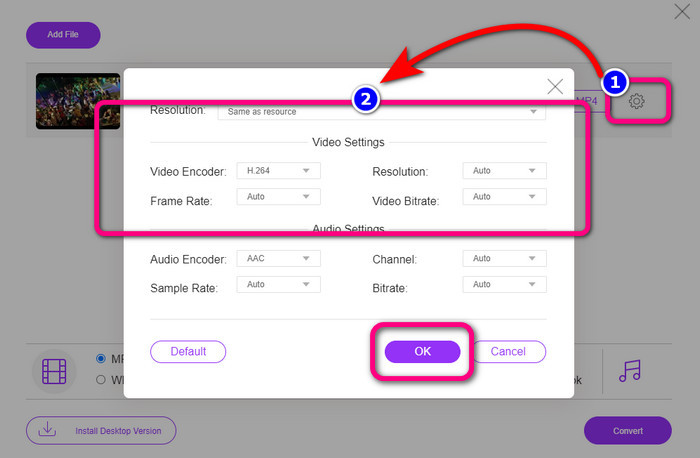
Adım 2: AMV videosunu ekledikten sonra, videonun kare hızını, bit hızını ve çözünürlüğünü ayarlamak için Setting simgesine tıklayın. Ardından OK’e basın.
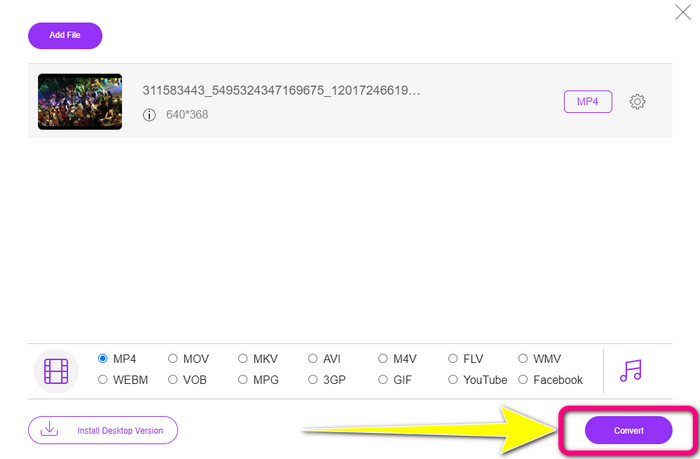
Adım 3: Arayüzün alt kısmına gidin ve MP4 dosya biçimini seçin. Sonra Convert düğmesine tıklayın. Bu aracı AMV’yi MKV’ye dönüştürmek için de kullanabilirsiniz.
Bölüm 4: AMV'yi MP4'e Dönüştürmeyle İlgili SSS
1. AMV, WMV ile aynı mıdır?
Aynı değiller. AMV, MP4 ve S1 MP3 oynatıcı uyumlu bir video dosyası formatıdır. WMV gibi diğer video formatlarıyla karşılaştırıldığında, boyutu daha küçüktür. Oynamak için çok fazla işlemci gücü gerektirmez.
2. Hangisi daha iyi, AVI mi yoksa AMV mi?
Videonuzu herhangi bir yerde oynatmak istiyorsanız AVI dosyasını kullanabilirsiniz. Ancak, daha küçük bir dosya boyutunu tercih ediyorsanız AMV dosya formatı iyi bir seçimdir.
3. Video dosyalarını MP4'e nasıl dönüştürebilirim?
Video Converter Ultimate'ı kullanabilirsiniz. Neredeyse tüm video formatlarını destekler ve video dosyalarını daha hızlı dönüştürebilirsiniz.
Sonuç
Yukarıda bahsedilen iki dönüştürücüyü kullanırsanız AMV’yi MP4'e dönüştürmek çok kolaydır. Ayrıca, gelişmiş ve deneyimsiz kullanıcılar bu araçlardan faydalanabilir; çünkü her ikisi de sezgisel bir arayüz ve basit yöntemler sunar. Öyleyse hemen Video Converter Ultimate ve FVC Free Video Converter Online kullanın!
-
 DIVX'i Hemen MP4'e Dönüştürmenin Başarılı Yöntemleri
 DIVX'i MP4'e nasıl dönüştürebilirim? En iyi çözümü arıyorsanız, doğru makaledesiniz. DIVX'i kolayca MP4'e nasıl dönüştüreceğinizi göstereceğiz.
-
 En Etkili Yöntemlerle F4V'yi MP4'e Dönüştürme
 F4V videolarınız iyi kalitede değil mi? Ardından bir MP4 dosyasına dönüştürün. Bu gönderi, F4V'yi çevrimiçi ve çevrimdışı olarak MP4'e dönüştürmenin en iyi yolunu sunacak
-
 Xvid'i MP4 Formatına Dönüştürmek İçin Beş Popüler Yaklaşım
 Bu makalede, Xvid'i MP4 dosya formatına nasıl dönüştüreceğinize dair bu harika yöntemlere bir göz atın. Ayrıca, dönüştürmede kullanabileceğiniz en iyi uygulamaları öğreneceksiniz.
