


 Video Dönüştürücü Ultimate
 Ekran kaydedicisi
 Video Onarımı
 Güvenli İndirme
MP4 Windows / Mac'te M4A'ya Nasıl Dönüştürülür (Ücretsiz ve Çevrimiçi)
MP4, birden çok istasyon ve video oynatıcı ile kullanılan yaygın bir dosya formatıdır. MP4 dosyaları video, ses ve diğer içerikleri depolayabilir. Artık birçok kişi MP4 videosunun ses parçasını dinlemeyi tercih ediyor. Kaliteyi korumak için MP4'ü M4A'ya dönüştürmek harika bir fikirdir. M4A, MPEG 4 Audio'nun kısaltmasıdır. İTunes, QuickTime, Windows Media Player ve daha fazlası dahil olmak üzere çoğu program M4A dosyalarını oynatabilir.

MP4 dosyasından sesi nasıl çıkaracağınızı merak ediyor olabilirsiniz. Bir MP4 dosyasını M4A dosyasına dönüştürmenin pek çok yolu vardır. Mobil cihazlarınızda gelecekte dinlemek için MP4’ü M4A’ya dönüştürme yollarını öğrenmek üzere bu yazıya göz atın.
Bölüm 1. MP4'ü M4A'ya Kalite Kaybı Olmadan Dönüştürmenin En İyi Ücretsiz Çevrimiçi Yolu
FVC Free Online Video Converter, MP4 formatını yalnızca M4A’ya değil, MP3, WAV, M4R, WMA, AIFF, AC3 vb. diğer formatlara da dönüştürebilen ücretsiz bir MP4'ten M4A’ya dönüştürücüdür. Toplu dönüştürme yapmanıza olanak tanır; böylece birden fazla MP4 videoyu aynı anda M4A’ya çevirebilirsiniz. Ayrıca bu ücretsiz çevrimiçi araç, MP4 videoyu MOV, AVI, FLV ve diğer video formatlarına dönüştürmenize de imkân tanır.
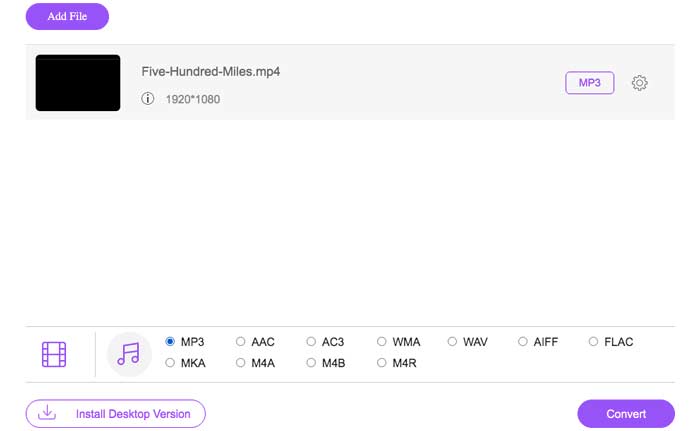
Adım 1. Tarayıcınızda https://www.free-videoconverter.net/free-online-video-converter/ adresini açın. Add Files to Convert düğmesine tıklayın, ardından başlatıcısını indirip kurmanız gerekir.

Adım 2. Dönüştürmek istediğiniz MP4 videoyu yükleyin ve ardından devam etmek için Open seçeneğine tıklayın.
Adım 3. Video dosyalarınızı bu uygulamaya yükledikten sonra, Audio simgesine tıklayın ve çıkış formatı olarak M4A formatını seçin.
Adım 4. Son olarak, sağ alt köşedeki Convert düğmesine tıklayın. Bir süre bekleyin ve MP4 dosyasından M4A sesinizi elde edeceksiniz.
Bölüm 2. MP4'i Ücretsiz Ses Dönüştürücü ile M4A'ya Dönüştürme
FVC Free Audio Converter, MP4 dosyalarını zahmetsizce M4A'ya dönüştürmenize izin veren ücretsiz bir yazılımdır. Herhangi bir video veya ses dosyasını M4A, MP3, WAV, vb. olarak değiştirebilir. Dönüştürmeyi başlatmak için Windows PC'nize indirebilir ve kurabilirsiniz.
Ücretsiz İndirWindows 7 veya sonraki sürümler içinGüvenli İndirme
Ücretsiz İndirMacOS 10.7 veya sonraki sürümler içinGüvenli İndirme
Adım 1. Bu ses dönüştürücüyü bilgisayarınızda başlatın. MP4 dosyalarını programa yüklemek için Add File(s) düğmesine tıklayın.

Adım 2. Output formats seçeneğini bulun ve açılır listeden çıktı formatı olarak M4A’yı seçin.
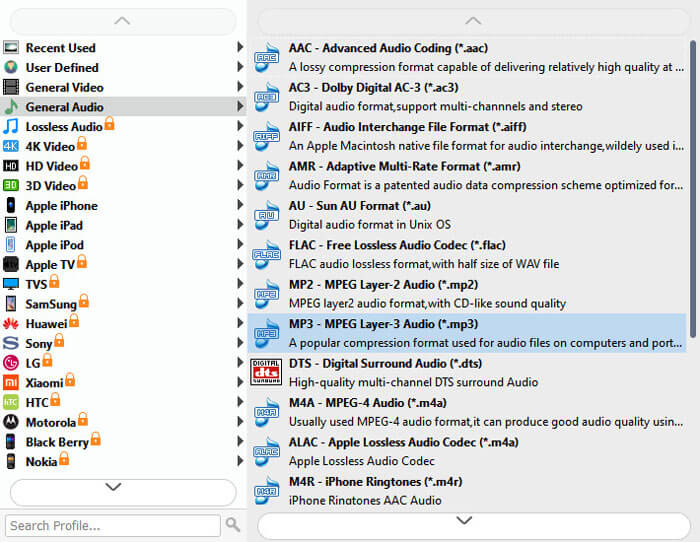
Adım 3. MP4 dosyalarını M4A’ya dönüştürmeye başlamak için Convert düğmesine tıklayın.
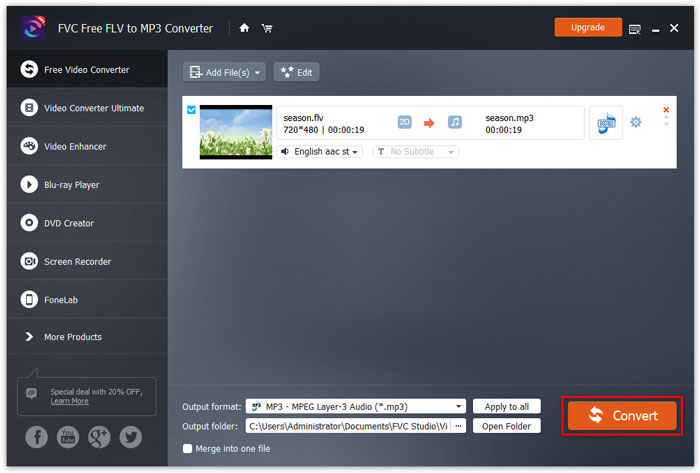
M4A’nın yanı sıra, bunu kullanarak MP4'ü MP3, AAC veya diğer ses formatlarına dönüştürebilirsiniz.
Bölüm 3. iTunes Kullanarak MP4'i M4A'ya Dönüştürme
MP4'i Windows veya Mac için iTunes ile M4A'ya dönüştürmek için, iTunes içe aktarma ayarlarını değiştirmeniz ve ardından bir M4A kopyası yapmak için Dönüştür menü seçeneğini kullanmanız gerekir.
Adım 1. Windows PC’nizde veya Mac’inizde iTunes’u açın.
Adım 2. Menü çubuğundan Editi seçin, ardından Preferences'a tıklayın. Sonra General sekmesine gidin ve Import Settingse tıklayın.
Adım 3. Import Using yanındaki menüyü bulun ve tıklayın, ardından videoyu dönüştürmek istediğiniz kodlama formatını seçin. Sonrasında OKe tıklayın.
Adım 4. Kitaplığınızdaki dönüştürmek istediğiniz şarkıları seçin. Ardından Fileı seçin, Create New Versiona tıklayın ve M4A sürümü oluşturun.
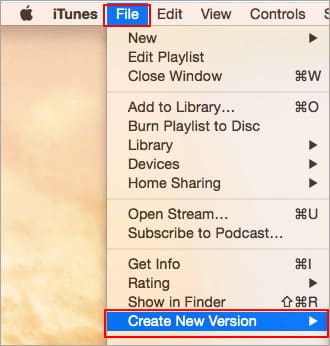
Dönüştürülen ses dosyaları, kitaplığınızda orijinal dosyaların yanında görünecektir.
Bölüm 4. MP4'ten M4A'ya Dönüştürme Hakkında SSS
1. M4A dosyası nedir?
M4A dosya uzantısına sahip bir dosya, bir MPEG-4 Ses dosyasıdır. M4A, genellikle Apple'ın iTunes Store'da şarkı indirme biçimi olarak bulunabilir.
2. M4A dosyaları nasıl açılır?
M4A dosyalarını açan programlar arasında iTunes, QuickTime, Windows Media Player vb. Yer alır. Android tabletler ve telefonlar, iPhone, iPad ve iPod touch da M4A dosyalarının oynatılmasını destekler.
3. MP4 dosyalarını çevrimiçi olarak nasıl birleştirebilirim?
FVC Free Online Video Merger, çeşitli MP4 veya MOV, AVI, FLV ve daha fazlası gibi diğer video formatlarını çevrimiçi olarak birleştirmenize ya da eklemenize yardımcı olabilir.
4. Windows Media Player, MP4'ü M4A'ya dönüştürebilir mi?
Hayır. Windows Media Player yalnızca video dosyalarını MP3 veya WAV'a dönüştürmeyi destekler.
Sonuç
Yukarıdaki üç yol, MP4'ü fazla çaba harcamadan ücretsiz olarak M4A'ya dönüştürmenize yardımcı olabilir. Dönüştürmeyi çevrimiçi yapmayı tercih ediyorsanız, FVC Ücretsiz Çevrimiçi Video Dönüştürücü harika bir seçim olmalıdır. MP4 dosyalarınızın boyutu büyükse, FVC Free Audio Converter veya iTunes, MP4 dosyalarını M4A'ya dönüştürmek için daha güvenilir olacaktır.
-
 MP4 Mac / Windows için WMV'ye Nasıl Dönüştürülür
 Bu gönderi, MP4 videosunun Mac veya Windows'ta WMV formatına nasıl dönüştürüleceğini paylaşıyor. Ayrıca size hem masaüstü yazılımı hem de web tabanlı çevrimiçi dönüştürücüler dahil olmak üzere çeşitli seçenekler sunacağız. En iyi MP4'ten WMV'ye dönüştürme araçlarını öğrenmeye hazır mısınız?
-
 WMV'yi Masaüstünde ve Çevrimiçi MP3'e Dönüştürme
 Herhangi bir ücretsiz video dönüştürücü yazılımını FVC stüdyosundan bulabilirsiniz. MP4, MOV, TS, AVI, WMV, FLAC, MP3 vb. Dahil olmak üzere herhangi bir video / ses formatı desteklenir.
-
 AVCHD'yi Windows / Mac / Çevrimiçi'de Ücretsiz Olarak MP4 Videolarına Dönüştürme
 Bilgisayarınızda AVCHD'yi MP4 videolara dönüştürmenin 5 kolay yolu vardır. AVCHD videolarını burada herhangi bir dönüştürücü ile kaliteyi kaybetmeden MP4'e dönüştürebilirsiniz.
