


 Video Dönüştürücü Ultimate
 Ekran kaydedicisi
 Video Onarımı
 Güvenli İndirme
MP4'ten MPG'ye Dönüştürme: En İyi Dönüştürücülerle Video Formatlarını Kolayca Değiştirin
Hiç harika MP4 videolarınızın bazı cihazlarda oynatılmadığı bir çıkmazda kaldığınız oldu mu? Sizi anlıyoruz! Ama endişelenmeyin, çünkü şahane bir çözümümüz var: MP4’ü MPG’ye dönüştürme. Evet, bu, değerli videolarınızın her yerde oynatılmasının anahtarı. Şöyle bir senaryo düşünün: Aile buluşmasında teyzenizin eski televizyonunda seyahat maceralarınızı göstermek istiyorsunuz. Ama ne yazık ki TV sadece MPG dosyalarını destekliyor ve yüzünüzde büyük bir hayal kırıklığı beliriyor. İşte tam bu noktada MP4’ten MPG’ye dönüştürmenin sihri devreye giriyor!
Şimdi, işte en iyi kısım. İşi bir cazibe gibi yapan bazı birinci sınıf programlarda size yol göstereceğiz.

Bölüm 1. MPG ve MP4
Pekala, video formatları hakkında konuşalım - MP4 ve MPG! Her ikisinin de avantajları var, ancak bazen küçük bir format değişikliği yapmanız gerekebilir. İşte incelemeniz için bir tablo:
| MP4 | MPG | |
| Video kalitesi | Verimli sıkıştırma ile yüksek kaliteli video | İyi video kalitesi, ancak daha büyük dosya boyutları |
| uyumluluk | Modern cihazlar ve uygulamalar tarafından geniş çapta desteklenir | Eski cihazlarla son derece uyumlu |
| Dosya boyutu | Çevrimiçi kolay paylaşım için daha küçük dosya boyutları | Daha büyük dosya boyutları, daha fazla depolama alanı gerektirebilir |
| İnternet Akışı | Web akışı ve paylaşımı için mükemmel | Çevrimiçi akış için sınırlı destek |
| Cihaz Desteği | Bazı eski cihazlarda çalışmayabilir | Eski cihazlar da dahil olmak üzere çoğu cihazda iyi çalışır |
| Düzenleme | Minimum kalite kaybıyla düzenlemeye izin verir | Düzenleme bazı kalite kayıplarına neden olabilir |
| kullanım | Çevrimiçi içerik ve sosyal medya için ideal | DVD'ler, eski cihazlar ve TV oynatma için uygun |
Bölüm 2. MP4'ü Yüksek Kalitede MPG'ye Dönüştürün
Sizin için gerçek bir hazine bulduk – en iyi MP4'ten MPEG’e dönüştürücü: Video Converter Ultimate! MP4 videolarınız bazı cihazlarda oynatılmayı reddettiğinde sürekli engellere takılmaktan bıktıysanız, bu araç tam bir kurtarıcı. MP4 dosyalarınızı zahmetsizce MPG formatına çeviren bir dönüştürme sihirbazıdır ve yeni ya da eski fark etmeksizin her tür cihazda sorunsuz oynatma sağlar.
Bu küçük güç merkezi sadece tek numara bir midilli değil. MP4'ten MPG'ye büyünün yanı sıra, bir dizi başka hile de sergiliyor. Farklı video formatları arasında dönüştürmeye mi ihtiyacınız var? Sorun değil. Bir videodan ses çıkarmak ister misiniz? Kekin parçası. Ve hey, bu kişisel dokunuş için bazı temel video düzenlemeleri yapmanıza bile izin veriyor. En iyi kısım? Sadelik göz önünde bulundurularak tasarlanmıştır. Teknik baş ağrısı veya karmaşık jargon yok. Herkesin başa çıkabileceği basit bir harikalık.
Şimdi, video sihrinizi gerçekleştirmenin kolay adımları burada.
Adım 1. İndirin ve Kurun
Video Converter Ultimate’ı edinmek için resmi web sitesine veya favori uygulama mağazanıza gidin. Kolaylık olması için aşağıya indirme bağlantılarını ekledik. Sadece Ücretsiz İndir düğmesine tıklayın. İndirildikten sonra basit kurulum talimatlarını izleyin – gerisini biliyorsunuz. Göz açıp kapayıncaya kadar araç cihazınızda kullanıma hazır olacak.
Ücretsiz İndirWindows 7 veya üzeri içinGüvenli İndirme
Ücretsiz İndirMacOS 10.7 veya üstü içinGüvenli İndirme
Adım 2. MP4 Dosyalarınızı Ekleyin
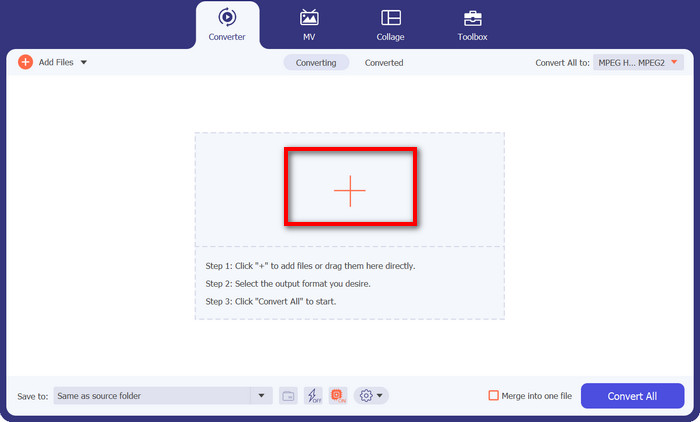
Programı başlatın; karşınıza sade ve kullanıcı dostu bir arayüz çıkacak. Gözünüzü korkutacak karmaşık terimler yok! Şimdi şu artı işareti düğmesine tıklayın. İsterseniz tek bir MP4 dosyası, isterseniz birden fazla dosya seçebilirsiniz – size kalmış.
Adım 3. Çıktı Olarak MPG Seçin
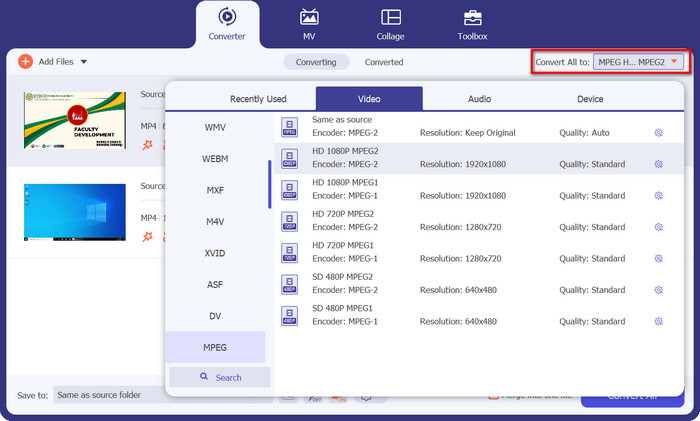
Şimdi istediğiniz çıktı formatını seçme zamanı. Tümünü Dönüştür bölümüne gidin ve açılır menüden MPEG seçeneğini bulun. Orada MPG’yi göreceksiniz; işte bu da uyumluluk cennetinin sihirli bileti.
Adım 4: Dönüştür’e Tıkla ve İşte Bu Kadar!
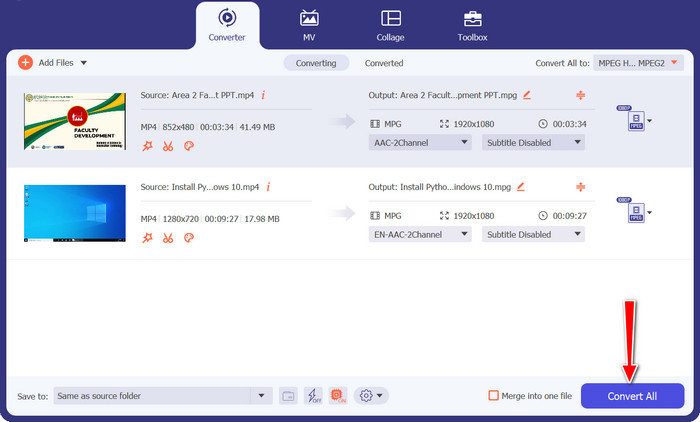
Sihri görmeye hazır mısınız? Harika! Büyük ve dost canlısı Tümünü Dönüştür düğmesine tıklayın ve Video Converter Ultimate’ın hünerlerini sergilemesini izleyin. Arkanıza yaslanın, rahatlayın; çok geçmeden MP4 videolarınız sihirli bir şekilde MPG formatına dönüştürülmüş olacak.
Bölüm 3. MP4'ü MPG Ücretsiz Çevrimiçi Olarak Dönüştürün
Herhangi bir yazılım indirmeye veya karmaşık kurulumlara ihtiyaç duymadan kusursuz video dönüştürmeler dünyasına adım atın. Bu güçlü çevrim içi dönüştürücü, sadelik odaklı tasarlandığından MP4 videolarınızı MPG formatına ve daha fazlasına dönüştürmeyi çocuk oyuncağı haline getiriyor. İster Windows PC, ister Mac, hatta mobil cihaz kullanın, Ücretsiz Çevrimiçi MP4 Dönüştürücü herhangi bir tarayıcıdan erişilebilir. MP4’ü MPG’ye çevrimiçi olarak, dilediğiniz zaman, dilediğiniz yerde dönüştürün.
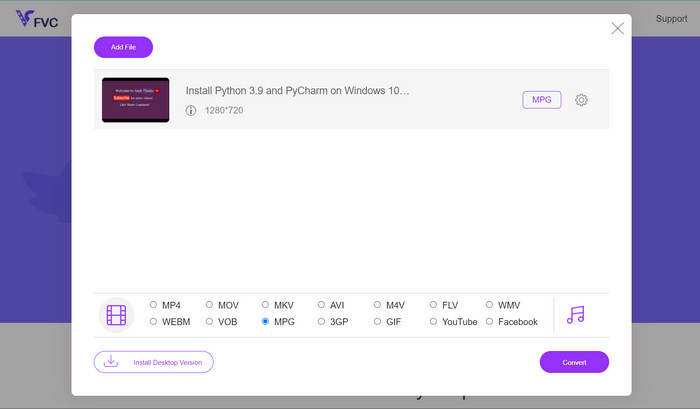
Adım 1. Önce, güvenilir tarayıcınızı kullanarak Ücretsiz Çevrimiçi MP4 Dönüştürücü sitesine gidin. Oraya vardığınızda, dostça görünen Dönüştürülecek Dosyaları Ekle düğmesini fark edeceksiniz.
Adım 2. MP4 videonuzu seçtiğinize göre şimdi istediğiniz çıktı formatını belirleme zamanı. Mevcut formatlar listesinden MPG seçeneğini bulun ve tatmin edici bir tıklama yapın.
Adım 3. Son sihirli dokunuşa hazır mısınız? Sadece Dönüştür düğmesine basın ve çevrim içi dönüştürücünün işini yapmasına izin verin. Çok kısa bir süre içinde MP4 videonuz MPG formatına dönüştürülmüş olacak.
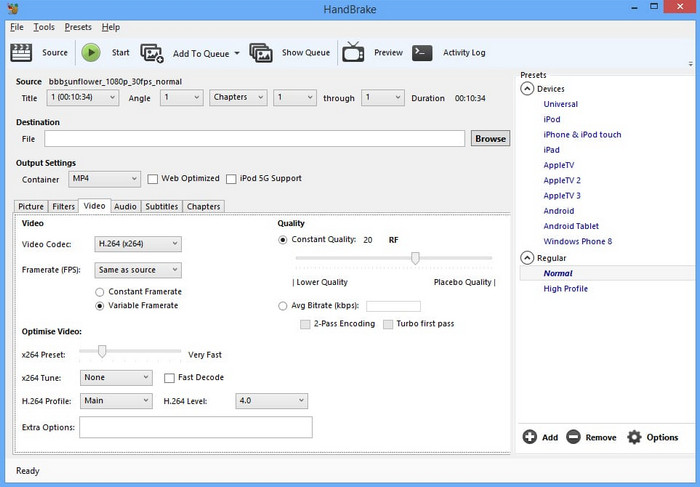
Bölüm 4. MP4'ü El Freni ile MPG'ye Dönüştürün
Uyumluluk konusunda endişeli misiniz? Olma! Handbrake, çok çeşitli çıktı formatlarını destekleyerek tüm video ihtiyaçlarınız için çok yönlü bir arkadaştır. Ücretsiz yazılımla MP4'ü MPG'ye dönüştürün, hatta tam tersini yapın. Bu dönüştürücü, hepsini işleme esnekliğine sahiptir.
Adım 1. Handbrake’i başlattığınızda sizi sade ve süssüz bir arayüz karşılayacak. Open Source (Kaynak Aç) düğmesine tıklayın ve bilgisayarınızdan dönüştürmek istediğiniz MP4 videoyu seçin.
Adım 2. Özet sekmesinde, Biçim bölümünün altında MPG seçeneğini arayın. Ayarlarda değişiklik yapmanız gerekiyorsa, bunları da burada düzenleyebilirsiniz.
Adım 3. Son olarak, Start Encode (Kodlamayı Başlat) düğmesine tıklayın ve Handbrake sihrini göstersin! MP4 videonuz kısa süre içinde MPG formatına dönüştürülecek.
Bölüm 5. MP4'ü VLC'de MPG'ye dönüştürün
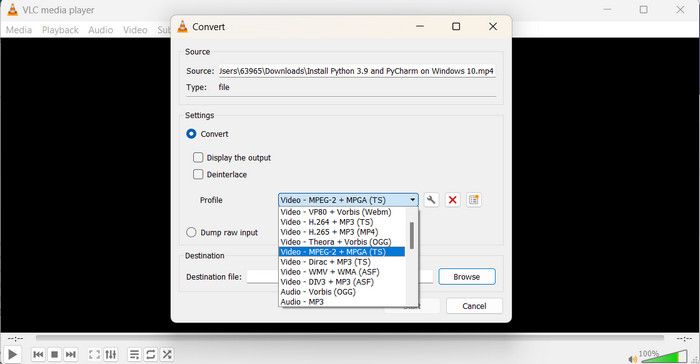
Burada bir teknoloji gurusu olmaya gerek yok. VLC, kafanızı karıştırmanıza izin vermeyecek basit, anlaşılır bir arayüze sahiptir. Kullanıcı dostu olması düşünülerek tasarlanmıştır, böylece herhangi bir güçlük çekmeden doğrudan video dönüştürmeye başlayabilirsiniz. MP4'ü MPG'ye ücretsiz olarak dönüştürmek için bu programla kısa sürede hızlı ve kolay bir kılavuzla sizi koruduk.
Adım 1. VLC’yi kurduktan sonra oynatıcıyı başlatın. Ardından üst menüden Ortam seçeneğine tıklayın ve Dönüştür/Kaydet öğesini seçin. Ortam Aç penceresinde Ekle düğmesine tıklayın ve dönüştürmek istediğiniz MP4 videoyu seçin.
Adım 2. Dönüştür penceresinde, Profil açılır menüsüne tıklayın ve tercihlerinize göre çıktı biçimi olarak Video - MPEG-1 seçeneğini belirleyin. Son olarak, dönüştürülen videonuz için hedef klasörü seçin ve Başlat düğmesine tıklayın.
Daha Fazla Okuma:
PC/Çevrimiçi/Mobil için En Güçlü 7 MP4’ten MOV’a Dönüştürücü
FLV’den MPG’ye – Mac, PC ve Çevrim İçi Ücretsiz Olarak FLV’yi MPG’ye Nasıl Dönüştürürsünüz
Bölüm 6. MP4'ten MPG'ye hakkında SSS
MPG formatı ne için kullanılır?
MPG (MPEG) formatı, DVD oynatıcılar ve TV'ler gibi eski cihazlarda video oynatmak için yaygın olarak kullanılır.
Videoları kaliteden ödün vermeden dönüştürebilir miyim?
Bazı video dönüştürücüler, kayıpsız dönüştürme seçenekleri sunar, ancak çoğu dönüştürme, bir miktar kalite kaybı içerir.
Çevrimiçi video dönüştürücülerin kullanımı güvenli midir?
En saygın çevrimiçi video dönüştürücülerin kullanımı güvenlidir, ancak güvenilir web sitelerini kullanmak ve dosyaları yüklerken dikkatli olmak çok önemlidir.
Kap formatı ile codec bileşeni arasındaki fark nedir?
Bir kap formatı (örn. MP4) video, ses ve diğer verileri tutarken, bir codec bileşeni (örn. H.264) video ve ses verilerini sıkıştırır ve açar.
Videoları 4K çözünürlüğe dönüştürebilir miyim?
Bazı video dönüştürücüler, videoları 4K çözünürlüğe dönüştürmeyi destekler, ancak çıktı kalitesi kaynak videoya göre değişebilir.
Sonuç
Evet millet, işte bu kadar! Video dönüştürme hakkında ve videolarımızın her cihazda sorunsuz oynamasına nasıl yardımcı olduğundan bahsettik. MP4’ten MPG’ye dönüştürmeden çeşitli format ve araçları keşfetmeye kadar her şeyi ele aldık.
-
 Windows/Mac/Android/iPhone için En İyi 4 MPG/MPEG Oynatıcı [2023]
 En sevdiğiniz MPG veya MPEG dosyasını sorunsuz bir şekilde oynatmak istiyorsanız, bu makaleden bilgisayarlar ve cep telefonları için en iyi 4 MPG / MPEG oynatıcı hakkında daha fazla bilgi edinebilirsiniz.
-
 AVI VS MP4 - AVI ve MP4 Formatları arasındaki Farklılıklar ve Benzerlikler
 Hangisi daha iyi bir video formatı, AVI veya MP4? Ayrıntılı karşılaştırmayı elde etmek istiyorsanız, bu AVI VS MP4 makalesine bakabilirsiniz. AVI ve MP4 arasındaki farklılıkları ve benzerlikleri birçok açıdan bilebilirsiniz.
-
 MOV'u MPG'ye Kolayca Dönüştürme (Çevrimdışı ve Çevrimiçi)
 Bu izlenecek yolda, MOV'u MPG'ye dönüştürmenin en hızlı yolunu keşfetmek üzeresiniz. Sizin için en iyi çevrimdışı ve çevrimiçi çözümleri oluşturduk.
