


 Video Dönüştürücü Ultimate
 Ekran kaydedicisi
 Video Onarımı
 Güvenli İndirme
MP4 Mac / Windows için WMV'ye Nasıl Dönüştürülür
Önerilen MP4’ten WMV’ye dönüştürücüler listesini tanıtmadan önce, video formatları hakkında size birkaç soru sormak istiyorum.
Bilgisayar sisteminde dijital video verilerini kaydetmek için video için tasarlanmış bir dosya formatı kullanmamız gerekir. Peki, hangi video formatlarını biliyorsunuz? MP4? WMV? FLV? AVI? Bunlar dijital video verilerini depolarken gerçekten de yaygın olarak kullanılan video formatlarıdır. Peki hiç neden bu kadar çok video dosya formatı olduğunu merak ettiniz mi? MP4 ile WMV arasındaki fark nedir?
Genel olarak, MP4 piyasadaki hemen hemen her tür cihazla uyumludur, bu da MP4'ü her yerde, hatta bilgisayarınızın veya telefonunuzun varsayılan video oynatıcısında bile oynatabileceğiniz anlamına gelir. Bununla birlikte, Windows cihazları kullanıyorsanız, WMV'nin size daha iyi hizmet verebileceğine inanıyorum. Yalnızca Microsoft tarafından geliştirildiği için değil, aynı zamanda HQ videoyu küçük bir disk alanına kaydedebildiği için.
Bugün, önerdiğimiz en iyi video dönüştürücülerle bir MP4 dosyasını WMV’ye nasıl dönüştüreceğinizi öğreneceksiniz.

Bölüm 1. MP4'ü Ücretsiz Çevrimiçi WMV'ye Dönüştürme
Klasik masaüstü yazılımını kurmanın yanı sıra, web tabanlı bir dönüştürücü kullanmak da günümüzde bir seçenek. Basit olmasına rağmen, birçok çevrimiçi dönüştürücü, dönüştürme sırasında biraz yavaştır. Hatta bazıları yüklediğiniz dosyaların boyutunu ve miktarını sınırlar ve çıktı videolarının kalitesini garanti edemez.
Bu nedenle size burada ücretsiz, hızlı ve verimli bir video dönüştürücü olan, bir sürü video veya sesi kayıpsız dönüştürmenize yardımcı olabilecek FVC Free Online Video Converter’ı tanıtıyoruz.
Çok işlevli bir ücretsiz çevrimiçi MP4'ten WMV’ye dönüştürücü olarak FVC Video Converter neredeyse her tür video formatını destekler. Büyük MP4 dosyalarını MKV, MOV, WMV, AVI, TS vb. formatlara veya bu formatlardan MP4'e dönüştürebilirsiniz. Ayrıca videonuzu ihtiyacınıza göre düzenleyebilirsiniz. FVC üzerinde video bit hızını, örnekleme hızını, kare hızını, çözünürlüğü ve sesi ayarlamak son derece kolaydır. Ve dönüştürmeden sonra videonuzda filigran olmaz.
Şimdi tüm bu özelliklerle, bu dönüştürücünün nasıl çalıştırılacağını anlamanın zor olabileceğinden endişelenebilirsiniz. Aslında gerçek oldukça zıttır. Bu MP4'ten WMV'ye dönüştürücüye hakim olmanız yalnızca birkaç adım alır.
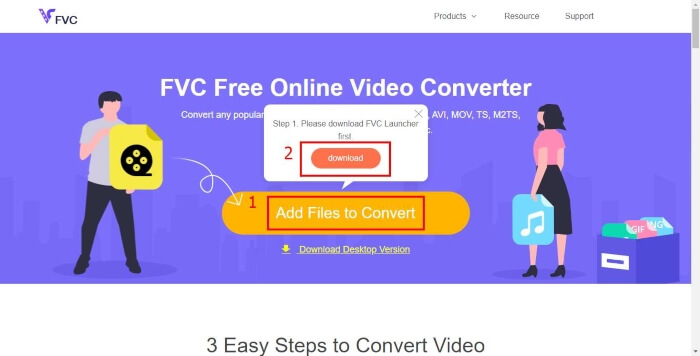
Adım 1. FVC Free Online Video Converter sayfasına gitmek için buraya tıklayın. Ardından önce FVC Launcher'ı indirmek için Add Files to Convert (Dönüştürülecek Dosyalar Ekle) seçeneğine tıklayın.
Dosyaları toplu dönüştürmek için Masaüstü Sürümü indirin.
Adım 2. Başlatıcıyı yükledikten sonra Open File (Dosya Aç) penceresi açılacaktır. Değiştirmek istediğiniz MP4 dosyasını bulun.
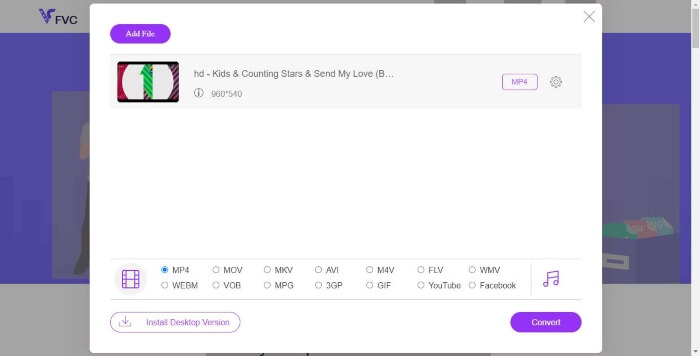
Adım 3. Ardından dönüştürme sayfasında çıktı formatı olarak WMV'yi seçin. Bu arada, video parametrelerini değiştirmek isterseniz, Setting (Ayar) simgesine tıklayarak Ayarlar penceresini açmanız yeterlidir. Convert (Dönüştür) düğmesine tıklayın ve dönüştürülen videonun kaydedileceği bir hedef klasör seçin.
Bölüm 2. MP4'ü Masaüstü Yazılımıyla WMV'ye dönüştürün
1. RealPlayer
RealPlayer 1995’ten bu yana en popüler medya oynatıcılardan biri haline geldi. Sadece videolarınızı, müziğinizi ve resimlerinizi kolayca yönetmenize yardımcı olmakla kalmaz, aynı zamanda videoları birden fazla formata dönüştürüp diğer mobil cihazlara aktarmanıza da imkân tanır.
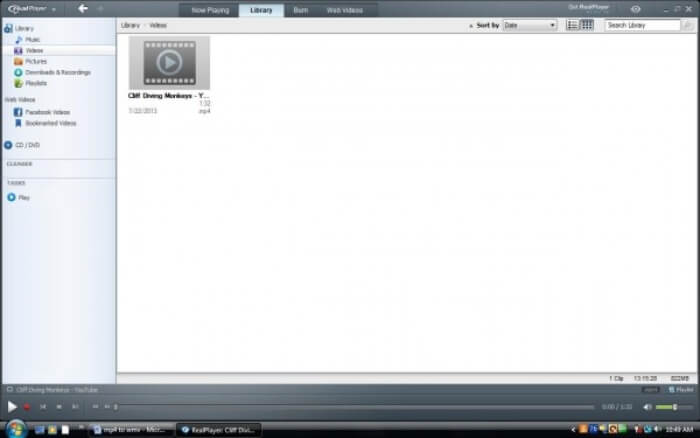
Adım 1. Bilgisayarınıza RealPlayer kuruluysa, MP4 dosyasını RealPlayer library'sine (kitaplığına) kaydedin. RealPlayer’ı başlattıktan sonra Library’yi seçin. Dosyanızı Video listesinde bulun.
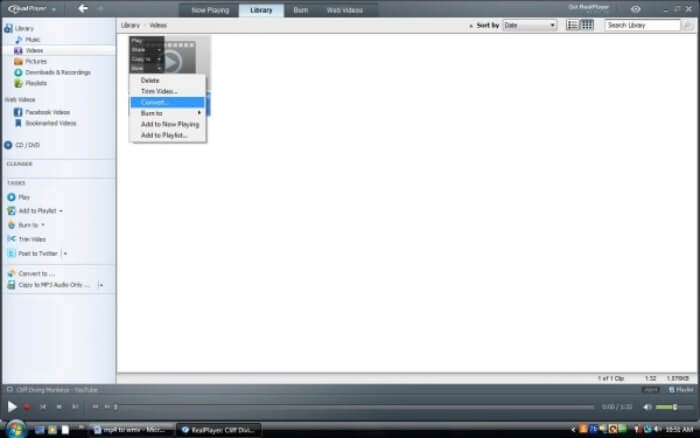
Adım 2. Dosyaya tıklayın ve açılan menüden More (Daha Fazla) seçeneğini seçin. Ardından Convert (Dönüştür) seçeneğini seçin.
Adım 3. Select a Device (Bir Cihaz Seçin) menüsünden WMV’yi seçin ve OK (Tamam) düğmesine tıklayın. Şimdi Start (Başlat) düğmesine tıklayın. Birkaç saniye içinde videonuz RealPlayer kitaplığında yer alacaktır.
2. VLC Media Player
VLC, farklı formatlardaki videoları oynatabilen, açık kaynaklı, çapraz platform bir oynatıcıdır. Ayrıca birçok popüler formata dosya dönüştürmeyi de destekler. MP4’ten WMV dosyası dışa aktarmak için aşağıdaki adımları izleyin.
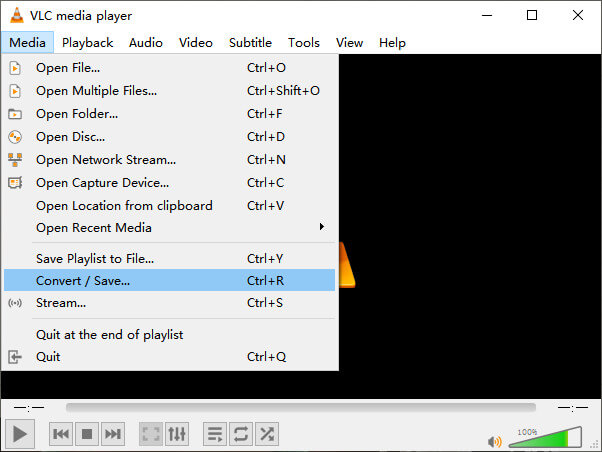
Adım 1. VLC Media Player’ı açın ve Media (Ortam) menüsünden Convert / Save (Dönüştür / Kaydet) seçeneğine tıklayın.
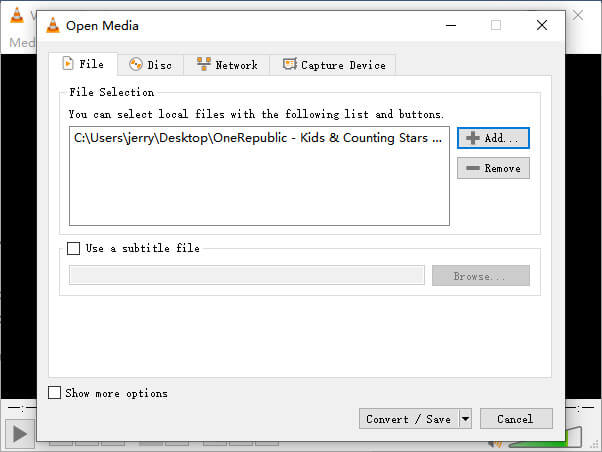
Adım 2. Dosyayı VLC’ye ekleyin. Ardından Convert / Save (Dönüştür / Kaydet) düğmesine tıklayın.
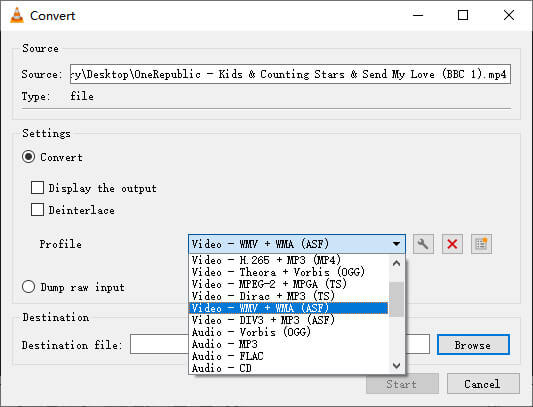
Adım 3. Profile (Profil) bölümünden WMV’yi bulun ve çıktı dosyasının kaydedileceği hedef klasörü seçin. Sonra Start (Başlat) düğmesine tıklayın.
MP4 ve WMV
2001 yılında Moving Picture Experts Group (MPEG) tarafından piyasaya sürülen MP4 formatı, video, ses, altyazı ve görüntü verilerini ayrı parçalarda kaydetmenize yardımcı olabilir. MPEG-4 Part 14'ün kısaltmasıdır. Ayrıca, video akışı ve paylaşımı için kullanılan en popüler formatlardan biridir.
Microsoft tarafından üretilen WMV, 2000'lerde en yaygın video formatlarından biriydi. Web üzerinden görülebilir ve Windows'ta çeşitli medya oynatıcılar tarafından oynatılabilir. Ayrıca Windows Media Player'ın varsayılan video dosyası biçimidir. Ancak son zamanlarda diğer formatlar tarafından devralındı.
Bölüm 3. MP4'ten WMV'ye Dönüştürme SSS'leri
1. El Freni MP4'ü WMV'ye dönüştürebilir mi?
Araştırma yaptıktan sonra, ne yazık ki en son Handbrake sürümünün MP4'ü WMV’ye dönüştüremediği ortaya çıktı. Handbrake’in çoğu yaygın multimedya dosyasını desteklediği doğru. Ancak bu, input sources (girdi kaynakları) içindir. Çıkış formatı seçenekleri ise MP4(.M4V) ve MKV’dir.
2. 100MB üzerindeki bir MP4 dosyasını ücretsiz olarak çevrimiçi olarak WMV'ye dönüştürebilir miyim?
Duruma bağlıdır. Farklı ücretsiz çevrimiçi video dönüştürücülerin farklı sınırlamaları vardır. Bazı dönüştürücüler, örneğin FVC Free Online Video Converter, 100 MB’ın üzerindeki dosyaları dönüştürmenize izin verir. Ancak bazı diğer dönüştürücüler bu boyutlar için sizden ücret talep edebilir.
3. Windows Media Player MP4'ü WMV'ye dönüştürebilir mi?
Windows Media Player ile MP4 dosyasını WMV’ye dönüştüremezsiniz. Çünkü o yalnızca bir oynatıcıdır, dönüştürücü değildir. Eğer MP4'ü WMV’ye dönüştürmek istiyorsanız, verimli bir video dönüştürücü kullanmanız gerekir.
4. WMV dosyasını Mac'te oynatabilir miyim?
Mac’te yerleşik video araçları WMV dosyalarını oynatamaz. Ancak MacOS’te WMV videolarını oynatmanın başka yolları da vardır. WMV’yi Mac’in desteklediği başka bir formata dönüştürebilirsiniz. Ya da WMV dosyalarını oynatmak için Windows Media Player for Mac yükleyebilirsiniz.
Sonuç
MP4 ve WMV birbirine benzerlikler gösterse de, kendilerine özgü bazı özelliklere de sahiptirler. Bu yüzden, seçimlerinizi somut koşullara göre yapmalısınız. Umarız bu yazıyı okuduktan sonra MP4'ü WMV’ye dönüştürme konusundaki sorunlarınız ortadan kalkar. Bir dahaki sefere WMV dosyasına ihtiyacınız olduğunda, yalnızca yukarıdaki kılavuzu izleyin ve dosyayı kolayca dönüştürün.
-
 MP4 Video Dosyalarınızı Kalite Kaybı Olmadan Animasyonlu GIF Görüntülerine Dönüştürme
 MP4 videonuzu animasyonlu GIF'lere dönüştürmenin en iyi yolunu mu arıyorsunuz? İşte bunu Photoshop, Windows Movie Maker, çevrimiçi video dönüştürücü ve daha fazlasında yapmak için ayrıntılı bir kılavuz.
-
 FLV Video Dosyalarınızı Bir Kuruş Ödemeden MP4'e Dönüştürme
 Bu kılavuz, FLV video dosyalarınızı Windows 10/8/7 / XP ve Mac OS X'te MP4 formatına dönüştürmek için dört ücretsiz yöntemi paylaşır, böylece herhangi bir cihazda videoların keyfini çıkarabilirsiniz.
-
 Kaliteyi Kaybetmeden MOV'u MP4'e Dönüştürme
 MOV (Apple QuickTime Movie) dosyalarını MP4'e dönüştürmek ister misiniz? Bu gönderi, MOV video dosyalarınızı Windows 10/8/7 / XP ve Mac OS X'te MP4 formatına dönüştürmek için 4 ücretsiz yöntem paylaşıyor.

