


 Video Dönüştürücü Ultimate
 Ekran kaydedicisi
 Video Onarımı
3 Çevrimiçi ve Çevrimdışı MPG'den MP4'e Dönüştürücüler MPG Dosyalarını Dönüştürmeyi Denemeniz Gerekir
MP4, günümüzde internette en sık gördüğünüz dosya biçimlerinden biridir. MPG ve MP4 birçok benzerliğe sahip olsalar da aralarında farklar da vardır. Ve MPG dosyanızı MP4 dosya biçimine dönüştürmek istiyorsanız, günümüzde popüler olan video dönüştürücülerini sizin için test ettik. Ayrıca, göz atmanız için en iyi MPG'den MP4'e dönüştürücüleri seçtik!

Bölüm 1. Neden MPG'yi MP4'e Dönüştürmeniz Gerekiyor?
MPG'yi MP4'e dönüştürmenin önemi nedir? MPG ve MP4, internetteki videolar için sıkça kullanılan biçimlerdir. Peki aralarındaki fark nedir? MPG veya MPEG, MPEG kodeğini kullanan orijinal biçimdir. Yüksek kalitede video çıktıları sağlayan bir kodlayıcıdır.
Öte yandan, MP4, en yaygın video dosyası formatlarından biridir ve modern video sıkıştırmasını kullanır. Yani, hangisi daha iyi? MP4'ün yüksek sıkıştırma yeteneği, dosyaların MPG gibi diğer herhangi bir video dosyası biçiminden daha küçük boyutlarda sıkıştırılmasına olanak tanır.
Bölüm 2. MPG'yi MP4'e Dönüştürmenin 3 Yolu
İşte çevrimiçi ve çevrimdışı kullanabileceğiniz ve MPG'yi MP4'e nasıl değiştireceğinizi öğrenebileceğiniz mükemmel video dönüştürücüler.
1. Video Converter Ultimate'ı kullanın
Video Converter Ultimate, MPG dosyanızı kolayca MP4 dosya biçimine dönüştürmenizi sağlayan bir medya dosyası dönüştürücüsüdür. Bu dönüştürücü, kullanımı kolay bir arayüze sahiptir ancak etkileyici çıktılar üretir. MPG dosyanızı düzenlemenizi, geliştirmenizi ve sıkıştırmanızı sağlayan özelliklere sahiptir. Ayrıca, bu dönüştürücüde MPG dosyalarınızı toplu olarak MP4'e dönüştürebilirsiniz.
Video Converter Ultimate ayrıca görüntüleri ve videoları kolajlayabileceğiniz bir seçeneğe sahiptir. Ayrıca, bir GIF oluşturmak istiyorsanız, bu dönüştürücü bu özelliğe sahiptir. Buna ek olarak, bu dönüştürücüyü kullanarak büyük dosyaları kalitelerini bozmadan dönüştürebilirsiniz. Özellikleri profesyonel gibi görünse de, kullanımı kolay olduğu için hızlı bir şekilde kullanabilirsiniz.
Adım 1. Bu dönüştürücüyü indirmek için aşağıdaki indirme düğmesine tıklayın. Kurulum işlemini takip edin ve ardından uygulamayı açın.
Ücretsiz İndirWindows 7 veya üstü içinGüvenli İndirme
Ücretsiz İndirMacOS 10.7 veya üstü içinGüvenli İndirme
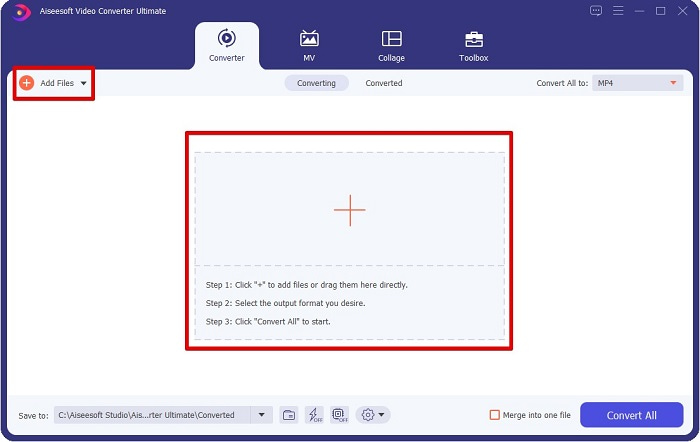
Adım 2. Dönüştürücüyü başlattıktan sonra, MPG dosyanızı yüklemek için Dosya Ekle düğmesine veya + düğmesine tıklayın. Bilgisayar dosyalarınız açılacak; klasörlerinizden dosyanızı bulun. Ardından dosyanızı kuyruğa eklemek için Aç'a tıklayın.
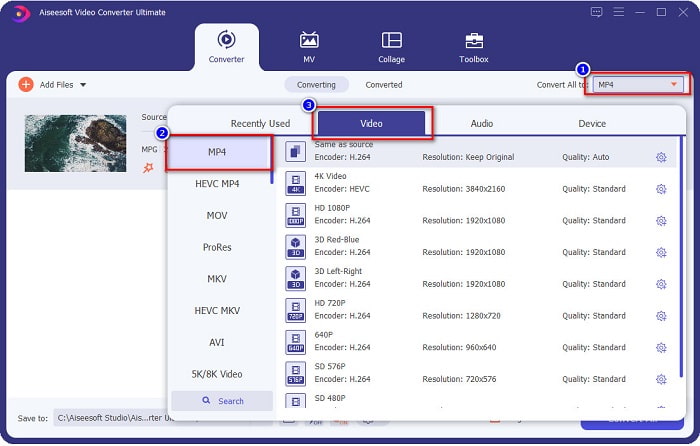
Adım 3. MPG dosyanızın biçimini değiştirmek için ekranınızın sağ üst köşesindeki Tümünü Dönüştür seçeneğine tıklayın. Dosya biçimlerinin listesini gördükten sonra, MP4 dosya biçimini seçin.
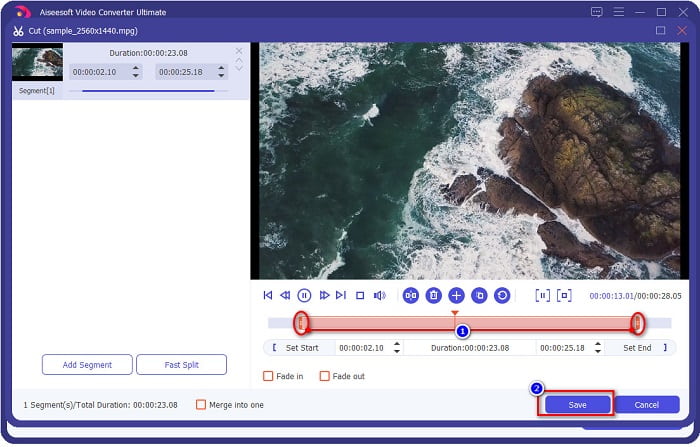
Videonuzun süresini kısaltmak istiyorsanız, videonuzu kırpmak için makas düğmesine tıklayın. oynatma başı düğmelerini sürükleyerek videonuzun süresini ayarlayabilirsiniz. Bitirmek için Kaydet'e tıklayın.
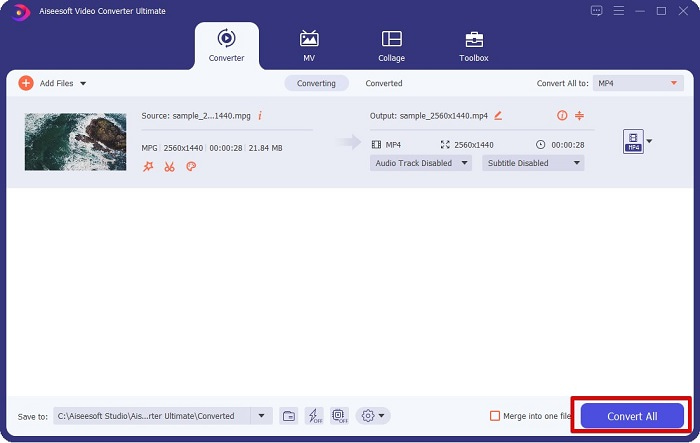
Adım 4. İstediğiniz dosya biçimini seçtiğinizde, MPG dosyanızı MP4 dosyasına dönüştürmek için Tümünü Dönüştür'e tıklayın. Kısa bir süre bekleyin; ardından MPG dosyanız MP4 dosyasına dönüştürülecektir. Bu basit adımlarla MPG dosyanızı kolayca MP4'e dönüştürmüş olursunuz.
2. Ücretsiz Çevrimiçi Dönüştürücü Kullanın
FVC Free Online Video Converter, MPG dosyanızı hiçbir kayıt gerektirmeden ücretsiz olarak MP4 dosya biçimine dönüştürmenizi sağlar. Bu, sınırlama olmadan dönüştürme yapmanıza olanak tanıyan ücretsiz bir çevrimiçi video dönüştürücüdür. Ayrıca, bu dönüştürücüyle çevrimiçi olarak büyük dosyalar da dönüştürebilirsiniz. Herhangi bir şey indirmenize gerek yoktur çünkü çevrimiçi olarak erişebilirsiniz. Ancak dezavantajı, internete bağımlı olmasıdır; yani dönüştürme hızınız, internet hızınıza bağlıdır. Yine de birçok kullanıcı bu dönüştürücüyü kullanmış ve harika bir video dönüştürücü olduğu kanıtlanmıştır.
FVC Free Online Video Converter'da dönüştürmek için gereken adımların listesi:
Adım 1. Tarayıcınıza gidin ve FVC Free Online Video Converter araması yapın.
Adım 2. Web sayfasına geldiğinizde, Dönüştürülecek Dosya Ekle seçeneğine tıklayın. Önce başlatıcıyı indirmeniz gereken bir metin kutusu görünecektir. Başlatıcı indirildikten sonra dosyalarınıza yönlendirileceksiniz; dönüştürmek istediğiniz MPG dosyasını seçin.
Dosyaları toplu dönüştürmek için Masaüstü Sürümü indirin.
Adım 3. MPG dosyanızı seçtikten sonra, video biçimlerinin yer aldığı ilk arayüzü göreceksiniz. MPG dosyanızı çevrimiçi olarak MP4'e dönüştürmeden önce MP4'ü seçin.
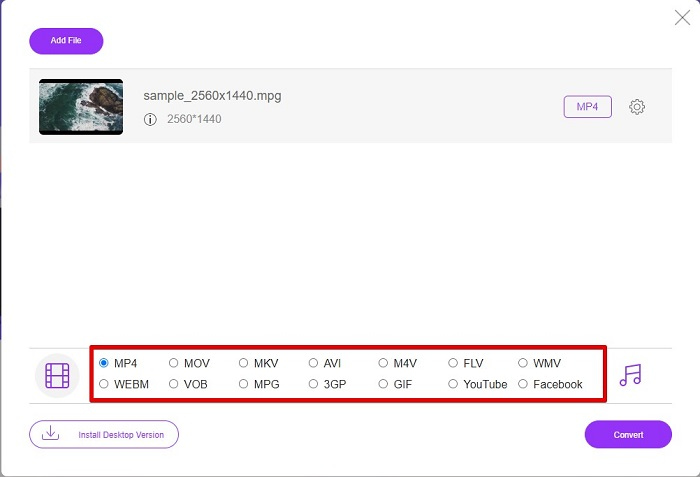
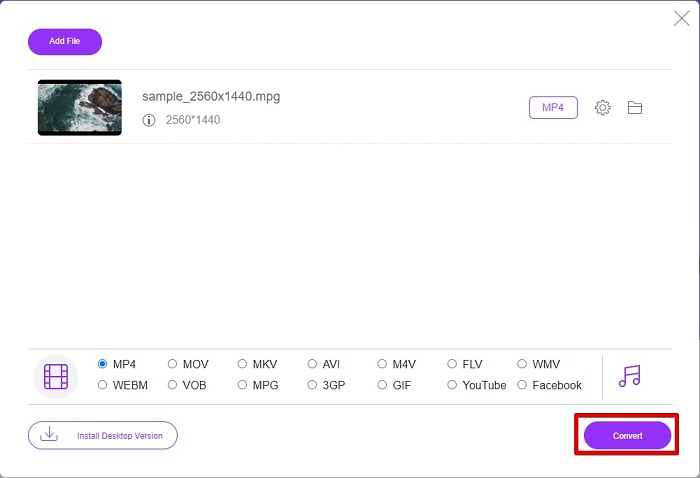
Adım 4. Dönüştürme işlemini başlatmak için Dönüştür düğmesine tıklayın. Dönüştürülen dosyanızı bilgisayarınızda nereye kaydetmek istediğinizi seçeceğiniz yeni bir sekme açılacak, ardından klasör seç'e tıklayın.
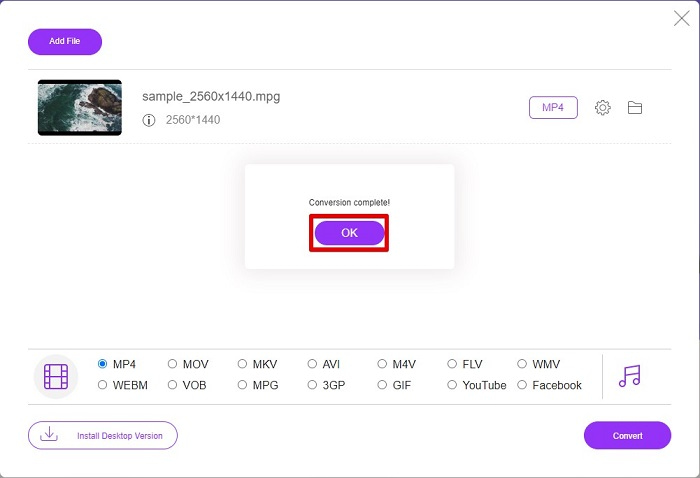
Adım 5. Son olarak, dosyanız dönüştürülmeye başlayacak; dönüştürme tamamlandığında bitirmek için Tamam'a tıklayın. Ve hepsi bu kadar! 1-2-3 kadar kolay bir şekilde dönüştürme işlemini tamamladınız!
3. ConvertFiles.com'u kullanın
ConvertFiles.com, MPG dosyanızı MP4'e dönüştürmek için ücretsiz bir çevrimiçi dönüştürücü uygulamasıdır. 300 çeşit dosya formatına kadar dosya formatlarını dönüştürmenize izin verir. Belgeleri, çizimleri, videoları, sunumları ve daha fazlasını dönüştürmenizi sağlayacak çevrimiçi bir MPG'den MP4'e dönüştürücü arıyorsanız. Ancak, bu çevrimiçi dönüştürücüyü kullanırken birçok rahatsız edici reklamla karşılaşacaksınız. Yine de, bu çevrimiçi dönüştürücü denemeye değer ve umut verici olduğunu kanıtladı.
MPG dosyanızı MP4 dosya formatına şu şekilde dönüştüreceksiniz:
Adım 1. Tarayıcınızda ConvertFiles.com'u arayın ve doğrudan web sayfasını ziyaret edin.
Adım 2. MPG dosyanızı, dikdörtgen düğmeye veya Yerel bir dosya seç ifadesinin yanındaki Gözat düğmesine tıklayarak seçin. MPG dosyanızı bulun ve seçin.
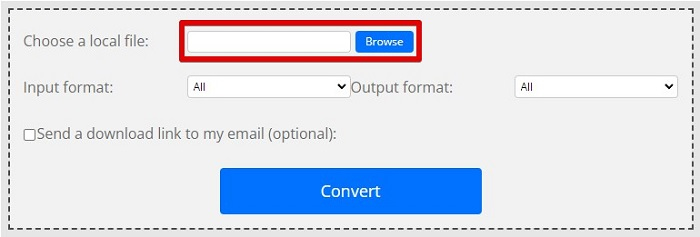
Adım 3. Dönüştürmek istediğiniz MPG dosyasını seçtikten sonra, çıktı biçiminde .mp4 biçimini açılır liste düğmesine tıklayarak seçin.
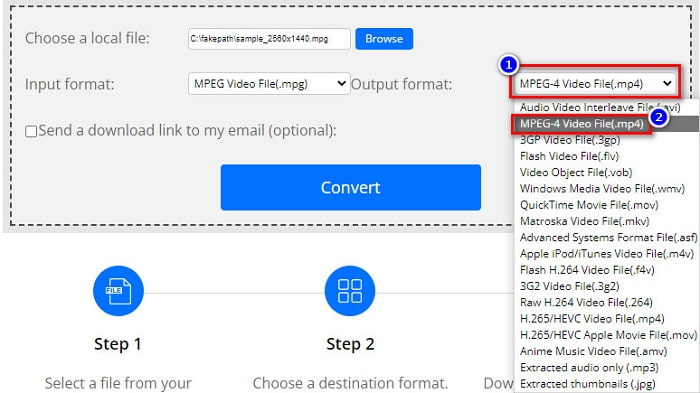
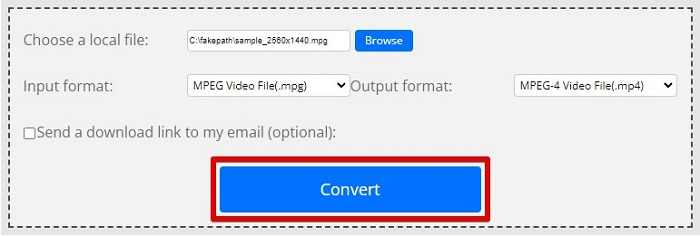
Adım 4. İstediğiniz dosya biçimini seçtiğinizde, artık Dönüştür'e tıklayarak dosyanızı dönüştürebilirsiniz.
MPG ve MP4
Hareketli Resim Uzmanları Grubu (MPEG) tarafından yapılan MPG, video, ses ve meta veri bilgilerini depolamak için yaygın bir dijital video formatıdır. İnternette paylaşmak için filmler oluştururken oldukça kullanışlıdır. MPG'deki bu dosyalar genellikle MPEG-1 veya MPEG-2 video/ses sıkıştırması içerir.
2001 yılında Moving Picture Experts Group (MPEG) tarafından piyasaya sürülen MP4 formatı, video, ses, altyazı ve görüntü verilerini ayrı parçalarda kaydetmenize yardımcı olabilir. MPEG-4 Part 14'ün kısaltmasıdır. Ayrıca, video akışı ve paylaşımı için kullanılan en popüler formatlardan biridir.
Bölüm 3. MPG ve MP4 Formatı hakkında SSS
MPG dosyalarını kalitesini kaybetmeden MP4'e dönüştürebilir miyim?
Evet. Video Converter Ultimate, dosya boyutuna rağmen kalitesini kaybetmeden MPG'nizi MP4 formatına dönüştürmenize olanak tanır.
MPG dosyalarını nerede oynatabilirim?
MPG dosyaları geniş ölçüde desteklenir. Bu nedenle Microsoft Windows Media Player ve VideoLAN VLC Media Player da dahil olmak üzere birçok medya oynatıcı bu dosya biçimini açabilir. Daha fazla bilgi için bu makaleye göz atabilirsiniz: Windows/Mac/Android/iPhone için En İyi 4 MPG/MPEG Oynatıcı [2021]
MP4'ü MPG'ye dönüştürebilir miyim?
Evet. Yukarıda listelediğimiz dosya dönüştürücüleri kullanarak MPG'yi MP4 dosya formatına dönüştürebilirsiniz.
Sonuç
Yukarıda listelediğimiz dönüştürücüler güvenilir oldukları kanıtlanmış araçlardır. Kullanımları kolaydır ve ücretsizdir! Ancak hem MPG dosyanızı MP4 dosya biçimine dönüştürebilen hem de dosyanızı geliştirebilecek harika özelliklere sahip bir dosya dönüştürücü istiyorsanız, o zaman Video Converter Ultimate en iyi seçimdir. Ayrıca, reklamsız bir çevrimiçi dönüştürücü ve büyük dosyaları da kolaylıkla dönüştürebilen bir araç arıyorsanız, FVC Free Online Converter'ı deneyin.
-
 Mac/Windows/Çevrimiçi Bilgisayarınızda MPG'yi MOV'a Dönüştürmenin 3 Kolay Yolu
 MPG dosyalarınızı dönüştürmek ve daha sonra bunları iOS, iPod, iPad veya Mac'inizde taşımak mı istiyorsunuz? Bu makale, adımlarla MPG'yi MOV'a nasıl dönüştüreceğinizi anlamaya yardımcı olacaktır.
-
 Kaliteyi Kaybetmeden MPG'yi FLV'ye Dönüştürme [Kanıtlanmış]
 En sevdiğiniz filmi bu medya oynatıcıda izlemelisiniz, ancak MPG'yi desteklemiyor. Bu makalede tanıtılan bu dönüştürücüleri kullanarak MPG dosyanızı FLV'ye dönüştürmeyi deneyin.
-
 MPG'yi WMV'ye Ücretsiz Dönüştürmek için 2 Ultimate MPG Dönüştürücü
 MPG'yi WMV'ye ücretsiz dönüştürmek ister misiniz? Bu durumda şanslısınız çünkü MPG dosyalarınızı dönüştürmek için kullanabileceğiniz iki araç olduğunu öğrendik.

