


 Video Dönüştürücü Ultimate
 Ekran kaydedicisi
 Video Onarımı
 Güvenli İndirme
E-posta için PDF Dosyalarını Nasıl Sıkıştırırsınız? Seçmek İçin 3 Etkili Yol
Gerçekten de, büyük dosyaları e‑posta ile göndermek zahmetli olabilir. Hatta size bazı sorunlar çıkarabilir ya da hiç teslim edilmeyebilir. Ayrıca, birçok e‑posta sağlayıcısı ekleri belirli dosya boyutlarıyla sınırlar; bu sınır, karmaşık bir PDF ile çok kolay aşılabilir. Bu durum, özellikle çok sayıda görsel içeren veya uzun metinli PDF’ler için geçerlidir. Bunu aşmak için, bu durumdaki çoğu kişi Dropbox veya Google Drive gibi dosya paylaşım hizmetlerine başvurur. Ancak çoğu zaman kullanışlı bir hileyi unuturlar: dosya sıkıştırma. Bunu yapabilen, üstelik oldukça popüler olan pek çok ücretsiz çevrim içi araç vardır. Peki, bir PDF dosyası e‑posta için nasıl etkili bir şekilde sıkıştırılır? Aşağıdaki tüm içeriği okumaya devam ederken öğreneceğiniz şey tam olarak budur.

Bölüm 1. E-posta için En İyi PDF Boyutu Nedir?
İşte bir gerçek: E-postalar için ideal PDF boyutu için sihirli bir sayı yoktur. Dikkat etmeniz gereken şey, e-posta platformunuzun ek sınırıdır. Popüler hizmetler ekleri yaklaşık 20 MB ile sınırlar, bu da özellikle çok sayıda resim içeren veya çok uzun belgeler olan PDF'lerde şaşırtıcı derecede kolay ulaşılabilir olabilir. Bu nedenle, PDF'niz belirtilen 20 MB sınırından büyükse, e-postanız muhtemelen gönderilmeyecektir ve bir hata mesajı alırsınız. Bununla birlikte, belirli bir boyut veya e-posta için en iyi PDF boyutunu hedeflemek yerine, güvenli oynamak ve 20 MB'ın altında tutmak en iyisidir. Bu şekilde, başarılı bir şekilde ekleneceği ve gönderileceğinden emin olabilirsiniz.
Bölüm 2. E-posta için PDF Dosyalarını Sıkıştırmak İçin Tek Tıklama
İşte e‑posta dosyalarını sıkıştırmanın harika ve hızlı bir yolu. Ağır PDF dosyalarınızı bozmadan küçültebilen bu ücretsiz aracı, yani FVC Free PDF Compressorı denemeye hazır olun. Çoğu e‑posta hizmeti yalnızca yaklaşık 20 MB civarında ek boyutuna izin verdiğinden, görseller veya çok sayıda metin içeren PDF’ler bu sınırı kolayca aşabilir. Bu sıkıştırıcı, PDF’inizi çok daha küçük, hatta 100 kilobaytın altına indirebilir! PDF’leri e‑posta için bu kadar büyük oranda küçültürken kaliteden ödün vermesinden endişe etmenize gerek yok, çünkü dosyaların kalitesini korur. Hatta muhtemelen orijinal sürüm ile küçültülmüş sürüm arasındaki farkı bile fark etmeyeceksiniz.
Üstelik bu harika araç kullanımı çok kolaydır ve herhangi bir uzmanlık seviyesine sahip herkes kullanabilir. Tek yapmanız gereken PDF dosyasını programa sürükleyip bırakmak ve otomatik olarak küçültecektir. Daha sonra, tek bir tıklamayla daha küçük PDF'yi bilgisayarınıza kaydedebilirsiniz. Bu şekilde, PDF'yi çevrimiçi olarak e-posta boyutuna sıkıştırabilir ve son belgede filigran olmadan e-postayla göndermek veya yüklemek için mükemmel bir boyuta getirebilirsiniz. Sürecini daha iyi anlamak için aşağıdaki ayrıntılı yönergelere bakın.
Adım 1. Ana arayüzünde, Add PDF File sekmesine tıklayın ve sıkıştırmanız gereken PDF dosyasını seçin.
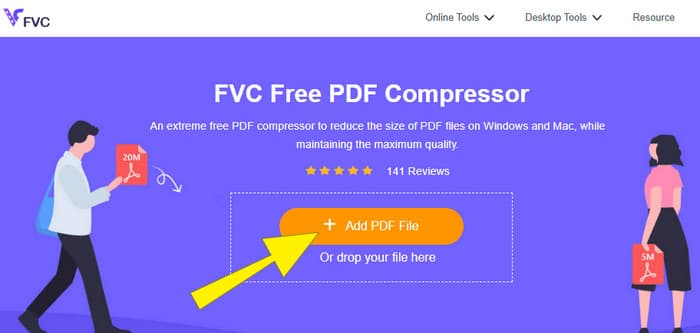
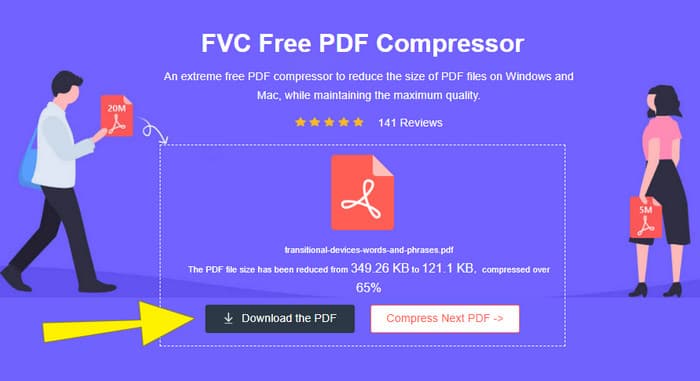
Adım 2. PDF dosyası yüklenirken, araç aynı anda sıkıştırma işlemini de yürütür.
Adım 3. İşlem tamamlandığında, Download the PDF düğmesine tıklayın.
Bölüm 3. Düzenleme Özellikleriyle E-posta İçin PDF Dosyalarını Sıkıştırın
Düzenleme özelliklerine de sahip bir araç tercih ediyorsanız, bu görev için ihtiyacınız olan şey Adobe Acrobat’tır. Adobe Acrobat, PDF dosyaları oluşturma, düzenleme ve yönetme konusunda bilinen bir programdır. PDF’lerle çalışmak için özel olarak tasarlanmış güçlü bir araç seti gibidir. Kullanışlı özelliklerinden biri de, boyut sınırı nedeniyle e‑postaya sığmayan hacimli bir PDF’iniz olduğunda kullanabileceğiniz PDF sıkıştırmadır. Hem çevrim içi hem masaüstü sürümü bulunan Adobe Acrobat, büyük PDF dosyalarını kalitede çok fazla bozulma olmadan e‑posta için sıkıştırmanıza yardımcı olabilir. Bunu, PDF içindeki görsellerin boyutunu küçültmek ya da gereksiz yazı tiplerini kaldırmak gibi çeşitli yollarla yapar. Ancak Adobe ve araç paketlerini bilenler için, öğrenme sürecinin dik bir eğriye sahip olmasına şaşırmamalısınız. Bu nedenle, süreci kolaylaştırmanız için aşağıdaki adımları hazırladık.
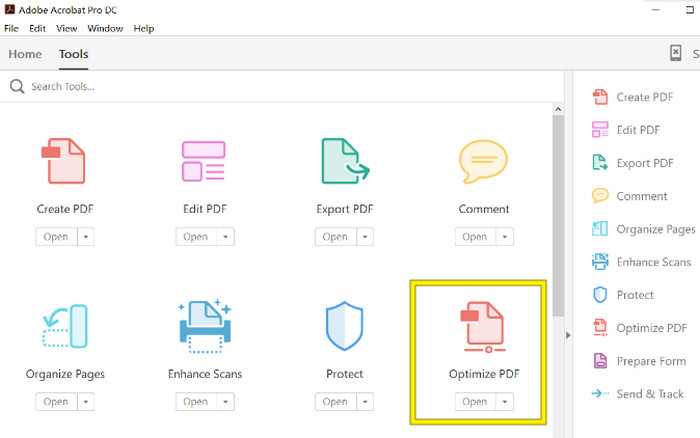
Adım 1. Acrobat’ı başlatın ve üzerinde çalışmanız gereken PDF dosyasını açın. Bunu yapmak için Tools-Optimize PDF-Open yolunu izleyin.
Adım 2. PDF dosyasını açtıktan sonra, yeni beliren gezinti alanından Reduce File Size seçeneğine tıklayın. Ardından, istediğiniz sıkıştırma ve optimizasyon düzeyine ulaşmak için sunulan düzenleme seçeneklerini ayarlayın veya kullanın.
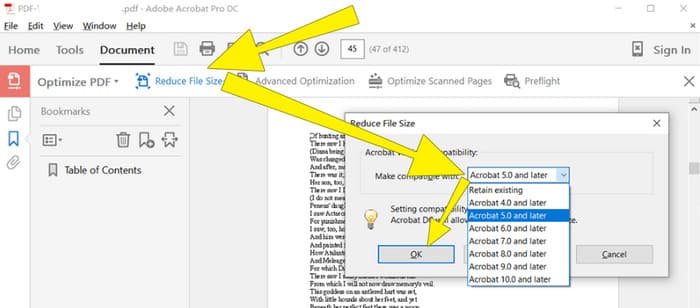
Adım 3. Bundan sonra, sıkıştırılmış PDF dosyasını kaydedin.
Bölüm 4. PDF Dosyalarını Dönüştürerek E-posta İçin Sıkıştırın
Bir PDF’i e‑posta ile göndermek için nasıl sıkıştıracağınıza dair yeni bir hile öğrenmek ister misiniz? Dosyayı JPG’ye dönüştürelim. Bu dönüştürme yöntemini PowerPoint kullanarak mükemmel şekilde yapabilirsiniz. PowerPoint, büyük olasılıkla sunum hazırlamak için kullandığınız bir programdır. Metinlerin, resimlerin ve hatta videoların bulunduğu bir slayt gösterisi hayal edin. PowerPoint, kitlenize göstermek üzere tek tek tıklayarak ilerlediğiniz slaytlardan oluşan bu sunumları hazırlamanızı sağlar. Öğretmenler, öğrenciler, iş insanları ve bilgiyi görsel olarak paylaşmak isteyen herkesin yaygın olarak kullandığı bir araçtır.
Şimdi, PowerPoint sunumunuza bir PDF eklemek kullanışlı olabilir, ancak en sezgisel süreç olmayabilir. Ancak bir kez yaptığınızda, bir JPG dosyası üretmek çocuk oyuncağı olacaktır. Ama endişelenmeyin! PDF'nizi kısa sürede yerleştirmeniz için takip etmeniz gereken adım adım size yol gösterebiliriz.
Adım 1. Bilgisayarınızda PowerPoint’i başlatın ve PDF dosyasını açabileceğiniz uygun slaydı seçin.
Adım 2. Şimdi, Insert sekmesi menüsüne gidin ve Metin bölümünden Nesne (Object) seçeneğini bulun. Bu seçeneğe tıklayın; yeni bir pencere açılacaktır. Bu pencerede, arayüzün sol tarafında bulunan Create from File seçeneğini işaretleyin. Ardından, PDF dosyasını slayda aktarmanızı sağlayacak olan Browse düğmesine tıklayın.
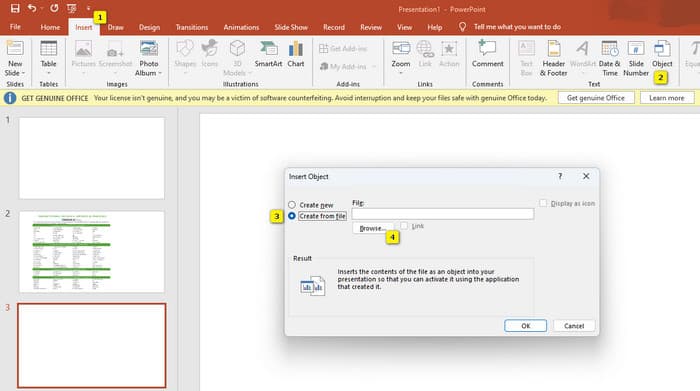
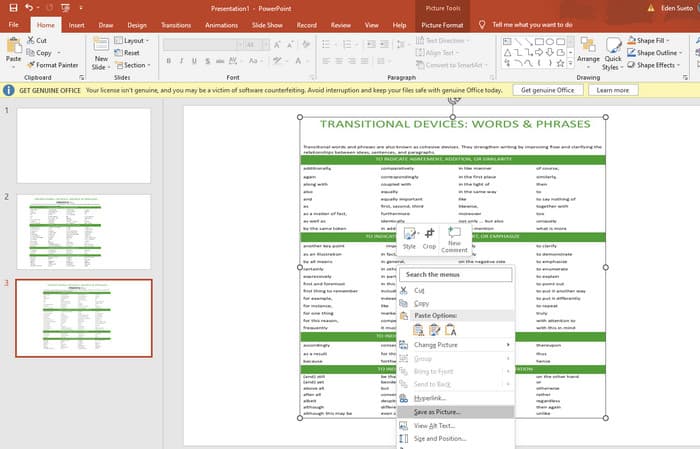
Adım 3. PDF dosyası yüklendikten sonra, onu JPG’ye dönüştürebilirsiniz. Bunu yapmak için, slayttaki PDF’in üzerine sağ tıklayın, Save As Picture seçeneğini seçin ve dosyayı JPEG olarak kaydedin.
Bölüm 5. PDF ve Sıkıştırma hakkında SSS
PDF eki olarak hangi boyutu e-postayla gönderebilirsiniz?
Bu, e-posta sağlayıcınıza bağlıdır; ancak çoğu e-posta eklerini 20 MB ile sınırlar.
En iyi ücretsiz PDF sıkıştırıcı hangisidir?
Ücretsiz PDF sıkıştırıcılar mevcuttur, ancak en iyisi her zaman kullanıcıların tercihlerine bağlıdır. Şimdiye kadar, FVC Free PDF Compressor en çok önerilen ücretsiz çevrimiçi araçtır.
PDF dosyaları e-posta için nasıl sıkıştırılır?
Aslında sıkıştırma işlemi PDF'ler için işe yarar çünkü zaten sıkıştırılmış dosyalardır.
Sonuç
Bu makale, PDF dosyalarını e‑posta için nasıl sıkıştıracağınızı en iyi yöntemlerle ele almaktadır. Dosyaları boyut sınırına uygun şekilde küçülttüğünüz sürece, PDF’lerinizi e‑posta ile daha sorunsuz ve daha verimli biçimde gönderebilirsiniz.
-
 Videolardan Filigranı Kolayca Kaldırma Konusunda En İyi 3 Çözüm
 Videodaki can sıkıcı filigranı kaldırmak ister misiniz? Bu blog ile bir videodaki filigranı kaldırmayla ilgili farklı fikirleri öğrenebilirsiniz.
-
 Herhangi Bir Videoya Hızlı Bir Şekilde Filigran Eklemenin En İyi 4 Yolu
 Bu makaleyi okuduysanız, Windows, Mac, Online, iOS ve Android'deki herhangi bir videoya nasıl filigran ekleneceğini ayrıntılı adımlarla öğrenelim.
-
 Bir GIF'e Çevrimiçi ve Çevrimdışı Filigran Eklemenin En Kolay 3 Yolu
 Doğru aracı doğru kullanırsanız, bir GIF'e filigran eklemek 1-2-3 kadar kolay olabilir. Piyasadaki araçlar çok geniş, ancak güvenebileceğiniz üç aracı sunacağız.
