


 Video Dönüştürücü Ultimate
 Ekran kaydedicisi
 Video Onarımı
 Güvenli İndirme
100% M4V Dosya Boyutunu GB'den MB'ye Sıkıştırmanın Ücretsiz Yolları
MP4'e benzer M4V dosya formatı, Apple tarafından üretilen harika bir video kapsayıcıdır. M4V dosyalarını iTunes, QuickTime, VLC Media Player, RealPlayer ve daha fazlası gibi hemen hemen tüm popüler oynatıcılarda oynatabilirsiniz. Ancak bazen M4V videonuzun saklanamayacak veya paylaşılamayacak kadar büyük olduğunu fark edebilirsiniz. Bu durumda dosyanın boyutunu küçültmeniz gerekir.
Eğer M4V sıkıştırmayı bilmiyorsanız, aşağıdaki seçenekleri deneyebilirsiniz.

Bölüm 1. M4V Online'ı Ücretsiz Olarak Sıkıştırma
Bahsettiğimiz gibi, YouTube, Facebook, Instagram veya diğer akış sitelerinde büyük bir video dosyasını düzenlemek ve paylaşmak biraz zor olabilir. Çünkü bu siteler genellikle yüklediğiniz videoda katı bir boyut sınırlamasına sahiptir. Ayrıca, büyük dosyalar bilgisayarınızda, disk sürücünüzde, telefonunuzda, flash sürücünüzde, hafıza kartınızda vb. Çok yer kaplayabilir.
Bu nedenle, büyük boyutlu bir M4V dosyanız olduğunda, boyutu profesyonel bir video sıkıştırıcıyla küçültmeniz daha iyi olur. Ücretsiz bir program arıyorsanız, neden FVC Free Video Compressor’ı denemiyorsunuz? Tamamen ücretsizdir. Dahası, çevrim içi bir sıkıştırma aracıdır; yani bilgisayarınıza büyük yazılımlar kurmadan herhangi bir videoyu istediğiniz boyuta sıkıştırabilirsiniz.
Google Chrome, Mozilla Firefox ve Microsoft Edge gibi herhangi bir genel tarayıcıda kullanabilirsiniz. Ve sıkıştırılmış videoya filigran eklenmeyecektir. Yüksek görüntü kalitesiyle videonun keyfini bile çıkarabilirsiniz.
İşte büyük M4V dosyalarının çevrimiçi olarak nasıl sıkıştırılacağına ilişkin adımlar.
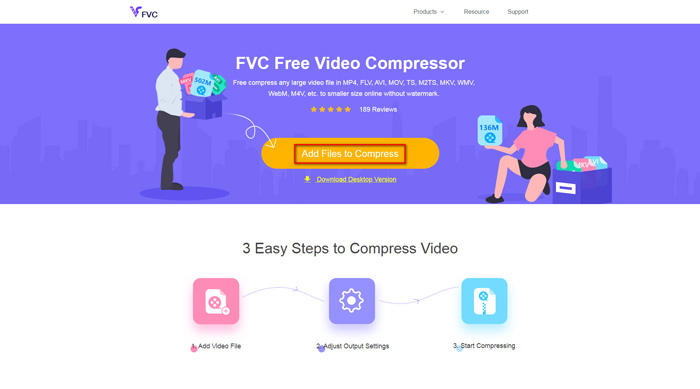
Adım 1. Tarayıcınızda FVC Free Video Compressor'ın web sitesine gidin. Afişte bir Add Files to Compress (Sıkıştırılacak Dosyaları Ekle) düğmesi göreceksiniz. Buna tıklayın ve talimatları izleyerek FVC başlatıcısını bilgisayarınıza indirip kurun.
Adım 2. Bundan sonra, sıkıştırmak istediğiniz M4V dosyasını seçmeniz gerekir. Ardından, istediğiniz dosya boyutunu zahmetsizce bulup ayarlamak için Size (Boyut) kutusunun arkasındaki kaydırıcıyı hareket ettirebilirsiniz. Ayrıca ihtiyacınıza göre çözünürlük ve bit hızını (bitrate) ayrı ayrı değiştirebilirsiniz.
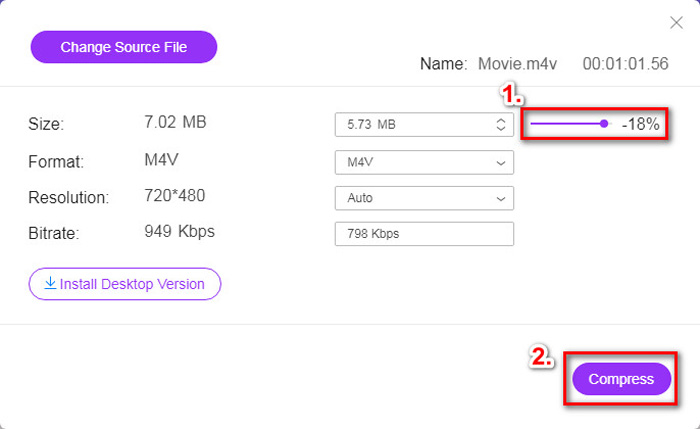
Adım 3. M4V’yi MP4'e sıkıştırmak istiyorsanız, burada çıktı formatı olarak MP4'ü seçmelisiniz. Eğer istemiyorsanız, sağ köşedeki Compress (Sıkıştır) düğmesine doğrudan tıklayabilirsiniz. Sıkıştırılmış videoyu kaydedeceğiniz bir klasör seçin ve istediğiniz videoyu elde etmek için birkaç saniye bekleyin.
Bölüm 2. Mac / Windows'ta M4V Dosya Boyutu Nasıl Azaltılır
M4V, Apple tarafından geliştirilen bir format olduğundan, Mac’te M4V dosyalarını sıkıştırmak için Apple’ın varsayılan oynatıcısı QuickTime Player’ı da kullanabilirsiniz. Ayrıca QuickTime Player, PC kullanıcıları için bir Windows sürümü de sunar. Ancak Windows için en son sürümün 2016'da yayımlanan QuickTime 7.7.9 olduğunu unutmamalısınız. Bu yüzden, aradığınız şey yeni yayımlanmış bir program ise, 4K videoları bile işleyebilen FVC Free Video Compressor’ı deneyebilirsiniz.
Her neyse, QuickTime'da M4V dosya boyutunu küçültmek için lütfen aşağıdaki adımları izleyin.
Adım 1. Sıkıştırılmayı bekleyen M4V dosyasını QuickTime ile açın.
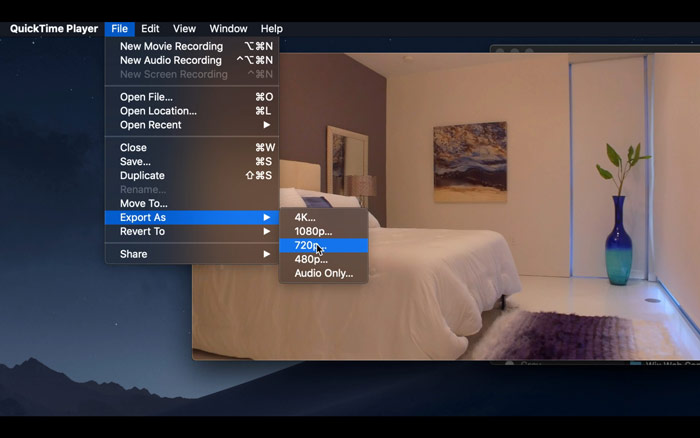
Adım 2. Sol üst köşedeki File (Dosya) menüsünü bulun. Tıklayın ve listeden Export As (Dışa Aktar) seçeneğini bulun. Ardından videoyu sıkıştırmak için, özgün videodan daha düşük bir çözünürlük seçin. Ne de olsa, burada boyutu artırmak istemiyoruz.
Adım 3. Kayıt yolunu değiştirmek istemiyorsanız, doğrudan Save (Kaydet) düğmesine tıklayabilirsiniz. Videonun dışa aktarılması için lütfen sabırla bekleyin.
Bölüm 3. M4V Sıkıştırmayla İlgili SSS
1. M4V'yi MP4 olarak yeniden adlandırabilir miyim?
Hayır, eğer kastettiğiniz şey, uzantıyı .mp4 olarak değiştirerek M4V’yi MP4'e dönüştürmekse, bu mümkün değildir. Çünkü kodlamaları aynı değildir. M4V’yi MP4’e dönüştürmek için daha profesyonel bir araca güvenmelisiniz.
2. YouTube, M4V formatını kabul ediyor mu?
Ne yazık ki YouTube, M4V içermeyen sınırlı sayıda dosya biçimini desteklemektedir. Dolayısıyla, M4V videonuzu YouTube'a yüklemek istiyorsanız, MP4 gibi YouTube tarafından desteklenen bir biçime dönüştürmelisiniz.
3. Birden fazla M4V videosunu tek bir videoda nasıl birleştirebilirim?
Birleştirilmesi gereken birkaç M4V video dosyanız varsa, çeşitli video dosyalarını birleştirmek için FVC Free Online Video Merger’ı deneyebilirsiniz.
Sonuç
Artık M4V dosyasını sıkıştırmak için 2 basit ve ücretsiz yola sahipsiniz. Bir Mac kullanıcısıysanız, video boyutunu küçültmek için QuickTime Player’ı kullanabilirsiniz. Ancak QuickTime’ın sunduğu sabit çözünürlüklerden memnun değilseniz ya da bir Windows PC kullanıyorsanız, FVC Free Video Compressor’a bir şans verebilirsiniz.
-
 M4V - MP3 Dönüştürücü - M4V Dosyalarından MP3 Ayıklamak için En İyi 4 Yöntem
 M4V videolarından MP3 sesini kolaylıkla çıkarmak istediğinizde, makaleden istediğiniz ses dosyalarını almak için en iyi 4 M4V - MP3 dönüştürücü hakkında daha fazla bilgi edinebilirsiniz.
-
 QuickTime Filmlerini Telefonda / Bilgisayarda Ücretsiz Olarak MP4'e Dönüştürmenin 4 Yolu
 Telefonunuzda veya bilgisayarınızda QuickTime'ı MP4 videolarına dönüştürmenin 4 yolunu okuyun ve edinin. Windows / Mac / iPhone / Android / çevrimiçi olarak dosya formatını MOV'dan MP4'e kolaylıkla değiştirebilirsiniz.
-
 4 En İyi MP4 - M4V Dönüştürücüler, MP4 Videoları Kolaylıkla M4V'e Dönüştürmek İçin
 MP4'ü M4V dosyalarına çevirmeniz gerektiğinde, iki format arasındaki farklar ve makaleden en iyi MP4 - M4V dönüştürücüleri hakkında daha fazla bilgi edinmelisiniz.
