


 Video Dönüştürücü Ultimate
 Ekran kaydedicisi
 Video Onarımı
 Güvenli İndirme
Bilmeniz Gereken 4 Yolla Dreamstime Filigranını Kaldırın
Sununuz veya projeniz için kullanıma hazır resimlere ihtiyacınız varsa, Dreamstime'ı seçmekle asla yanlış yapmış olmazsınız. Bu uygulama size her zaman kullanıma hazır telifsiz stok fotoğraflar verebilir. Halihazırda, düşük fiyata yüksek kaliteli çıktıya sahip belirli bir görüntü arayan kullanıcılara yardımcı olur. 15 görseli buradan ücretsiz olarak indirebilseniz de, bu ürün, buradan indirdiğiniz görseli kullandığınızda uygulamayı tanıtmak için bir filigran bırakır.
Kullanılabilirliğinin mükemmel ve görsel fiyatlarının düşük olduğunu inkâr edemeyiz, ancak aramızdaki herkes bu siteye kredi satın almayı karşılayamayabilir. Artık endişelenmeyin! Çünkü sizi düşündük; aşağıda verdiğimiz bilgiler, nihai çıktıda kalan Dreamstime filigranını kaldırmanın izleyebileceğiniz yollarıdır.

Bölüm 1. Kredi Satın Alarak Dreamstime Filigranını Kaldırma
Kullanabileceğiniz en etkili Dreamstime filigran temizleme seçeneği olduğu için satın alma seçeneğini geride bırakamayız. Devam etmeden önce, filigransız bir görüntü satın alabilmeniz için Dreamstime'ın size ihtiyacı olduğunu bilmeniz gerekecek. Kredi adı bir Dreamstime para birimidir; gerçek parayı kullanır ve onu Dreamstime'ın kabul ettiği dijital bir paraya dönüştürür. Dreamstime'da krediniz olmadığını varsayalım. Bu durumda aşağıdaki adımları takip ederek kredi satın alabilir ve ürün logosu olmadan görsele sahip olabilirsiniz.
Adım 1. Dreamstime’ın resmi web sitesini açın ve Dreamstime’da kredi satın almadan önce bir hesap oluşturun. Burada zaten bir hesabınız varsa, aracı düzgün kullanmak için önce giriş yapmanız gerekir.
Adım 2. Hesabınızla Dreamstime’a giriş yaptıktan sonra Fiyatlar ve İndirme Planlarına tıklayın, ardından içindeki mevcut ücretleri görmek için Kredi Paketleri bölümüne gidin.
Adım 3. Sizden istenen tüm bilgileri eksiksiz girin, ardından ödemenizi işleme koymak için Ödemeyi Tamamla’ya tıklayın. Bu kadar kolay; artık Dreamstime’dan görsel satın alırken para birimi olarak kullanmak üzere kredi satın aldınız.
Bölüm 2. Dreamstime Filigranı Web'den Ücretsiz Olarak Nasıl Kaldırılır
FVC Ücretsiz Filigran Sökücü Çevrimiçi
Çevrimiçi olarak kullanabileceğiniz en iyi bilinen Dreamstime filigran çıkarıcılardan biri, FVC Free Watermark Remover Online'dan başkası değildir. Sahip olduğunuz görüntüdeki filigranı kaldırmak için bu araçtan yararlanabilirsiniz. Performans açısından bu çevrimiçi araç, özellikle görüntüdeki logoyu, filigranı, damgaları, tarihleri, nesneleri vb. kaldırma konusunda düşündüğünüzü daha iyi yapabilir. Bu araçtan hala şüphe duymuyor musunuz? Bu durumda, aşağıda eklediğimiz adımları okuyun ve Dreamstime'ın eklediği filigranı kaldırmak için bunları da takip edebilirsiniz.
Adım 1. Bu bağlantıya tıkladığınızda tarayıcınızda yeni bir sekme açılacaktır.
Adım 2. Dreamstime’dan filigranlı olarak dışa aktardığınız fotoğrafları içe aktarmak için Resim Yükleye tıklayın.
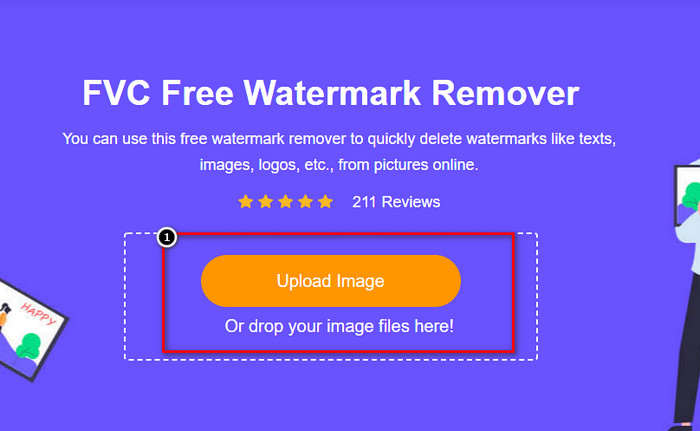
Adım 3. Filigranı izlemek için araçları kullanabilirsiniz; bunlardan birini seçin ve filigranı onunla izleyin.
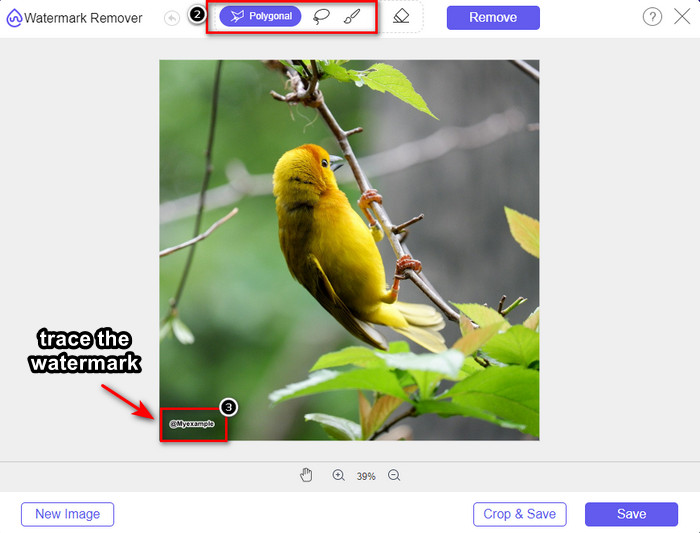
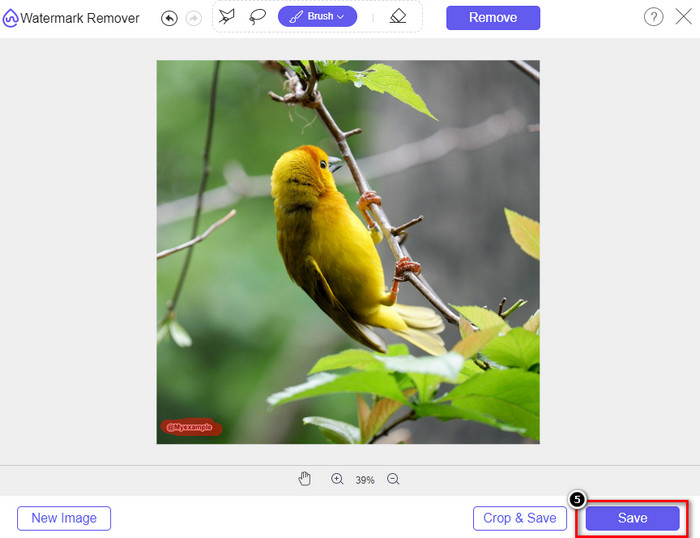
Adım 4. Görseli dışa aktarmaya geçmeden önce önce Kaldır simgesine tıklayın.

Adım 5. Son olarak, burada vurguladığınız gömülü filigran olmadan görseli kaydetmek için İndire tıklayın.
WatermarkRemover.IO
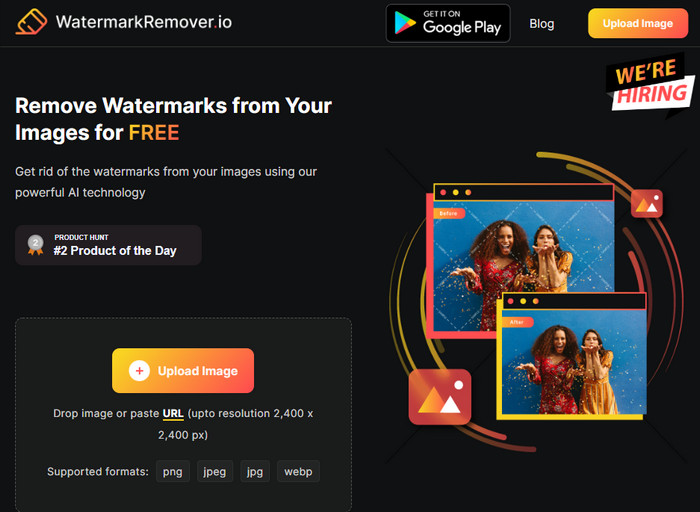
WatermarkRemover.io, bu süreçte size yardımcı olabilecek, Dreamstime fotoğraflarındaki filigranı kaldırmak için çevrim içi kullanabileceğiniz bir araçtır. Bu araç, daha önce bahsedilen çevrim içi filigran kaldırıcı gibi ücretsizdir. Herhangi bir tarayıcıda kullanılabildiği için bu araca kayıt olma konusunda endişelenmenize gerek yoktur. Ayrıca, bu aracı kullandığınızda, görsellerinizdeki filigranı kaldırmak için yapay zeka teknolojisi kullanır. Bunu nasıl yapacağınızı öğrenmek için aşağıdaki bilgileri okumaya devam etmelisiniz.
Adım 1. Tarayıcınızda aratarak bu filigran kaldırıcının resmi web sitesini açın.
Adım 2. Filigranını kaldırmak istediğiniz fotoğrafı yüklemek için Resim Yükle simgesine tıklayın.
Adım 3. Filigranlı görseli yüklemeyi bitirdiyseniz, görselinizdeki filigranı otomatik olarak kaldıracağı için Görseli İndir’e tıklayın.
Bölüm 3. Ultimate Çözümü Kullanarak Videolarda Dreamstime Filigranı Nasıl Kaldırılır
Videolar için Dreamstime filigran kaldırıcıyı, örneğin kapsamlı FVC Video Converter Ultimate gibi yazılımlar şeklinde indirebilirsiniz. Bu, her an kullanıma hazır, son derece esnek ve işi her zaman bitirmeye hazır bir araçtır. Bu araç; düşük kaliteli ses, çözünürlük, desteklenmeyen biçim ve rahatsız edici filigran gibi videolarınızda karşılaşabileceğiniz sorunlarla başa çıkar. Filigran kaldırmak için kurabileceğiniz diğer yazılımlarla karşılaştırıldığında, bu yazılım performansı, işleme hızı ve kullanılabilirliği açısından olağanüstü derecede başarılıdır. Hızınızı koruyun; çünkü videolarınızdaki filigranı nasıl kaldıracağınızı ayrıntılı adımlarla göstereceğiz.
Adım 1. Her şeyden önce, aşağıda verilen indirme düğmesine tıklayarak yazılımı masaüstünüze indirmeniz gerekir. Lütfen kurmak için doğru sürümü seçin, hızlı kurulumdan geçin ve yazılımı başlatın.
Ücretsiz İndirWindows 7 veya üstü içinGüvenli İndirme
Ücretsiz İndirMacOS 10.7 veya üstü içinGüvenli İndirme
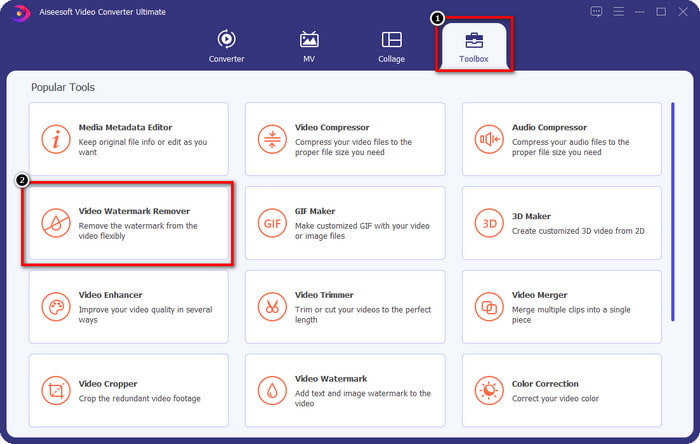
Adım 2. Yazılımın sunduğu çok işlevli Araç Kutusunu açın ve ardından Video Filigran Kaldırmayı seçin.
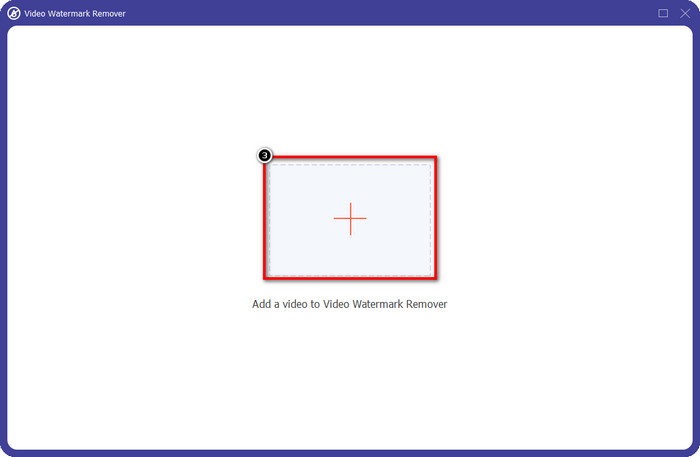
Adım 3. Ardından, indirdiğiniz videoyu yüklemek ve Dreamstime filigranını kaldırmaya başlamak için + simgesine tıklayın.
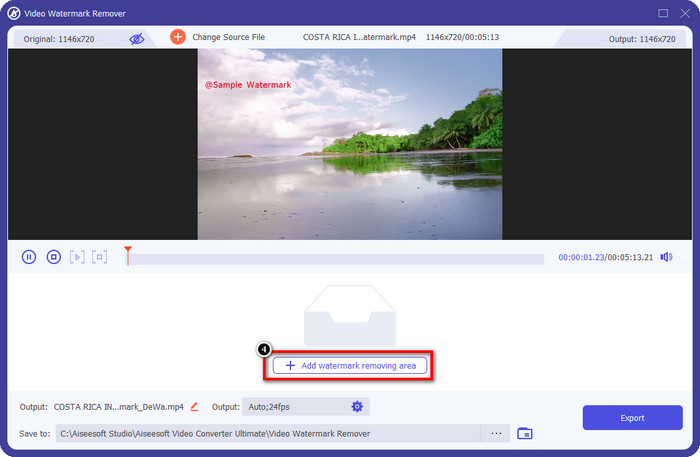
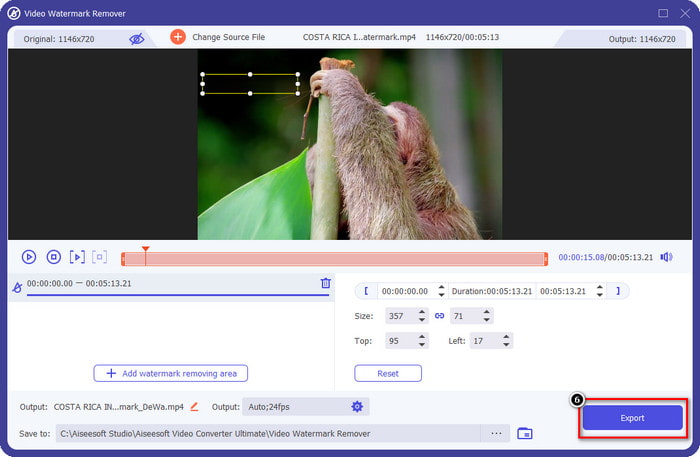
Adım 4. Daha sonra, seçimi filigranın üzerine yerleştirmek için Filigran Kaldırma Alanı Ekleye tıklayın.
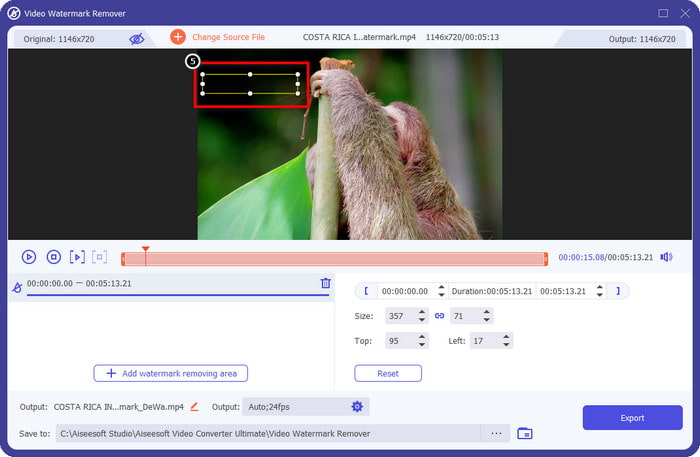
Adım 5. Filigran Kaldırma Alanı Ekle’ye tıkladıktan sonra ekranda dikdörtgen bir şekil belirecektir; filigranı kaldırmak için bunu filigranın üzerine yerleştirin.
Adım 6. Videoyu Dreamstime filigranı olmadan indirmek için Dışa Aktar düğmesine tıklayın.
İlgili:
Bölüm 4. Dreamtime Filigranının Nasıl Kaldırılacağına İlişkin SSS
Satın aldıktan sonra Dreamtime'daki filigranı sınırsız olarak kaldırabilir miyim?
Kredi satın aldıysanız yapamazsınız, ancak devam edip biraz daha aşağı kaydırabilirsiniz ve bunu düzenli olarak kullanıyorsanız yararlanabileceğiniz sınırsız görüntü erişimi olduğunu göreceksiniz. Fiyatı dünya çapında farklı bölgelerde veya yerlerde aynı değildir.
Dreamstime ne tür bir kartı destekler?
Artık burada bir kredi veya abonelik ücreti satın almaya karar verdiğinize göre, Master Card, Visa, AMEX ve diğer büyük kredi kartlarınızı kullanabilirsiniz; Diğerlerini tanımak için resmi web sitesinde kontrol edebilirsiniz.
Filigransız videolar satın almak için Dreamstime'daki kredileri kullanabilir miyim?
Videoyu veya bu platformun sahip olduğu herhangi bir ürünü satın almak için kredi kullanabilirsiniz. Kredinin amacı sadece görseller ve videolar için değildir; buradan ses satın almak için de kullanabilirsiniz.
Sonuç
Dreamstime filigranı nasıl kaldırılır? Listelediğimiz iki araç ve kullanabileceğiniz en iyi filigran kaldırıcılı video ile resimlerinizdeki filigranla nasıl başa çıkacağınızı zaten biliyorsunuz. Yani video veya görsellerde filigran sorunu yaşıyorsanız yukarıdaki yazılımı özgürce kullanabilir ve eklediğimiz öğreticiyi takip edebilirsiniz. Sorun çözüldüğü için soruna elveda demeyin!
-
 Windows ve Mac'te VSDC Filigranını Hızla Kaldırmanın 2 Yolu
 Videolarınızdaki VSDC filigranını kaldırmanın bir yolunu mu arıyorsunuz? Bu yazımızda filigrandan kurtulmak için kullanabileceğiniz araçlar sunuyoruz.
-
 Videolardaki Animoto Filigranını Kolay ve Etkili Bir Şekilde Kaldırın
 Videodaki Animoto filigranı nasıl kaldırılır? Nasıl yapılacağına dair eksiksiz bir eğitim verdiğimiz için bu makaleyi okumaya devam edin.
-
 Final Cut Pro Kullanarak Videodan Filigran Nasıl Kaldırılır [Komple Kılavuz]
 Videolardaki filigranla ilgili bir sorun mu yaşıyorsunuz? Final Cut Pro kullanarak videodan filigranın nasıl kaldırılacağına dair bir eğitim sağladığımız için daha fazlasını söylemeye gerek yok.
