


 Video Dönüştürücü Ultimate
 Ekran kaydedicisi
 Video Onarımı
 Güvenli İndirme
Dışa Aktarılan Projelerde/Videolarda Filmora Filigranı Nasıl Kolayca Kaldırılır
Wondershare Filmora, üzerinde çalıştığınız projeye ince ayar yapmak için kullanabileceğiniz orta seviye bir video düzenleyici olarak kabul edilir. Orta seviye bir editör olmasına rağmen, efektler, şablonlar, eklentiler vb. gibi kullanmayı seveceğiniz kapsamlı özelliklere sahiptir. Yeni başlayan biriyseniz ve sorunsuz video düzenleme deneyimi yaşamak ancak fanatik bir çıktı üretmek istiyorsanız. Şüphesiz, bu sizin için bir seçim olabilir.
Kullanımı kolay olduğu için birçok kullanıcı onu denemiş ve onunla video üretmiştir; sonuç mükemmeldir, ancak bir ürün filigranı vardır. Filigranı kaldırmanın bir yolu, aylık, yıllık ya da süresiz bir plan satın almaktır; peki ya bunu alacak paranız yoksa? Burada, dışa aktarılan her videodaki Filmora filigranı nasıl kaldırılır size öğreteceğiz.

Bölüm 1. Videoyu Yeniden Boyutlandırmadan Filmora Filigranı Nasıl Kaldırılır
FVC Video Converter Ultimate, 4K çözünürlükte olsalar bile videolardaki filigranları düzenleyebilen, indirebileceğiniz gelişmiş bir video düzenleyicisidir. Windows ve Mac kullanıcıları bu düzenleyiciyi yalnızca işletim sistemlerinde kullanılabildiği için değil, sunduğu özellikler ve işlevler nedeniyle de keyifle kullanabilir. Belki bir numaralı video düzenleyicisi olmayabilir, ancak videodaki filigranı kaldırma gücü şaşırtıcı derecede etkileyicidir.
Yazılımı satın almanız gerekecek olsa da, fiyatının Filmora'dan daha ucuz olduğunu düşünüyoruz. Bir Filmora filigran temizleyicisine mi ihtiyacınız var? Bu sizin tercihiniz ve videodaki filigranı veya damgaları kaldırırken bu filigran çıkarıcıyı etkili bir şekilde kaldırmanın adımları burada.
Adım 1. Aşağıya eklediğimiz indirme düğmesine tıklayarak bu düzenleyicinin resmi sürümünü indirin. Kurun, yazılımı açın ve ekranınızda çekici bir arayüz belirecektir.
Ücretsiz İndirWindows 7 veya üstü içinGüvenli İndirme
Ücretsiz İndirMacOS 10.7 veya üstü içinGüvenli İndirme
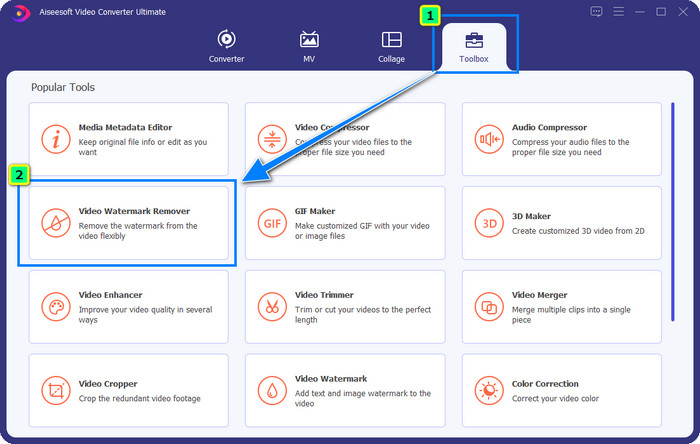
Adım 2. Düzenleyiciyi açtığınıza göre, bu yazılımda dört seçenek olduğunu göreceksiniz. Filigranı kaldırmak için Araç Kutusunu açın. Araç Kutusu menüsünün altında bulunan Video Filigran Kaldırıcıyı seçin.
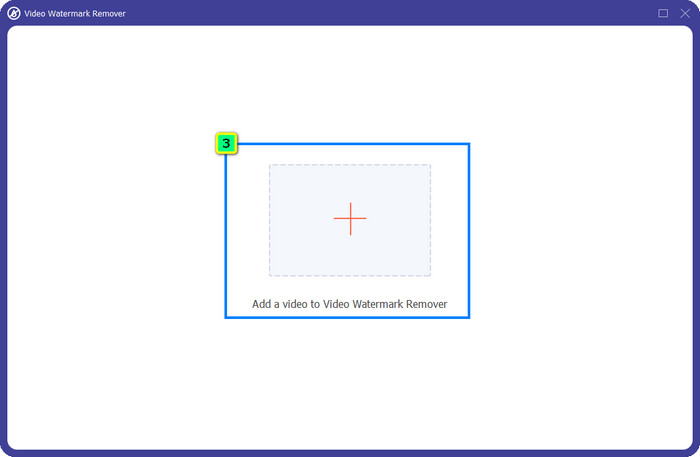
Adım 3. Buna tıkladıktan sonra ekranınızda yeni bir pencere açılacaktır. Ortadaki artı simgesine tıklayarak Wondershare Filmora filigranını kaldırmak istediğiniz dosyayı ekleyin.
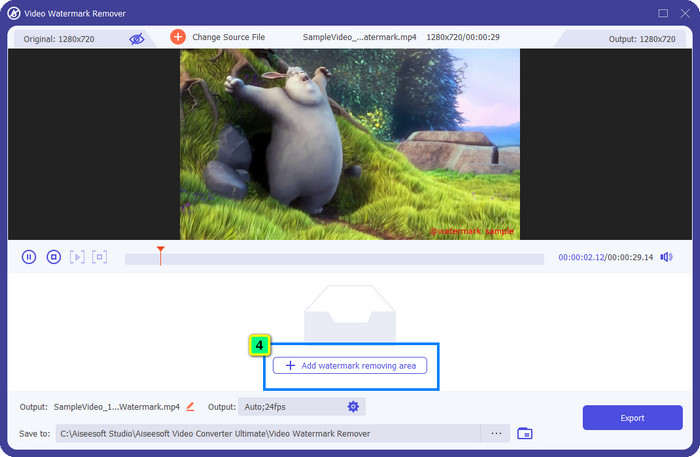
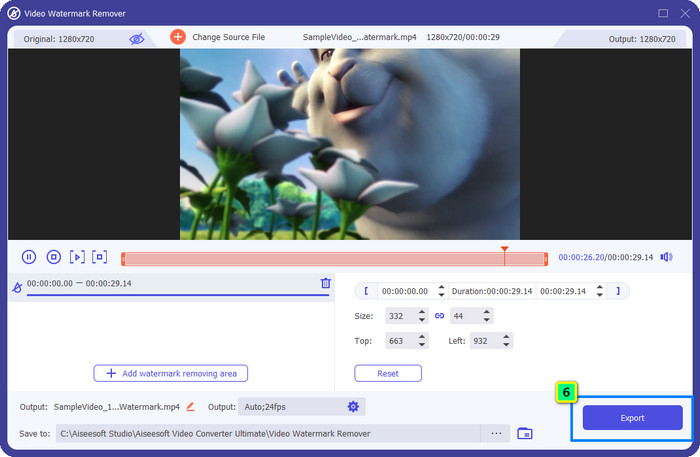
Adım 4. Ardından, bu aracın filigran kaldırma özelliğini kullanmaya başlamak için Filigran Kaldırma Alanı Ekleye tıklayın.
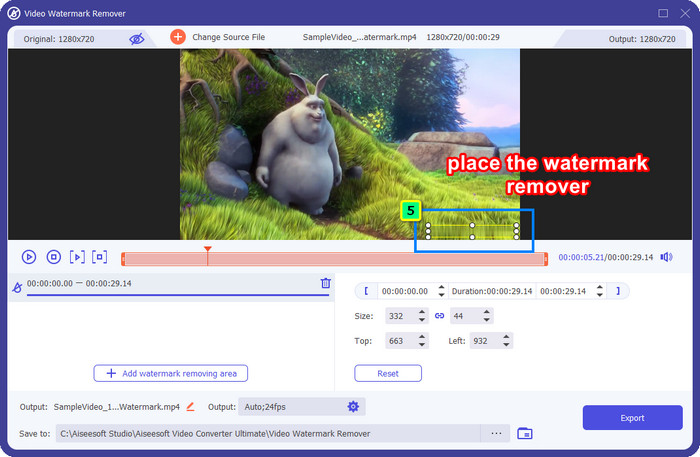
Adım 5. Şimdi tek yapmanız gereken kutuyu filigranın üzerine yerleştirmek ve kaldırmak istediğiniz filigranın kutunun içinde olduğundan emin olmak. Değilse, kutuyu kenarlardaki noktaları sürükleyerek yeniden boyutlandırabilir ve ayarlayabilirsiniz.
Adım 6. Videonuza bağlı filigranı kaldırmayı başlatmak için Dışa Aktara tıklayın; son çıktı birkaç saniye içinde hazır olacaktır, bu kadar kolay.
Bölüm 2. Filigranı Kırparak Filmora Filigranını Kaldırma
İlk tanıttığımız filigran kaldırıcı etkili olsa da, Filmora video düzenleyici filigranını kaldırmak için farklı bir yaklaşım daha deneyebilirsiniz; bu da kırpma yöntemidir. FVC Video Converter Ultimate, videoyu yeniden boyutlandırmak ve ekli filigranı kaldırmak için kullanabileceğiniz, yapay zekâ destekli bir video kırpıcı sunar. Bu yöntem, filigran kaldırıcıya kıyasla daha az adım içeriyor olsa da, yine de bir seçenek olarak görülmelidir ve ilk tercih değildir. Neden? Çünkü görüntünün boyutlarını keser ve videonun bazı kısımlarını kırpar.
Yine de, kullanmayı denemek isterseniz, cihazınızda en iyi araca sahip olduğunuzda buna sahip olabilirsiniz.
Ücretsiz İndirWindows 7 veya üstü içinGüvenli İndirme
Ücretsiz İndirMacOS 10.7 veya üstü içinGüvenli İndirme
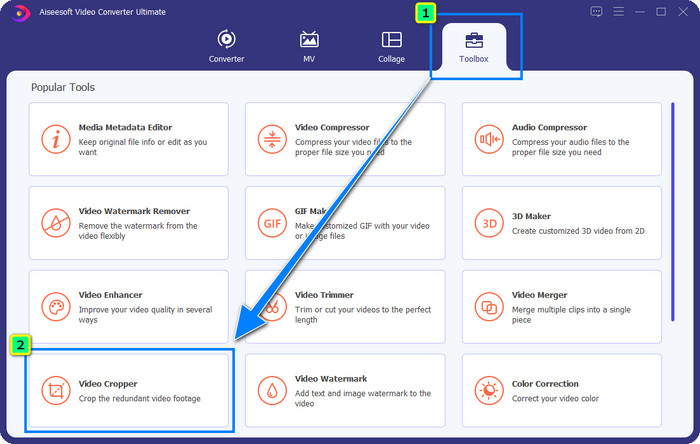
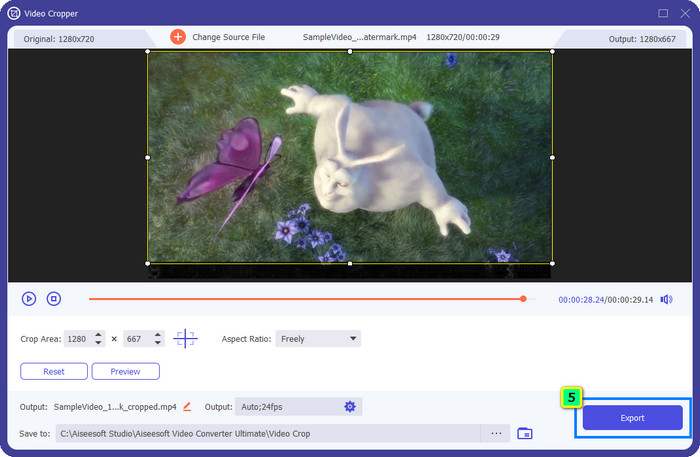
Adım 1. Yazılımı indirdikten sonra Araç Kutusuna tıklayın ve Video Kırpıcıyı bulun.
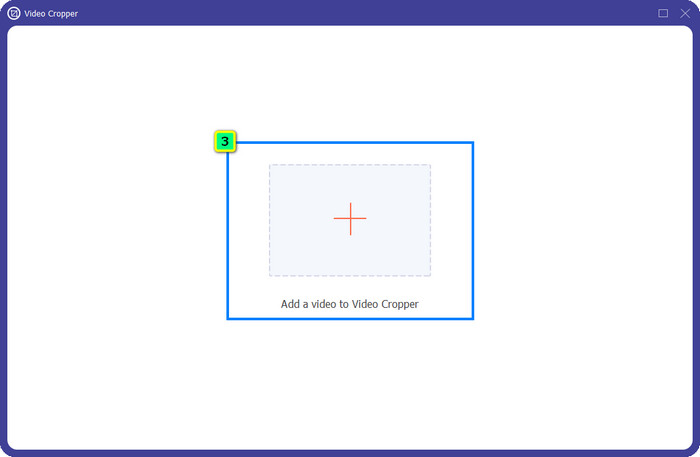
Adım 2. Artı simgesine tıklayarak kırpmak istediğiniz videoyu buraya ekleyin.
Adım 3. Çerçeveyi, tercihlerinize göre noktaları sürükleyerek değiştirebilirsiniz.
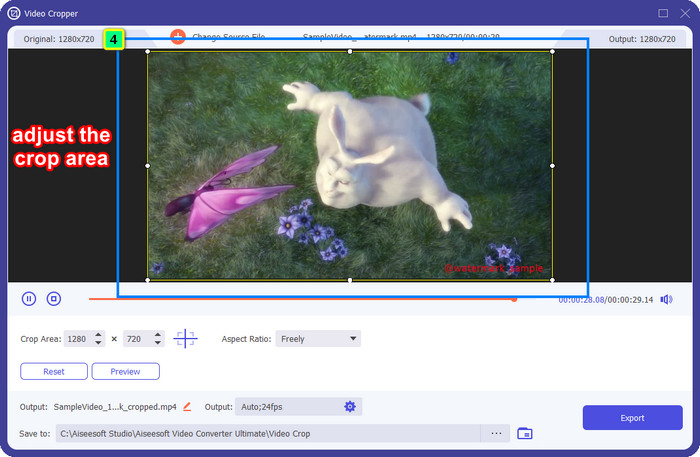
Adım 4. Kırpılmış sürümden memnunsanız, Dışa Aktara tıklayın; yapay zekâ videoyu otomatik olarak kırpacaktır.
Bölüm 3. Filmora Filigranı Çevrimiçi Olarak Ücretsiz Nasıl Kaldırılır
Yazılım indirmeden Filmora logosu nasıl kaldırılır? Video Filigran Kaldırıcı Onlineı kullanmayı deneyebilirsiniz. Bu araç, herhangi bir yazılım indirmeden videodaki filigranı hızla kaldırması gerekenler için çevrimiçi bir çözümdür. Esnek olduğu için bu filigran kaldırıcıyı makaleye ekliyoruz; çünkü cihazınızdaki farklı web tarayıcılarından erişebilirsiniz.
Çevrimiçi bir araç olması nedeniyle, bir filigranı kaç kez kaldırabileceğiniz, küçük bir video giriş formatı aralığı ve işlem hızı gibi belirli sınırlamalar vardır. Ancak bunlara aldırmazsanız, adımları takip etmeye başlayabilirsiniz.
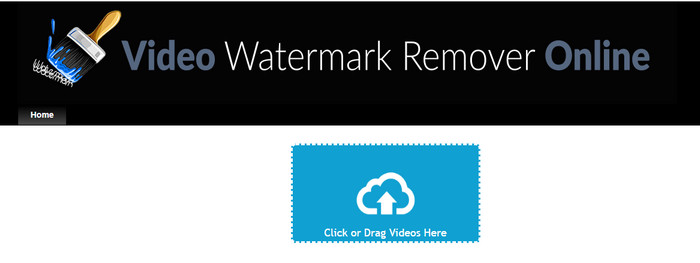
Adım 1. Favori web tarayıcınızı açın, adını aratın ve bu filigran kaldırıcının ana alan adına doğrudan gitmek için sonuçta çıkan adına tıklayın.
Adım 2. Yükle simgesine tıklayın veya filigranlı video dosyasını sürükleyip bırakın.
Adım 3. Araç videoyu işlerken bekleyin; çünkü filigranı tarar. Ardından Filigranı Kaldıra basın.
Bölüm 4. Filmora Logosunun Nasıl Kaldırılacağına İlişkin SSS
Filmora'dan filigran nasıl kaldırılır?
Filigranı Filmora'dan kaldırmanın resmi yolu, aylık, yıllık veya kalıcı bir plan satın almaktır. Böylece burada oluşturduğunuz projeyi her dışa aktardığınızda, nihai çıktıda filigran bırakmaz. Bir plan satın almak istemiyorsanız, web'de bulunan farklı ücretsiz kayıt kodlarını kullanabilirsiniz.
Wondershare Filmora'nın crackli sürümünü indirmek güvenli midir?
Hayır, değil! Bu yazılımı üçüncü taraf bir web sitesine indirmek önerdiğimiz şey değil, çünkü bazı web sitelerine erişim güvenli değildir ve bunların crackli sürümleri bilgisayarınıza kötü amaçlı yazılımlar getirebilir. Onarılamaz hasarları önlemek için kötü niyetli üçüncü taraf web sitelerine erişmekten ve bu sitelerden indirme yapmaktan kaçının.
Filmora için en iyi alternatif video düzenleyici nedir?
Windows kullanıcıları için, bu makaleye eklediğimiz bilgileri okumanız faydalı olacaktır; çünkü işletim sisteminizde Filmora ile benzer veya ondan daha iyi çalışan en iyi 5 Windows video düzenleyiciyi buraya dahil ettik. Ancak bir Mac cihaz kullanıyorsanız, macOS’te en iyi çalışan Wondershare Filmora alternatifleri olan en iyi Mac video düzenleyicilerini öğrenebilirsiniz.
Sonuç
Hepsi dahildir! Filmora filigranının nasıl kaldırılacağı ile ilgili bilgiler bu makaleye eklenmiştir. Peki eklediğimiz araçlar hakkında ne düşünüyorsunuz? Filigran kaldırma konusunda deneyiminiz olmasa da, eklediğimiz her araçla ilgili öğreticiyi takip edebilirsiniz. Bugün, plan satın almadan oluşturduğunuz projeyi Filmora'da izlemenin keyfini çıkarmaya başlayabilirsiniz. Bu makaleyi başkalarıyla paylaşın, böylece onlara yardımcı olabiliriz! Paylaşmak önemsemektir!
-
 Wondershare DVD Creator'dan Filigran Nasıl Kolayca Kaldırılır
 Bu makale, Wondershare DVD Creator'dan filigranın nasıl kaldırılacağına ilişkin bilgileri kapsar. İhtiyacınız olan tüm bilgileri almak için bunu okumak bir zorunluluktur.
-
 Movavi Filigranını Ücretsiz Olarak Nasıl Kaldıracağınızı Öğrenin [Olması Gereken!]
 Movavi'de bir video veya resmi dışa aktarmak bir filigran bırakacaktır, ancak bunu kaldırmak mümkün müdür? Filigranın ücretsiz olarak nasıl kaldırılacağını öğretmek için bunu okuyun.
-
 Windows ve Mac'te Fiverr Filigranını Kaldırmanın 3 Kolay Yolu
 Fiverr filigranını kaldırabilecek bir uygulama arıyorsanız doğru sayfadasınız. Fiverr filigranını nasıl kolayca kaldırabileceğinizi öğrenmek için bu gönderiyi okuyun.
