


 Video Dönüştürücü Ultimate
 Ekran kaydedicisi
 Video Onarımı
MP4 Videoları Kolayca Tersine Çevirmek için Kullanabileceğiniz En Yeni Çevrimiçi ve Çevrimdışı Yazılım
Çoğu zaman videomuzu tersine çevirmeye çalıştığımızda, ortaya kendimizi bile şaşırtan ve sanki bizmişiz gibi gelen komik tepkiler çıkar. Geriye doğru oynatıldığı için, bunun etkisi gözlerimiz için yepyeni bir şey yaratır. Bu yüzden, MP4 videoları tersine çevirmenin etkili yollarını öğrenmek istiyorsanız, bu makaleyi okumanız şart. Çünkü burada çevrimiçi ve çevrimdışı farklı yazılımlar tanıtılıyor ve bu programlarla çok sayıda ters video oluşturmak son derece kolaylaşıyor. Öyleyse daha fazla vakit kaybetmeden, bunları size tek tek tanıtalım.

Bölüm 1. Bir MP4 Videoyu Tersine Çevirme (Çevrimdışı)
Tüm web üzerindeki olağanüstü araçlardan biri Video Converter Ultimate’tır. Bu araç, MP4 tersine çevirme konusunda zorlanan milyonlarca kullanıcıya şimdiden yardımcı oldu. Bu listedeki diğer araçlardan farklı olarak, internet bağlantınız olmasa bile bu yazılıma erişebilirsiniz. Ayrıca bu araç dosyaları çok hızlı içe ve dışa aktarabilir; göz açıp kapayıncaya kadar videonun çoktan tersine döndüğünü fark etmeyebilirsiniz. Bunun yanında, bu aracın diğerleri gibi müthiş bir özelliği daha var: Kullanmak isteyebileceğiniz tüm gelişmiş özelliklere sahip. Şimdi, videoyu etkili biçimde nasıl tersine çevireceğinize dair adımlara geçelim.
Video Converter Ultimate'da Videoları Tersine Çevirme Adımları
Adım 1. Öncelikle aracı bilgisayarınıza indirmeniz gerekiyor. Ardından kurulumu yapın ve kurulum adımlarını takip edin.
Ücretsiz İndirWindows 7 veya üstü içinGüvenli İndirme
Ücretsiz İndirMacOS 10.7 veya üstü içinGüvenli İndirme
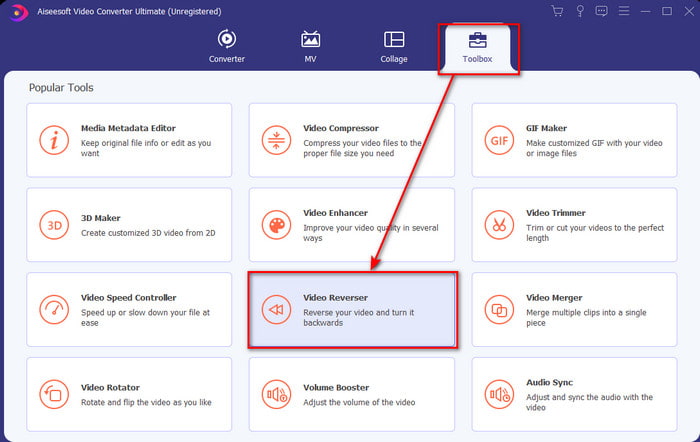
Adım 2. Yazılımı başlatın, Araç Kutusu’na tıklayın ve Video Ters Çevirici’yi seçin.
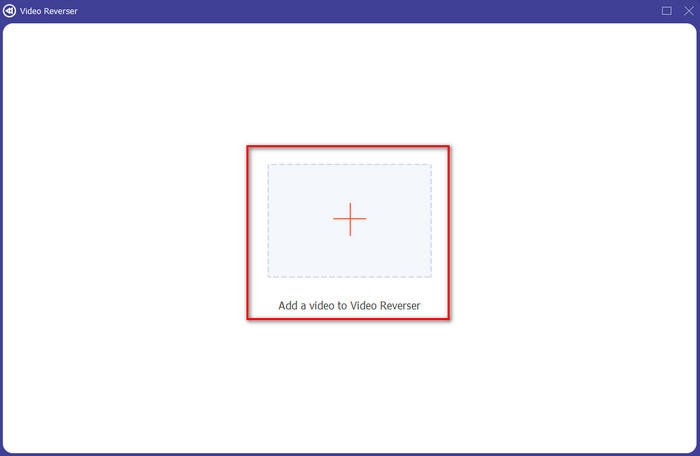
Adım 3. Ardından + simgesine tıklayarak MP4 dosyasını ekleyin ve bilgisayarınızın klasörlerinden seçin. Dosyayı arayüze eklemek için Aç’a tıklayın.
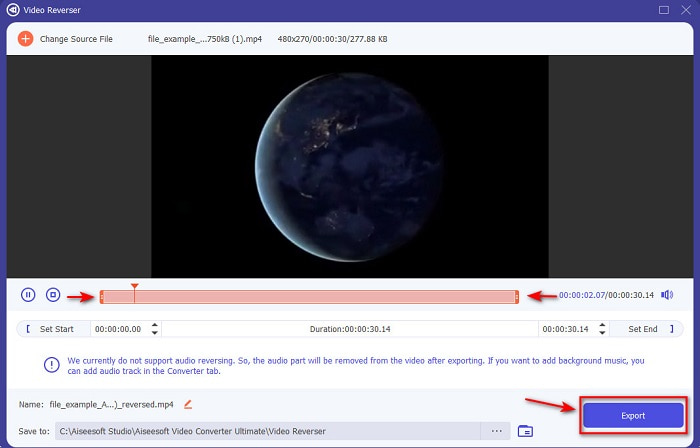
Adım 4. Şimdi videonun süresini değiştirmek için başlangıç ve bitiş oynatma noktalarını ayarlayın. Devam etmek için Dışa Aktar’a tıklayın.
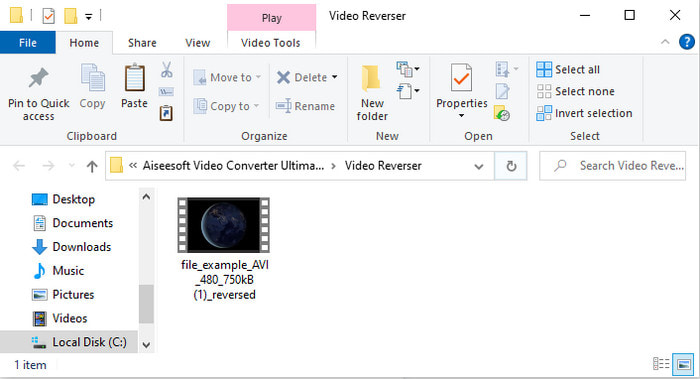
Adım 5. Dışa aktarma tamamlandıktan sonra, ters çevrilmiş dosyayı oynatmak ve konumunu görmek için klasördeki dosyaya tıklayın.
Bölüm 2. Bir MP4 Videoyu Tersine Çevirme (Çevrimiçi)
1. DosyaDönüştürücü
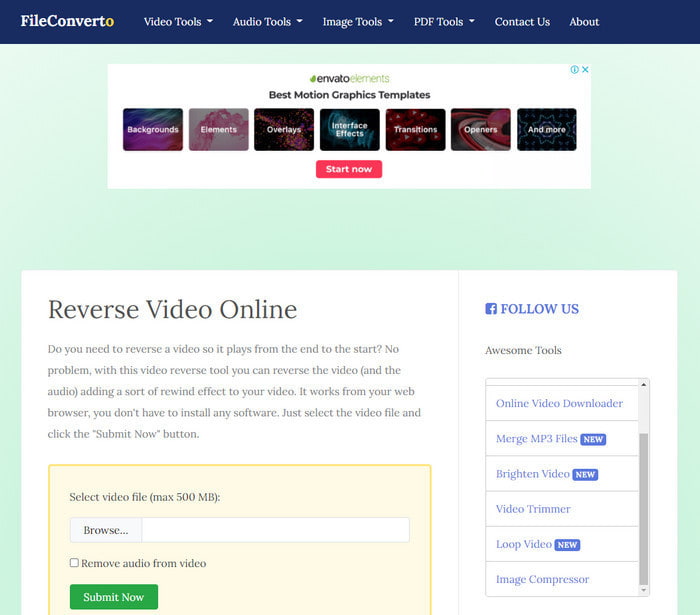
Çevrimiçi MP4 ters çevirme aracı FileConverto, videonuzu sıra dışı hale getirmek için kullanabileceğiniz pek çok web aracı özelliğine sahiptir. Herhangi bir yazılım indirmek istemeyenler için bu web aracının performansı oldukça uygundur. Ancak web arayüzü biraz sönük görünüyor, yükleme süreci oldukça zaman alabiliyor ve tüm video formatlarını desteklemiyor. Ayrıca tersine çevirmeye çalışırken bazı hatalarla ve açılan ek web sayfalarıyla karşılaşabilirsiniz. Bilinen birçok sorunu olsa da yine de kullanılmaya değer bir araçtır.
Artıları
- Yazılıma erişmek kolaydır ve ihtiyaç duyacağınız birçok temel düzenleme özelliğine sahiptir.
- Çok Kullanıcı Dostu, tersine çevirme deneyimi olmayan bir kullanıcı bile burada yapabilir.
- Dönüşümünüzü harika olan 500mb ile sınırlar.
Eksileri
- Dosyaları buraya içe aktarma ve dışa aktarma, beklenenden çok daha yavaş.
- Web aracında yalnızca sizi rahatsız edebilecek çok sayıda reklam var. Ve bir web aracı özelliğini tıkladıktan sonra, bir reklam onu tekrar tıklamanız gerektiğini gösterecek.
- Tüm video formatlarını desteklemiyor.
2. Seçim
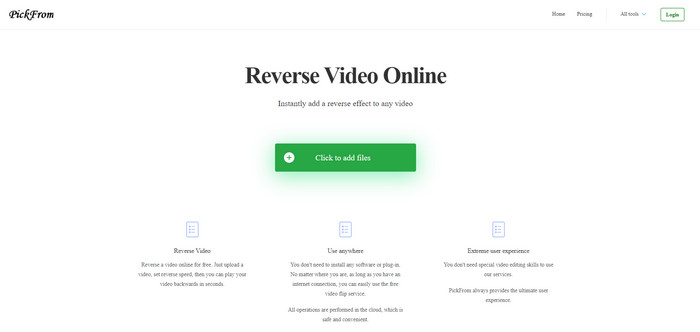
FileConverto ile karşılaştıracak olursak PickFrom daha iyi bir arayüze sahiptir. Minimalist tasarımı ve beyazla camgöbeği tonlarının birleşimi onu görsel olarak çok hoş kılar. Yalnız, metinler oldukça ince olduğundan okumak zor olabilir. Özellikle gözleriniz çok iyi görmüyorsa aracı okumakta zorlanabilirsiniz. Ayrıca burada MP4 videoları tersine çevirmek istediğinizde, seçeneklerin basitleştirilmiş Çince olarak yazıldığını göreceksiniz. Bu da anlamayı zorlaştırıyor; fakat dosya içe aktarma hızı FileConverto’dan daha yüksek.
Artıları
- FileConverto'ya kıyasla çok daha iyi bir web arayüzüne sahiptir.
- Web sitesinin üst kısmında reklam yok ama aşağı kaydırırsanız bir sürü sinir bozucu reklam var.
- Birçok temel düzenleme özelliğini destekler.
Eksileri
- Araç ayarları, Çince konuşmayı bilmiyorsanız anlaması zor olan Çince yazılmıştır.
- Başlat düğmesine tıkladıktan sonra araç yanıt vermemeye başlar ve dışa aktarma işlemi çok zaman alır.
- Dışa aktarılan videonun kalitesini düşürür.
3. Medya.io
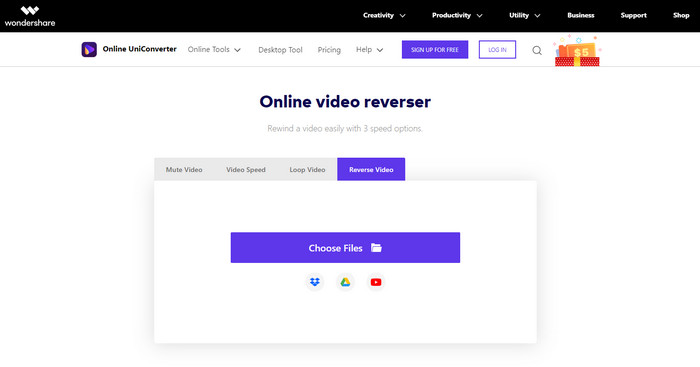
Media.io’nun 3 farklı ters oynatma hızı seçeneği vardır: 0.5x, 1x, 2x. Ters çevirme özelliği sayesinde videoyu tersine çevirip MP4’ü geriye doğru oynatabilirsiniz. Araç iyi görünse de Media.io’yu kullanırken karşılaşacağınız bazı sorunlar var. Örneğin dosyayı dışa aktarmak istediğinizde, önce oturum açmanızı isteyecektir. Ayrıca burada yalnızca boyutu sınırlı 10 adet ters video oluşturabilirsiniz.
Artıları
- Araç arayüzü harika ve çekici.
- Orijinal formatı isterseniz veya muhafaza ederseniz, ters videonun son çıktı formatını değiştirebilirsiniz.
- Videonun sesini kapatabilir veya sesini açabilirsiniz.
Eksileri
- Web sitesi, dışa aktarmadan önce kaydolmanızı isteyecektir; bu, e-posta yoluyla bildirim göndermelerine izin vereceğiniz anlamına gelir.
- x 2'nin tersi, diğer araçların x 2'sinden daha yavaştır.
- Araç, web aracının kullanılabilirliğini sınırlar. Örneğin, günde 10'dan fazla dosyayı tersine çeviremezsiniz ve dosya boyutu için bir maksimum sınırı vardır.
Bölüm 3. MP4'ü Ters Çevirme Hakkında SSS
Videoyu ters çevirdikten sonra kaliteyi düşürür mü?
Araçta bir videoyu ters çevirmek, geri almak istediğiniz videonun kalitesini düşürmemelidir. Ancak, video kalitesini düşüren birçok yazılım var. Ancak kalitesini yüksek değil düşük olarak belirlediğiniz bazı durumlar vardır.
Ters dosyama nasıl ses eklenir?
Burada listelenen yazılımların çoğu ses dosyalarını tersine çevirmeyi desteklemez, ancak şu bağlantıya giderek videoya nasıl ses ekleyeceğinizi öğrenebilirsiniz: videoya ses ekleme.
İPhone'da ters videomu nasıl birleştirebilirim?
iPhone’da videoları etkili bir şekilde birleştirmenin birçok yolu vardır. Bu makaleyi okuyarak iPhone’da videoları birleştirmenin 4 farklı yolunu öğrenebilirsiniz.
Sonuç
Sonuç olarak, artık bu çeşitli araçların yardımıyla bir MP4 dosyasını nasıl tersine çevireceğimizi biliyoruz; bunlardan size en uygun olanı seçebilirsiniz. Ayrıca, bu makalede bahsedilen tüm araçlar Video Converter Ultimate kadar çarpıcı bir nihai video çıktısı sunmaz. Bu yüzden bu araçla gerçekten etkilenmek istiyorsanız, önce onu indirmeniz şart. Çünkü bu aracın tüm işlevlerini anlamak için kalın bir kitap okumanıza gerek kalmayacak kadar basit bir kullanıma sahiptir.
Ücretsiz İndirWindows 7 veya üstü içinGüvenli İndirme
Ücretsiz İndirMacOS 10.7 veya üstü içinGüvenli İndirme
-
 [2021 Güncellemesi] PC, Mac, iOS ve Android için En İyi 9 GIF Düzenleyici
 Daha etkileyici olabilmesi için GIF'inize kişisel bir dokunuş eklemeniz mi gerekiyor? Nasıl düzenleneceğini ve iş için en iyi aracı öğrenmek için bu makaleyi okumaya devam edin.
-
 Android Telefonlarda Oynatılmayan Videoları Onarma Rehberi
 Android cihazınızda videoların oynatılamamasının sebeplerinin neler olduğunu bilmek ister misiniz? Ve eğer öyleyse, sorunu kendi başınıza çözmenin herhangi bir yolu var mı? Daha fazlasını öğrenmek için okumaya devam edin.
-
 PS4'te MKV Dosyalarının Nasıl Oynanacağına İlişkin Ayrıntılı Kılavuz [Güncelleme 2021]
 Bu makaleyi okuyarak, PS4'te MKV'nin nasıl oynatılacağını ve videonun çalışmaması durumunda video dosyasının nasıl dönüştürüleceğini öğreneceksiniz' Oyna.
