


 Video Dönüştürücü Ultimate
 Ekran kaydedicisi
 Video Onarımı
 Güvenli İndirme
En İyi Araçlarla Videoyu Kısaltmanın En Hızlı ve En Kolay Yolları
Bir videoyu kırpmak veya kısaltmak önemlidir çünkü videonuzdan yalnızca gerekli klipleri vurgular. Bir videoyu kırpmak, video klibin sonunun başlangıcını çıkarmak anlamına gelir. Bu temel düzenleme unsuru, izleyicilerinizin dikkatini kaybetmemeniz için gereklidir. Bu nedenle, uzun videonuzu kırpmak veya kısaltmak istiyorsanız, bu makalede bir videoyu nasıl kısaltacağınızı öğreneceksiniz.

Bölüm 1. En İyi Uygulamayı Kullanarak Bir Videoyu Kırpıcı Üzerinde Kısaltmanın 2 Yöntemi
FVC Video Converter Ultimate, videonuzu kırpmak için en iyi masaüstü aracıdır. Bu aracın sezgisel bir yazılım arayüzü vardır ve kullanımı ücretsizdir. Bu çevrimdışı dönüştürücü, video dosyanıza segmentler eklemenize olanak tanır. Buna ek olarak, videonuzu tercih ettiğiniz farklı parçalara hızlıca bölmenizi sağlayan bir özelliğe sahiptir. Ve birden fazla dosya formatını tek bir dosyada birleştirebilen bir araç arıyorsanız, bu uygulama bunu sizin için yapabilir.
Ayrıca bu araç, GIF yapıcı, video birleştirici, video filigranı kaldırma gibi birçok gelişmiş özellik sunar. Daha da iyisi, MP4, WMV, FLV, AVI, MPG, WebM, MKV ve 1000’den fazla format dahil olmak üzere çok sayıda dosya formatını destekler. Dolayısıyla bu uygulamayı videonuzu kısaltmak için kullanmak istiyorsanız, izlemeniz için iki yöntemimiz var.
Yöntem 1. FVC'nin Video Kırpıcısını Kullanın
Adım 1. Önce, aşağıdaki İndir düğmesine tıklayarak FVC Video Converter Ultimate programını indirin. Kurulum işlemini takip edin ve ardından uygulamayı çalıştırın.
Ücretsiz İndirWindows 7 veya üstü içinGüvenli İndirme
Ücretsiz İndirMacOS 10.7 veya üstü içinGüvenli İndirme
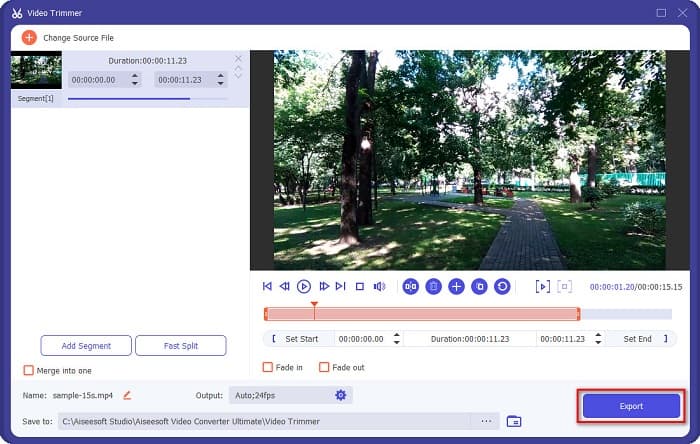
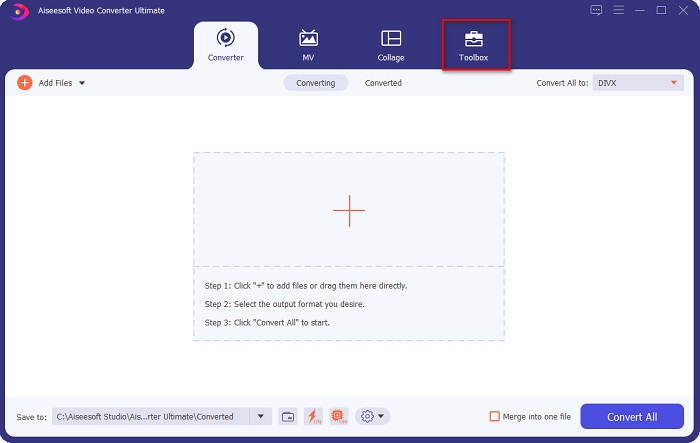
Adım 2. Sonra, yazılım arayüzünün üst kısmında bulunan Araç Kutusu panelini seçin. Ardından araç kutusu panelinde Video Kesiciye tıklayın.
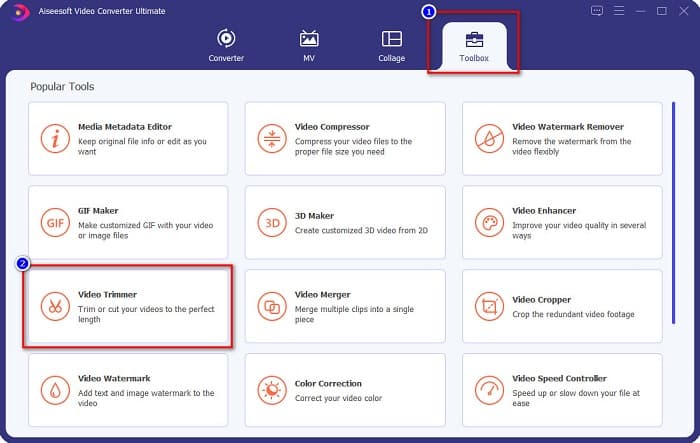
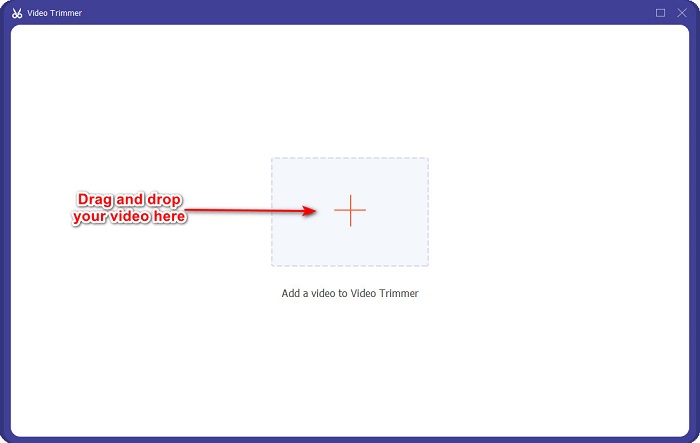
Adım 3. Daha sonra, bir sonraki arayüzde + simgesine tıklayın veya videonuzu + simgesinin üzerine sürükleyip bırakın.
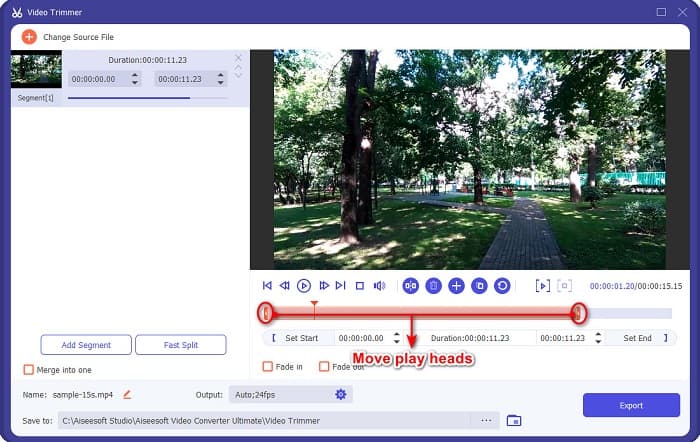
Adım 4. Ardından, oynatma başlık düğmelerini istediğiniz uzunluğa getirin. Ok başı, videonuzun ön izlemesinin konumunu gösterir. Oynatma başlıkları ise videonuzun uzunluğunu gösterir. Videonuzdaki geçici değişiklikleri ön izleme penceresinde görebilirsiniz.
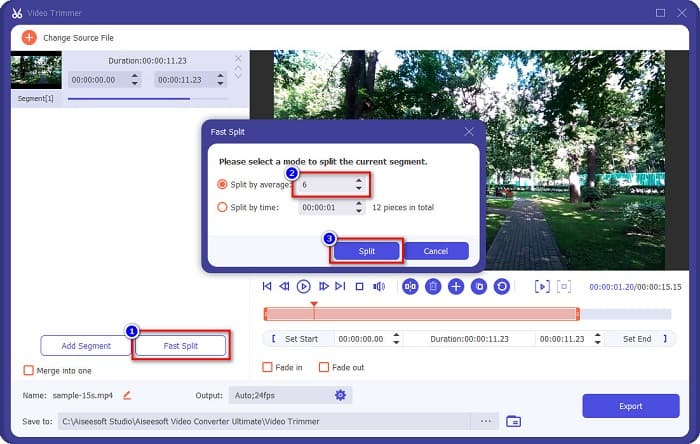
İsteğe bağlı. Videonuzu segmentlere ayırmanın daha basit bir yolunu istiyorsanız:
1. Hızlı Böl düğmesine tıklayın.
2. Videonuzda olmasını istediğiniz bölme sayısını seçin ve ardından Böl düğmesine basın.
3. Videonuzu bölmek istemiyorsanız sonraki adıma geçin.
Adım 5. Son olarak, değişiklikleri videonuza uygulamak için Dışa Aktar düğmesine tıklayın. Ardından çıktı dosyanız bilgisayarınızdaki dosyalar arasına otomatik olarak kaydedilecektir.
Yöntem 2. FVC'nin Video Hız Değiştiricisini kullanın
FVC Video Converter Ultimate ayrıca videonuzun hızını 0.125x, 0.25x, 0.5x, 0.75x, 1.25x, 1.5x, 2x, 4x ve 8x hızlarında değiştirebileceğiniz bir özelliğe sahiptir. Videonuzun uzunluğunu kısaltmak istiyorsanız, videonuzu yüksek bir hıza ayarlayın. Daha ayrıntılı adımlar için aşağıdaki kılavuzu izleyin.
Adım 1. FVC Video Converter Ultimate’ı açın. Ve yazılımın ana arayüzünde Araç Kutusu seçeneğine tıklayın.
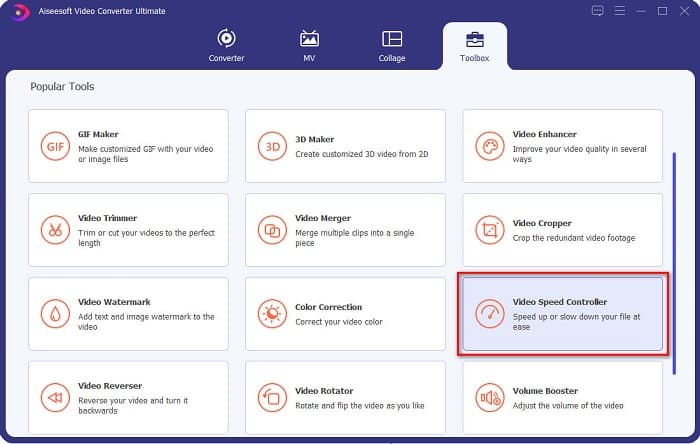
Adım 2. Daha sonra, Video Hız Denetleyicisine tıklayın ve bir sonraki adıma geçin.
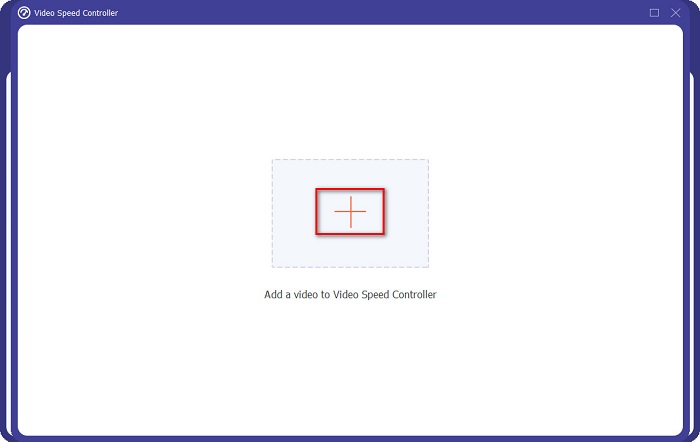
Adım 3. Sonraki adımda, kırpmak istediğiniz videoyu yüklemek için + simgesine tıklayın. Bilgisayar klasörleriniz açılacak; buradan videoyu seçip yazılımın arayüzüne yükleyeceksiniz.
Adım 4. Videonuzu kısaltmak için, hızı 1.25x ile 8x arasında seçin.
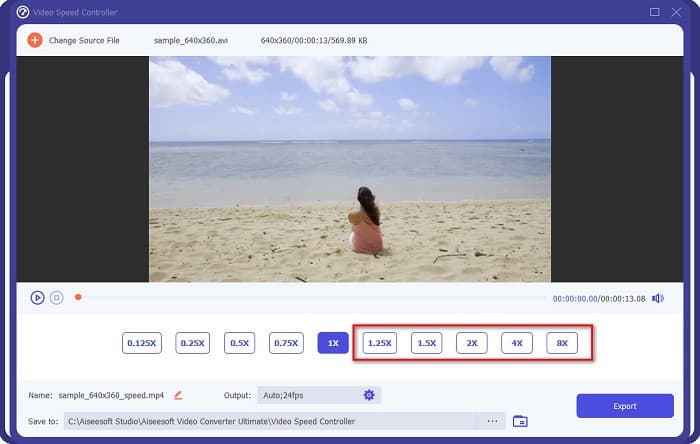
Adım 5. Son adım olarak, videonuzdaki değişiklikleri kaydetmek için Dışa Aktar düğmesine tıklayın. Ardından çıktı dosyanız bilgisayarınızdaki dosyalar arasına otomatik olarak kaydedilecektir.
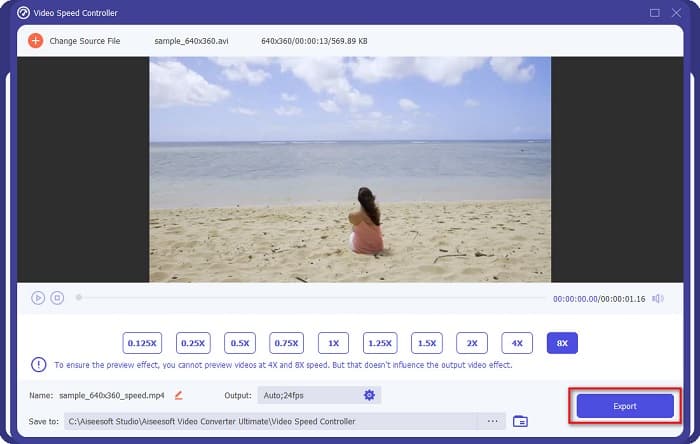
Daha kısa video uzunluğu için 8x hızını seçin.
Artıları
- MOV, MKV, AVI, MP4, WMV, WMA, MPEG ve 1000+ format dahil olmak üzere çok sayıda dosya formatını destekler.
- Kullanımı kolay bir yazılım arayüzüne sahiptir.
- Videonuzu yalnızca birkaç tıklamayla hızlı bir şekilde bölmenize olanak tanır.
- Windows, Mac ve Linux gibi tüm çapraz medya platformlarında indirilebilir.
Eksileri
- Diğer özelliklerine erişmeden önce uygulamayı satın alın.
Bölüm 2. 2 Çevrimiçi Video Kırpıcıyı Deneyin
Videonuzu hiçbir şey indirmeden kırpmak istiyorsanız, kullanabileceğiniz çevrimiçi video kırpıcılar vardır. Bu bölümde birçok kişinin kullandığı en iyi çevrimiçi video düzenleyicileri listeledik.
Videoyu Kırp
Trim Video, sezgisel kullanıcı arayüzü sayesinde kullanımı kolay bir çevrimiçi video kırpma aracıdır. Diğer çevrimiçi araçlar gibi kurulum gerektirmediği için kullanışlı bir araçtır. Buna ek olarak, videonuzu 90, 180 veya 270 derece döndürmenizi sağlayan bir özelliğe sahiptir. Ayrıca, bu araç gizlilik korumalı olduğundan verilerinizin güvenliği konusunda endişelenmenize gerek yoktur. Ancak, web tabanlı bir uygulama olduğundan dikkatinizi dağıtabilecek reklamlar içerir.
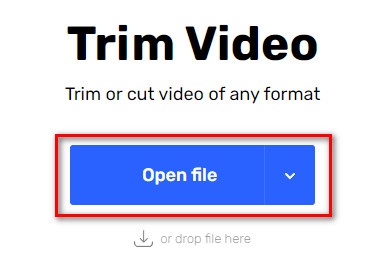
Adım 1. Tarayıcınızda çevrimiçi video kesici araması yapın. Ardından Trim Video sitesine tıklayın. Yazılımın ana arayüzünde Dosya Aç düğmesine tıklayın.
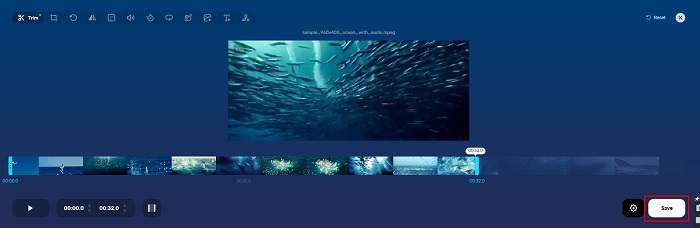
Adım 2. Daha sonra, oynatma başlık düğmelerini istediğiniz uzunluğa ayarlayın.
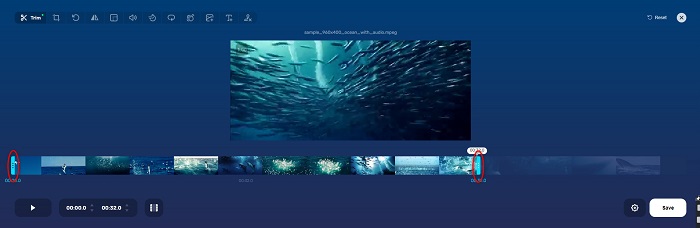
Adım 3. Videonuzun uzunluğunu değiştirmek için Kaydet düğmesine tıklayın.
Artıları
- Kullanımı kolay bir GUI'ye sahiptir.
- Videonuzu kırpmak ve döndürmek için özelliklere sahiptir.
- Kullanımı güvenlidir.
Eksileri
- Sinir bozucu reklamlar içerir.
- Yavaş yükleme ve yükleme işlemine sahiptir.
Clideo
Bir başka çevrimiçi video kırpma aracı ise Clideodur. Bu çevrimiçi aracın basit bir kullanıcı arayüzü vardır, bu da onu kullanıcı dostu bir araç yapar. Ayrıca AVI, MP4, VOB, MPG, MOV vb. gibi çoğu standart dosya biçimini destekler. Dahası, bu araç yüksek düzeyde güvenlik uygular; bu da verilerinizin güvende olduğu ve başkaları tarafından görüntülenemeyeceği anlamına gelir. Buna ek olarak Clideo, sizi rahatsız edebilecek herhangi bir reklam içermez.
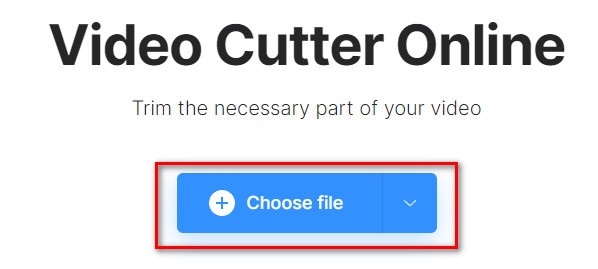
Adım 1. Kullandığınız tarayıcıda Clideo video kesici şeklinde arama yapın. Ve yazılımın ilk arayüzünde Dosya Seç düğmesine tıklayın. Kısaltmak istediğiniz videoyu seçeceğiniz bilgisayar klasörleriniz açılacaktır.
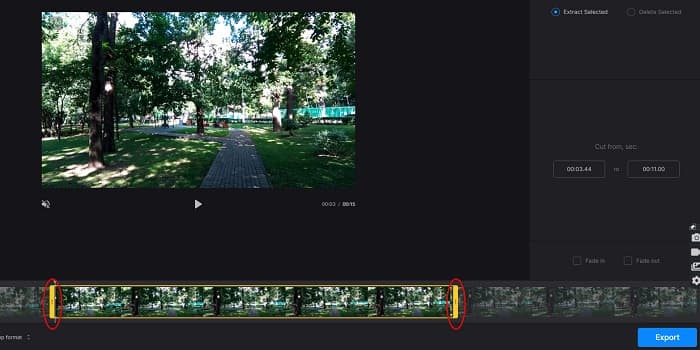
Adım 2. Videonuzun sahip olmasını istediğiniz uzunluğa gelene kadar oynatma başlık düğmelerini hareket ettirin.
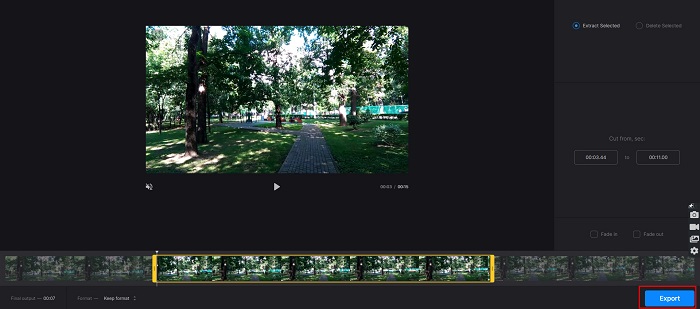
Adım 3. Son adımda, videonuzun uzunluğunu değiştirmek için Dışa Aktar düğmesine tıklayın.
Artıları
- Kullanımı kolay bir arayüze sahiptir.
- Kullanımı güvenlidir.
- Herhangi bir reklam içermez.
Eksileri
- İnternet bağlantınız yavaşken işlemlerde yavaşlama yaşayabilirsiniz.
Bölüm 3. Videoyu Kısaltma Hakkında SSS
İPhone'da video nasıl kısaltılır?
Önce Fotoğraf uygulamasını açın ve kırpmak istediğiniz videoyu seçin. Ardından Düzenle'ye dokunun. Ardından, kaydırıcıları istediğiniz video uzunluğuna getirin ve videonuzdaki değişiklikleri kaydetmek için Bitti'ye dokunun.
Videonuzu kırpmak kaliteyi etkiler mi?
Hayır. Çoğu kırpma aracı videonuzun kalitesini etkilemez. Ancak videonuzu kısaltırken kaliteyi etkilemeyen bir araç arıyorsanız, FVC Video Converter Ultimate kullanın.
Videonuzu kısaltmak dosya boyutunu etkiler mi?
Evet. Videonuz ne kadar kısa olursa, dosya boyutu o kadar az olur. Buna karşılık, videonuz uzunsa, çok büyük bir dosya boyutu içerir.
Sonuç
Bir kırpma aracı ve video hız değiştirici kullanarak videoyu kısaltma hakkında anlatacaklarımız bu kadar. Listelenen tüm araçlar harika sonuçlar verir ve size en iyi performansı garanti eder. Ancak videonuzu kısaltma konusunda pek çok özelliğe sahip, yaygın olarak kullanılan en iyi aracı arıyorsanız, FVC Video Converter Ultimate sizin için en iyi araçtır.
-
 Çevrimiçi Şarkılar Nasıl Kesilir ve Birleştirilir - Bilmeniz Gereken En İyi 4 Yol
 Bir müzik parçası oluşturmak için çevrimiçi şarkıları kesmek ve birleştirmek istediğinizde, makaleden şarkıları kırpmak ve dosyaları birleştirmek için en iyi 4 çevrimiçi araç hakkında daha fazla bilgi edinebilirsiniz.
-
 Prosedür ve Bilgi ile En İyi MP4 Düzelticiyi Keşfedin
 İzlediğiniz vloggerlar gibi videoları nasıl keseceğinizi öğrenmek ister misiniz? Ardından, hangi MP4 düzelticileri kullanabileceğinizi öğrenmek için bu gönderiyi okumaya devam edin.
-
 Her Sesi Kolayca Kesmek için 5 MP3 Kesici [2022 Güncellendi]
 Sesi kırpmak için bir MP3 kesiciye mi ihtiyacınız var? Bu durumda, bu makaleyi okuyun çünkü güvenebileceğiniz ve ses için kolay kesim sağlayan araçları sağlıyoruz.
