


 Video Dönüştürücü Ultimate
 Ekran kaydedicisi
 Video Onarımı
 Güvenli İndirme
Filigran Nedir Öğrenin | Videolarda İhtiyaç Duyulmasının Türleri ve Nedenleri
Günümüzde video yüklemek, çalışan, öğrenci, yaşlı ya da genç fark etmeksizin herkesin, hatta videoları diğer sosyal medya platformlarında yeniden paylaşanların bile kolayca yapabildiği bir şey hâline geldi. Ücretsiz olsa da, bazı kişiler başkalarının videolarını kullanarak para kazanmak için bundan faydalanıyor ve adeta sahipleniyorlar. Bu yüzden, ürettiğiniz çalışmanın çalınmasını engellemek için videoya bir filigran (watermark) eklemelisiniz. Peki neden eklemeniz gerekiyor? Amacı nedir? Videodaki filigran nasıl eklenir veya kaldırılır? Aklınızdaki tüm sorulara yanıt bulmak için, videoda filigran nedir sorusunun cevabını öğrenmek üzere bu makaleyi okumaya devam etmelisiniz.

Bölüm 1. Video Filigranları Nedir?
Filigranların, web'e yüklenen videolar gibi çoğu dijital içeriğin parçası olduğu bilinmektedir. İnternetteki videoların herhangi biri tarafından çalınmasını ve kendi çıkarları için kullanılmasını engeller. Ayrıca, herkesin söz konusu videonun sahibi veya kaynağının nerede veya hangisi olduğunu bilmesini sağlar. Korumak veya tanıtmak için herkesin filigran ekleme erişimi olsa da, yine de Filigranınızı herkesin bilmesi için benzersiz ve ayırt edilebilir hale getirmeniz gerekir. Ancak, video düzenlemede kullanmanız gereken bir filigran nedir? Genellikle videolarda görülen filigran türleri vardır; Bunların ne olduğunu öğrenmek için bu makaleyi okumaya devam etmelisiniz.
Bölüm 2. Video Filigran Türleri Nelerdir?
Videonuza eklemek için kullanabileceğiniz dört tür video filigranı vardır. Türlerini öğrenmek için, ne tür filigran kullanmanız gerektiğini bilmenize yardımcı olacak aşağıdaki ayrıntıları okumaya devam etmelisiniz.
Videolara Uygulayabileceğiniz 4 Filigran Türü:
◆ Perceptible Watermark – isminden de anlaşılacağı gibi görünürdür; yani çıplak gözle gördüğümüz filigran, görünür filigran olarak kabul edilir. Herkes onu görsel olarak fark edebildiği için çabucak tespit edilir. Genellikle bir markayı tanıtmak amacıyla kullanılırlar.
◆ Imperceptible Watermark – görünür filigranın tam tersidir. Bu filigran türü, videoyu çalmaya çalışan hırsızı yakalamak isteyen herkes için idealdir. Çünkü filigran görünmez olduğunda, çıplak gözle siz bile onu fark edemezsiniz.
◆ Public Watermark – Belirli bir algoritma sayesinde herkes filigranı kendi tercihine göre değiştirebilir. Herkese açık olsa da, filigran eklemenin en güvenli yolu olarak kabul edilmez.
◆ Fragile Watermark – filigranlama için en hassas tasarımdır. İçeriğinin sahtekarlar tarafından manipüle edilmesini istemeyen kişiler için en uygun seçenektir. Ayrıca, videonun verilerini değiştirerek çok kolay bir şekilde bozulabilir.
Bölüm 3. Video İçeriğinize Neden Filigran Eklemelisiniz?
Bununla kullanıcılar ve hatta yükledikleri videonun sahibinin, web sitesinin veya yazılımın kim olduğunu kolayca tespit edebilirsiniz. Ayrıca Filigran, logo, marka adı, etiket satırı ve daha fazlasını eklemek gibi web'de incelikli markalama için kullanılabilir. Filigranlar öncelikle markanın tanınması ve korunması için kullanılır. Filigran eklemekteki amacınız ne olursa olsun, özellikle web'e yüklemek üzereysek, herkesin bir filigran eklemesi gerekir.
Videolarda kullanılan Filigranların çoğu şeffaftır, çünkü bunlar, özellikle ortaya yerleştirilmişlerse, çıkarılması en zor olanlardır. Filigran şeffaf olsa da, filigranlı bir videoyu izlemek sandığınız kadar tatsız değildir. Yardımcı olabilse de, özellikle deneyim izleyen kullanıcılar için filigranla ilgili dezavantajlar vardır. Kullanabileceğiniz en iyi ücretsiz filigran yazılımının ne olduğunu öğrenmek için 4. bölümü okuyun.
Bölüm 4. Videolarınıza Filigran Ekleme ve Kaldırma
Videonuza filigran eklemek ya da var olanı kaldırmak mı istiyorsunuz? Neyse ki, FVC Video Converter Ultimate bu sorunu filigranı kaldırarak ve ekleyerek çözebilir. Bu yazılım, videoya filigran ekleme konusunda son derece sorunsuz çalışır. Profesyoneller için en iyi seçimdir; ancak kullanıcı dostu arayüzü sayesinde yeni başlayanlar için de harika bir seçenek olabilir! Çünkü sadece birkaç dakika içinde filigran ekleme ve kaldırma işlemlerini ustalıkla yapmanızı sağlar.
İlk ayrıntılar bir filigranın ne olduğunu ve nasıl yapıldığını belirtir. Aşağıdaki adım adım öğreticiyi okuyarak videonuza ekleme ve çıkarma yapmamızın zamanı geldi. Ama önce, aşağıda sunulan indir düğmesine tıklayarak yazılımı masaüstünüze indirmelisiniz. Kurulum ve kurulum sürecini takip edin, ardından aracı çalıştırın ve şimdi adımlara ilerleyebilirsiniz.
Ücretsiz İndirWindows 7 veya üstü içinGüvenli İndirme
Ücretsiz İndirMacOS 10.7 veya üstü içinGüvenli İndirme
Videoya Filigran Nasıl Eklenir:
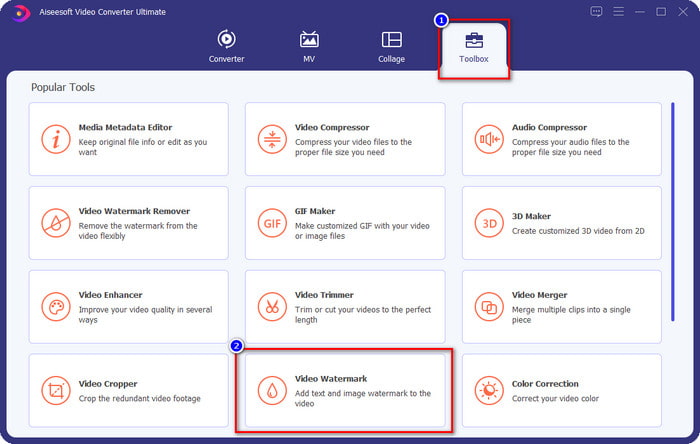
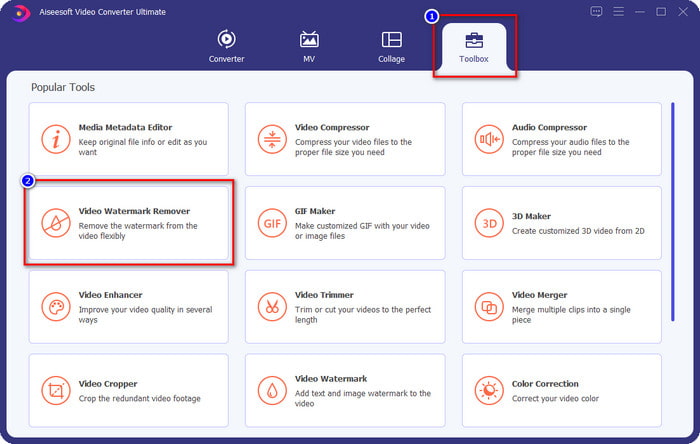
Adım 1. Yazılımı açtıktan sonra, Toolbox (Araç Kutusu) bölümüne gidin ve Video Watermark (Video Filigranı) seçeneğini bulun; ardından tıklayın.
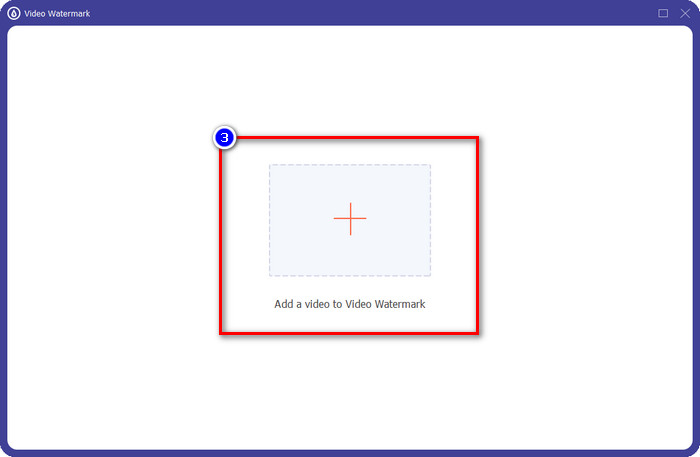
Adım 2. Filigran eklemek istediğiniz videoyu yüklemek için + düğmesine basın. Açılacak klasörden yüklemek istediğiniz video dosyasını bulun ve devam etmek için Open (Aç) düğmesine tıklayın.
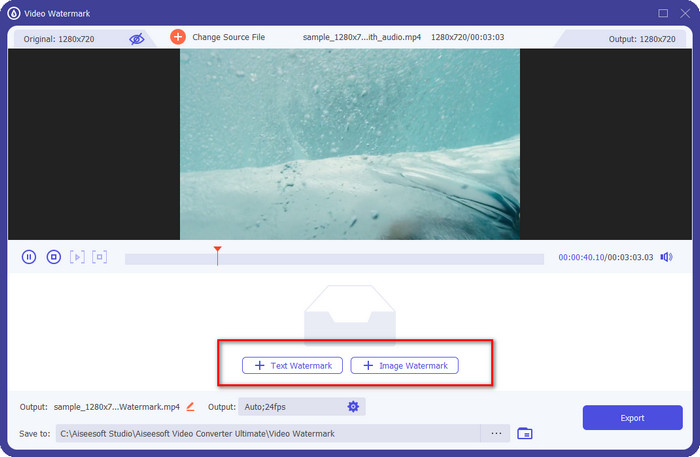
Adım 3. İki seçenek mevcuttur; yazı eklemek istiyorsanız Text Watermark (Metin Filigranı) seçeneğine, logo veya görsel eklemek istiyorsanız Image Watermark (Görüntü Filigranı) seçeneğine tıklamanız gerekir.
Metin Filigranı için:
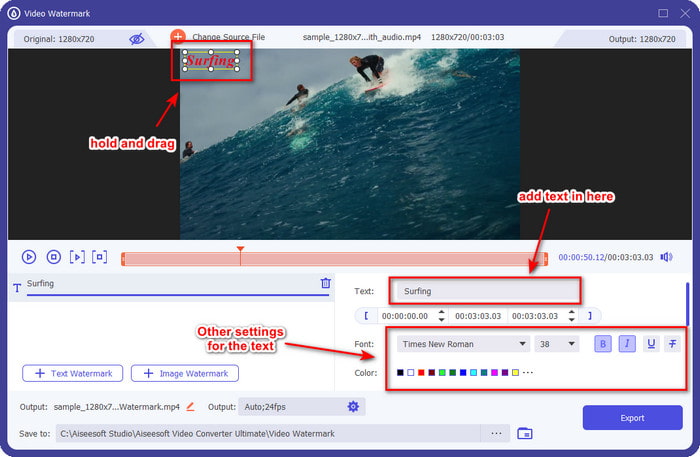
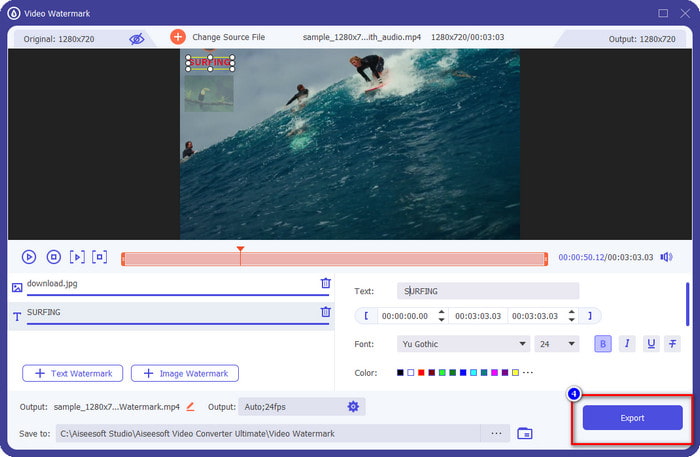
Bu bölüme eklemek istediğiniz filigranı yazın ve ardından metin filigranın yazı tipi rengini ve stilini ihtiyaçlarınıza göre değiştirebilirsiniz. Videonun herhangi bir yerine yerleştirmek için videodaki metni sürükleyin.
Görüntü Filigranı için:
Image Watermark (Görüntü Filigranı) seçeneğine tıklayın ve filigran olarak kullanmak istediğiniz görsel dosyasını seçin. Kullanmak istediğiniz görselin önceden sürücüde bulunmasına dikkat edin. Bu kısımda görsele ait diğer ayarları da değiştirebilirsiniz. Görsel filigranı videonun üzerine sürükleyerek doğru şekilde konumlandırın.
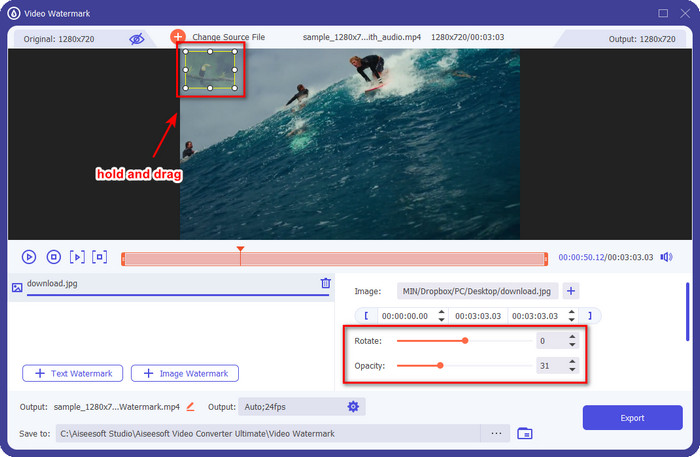
Adım 4. Filigran eklenmiş videoyu kaydetmek için artık Export (Dışa Aktar) düğmesine tıklayabilirsiniz.
Bir Videodan Filigran Nasıl Kaldırılır:
Adım 1. Toolbox (Araç Kutusu) bölümünde Video Watermark Remover (Video Filigran Kaldırıcı) seçeneğini bulun ve açın.
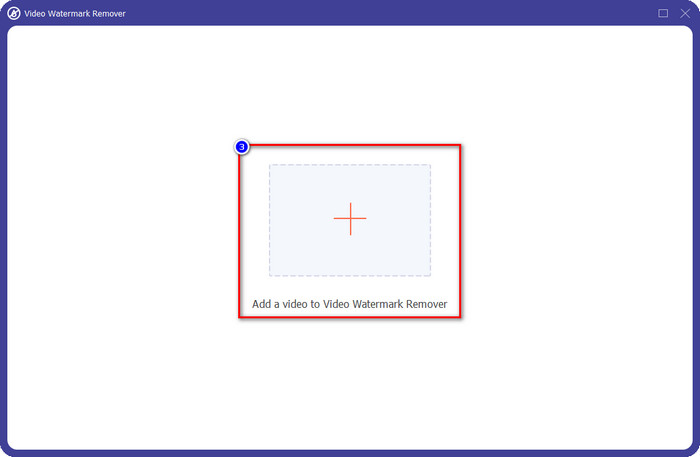
Adım 2. Filigranlı videoyu yüklemek için + simgesine tıklayın ve karar verdiyseniz Open (Aç) düğmesine basın.
Adım 3. Videonuzdaki filigranı kaldırmak için Add Watermark Removing Area (Filigran Kaldırma Alanı Ekle) seçeneğine tıklayın.
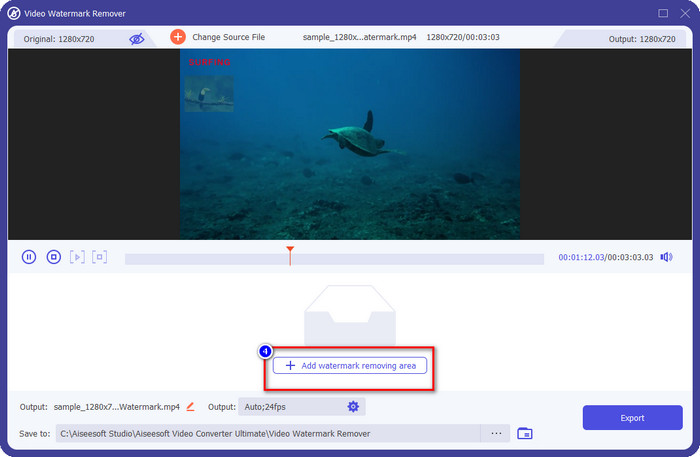
Adım 4. Filigranı kaldırmak için filigran kaldırma çerçevesini filigranın üzerine yerleştirin. Ayrıca videonuz üzerinde bu çerçevenin boyutunu serbestçe değiştirebilir ve konumunu ayarlayabilirsiniz.
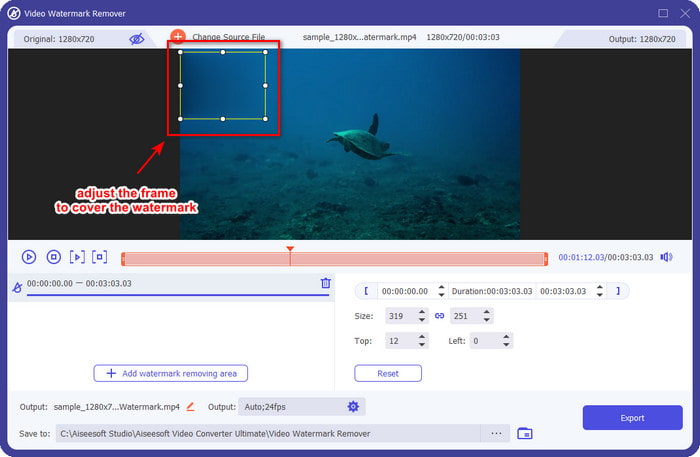
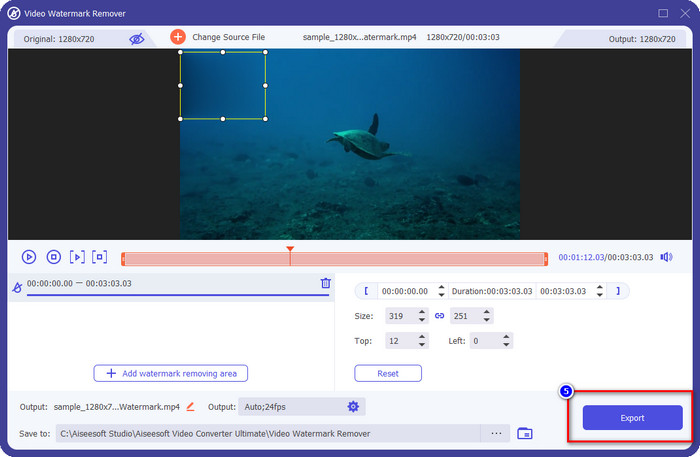
Adım 5. Filigran artık bulanıklaştırıldığına göre, videoyu filigransız kaydetmek için Export (Dışa Aktar) düğmesine tıklayabilirsiniz. İşte bu kadar basit.
İlgili:
GIF’ten Filigran Nasıl Kaldırılır
Bölüm 5. Videoda Filigran Hakkında SSS
Aynı anda hem metin hem de görsel filigran ekleyebilir miyim?
Kesinlikle evet. Uğraştığınız videoya metin ve resim filigranı ekleyebilirsiniz. Bunu yapmak için, metin ve resim kullanarak filigran ekleme arayışınızda yukarıda verdiğimiz adımları takip edebilirsiniz.
Filigran, videonun dosya boyutunu artırır mı?
Videonun filigranlı dosya boyutu, filigransız olandan farklı olmasa da, filigranlı videonun dosya boyutu, filigransız videodan biraz farklıdır. Yine de videonun dosya boyutunun büyük olasılıkla, olsun veya olmasın aynı olduğunu söyleyebiliriz.
Hangi filigran türü ihtiyaçlarıma daha uygundur?
Karşılaştığınız videoya filigran eklemeden önce, farklı filigran türlerini bilmek şarttır. Hangisini kolayca kullanmanız gerektiğini belirlemek için lütfen yukarıda eklediğimiz bilgileri ayrı ayrı tartıştığımız için okuyun.
Sonuç
Sonunda filigran logosunun ne olduğunu ve videonuza nasıl filigran ekleyeceğinizi öğrendik. Eğer filigranla ilgili tüm işlemler için – ekleme veya kaldırma – tek duraklı bir çözüm istiyorsanız, FVC Video Converter Ultimate ihtiyaç duyacağınız yardımcı araçtır. Bu aracın başka neler yapabildiğini görmek istiyorsanız, hemen şimdi masaüstünüze indirip kendiniz deneyebilirsiniz.
-
 Windows ve Mac'te Photoshop'ta Bir Videoya Filigran Eklemenin En İyi Yolu
 Photoshop'ta bir videoya nasıl filigran ekleneceğini bilmek ister misiniz? Bu durumda, bu makale size bilmeniz gereken bir veya iki şeyi sağlayacaktır.
-
 Tiktok Videolarından Tiktok Filigranlarını Kaldırmanın 4 Etkili Yolu
 Dışa aktarılan Tiktok videolarınızdan Tiktok filigranını kaldırmanız mı gerekiyor? Burada sunduğumuz araçlar yardımıyla yapabilirsiniz; kolayca yapabilirsiniz.
-
 Mac'te iMovie'de Videoya Filigran Nasıl Eklenir [All Embracing]
 iMovie'de bir videoya filigran eklemenin sırlarını bilmek ister misiniz? Kimsenin üzerine çayı dökmeyin ve bu makaleyi okuyarak öğrenin.
