


 Chuyển đổi video Ultimate
 Trình ghi màn hình
 Sửa chữa video
 Tải xuống an toàn
Xóa hình mờ Dreamstime với 4 cách bạn cần biết
Nếu bạn cần hình ảnh sẵn sàng để sử dụng cho bản trình bày hoặc dự án của mình, bạn không bao giờ sai khi chọn Dreamstime. Ứng dụng này có thể cung cấp cho bạn kho ảnh miễn phí bản quyền sẵn sàng để sử dụng bất cứ lúc nào. Nó đã giúp người dùng tìm kiếm một hình ảnh cụ thể với đầu ra chất lượng cao với mức giá thấp. Mặc dù bạn có thể tải xuống 15 hình ảnh miễn phí tại đây, nhưng sản phẩm này sẽ để lại hình mờ để quảng cáo ứng dụng khi bạn sử dụng hình ảnh bạn tải xuống tại đây.
Chúng ta không thể phủ nhận rằng khả năng sử dụng của nó rất tuyệt vời và giá hình ảnh thì thấp, nhưng không phải ai trong chúng ta cũng có thể đủ khả năng mua credit trên đó. Đừng lo nữa! Vì chúng tôi đã chuẩn bị sẵn cho bạn, những thông tin dưới đây là các cách bạn có thể làm theo để xóa watermark Dreamstime xuất hiện trên ảnh đầu ra cuối cùng.

Phần 1. Cách xóa hình mờ Dreamstime bằng cách mua các khoản tín dụng
Chúng tôi không thể bỏ lại tùy chọn mua vì đây là tùy chọn xóa hình mờ Dreamstime hiệu quả nhất mà bạn có thể sử dụng. Trước khi chúng tôi tiếp tục, bạn sẽ cần biết rằng Dreamstime cần bạn có để có thể mua hình ảnh mà không có hình mờ. Tín dụng tên là một loại tiền tệ Dreamstime; nó sử dụng tiền thật và chuyển nó thành tiền kỹ thuật số mà Dreamstime chấp nhận. Giả sử bạn không có tín dụng trên Dreamstime. Trong trường hợp đó, bạn có thể làm theo các bước sau đây để mua một khoản tín dụng để tải xuống và có hình ảnh mà không có bất kỳ biểu tượng nào của sản phẩm còn lại.
Bước 1. Mở trang web chính thức của Dreamstime, sau đó bạn phải tạo một tài khoản trước khi mua credit trên Dreamstime. Nếu bạn đã có tài khoản, hãy đăng nhập trước để sử dụng đầy đủ chức năng.
Bước 2. Sau khi bạn đã đăng nhập tài khoản Dreamstime, hãy nhấp vào Price and Download Plans, rồi vào mục Credit Package để xem những mức giá hiện có trong đó.
Bước 3. Điền đầy đủ các thông tin mà hệ thống yêu cầu, sau đó nhấp Complete Checkout để xử lý thanh toán bạn đã thiết lập trên công cụ. Dễ như vậy là bạn đã mua được credit dùng làm đơn vị tiền tệ cho việc mua ảnh trên Dreamstime.
Phần 2. Cách xóa Dreamstime Watermark miễn phí trên web
FVC Free Watermark Remover Online
Một trong những phần mềm xóa hình mờ Dreamstime trực tuyến nổi tiếng nhất mà bạn có thể sử dụng không gì khác ngoài FVC Free Watermark Remover Online. Bạn có thể tận dụng công cụ này để xóa hình mờ trong hình ảnh bạn có. Hiệu suất khôn ngoan, công cụ trực tuyến này có nhiều khả năng hơn những gì bạn nghĩ, đặc biệt là trong việc xóa logo, hình mờ, tem, ngày tháng, đối tượng, v.v., trên hình ảnh. Bạn vẫn còn nghi ngờ công cụ này? Trong trường hợp đó, hãy đọc các bước chúng tôi đã thêm bên dưới và bạn cũng có thể làm theo chúng để xóa hình mờ mà Dreamstime đã thêm.
Bước 1. Bằng cách nhấp vào liên kết này, một thẻ mới sẽ mở trên trình duyệt của bạn.
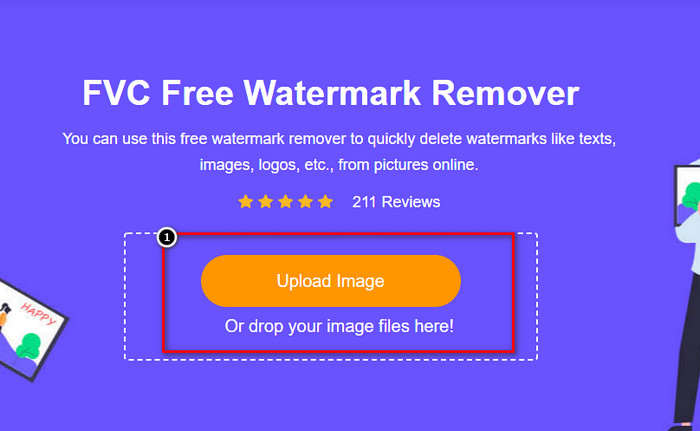
Bước 2. Nhấp Upload Image để nhập những bức ảnh bạn đã tải từ Dreamstime có gắn watermark.
Bước 3. Bạn có thể dùng các công cụ để vẽ theo watermark, chọn một công cụ, rồi tô/truy vết watermark bằng công cụ đó.
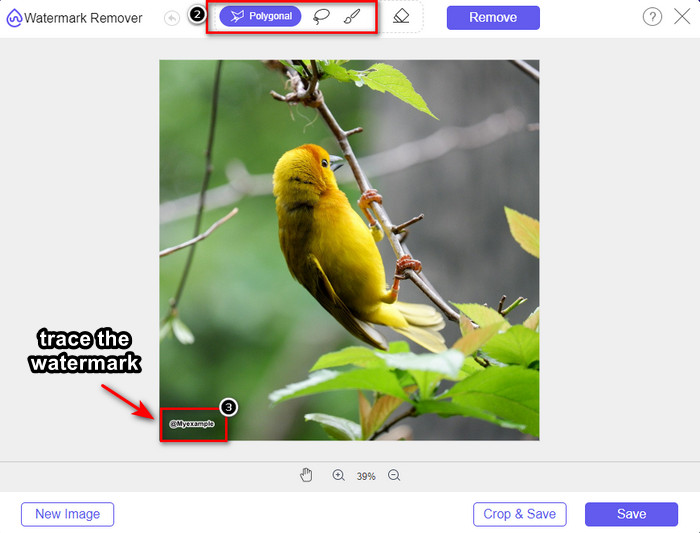
Bước 4. Nhấp vào biểu tượng Remove trước khi bạn tiếp tục xuất ảnh.

Bước 5. Cuối cùng, nhấp Download để lưu ảnh mà không còn watermark được bạn đánh dấu trước đó.

WatermarkRemover.IO

WatermarkRemover.io là một công cụ xóa watermark khỏi ảnh Dreamstime trực tuyến mà bạn có thể sử dụng để hỗ trợ trong quá trình này. Công cụ này miễn phí sử dụng, giống như trình xóa watermark trực tuyến được nhắc đến đầu tiên. Bạn cũng không cần phải đăng ký tài khoản vì nó dùng được trên bất kỳ trình duyệt nào. Nó còn sử dụng công nghệ AI để xóa watermark trên ảnh của bạn khi bạn dùng công cụ này. Để biết cách thực hiện, hãy tiếp tục đọc các thông tin bên dưới.
Bước 1. Mở trang web chính thức của trình xóa watermark này bằng cách tìm kiếm nó trên trình duyệt của bạn.
Bước 2. Nhấp vào biểu tượng Upload Image để tải lên bức ảnh có watermark mà bạn muốn xóa.
Bước 3. Khi đã tải xong ảnh có watermark, hãy nhấn Download Image vì công cụ sẽ tự động xóa watermark trên ảnh của bạn.
Phần 3. Cách xóa hình mờ Dreamstime trên video bằng giải pháp cuối cùng
Bạn có thể tải xuống một trình xóa watermark Dreamstime cho video như FVC Video Converter Ultimate. Đây là công cụ cực kỳ linh hoạt, luôn sẵn sàng hoạt động và hoàn thành công việc bất cứ lúc nào. Công cụ này xử lý những vấn đề bạn có thể gặp với video như âm thanh kém chất lượng, độ phân giải thấp, định dạng không được hỗ trợ và watermark gây khó chịu. So với các phần mềm khác mà bạn có thể cài để xóa watermark, công cụ này vượt trội rõ rệt về hiệu năng, tốc độ xử lý và tính dễ dùng. Hãy theo kịp vì chúng tôi sẽ hướng dẫn chi tiết cách xóa watermark trên video của bạn.
Bước 1. Trước hết, bạn cần tải phần mềm về máy tính bằng cách nhấp nút tải xuống bên dưới. Hãy chọn đúng phiên bản để cài đặt, đi qua vài bước thiết lập nhanh và khởi chạy phần mềm.
Tải xuống miễn phí cho Windows 7 trở lên. Tải xuống an toàn.
Tải xuống miễn phí cho MacOS 10.7 trở lên. Tải xuống an toàn.
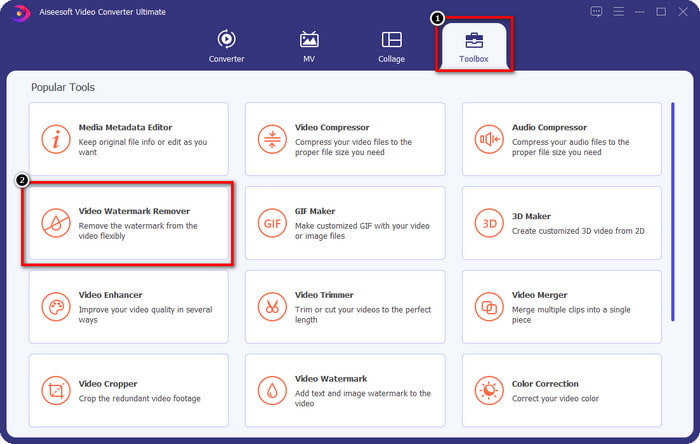
Bước 2. Mở Toolbox đa chức năng mà phần mềm này cung cấp, sau đó chọn Video Watermark Remover.
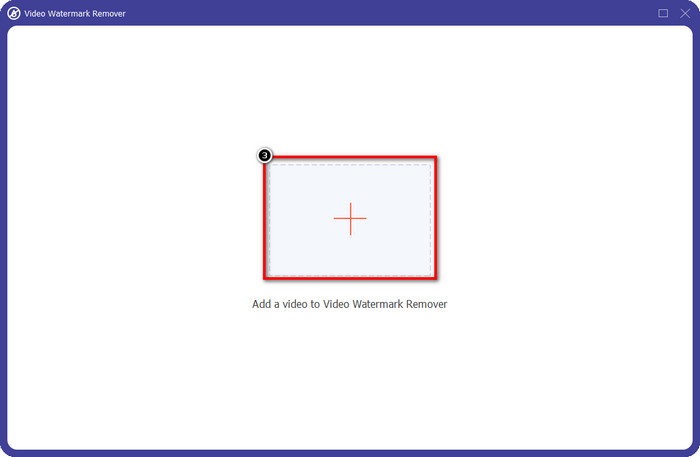
Bước 3. Sau đó, nhấp vào biểu tượng + để tải lên video bạn đã tải về và bắt đầu xóa watermark Dreamstime.
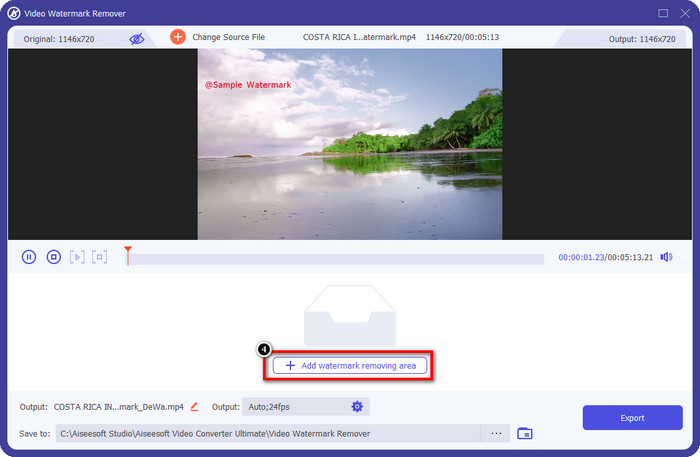
Bước 4. Tiếp theo, nhấp Add Watermark Removing Area để đặt vùng chọn lên watermark.
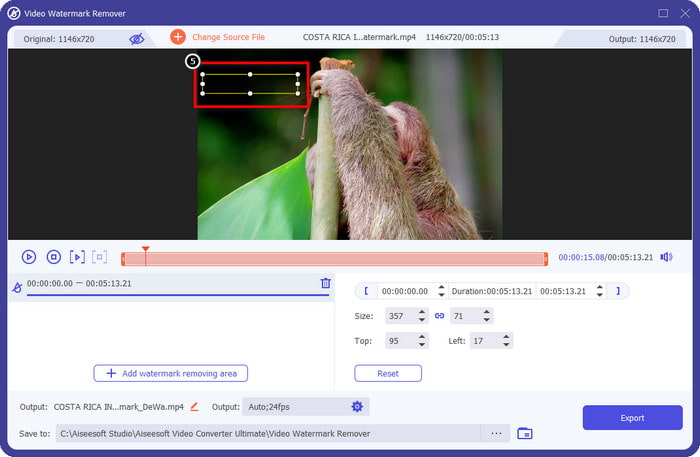
Bước 5. Sau khi nhấp Add Watermark Removing Area, sẽ có một hình chữ nhật xuất hiện trên màn hình, hãy đặt nó lên vùng watermark để xóa.
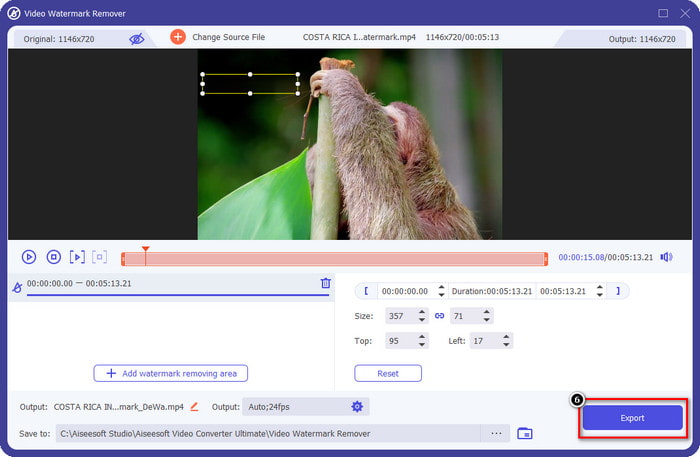
Bước 6. Nhấp nút Export để tải xuống video không còn watermark Dreamstime nữa.
Có liên quan:
Phần 4. Các câu hỏi thường gặp về cách xóa hình mờ Dreamtime
Tôi có thể xóa watermark không giới hạn trên Dreamtime sau khi mua nó không?
Bạn không thể nếu bạn đã mua tín dụng, nhưng bạn có thể tiếp tục và cuộn xuống thêm một chút, và bạn sẽ thấy rằng có quyền truy cập hình ảnh không giới hạn mà bạn có thể tận dụng nếu bạn đang sử dụng nó thường xuyên. Giá của nó không giống nhau ở các khu vực hoặc nơi khác nhau trên toàn thế giới.
Dreamstime hỗ trợ loại thẻ nào?
Bây giờ bạn đã quyết định mua tín dụng hoặc phí đăng ký tại đây, bạn có thể sử dụng Thẻ Master, Visa, AMEX và các thẻ tín dụng chính khác của mình; bạn có thể kiểm tra nó trên trang web chính thức để biết những người khác.
Tôi có thể sử dụng tín dụng trên Dreamstime để mua video không có hình mờ không?
Bạn có thể sử dụng tín dụng để mua video hoặc bất kỳ sản phẩm nào mà nền tảng này có. Mục đích của tín dụng không chỉ dành cho hình ảnh và video; bạn cũng có thể sử dụng nó để mua âm thanh tại đây.
Phần kết luận
Làm cách nào để xóa hình mờ Dreamstime? Chà, bạn đã biết cách xử lý hình mờ trong hình ảnh của mình bằng hai công cụ mà chúng tôi sử dụng và video với công cụ xóa hình mờ tối ưu mà bạn có thể sử dụng. Vì vậy, nếu bạn gặp vấn đề về watermark trên video hoặc hình ảnh, bạn có thể thoải mái sử dụng phần mềm trên và làm theo hướng dẫn mà chúng tôi đã bổ sung. Nói lời tạm biệt với vấn đề vì nó đã được giải quyết!
-
 2 cách xóa VSDC Watermark trên Windows và Mac nhanh chóng
 Bạn đang tìm cách xóa hình mờ VSDC trên video của mình? Với bài viết này, chúng tôi cung cấp các công cụ bạn có thể sử dụng để loại bỏ hình mờ.
-
 Xóa hình mờ Animoto trên video một cách dễ dàng và hiệu quả
 Làm cách nào để xóa hình mờ Animoto trên video? Hãy tiếp tục đọc bài viết này vì chúng tôi đã cung cấp hướng dẫn đầy đủ về cách thực hiện.
-
 Cách xóa hình mờ khỏi video bằng Final Cut Pro [Hướng dẫn hoàn chỉnh]
 Bạn gặp sự cố với hình mờ trên video? Không cần nói thêm, vì chúng tôi đã cung cấp một hướng dẫn về cách xóa hình mờ khỏi video bằng Final Cut Pro.
