


 Chuyển đổi video Ultimate
 Trình ghi màn hình
 Sửa chữa video
 Tải xuống an toàn
Mẹo và thủ thuật để loại bỏ hình mờ Powtoon trên video một cách hiệu quả
Bạn đã bao giờ tạo được một đoạn hoạt hình hoàn hảo, nhưng khi xuất ra thì Powtoon lại thêm hình mờ? Những trường hợp như vậy thường xảy ra nếu bạn dùng phiên bản miễn phí của ứng dụng. Hình mờ có làm hỏng video của bạn không? Đừng lo nữa! Bạn có thể học cách xóa hình mờ Powtoon bằng những phương pháp khác nhau mà chúng tôi giới thiệu tại đây.

Phần 1. Cách xóa hình mờ Powtoon mà không cần đăng ký [Lựa chọn của biên tập viên]
FVC Video Converter Ultimate là một giải pháp toàn diện mà bạn có thể tải về trên Windows hoặc Mac để xóa hình mờ Powtoon. Ngay cả khi bạn chưa có kinh nghiệm xóa hình mờ trên các video tự tạo, bạn vẫn có thể dễ dàng thực hiện với công cụ này. Tiện lợi và nhanh chóng – đó là trải nghiệm mà FVC muốn mang lại cho bạn khi sử dụng phần mềm này, và họ đã làm rất tốt. Vì vậy, nếu bạn muốn trải nghiệm cách xóa hình mờ, hãy làm theo các bước mà chúng tôi hướng dẫn dưới đây.
Các bước xóa hình mờ Powtoon bằng FVC Video Converter Ultimate:
Bước 1. Bạn có thể sở hữu phần mềm chỉnh sửa video ấn tượng nhất trên Windows và Mac bằng cách nhấp nút tải xuống bên dưới. Sau đó cài đặt phần mềm, thực hiện thiết lập nhanh và khởi chạy chương trình.
Tải xuống miễn phí cho Windows 7 trở lên. Tải xuống an toàn.
Tải xuống miễn phí cho MacOS 10.7 trở lên. Tải xuống an toàn.
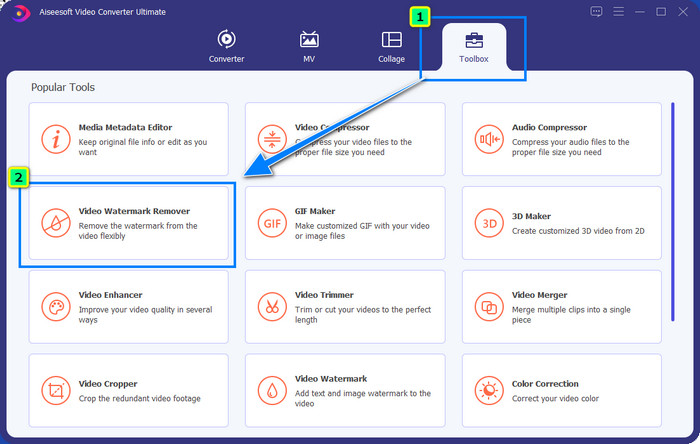
Bước 2. Trong mục Hộp công cụ (Toolbox), nhấp vào Video Watermark Remover để xóa hình mờ mà Powtoon thêm vào video đã chỉnh sửa của bạn.
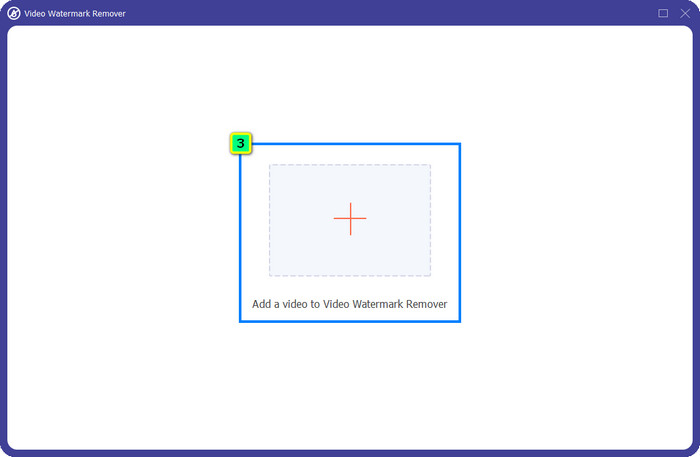
Bước 3. Nhấn vào biểu tượng + để tải lên video bạn muốn chỉnh sửa, chọn tệp video trong thư mục hiện ra và nhấn Open.
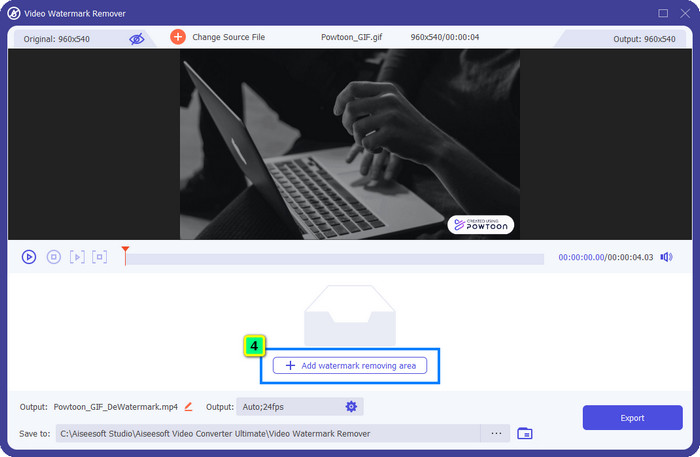
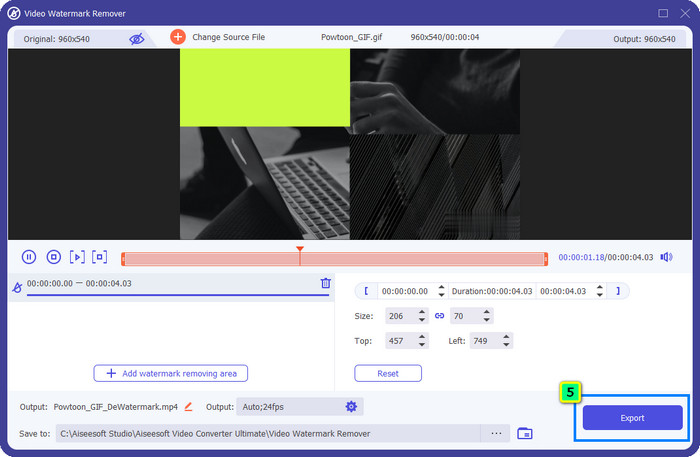
Bước 4. Nhấn Add Watermark Removing Area và đặt khung lựa chọn lên phần hình mờ; bạn có thể điều chỉnh vùng này sao cho phù hợp.
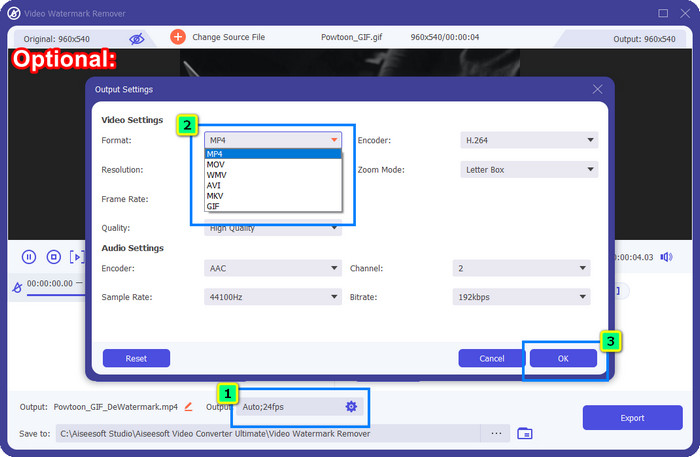
Tùy chọn: Muốn lưu bản xuất cuối cùng dưới một định dạng mới? Nhấp vào Output rồi đến Format và chọn định dạng video mới bạn muốn. Bạn cũng có thể điều chỉnh các thiết lập video và âm thanh khác rồi nhấn OK để lưu thay đổi.
Bước 5. Nhấn nút Export để tải xuống video mà bạn đã xóa hình mờ.
Phần 2. Cách xóa Hình mờ Powtoon với Đăng ký [Dựa trên gói]
Powtoon có hình mờ không? Có, nó có thêm hình mờ khi bạn sử dụng phiên bản miễn phí. Nhưng nếu bạn mua Pro hoặc Pro +, bạn có thể xuất kết quả cuối cùng mà không có hình mờ. Vì vậy, nếu bạn muốn biết cách mua phần mềm để thưởng thức video bạn đã chỉnh sửa mà không có watermark, hãy làm theo các bước tiếp theo.
Các bước về cách mua gói Powtoon Pro và Pro +:
Bước 1. Mở trang web chính thức của Powtoon và nhấp vào Pricing để xem giá các gói phiên bản trả phí.
Bước 2. Chọn gói bạn muốn, Pro hoặc Pro+, rồi nhấp Get Plan.
Bước 3. Điền các thông tin thanh toán cần thiết, tiếp tục đến phương thức thanh toán (Payment Method) và nhấp Make Secure Payment.
Phần 3. Làm thế nào để loại bỏ Powtoon Watermark trực tuyến miễn phí [Dịch vụ web]
1. Media.io - Watermark Remover
Media.io - Watermark Remover có thể xóa hình mờ Powtoon miễn phí. Công cụ này dùng được trên mọi trình duyệt web, nghĩa là bạn không cần tải ứng dụng về để sử dụng. Tuy công cụ xóa hình mờ này miễn phí, bạn vẫn cần có kết nối Internet ổn định để dùng. Quá trình tải lên và tải xuống sẽ mất thời gian hơn so với trình xóa hình mờ đầu tiên chúng tôi giới thiệu. Dù vậy, đây vẫn là một lựa chọn tuyệt vời dành cho bạn, và nếu muốn biết cách sử dụng, hãy làm theo các bước bên dưới.
Các bước xóa hình mờ Powtoon bằng Media.io:
Bước 1. Mở trang web và nhấp Choose File để thêm video bạn muốn xóa hình mờ. Hãy chờ trong lúc tải vì quá trình này có thể tốn nhiều thời gian tùy thuộc vào tốc độ Internet.
Bước 2. Nhấn Add Area và đặt vùng xóa hình mờ vào vị trí có hình mờ.
Bước 3. Nhấn Export để lưu video Powtoon đã chỉnh sửa về ổ đĩa cục bộ – đơn giản như vậy thôi.
2. Kapwing
Kapwing là một công cụ dịch vụ web chuyên dụng khác có thể xóa hình mờ trên video của bạn bằng cách cắt khung hình. Ngoài ra, nó còn cung cấp các tính năng chỉnh sửa bổ sung giúp bạn tạo ra video ấn tượng, gần giống như Powtoon. Không giống các giải pháp xóa hình mờ khác mà chúng tôi giới thiệu, phần mềm này sẽ thay đổi kích thước video vì bạn phải cắt bỏ phần chứa hình mờ. Nếu bạn không ngại việc bị cắt bớt khung hình, hãy làm theo các bước dưới đây để loại bỏ hình mờ Powtoon.
Các bước cắt hình mờ Powtoon bằng Kapwing:
Bước 1. Dùng trình duyệt của bạn để tìm kiếm và mở chương trình.
Bước 2. Nhấp Add Media để nhập video bạn muốn cắt vào đây.
Bước 3. Sau khi đặt đoạn video lên timeline, nhấp Crop để chỉnh lại tỷ lệ theo kích thước bạn mong muốn.
Bước 4. Nếu bạn muốn lưu bản xuất cuối cùng, hãy nhấp Done Cropping.
Phần 4. Những câu hỏi thường gặp về cách xóa Powtoon Watermark
Nền tảng tốt nhất để tăng độ phân giải video trên Powtoon là gì?
Có hàng triệu cách để tăng độ phân giải video Powtoon của bạn. Tuy nhiên, một số cách lại không hoạt động như kỳ vọng. Vì vậy, thay vì thử vận may, chúng tôi sẽ làm phần khó cho bạn, và bạn chỉ cần dành vài phút đọc bài viết này. Hãy chọn trong số 8 bộ chuyển đổi độ phân giải video xem công cụ nào phù hợp nhất với nhu cầu của bạn.
Làm cách nào để thêm hình mờ vào video?
Cách tốt nhất để thêm hình mờ vào video là nhờ sự hỗ trợ của phần mềm, dù đó là chữ, logo, con dấu, ngày giờ hay tương tự. Nếu có thời gian rảnh, bạn có thể thử đọc và tìm hiểu cách thêm hình mờ trên các nền tảng khác nhau một cách dễ dàng.
Tại sao Powtoon lại đắt?
Powtoon trở nên đắt đỏ vì khả năng chỉnh sửa hoạt ảnh mà nó cung cấp mà hầu như bạn không thể có trên một trình chỉnh sửa video khác, cho dù trực tuyến hay ngoại tuyến. Nó cũng đang di chuyển, vì vậy bạn sẽ không cần phải cài đặt trình khởi chạy để bắt đầu sử dụng nó. Tuy nhiên, giá của nó không thể đạt được đối với nhiều người. Thay vì sử dụng phiên bản miễn phí Powtoon và có hình mờ, hãy thử sử dụng giải pháp thay thế trình chỉnh sửa video tốt nhất, FVC Video Converter Ultimate. Nó cung cấp vô số tính năng và chức năng mà bạn chắc chắn có thể thích thú khi sử dụng.
Phần kết luận
Bạn có thể lưu video từ Powtoon mà không có hình mờ, nhưng bạn phải mua gói dịch vụ để lưu video đã chỉnh sửa mà không bị gắn bất kỳ hình mờ nào. Không thích ý tưởng mua gói trả phí? Vậy hãy thử các công cụ xóa hình mờ trực tuyến mà chúng tôi giới thiệu. Kết nối Internet chậm? Khi đó, chúng tôi khuyên bạn dùng FVC Video Converter Ultimate để xóa hình mờ trên video một cách nhanh chóng và chuyên nghiệp. So với hàng triệu phần mềm khác, FVC Video Editor mang đến giải pháp hiệu quả nhất để xóa mọi thứ trên video của bạn. Bạn cũng có thể tinh chỉnh thêm bằng các tính năng và chức năng mà phần mềm này cung cấp.
-
 Dễ dàng xóa Watermark khỏi PDF với các bước đơn giản
 Xóa Watermark khỏi PDF bằng cách làm theo các bước đơn giản sau. Tìm hiểu cách dễ dàng xóa hình mờ khỏi tệp PDF của bạn bằng các công cụ tuyệt vời này.
-
 Các cách dễ dàng để xóa hình mờ khỏi ảnh tốt nghiệp
 Bạn muốn biết những cách tốt nhất để xóa hình mờ khỏi ảnh tốt nghiệp? Bằng cách đọc bài viết này, bạn sẽ có thể biết cách xóa hình mờ trên ảnh grad một cách dễ dàng.
-
 Cách xóa hình mờ khỏi video bằng Final Cut Pro [Hướng dẫn hoàn chỉnh]
 Bạn gặp sự cố với hình mờ trên video? Không cần nói thêm, vì chúng tôi đã cung cấp một hướng dẫn về cách xóa hình mờ khỏi video bằng Final Cut Pro.
