


 Chuyển đổi video Ultimate
 Trình ghi màn hình
 Sửa chữa video
 Tải xuống an toàn
Cách chuyển đổi miễn phí các tệp video DAT của bạn sang định dạng FLV
Vì có quá nhiều định dạng video nên đôi khi bạn cần chuyển đổi từ định dạng này sang định dạng khác. Bài viết này tập trung vào cách chuyển DAT sang FLV trên máy tính và trực tuyến hoàn toàn miễn phí. Tệp có phần mở rộng DAT không phải là tệp chuẩn mà là tệp dữ liệu dùng để lưu trữ thông tin. Do đó không có chương trình cụ thể nào chịu trách nhiệm mở tệp DAT. Nếu một tệp video được lưu theo cách này, một trình chuyển đổi DAT sang FLV phù hợp có thể giúp bạn mở nó.

Phần 1: Các cách miễn phí tốt nhất để chuyển đổi DAT sang FLV
Cách 1: Chuyển đổi DAT sang FLV với Free FLV Converter
FVC Free FLV Converter là một trình chuyển đổi video mạnh mẽ mặc dù là phần mềm miễn phí. Điều đó có nghĩa là bạn có thể có được các tính năng tương tự như phần mềm chuyên nghiệp mà không phải trả một xu nào.
Các tính năng chính của trình chuyển đổi DAT sang FLV miễn phí tốt nhất
- 1. Chuyển đổi hàng loạt các tập tin DAT sang định dạng FLV một cách nhanh chóng.
- 2. Sản xuất đầu ra chất lượng cao bằng cách sử dụng công nghệ tiên tiến.
- 3. Bao gồm một loạt các công cụ thưởng, như chỉnh sửa video.
Tải Miễn PhíDành cho Windows 7 hoặc mới hơnTải xuống An toàn
Tải Miễn PhíDành cho MacOS 10.7 hoặc mới hơnTải xuống An toàn
Cách chuyển DAT sang FLV miễn phí
Bước 1: Mở tệp DAT
Khởi chạy trình chuyển đổi DAT sang FLV miễn phí tốt nhất sau khi bạn cài đặt nó trên máy tính. Để giữ an toàn cho dữ liệu, tốt hơn hết bạn nên tải nó từ trang web chính thức. Nhấp vào nút Add File(s) lớn ở giao diện chính, tìm và chọn các tệp video DAT rồi mở chúng. Sau đó chúng sẽ xuất hiện trong khu vực thư viện.

Bước 2: Đặt FLV làm định dạng đầu ra
Đi tới khu vực phía dưới, nhấp và mở rộng tùy chọn Output format. Chuyển sang thẻ General Video trong danh sách, cuộn xuống và chọn FLV hoặc định dạng liên quan. Bạn cũng có thể đặt lại tốc độ khung hình, độ phân giải và các tham số khác bằng cách nhấn vào biểu tượng Gear trên mỗi tiêu đề.

Bước 3: Chuyển đổi DAT sang FLV
Tiếp theo, nhấp vào nút Open Folder và thay đổi thư mục đích theo ý bạn. Mặc định, trình chuyển đổi DAT sang FLV sẽ lưu tệp xuất ra vào thư viện video của bạn. Cuối cùng, nhấp vào nút Convert để bắt đầu chuyển DAT sang FLV trên máy tính của bạn ngay lập tức. Quá trình chuyển đổi chỉ mất vài phút để hoàn thành.

Cách 2: Cách chuyển đổi DAT sang FLV bằng VLC
VLC là một cách khác để chuyển đổi DAT sang FLV miễn phí. Trình phát đa phương tiện nguồn mở có thể mở tệp video có phần mở rộng DAT và chuyển đổi tệp đó thành tệp video tiêu chuẩn. Xem xét các thủ tục phức tạp, chúng tôi chia sẻ các bước cơ bản dưới đây.
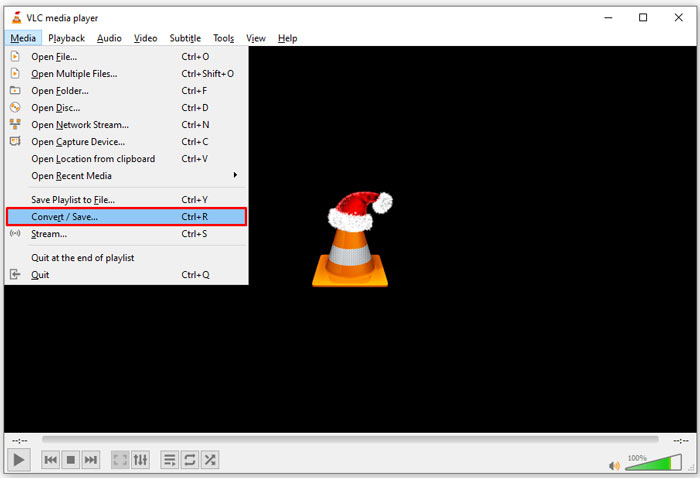
Bước 1: Mở VLC và nhấp vào mục Convert/Save trong menu Media trên thanh công cụ phía trên. Sau đó bạn sẽ thấy hộp thoại mở phương tiện.
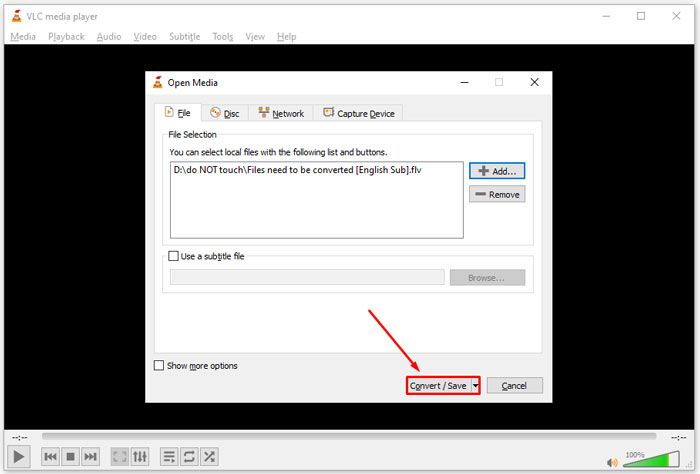
Bước 2: Nhấp vào nút Add và mở các tệp video DAT trong VLC. Nhấn nút Convert/Save để tiếp tục.
Bước 3: Mở danh sách thả xuống Profile và đặt FLV làm định dạng đầu ra. Nhấp vào nút Browse để chọn một thư mục xuất trong phần Destination.
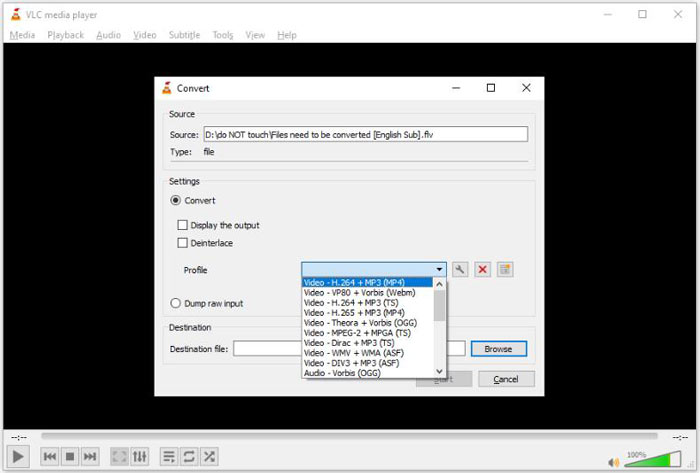
Bước 4: Nhấp vào nút Start để bắt đầu chuyển DAT sang FLV. Thời gian chuyển đổi trong VLC sẽ kéo dài tương đương với độ dài video của bạn.
Phần 2: Làm thế nào để chuyển đổi DAT sang FLV trực tuyến
FVC Free Online Video Converter là cách đơn giản để chuyển DAT sang FLV trực tuyến miễn phí. So với các trình chuyển đổi video trực tuyến khác, công cụ này cho phép bạn thực hiện công việc mà không bị bất kỳ giới hạn nào, như giới hạn dung lượng tệp, yêu cầu đăng ký, hình mờ, v.v.
Bước 1: Mở trình duyệt và truy cập https://www.free-videoconverter.net/free-online-video-converter/. Nhấp vào nút Add Files to Convert để tải trình khởi chạy.

Bước 2: Nhấp vào nút Add File trên trình khởi chạy và tải các tệp video DAT từ máy tính của bạn lên. Sau đó chuyển đến khu vực định dạng ở phía dưới và chọn FLV.

Bước 3: Nhấn nút Convert để bắt đầu chuyển DAT sang FLV trực tuyến. Khi hoàn tất, hãy tải các tệp video về ổ cứng của bạn.
Có thể bạn sẽ thích:
Chuyển đổi tệp TS của bạn sang định dạng FLV
Phần 3: Câu hỏi thường gặp về DAT to FLV
Tôi có thể chuyển đổi tệp DAT sang FLV từ Internet Explorer không?
Nếu tệp DAT từ IE đang lưu trữ nội dung video, bạn có thể chuyển đổi chúng thành video tiêu chuẩn. Tuy nhiên, DAT không chỉ lưu trữ dữ liệu video, mà còn cả các thông tin khác. Đối với dữ liệu khác, bạn không thể chuyển đổi thành video.
Làm cách nào để mở tệp DAT?
Tệp DAT là một tệp dữ liệu chứa thông tin về chương trình mà nó được liên kết. Bạn có thể thử mở tệp DAT bằng cách nhấp đúp vào tệp đó. Hệ thống của bạn có thể phân phối chương trình thích hợp.
Tôi có thể chuyển đổi DAT sang QuickTime không?
Nó phụ thuộc vào tình hình của bạn. Đầu tiên, các tệp DAT phải lưu trữ dữ liệu video. Sau đó, bạn cũng cần một công cụ chuyển đổi video hỗ trợ DAT và QuickTime.
Phần kết luận
Hướng dẫn này đã chia sẻ ba cách để chuyển đổi DAT sang FLV trên máy tính để bàn hoặc trực tuyến của bạn. VLC là một cách miễn phí để thực hiện công việc trên Windows, Mac và Linux. Tuy nhiên, FVC Free FLV Converter cung cấp nhiều tính năng chuyên nghiệp hơn với việc yêu cầu bất kỳ khoản thanh toán nào. Nếu bạn có câu hỏi khác, vui lòng để lại lời nhắn bên dưới bài viết này.
-
 MP4 sang FLV | Top 3 trình chuyển đổi miễn phí (Trực tuyến / Mac / Windows)
 Bài đăng này là hướng dẫn chi tiết để chuyển đổi MP4 sang FLV. Bạn có thể sử dụng 3 trình chuyển đổi miễn phí hàng đầu để thay đổi MP4 sang FLV trực tuyến, trên máy tính Windows hoặc Mac một cách dễ dàng.
-
 3 giải pháp chuyển đổi MTS sang FLV Miễn phí & Trực tuyến
 Bạn muốn chuyển đổi MTS sang FLV? Dưới đây là 3 phần mềm chuyển đổi MTS sang FLV miễn phí mà bạn có thể thử để chuyển MTS sang FLV trên Mac OS X và Windows 10/8/7.
-
 4 cách miễn phí hàng đầu để chuyển đổi video FLV sang MP4 trên máy tính để bàn và trực tuyến
 Hướng dẫn này chia sẻ bốn phương pháp miễn phí để chuyển đổi tệp video FLV của bạn sang định dạng MP4 trên Windows 10/8/7 / XP và Mac OS X, vì vậy bạn có thể thưởng thức video trên mọi thiết bị.
