


 Chuyển đổi video Ultimate
 Trình ghi màn hình
 Sửa chữa video
 Tải xuống an toàn
Cách chuyển M2TS thành MP4 mà không làm giảm chất lượng
“Khi tôi đưa video từ máy ảnh Sony sang máy tính, chúng là tệp M2TS, không thể chia sẻ trên Facebook hoặc YouTube. Tôi có thể tìm công cụ chuyển đổi video để chuyển đổi tệp sang MP4 và xem trên máy tính của mình ở đâu? ”
Sometimes you want to play M2TS files on some portable devices, or upload them to YouTube or Facebook. It’s wise to convert them to a common video format like MP4. In this post, we will share you 5 free ways to convert M2TS to MP4 on Windows and Mac.

Phần 1. Cách tốt nhất để chuyển đổi M2TS sang MP4 miễn phí
Not all media players support M2TS files. To better enjoy M2TS video from HD camcorders, you’d better change M2TS to commonly used MP4 for for playback. FVC Free M2TS Converter is an all-in-one M2TS converter and editor. You can not only convert M2TS files to MP4, MKV, AVI, MOV, etc., but also edit the M2TS files like compress, merge, theme, and more.
Free DownloadFor Windows 7 or laterSecure Download
Free DownloadFor MacOS 10.7 or laterSecure Download
Step 1.By clicking the Free Download button, you can quickly download Free M2TS Converter. Then install and launch it on your Windows computer. Click Add File(s) button to import the M2TS file into the program.
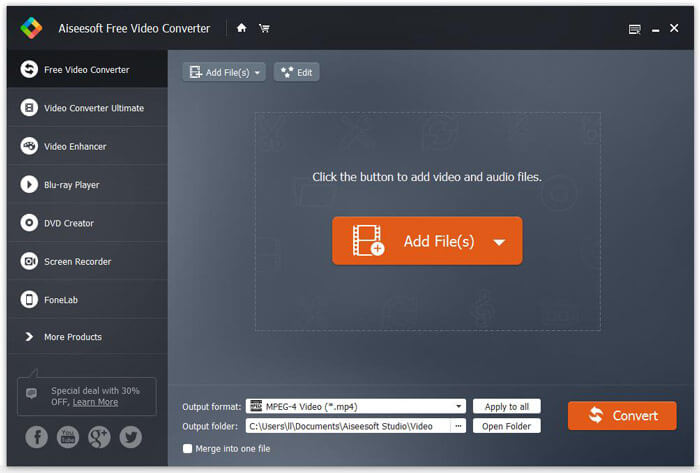
Step 2.Click the drop down button of Output format, and choose MPEG-4 Video (*.mp4) as the output format. You can also set the output folder to save the converted file.

Step 3.If you want to add a specific them for the video, you can click the Edit button on the top menu to choose a proper theme. After all settings are set, you can click Convert button to start changing M2TS file to MP4.

Phần 2. Cách thay đổi M2TS thành MP4 Online
If you want to convert M2TS to MP4 online for free, FVC Free Online Video Converter will be a great choice. As a free online multimedia converter, it supports converting nearly all mainstream videos and audio to MP4, FLV, MKV, MOV, M4V, MTS, TS, M2TS, WMV, ASF, VOB, MP3, AAC, etc. Besides it’s quite easy to use.
Step 1. Go to the website of FVC Free Online Video Converter. Click Add Files to Convert on the top. Then download and install FVC launcher.

Step 2. Select the video you want to convert. If you want a MP4 video, just click MP4. Then Convert.

Step 3. You can just save the MP4 video to the desktop. After that, the conversion will start automatically.
Phần 3. Làm thế nào để chuyển đổi M2TS sang MP4 với ConvertFiles
ConvertFiles là công cụ chuyển đổi M2TS sang MP4 dựa trên web hỗ trợ hơn 200 định dạng video, âm thanh, hình ảnh, tài liệu, bản trình bày và lưu trữ. Làm theo các bước đơn giản dưới đây để bắt đầu chuyển đổi tệp M2TS sang MP4 trực tuyến.
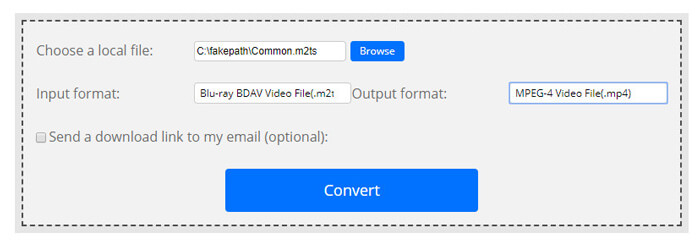
Step 1.Go to the official page of ConvertFiles. Click Browse button to upload your local M2TS file.
Step 2.Click the Input format box and select HDV Video File(.m2ts), and click Output format box to select MPEG-4 Video File(.mp4) as the output format.
Step 3.Click the Convert button to start transforming M2TS to MP4 for free. The conversion may take within minutes. After that, you can click the download link to download the converted MP4 file.
Đôi khi chuyển đổi có thể không thành công do định dạng đầu vào không hợp lệ. Để đạt được tỷ lệ thành công cao, bạn có thể dùng thử Free M2TS Converter.
Phần 4. Làm thế nào để chuyển đổi M2TS sang MP4 với VLC
VLC Media Player là một trình phát đa phương tiện mã nguồn mở cho Windows, Mac, Linux, iOS và Android. Nó cũng hoạt động như một công cụ chuyển đổi M2TS sang MP4 tuyệt vời để chuyển đổi các tệp M2TS sang MP4, MOV, AVI, v.v. Hơn nữa, bạn có thể chỉnh sửa các tệp M2TS như cắt, cắt, xoay, thêm hiệu ứng hình ảnh và hơn thế nữa.
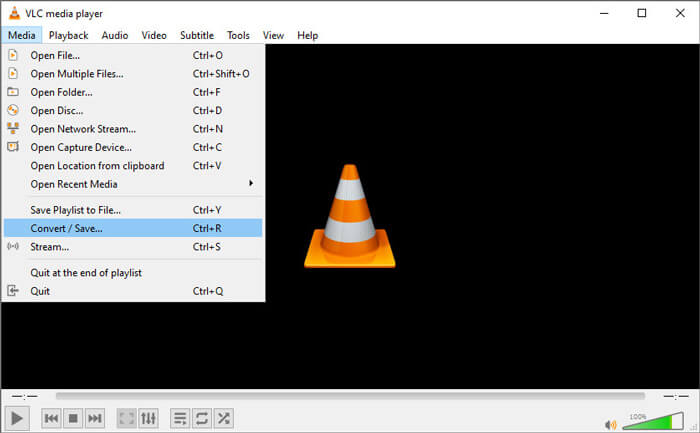
Step 1.Download and run VLC Media Player on your computer. Click Media > Convert / Save... to move on. Then click Add... button to add your M2TS file.
Step 2.Click Convert / Save button to enter the Convert window. Click the Profile drop down button to select Video - H.264 + MP3 (MP4) as the output format.
Step 3.Click Browse button to choose a destination folder. Then click the Start button to start converting M2TS to MP4.
Phần 5. Làm thế nào để xuất MP4 từ M2TS với phanh tay
HandBrake là một trình chuyển mã video mã nguồn mở và miễn phí khác có thể chuyển đổi video từ hầu hết mọi định dạng. Bạn có thể thử Handbrake để chuyển đổi tệp M2TS sang MP4 bằng các bước sau.
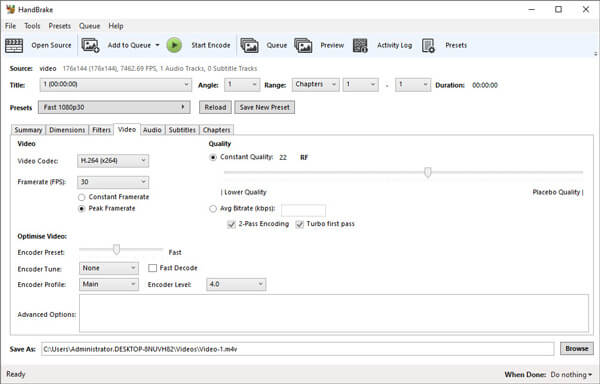
Step 1.Free download, install and launch HandBrake on your Windows/Mac. Click Open Source on the left corner to import the M2TS file from your local folder.
Step 2.You can adjust the settings to the M2TS file. Select MP4 from the drop down button of Format in Summary tab. In the Video tab, you can adjust video codec, video quality, framerate, and optimize video.
Step 3.Click Browse button to set the destination folder. Then click Start Encode button to start converting M2TS to MP4 for free.
Phần 6. Những câu hỏi thường gặp về chuyển đổi M2TS sang MP4
What is the difference between M2TS and MP4?
M2TS là viết tắt của MPEG-2 Transport System. Đây là định dạng tệp chứa video âm thanh đĩa Blu-ray và được sử dụng để ghép kênh video, âm thanh và các luồng khác. Nói chung, tệp M2TS lớn hơn tệp MP4 ở cùng chất lượng. Các tệp MP4 được hỗ trợ trên hầu hết các trình phát đa phương tiện, nhưng tệp M2TS chỉ có thể được phát trên một số trình phát.
How do I play M2TS files on my PC?
Bạn có thể mở trực tiếp tệp M2TS trong một số ứng dụng trình phát đa phương tiện phổ biến, bao gồm Windows Media Player, VLC Media Player, 5K Player, SMPlayer, Splash, v.v. Bạn cũng có thể phát tệp M2TS bằng Phần mềm Sony Picture Motion Browser.
Can VLC play M2TS files?
Đúng. Bạn có thể phát các tệp M2TS bằng VLC Media Player trên Windows và Mac. Chỉ cần chạy trình phát đa phương tiện VLC và nhấp vào Phương tiện để Mở tệp để phát tệp M2TS trong VLC. Nếu điều đó không hiệu quả đối với vấn đề codec, trước tiên bạn nên chuyển đổi M2TS sang định dạng video được hỗ trợ VLC.
Conclusion
Với 5 phương pháp miễn phí ở trên, bạn có thể chuyển đổi tệp M2TS sang MP4 một cách dễ dàng. Sau khi so sánh, FVC Free M2TS Converter nên là công cụ chuyển đổi M2TS sang MP4 tốt nhất. Với công nghệ tăng tốc phần cứng, nó xuất các tệp MP4 với chất lượng cao chỉ trong vài phút. Bạn có thể thử công cụ chuyển đổi miễn phí này ngay lập tức.
-
 Hướng dẫn toàn diện về cách chuyển đổi TS sang MP4
 Tập tin TS là gì và muốn chuyển đổi TS sang MP4? Trong bài đăng này, chúng tôi sẽ chia sẻ cho bạn các phương pháp trực tuyến và miễn phí để chuyển đổi TS sang MP4.
-
 Cách chuyển đổi tệp MTS sang MP4
 Bạn chưa biết cách chuyển đổi tập tin MTS sang MP4? Trong hướng dẫn này, bạn sẽ tìm thấy 6 cách miễn phí và dễ dàng để thay đổi định dạng MTS thành MP4 trên Windows hoặc Mac mà không làm giảm chất lượng.
-
 2 cách đơn giản để chuyển đổi miễn phí MTS sang MP3
 Bạn có nhu cầu trích xuất âm thanh MP3 từ file MTS nhưng không biết làm thế nào? Bài viết này chia sẻ 2 cách dễ dàng giúp bạn chuyển MTS / M2TS sang MP3 với chất lượng âm thanh cao.
