


 Chuyển đổi video Ultimate
 Trình ghi màn hình
 Sửa chữa video
 Tải xuống an toàn
Tìm hiểu kiến thức cơ bản về ứng dụng ghi định dạng AMR
AMR or also known as Adaptive Multi-Rate is a lossy format. This type of file contains voice recording, MMS messages and such. It was made specifically for 3G phones only but now you can open it with the other media player that supports this format. Moreover, users encounter trouble choosing what is the best AMR recorder that fits their demands. So, this article talks about the tools that are all based on your specification, steps, information and many more. Read this write-up to know what is the best for you as their future customer. Without any more delay let’s now proceed.
Phần 1. Máy ghi AMR tốt nhất cho Windows và Mac
Máy ghi âm thanh miễn phí FVC

An online tool that allows you to record any calls, jamming sessions, voice over, and many more. FVC Free Audio Recorder is a tool developed by the FVC which allows the user to experience a better recording online. This tool does the task as an audio recorder. If you have a doubt about this tool, why don’t you try it first. So, without any more explanation, let’s explore this incredible tool and learn from it by following this simple step provided to you.
Step 1. Press the link to go to the main website. Don’t worry, it is malware free.
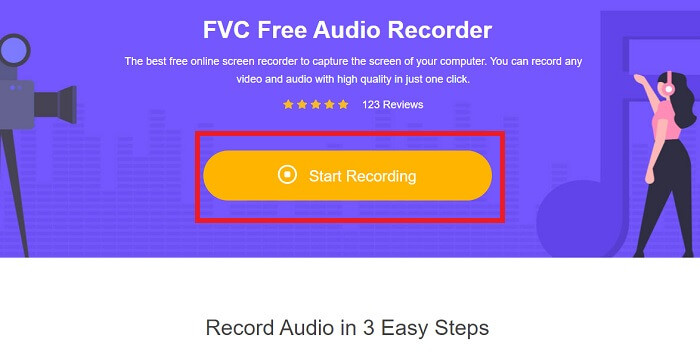
Step 2. launch the tool by clicking Start Recording.
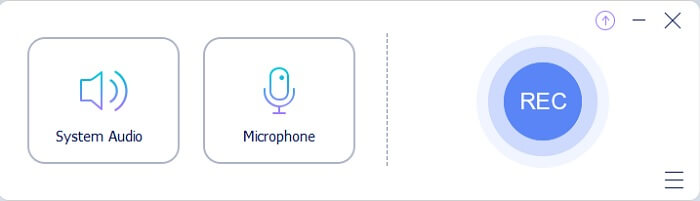
Step 3. A toolbar like this will show to your screen. It only means that the tool is already running.
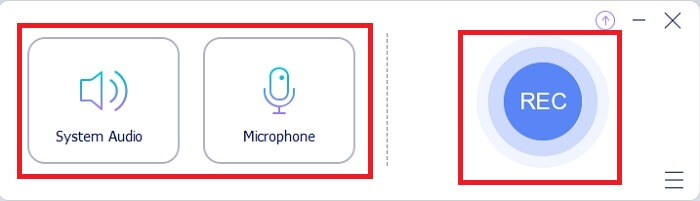
Step 4. The tool bar has a Speaker to add the sound in the system and Mic for your voice. If you’re ready click the round button to Start.
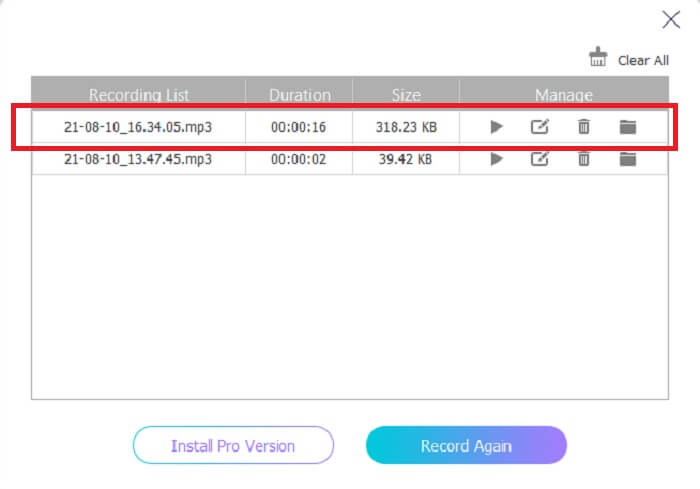
Step 5. If recording is already finished, click the cube shape button to stop the recording. It will be automatically saved in your storage. If you want to re-listen again the recording click the three-lined below and the recording list will show the first one that is the latest.
Phần 2. 4 Công cụ thay thế tốt nhất cho AMR Recorder cho Windows và Mac
1. Trình ghi màn hình FVC
If you are looking for the best mp3, amr, wav, ac3 audio recorder then this is for you. No need to look for the other tools, instead focus on what this tool can provide. Because this tool is the one-and-only FVC Screen Recorder. This is the finest premium video-audio recorder that most people use as their first-choice recorder. Not only that, maybe you’re wondering why you should use this tool as your personal recorder. Then it is an honor to introduce this tool and provide these easy steps for you. Without further ado let’s proceed to the steps. Follow it thoroughly to become a pro in recording.
Step 1. Choose between the platform that you’re currently using. Download it then install. Change the Preferences according to your wants and click the Finish to save.
Tải miễn phíDành cho Windows 7 hoặc mới hơnTải xuống an toàn
Tải miễn phíDành cho MacOS 10.7 hoặc mới hơnTải xuống an toàn
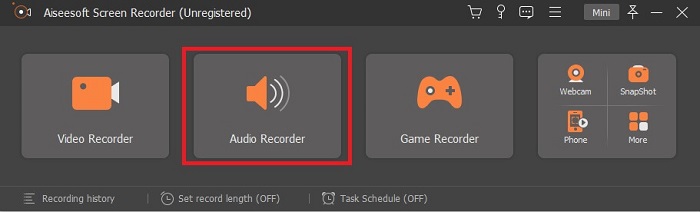
Step 2. After launching the tool, A floating toolbar like this will show in your display. Then click the Audio Recorder to proceed.
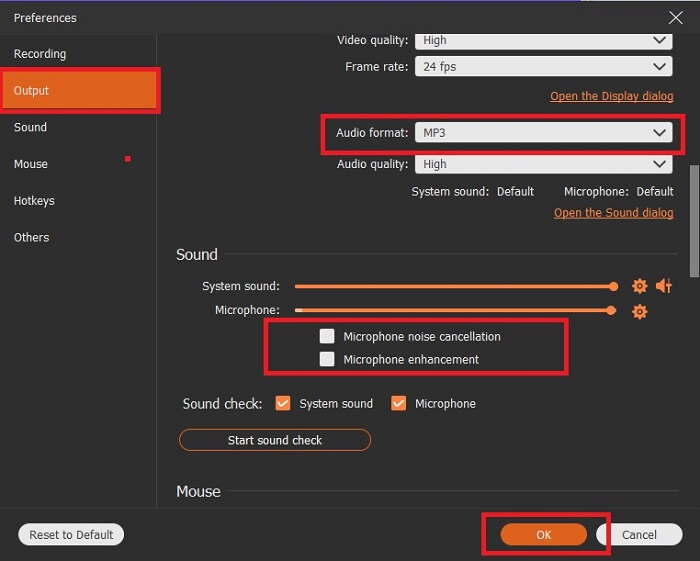
Step 3. Find the gear icon to go to the settings. Change the Audio output to the format you want and adjust other options then click OK to save.
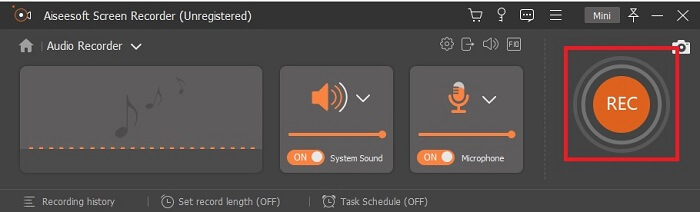
Step 4. In the toolbar, click the System Sound and Microphone to add the audio system and your voice. If everything is done, now you’re ready to go. Click the round REC button to start recording.
Step 5. If everything is settled and done, click the box button to stop the recording. Click the Save and Next to save the final output. If you want to recap your recording then click the parallel line and a history of your recording will show.
2. Audacity
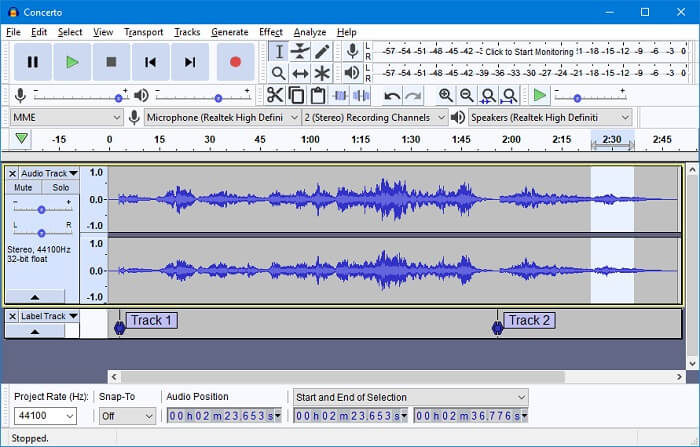
Another audio recording tool. Audacity is a bit complicated if you're new to the interface but in later days you’ll get onto this. You may as well record and edit it, like merging audio tracks. But the program has a limited mixing ability and the files for installation of the tool are separated for the plug-ins and encoders.
3. Wavosaur
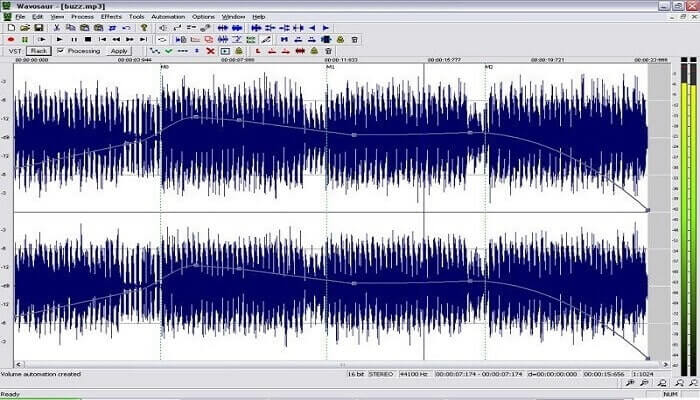
Wavosaur has tools to record and edit, such as copy, trimming, splitting etc. This tool can do the most complicated things like music arrangement, complex beat, and many more. If you’ve been troubled on how to use the tool because you’re not familiar with it, it also provides a video tutorial for you to understand.
4. Adobe Audition
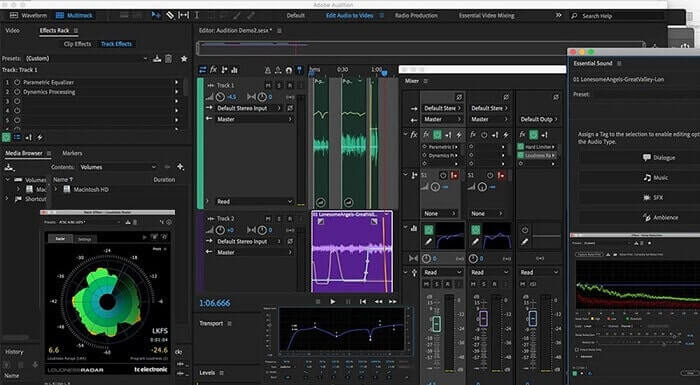
This tool is most commonly used in industrial recording. If money is no issue to you then Adobe Audition is a good tool for music producing. It provides precise editing of the music, cleaning it up, sound design and others. But the tool can’t provide you a one-time payment and it has an overwhelming User Interface. So, you must be prepared if you want to try using the tool.
Phần 3. Biểu đồ so sánh
| Đặc trưng | Máy ghi âm thanh miễn phí FVC | Trình ghi màn hình FVC | Audacity | Wavosaur | Adobe Audition |
| Ghi âm |  | | | | |
| Khử tiếng ồn |  | | | | |
| Công cụ chỉnh sửa | | | | | |
| Cải tiến micrô | | | | | |
| Chuyên môn | Ghi đơn giản nhưng hiệu quả | Nhiều tùy chọn hơn được cung cấp cho người dùng hơn là phiên bản miễn phí với đầu ra chuyên nghiệp. Tuy nhiên, nó rất dễ sử dụng với đầu ra chuyên nghiệp. | Hiệu ứng cơ bản, chỉnh sửa và thêm. | Chỉnh sửa các công cụ để phát, dừng, ghi, tua lại và hơn thế nữa. | bộ công cụ toàn diện. |
| Định dạng có sẵn / s | MP3 và AMR | MP3, WMA, AAC, M4A, FLAC, OGG, AMR, Opus và nhiều hơn nữa. | WAV, AIFF và MP3 | WAV và MP3 | AC-3, M4A, MAT, VOX, W64, WAV, v.v. |
| Phạm vi giá | Nó là một công cụ trực tuyến miễn phí | Trong 1 tháng: $25,00 Trong một năm: $31.20 Đối với giấy phép trọn đời: $55.20 | Phần mềm có thể tải xuống miễn phí | Phần mềm có thể tải xuống miễn phí | $27,62 / thời điểm, hàng năm $315,61 / năm, hàng năm $41.43 / gói hàng tháng |
Phần 4. Câu hỏi thường gặp về AMR Recorder
Các loại tệp AMR khác nhau là gì?
Amr has two types of format standards the AMR-NB and the AMR-WB.
AMR-NB is a narrowband version or known as the basic version. It includes a low bitrate that you may have on MP3 that ranges from 300 to 3400 that are most commonly used for traditional telephones. Examples of its bitrate are:06.70 kbps, 07.40 kbps, 07.95 kbps, 10.20 kbps, 12.20 kbps.
While the AMR-WB occupies a much broader bandwidth. It stores more quality audio than the NB, the range of it is from 50 to 7000 Hz. Because of its wide range frequency GSM and UMTS use this to optimize. Here are some lists of the bitrates it used:15.85 kbps, 18.25 kbps, 19.85 kbps, 23.05 kbps, 23.85 kbps.
Tại sao AMR của tôi không thể mở trong trình phát media của tôi?
Like any other file formats, some of the media players don't support this type of format. So, if you want to play your AMR recordings, FVC Free Video Player might help you to play it.
AMR có phải là định dạng tệp nén không?
Có, nó là một định dạng codec âm thanh nén để mã hóa giọng nói.
Phần kết luận
Để kết thúc bài viết, công cụ này được cho là có những khả năng và tính độc đáo khác nhau của riêng chúng. Nhưng không phải tất cả chúng đều là sự lựa chọn tốt nhất cho người mới bắt đầu. Vì vậy, nếu bạn muốn biết máy ghi âm tốt nhất được chọn bởi người mới bắt đầu và cả chuyên gia. FVC Screen Recorder là một công cụ đa chức năng cho phép bạn làm những gì bạn muốn. Nó không giới hạn người dùng trong biên giới của bạn. Nhưng nó giúp bạn tiến xa hơn và bước ra khỏi vùng an toàn của mình. Vậy bạn còn chần chừ gì nữa, công cụ đặc biệt này sẽ không là gánh nặng cho bạn mà sẽ là trợ thủ đắc lực của bạn.
-
 Top 5 trình ghi màn hình WebM tốt nhất cho Windows / Mac: Đánh giá chuyên sâu
 Tìm hiểu thêm về các tệp Phần mở rộng WebM bằng cách đọc qua bài viết và khám phá các ứng dụng ghi màn hình WebM mà bạn có thể sử dụng để quay video màn hình WebM.
-
 4 đầu ghi video SWF tốt nhất có thể truy cập trực tuyến miễn phí
 Bạn đã nghe nói về tệp SWF chưa? Tìm hiểu thêm về định dạng tệp này và khám phá các cách ghi tệp SWF bằng các công cụ trực tuyến miễn phí.
-
 Máy ghi hình MTV có một không hai Tương thích trên máy tính Mac / Windows
 Bài viết này sẽ giúp bạn tìm hiểu về định dạng tệp MTV và danh sách các đầu ghi video MTV mà bạn có thể sử dụng để quay màn hình máy tính một cách dễ dàng.
