


 Chuyển đổi video Ultimate
 Trình ghi màn hình
 Sửa chữa video
Tìm hiểu nghệ thuật chuyển đổi tệp để chuyển đổi định dạng AMR sang MP3
AMR là một vùng chứa âm thanh được dùng để lưu trữ dữ liệu giọng nói hoặc tiếng nói của con người. Vì vậy, nếu bạn đang thực hiện một cuộc gọi điện thoại và muốn ghi âm lại, thì đây là định dạng tốt nhất để ghi. Mặc dù dung lượng tệp ở định dạng vùng chứa này nhỏ, nhưng hầu hết các trình phát đa phương tiện vẫn không hỗ trợ định dạng này. Thay vì cài thêm một trình phát media, tại sao bạn không thử chuyển nó sang một định dạng mới? Cách tốt nhất để chuyển AMR sang MP3 nằm trong danh sách dưới đây. Hơn nữa, hãy chọn bộ chuyển đổi hỗ trợ chuyển đổi một cách hiệu quả và nhanh chóng.

Phần 1. AMR so với MP3: Cái nào tốt hơn?
AMR và MP3 là một trong những định dạng âm thanh tốt nhất mà bạn có thể sử dụng để lưu trữ âm thanh của mình mà vẫn giữ được chất lượng của nó. Nhưng chúng cũng có những điểm không giống nhau, vì vậy chúng tôi ở đây để xác định đó là những gì và chúng ta hãy biết cái nào là tốt nhất.
AMR
Như đã đề cập trước đó, định dạng này được sử dụng để lưu trữ các tệp âm thanh được ghi lại qua các cuộc gọi điện thoại. Ngoài ra, định dạng này được Ericsson nén và phát triển để có kích thước nhỏ hơn. Mặc dù, định dạng này không thích hợp để sử dụng để lưu trữ nhạc vì độ nén mà nó cung cấp.
MP3
Nó được biết đến là định dạng âm thanh phổ biến để lưu trữ các bản ghi âm và âm nhạc theo cả hai cách. Ngoài ra, định dạng này được biết đến rộng rãi nên bạn có thể nghe định dạng tệp có tên mở rộng là .mp4 trên bất kỳ trình phát đa phương tiện nào. Nhưng nếu bạn sử dụng điều này để lưu trữ các cuộc gọi ghi âm, kích thước tệp lớn hơn nhiều và chất lượng kém hơn AMR.
Vì vậy, nếu bạn muốn ghi âm và lưu lại dưới dạng AMR hoặc MP3 thì hãy thử dùng FVC Screen Recorder. Công cụ này có Audio Recorder để ghi âm với dung lượng nhỏ nhưng âm thanh vẫn trong trẻo, rõ nét. Hãy ghi lại các buổi jamming, podcast hoặc nhiều nội dung khác tại đây.
Tải miễn phíDành cho Windows 7 hoặc mới hơnTải xuống an toàn
Tải miễn phíDành cho MacOS 10.7 hoặc mới hơnTải xuống an toàn
Hơn nữa, bây giờ chúng ta hãy tiến hành và chọn công cụ chuyển đổi tốt nhất để chuyển đổi AMR sang MP3 với các bước chi tiết được cung cấp bên dưới. Tất cả các công cụ được đề cập bên dưới đã được nhóm của chúng tôi kiểm tra cẩn thận để chỉ cung cấp thông tin thực tế về nó.
Phần 2. Tìm hiểu Cách chuyển AMR sang MP3 Trực tuyến và Ngoại tuyến
1. FVC Video Converter Ultimate
Trình chuyển đổi tuyệt vời đã xuất hiện, đó là FVC Video Converter Ultimate. Mỗi vấn đề có một cách giải quyết khác nhau, nhưng nếu bạn có trong tay bộ chuyển đổi đa năng này – vừa là trình chuyển đổi, chỉnh sửa, tăng cường, tăng tốc và hơn thế nữa – thì tại sao còn phải tìm thêm công cụ khác để xử lý việc chuyển đổi? Công cụ này đã có đủ mọi thứ. Ngoài ra, hầu hết các bộ chuyển đổi khác đều kém hiệu quả. Mặc dù đây là công cụ trả phí nhưng bạn không cần lo lắng, vì nó khá rẻ, nghĩa là chỉ với vài đô la bạn đã có thể học cách chuyển AMR sang MP3. Để gây ấn tượng với ai đó, bạn có thể dùng trình chuyển đổi này bằng cách làm theo các bước đơn giản được cung cấp riêng cho bạn dưới đây.
Bước 1. Tải phần mềm về máy bằng cách nhấp vào nút tải xuống. Sau đó cài đặt, thiết lập và nhấp Finish để lưu cài đặt.
Tải xuống miễn phí cho Windows 7 trở lên. Tải xuống an toàn.
Tải xuống miễn phí cho MacOS 10.7 trở lên. Tải xuống an toàn.
Bước 2. Để thêm tệp âm thanh AMR, hãy nhấp vào dấu cộng để tìm tệp trong thư mục của bạn.
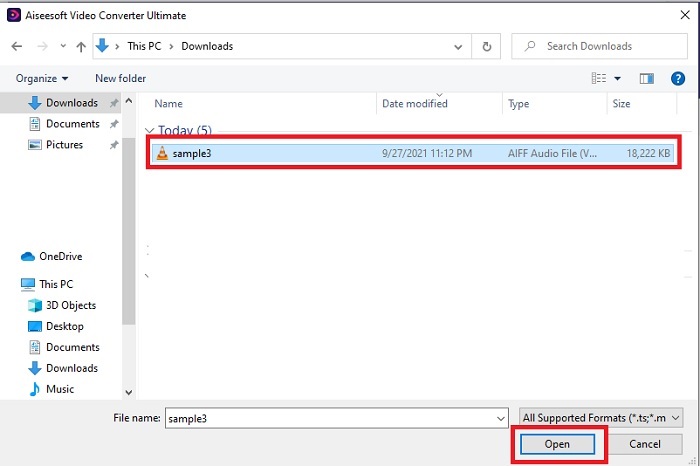
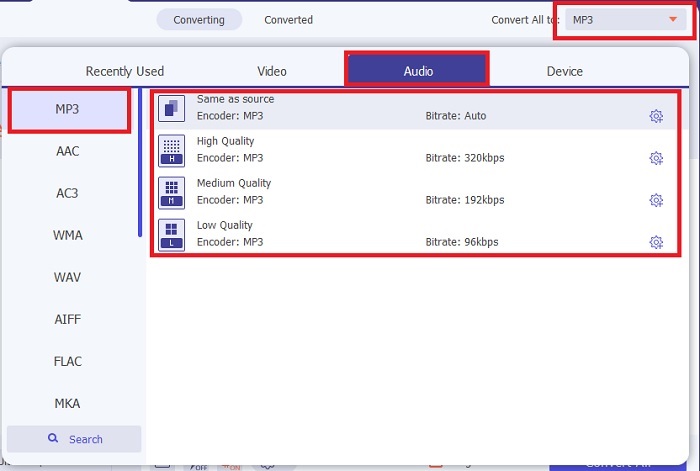
Bước 3. Nhấn vào tùy chọn Convert All để đổi AMR sang MP3 hoặc bất kỳ định dạng âm thanh nào bạn muốn.
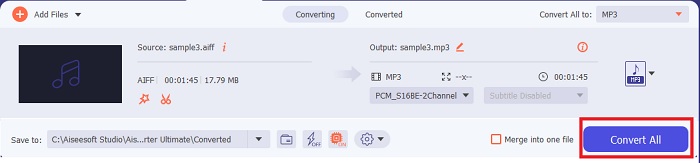
Bước 4. Để bắt đầu quá trình chuyển đổi, hãy nhấn Convert All.
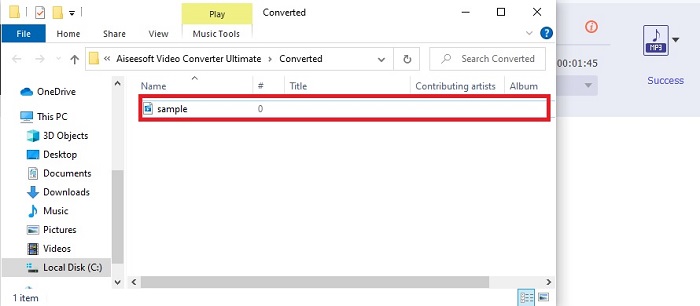
Bước 5. Khi quá trình hoàn tất, một thư mục tệp sẽ hiển thị trên màn hình. Hãy nhấp vào tệp đầu tiên để nghe tệp AMR đã được chuyển đổi.
2. FVC Free Audio Converter
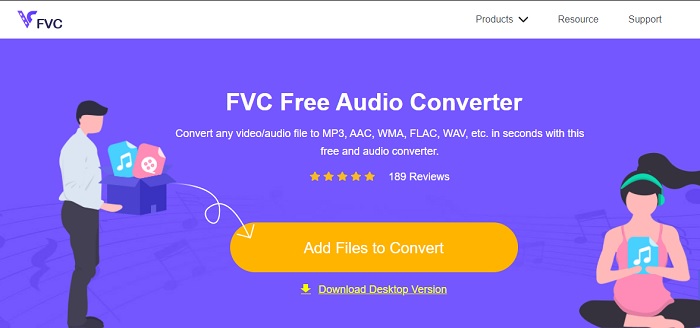
Nếu bạn không thích tải phần mềm về máy thì có thể sử dụng trình chuyển đổi AMR sang MP3 trực tuyến là FVC Free Audio Converter. Công cụ web này do FVC phát triển dành cho những ai không muốn tốn tiền cho việc chuyển đổi. Tuy nhiên, công cụ này chỉ có thể truy cập trực tuyến, nghĩa là bạn không thể sử dụng nếu khu vực của bạn không có Internet. Đồng thời, các tính năng chỉnh sửa nâng cao không có trong webtool này, nhưng bạn có thể thay đổi bitrate, fps và độ phân giải của tệp xuất. Không những vậy, định dạng hỗ trợ ở đây khá hạn chế nhưng số lần chuyển đổi thì không giới hạn. Nghĩa là bạn có thể chuyển bao nhiêu tệp tùy thích, chỉ là từng tệp một. Ngoài ra, để biết công cụ web này hoạt động như thế nào, bạn phải làm theo các bước được trình bày dưới đây.
Bước 1. Để mở FVC Free Audio Converter, hãy nhấp vào siêu liên kết dẫn đến trang chủ.
Bước 2. Sau đó nhấn Add Files to Convert để khởi động công cụ.
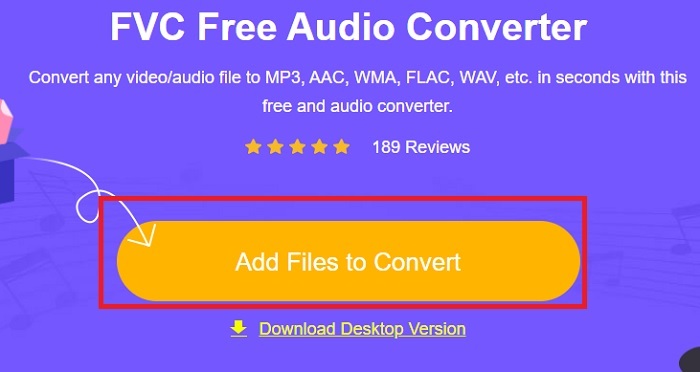
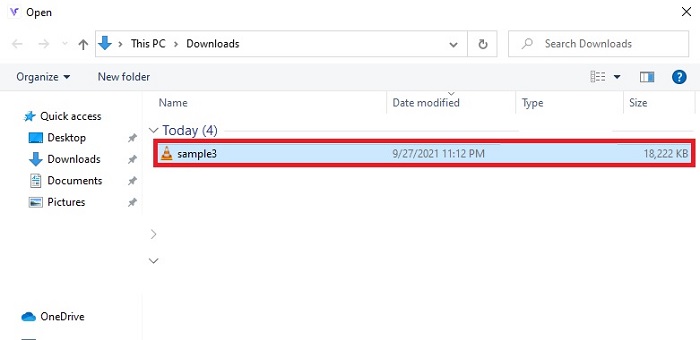
Bước 3. Sau khi khởi chạy công cụ, đây là lúc bạn chèn tệp AMR của mình. Sau khi tìm được tệp, hãy nhấp open để tải chúng lên công cụ.
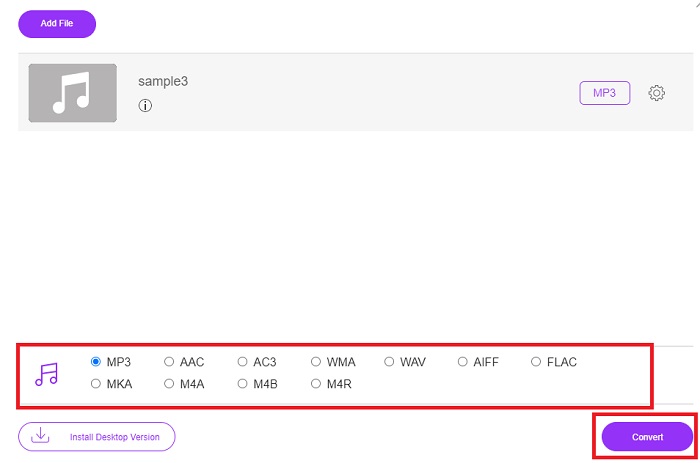
Bước 4. Chọn định dạng âm thanh mà bạn muốn ở đây. Nếu đã chọn xong định dạng mới, nhấp nút Convert để bắt đầu quá trình.
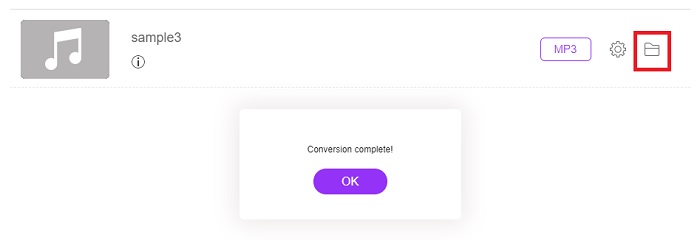
Bước 5. Khi việc chuyển đổi xong, hãy nhấp vào thư mục để tìm tệp đã hoàn tất bạn vừa chuyển đổi.
3. VLC Media Player
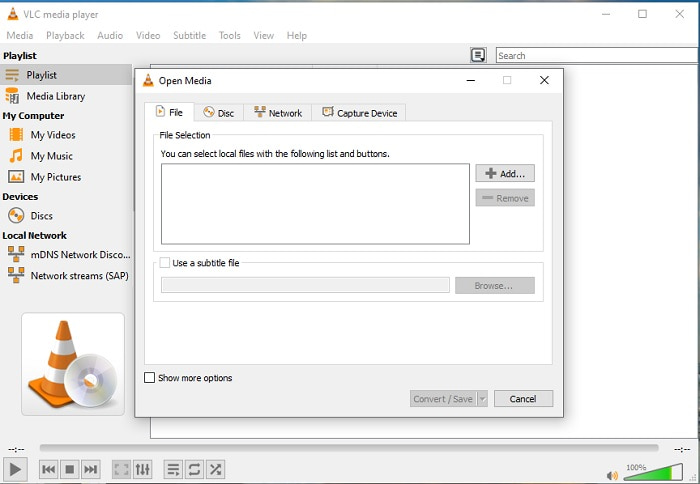
Bạn có thể dùng phần mềm chuyển AMR sang MP3 này và tải miễn phí trên PC hoặc Mac. Tuy nhiên, VLC hỗ trợ ít định dạng hơn và chỉ có một số tính năng tăng cường để thêm vào tệp media. Bên cạnh đó, việc chuyển đổi tệp bằng VLC khó hơn nhiều so với việc chỉ phát tệp media. Vì vậy, nếu bạn cố gắng chuyển đổi ở đây thì đừng kỳ vọng quá nhiều, bởi nó không phải lựa chọn tốt nhất cho việc chuyển đổi. Dù vậy, bạn vẫn có thể tự thử bằng cách làm theo các bước dưới đây.
Bước 1. Tải, cài đặt và mở VLC trên máy tính bàn của bạn.
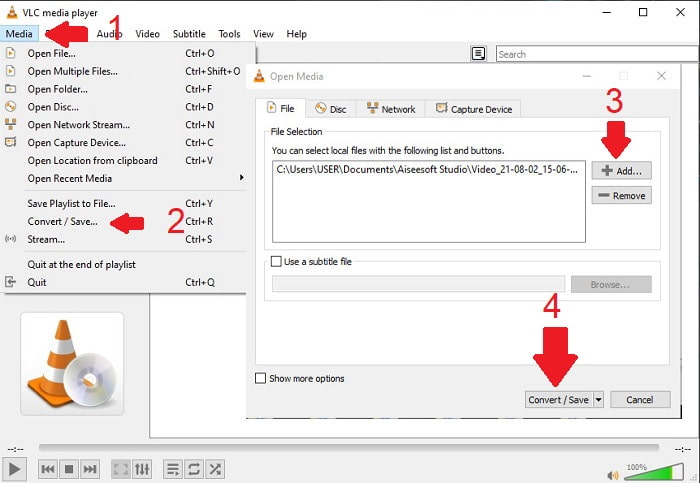
Bước 2. Nhấp vào Media ở phía trên giao diện, sau đó chọn Convert/Save. Ở giao diện mới, nhấp Add để chèn tệp rồi nhấn Convert/Save để tiếp tục.
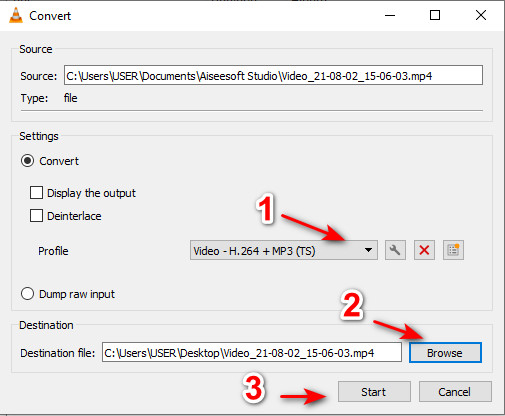
Bước 3. Chọn định dạng bạn muốn ở mục Profile, đặt Destination file, rồi nhấp Start.
4. Windows Media Player
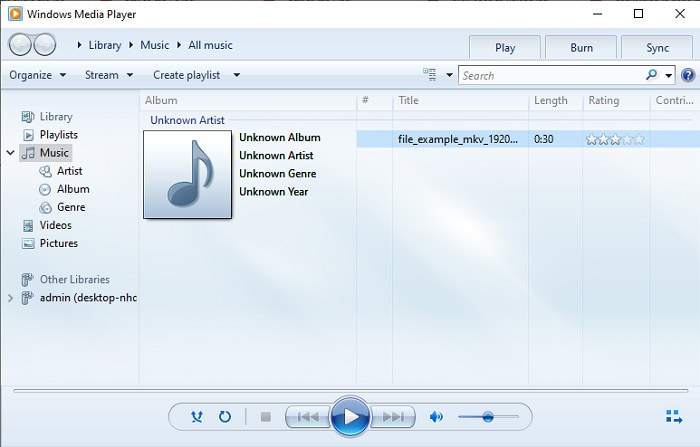
Khác với VLC, Windows Media Player là trình phát media mặc định mà bạn có thể dùng trên mọi máy tính chạy Windows. Tuy nhiên, định dạng AMR không thể phát ở đây do cách nén dữ liệu của nó. Vì vậy, nếu muốn phát tệp .amr tại đây, bạn cần làm theo hướng dẫn cách chuyển AMR sang MP3 trên Windows Media Player. Về mặt kỹ thuật, đây không phải là bộ chuyển đổi thông thường mà giống một trình “rip” giúp đổi định dạng khi lưu.
Bước 1. Mở Windows Media Player trên máy tính.
Bước 2. Nhấp Organize và chọn Options. Sau đó nhấn Change để thay đổi thư mục lưu, chọn Format và điều chỉnh chất lượng âm thanh theo ý bạn. Nhấp Apply và OK để tiếp tục.
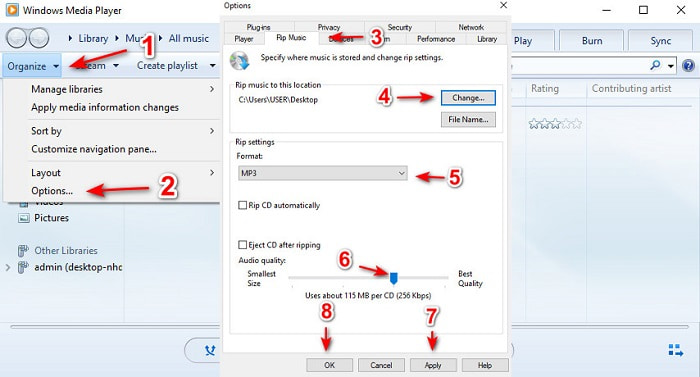
Bước 3. Đưa đĩa DVD, CD hoặc Blu-ray bạn muốn rip và chuyển đổi vào. Sau khi đưa đĩa vào, quá trình sẽ tự động bắt đầu.
Đọc thêm
Phần 3. Câu hỏi thường gặp về AMR to MP3
Tại sao tôi không thể phát các tệp .amr của mình?
Nếu bạn đã cập nhật hệ điều hành, có khả năng tệp .amr sẽ không phát được như bình thường. Phần lớn trường hợp, tệp .amr đã bị hỏng hoặc lỗi nên bạn cũng không thể phát được. Tuy vậy, bạn vẫn có thể thử tải trình phát AMR này về để nghe và cố gắng khôi phục một phần dữ liệu trong tệp .amr của mình. Tải Blu-ray Player cho PC Tải Blu-ray Player cho Mac
Codec được sử dụng để lưu trữ dữ liệu cho các tệp AMR là gì?
Các tệp AMR sử dụng codec 8 nguồn để đặt tần số mẫu 8kHz hoặc 13-bit được sử dụng để tối ưu hóa dữ liệu của các bài phát biểu bằng lời nói của con người. Ngoài ra, nó được mã hóa bằng dải tần hẹp dưới 200 đến 3400 hertz.
Tôi có thể phát tệp AMR trên iPhone của mình không?
Mặc dù tệp .amr vẫn còn được dùng trên các thiết bị Android, nhưng hệ điều hành iOS lại không hỗ trợ loại định dạng này vì cấu trúc dữ liệu phức tạp. Vì vậy, cách tốt nhất nếu muốn lưu AMR trên iOS là bạn phải chuyển AMR sang MP3 trên iPhone. Bạn có thể dùng các công cụ ở trên rồi chuyển tệp sang iPhone sau.
Phần kết luận
Để kết thúc phần trao đổi, giờ đây bạn đã dễ dàng hiểu hơn về định dạng AMR và những loại tệp mà nó bao hàm. Mặc dù các trình chuyển đổi được giới thiệu ở đây đều có thể chuyển AMR sang MP3, nhưng trình chuyển đổi nổi bật vẫn biết cách tạo sự khác biệt. FVC Video Converter Ultimate thể hiện rất nhiều tiềm năng, không chỉ trong việc chuyển đổi mà còn ở nhiều phương diện khác. Nếu bạn muốn trải nghiệm một tầm cao mới trong việc chuyển đổi tệp media thì nhất định phải dùng bộ chuyển đổi “ultimate” này.
Tải miễn phíDành cho Windows 7 hoặc mới hơnTải xuống an toàn
Tải miễn phíDành cho MacOS 10.7 hoặc mới hơnTải xuống an toàn
-
 Cách chuyển đổi M4A sang MP3 với 4 bộ chuyển đổi âm thanh miễn phí
 Không thể chơi M4A và cần chuyển đổi nó sang MP3? Có cách nào miễn phí để chuyển đổi M4A sang MP3 trực tuyến không? Bài đăng này chia sẻ 4 cách miễn phí giúp bạn chuyển đổi M4A sang MP3 bằng iTunes, trình chuyển đổi âm thanh trực tuyến và chuyên nghiệp.
-
 Cách chuyển WMA sang MP3 trên Mac / Windows / Trực tuyến
 Có thể chuyển đổi WMA sang MP3 bằng Windows Media Player không? Làm thế nào để chuyển đổi WMA sang MP3 miễn phí? Bài đăng này chia sẻ 4 phương pháp đơn giản giúp bạn chuyển đổi âm thanh từ WMA sang MP3 trên Mac, Windows PC và trực tuyến.
-
 Top 5 công cụ ghi AMR tốt nhất có sẵn cho mọi hệ điều hành
 Bạn muốn biết định dạng AMR là gì và máy ghi AMR tốt nhất mà bạn nên chọn sẽ cung cấp một bản ghi tuyệt vời.
