


 Chuyển đổi video Ultimate
 Trình ghi màn hình
 Sửa chữa video
 Tải xuống an toàn
4 cách hàng đầu về cách xóa biểu tượng cảm xúc khỏi video
Việc dùng biểu tượng cảm xúc (emoji) rất thú vị khi nhắn tin cho ai đó. Nhưng khi xem những bộ phim hay video yêu thích, có thể nói việc phải nhìn thấy emoji trên màn hình lại khá khó chịu. Vì vậy, chúng tôi sẽ giới thiệu cho bạn một trong những phương pháp hiệu quả nhất để loại bỏ những đối tượng gây phiền nhiễu này khỏi video của bạn. Vậy còn chờ gì nữa? Hãy cùng đọc bài viết này và tìm hiểu cách xóa emoji khỏi video theo những phương pháp đơn giản và nhanh nhất.

Phần 1: Cách xóa biểu tượng cảm xúc khỏi video bằng công cụ tốt nhất
Cách tốt nhất để xóa emoji khỏi video là sử dụng Video Converter Ultimate. Phần mềm tuyệt vời này có thể xóa các chi tiết dư thừa khỏi video của bạn, như emoji hoặc emoticon, chữ, watermark, logo và nhiều thứ khác. Ngoài ra, nó có giao diện dễ hiểu với các bước thao tác đơn giản, thuận tiện cho mọi đối tượng người dùng. Công cụ này cung cấp hai cách để xóa emoji khỏi video, đó là Trình xóa Watermark Video và Công cụ Cắt Video. Hơn nữa, nó hỗ trợ nhiều định dạng video khác nhau như MP4, M4V, MOV, SWF, FLV, 3GP, MTS và nhiều hơn nữa. Nếu bạn là người dùng Windows hoặc Mac, bạn đều có thể sử dụng công cụ này vì Video Converter Ultimate hỗ trợ cả Windows lẫn Mac.
Ngoài ra, bạn có thể tạo GIF từ hình ảnh và video của mình bằng công cụ này vì nó cung cấp tính năng Trình tạo GIF. Ngoài ra, nếu bạn muốn đồng bộ hóa âm thanh từ video của mình, bạn có thể thực hiện bằng công cụ này. Nó có tính năng Đồng bộ hóa âm thanh cho phép bạn điều chỉnh và đồng bộ hóa âm thanh với video.
Chúng tôi sẽ chỉ cho bạn các phương pháp tốt nhất để xóa các biểu tượng cảm xúc khó chịu khỏi video của bạn bằng Công cụ xóa hình mờ video.
Bước 1: Tải Video Converter Ultimate về máy Windows hoặc Mac của bạn. Bạn có thể nhấp nút Tải xuống bên dưới. Mở ứng dụng sau khi hoàn tất cài đặt.
Tải xuống miễn phí cho Windows 7 trở lên. Tải xuống an toàn.
Tải xuống miễn phí cho MacOS 10.7 trở lên. Tải xuống an toàn.
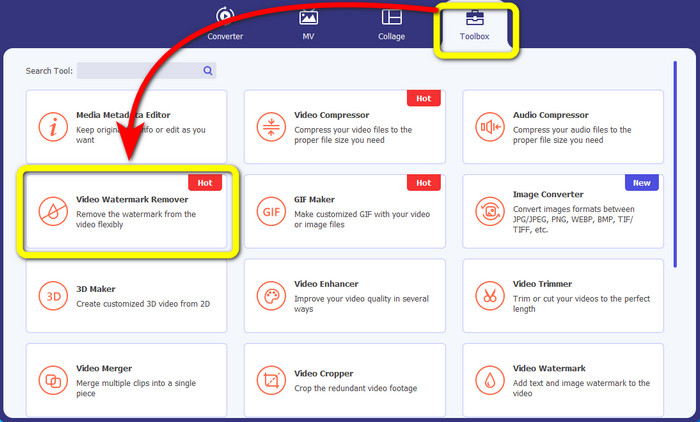
Bước 2: Khi giao diện xuất hiện, bạn sẽ thấy bốn tùy chọn ở phía trên. Chọn mục Hộp công cụ (Toolbox) và nhấp vào Video Watermark Remover.
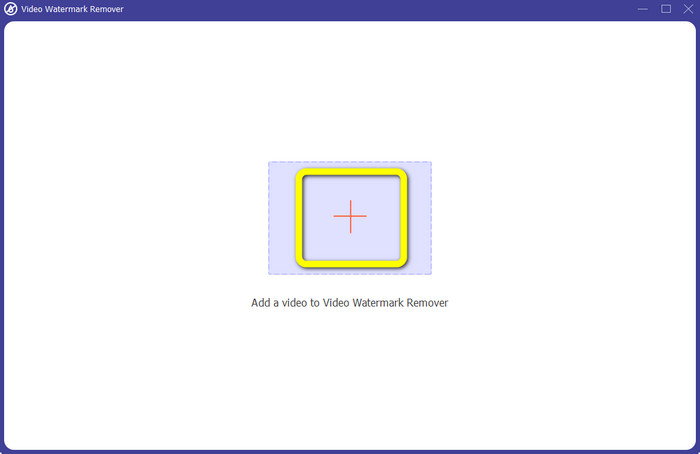
Bước 3: Tiếp theo, nhấp vào biểu tượng dấu + để thêm video có emoji mà bạn muốn xóa.
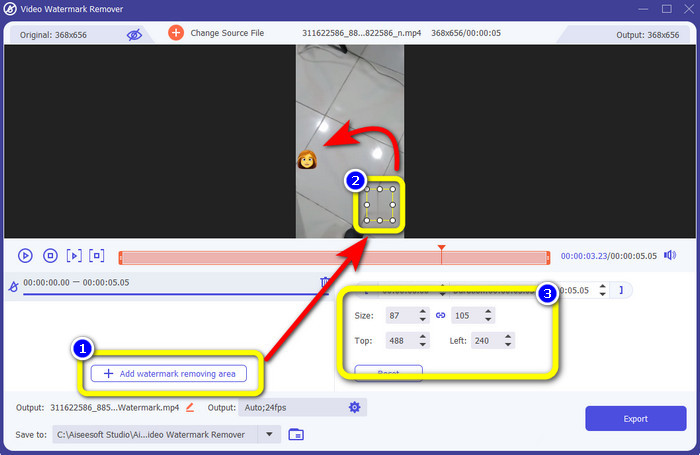
Bước 4: Sau khi thêm video, nhấn nút Add Watermark Removing Area. Một ô nhỏ sẽ xuất hiện trên video, hãy dùng ô này để che emoji. Ở hộp thiết lập thứ ba, bạn có thể dùng các tùy chọn Size (Kích thước), Top (Trên), và Left (Trái) để di chuyển ô che trên màn hình.
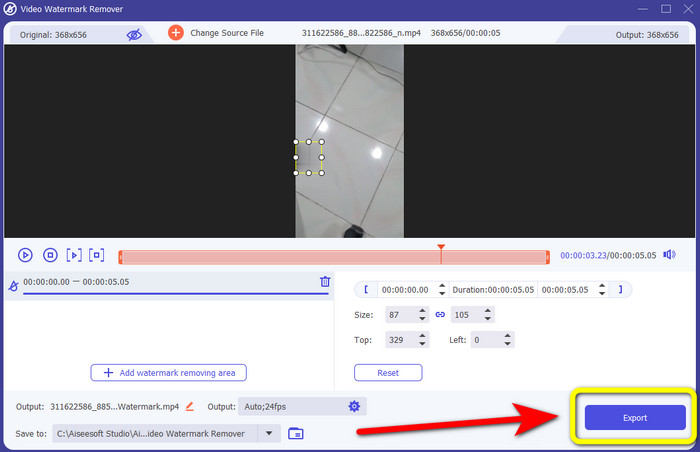
Bước 5: Khi bạn đã che được emoji, hãy nhấn nút Export. Chờ quá trình xử lý hoàn tất rồi lưu lại video đã xóa emoji.
Phần 2: Cách trực tuyến để xóa biểu tượng cảm xúc khỏi video
Sử dụng Media.io
Nếu bạn quan tâm đến công cụ xóa emoji online, bạn có thể thử Media.io. Công cụ trực tuyến này có thể xóa các chi tiết gây mất tập trung khỏi video như emoji, watermark, logo và nhiều thứ khác. Không cần kinh nghiệm trước đó vì nó chỉ có vài bước đơn giản để xóa emoji khỏi video của bạn. Ngoài ra, ứng dụng này còn là công cụ đa nền tảng, nghĩa là bạn có thể truy cập trên iPhone, Android, iPad, Windows và Mac. Nó cũng có thể đọc các định dạng video phổ biến như WMV, MOV, MP4, FLV, 3GP, AVI và nhiều hơn nữa. Bên cạnh đó, công cụ còn đảm bảo quyền riêng tư vì chỉ mình bạn có thể truy cập các video đã tải lên.
Tuy nhiên, Media.io chỉ có thể cung cấp các tính năng hạn chế khi sử dụng phiên bản miễn phí. Bạn chỉ có thể tải lên tệp có kích thước tối đa là 100Mb và quá trình xóa diễn ra bình thường. Bạn phải mua phiên bản cơ bản hoặc chuyên nghiệp để trải nghiệm nhiều tính năng hơn từ ứng dụng trực tuyến này. Làm theo các bước bên dưới để xóa biểu tượng cảm xúc khỏi video của bạn.
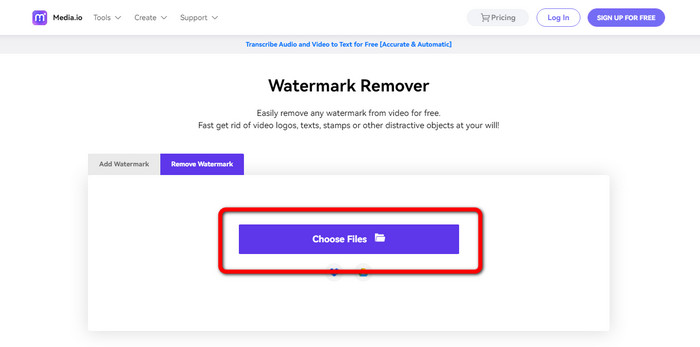
Bước 1: Truy cập trang web Media.io. Nhấp nút Choose Files và thêm video có emoji của bạn.
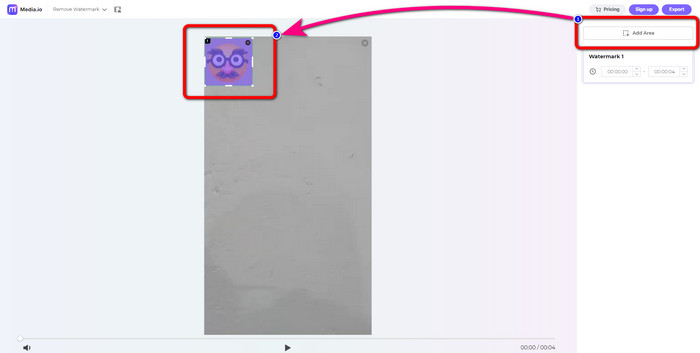
Bước 2: Sau khi tải video lên, nhấp nút Add Area. Một khung màu xanh dương sẽ xuất hiện. Kéo khung đó đến vị trí emoji để che nó lại.
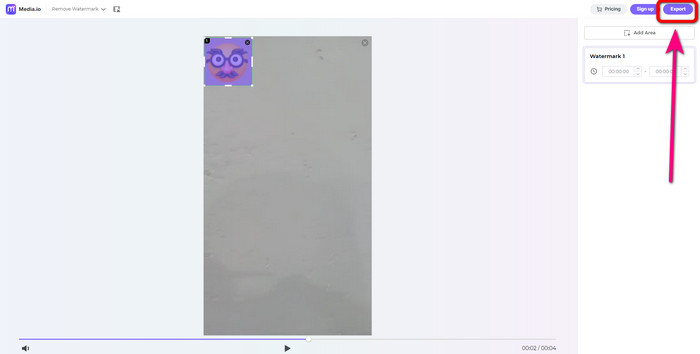
Bước 3: Ở bước cuối cùng, nhấn nút Export và lưu video của bạn không còn emoji.
Sử dụng 123Apps
Một loại bỏ biểu tượng cảm xúc trực tuyến khác mà bạn có thể sử dụng là 123Apps. Với hướng dẫn của công cụ này, bạn có thể dễ dàng xóa mọi yếu tố gây khó chịu khỏi video của mình, chẳng hạn như biểu tượng cảm xúc, nhãn dán, biểu trưng, hình mờ, dấu ngày tháng, v.v. Ngoài ra, bạn có thể sử dụng nó một cách dễ dàng vì nó có giao diện trực quan, phù hợp cho người mới bắt đầu. Ngoài ra, nó hỗ trợ nhiều định dạng tệp video, như MOV, AVI, MP4, WMV, v.v. Ngoài việc xóa biểu tượng cảm xúc và đối tượng khỏi video, bạn cũng có thể sử dụng 123Apps để chỉnh sửa video. Nó có các công cụ khác nhau mà bạn có thể sử dụng, chẳng hạn như bộ cắt video, bộ quay, bộ xén, bộ lặp, hợp nhất và hơn thế nữa.
Tuy nhiên, nó có những hạn chế. Bạn chỉ có thể tải lên với kích thước tệp tối đa là 500Mb. Để làm việc với một tệp lớn hơn, bạn phải mua một gói đăng ký. Cuối cùng, đôi khi công cụ này hoạt động không tốt do kết nối internet. Nếu bạn muốn xóa biểu tượng cảm xúc khỏi video của mình, hãy thử làm theo các bước đơn giản bên dưới.
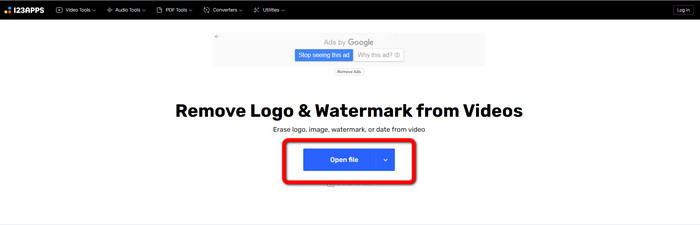
Bước 1: Truy cập trang web 123APPS và nhấp nút Open File để tải video có emoji lên.
Bước 2: Dùng chuột để chọn vùng mà bạn muốn xóa.
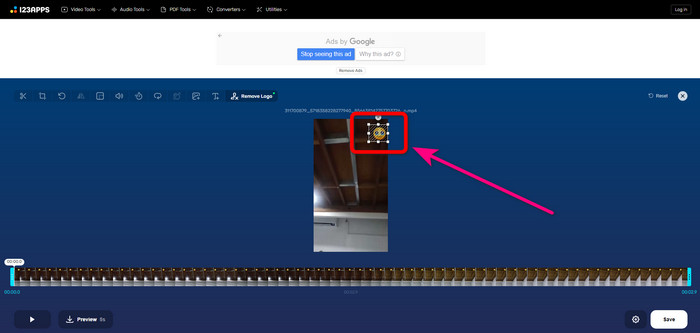
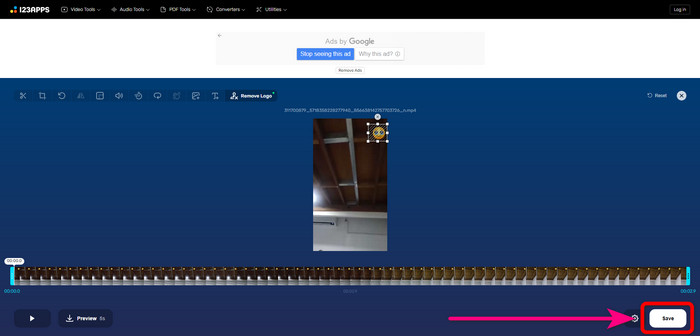
Bước 3: Cuối cùng, nhấn nút Save. Chờ quá trình xóa hoàn tất và lưu video về thiết bị của bạn.
HitPaw Watermark Remover trực tuyến
Một trong những công cụ hữu ích để xóa emoji khỏi video là HitPaw Watermark Remover Online. Đây vừa là công cụ trực tuyến, vừa có bản cài đặt trên máy tính, vì vậy bạn có thể chọn dùng online hoặc trên desktop. Nó có thể giúp bạn xóa mọi thứ như watermark khỏi video chỉ trong vài giây. Bạn thậm chí có thể dùng không giới hạn. Thêm vào đó, công cụ không đòi hỏi kỹ năng kỹ thuật chuyên nghiệp vì chỉ có ba bước cơ bản để xóa các đối tượng gây khó chịu khỏi video.
Hơn nữa, nó có bảo mật cấp cao, có nghĩa là tệp của bạn an toàn và chỉ bạn mới có thể chỉnh sửa video của mình. Tuy nhiên, khi sử dụng công cụ trực tuyến này, bạn phải xem xét kết nối internet. Nó sẽ không hoạt động tốt nếu bạn có internet chậm. Ngoài ra, đôi khi, nó không tương thích với các thiết bị khác, như Android. Làm theo các bước bên dưới để loại bỏ biểu tượng cảm xúc khỏi video.
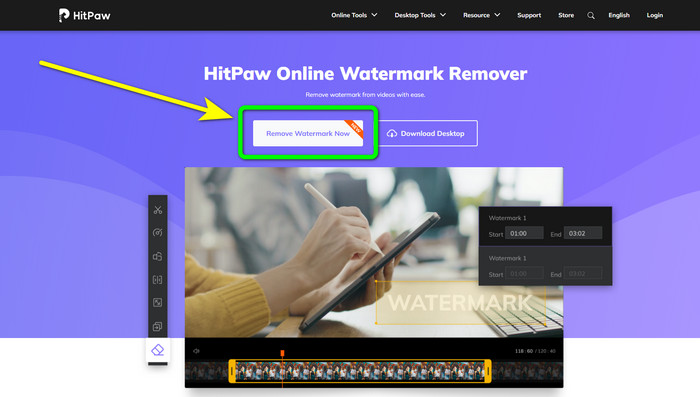
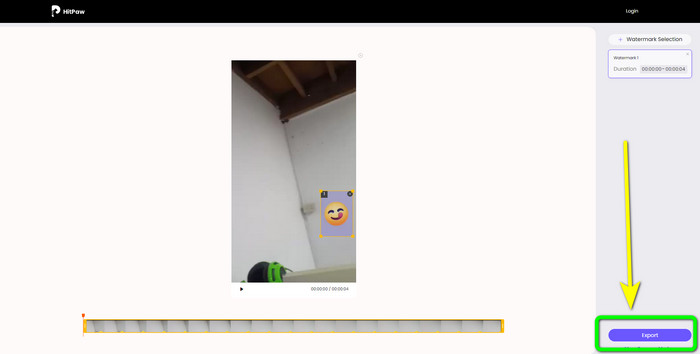
Bước 1: Truy cập trang web HitPaw Online Watermark Remover. Nhấp nút Remove Watermark Now > Choose File để chèn video của bạn.
Bước 2: Sau khi chèn video, bạn có thể dùng ngay khung màu xanh trên video. Kéo khung này để che lên emoji.
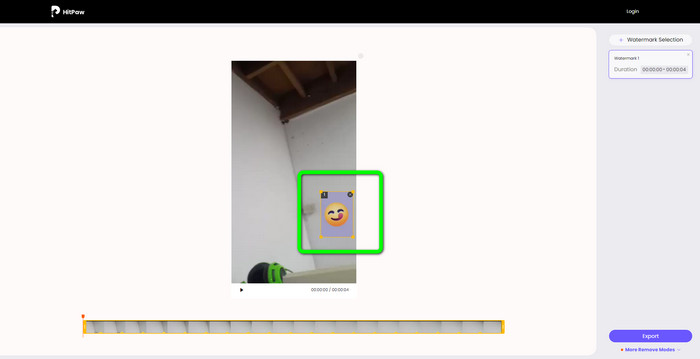
Bước 3: Cuối cùng, nhấp nút Export và lưu video của bạn.
Phần 3: Câu hỏi thường gặp về xóa biểu tượng cảm xúc khỏi video
1. Tôi có thể xóa biểu tượng cảm xúc khỏi video của mình bằng Android và iPhone không?
Có, bạn có thể. Bạn có thể sử dụng Watermark Remover, Logo Eraser, PicLab, Photo Eraser, v.v. Đây là những ứng dụng tốt mà bạn có thể sử dụng để loại bỏ các yếu tố không cần thiết khỏi video của mình.
2. Làm cách nào để xóa một đối tượng khỏi video của tôi?
Bạn có thể sử dụng Video Converter Ultimate. Đây là một công cụ hữu ích để xóa các đối tượng khỏi video của bạn.
3. Tại sao tôi nên xóa biểu tượng cảm xúc khỏi video của mình?
Lý do đơn giản là để bạn thích xem những bộ phim hay video yêu thích của mình. Thật không dễ chịu khi thấy những yếu tố không cần thiết này, như biểu tượng cảm xúc. Vì vậy, tốt hơn là bạn nên xóa chúng khỏi video của mình.
Phần kết luận
Đó là bốn cách hàng đầu để xóa emoji khỏi video. Nếu bạn đang tìm kiếm các phương pháp đơn giản, không rườm rà, bạn có thể thử Video Converter Ultimate. Ứng dụng này có thể giúp bạn xóa các chi tiết gây khó chịu khỏi video một cách dễ dàng.
-
 Cách nhanh nhất để xóa biểu trưng khỏi video trong Adobe Premiere Pro
 Hãy thử những cách dễ dàng và nhanh nhất này để xóa biểu trưng khỏi video trong Adobe Premiere Pro. Bài viết này sẽ cung cấp cho bạn những cách tốt nhất mà bạn có thể thử sử dụng thiết bị của mình
-
 Cách xóa biểu trưng khỏi video bằng Windows Movie Maker
 Nếu bạn muốn tìm hiểu về cách xóa logo khỏi video bằng Windows Movie Maker và các cách thay thế khác, hãy đọc bài viết này. Chúng tôi có những cách dễ dàng cho bạn.
-
 Các cách tuyệt vời về cách xóa nhãn dán khỏi ảnh và video
 Bạn có muốn dễ dàng xóa nhãn dán khỏi video và ảnh không? Dưới đây là những cách hiệu quả, bao gồm cả những phương pháp đáng tin cậy nhất và dễ dàng nhất mà bạn có thể thử.
